phone Citroen DS5 RHD 2014 1.G Owner's Guide
[x] Cancel search | Manufacturer: CITROEN, Model Year: 2014, Model line: DS5 RHD, Model: Citroen DS5 RHD 2014 1.GPages: 400, PDF Size: 37.32 MB
Page 301 of 400
07
299
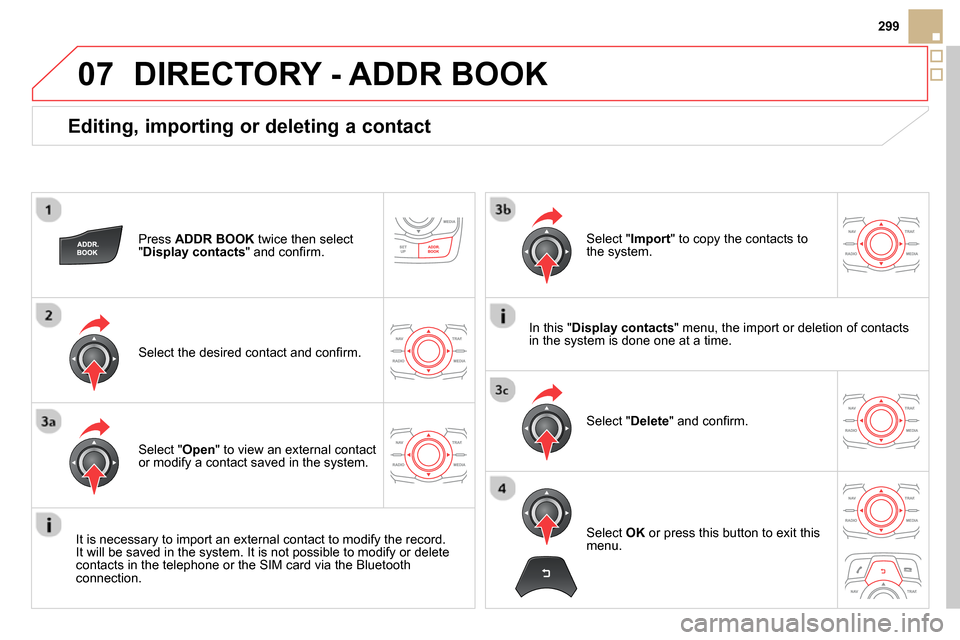
Editing, importing or deleting a contact
Press ADDR BOOK
twice then select
" Display contacts
" and confi rm.
Select the desired contact and confi rm.
Select " Import
" to copy the contacts to
the system.
Select " Open
" to view an external contact
or modify a contact saved in the system.
Select " Delete
" and confi rm.
It is necessary to import an external contact to modify the record.
It will be saved in the system. It is not possible to modify or delete
contacts in the telephone or the SIM card via the Bluetooth
connection.
DIRECTORY - ADDR BOOK
Select OK
or press this button to exit this
menu.
In this " Display contacts
" menu, the import or deletion of contacts
in the system is done one at a time.
Page 310 of 400
09
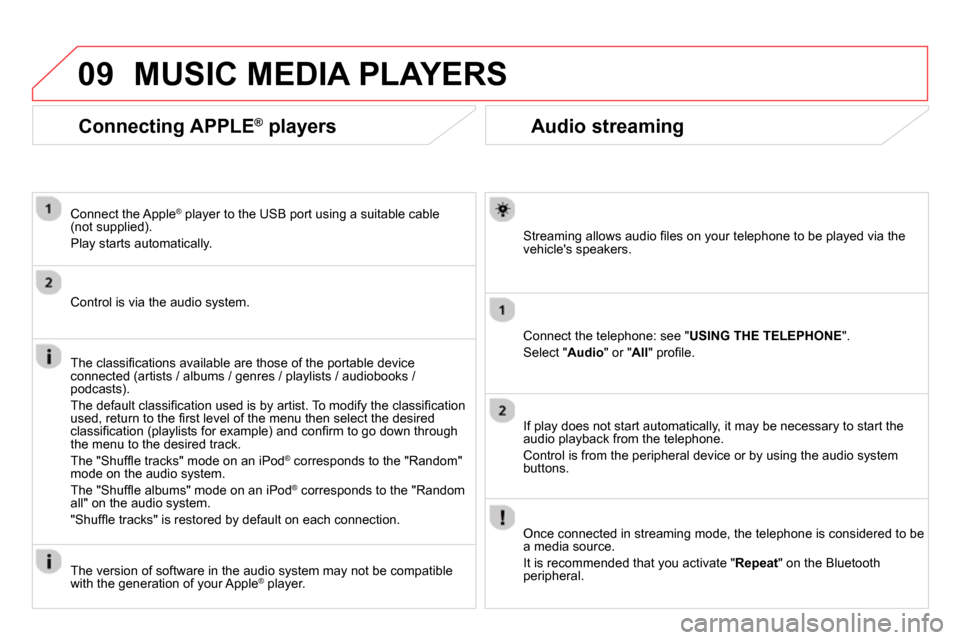
Audio streaming
Streaming allows audio fi les on your telephone to be played via the
vehicle's speakers.
Connect the telephone: see " USING THE TELEPHONE
".
Select " Audio
" or " All
" profi le.
If play does not start automatically, it may be necessary to start the
audio playback from the telephone.
Control is from the peripheral device or by using the audio system
buttons.
Once connected in streaming mode, the telephone is considered to be
a media source.
It is recommended that you activate " Repeat
" on the Bluetooth
peripheral.
MUSIC MEDIA PLAYERS
Connecting APPLE ®
players
Connect the Apple ®
player to the USB port using a suitable cable
(not supplied).
Play starts automatically.
Control is via the audio system.
The classifi cations available are those of the portable device
connected (artists / albums / genres / playlists / audiobooks /
podcasts).
The default classifi cation used is by artist. To modify the classifi cation
used, return to the fi rst level of the menu then select the desired
classifi cation (playlists for example) and confi rm to go down through
the menu to the desired track.
The "Shuffl e tracks" mode on an iPod
®
corresponds to the "Random"
mode on the audio system.
The "Shuffl e albums" mode on an iPod
®
corresponds to the "Random
all" on the audio system.
"Shuffl e tracks" is restored by default on each connection.
The version of software in the audio system may not be compatible
with the generation of your Apple
® player.
Page 316 of 400
12 SCREEN MENU MAP(S)
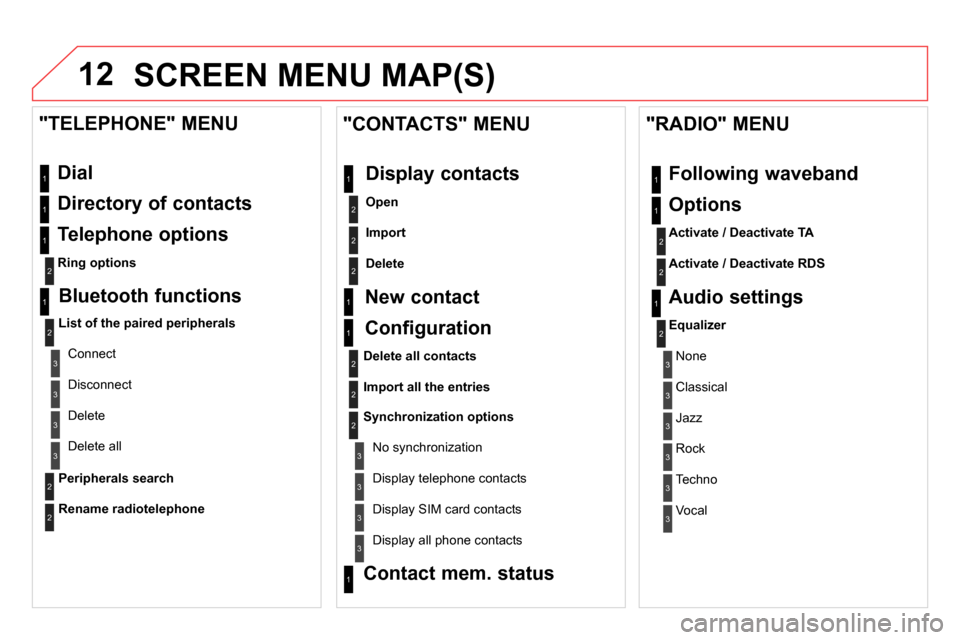
Dial
Directory of contacts
Telephone options
Ring options
"TELEPHONE" MENU
1
2
1
1
3
3
2
1
3
3
2
2
1
2
2
2
1
1
2
2
2
1
3
3
3
3
1
2
2
1
1
3
3
3
3
3
3
2
Configuration
Delete all contacts
Import all the entries
Synchronization options
No synchronization
"CONTACTS" MENU
Display contacts
Open
Import
Delete
New contact
Equalizer
"RADIO" MENU
Following waveband
Options
Activate / Deactivate TA
Activate / Deactivate RDS
Audio settings
Display telephone contacts
Display SIM card contacts
Contact mem. status
Display all phone contacts
Bluetooth functions
List of the paired peripherals
Connect
Disconnect
Delete
Peripherals search
Delete all
Rename radiotelephone
None
Classical
Jazz
Rock
Techno
Vocal
Page 319 of 400
317
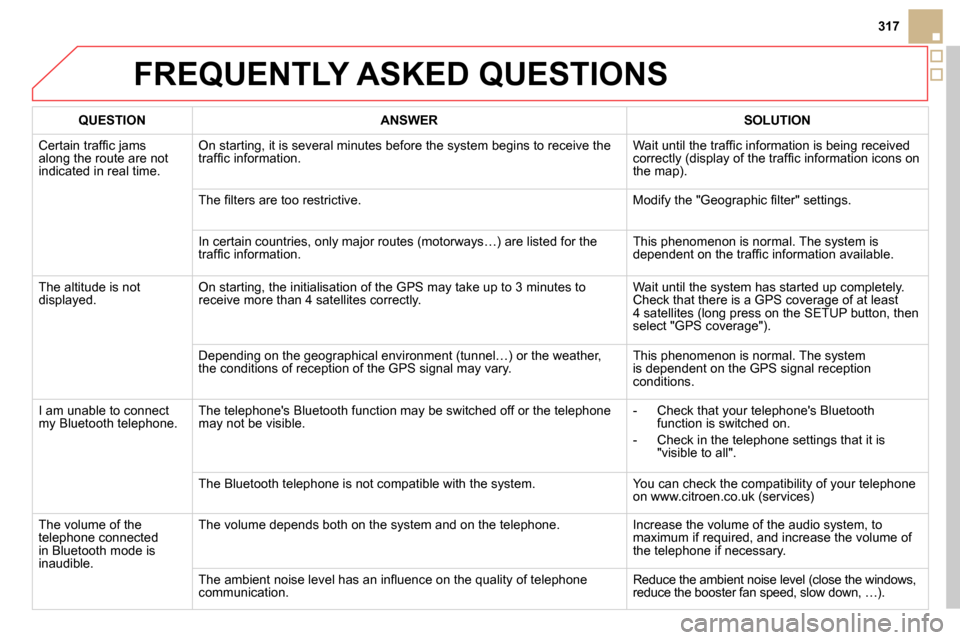
FREQUENTLY ASKED QUESTIONS
QUESTION
ANSWER
SOLUTION
Certain traffi c jams
along the route are not
indicated in real time. On starting, it is several minutes before the system begins to receive the
traffi c information. Wait until the traffi c information is being received
correctly (display of the traffi c information icons on
the map).
The fi lters are too restrictive. Modify the "Geographic fi lter" settings.
In certain countries, only major routes (motorways…) are listed for the
traffi c information. This phenomenon is normal. The system is
dependent on the traffi c information available.
The altitude is not
displayed. On starting, the initialisation of the GPS may take up to 3 minutes to
receive more than 4 satellites correctly. Wait until the system has started up completely.
Check that there is a GPS coverage of at least
4 satellites (long press on the SETUP button, then
select "GPS coverage").
Depending on the geographical environment (tunnel…) or the weather,
the conditions of reception of the GPS signal may vary. This phenomenon is normal. The system
is dependent on the GPS signal reception
conditions.
I am unable to connect
my Bluetooth telephone. The telephone's Bluetooth function may be switched off or the telephone
may not be visible.
- Check that your telephone's Bluetooth
function is switched on.
- Check in the telephone settings that it is
"visible to all".
The Bluetooth telephone is not compatible with the system. You can check the compatibility of your telephone
on www.citroen.co.uk (services)
The volume of the
telephone connected
in Bluetooth mode is
inaudible. The volume depends both on the system and on the telephone. Increase the volume of the audio system, to
maximum if required, and increase the volume of
the telephone if necessary.
The ambient noise level has an infl uence on the quality of telephone
communication. Reduce the ambient noise level (close the windows,
reduce the booster fan speed, slow down, …).
Page 320 of 400
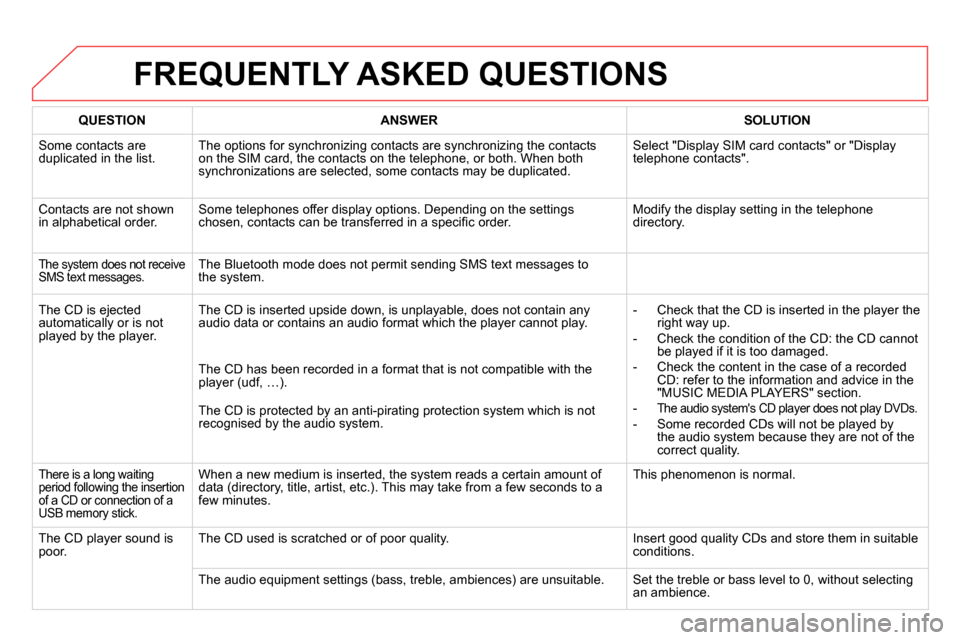
FREQUENTLY ASKED QUESTIONS
QUESTION
ANSWER
SOLUTION
Some contacts are
duplicated in the list. The options for synchronizing contacts are synchronizing the contacts
on the SIM card, the contacts on the telephone, or both. When both
synchronizations are selected, some contacts may be duplicated. Select "Display SIM card contacts" or "Display
telephone contacts".
Contacts are not shown
in alphabetical order. Some telephones offer display options. Depending on the settings
chosen, contacts can be transferred in a specifi c order. Modify the display setting in the telephone
directory.
The system does not receive
SMS text messages. The Bluetooth mode does not permit sending SMS text messages to
the system.
The CD is ejected
automatically or is not
played by the player. The CD is inserted upside down, is unplayable, does not contain any
audio data or contains an audio format which the player cannot play.
- Check that the CD is inserted in the player the
right way up.
- Check the condition of the CD: the CD cannot
be played if it is too damaged.
- Check the content in the case of a recorded
CD: refer to the information and advice in the
"MUSIC MEDIA PLAYERS" section.
-
The audio system's CD player does not play DVDs.
- Some recorded CDs will not be played by
the audio system because they are not of the
correct quality. The CD has been recorded in a format that is not compatible with the
player (udf, …).
The CD is protected by an anti-pirating protection system which is not
recognised by the audio system.
There is a long waiting
period following the insertion
of a CD or connection of a
USB memory stick. When a new medium is inserted, the system reads a certain amount of
data (directory, title, artist, etc.). This may take from a few seconds to a
few minutes. This phenomenon is normal.
The CD player sound is
poor. The CD used is scratched or of poor quality. Insert good quality CDs and store them in suitable
conditions.
The audio equipment settings (bass, treble, ambiences) are unsuitable. Set the treble or bass level to 0, without selecting
an ambience.
Page 323 of 400

321
QUESTION
ANSWER
SOLUTION
With the engine off, the
system switches off after
a few minutes of use. When the engine is switched off, the system's operating time depends on
the battery charge.
The switch-off is normal: the system switches to economy mode and
switches off to prevent discharging of the vehicle's battery. Start the vehicle's engine to increase the battery
charge.
Playback of my USB
memory stick starts only
after a very long wait
(around 2 to 3 minutes). Some fi les supplied with the memory stick may greatly slow down access
to reading the memory stick (multiplication by 10 of the catalogue time). Delete the fi les supplied with the memory stick
and limit the number of sub-folders in the fi le
structure on the memory stick.
When I connect my
iPhone as telephone and
to the USB port at the
same time, I am unable
to play the music fi les. When the iPhone connects automatically as a telephone, it forces the
streaming function. The streaming function takes the place of the USB
function which is then not useable, there is a period without sound of the
track being played with Apple
®
players. Disconnect and reconnect to the USB port (the
USB function takes priority over streaming).
When I connect my Apple
®
player or my BlackBerry ®
to the USB port, I have
alert messages on the
current consumption by
the USB port. When charging, the current consumption of these smartphones is greater
than the rating of the USB port, which is 500 mA.
FREQUENTLY ASKED QUESTIONS
Page 325 of 400

323
The system is coded in such a way that it will only
operate in your vehicle.
AUDIO SYSTEM / BLUETOOTH
01 First steps
For safety reasons, the driver must only carry out
operations which require prolonged attention while the
vehicle is stationary.
When the engine is switched off and to prevent
discharging of the battery, the audio system may switch
off after a few minutes.
CONTENTS
02 Steering mounted controls
03 Main menu
04 Audio
05 Using the telephone
06 Audio settings
07 Screen menu map
Frequently asked questions p.
p.
p.
p.
p.
p.
p.
p.
324
325
326
327
337
345
346
348
Page 326 of 400
01
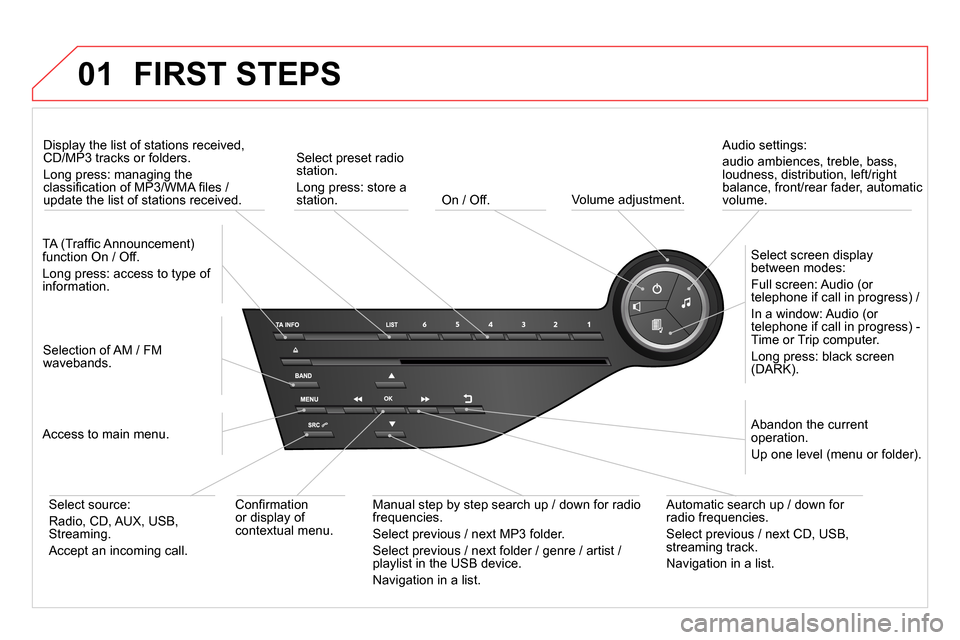
On / Off.
FIRST STEPS
Volume adjustment.
Select screen display
between modes:
Full screen: Audio (or
telephone if call in progress) /
In a window: Audio (or
telephone if call in progress) -
Time or Trip computer.
Long press: black screen
(DARK).
Selection of AM / FM
wavebands.
Select preset radio
station.
Long press: store a
station.
Display the list of stations received,
CD/MP3 tracks or folders.
Long press: managing the
classifi cation of MP3/WMA fi les /
update the list of stations received.
TA (Traffi c Announcement)
function On / Off.
Long press: access to type of
information.
Confi rmation
or display of
contextual menu.
Automatic search up / down for
radio frequencies.
Select previous / next CD, USB,
streaming track.
Navigation in a list.
Abandon the current
operation.
Up one level (menu or folder).
Manual step by step search up / down for radio
frequencies.
Select previous / next MP3 folder.
Select previous / next folder / genre / artist /
playlist in the USB device.
Navigation in a list.
Select source:
Radio, CD, AUX, USB,
Streaming.
Accept an incoming call.
Access to main menu.
Audio settings:
audio ambiences, treble, bass,
loudness, distribution, left/right
balance, front/rear fader, automatic
volume.
Page 327 of 400
02
SRC
+
-
325
STEERING MOUNTED CONTROLS
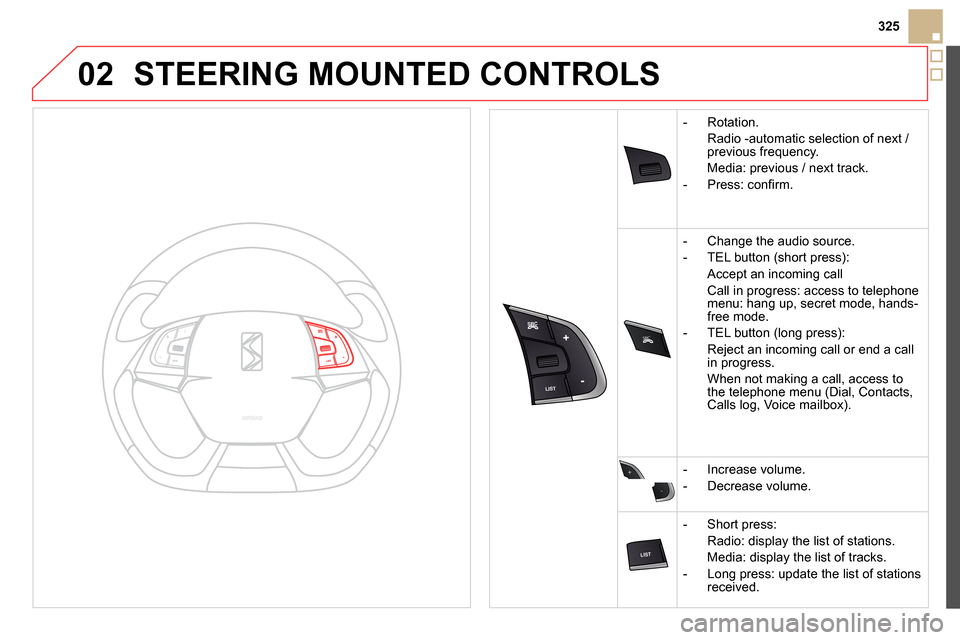
- Rotation
.
Radio -automatic selection of next /
previous frequency.
Media: previous / next track.
- Press: confi rm.
- Change the audio source.
- TEL button (short press):
Accept an incoming call
Call in progress: access to telephone
menu: hang up, secret mode, hands-
free mode.
- TEL button (long press):
Reject an incoming call or end a call
in progress.
When not making a call, access to
the telephone menu (Dial, Contacts,
Calls log, Voice mailbox).
- Increase volume.
- Decrease volume.
- Short press:
Radio: display the list of stations.
Media: display the list of tracks.
- Long press: update the list of stations
received.
Page 328 of 400
03 MAIN MENU
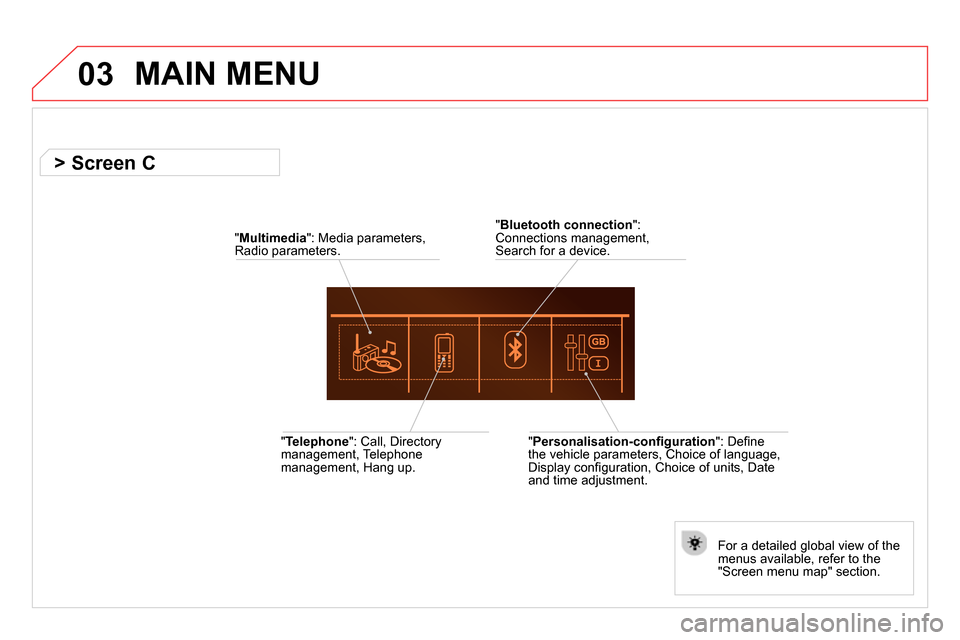
" Telephone
": Call, Directory
management, Telephone
management, Hang up.
For a detailed global view of the
menus available, refer to the
"Screen menu map" section.
" Bluetooth connection
":
Connections management,
Search for a device.
" Multimedia
": Media parameters,
Radio parameters.
" Personalisation-confi guration
": Defi ne
the vehicle parameters, Choice of language,
Display confi guration, Choice of units, Date
and time adjustment.
> Screen C