brake light CITROEN DS7 CROSSBACK 2017 User Guide
[x] Cancel search | Manufacturer: CITROEN, Model Year: 2017, Model line: DS7 CROSSBACK, Model: CITROEN DS7 CROSSBACK 2017Pages: 244, PDF Size: 6.87 MB
Page 103 of 244
101
Driving06
Parking the vehicle with the brake
released
In very cold conditions (ice), applying the
parking brake is not recommended.
To immobilise the vehicle, place the chock
against one of the wheels.
Mode P is automatically selected when
the ignition is switched off. The wheels
are blocked.
For more information on Free-wheeling, refer
to the corresponding section.
If you open the driver's door while mode N
is engaged, an audible signal will sound
and mode P will be engaged. The audible signal
stops when the driver's door is closed.
Deactivating automatic
operation
In some situations, for example when it is
extremely cold or when towing (e.g. caravan,
breakdown), it may be necessary to deactivate
automatic operation of the system.
► Start the engine.
► Use the control to apply the parking brake, if it
is released.
► Take your foot fully off the brake pedal.
► Keep the control pushed in the release
direction for 10 to a maximum of 15 seconds. ►
Release the control.
► Depress and hold the brake pedal.
► Pull the control in the application direction for
2 seconds.
This indicator lamp on the instrument
panel comes on to confirm deactivation of
the automatic functions.
► Release the control and the brake pedal.
From this point onwards, only the manual
functions, using the control, allow the parking
brake to be applied and released.
► Follow this procedure again to reactivate
automatic operation (confirmed by the indicator
lamp on the instrument panel going out).
Emergency braking
If depressing the brake pedal fails to provide
effective braking or in exceptional circumstances
(e.g. driver unwell, assisted driving), the vehicle
can be braked by sustained pulling on the electric
parking brake control. Braking continues for as
long as the control is kept pulled, and ceases
when the control is released.
The ABS and DSC systems stabilise the vehicle
during emergency braking.
If emergency braking malfunctions, the message
"Parking brake fault" will be displayed on the
instrument panel.
If the ABS and DSC systems
malfunction, indicated by lighting
one or both warning lamps on the instrument
panel, the vehicle’s stability is no longer ensured. ►
In this case, ensure the vehicle's stability by
successive and repeated "pull-release" actions on
the electric parking brake control until the vehicle
comes to a complete stop.
Automatic gearbox
Automatic 8-speed gearbox with a push selector.
It also offers a manual mode with gear changes
via control paddles located behind the steering
wheel.
Gearbox selector positions
P. Park
For parking the vehicle: the front wheels are
blocked.
R. Reverse gear
N. Neutral
For moving the vehicle with the ignition off, or
to allow it to free-wheel.
For more information on Changing to free-
wheeling, refer to the corresponding section.
D. Driving in automatic mode
The gearbox manages gear changes according
to the style of driving, the road profile and the
vehicle load.
M. Driving in manual mode
The driver changes gear using the steering-
mounted controls.
Page 110 of 244
108
Driving06
E-TENSE 4X4 360
The electrical energy is used to
supplement the petrol engine or recharge the
traction battery, depending on the type of
driving.
This mode is optimised with specific settings
which make the most of the dynamic
performance of this vehicle (power steering,
accelerator pedal sensitivity, ESC).
Comfort
(Depending on equipment)
Combines Hybrid mode and Comfort mode of the
DS ACTIVE SCAN SUSPENSION function.
To favour flexible shock absorption improving
driving comfort on poor surfaces.
For more information on DS ACTIVE SCAN
SUSPENSION, refer to the corresponding
section.
4WD (4-wheel drive)
(Depending on version)
Improves the vehicle's grip at low and moderate
speeds by driving all 4 wheels continuously.
4WD mode (4-wheel drive) is especially suited
to driving on snow-covered roads and difficult
terrain (e.g. mud, sand) as well as ford crossings,
at moderate speed.
Depending on the driving conditions and the
battery charge level, 4WD mode may be 100%
electric.
If the system does not detect a situation of wheel
slipping or poor grip after 300 metres of driving, it
switches to Hybrid mode.
This mode will be even more effective if
the vehicle is fitted with suitable tyres,
such as winter tyres.
The grip can be improved up to 84 mph (135 km/h)
using the electric motors; above this speed, the
vehicle is driven by the front wheels only.
Hill start assist
This system keeps the vehicle briefly stationary
(for approximately 2 seconds) when making a hill
start, while you transfer your foot from the brake
pedal to the accelerator pedal.
The system is only active when:
–
The v
ehicle is completely stationary, with your
foot on the brake pedal.
–
Cert
ain slope conditions are met.
–
The driv
er’s door is closed.
Do not leave the vehicle while it is being
held temporarily by hill start assist.
If someone needs to get out of the vehicle with
the engine running, apply the parking brake
manually. Then check that the parking brake
indicator lamp and the P indicator lamp in the
electric parking brake control are on fixed.
The hill start assist function cannot be
deactivated. However, using the parking
brake to immobilise the vehicle interrupts its
operation.
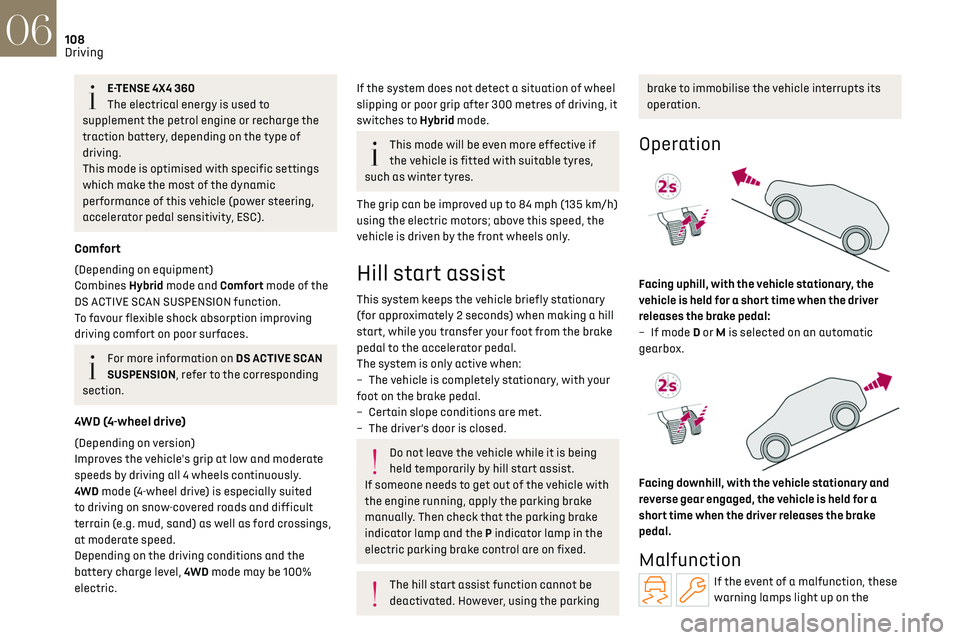
Operation
Facing uphill, with the vehicle stationary, the
vehicle is held for a short time when the driver
releases the brake pedal:
–
If mode
D or M is selected on an automatic
gearbox.
Facing downhill, with the vehicle stationary and
reverse gear engaged, the vehicle is held for a
short time when the driver releases the brake
pedal.
Malfunction
If the event of a malfunction, these
warning lamps light up on the
Page 130 of 244
128
Driving06
– Driving on a rolling road.
Malfunction
In the event of a malfunction, the
Service warning lamp comes on and
this (orange) symbol appears on the instrument
panel, accompanied by the display of a message
and an audible signal.
Have it checked by a dealer or a qualified
workshop.
Active Safety Brake with
Collision Risk Alert and
Intelligent emergency
braking assistance
For more information, refer to the General
recommendations on the use of driving
and manoeuvring aids.
This system:
– w arns the driver that their vehicle is at risk of
collision with the preceding vehicle, a pedestrian
or a cyclist.
–
reduc
es the vehicle's speed to avoid a collision
or to limit its severity.
The speed will be reduced by a maximum
of 16 mph (25 km/h) (versions with camera
only) or by a maximum of 31 mph (50 km/h)
(versions with camera and radar).
The system also takes motorcyclists into
account.
It may also react on animals. Animals
(especially animals smaller than 0.5 m)
and objects on the road are not necessarily
detected.
This system includes three functions:
–
Collision Risk Alert.
–
In
telligent emergency braking assistance
(iEBA).
–
Activ
e Safety Brake (automatic emergency
braking).
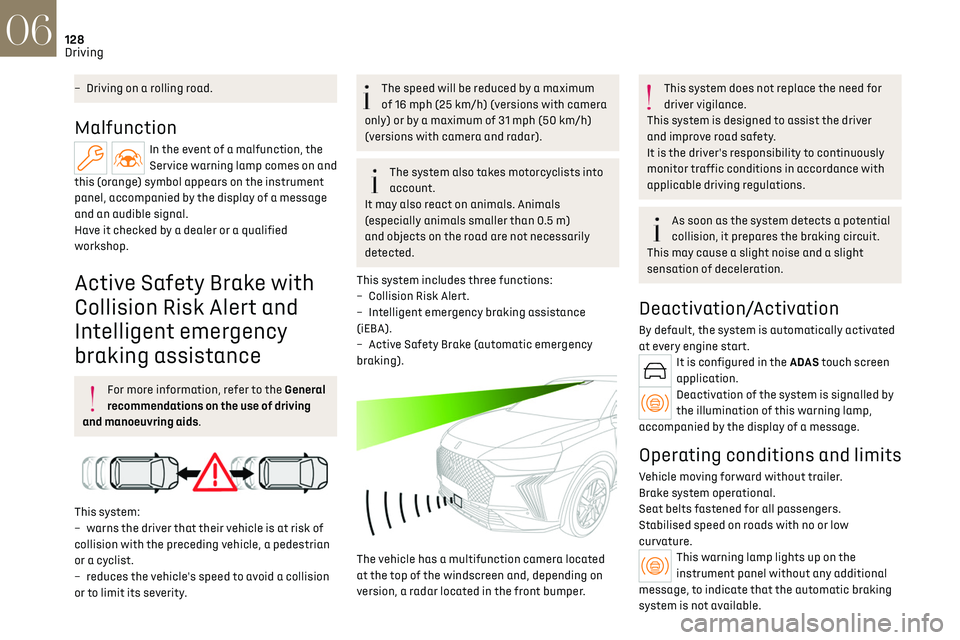
The vehicle has a multifunction camera located
at the top of the windscreen and, depending on
version, a radar located in the front bumper.
This system does not replace the need for
driver vigilance.
This system is designed to assist the driver
and improve road safety.
It is the driver's responsibility to continuously
monitor traffic conditions in accordance with
applicable driving regulations.
As soon as the system detects a potential
collision, it prepares the braking circuit.
This may cause a slight noise and a slight
sensation of deceleration.
Deactivation/Activation
By default, the system is automatically activated
at every engine start.
It is configured in the ADAS touch screen
application.
Deactivation of the system is signalled by
the illumination of this warning lamp,
accompanied by the display of a message.
Operating conditions and limits
Vehicle moving forward without trailer.
Brake system operational.
Seat belts fastened for all passengers.
Stabilised speed on roads with no or low
curvature.
This warning lamp lights up on the
instrument panel without any additional
message, to indicate that the automatic braking
system is not available.
Page 132 of 244
130
Driving06
It is possible that collision warnings are
not given, are given too late or seem
unjustified.
The driver must always stay in control of the
vehicle and be prepared to react at any time to
avoid an accident.
If you select "Far" in the touch screen,
then the system warns sooner. This
increases the safety but increases also the
amount of alerts, if the legal safety distance is
not kept.
To reduce the alert occurrence, you can change
the setting to either of the other two.
Intelligent emergency braking
assistance (iEBA)
This function increases vehicle deceleration if the
driver does not brake enough to avoid a collision.
This assistance is only provided if the driver
presses the brake pedal.
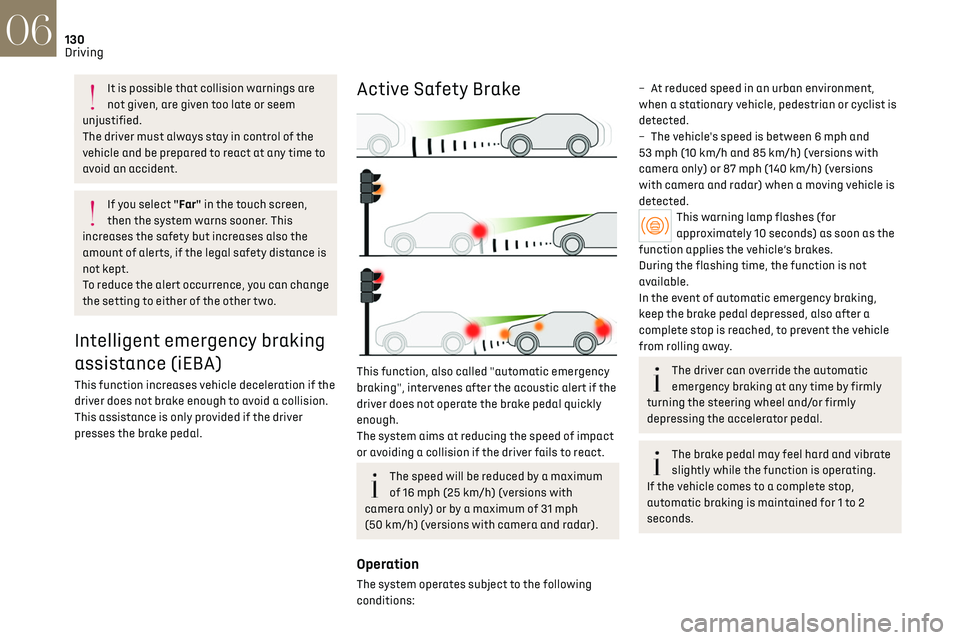
Active Safety Brake
This function, also called "automatic emergency
braking", intervenes after the acoustic alert if the
driver does not operate the brake pedal quickly
enough.
The system aims at reducing the speed of impact
or avoiding a collision if the driver fails to react.
The speed will be reduced by a maximum
of 16 mph (25 km/h) (versions with
camera only) or by a maximum of 31 mph
(50 km/h) (versions with camera and radar).
Operation
The system operates subject to the following
conditions:
– At reduced speed in an urban environment,
when a stationary vehicle, pedestrian or cyclist is
detected.
–
The v
ehicle's speed is between 6 mph and
53 mph (10 km/h and 85 km/h) (versions with
camera only) or 87 mph (140 km/h) (versions
with camera and radar) when a moving vehicle is
detected.
This warning lamp flashes (for
approximately 10 seconds) as soon as the
function applies the vehicle’s brakes.
During the flashing time, the function is not
available.
In the event of automatic emergency braking,
keep the brake pedal depressed, also after a
complete stop is reached, to prevent the vehicle
from rolling away.
The driver can override the automatic
emergency braking at any time by firmly
turning the steering wheel and/or firmly
depressing the accelerator pedal.
The brake pedal may feel hard and vibrate
slightly while the function is operating.
If the vehicle comes to a complete stop,
automatic braking is maintained for 1 to 2
seconds.
Page 137 of 244
135
Driving06
Operating limits
The system goes into standby automatically in
the following cases:
–
ESC deactiv
ated or operation triggered.
–
Speed belo
w 43 mph (70 km/h) or greater than
112 mph (180 km/h).
–
Electric
al connection to a trailer.
–
U
se of a"space-saver" spare wheel detected (as
detection is not immediate, deactivation of the
system is recommended).
–
Dynamic driving style det
ected, pressure on the
brake or accelerator pedal.
–
D
riving over lane markings.
–
Activ
ation of the direction indicators.
–
C
rossing the inside line on a bend.
–
D
riving on a tight bend.
–
Inactivity b
y the driver detected during
correction.
The following situations may interfere
with the operation of the system or
prevent it from working:
–
Insufficien
t contrast between the road
surface and the verge or hard shoulder
(e.g. shade).
–
Lane markings w
orn, hidden (snow, mud) or
multiple (roadworks, etc.),
–
C
lose proximity to the vehicle in front (lane
markings may not be detected).
–
R
oads that are narrow, winding.
Risk of undesirable operation
The system should be deactivated in the following
situations:
–
When changing a wheel or w
orking near a
wheel.
–
T
owing or with a bicycle carrier on a towing
device, especially with trailer not plugged in or
not approved.
–
R
oad in poor condition, unstable or with very
poor grip (risk of aquaplaning, snow, ice).
–
Adv
erse weather conditions.
–
D
riving on racing circuits.
–
D
riving on a rolling road.
Deactivation/Activation
By default, the system is automatically activated
at every engine start.
It is configured in the ADAS touch screen
application.
or
Direct access to the Shortcuts for driving aids.
Deactivation is confirmed by the
illumination of this indicator lamp on the
instrument panel.
Malfunction
In the event of a malfunction, these
warning lamps light up on the
instrument panel, accompanied by the display of
a message and an audible signal.
Have it checked by a dealer or a qualified
workshop.
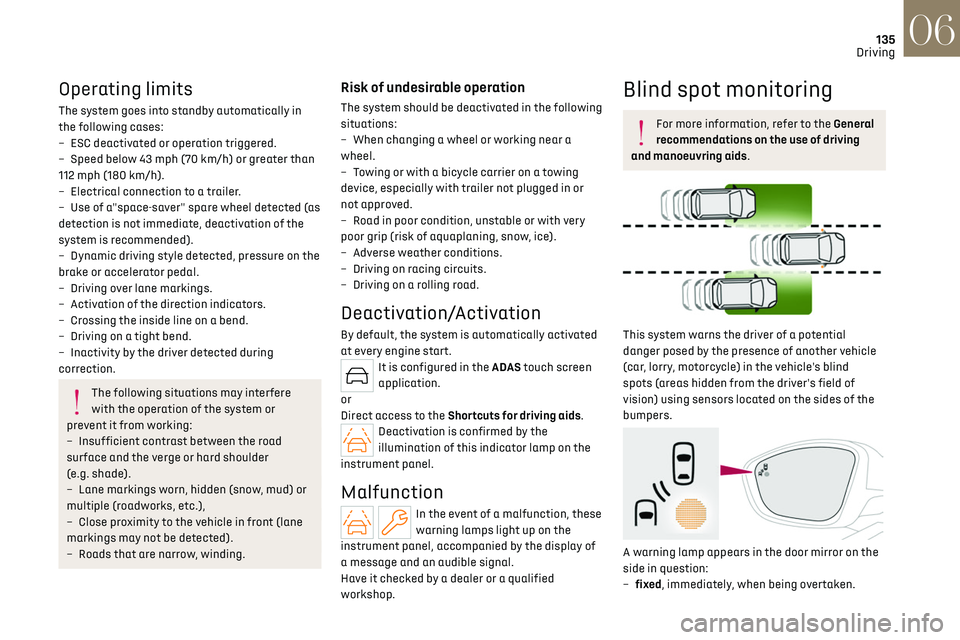
Blind spot monitoring
For more information, refer to the General
recommendations on the use of driving
and manoeuvring aids.
This system warns the driver of a potential
danger posed by the presence of another vehicle
(car, lorry, motorcycle) in the vehicle's blind
spots (areas hidden from the driver's field of
vision) using sensors located on the sides of the
bumpers.
A warning lamp appears in the door mirror on the
side in question:
–
fix
ed, immediately, when being overtaken.
Page 181 of 244
179
In the event of a breakdown08
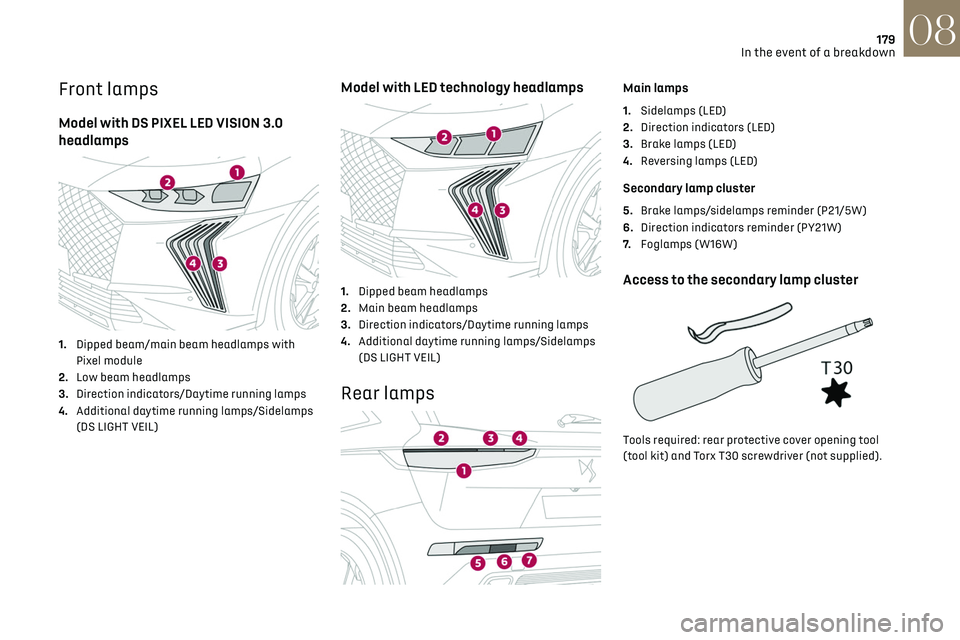
Front lamps
Model with DS PIXEL LED VISION 3.0
headlamps
1. Dipped beam/main beam headlamps with
Pixel module
2. Low beam headlamps
3. Direction indicators/Daytime running lamps
4. Additional daytime running lamps/Sidelamps
(DS LIGHT VEIL)
Model with LED technology headlamps
1.Dipped beam headlamps
2. Main beam headlamps
3. Direction indicators/Daytime running lamps
4. Additional daytime running lamps/Sidelamps
(DS LIGHT VEIL)
Rear lamps
Main lamps
1.Sidelamps (LED)
2. Direction indicators (LED)
3. Brake lamps (LED)
4. Reversing lamps (LED)
Secondary lamp cluster
5.Brake lamps/sidelamps reminder (P21/5W)
6. Direction indicators reminder (PY21W)
7. Foglamps (W16W)
Access to the secondary lamp cluster
Tools required: rear protective cover opening tool
(tool kit) and Torx T30 screwdriver (not supplied).
Page 215 of 244
213Alphabetical index
360 Vision 140
A
ABS 79
Accelerated charging unit (Wallbox)
147–148
Accessories
76
Active LED Vision
65
Active Safety Brake
128, 130
Active Scan Suspension
105
Active suspension
105
Adaptive headlamp lighting
67
AdBlue®
19, 165
AdBlue® tank
166
Additive, Diesel
163
Adjusting headlamps
65
Adjusting head restraints
43
Adjusting seat
43–44
Adjusting the air distribution
50, 52
Adjusting the air flow
50, 52
Adjusting the headlamp beam height
65
Adjusting the height and reach
of the steering wheel
46
Adjusting the seat angle
44
Adjusting the seat belt height
82
Adjusting the temperature
51
Adjusting the time
23, 208
Advice on care and maintenance
146, 167
Advice on driving
8, 96–97
Airbags
83–87
Airbags, curtain 85–86
Airbags, front
84–85, 88
Airbags, lateral
84–85
Air conditioning
50–51
Air conditioning, automatic
53
Air conditioning, dual-zone automatic
51
Air intake
52–53
Air vents
49
Alarm
37–38
Amplifier, audio
58
Anti-lock braking system (ABS)
79
Antitheft / Immobiliser
27
Applications
24
Armrest, front
58
Armrest, rear
60
Assistance call
77–78
Assistance, emergency braking
80, 130
Audio streaming (Bluetooth)
205
B
Battery, 12 V 159, 163, 181–185
Battery, ancillaries
181
Battery, charging
181–182, 184
Battery, remote control
31
Blanking screen (snow shield)
158
Blind
40–41
Blind spot monitoring
135
BlueHDi
19, 163, 170
Bluetooth (hands-free)
202
Bluetooth (telephone) 202
Bodywork
168
Bonnet
160
Boot
32–34, 62
Brake discs
164
Brake lamps
179
Brakes
164
Braking
105
Braking assistance system
79–80
Braking, automatic emergency
128, 130
Braking, dynamic emergency
100–101
Bulbs (changing)
178–179
C
Capacity, fuel tank 143
Care of the bodywork
168
Central locking
29–30
Changing a bulb
178–179
Changing a fuse
180
Changing a wheel
171, 175
Changing a wiper blade
73–74
Changing the remote control battery
31
Changing to free-wheeling
166
Charge level indicator (Rechargeable hybrid)
21
Charger, induction
57
Charger, wireless
57
Charging cable
149
Charging cable
(Rechargeable hybrid)
147–148, 154
Page 216 of 244
214Alphabetical index
Charging connector
(Rechargeable hybrid)
146, 153–154
Charging flap
(Rechargeable hybrid)
146, 153–154
Charging the traction battery
(Rechargeable hybrid)
20, 145, 153–154
CHECK
21
Checking the engine oil level
18
Checking the levels
161–162
Checking tyre pressures (using the kit)
172, 174
Checks
161, 163–165
Checks, routine
163–164
Child lock
95
Children
83, 89–91, 94
Children (safety)
95
Child seats
83, 86–89
Child seats, conventional
88–89
Child seats, i-Size
94
Child seats, ISOFIX
90–92
Cigar lighter
56
Cleaning (advice)
146, 167–169
Clock
23
Closing the boot
29, 33
Closing the doors
29, 32
Collision Risk Alert
128–129
Comfort mode
108
Configuration, vehicle
10, 24
Connection, Bluetooth
202
Connectivity
207
Consumptions
24
Container, AdBlue®
165–166
Control, emergency boot release
33Control, emergency door 30–31
Control, heated seats
46
Controls, steering mounted
101–103
Control stalk, lighting
63–64
Control stalk, wipers
72–74
Control unit
147–149, 154
Courtesy lamp, front
59
Courtesy lamps
59
Cruise control
116, 118–120
Cruise control, adaptive
120
Cruise control, adaptive with Stop function
116
Cruise control by speed limit recognition
116
Cup holder
56
D
Date (setting) 208
Daytime running lamps
64, 179
Deactivating the passenger airbag
84, 87–88
Deadlocking
27, 29
Deferred charging
24, 155
Deferred charging
(Rechargeable hybrid)
24–25, 146, 153
Defrosting
47, 53
Defrosting, front
53
Defrosting, rear screen
54
Demisting
47, 53
Demisting, front
53
Demisting, rear
54
Diagnosis, vehicle
21
Dials and gauges 10
Digital instrument panel
10
Dimensions
193
Dipstick
18, 161
Direction indicators (turn signals)
64, 179
Display screen, instrument panel
10
Domestic charging
149
Domestic charging (Rechargeable hybrid)
154
Door pockets
56
Doors
32
Driver’s attention warning
131–132
Driving
42–43, 96–97
Driving aids camera (warnings)
112
Driving aid shortcuts
113
Driving aids (recommendations)
112
Driving economically
8
Driving modes
106
Driving positions (storing)
45
DS Drive Assist
120
Dynamic stability control (DSC)
80
E
EBFD 79
Eco-driving (advice)
8
ECO mode
106
Electric automatic gearbox
(Rechargeable hybrid)
104
Electronic brake force distribution (EBFD)
79
Emergency braking assistance (EBA)
80
Page 217 of 244
215Alphabetical index
Emergency call 77–78
Emergency switching off
99
Emergency warning lamps
76, 170
Emissions control system, SCR
20, 165
Energy economy (mode)
159
Energy economy mode
159
Energy flows
24
Energy recovery
20, 105
Engine
165
Engine compartment
160–161
Engine, Diesel
143, 161, 170, 191
Engine, petrol
107, 161, 190
Engines
189–191
Environment
8, 31
e-Save function (energy reserve)
24
ESC (electronic stability control)
79
Expanded traffic sign recognition
116
Exterior lighting
66
F
Fatigue detection 131–132
Favourite driving functions
113
Filling the AdBlue® tank
163, 166
Filling the fuel tank
143–144
Filter, air
163
Filter, oil
163
Filter, particle
163
Filter, passenger compartment
50, 163
Fitting a wheel
175, 177
Fitting roof bars 157–158
Fittings, boot
60
Fittings, interior
56–57
Fittings, rear
60
Flap, charging
155
Flap, fuel filler
143–144
Flap, ski
60
Flashing indicators
64
Flat bed (towing)
186
Floor, boot, adjustable
62
Fluid, brake
162
Fluid, engine coolant
162
Foglamps, rear
63
Folding the rear seats
48–49
Folding/unfolding the door mirrors
47
Four-wheel drive (4WD)
108, 159
Frequency (radio)
205
Fuel
8, 143
Fuel consumption
8, 20
Fuel level, low
143
Fuel (tank)
143–144
Fuses
180
G
Gauge, fuel 143
Gearbox, automatic
101–104, 108, 164, 181
Gearbox, manual
108
Gear shift indicator
109
Glove box
56
Grab handles 56
H
Hands-free access 35–36
Hands-free tailgate
35–36
Hazard warning lamps
76, 170
Headlamps (adjustment)
65
Headlamps, automatic dipping
66–67
Headlamps, automatic operation
65
Headlamps, dipped beam
179
Headlamps, halogen
65
Headlamps, main beam
66, 179
Head restraints, front
43
Head restraints, rear
48–49
Heated and ventilated seats
45
Heating
49
Heating, programmable
25, 54
Hi-Fi system
58
High voltage
145
Hill start assist
108
Histogramme, fuel consumption
24–25
Horn
77
I
Ignition 99, 207
Ignition on
99
Immobiliser, electronic
97
Page 218 of 244
216Alphabetical index
Indicator, AdBlue® range 19
Indicator, coolant temperature
19
Indicator, engine oil level
18
Indicators, direction
64
Indicator, service
17
Inflating tyres
164, 193
Inflating tyres and accessories
(using the kit)
172, 174
Information, vehicle
10, 210
Infrared camera
70, 112
Instrument panel
10, 22, 113
ISOFIX mountings
90
J
Jack 171–172, 175
Jump starting
181
K
Key 26–27, 30–31
Key, electronic
28–29
Keyless Entry and Starting
26, 28–29, 97–98
Key not recognised
99
Key with remote control
26, 97
Kit, hands-free
202
Kit, puncture repair
171–172
Kit, temporary puncture repair
171–174
Klaxon
77
L
Labels, identification 193
Lamps, parking
64
Lamps, rear
179
Lane assist
120, 124–126
Lane keeping assist
133
Leather (care)
169
LEDs - Light-emitting diodes
64, 178–179
Level, AdBlue®
163
Level, brake fluid
162
Level, Diesel additive
163
Level, engine coolant
19, 162
Level, engine oil
18, 161
Levels and checks
161–162
Level, screenwash fluid
73, 162
Light-emitting diodes - LEDs
64, 178–179
Lighting, boot
62
Lighting dimmer
21
Lighting, directional
69
Lighting, exterior
63, 66
Lighting, guide-me home
65–66
Lighting, interior
59
Lighting, mood
59
Lighting, welcome
65–66
Loading
61, 157–158
Load reduction mode
159
Load space cover
60
Locating your vehicle
27
Locking
27, 29
Locking from the inside
30
Locking the doors 30
Log, alerts
21
Long objects, transporting
60
M
Mains socket (domestic network) 147–148
Maintenance (advice)
146, 167
Maintenance, routine
113, 163–165
Manoeuvring aids (recommendations)
112
Map reading lamps
59
Markings, identification
193
Massage function
46
Massage, multi-point
46
Mat
59, 113
Menu, shortcuts
24
Mirror, rear view
47
Mirrors, door
47, 54, 135
Mirror, vanity
56
Misfuel prevention
144
Mobile application
24–25, 54, 153, 155
Motor, electric
107, 145, 192
Motorised tailgate
33–34
Mountings, ISOFIX
90
N
Net, high load retaining 61
Night vision
70