roof CITROEN DS7 CROSSBACK 2017 User Guide
[x] Cancel search | Manufacturer: CITROEN, Model Year: 2017, Model line: DS7 CROSSBACK, Model: CITROEN DS7 CROSSBACK 2017Pages: 244, PDF Size: 6.87 MB
Page 44 of 244
42
Ease of use and comfort03
Driving position
Correct seating position
Adopting a good driving position contributes to
improving driver comfort and protection.
It also optimises interior and exterior visibility as
well as access to controls.
Certain seat adjustments described in this
section depend on the trim level and the country
in which the vehicle is sold.
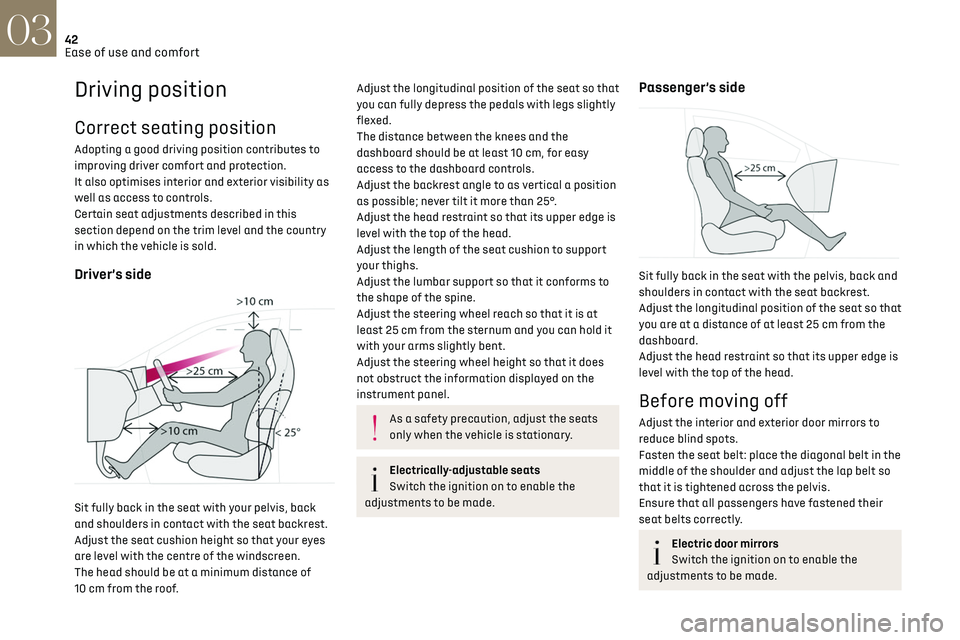
Driver’s side
Sit fully back in the seat with your pelvis, back
and shoulders in contact with the seat backrest.
Adjust the seat cushion height so that your eyes
are level with the centre of the windscreen.
The head should be at a minimum distance of
10 cm from the roof.
Adjust the longitudinal position of the seat so that
you can fully depress the pedals with legs slightly
flexed.
The distance between the knees and the
dashboard should be at least 10 cm, for easy
access to the dashboard controls.
Adjust the backrest angle to as vertical a position
as possible; never tilt it more than 25°.
Adjust the head restraint so that its upper edge is
level with the top of the head.
Adjust the length of the seat cushion to support
your thighs.
Adjust the lumbar support so that it conforms to
the shape of the spine.
Adjust the steering wheel reach so that it is at
least 25 cm from the sternum and you can hold it
with your arms slightly bent.
Adjust the steering wheel height so that it does
not obstruct the information displayed on the
instrument panel.
As a safety precaution, adjust the seats
only when the vehicle is stationary.
Electrically-adjustable seats
Switch the ignition on to enable the
adjustments to be made.
Passenger’s side
Sit fully back in the seat with the pelvis, back and
shoulders in contact with the seat backrest.
Adjust the longitudinal position of the seat so that
you are at a distance of at least 25 cm from the
dashboard.
Adjust the head restraint so that its upper edge is
level with the top of the head.
Before moving off
Adjust the interior and exterior door mirrors to
reduce blind spots.
Fasten the seat belt: place the diagonal belt in the
middle of the shoulder and adjust the lap belt so
that it is tightened across the pelvis.
Ensure that all passengers have fastened their
seat belts correctly.
Electric door mirrors
Switch the ignition on to enable the
adjustments to be made.
Page 63 of 244
61
Ease of use and comfort03
– a movable section which rises when the boot is
opened, with an open storage space.
To remove the load space cover shelf:
► Unhook the two cords.
► Raise the movable section slightly, then unclip
it on each side.
► Unclip the fixed section on each side, then
take out the load space cover shelf.
In the event of sudden deceleration,
objects placed on the load space cover
shelf can turn into projectiles.
High load retaining net
This removable net allows the entire loading
volume up to the roof to be used:
–
behind the fron
t seats (1
st row) when the rear
seats are folded down.
–
behind the rear sea
ts (2
nd row) when the load
space cover is removed.
This removable net protects the
occupants in the event of sudden braking.
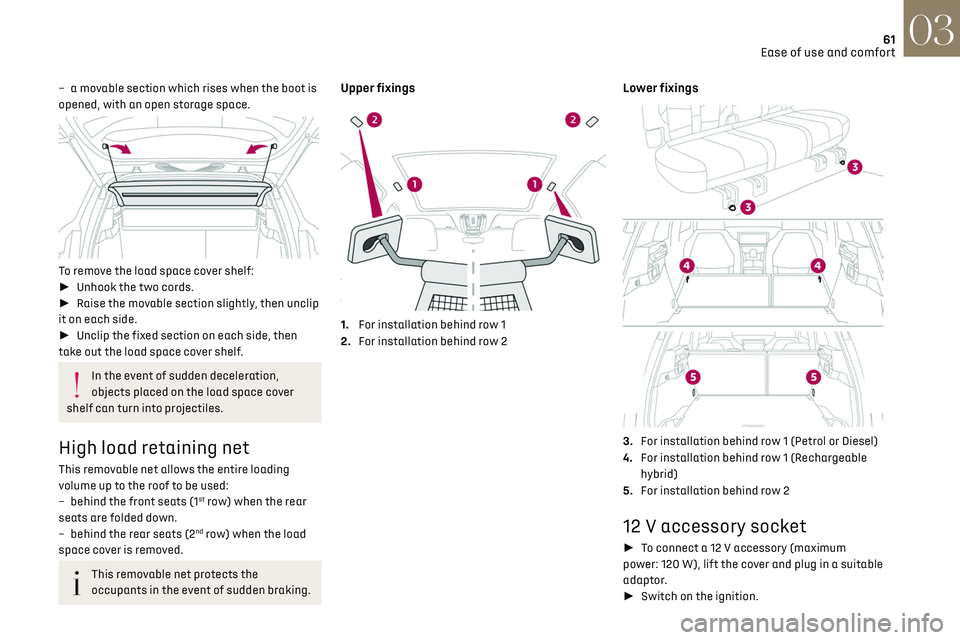
Upper fixings
1. For installation behind row 1
2. For installation behind row 2
Lower fixings
3.For installation behind row 1 (Petrol or Diesel)
4. For installation behind row 1 (Rechargeable
hybrid)
5. For installation behind row 2
12 V accessory socket
► To connect a 12 V accessory (maximum
power: 120 W), lift the cover and plug in a suitable
adaptor.
► Switch on the ignition.
Page 68 of 244
66
Lighting and visibility04
dipped beam headlamps come on automatically
when the ignition is switched off.
You can activate/deactivate and adjust
the duration of the guide-me-home lighting
in the Settings > Vehicle touch screen application.
Manual
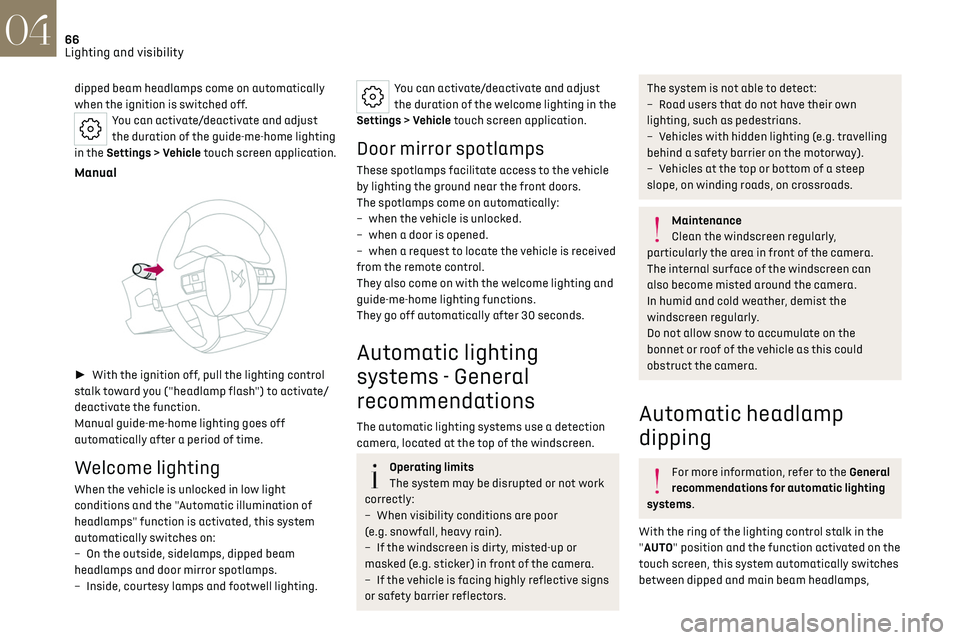
► With the ignition off, pull the lighting control
stalk toward you ("headlamp flash") to activate/
deactivate the function.
Manual guide-me-home lighting goes off
automatically after a period of time.
Welcome lighting
When the vehicle is unlocked in low light
conditions and the "Automatic illumination of
headlamps" function is activated, this system
automatically switches on:
–
O
n the outside, sidelamps, dipped beam
headlamps and door mirror spotlamps.
–
Inside
, courtesy lamps and footwell lighting.
You can activate/deactivate and adjust
the duration of the welcome lighting in the
Settings > Vehicle touch screen application.
Door mirror spotlamps
These spotlamps facilitate access to the vehicle
by lighting the ground near the front doors.
The spotlamps come on automatically:
–
when the v
ehicle is unlocked.
–
when a door is opened.
–
when a reque
st to locate the vehicle is received
from the remote control.
They also come on with the welcome lighting and
guide-me-home lighting functions.
They go off automatically after 30 seconds.
Automatic lighting
systems - General
recommendations
The automatic lighting systems use a detection
camera, located at the top of the windscreen.
Operating limits
The system may be disrupted or not work
correctly:
–
When visibility c
onditions are poor
(e.g. snowfall, heavy rain).
–
If the windscreen is dirty
, misted-up or
masked (e.g. sticker) in front of the camera.
–
If the v
ehicle is facing highly reflective signs
or safety barrier reflectors.
The system is not able to detect:
– R oad users that do not have their own
lighting, such as pedestrians.
–
V
ehicles with hidden lighting (e.g. travelling
behind a safety barrier on the motorway).
–
V
ehicles at the top or bottom of a steep
slope, on winding roads, on crossroads.
Maintenance
Clean the windscreen regularly,
particularly the area in front of the camera.
The internal surface of the windscreen can
also become misted around the camera.
In humid and cold weather, demist the
windscreen regularly.
Do not allow snow to accumulate on the
bonnet or roof of the vehicle as this could
obstruct the camera.
Automatic headlamp
dipping
For more information, refer to the General
recommendations for automatic lighting
systems.
With the ring of the lighting control stalk in the
"AUTO" position and the function activated on the
touch screen, this system automatically switches
between dipped and main beam headlamps,
Page 88 of 244
86
Safety05
Curtain airbags
Do not fix or attach anything to the roof,
as this could cause head injuries when the
curtain airbag is deployed.
Do not remove the grab handles installed on
the roof, as these help to secure the curtain
airbags.
Child seats
The regulations on carrying children are
specific to each country. Refer to the
legislation in force in your country.
For maximum safety, please observe the following
recommendations:
–
In ac
cordance with European regulations,
all children under the age of 12 or less than 1.5
metres tall must travel in approved child seats
suited to their weight, on seats fitted with a seat
belt or ISOFIX mountings.
–
Statistically
, the safest seats in your vehicle for
carrying children are the rear seats.
–
C
hildren weighing less than 9 kg must travel
in the "rearward facing" position, whether in the
front or rear of the vehicle.
It is recommended that children travel on
the rear seats of the vehicle:
–
"rearward facing" up to the age of 3.
–
"forward facing" over the age of 3.
Make sure that the seat belt is correctly
positioned and tightened.
For child seats with a support leg, ensure that
the support leg is in firm and steady contact
with the floor.
An incorrectly installed child seat in a
vehicle compromises the child's safety in
the event of an accident.
Ensure that there is no seat belt or seat belt
buckle under the child seat, as this could
destabilise it.
Remember to fasten the seat belts or the child
seat harness keeping the slack relative to
the child's body to a minimum, even for short
journeys.
When installing a child seat using the seat
belt, ensure that the seat belt is tightened
correctly on the child seat and that it secures
the child seat firmly on the vehicle seat. If the
passenger seat is adjustable, move it forwards
if necessary.
Remove the head restraint before installing a
child seat with a backrest on a passenger seat.
Ensure that the head restraint is stored or
attached securely to prevent it from being
thrown around the vehicle in the event of sharp
braking. Refit the head restraint once the child
seat has been removed.
Installing a booster seat
The chest part of the seat belt must be
positioned on the child's shoulder without
touching the neck.
Ensure that the lap part of the seat belt passes
correctly over the child's thighs.
Use a booster seat with a backrest, equipped
with a belt guide at shoulder level.
Additional protections
To prevent accidental opening of the
doors and rear windows, use the "Child lock".
Take care not to open the rear windows by
more than one third.
To protect young children from the sun's rays,
fit side blinds on the rear windows.
As a safety measure, do not leave:
–
A child alone and unsupervised inside a
v
ehicle.
–
A child or an animal in a v
ehicle which is
exposed to the sun, with the windows closed.
–
The k
eys within reach of children inside the
vehicle.
Child seat at the rear
Forward-facing or rearward-facing
Page 131 of 244
129
Driving06
This is a normal behavior indicating that a
condition is not fulfilled and which does not
request the support of a workshop.
In any situations with ignition on where automatic
braking presents a risk, deactivating the system
via the driving aids touch screen application is
recommended, for instance:
–
T
owing a trailer (particularly a trailer without
its own braking system).
–
Carrying long objects on roo
f bars.
–
D
riving with snow chains.
–
U
sing an automatic car wash.
–
Performing an
y maintenance (e.g. changing a
wheel, working inside the engine compartment).
–
Placing the v
ehicle on a rolling bench in a
workshop.
–
T
owing the vehicle.
–
Follo
wing an impact to the windscreen close to
the detection camera.
The system is automatically deactivated
once the use of a different diameter
"space-saver" type spare wheel is detected, or
if a fault with the two lateral brake lamps is
detected.
The system diagnoses permanently its
capability and may inhibit itself without
specific driver indication, if the system is
outside of the regular operating conditions
(e.g. sensor initialization, board voltage out of
regular range, activation of stability system).
Therefore, the system may not be available
just after starting the vehicle.
It can be dangerous to drive if the brake
lamps are not in perfect working order.
The driver must not overload the vehicle
(keep within the GVW limit and load
height limits for roof bars).
Following an impact (e.g. a collision), the
system is automatically deactivated.
Have it checked by a dealer or a qualified
workshop.
Collision Risk Alert
This function warns the driver if there is a risk
of collision with the preceding vehicle, or with a
pedestrian or cyclist.
Modifying the alert trigger threshold
The trigger threshold determines the sensitivity
with which the function warns of the risk of
collision.
It is configured in the ADAS touch screen
application.
► Select one of the 3 preset
thresholds: "Far ", "Medium" or "Near".
The selected threshold is memorised when the
ignition is switched off.
Operation
Depending on the collision risk detected by the
system and the alert trigger threshold chosen
by the driver, different levels of alert may be
triggered and displayed on the instrument panel.
The system takes into account the vehicle
dynamics, the difference speed of the own vehicle
and the object identified for the collision risk, and
the operation of the vehicle (e.g. actions on the
pedals, steering wheel) to trigger the alert at the
most relevant moment.
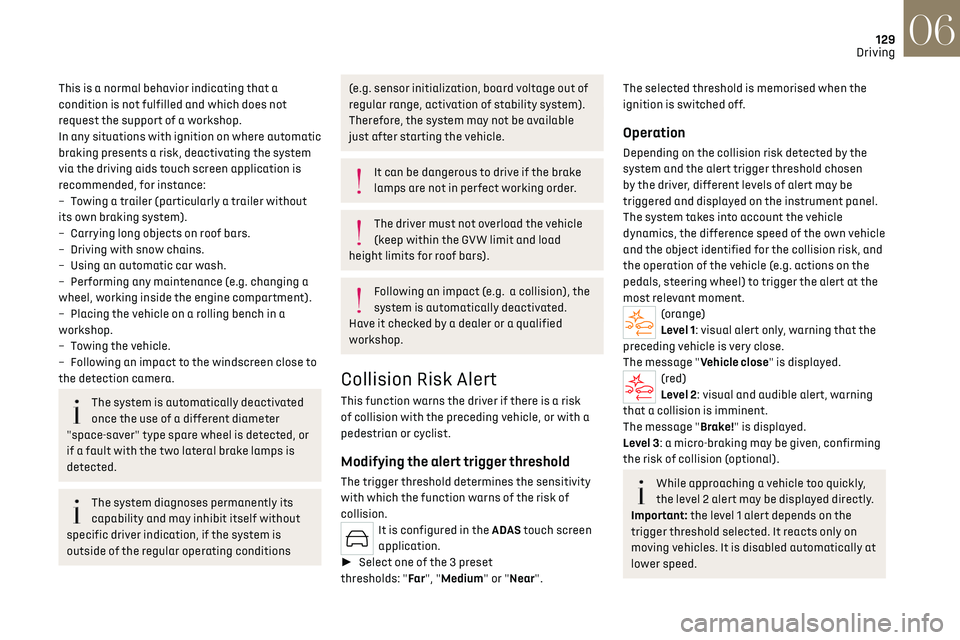
(orange)
Level 1: visual alert only, warning that the
preceding vehicle is very close.
The message "Vehicle close" is displayed.
(red)
Level 2: visual and audible alert, warning
that a collision is imminent.
The message "Brake!" is displayed.
Level 3: a micro-braking may be given, confirming
the risk of collision (optional).
While approaching a vehicle too quickly,
the level 2 alert may be displayed directly.
Important: the level 1 alert depends on the
trigger threshold selected. It reacts only on
moving vehicles. It is disabled automatically at
lower speed.
Page 159 of 244
157
Practical information07
As soon as you release the handle, it is engaged
automatically in its storage case.
Usage position
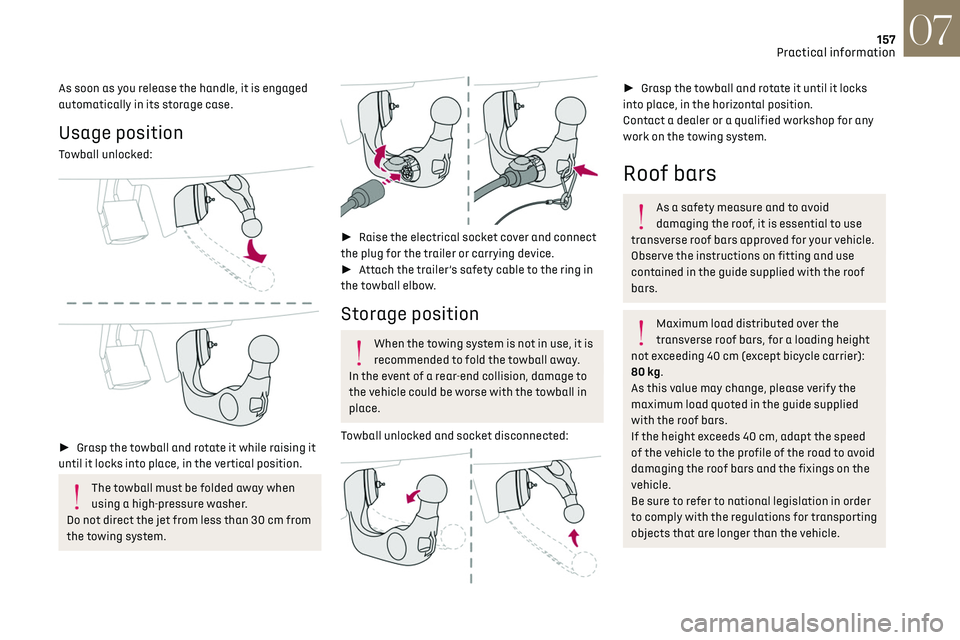
Towball unlocked:
► Grasp the towball and rotate it while raising it
until it locks into place, in the vertical position.
The towball must be folded away when
using a high-pressure washer.
Do not direct the jet from less than 30 cm from
the towing system.
► Raise the electrical socket cover and connect
the plug for the trailer or carrying device.
► Attach the trailer’s safety cable to the ring in
the towball elbow.
Storage position
When the towing system is not in use, it is
recommended to fold the towball away.
In the event of a rear-end collision, damage to
the vehicle could be worse with the towball in
place.
Towball unlocked and socket disconnected:
► Grasp the towball and rotate it until it locks
into place, in the horizontal position.
Contact a dealer or a qualified workshop for any
work on the towing system.
Roof bars
As a safety measure and to avoid
damaging the roof, it is essential to use
transverse roof bars approved for your vehicle.
Observe the instructions on fitting and use
contained in the guide supplied with the roof
bars.
Maximum load distributed over the
transverse roof bars, for a loading height
not exceeding 40 cm (except bicycle carrier):
80 kg.
As this value may change, please verify the
maximum load quoted in the guide supplied
with the roof bars.
If the height exceeds 40 cm, adapt the speed
of the vehicle to the profile of the road to avoid
damaging the roof bars and the fixings on the
vehicle.
Be sure to refer to national legislation in order
to comply with the regulations for transporting
objects that are longer than the vehicle.
Page 160 of 244
158
Practical information07
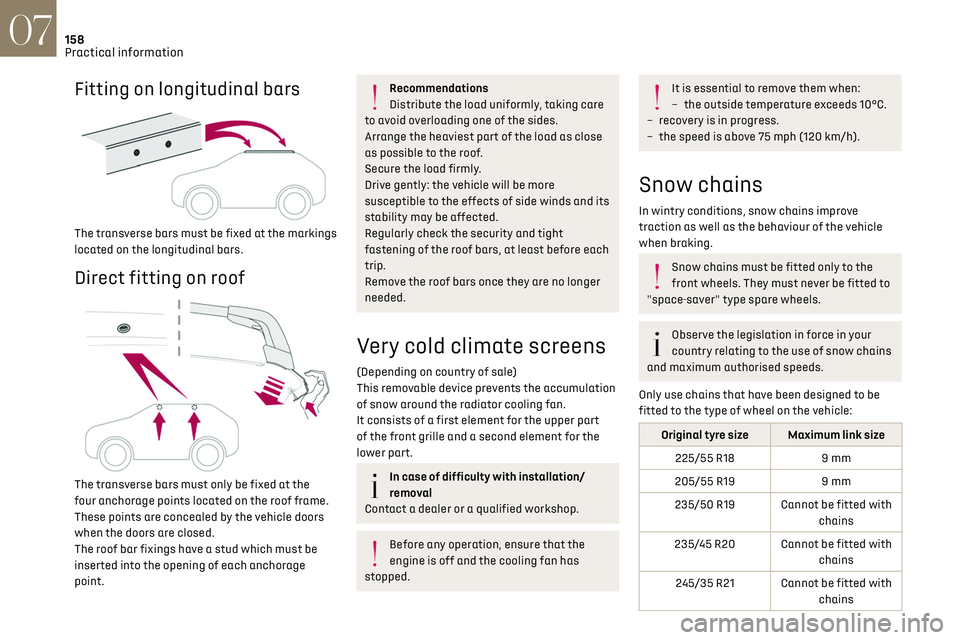
Fitting on longitudinal bars
The transverse bars must be fixed at the markings
located on the longitudinal bars.
Direct fitting on roof
The transverse bars must only be fixed at the
four anchorage points located on the roof frame.
These points are concealed by the vehicle doors
when the doors are closed.
The roof bar fixings have a stud which must be
inserted into the opening of each anchorage
point.
Recommendations
Distribute the load uniformly, taking care
to avoid overloading one of the sides.
Arrange the heaviest part of the load as close
as possible to the roof.
Secure the load firmly.
Drive gently: the vehicle will be more
susceptible to the effects of side winds and its
stability may be affected.
Regularly check the security and tight
fastening of the roof bars, at least before each
trip.
Remove the roof bars once they are no longer
needed.
Very cold climate screens
(Depending on country of sale)
This removable device prevents the accumulation
of snow around the radiator cooling fan.
It consists of a first element for the upper part
of the front grille and a second element for the
lower part.
In case of difficulty with installation/
removal
Contact a dealer or a qualified workshop.
Before any operation, ensure that the
engine is off and the cooling fan has
stopped.
It is essential to remove them when:
– the outside t emperature exceeds 10°C.
–
rec
overy is in progress.
–
the speed is abo
ve 75 mph (120 km/h).
Snow chains
In wintry conditions, snow chains improve
traction as well as the behaviour of the vehicle
when braking.
Snow chains must be fitted only to the
front wheels. They must never be fitted to
"space-saver" type spare wheels.
Observe the legislation in force in your
country relating to the use of snow chains
and maximum authorised speeds.
Only use chains that have been designed to be
fitted to the type of wheel on the vehicle:
Original tyre size Maximum link size 225/55 R18 9 mm
205/55 R19 9 mm
235/50 R19 Cannot be fitted with chains
235/45 R20 Cannot be fitted with chains
245/35 R21 Cannot be fitted with chains
Page 185 of 244
183
In the event of a breakdown08
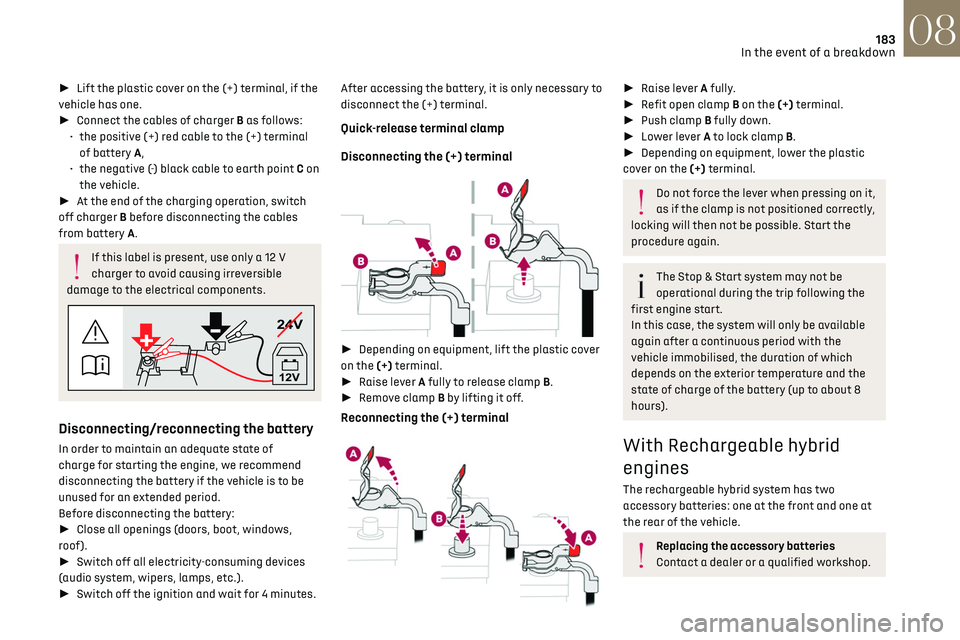
► Lift the plastic cover on the (+) terminal, if the
vehicle has one.
► Connect the cables of charger B as follows:
•
the po
sitive (+) red cable to the (+) terminal
of battery A,
•
the nega
tive (-) black cable to earth point C on
the vehicle.
► At the end of the charging operation, switch
off charger B before disconnecting the cables
from battery A.
If this label is present, use only a 12 V
charger to avoid causing irreversible
damage to the electrical components.
24V
12V
Disconnecting/reconnecting the battery
In order to maintain an adequate state of
charge for starting the engine, we recommend
disconnecting the battery if the vehicle is to be
unused for an extended period.
Before disconnecting the battery:
► Close all openings (doors, boot, windows,
roof).
► Switch off all electricity-consuming devices
(audio system, wipers, lamps, etc.).
► Switch off the ignition and wait for 4 minutes. After accessing the battery, it is only necessary to
disconnect the (+) terminal.
Quick-release terminal clamp
Disconnecting the (+) terminal
►
Depending on equipment, lift the plastic cover
on the (+) terminal.
► Raise lever A fully to release clamp B.
► Remove clamp B by lifting it off.
Reconnecting the (+) terminal
► Raise lever A fully.
► Refit open clamp B on the (+) terminal.
► Push clamp B fully down.
► Lower lever A to lock clamp B.
► Depending on equipment, lower the plastic
cover on the (+) terminal.
Do not force the lever when pressing on it,
as if the clamp is not positioned correctly,
locking will then not be possible. Start the
procedure again.
The Stop & Start system may not be
operational during the trip following the
first engine start.
In this case, the system will only be available
again after a continuous period with the
vehicle immobilised, the duration of which
depends on the exterior temperature and the
state of charge of the battery (up to about 8
hours).
With Rechargeable hybrid
engines
The rechargeable hybrid system has two
accessory batteries: one at the front and one at
the rear of the vehicle.
Replacing the accessory batteries
Contact a dealer or a qualified workshop.
Page 202 of 244
200
DS IRIS SYSTEM - 12" touch screen Infotainment system10
– After opening voice recognition with
the steering wheel-mounted button or the
button on the touch screen, always wait for
the "beep” (audible signal) before talking.
No "beep" sounds when voice recognition is
opened using "OK Iris".
–
For optimal opera
tion, it is recommended
that you close the windows and the sunroof
(depending on equipment) to avoid any
external interference, and switch the
ventilation off.
–
Before speaking the v
oice commands, ask
the other passengers not to speak.
Voice command example for air
conditioning:
"raise the fan speed"
"Turn on air conditioning"
"i'm too hot"
Voice command example for radio and
media:
"I want to listen to michael jackson"
"switch to radio"
"tune to 88.5"
Media voice commands are only available
with a USB connection.
Voice command example for navigation:
"navigate home"
"Navigate me to gabrielle's house"
"search for public parking nearby"
Depending on the country, give
destination (address) instructions in the
language configured for the system.
Voice command example for telephone:
"Call Matthew's mobile"
"call 0113 345 9869"
"Call jonathan"
If there is no telephone connected by
Bluetooth®, a voice message announces:
"Connect a telephone by Bluetooth®", and the
voice session will be closed.
Voice command example for the weather:
"do i need a raincoat"
"how is the weather tonight"
"what is today's humidity level"
Navigation
Navigation home screen
(depending on equipment)
Access to additional videos
https://www.tomtom.com/
PSAGroup-Connected-Nav
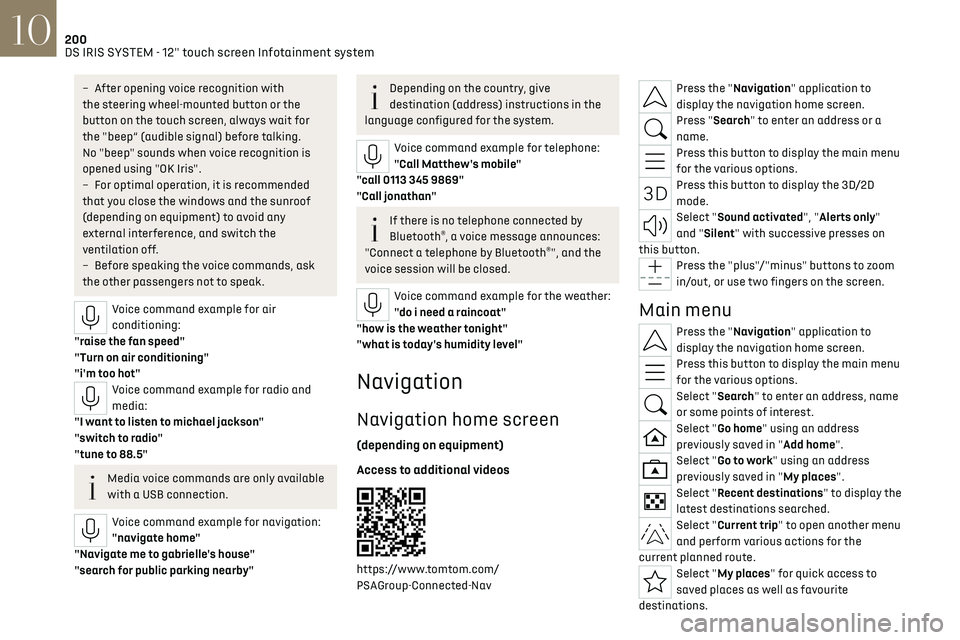
Press the "Navigation" application to
display the navigation home screen.
Press "Search" to enter an address or a
name.
Press this button to display the main menu
for the various options.
Press this button to display the 3D/2D
mode.
Select "Sound activated", "Alerts only"
and "Silent" with successive presses on
this button.
Press the "plus"/"minus" buttons to zoom
in/out, or use two fingers on the screen.
Main menu
Press the "Navigation" application to
display the navigation home screen.
Press this button to display the main menu
for the various options.
Select "Search" to enter an address, name
or some points of interest.
Select "Go home" using an address
previously saved in "Add home".
Select "Go to work" using an address
previously saved in "My places".
Select "Recent destinations" to display the
latest destinations searched.
Select "Current trip" to open another menu
and perform various actions for the
current planned route.
Select "My places" for quick access to
saved places as well as favourite
destinations.
Page 217 of 244
215Alphabetical index
Emergency call 77–78
Emergency switching off
99
Emergency warning lamps
76, 170
Emissions control system, SCR
20, 165
Energy economy (mode)
159
Energy economy mode
159
Energy flows
24
Energy recovery
20, 105
Engine
165
Engine compartment
160–161
Engine, Diesel
143, 161, 170, 191
Engine, petrol
107, 161, 190
Engines
189–191
Environment
8, 31
e-Save function (energy reserve)
24
ESC (electronic stability control)
79
Expanded traffic sign recognition
116
Exterior lighting
66
F
Fatigue detection 131–132
Favourite driving functions
113
Filling the AdBlue® tank
163, 166
Filling the fuel tank
143–144
Filter, air
163
Filter, oil
163
Filter, particle
163
Filter, passenger compartment
50, 163
Fitting a wheel
175, 177
Fitting roof bars 157–158
Fittings, boot
60
Fittings, interior
56–57
Fittings, rear
60
Flap, charging
155
Flap, fuel filler
143–144
Flap, ski
60
Flashing indicators
64
Flat bed (towing)
186
Floor, boot, adjustable
62
Fluid, brake
162
Fluid, engine coolant
162
Foglamps, rear
63
Folding the rear seats
48–49
Folding/unfolding the door mirrors
47
Four-wheel drive (4WD)
108, 159
Frequency (radio)
205
Fuel
8, 143
Fuel consumption
8, 20
Fuel level, low
143
Fuel (tank)
143–144
Fuses
180
G
Gauge, fuel 143
Gearbox, automatic
101–104, 108, 164, 181
Gearbox, manual
108
Gear shift indicator
109
Glove box
56
Grab handles 56
H
Hands-free access 35–36
Hands-free tailgate
35–36
Hazard warning lamps
76, 170
Headlamps (adjustment)
65
Headlamps, automatic dipping
66–67
Headlamps, automatic operation
65
Headlamps, dipped beam
179
Headlamps, halogen
65
Headlamps, main beam
66, 179
Head restraints, front
43
Head restraints, rear
48–49
Heated and ventilated seats
45
Heating
49
Heating, programmable
25, 54
Hi-Fi system
58
High voltage
145
Hill start assist
108
Histogramme, fuel consumption
24–25
Horn
77
I
Ignition 99, 207
Ignition on
99
Immobiliser, electronic
97