air condition CITROEN DS7 CROSSBACK 2017 Owner's Manual
[x] Cancel search | Manufacturer: CITROEN, Model Year: 2017, Model line: DS7 CROSSBACK, Model: CITROEN DS7 CROSSBACK 2017Pages: 244, PDF Size: 6.87 MB
Page 108 of 244
106
Driving06
The system uses a computer and sensors, which
determine the optimal level of shock absorption
to be applied to each shock absorber.
The system is also associated with a camera,
located at the top of the windscreen, constantly
monitoring the road condition. Based on the
information transmitted by the camera, the
system anticipates possible road defects.
The operation of the system depends on the
driving mode selected (depending on equipment).
For more information on the Driving modes,
please refer to the corresponding section.
Malfunction
In the event of a malfunction, this warning
lamp lights up on the instrument panel.
Have it checked by a dealer or a qualified
workshop.
Driving modes
The driving modes available depend on the engine
and equipment of the vehicle.
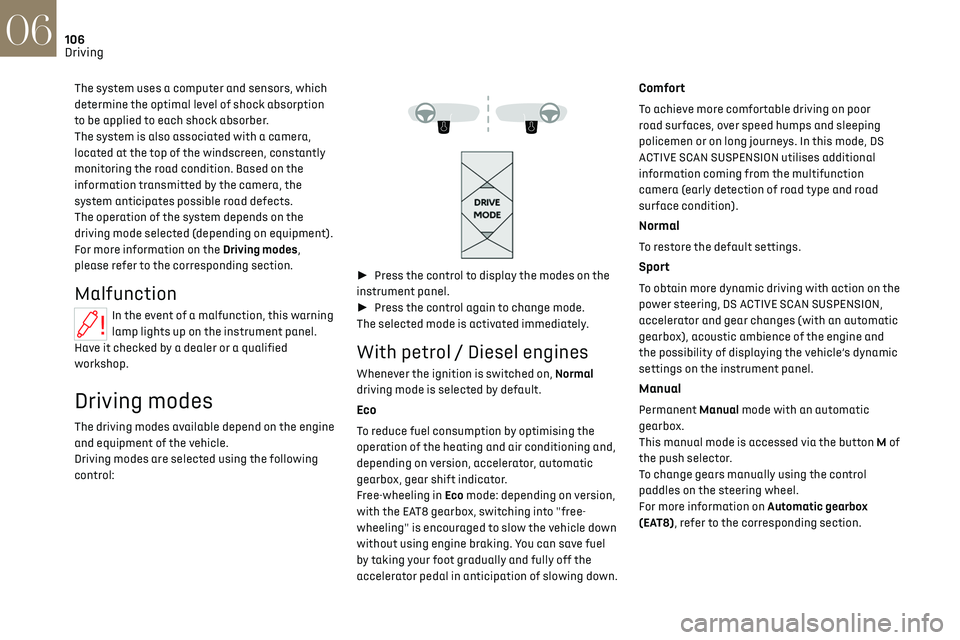
Driving modes are selected using the following
control:
► Press the control to display the modes on the
instrument panel.
► Press the control again to change mode.
The selected mode is activated immediately.
With petrol / Diesel engines
Whenever the ignition is switched on, Normal
driving mode is selected by default.
Eco
To reduce fuel consumption by optimising the
operation of the heating and air conditioning and,
depending on version, accelerator, automatic
gearbox, gear shift indicator.
Free-wheeling in Eco mode: depending on version,
with the EAT8 gearbox, switching into "free-
wheeling" is encouraged to slow the vehicle down
without using engine braking. You can save fuel
by taking your foot gradually and fully off the
accelerator pedal in anticipation of slowing down.
Comfort
To achieve more comfortable driving on poor
road surfaces, over speed humps and sleeping
policemen or on long journeys. In this mode, DS
ACTIVE SCAN SUSPENSION utilises additional
information coming from the multifunction
camera (early detection of road type and road
surface condition).
Normal
To restore the default settings.
Sport
To obtain more dynamic driving with action on the
power steering, DS ACTIVE SCAN SUSPENSION,
accelerator and gear changes (with an automatic
gearbox), acoustic ambience of the engine and
the possibility of displaying the vehicle’s dynamic
settings on the instrument panel.
Manual
Permanent Manual mode with an automatic
gearbox.
This manual mode is accessed via the button M of
the push selector.
To change gears manually using the control
paddles on the steering wheel.
For more information on Automatic gearbox
(EAT8), refer to the corresponding section.
Page 113 of 244
111
Driving06
The tyre under-inflation detection cannot,
in any circumstances, replace the need
for vigilance on the part of the driver.
This system does not avoid the need to
regularly check the tyre pressures (including
the spare wheel), especially before a long
journey.
Driving with under-inflated tyres, particularly
in adverse conditions (heavy load, high speed,
long journey):
–
w
orsens road-holding.
–
lengthens braking dist
ances.
–
c
auses premature wear of the tyres.
–
increase
s energy consumption.
The inflation pressures defined for the
vehicle can be found on the tyre pressure
label.
For more information on the Identification
markings, refer to the corresponding section.
Checking tyre pressures
This check should be done monthly when
the tyres are "cold" (vehicle stopped for 1 hour
or after a journey of less than 6 miles (10 km)
at moderate speeds).
Otherwise, add 0.3 bar to the pressures shown
on the label.
Snow chains
The system does not have to be
reinitialised after fitting or removing snow
chains.
Under-inflation alert
This is signalled by the fixed illumination
of this warning lamp, accompanied by an
audible signal and, depending on equipment, the
display of a message.
► Reduce speed immediately, avoid excessive
steering movements and avoid sudden braking.
► Stop the vehicle as soon as it is safe to do so.
The loss of pressure detected may not
always cause visible deformation of the
tyre.
Do not rely on just a visual check.
► Using a compressor, such as the one in
the temporary puncture repair kit, check the
pressures of all four tyres when cold.
► If it is not possible to carry out this check
immediately, drive carefully at reduced speed.
► In the event of a puncture, use the temporary
puncture repair kit or the spare wheel (depending
on equipment).
Driving too slowly may not ensure
optimum monitoring.
The alert is not immediately triggered in the
event of a sudden loss of pressure or tyre blow-
out. This is because analysis of the values read
by the wheel's speed sensors can take several
minutes.
The alert may be delayed at speeds below 25
mph (40 km/h), or when adopting a sporty
driving mode.
The alert is kept active until the system is
reinitialised.
Reinitialisation
► The system must be reinitialised after any
adjustment to the pressure of one or more tyres,
and after changing one or more wheels.
Before reinitialising the system, make
sure that the pressures of the four tyres
are correct for the conditions of use of the
vehicle and conform to the values written on
the tyre pressure label.
Check the pressures of the four tyres before
performing the reinitialisation.
The system does not advise if a pressure is
incorrect at the time of reinitialisation.
With the vehicle stationary, the system
can be reinitialised in the Settings>Vehicle
touch screen application.
► Then select Safety > Tire Pressure Setup.
► Press YES to confirm.
The reinitialisation is confirmed by the display of
a message and an audible signal.
Page 114 of 244
112
Driving06
Malfunction
In the event of a malfunction, these
warning lamps light up on the
instrument panel.
A message appears, accompanied by an audible
signal.
In this case, the tyre under-inflation monitoring
function is no longer performed.
Have it checked by a dealer or a qualified
workshop.
Non-standard or 'space-saver' spare
wheel
The use of this type of spare wheel may
suspend tyre pressure monitoring.
In this case, the malfunction warning lamp
comes on and disappears once the wheel has
been replaced by one of uniform size (the same
as the others), the pressure readjusted and
the reinitialisation carried out.
Driving and manoeuvring
aids - General
recommendations
Driving and manoeuvring aids cannot, in
any circumstances, replace the need for
vigilance on the part of the driver.
The driver must comply with the Highway
Code, must remain in control of the vehicle in
all circumstances and must be able to retake
control of it at all times. The driver must adapt
the speed to climatic conditions, traffic and
the state of the road.
It is the driver's responsibility to constantly
monitor traffic conditions, assess the distance
and relative speed of other vehicles, and
anticipate their manoeuvres before using the
direction indicator and changing lanes.
These systems do not make it possible to
exceed the laws of physics.
Driving aids
You should hold the steering wheel with
both hands, always use the door and interior
mirrors, always leave your feet close to the
pedals and take a break every 2 hours.
Manoeuvring aids
The driver must always check the
surroundings of the vehicle before and during
the whole manoeuvre, in particular using the
mirrors.
Radar(s)
The operation of the radar(s), along with
any associated functions, may be affected by
the accumulation of dirt (e.g. mud, ice), in poor
weather conditions (e.g. heavy rain, snow), or
if the bumpers are damaged.
If the front bumper is to be repainted, contact
a dealer or a qualified workshop; certain types
of paint could interfere with the operation of
the radar(s).
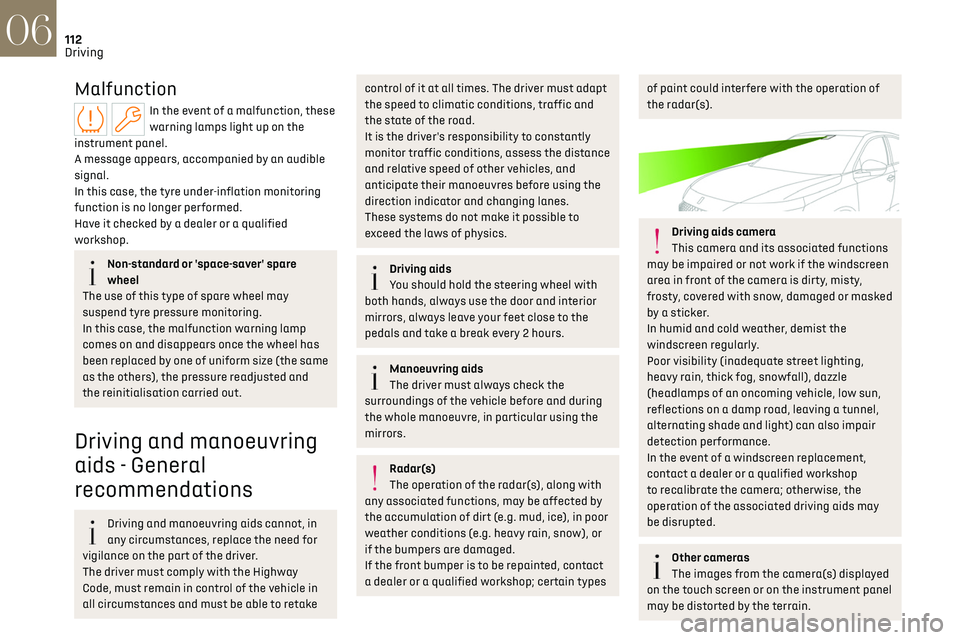
Driving aids camera
This camera and its associated functions
may be impaired or not work if the windscreen
area in front of the camera is dirty, misty,
frosty, covered with snow, damaged or masked
by a sticker.
In humid and cold weather, demist the
windscreen regularly.
Poor visibility (inadequate street lighting,
heavy rain, thick fog, snowfall), dazzle
(headlamps of an oncoming vehicle, low sun,
reflections on a damp road, leaving a tunnel,
alternating shade and light) can also impair
detection performance.
In the event of a windscreen replacement,
contact a dealer or a qualified workshop
to recalibrate the camera; otherwise, the
operation of the associated driving aids may
be disrupted.
Other cameras
The images from the camera(s) displayed
on the touch screen or on the instrument panel
may be distorted by the terrain.
Page 118 of 244
116
Driving06
Operating limits
The system does not take account of reduced
speed limits, especially those imposed in the
following cases:
–
Poor w
eather (rain, snow).
–
A
tmospheric pollution.
–
Towing.
–
D
riving with a space-saver type spare wheel or
snow chains fitted.
–
Tyre repaired using the t
emporary puncture
repair kit.
–
Y
oung drivers.
The system may not display the speed limit if it
does not detect a speed limit sign within a preset
period and in the following situations:
–
R
oad signs that are obstructed, non-standard,
damaged or bent.
–
Ob
solete or incorrect maps.
Recommendation
In addition to Road signs recognition, the driver
can select the speed displayed as a speed setting
for the speed limiter or cruise control using the
speed limiter or cruise control 'store' button.
For more information on the Speed limiter,
Cruise control or Adaptive cruise control,
refer to the corresponding sections.
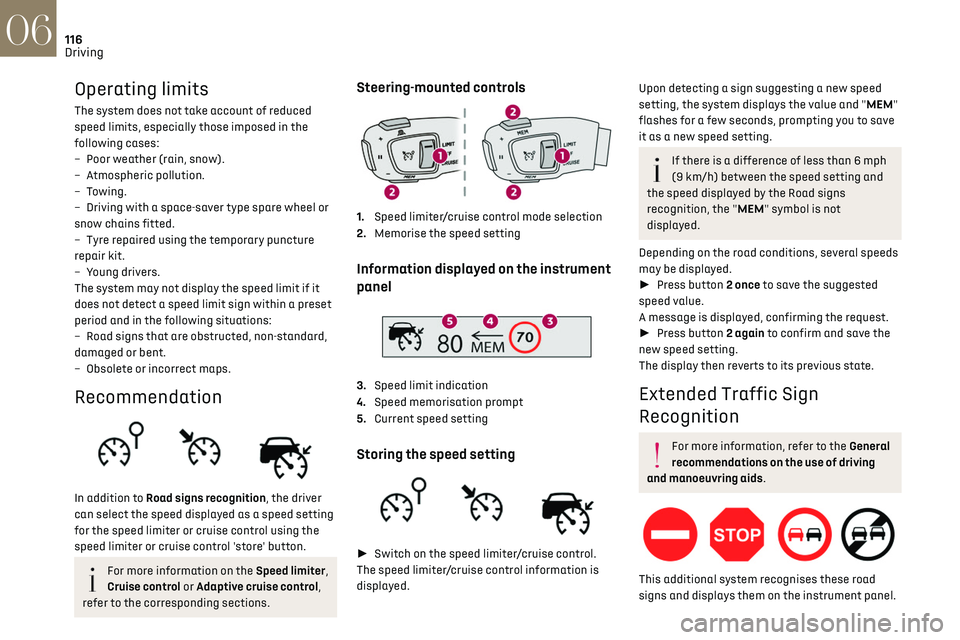
Steering-mounted controls
1. Speed limiter/cruise control mode selection
2. Memorise the speed setting
Information displayed on the instrument
panel
3.Speed limit indication
4. Speed memorisation prompt
5. Current speed setting
Storing the speed setting
► Switch on the speed limiter/cruise control.
The speed limiter/cruise control information is
displayed.
Upon detecting a sign suggesting a new speed
setting, the system displays the value and "MEM"
flashes for a few seconds, prompting you to save
it as a new speed setting.
If there is a difference of less than 6 mph
(9 km/h) between the speed setting and
the speed displayed by the Road signs
recognition, the "MEM" symbol is not
displayed.
Depending on the road conditions, several speeds
may be displayed.
► Press button 2 once to save the suggested
speed value.
A message is displayed, confirming the request.
► Press button 2 again to confirm and save the
new speed setting.
The display then reverts to its previous state.
Extended Traffic Sign
Recognition
For more information, refer to the General
recommendations on the use of driving
and manoeuvring aids.
This additional system recognises these road
signs and displays them on the instrument panel.
Page 133 of 244
131
Driving06
Malfunction
This warning lamp lights up on the
instrument panel with the message
"Sensor blind" in certain cases.
Version with camera only: the system is
deactivated.
Version with camera and radar: the system may
continue to operate in a degraded mode.
This may be caused by a reduced visibility
(e.g. rain, fog, snow, blinding by low sun) or by a
real sensor blockage. In this case, stop the vehicle
and verify if the front camera or the front radar is
covered by dirt, snow, ice or anything preventing
the sensing.
In the event of a malfunction, this warning
lamp lights up on the instrument panel,
accompanied by the display of a message and an
audible signal.
Have it checked by a dealer or a qualified
workshop.
If these warning lamps come on
after the engine has been switched
off and then restarted, contact a dealer or a
qualified workshop to have the system checked.
These warning lamps light up on
the instrument panel and/or in the
warning lamp display for seat belts and front
passenger airbag to indicate that the driver's and/
or front passenger's seat belt is not fastened
(depending on version). The automatic braking
system is deactivated until the seat belts are
fastened.
Distraction detection
For more information, refer to the General
recommendations on the use of driving
and manoeuvring aids.
The function comprises the "Driver Attention
Warning" and "Driver Attention Warning by
Camera" systems, combined, depending on
version, with the "DS DRIVER ATTENTION
MONITORING" system.
These systems are in no way designed to
keep the driver awake or to prevent the
driver from falling asleep at the wheel.
It is the driver’s responsibility to stop if feeling
tired.
Take a break if you are feeling tired or at least
every 2 hours.
Activation/Deactivation
By default, the function is automatically activated
at every engine start.
The settings are changed via the ADAS
touch screen application.
Driver Attention Warning
The system triggers an alert when it
detects that the driver has not taken a
break after two hours of driving at a speed above
43 mph (70 km/h).
This alert is issued via the display of a message
encouraging the driver to take a break,
accompanied by an audible signal.
If the driver does not follow this advice, the alert
is repeated hourly until the vehicle is stopped.
The system resets itself if one of the following
conditions is met:
–
With the engine running, the v
ehicle has been
stationary for more than 15 minutes.
–
The ignition has been s
witched off for a few
minutes.
–
The driv
er's seat belt is unfastened and their
door is opened.
As soon as the speed of the vehicle drops
below 43 mph (70 km/h), the system goes
into standby.
Driving time starts being counted again once
the speed reaches above 43 mph (70 km/h).
Page 134 of 244
132
Driving06
Driver Attention Warning by
Camera
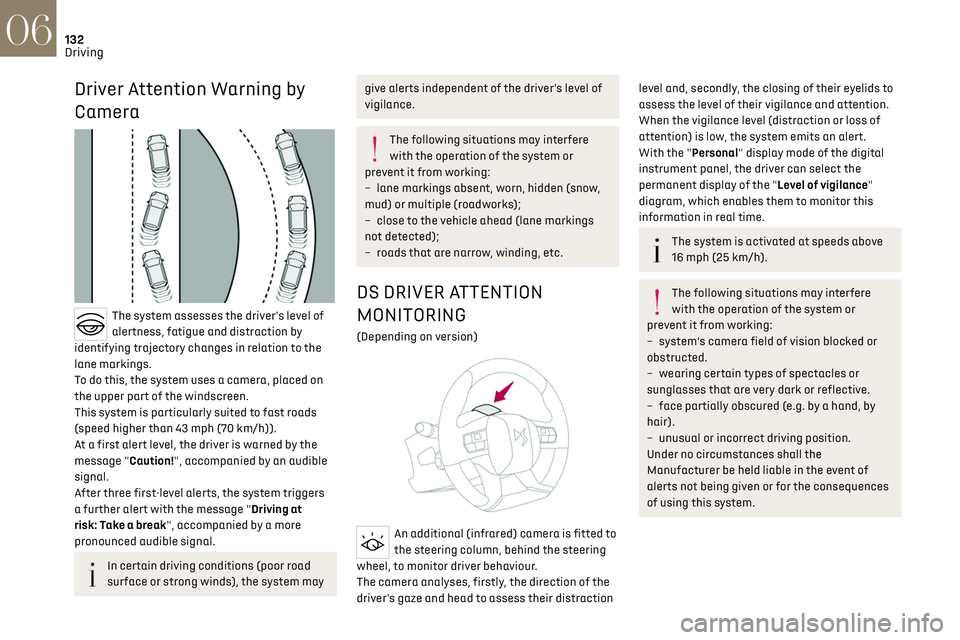
The system assesses the driver's level of
alertness, fatigue and distraction by
identifying trajectory changes in relation to the
lane markings.
To do this, the system uses a camera, placed on
the upper part of the windscreen.
This system is particularly suited to fast roads
(speed higher than 43 mph (70 km/h)).
At a first alert level, the driver is warned by the
message "Caution!", accompanied by an audible
signal.
After three first-level alerts, the system triggers
a further alert with the message "Driving at
risk: Take a break", accompanied by a more
pronounced audible signal.
In certain driving conditions (poor road
surface or strong winds), the system may
give alerts independent of the driver's level of
vigilance.
The following situations may interfere
with the operation of the system or
prevent it from working:
–
lane markings ab
sent, worn, hidden (snow,
mud) or multiple (roadworks);
–
clo
se to the vehicle ahead (lane markings
not detected);
–
roads tha
t are narrow, winding, etc.
DS DRIVER ATTENTION
MONITORING
(Depending on version)
An additional (infrared) camera is fitted to
the steering column, behind the steering
wheel, to monitor driver behaviour.
The camera analyses, firstly, the direction of the
driver's gaze and head to assess their distraction
level and, secondly, the closing of their eyelids to
assess the level of their vigilance and attention.
When the vigilance level (distraction or loss of
attention) is low, the system emits an alert.
With the "Personal" display mode of the digital
instrument panel, the driver can select the
permanent display of the "Level of vigilance"
diagram, which enables them to monitor this
information in real time.
The system is activated at speeds above
16 mph (25 km/h).
The following situations may interfere
with the operation of the system or
prevent it from working:
–
s
ystem’s camera field of vision blocked or
obstructed.
–
w
earing certain types of spectacles or
sunglasses that are very dark or reflective.
–
fac
e partially obscured (e.g. by a hand, by
hair).
–
unusual or inc
orrect driving position.
Under no circumstances shall the
Manufacturer be held liable in the event of
alerts not being given or for the consequences
of using this system.
Page 145 of 244
143
Practical information07
TAILOR-MADE
LUBRICANTS
FOR HAUTE
COUTURE CARS
* 1L & 5L produced in Europe
Partner\f \fince the brand’\f creation in \b015, DS automobile\f &
TotalEnergie\f \fhare common value\f : excellence, performance and
know-how. TotalEnergie\f equip\f DS vehicle\f with Quartz lubricant\f
from their fir\ft filling in the factory to approved maintenance
network\f to guarantee them optimal performance on a daily ba\fi\f.
Tailor-made for DS vehicle\f, Quartz lubricant\f make them even more
efficient, more fuel efficient and more environmentally friendly.
TotalEnergie\f and DS, official partner\f in\t automotive excellence !
Keep your engine younger for longer \
!
Quartz Ineo Xtra Fir\ft 0W-\b0 i\f a very high performance lubricant
re\fulting from the joint work of the DS Automobile\f and
TotalEnergie\f R&D team\f. It\f innovative technology extend\f your
engine’\f life while reaching \fignificant fuel \faving\f and thu\f
limiting CO
\b emi\f\fion\f. The product i\f now available in new
packaging* made of 50% recycled material and 100% rec\tyclable.
Compatibility of fuels
Petrol fuels conforming to the EN228 standard
containing up to 5% and 10% ethanol respectively.
Diesel fuels conforming to the EN590, EN16734
and EN16709 standards and containing up to
7%, 10%, 20% and 30% fatty acid methyl ester
respectively. The use of B20 or B30 fuels, even
occasionally, imposes special maintenance
conditions referred to as "Arduous conditions".
Paraffinic Diesel fuel conforming to the EN15940
standard.
The use of any other type of (bio)fuel
(e.g. pure or diluted vegetable or animal
oils, domestic fuel) is strictly prohibited - risk
of damaging the engine and fuel system!
The only fuel additives authorised for use
are those that meet the B715001 (petrol)
or B715000 (Diesel) standards.
Diesel at low temperature
At temperatures below 0 °C (+32 °F), the
formation of paraffins in summer-type Diesel
fuels could prevent the engine from operating correctly. In these temperature conditions, use
winter-type Diesel fuel and keep the fuel tank
more than 50 % full.
At temperatures below -15 °C (+5 °F) to avoid
problems starting, it is best to park the vehicle
under shelter (heated garage).
Travelling abroad
Certain fuels could damage your vehicle’s engine.
In certain countries, the use of a particular fuel
may be required (specific octane rating, specific
trade name, etc.) to ensure correct operation of
the engine.
For all additional information, consult a dealer.
Refuelling
Fuel tank capacity: approximately 55
litres (Diesel), 62 litres (Petrol) or 43 litres
(Rechargeable hybrid).
Reserve level: approximately 6 litres.
Low fuel level
When the low fuel level is reached, this
warning lamp lights up on the instrument
panel, accompanied by the display of a message
and an audible signal. When it first comes on,
about 6 litres of fuel remain.
Until sufficient fuel is added, this warning lamp
appears every time the ignition is switched on,
accompanied by the message and the audible
signal. When driving, this message and audible
signal are repeated with increasing frequency as
the fuel level drops towards 0.
You must refuel as soon as possible to avoid
running out of fuel.
For more information on Running out of fuel
(Diesel), refer to the corresponding section.
A small arrow by the warning lamp
indicates which side of the vehicle the
fuel filler flap is located on.
Stop & Start
Never refuel with the engine in STOP
mode; you must switch off the ignition.
Refuelling
Any addition of fuel must be in quantities of at
least 10 litres, in order to be registered by the fuel
gauge.
Opening the filler flap may create a noise caused
by an inrush of air. This vacuum is entirely normal,
resulting from the sealing of the fuel system.
To refuel in complete safety:
► Always switch off the engine.
Page 152 of 244
150
Practical information07
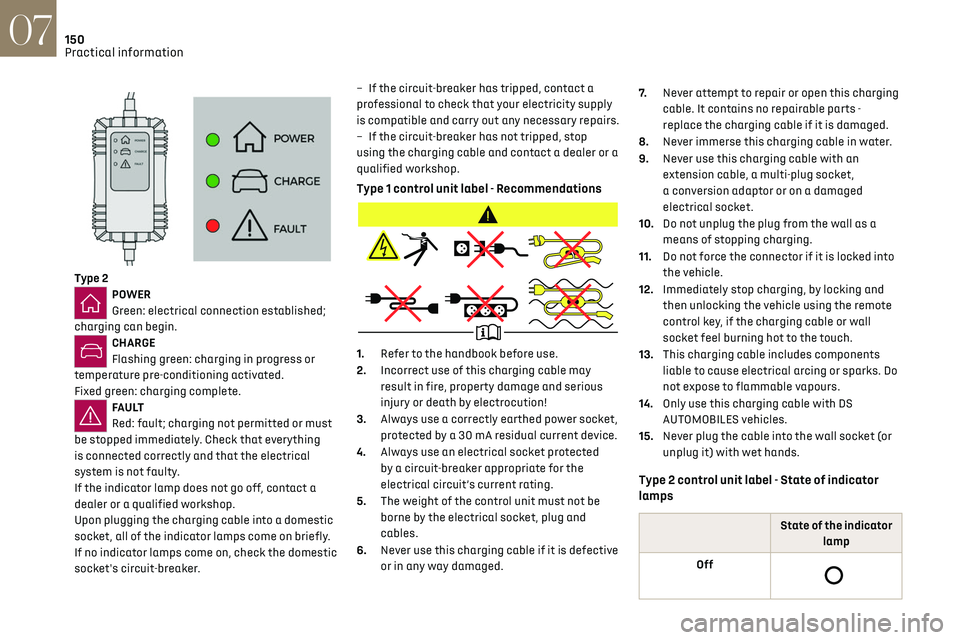
Type 2POWER
Green: electrical connection established;
charging can begin.
CHARGE
Flashing green: charging in progress or
temperature pre-conditioning activated.
Fixed green: charging complete.
FA U LT
Red: fault; charging not permitted or must
be stopped immediately. Check that everything
is connected correctly and that the electrical
system is not faulty.
If the indicator lamp does not go off, contact a
dealer or a qualified workshop.
Upon plugging the charging cable into a domestic
socket, all of the indicator lamps come on briefly.
If no indicator lamps come on, check the domestic
socket's circuit-breaker. –
If the circ
uit-breaker has tripped, contact a
professional to check that your electricity supply
is compatible and carry out any necessary repairs.
–
If the circ
uit-breaker has not tripped, stop
using the charging cable and contact a dealer or a
qualified workshop.
Type 1 control unit label - Recommendations
1. Refer to the handbook before use.
2. Incorrect use of this charging cable may
result in fire, property damage and serious
injury or death by electrocution!
3. Always use a correctly earthed power socket,
protected by a 30 mA residual current device.
4. Always use an electrical socket protected
by a circuit-breaker appropriate for the
electrical circuit’s current rating.
5. The weight of the control unit must not be
borne by the electrical socket, plug and
cables.
6. Never use this charging cable if it is defective
or in any way damaged. 7.
Never attempt to repair or open this charging
cable. It contains no repairable parts -
replace the charging cable if it is damaged.
8. Never immerse this charging cable in water.
9. Never use this charging cable with an
extension cable, a multi-plug socket,
a conversion adaptor or on a damaged
electrical socket.
10. Do not unplug the plug from the wall as a
means of stopping charging.
11. Do not force the connector if it is locked into
the vehicle.
12. Immediately stop charging, by locking and
then unlocking the vehicle using the remote
control key, if the charging cable or wall
socket feel burning hot to the touch.
13. This charging cable includes components
liable to cause electrical arcing or sparks. Do
not expose to flammable vapours.
14. Only use this charging cable with DS
AUTOMOBILES vehicles.
15. Never plug the cable into the wall socket (or
unplug it) with wet hands.
Type 2 control unit label - State of indicator
lamps
State of the indicator
lamp
Off
Page 161 of 244
159
Practical information07
For more information, contact a dealer or a
qualified workshop.
Installation tips
► To fit the snow chains during a journey, stop
the vehicle on a flat surface at the side of the
road.
► Apply the parking brake and position any
wheel chocks under the wheels to prevent
movement of the vehicle.
► Fit the snow chains following the instructions
provided by the manufacturer.
► Move off gently and drive for a few moments,
without exceeding 31 mph (50 km/h).
► Stop the vehicle and check that the snow
chains are correctly tightened.
It is strongly recommended that you
practise fitting the snow chains on a level
and dry surface before setting off.
Avoid driving with snow chains on roads
that have been cleared of snow to avoid
damaging the vehicle's tyres and the road
surface. If the vehicle is fitted with alloy
wheels, check that no part of the chain or its
fixings is in contact with the wheel rim.
Rechargeable hybrid vehicles
The use of snow chains is only authorised
on the front wheels.
The driving mode selector must be on the 4WD
position (depending on version).
Energy economy mode
This system manages the duration of use of
certain functions, in order to conserve a sufficient
level of charge in the battery with the ignition off.
After switching off the engine and for a maximum
cumulative period of around 30 minutes, you can
continue to use functions such as the audio and
telematics system, dipped beam headlamps or
courtesy lamps.
Selecting the mode
A confirmation message is displayed when
energy economy mode is entered, and the active
functions are placed on standby.
If a telephone call is in progress at the
time, it will be maintained for around 10
minutes via the audio system’s hands-free
system.
Exiting the mode
These functions are automatically reactivated the
next time the vehicle is used.
To restore the use of these functions immediately,
start the engine and let it run:
–
For le
ss than 10 minutes, to use the equipment
for approximately 5 minutes.
–
For more than 10 minut
es, to use the equipment
for approximately 30 minutes.
Let the engine run for the specified duration to
ensure that the battery charge is sufficient.
To recharge the battery, avoid repeatedly or
continuously restarting the engine.
A flat battery prevents the engine from
starting.
For more information on the 12 V battery, refer
to the corresponding section.
Load reduction mode
This system manages the use of certain functions
according to the level of charge remaining in the
battery.
When the vehicle is being driven, the load
reduction function temporarily deactivates
certain functions, such as the air conditioning
and the heated rear screen.
The deactivated functions are reactivated
automatically as soon as conditions permit.
Bonnet
Stop & Start
Before doing anything under the bonnet,
you must switch off the ignition to avoid any
risk of the engine restarting automatically.
Take care with objects or clothing that could
be caught in the blades of the cooling fan
Page 162 of 244
160
Practical information07
or in certain moving components - risk of
strangulation and serious injury!
Rechargeable hybrid vehicles
Before any work is carried out under the
bonnet, it is essential to switch off the ignition
and disconnect the charging connector nozzle
if it is connected, check that the READY
indicator lamp is off on the instrument panel
and wait 4 minutes - risk of serious injury!
The location of the interior bonnet release
lever prevents the bonnet being opened
when the left-hand front door is closed.
When the engine is hot, handle the
exterior safety catch with care (risk of
burns), using the protected area.
When the bonnet is open, take care not to
damage the safety catch.
Do not open the bonnet under very windy
conditions.
Cooling of the engine when stopped
The engine cooling fan may start after the
engine has been switched off.
Take care with objects or clothing that could
be caught in the blades of the fan!
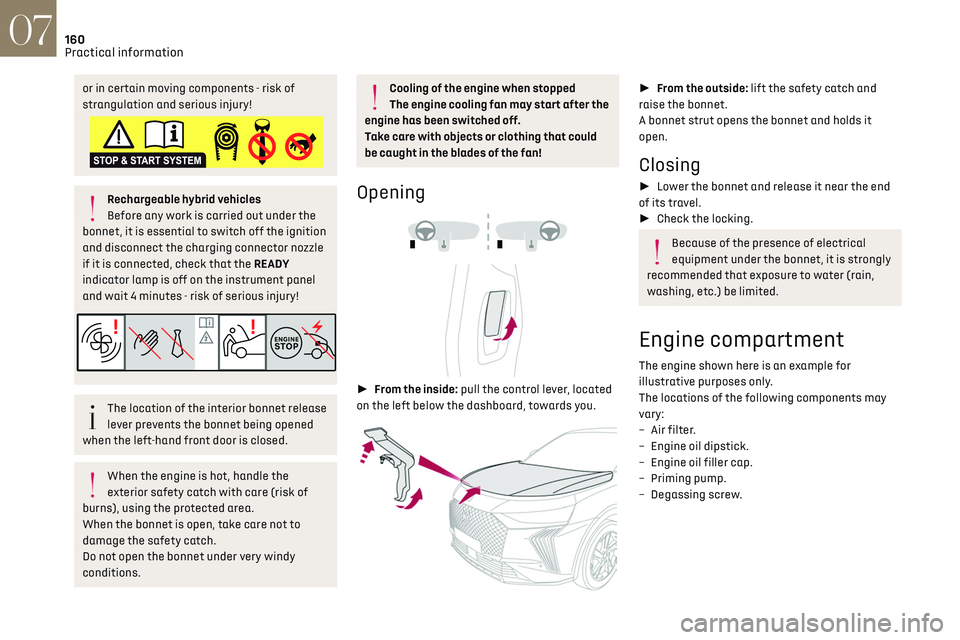
Opening
► From the inside: pull the control lever, located
on the left below the dashboard, towards you.
► From the outside: lift the safety catch and
raise the bonnet.
A bonnet strut opens the bonnet and holds it
open.
Closing
► Lower the bonnet and release it near the end
of its travel.
► Check the locking.
Because of the presence of electrical
equipment under the bonnet, it is strongly
recommended that exposure to water (rain,
washing, etc.) be limited.
Engine compartment
The engine shown here is an example for
illustrative purposes only.
The locations of the following components may
vary:
–
Air filt
er.
–
Engine oil dip
stick.
–
Engine oil filler c
ap.
–
Priming pump
.
–
Degas
sing screw.