service CITROEN DS7 CROSSBACK 2017 Owner's Manual
[x] Cancel search | Manufacturer: CITROEN, Model Year: 2017, Model line: DS7 CROSSBACK, Model: CITROEN DS7 CROSSBACK 2017Pages: 244, PDF Size: 6.87 MB
Page 164 of 244
162
Practical information07
Checking using the dipstick
For the location of the dipstick, please refer
to the illustration of the corresponding engine
compartment.
► Grasp the dipstick by its coloured grip and pull
it out completely.
► Wipe the end of the dipstick using a clean, lint-
free cloth.
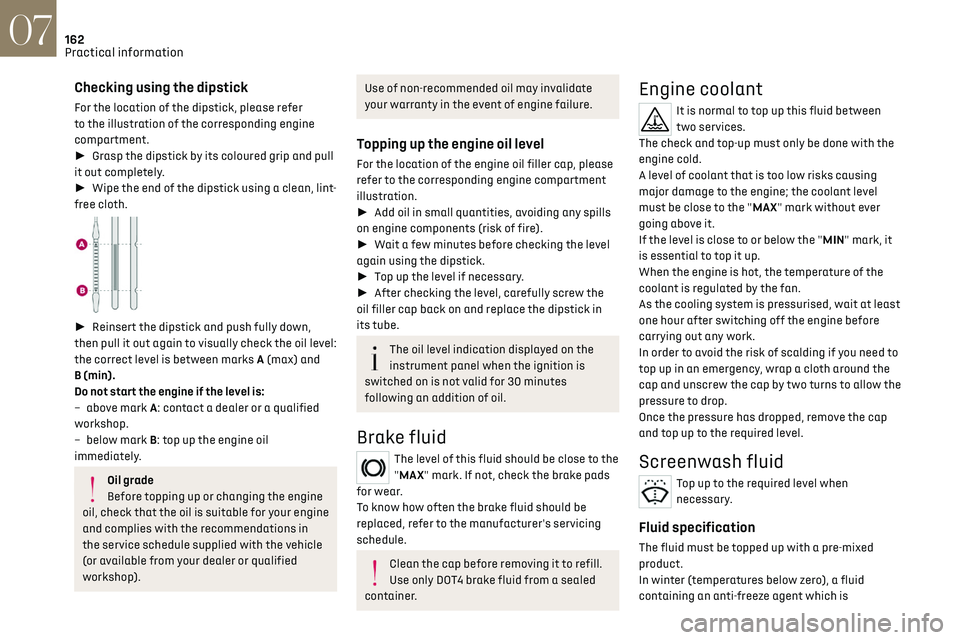
► Reinsert the dipstick and push fully down,
then pull it out again to visually check the oil level:
the correct level is between marks A (max) and
B (min).
Do not start the engine if the level is:
–
abo
ve mark A: contact a dealer or a qualified
workshop.
–
belo
w mark B: top up the engine oil
immediately.
Oil grade
Before topping up or changing the engine
oil, check that the oil is suitable for your engine
and complies with the recommendations in
the service schedule supplied with the vehicle
(or available from your dealer or qualified
workshop).
Use of non-recommended oil may invalidate
your warranty in the event of engine failure.
Topping up the engine oil level
For the location of the engine oil filler cap, please
refer to the corresponding engine compartment
illustration.
► Add oil in small quantities, avoiding any spills
on engine components (risk of fire).
► Wait a few minutes before checking the level
again using the dipstick.
► Top up the level if necessary.
► After checking the level, carefully screw the
oil filler cap back on and replace the dipstick in
its tube.
The oil level indication displayed on the
instrument panel when the ignition is
switched on is not valid for 30 minutes
following an addition of oil.
Brake fluid
The level of this fluid should be close to the
"MAX" mark. If not, check the brake pads
for wear.
To know how often the brake fluid should be
replaced, refer to the manufacturer's servicing
schedule.
Clean the cap before removing it to refill.
Use only DOT4 brake fluid from a sealed
container.
Engine coolant
It is normal to top up this fluid between
two services.
The check and top-up must only be done with the
engine cold.
A level of coolant that is too low risks causing
major damage to the engine; the coolant level
must be close to the "MAX" mark without ever
going above it.
If the level is close to or below the "MIN" mark, it
is essential to top it up.
When the engine is hot, the temperature of the
coolant is regulated by the fan.
As the cooling system is pressurised, wait at least
one hour after switching off the engine before
carrying out any work.
In order to avoid the risk of scalding if you need to
top up in an emergency, wrap a cloth around the
cap and unscrew the cap by two turns to allow the
pressure to drop.
Once the pressure has dropped, remove the cap
and top up to the required level.
Screenwash fluid
Top up to the required level when
necessary.
Fluid specification
The fluid must be topped up with a pre-mixed
product.
In winter (temperatures below zero), a fluid
containing an anti-freeze agent which is
Page 165 of 244
163
Practical information07
appropriate for the temperature conditions
must be used in order to protect the system's
components (pump, tank, ducts, jets).
Filling with pure water is prohibited in all
circumstances (risk of freezing, limescale,
etc.).
Diesel fuel additive (Diesel with
particle filter)
On reaching the minimum level in the
particle filter additive tank, this warning
lamp comes on fixed, accompanied by an audible
signal and a warning message.
Topping up
The topping up of this additive must be carried
out quickly.
Visit a dealer or a qualified workshop.
AdBlue® (BlueHDi)
An alert is triggered when the reserve level is
reached.
For more information on the Indicators and in
particular the AdBlue range indicators, refer to
the corresponding section.
To avoid the vehicle being immobilised in
accordance with regulations, you must top up the
AdBlue tank.
For more information on AdBlue
® (BlueHDi), and
in particular the supply of AdBlue, refer to the
corresponding section.
Checks
Unless otherwise indicated, check these
components in accordance with the
Manufacturer's service schedule and according to
your engine.
Otherwise, have them checked by a dealer or a
qualified workshop.
Only use products recommended by the
Manufacturer or products of equivalent
quality and specification.
In order to optimise the operation of
components as important as those in the
braking system, the Manufacturer selects and
offers very specific products.
12 V battery
The battery does not require any
maintenance.
Check regularly that the terminals are correctly
tightened (versions without quick-release
terminals) and that the connections are clean.
For more information on the precautions
to take before any work on the 12 V
battery, refer to the corresponding section.
Versions equipped with Stop & Start are
fitted with a 12 V lead-acid battery with
special technology and specifications.
Its replacement should be carried out only by a
dealer or a qualified workshop.
Passenger compartment filter
Depending on the environment and the use
of the vehicle (e.g. dusty atmosphere, city
driving), change it twice as often, if necessary.
A clogged passenger compartment filter
can adversely affect air conditioning
system performance and generate undesirable
odours.
Air filter
Depending on the environment and the use
of the vehicle (e.g. dusty atmosphere, city
driving), change it twice as often, if necessary.
Oil filter
Change the oil filter each time the engine
oil is changed.
Particle filter (Diesel)
The start of clogging of the particle filter is
indicated by the temporary lighting of this
warning lamp, accompanied by an alert message.
As soon as traffic conditions allow, regenerate
the filter by driving at a speed of at least 37 mph
(60 km/h), with an engine speed above 2,500
rpm, for about 15 minutes (until the warning lamp
goes out).
If it is not possible to reach 37 mph (60 km/h),
leave the engine running at idle for about 15
minutes, then drive with an engine speed above
2,500 rpm for 15 minutes.
Page 166 of 244
164
Practical information07
Do not switch off the engine until the filter
is fully regenerated; repeated intervals
can degrade the engine oil prematurely.
Regenerating the filter while the vehicle is
stationary is not recommended.
Following prolonged operation of the
vehicle at very low speed or at idle, you
may, in exceptional circumstances, notice
water vapour coming from the exhaust while
accelerating. These emissions have no impact
on the vehicle’s behaviour and the
environment.
New vehicle
During the first few particle filter
regeneration operations, you may notice a
"burning" smell. This is perfectly normal.
Automatic gearbox
The gearbox does not require any
maintenance (no oil change).
Electric parking brake
This system does not require any routine
servicing. However, in the event of a
problem, do not hesitate to have the system
checked by a dealer or a qualified workshop.
For more information on the Electric
parking brake, refer to the corresponding
section.
Brake pads
Brake wear depends on the style of driving,
particularly in the case of vehicles used in
town, over short distances. It may be necessary to
have the condition of the brakes checked, even
between vehicle services.
Unless there is a leak in the circuit, a drop in the
brake fluid level indicates that the brake pads are
worn.
After washing the vehicle, moisture, or in
wintry conditions, ice can form on the
brake discs and pads: braking efficiency may
be reduced. Gently dab the brakes to dry and
defrost them.
Brake disc wear
For information on checking brake disc
wear, contact a dealer or a qualified
workshop.
Wheels and tyres
The inflation pressure of all tyres,
including the spare wheel, must be
checked on "cold” tyres.
The pressures indicated on the tyre pressure label
are valid for "cold" tyres. If you have driven for
more than 10 minutes or more than 6 miles (10
kilometres) at over 31 mph (50 km/h), add 0.3 bar
(30 kPa) to the values indicated on the label.
Under-inflation increases energy
consumption. Non-compliant tyre
pressures cause tyres to wear prematurely and
have an adverse effect on the vehicle's road
holding - risk of accident!
Driving with worn or damaged tyres reduces the
braking and road holding performance of the
vehicle. Regularly check the condition of the tyres
(tread and sidewalls) and rims as well as the
presence of the valve caps.
When the wear indicators no longer appear set
back from the tread, the depth of the grooves is
less than 1.6 mm; replace the tyres as soon as
possible.
Using different size wheels and tyres from those
specified can affect the lifetime of tyres, wheel
rotation, ground clearance, the speedometer
reading and have an adverse effect on road
holding.
Fitting different tyres on the front and rear axles
can cause the ESC to mistime.
Always mark the direction of rotation on the tyres
that will be stored when fitting winter or summer
tyres. Store them in a cool, dry place and away
from direct exposure to the sun's rays.
Winter or 4-seasons tyres can be identified
by this symbol on their sidewalls.
Shock absorbers
It is not easy for drivers to detect when
shock absorbers are worn. Nevertheless,
Page 167 of 244
165
Practical information07
the shock absorbers have a major impact on road
holding and braking performance.
For your safety and driving comfort, it is important
to have them regularly checked by a dealer or a
qualified workshop.
Timing and accessory kits
The timing and accessory kits are used
from the time the engine is started until it
is switched off. It is normal for them to wear over
time.
A faulty timing or accessory kit can damage
the engine, rendering it unusable. Observe the
recommended replacement frequency, stated in
distance travelled or time elapsed, whichever is
reached first.
AdBlue® (BlueHDi)
To respect the environment and ensure
compliance with the Euro 6 standard, without
adversely affecting the performance or
fuel consumption of its Diesel engines, the
Manufacturer has taken the decision to equip
its vehicles with a system that combines SCR
(Selective Catalytic Reduction) with a Diesel
Particle Filter (DPF) for the treatment of exhaust
gases.
SCR system
Using a liquid called AdBlue® that contains
urea, a catalytic converter turns up to 85% of
the nitrogen oxides (NOx) into nitrogen and
water, which are harmless to health and the
environment.
The AdBlue® is contained in a special tank
holding about 17 litres.
Its capacity allows a driving range of
approximately 3,900 miles (6,500 km), which may
vary considerably depending on your driving style.
An alert system is triggered once the reserve level
is reached: it is then possible to drive for a further
1,500 miles (2,400 km) before the tank is empty
and the vehicle is immobilised.
For more information on the Warning and
indicator lamps and the associated alerts,
or the Indicators, please refer to the
corresponding sections.
Once the AdBlue® tank is empty, a device
required by law prevents the engine from
being restarted.
If the SCR system is faulty, the level of
emissions from the vehicle will no longer meet
the Euro 6 standard and the vehicle starts
polluting the environment.
In the event of a confirmed SCR system
malfunction, it is essential to visit a dealer or a
qualified workshop. After 660 miles (1,100 km),
a device is automatically activated to prevent
the engine from starting.
In both cases, a range indicator indicates
the distance that can be travelled before the
vehicle is stopped.
Freezing of the AdBlue®
AdBlue® freezes at temperatures below
around -11°C.
The SCR system includes a heater for the
AdBlue
® tank, allowing you to continue driving
in very cold conditions.
Supply of AdBlue®
It is recommended that the AdBlue® be topped up
as soon as the first alert is issued indicating that
the reserve level has been reached.
For the correct operation of the SCR
system:
–
U
se only AdBlue
® fluid that meets the ISO
22241 standard.
–
Ne
ver transfer AdBlue
® to another container
as it would lose its purity.
–
Ne
ver dilute AdBlue
® with water.
You can obtain AdBlue
® from a dealer or a
qualified workshop, as well as service stations
equipped with AdBlue
® pumps specially designed
for passenger vehicles.
Recommendations on storage
AdBlue® freezes at about -11°C and deteriorates
above +25°C. Containers should be stored in a
cool area and protected from direct sunlight.
Under these conditions, the fluid can be kept for
at least a year.
If the fluid has frozen, it can be used once it has
completely thawed out at room temperature.
Page 168 of 244
166
Practical information07
Never store AdBlue® containers in your
vehicle.
Precautions for use
AdBlue® is a urea-based solution. This fluid is non-
flammable, colourless and odourless (when kept
in a cool place).
In the event of contact with the skin, wash the
affected area with soap and running water. In the
event of contact with the eyes, immediately rinse
the eyes with large amounts of water or with an
eye wash solution for at least 15 minutes. Seek
medical attention if you feel a persistent burning
sensation or irritation.
If swallowed, immediately wash out the mouth
with clean water and then drink plenty of water.
In certain conditions (high temperature, for
example), the risk of release of ammonia cannot
be excluded: do not inhale the fluid. Ammonia
vapours have an irritant effect on mucous
membranes (eyes, nose and throat).
Store AdBlue® out of the reach of children,
in its original container.
Procedure
Before starting the top-up procedure, ensure that
the vehicle is parked on a flat and level surface.
In wintry conditions, ensure that the temperature
of the vehicle is above -11°C. Otherwise the
AdBlue
® may be frozen and so cannot be poured
into the tank. Park the vehicle in a warmer area
for a few hours to allow the top-up to be carried
out.
Never pour the AdBlue® into the Diesel fuel
tank.
If any AdBlue® is splashed, or if there are
any spillages on the bodywork, rinse
immediately with cold water or wipe with a
damp cloth.
If the fluid has crystallised, clean it off using a
sponge and hot water.
Important: in the event of a top-up after an
AdBlue breakdown, you must wait about
5 minutes before switching on the ignition,
without opening the driver's door, unlocking
the vehicle or bringing the electronic key into
the passenger compartment.
Switch on the ignition, then wait for 10
seconds before starting the engine.
► Press the "START/STOP" button to switch off
the engine.
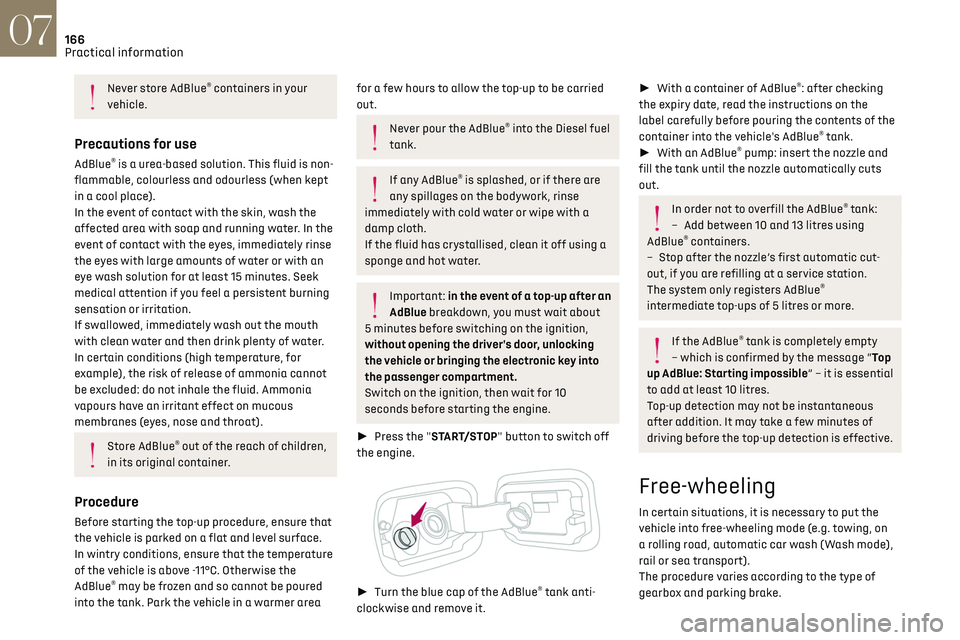
► Turn the blue cap of the AdBlue® tank anti-
clockwise and remove it.
► With a container of AdBlue®: after checking
the expiry date, read the instructions on the
label carefully before pouring the contents of the
container into the vehicle's AdBlue
® tank.
► With an AdBlue® pump: insert the nozzle and
fill the tank until the nozzle automatically cuts
out.
In order not to overfill the AdBlue® tank:
–
Add betw
een 10 and 13 litres using
AdBlue
® containers.
–
St
op after the nozzle’s first automatic cut-
out, if you are refilling at a service station.
The system only registers AdBlue
®
intermediate top-ups of 5 litres or more.
If the AdBlue® tank is completely empty
– which is confirmed by the message “Top
up AdBlue: Starting impossible” – it is essential
to add at least 10 litres.
Top-up detection may not be instantaneous
after addition. It may take a few minutes of
driving before the top-up detection is effective.
Free-wheeling
In certain situations, it is necessary to put the
vehicle into free-wheeling mode (e.g. towing, on
a rolling road, automatic car wash (Wash mode),
rail or sea transport).
The procedure varies according to the type of
gearbox and parking brake.
Page 184 of 244
182
In the event of a breakdown08
Check beforehand that the backup battery has
a nominal voltage of 12 V and a capacity at
least equal to that of the discharged battery.
The two vehicles must not be in contact with
each other.
Switch off all electricity-consuming equipment
on both vehicles (audio system, wipers,
lighting, etc.).
Make sure that the jump leads are well away
from the engine’s moving parts (fan, belt, etc.).
Do not disconnect the (+) terminal while the
engine is running.
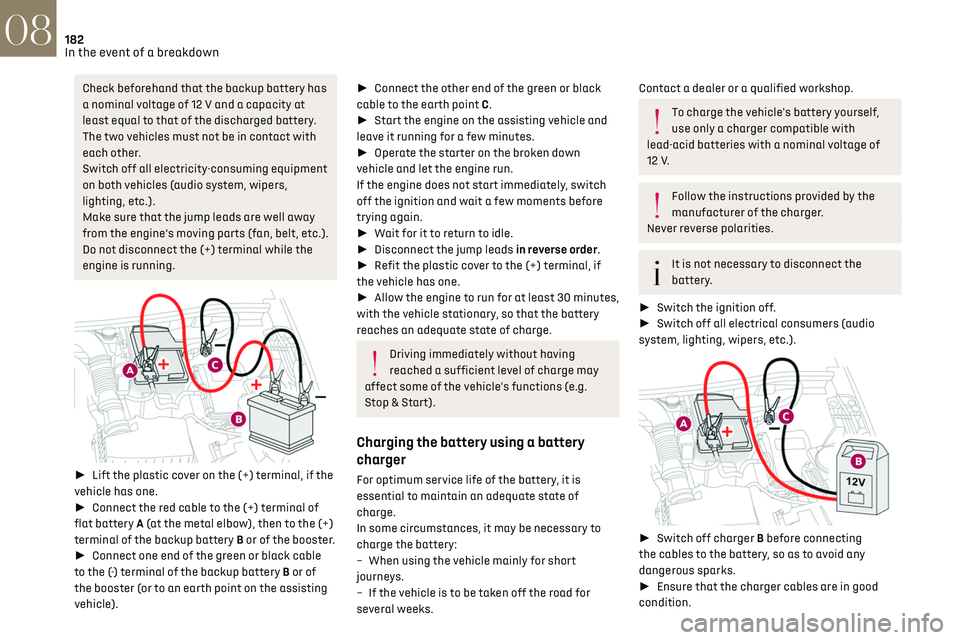
► Lift the plastic cover on the (+) terminal, if the
vehicle has one.
► Connect the red cable to the (+) terminal of
flat battery A (at the metal elbow), then to the (+)
terminal of the backup battery B or of the booster.
► Connect one end of the green or black cable
to the (-) terminal of the backup battery B or of
the booster (or to an earth point on the assisting
vehicle).
► Connect the other end of the green or black
cable to the earth point C.
► Start the engine on the assisting vehicle and
leave it running for a few minutes.
► Operate the starter on the broken down
vehicle and let the engine run.
If the engine does not start immediately, switch
off the ignition and wait a few moments before
trying again.
► Wait for it to return to idle.
► Disconnect the jump leads in reverse order.
► Refit the plastic cover to the (+) terminal, if
the vehicle has one.
► Allow the engine to run for at least 30 minutes,
with the vehicle stationary, so that the battery
reaches an adequate state of charge.
Driving immediately without having
reached a sufficient level of charge may
affect some of the vehicle's functions (e.g.
Stop & Start).
Charging the battery using a battery
charger
For optimum service life of the battery, it is
essential to maintain an adequate state of
charge.
In some circumstances, it may be necessary to
charge the battery:
–
When using the v
ehicle mainly for short
journeys.
–
If the v
ehicle is to be taken off the road for
several weeks.
Contact a dealer or a qualified workshop.
To charge the vehicle's battery yourself,
use only a charger compatible with
lead-acid batteries with a nominal voltage of
12 V.
Follow the instructions provided by the
manufacturer of the charger.
Never reverse polarities.
It is not necessary to disconnect the
battery.
► Switch the ignition off.
► Switch off all electrical consumers (audio
system, lighting, wipers, etc.).
► Switch off charger B before connecting
the cables to the battery, so as to avoid any
dangerous sparks.
► Ensure that the charger cables are in good
condition.
Page 186 of 244
184
In the event of a breakdown08
Jump-starting another vehicle
Do not start or jump-start another vehicle
using the vehicle’s accessory batteries.
Accessing the accessory batteries
Front
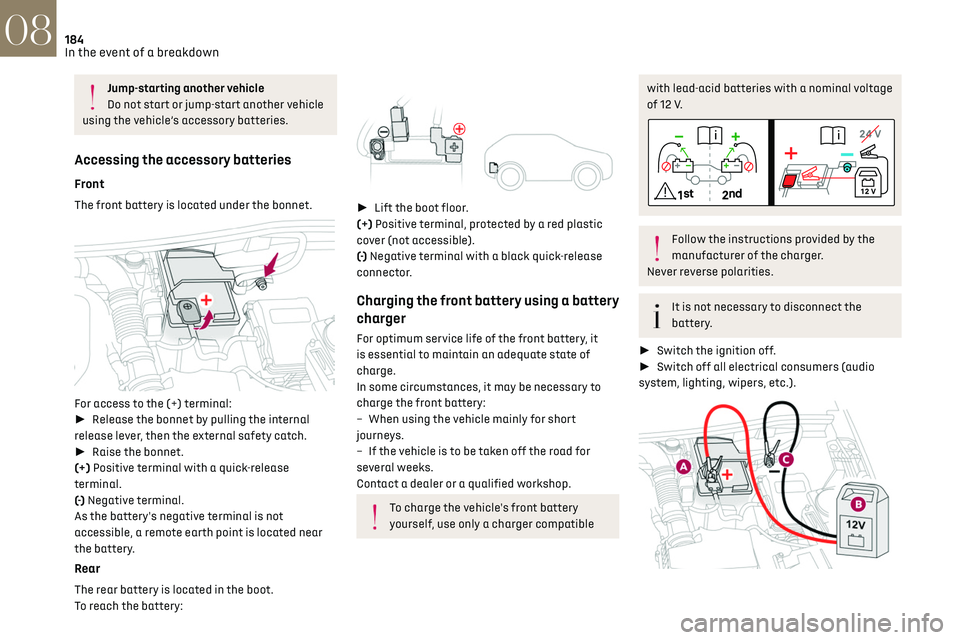
The front battery is located under the bonnet.
For access to the (+) terminal:
► Release the bonnet by pulling the internal
release lever, then the external safety catch.
► Raise the bonnet.
(+) Positive terminal with a quick-release
terminal.
(-) Negative terminal.
As the battery's negative terminal is not
accessible, a remote earth point is located near
the battery.
Rear
The rear battery is located in the boot.
To reach the battery:
► Lift the boot floor.
(+) Positive terminal, protected by a red plastic
cover (not accessible).
(-) Negative terminal with a black quick-release
connector.
Charging the front battery using a battery
charger
For optimum service life of the front battery, it
is essential to maintain an adequate state of
charge.
In some circumstances, it may be necessary to
charge the front battery:
–
When using the v
ehicle mainly for short
journeys.
–
If the v
ehicle is to be taken off the road for
several weeks.
Contact a dealer or a qualified workshop.
To charge the vehicle's front battery
yourself, use only a charger compatible
with lead-acid batteries with a nominal voltage
of 12 V.
Follow the instructions provided by the
manufacturer of the charger.
Never reverse polarities.
It is not necessary to disconnect the
battery.
► Switch the ignition off.
► Switch off all electrical consumers (audio
system, lighting, wipers, etc.).
Page 188 of 244
186
In the event of a breakdown08
Referring to the relevant section, reinitialise
certain equipment:
–
Electronic k
ey.
–
Sunroo
f and electric blind.
–
Electric windo
ws.
–
Da
te and time.
–
Pre
set radio stations.
After reconnecting the battery, the
message "Collision risk detection system
fault" is displayed on the instrument panel
when the ignition is switched on. This
operation is perfectly normal. The message
will disappear while driving.
Towing the vehicle
General recommendations
Observe the legislation in force in the
country where you are driving.
Ensure that the weight of the towing vehicle is
higher than that of the towed vehicle.
The driver must remain at the wheel of the
towed vehicle and must have a valid driving
licence.
When towing a vehicle with all four wheels on
the ground, always use an approved towing
arm; rope and straps are prohibited.
The towing vehicle must move off gently.
When the vehicle is towed with its engine
off, there is no longer braking and steering
assistance.
A professional towing service must be
called if:
–
B
roken down on a motorway or main road.
–
No
t possible to put the gearbox into neutral,
unlock the steering, or release the parking
brake.
– Not possible to tow a vehicle with an
automatic gearbox, with the engine running.
–
T
owing with only two wheels on the ground.
–
Four-wheel driv
e vehicle.
–
No appro
ved towbar available.
Rechargeable hybrid vehicles
Before any intervention, with the ignition
on, depress the brake pedal and select mode
N, then switch off the hybrid system (READY
indicator lamp off).
Always call on professionals for recovery of the
vehicle on a flatbed lorry or trailer.
Use the towing eye only to free the vehicle
if it is stuck, or to secure it for recovery on a
flatbed lorry or trailer.
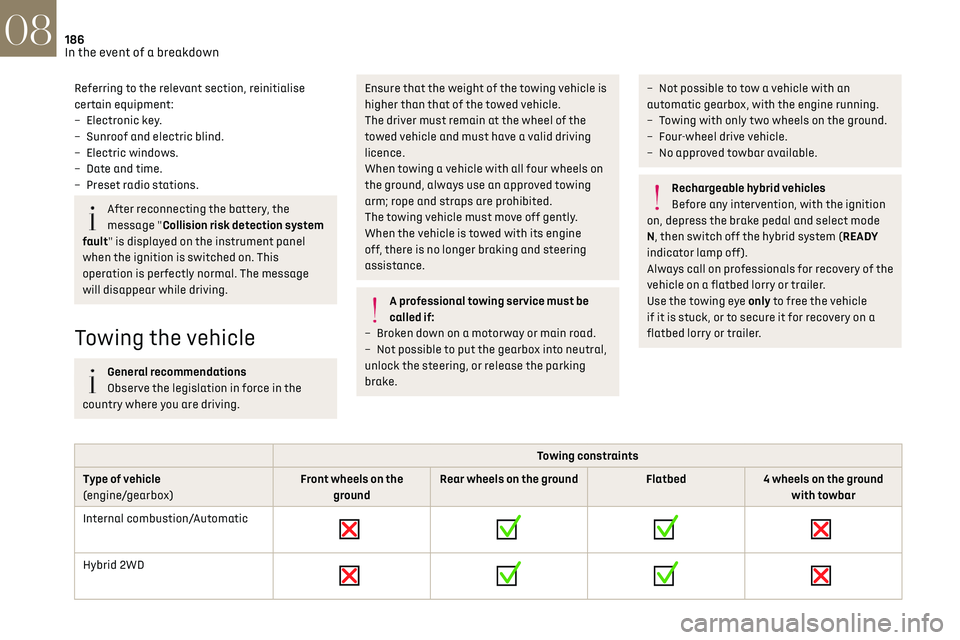
Towing constraints
Type of vehicle
(engine/gearbox) Front wheels on the
ground Rear wheels on the ground
Flatbed4 wheels on the ground
with towbar
Internal combustion/Automatic
Hybrid 2WD
Page 196 of 244
194DS IRIS SYSTEM - 12" touch screen Infotainment system10
DS IRIS SYSTEM - 12" touch
screen Infotainment
system
GPS navigation - Applications
- Multimedia audio system -
Bluetooth
® telephone
The functions and settings described vary
according to the version and
configuration of the vehicle, and according to
the country of sale.
For safety reasons and because they
require continued attention on the part of
the driver, the following operations must be
carried out with the vehicle stationary and the
ignition on:
–
Pairing the smartphone with the s
ystem via
Bluetooth
®.
–
U
sing the smartphone.
–
Connecting t
o Mirror Screen (Apple
®CarPlay®
or Android Auto).
–
C
hanging the system settings and
configuration.
The message Energy economy mode is
displayed when the system is about to go
into standby.
For more information on Energy economy
mode, refer to the "Practical information"
section.
Warning
Navigation is a driving aid. It cannot
replace the driver. All guidance instructions
should be carefully checked by the user.
By using the navigation, you accept the
following terms and conditions:
https://www.tomtom.com/en_gb/legal/
eula-automotive/?388448
First steps
The system starts when the ignition is
switched on.
Short press, ignition off: system on/off.
Short press, ignition on: mute/restore sound.
Long press, ignition on: start standby mode (mute
sound, screens and clock display off).
► Increase or decrease the volume using the
knob or the "plus" or "minus" buttons (depending
on equipment).
Information
This system gives access to the following
elements: –
Audio equipmen
t and telephone controls with
display of associated information.
–
Connect
ed services and display of associated
information.
–
Na
vigation system controls and display
of associated information (depending on
equipment).
–
V
oice recognition (depending on equipment).
–
Time and outside t
emperature.
–
Hea
ting/air conditioning system controls and
reminders of settings.
–
Settings for driving aid functions, c
omfort
and safety functions, extended head-up display
(depending on equipment and version), audio
equipment and digital instrument panel.
–
Settings for functions specific t
o rechargeable
hybrid vehicles.
–
Displa
y of visual manoeuvring aid functions.
–
In
teractive handbook.
–
Video t
utorials (e.g. screen management,
driving aids, voice recognition).
Upper banner
Certain information is displayed permanently in
the upper banner of the touch screen:
–
O
utside temperature from the vehicle's sensors
(associated with a blue symbol if there is a risk
of ice).
–
T
emperature setting reminder for the air
conditioning on the driver's and passenger sides.
–
C
harge level of the connected smartphone.
–
Sy
stem connection status (Bluetooth
®, Wi-Fi,
mobile telephone network).
Page 197 of 244
195DS IRIS SYSTEM - 12" touch screen Infotainment system10
– Time.
– Q uick access to the Mirror Screen® functions
(associated with a connected smartphone).
Swipe down from the upper edge of the touch
screen to access the notifications centre and
display a list of quick settings :Guest, Privacy
Settings, Brightness, My Devices, night mode, etc.
Principles
► Use this button (HOME) to display the
most recent home page used; a second
press displays the first home page, then press the
virtual buttons displayed on the touch screen.
Scroll through the home pages by sliding
your finger along the screen to the right or
to the left.
Principle of movement in the system
Depending on the pages displayed on the screen,
scroll through the text or the menu (on the left
side of the screen) by sliding your finger, as with
a smartphone.
Touch buttons
Display/hide the context menu.
Return to the previous page.
► To change the status of a function, press the
description for the corresponding line (change
confirmed by the slider moving to the right/left:
function activated/deactivated).
Access to additional information about the
function.
Access to a function’s settings.
Add/delete shortcuts.
Configuring profiles
Press the "Settings" application.
In the list, select the "Profile" tab.
The screen displays a "Guest" profile built
into the system and allows you to create and
personalise several new profiles with or without
an associated mobile device.
The "Guest" profile has a default display
with the possibility of adding to it and/or
returning it to its initial configuration. This profile
is built into the system and cannot be deleted.
Each profile created can be associated
with a mobile device of your choice
connected via Bluetooth
®; the Bluetooth® function
of the mobile device must first be activated. This
association allows the system to detect your
presence in the vehicle when it starts and to
propose the activation of your personalised
profile.
The connected mobile device serves as an access
key to the profile and restores the last value of the
associated Private Mode.
If a profile is not connected to the mobile device,
the last profile used will be highlighted.
Select "Create Profile", then follow the
procedure.
Creating a new profile allows you to personalise: –
Language
, units, Privacy Settings.
–
Screen c
onfiguration, appearance, SMART
TOUCH (depending on equipment).
–
Audio settings, fa
vourite radio stations.
–
Ligh
ting, interior ambience (refer to the "Ease
of use and comfort" section).
–
Na
vigation history, favourite points of interest
(POIs), navigation settings.
–
Some driving aids and the list o
f favourites.
To delete a profile, select it from the list of
profiles then press the bin.
Privacy Settings
"Privacy Settings" management is associated
with each profile. This function is used with:
a "Guest" profile configured by default in "Sharing
Data and Location" mode,
or
a profile to be created in the system, with or
without connection to a mobile device.
If there is no connection to a mobile device, the
mode value will be set to "Sharing Data and
Location" mode.
The connected mobile device serves as an access
key to personal information. First activate the
Bluetooth
® function on the mobile device. The last
saved mode value will be restored.
"Sharing Data and Location"
This mode allows the vehicle to externally
transmit all the personal data needed for each
valid available connected service.