wheel CITROEN DS7 CROSSBACK 2017 Repair Manual
[x] Cancel search | Manufacturer: CITROEN, Model Year: 2017, Model line: DS7 CROSSBACK, Model: CITROEN DS7 CROSSBACK 2017Pages: 244, PDF Size: 6.87 MB
Page 174 of 244
172In the event of a breakdown08
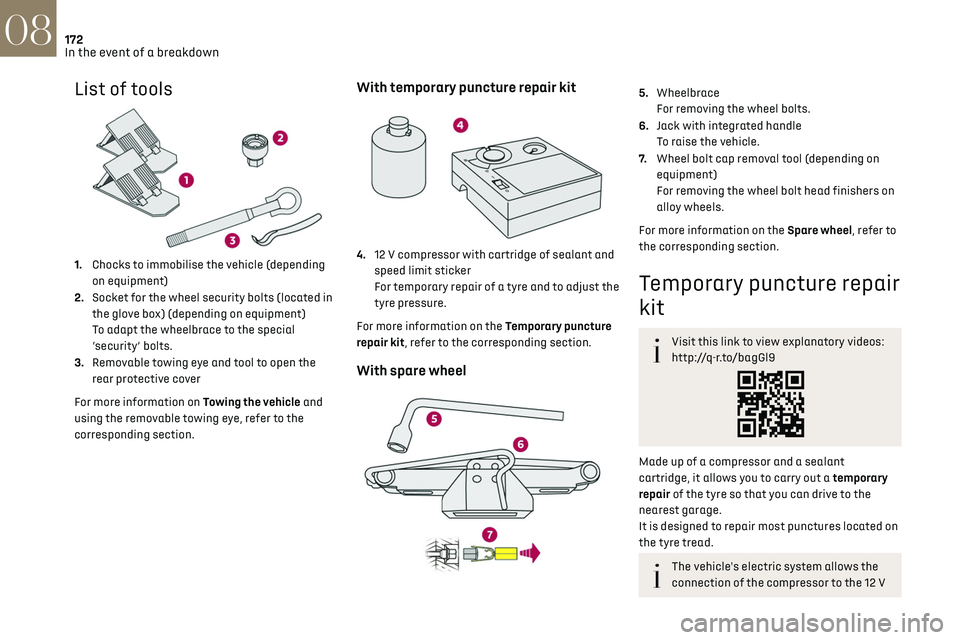
List of tools
1.Chocks to immobilise the vehicle (depending
on equipment)
2. Socket for the wheel security bolts (located in
the glove box) (depending on equipment)
To adapt the wheelbrace to the special
‘security’ bolts.
3. Removable towing eye and tool to open the
rear protective cover
For more information on Towing the vehicle and
using the removable towing eye, refer to the
corresponding section.
With temporary puncture repair kit
4. 12 V compressor with cartridge of sealant and
speed limit sticker
For temporary repair of a tyre and to adjust the
tyre pressure.
For more information on the Temporary puncture
repair kit, refer to the corresponding section.
With spare wheel
5. Wheelbrace
For removing the wheel bolts.
6. Jack with integrated handle
To raise the vehicle.
7. Wheel bolt cap removal tool (depending on
equipment)
For removing the wheel bolt head finishers on
alloy wheels.
For more information on the Spare wheel, refer to
the corresponding section.
Temporary puncture repair
kit
Visit this link to view explanatory videos:
http://q-r.to/bagGl9
Made up of a compressor and a sealant
cartridge, it allows you to carry out a temporary
repair of the tyre so that you can drive to the
nearest garage.
It is designed to repair most punctures located on
the tyre tread.
The vehicle's electric system allows the
connection of the compressor to the 12 V
Page 175 of 244
173In the event of a breakdown08
power supply for long enough to repair a tyre
after a puncture.
Tyre inflation pressures are indicated on
this label.
For more information on Identification
markings, particularly this label, refer to the
corresponding section.
For more information on the Tool kit, refer
to the corresponding section.
Repair procedure
Do not remove any foreign body (e.g. nail,
screw) which has penetrated the tyre.
► Park the vehicle without obstructing traffic
and apply the parking brake.
► Follow the safety instructions (hazard warning
lamps, warning triangle, high visibility jacket,
etc.) according to the legislation in force in the
country in which you are driving.
► Switch the ignition off.
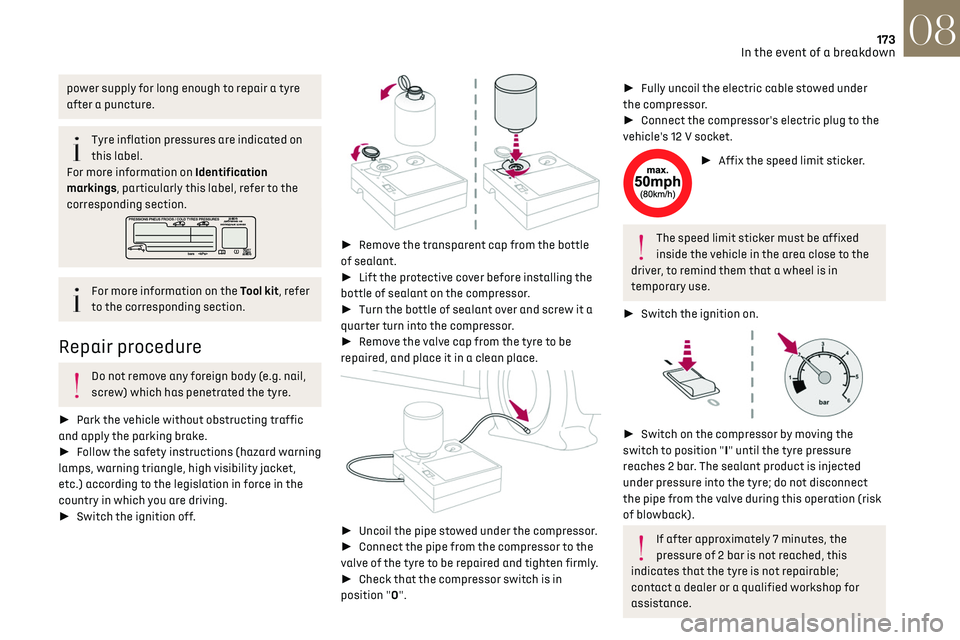
► Remove the transparent cap from the bottle
of sealant.
► Lift the protective cover before installing the
bottle of sealant on the compressor.
► Turn the bottle of sealant over and screw it a
quarter turn into the compressor.
► Remove the valve cap from the tyre to be
repaired, and place it in a clean place.
► Uncoil the pipe stowed under the compressor.
► Connect the pipe from the compressor to the
valve of the tyre to be repaired and tighten firmly.
► Check that the compressor switch is in
position "O".
► Fully uncoil the electric cable stowed under
the compressor.
► Connect the compressor's electric plug to the
vehicle's 12 V socket.
► Affix the speed limit sticker.
The speed limit sticker must be affixed
inside the vehicle in the area close to the
driver, to remind them that a wheel is in
temporary use.
► Switch the ignition on.
► Switch on the compressor by moving the
switch to position "I" until the tyre pressure
reaches 2 bar. The sealant product is injected
under pressure into the tyre; do not disconnect
the pipe from the valve during this operation (risk
of blowback).
If after approximately 7 minutes, the
pressure of 2 bar is not reached, this
indicates that the tyre is not repairable;
contact a dealer or a qualified workshop for
assistance.
Page 177 of 244
175
In the event of a breakdown08
Spare wheel
Visit this link to view explanatory videos:
http://q-r.to/bagGl9
For more information on the Tool kit, refer
to the corresponding section.
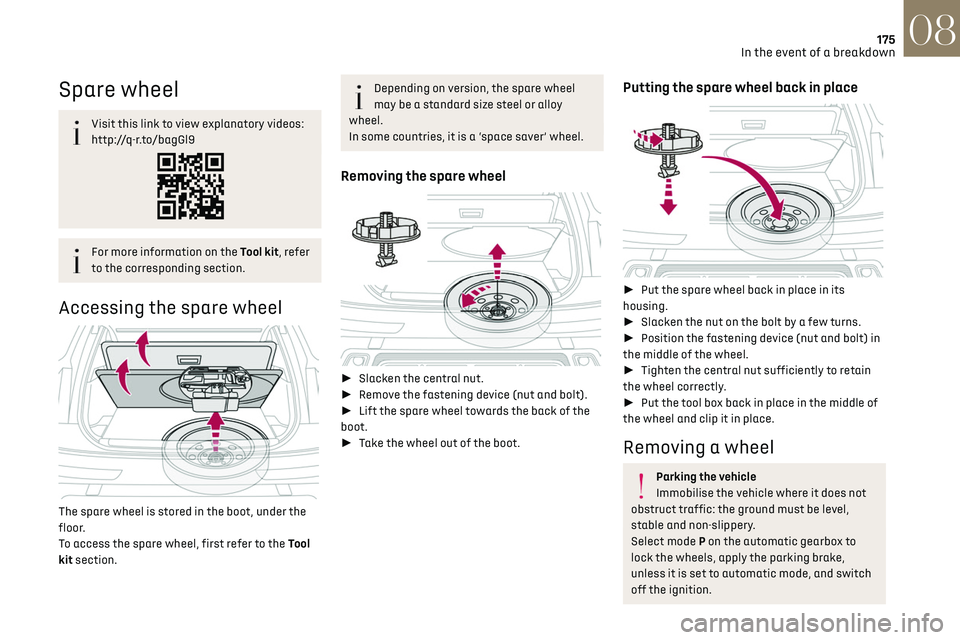
Accessing the spare wheel
The spare wheel is stored in the boot, under the
floor.
To access the spare wheel, first refer to the Tool
kit section.
Depending on version, the spare wheel
may be a standard size steel or alloy
wheel.
In some countries, it is a ‘space saver’ wheel.
Removing the spare wheel
► Slacken the central nut.
► Remove the fastening device (nut and bolt).
► Lift the spare wheel towards the back of the
boot.
► Take the wheel out of the boot.
Putting the spare wheel back in place
► Put the spare wheel back in place in its
housing.
► Slacken the nut on the bolt by a few turns.
► Position the fastening device (nut and bolt) in
the middle of the wheel.
► Tighten the central nut sufficiently to retain
the wheel correctly.
► Put the tool box back in place in the middle of
the wheel and clip it in place.
Removing a wheel
Parking the vehicle
Immobilise the vehicle where it does not
obstruct traffic: the ground must be level,
stable and non-slippery.
Select mode P on the automatic gearbox to
lock the wheels, apply the parking brake,
unless it is set to automatic mode, and switch
off the ignition.
Page 178 of 244
176
In the event of a breakdown08
Check that the parking brake indicator lamps
on the instrument panel are on fixed.
The occupants must get out of the vehicle and
wait where they are safe.
If necessary, place a chock under the wheel
diagonally opposite the wheel to be changed.
Never go underneath a vehicle raised using a
jack; use an axle stand.
Wheel with wheel trim
When removing the wheel, first remove
the wheel trim by pulling at the valve aperture
using the wheelbrace.
When refitting the wheel, refit the wheel trim,
starting by placing its aperture in line with the
valve and then pushing it into place all round
its edge with the palm of your hand.
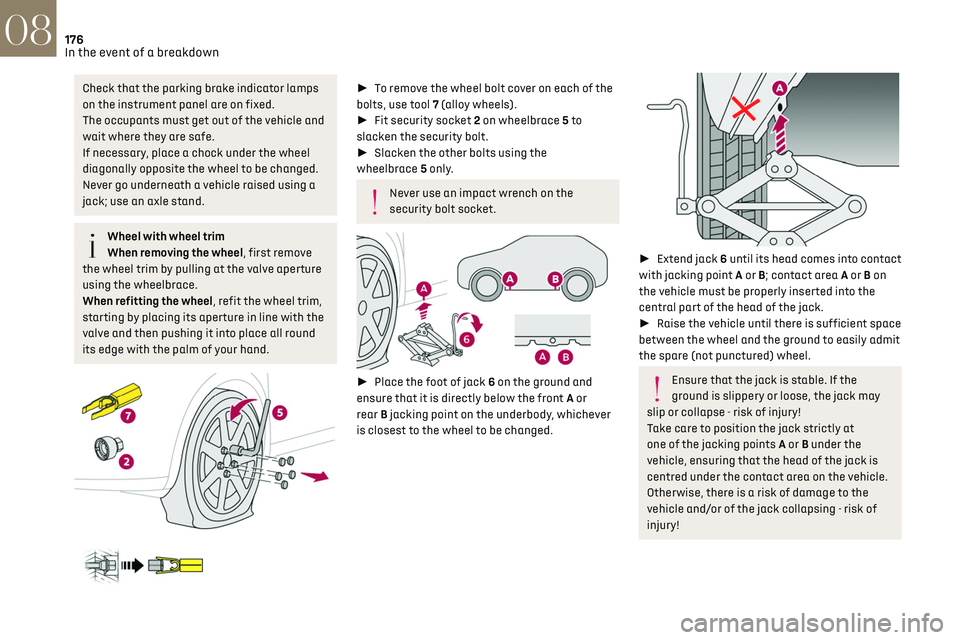
► To remove the wheel bolt cover on each of the
bolts, use tool 7 (alloy wheels).
► Fit security socket 2 on wheelbrace 5 to
slacken the security bolt.
► Slacken the other bolts using the
wheelbrace 5 only.
Never use an impact wrench on the
security bolt socket.
► Place the foot of jack 6 on the ground and
ensure that it is directly below the front A or
rear B jacking point on the underbody, whichever
is closest to the wheel to be changed.
► Extend jack 6 until its head comes into contact
with jacking point A or B; contact area A or B on
the vehicle must be properly inserted into the
central part of the head of the jack.
► Raise the vehicle until there is sufficient space
between the wheel and the ground to easily admit
the spare (not punctured) wheel.
Ensure that the jack is stable. If the
ground is slippery or loose, the jack may
slip or collapse - risk of injury!
Take care to position the jack strictly at
one of the jacking points A or B under the
vehicle, ensuring that the head of the jack is
centred under the contact area on the vehicle.
Otherwise, there is a risk of damage to the
vehicle and/or of the jack collapsing - risk of
injury!
Page 179 of 244
177
In the event of a breakdown08
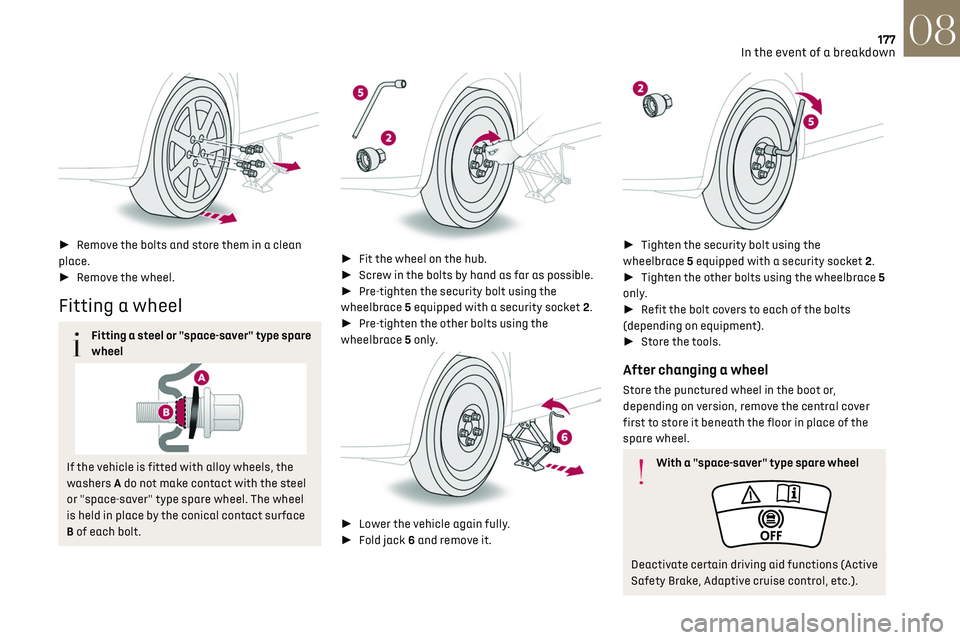
► Remove the bolts and store them in a clean
place.
► Remove the wheel.
Fitting a wheel
Fitting a steel or "space-saver" type spare
wheel
If the vehicle is fitted with alloy wheels, the
washers A do not make contact with the steel
or "space-saver" type spare wheel. The wheel
is held in place by the conical contact surface
B of each bolt.
► Fit the wheel on the hub.
► Screw in the bolts by hand as far as possible.
► Pre-tighten the security bolt using the
wheelbrace 5 equipped with a security socket 2.
► Pre-tighten the other bolts using the
wheelbrace 5 only.
► Lower the vehicle again fully.
► Fold jack 6 and remove it.
► Tighten the security bolt using the
wheelbrace 5 equipped with a security socket 2.
► Tighten the other bolts using the wheelbrace 5
only.
► Refit the bolt covers to each of the bolts
(depending on equipment).
► Store the tools.
After changing a wheel
Store the punctured wheel in the boot or,
depending on version, remove the central cover
first to store it beneath the floor in place of the
spare wheel.
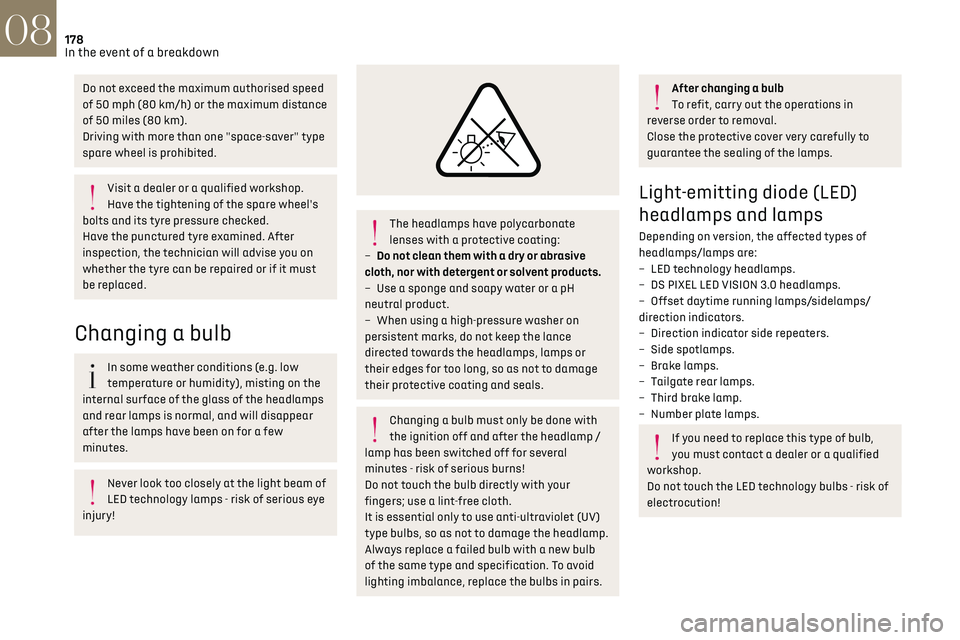
With a "space-saver" type spare wheel
Deactivate certain driving aid functions (Active
Safety Brake, Adaptive cruise control, etc.).
Page 180 of 244
178
In the event of a breakdown08
Do not exceed the maximum authorised speed
of 50 mph (80 km/h) or the maximum distance
of 50 miles (80 km).
Driving with more than one "space-saver" type
spare wheel is prohibited.
Visit a dealer or a qualified workshop.
Have the tightening of the spare wheel's
bolts and its tyre pressure checked.
Have the punctured tyre examined. After
inspection, the technician will advise you on
whether the tyre can be repaired or if it must
be replaced.
Changing a bulb
In some weather conditions (e.g. low
temperature or humidity), misting on the
internal surface of the glass of the headlamps
and rear lamps is normal, and will disappear
after the lamps have been on for a few
minutes.
Never look too closely at the light beam of
LED technology lamps - risk of serious eye
injury!
The headlamps have polycarbonate
lenses with a protective coating:
–
Do not clean them with a dry or abrasiv
e
cloth, nor with detergent or solvent products.
–
U
se a sponge and soapy water or a pH
neutral product.
–
When using a high-pre
ssure washer on
persistent marks, do not keep the lance
directed towards the headlamps, lamps or
their edges for too long, so as not to damage
their protective coating and seals.
Changing a bulb must only be done with
the ignition off and after the headlamp /
lamp has been switched off for several
minutes - risk of serious burns!
Do not touch the bulb directly with your
fingers; use a lint-free cloth.
It is essential only to use anti-ultraviolet (UV)
type bulbs, so as not to damage the headlamp.
Always replace a failed bulb with a new bulb
of the same type and specification. To avoid
lighting imbalance, replace the bulbs in pairs.
After changing a bulb
To refit, carry out the operations in
reverse order to removal.
Close the protective cover very carefully to
guarantee the sealing of the lamps.
Light-emitting diode (LED)
headlamps and lamps
Depending on version, the affected types of
headlamps/lamps are:
–
LED t
echnology headlamps.
–
DS PIXEL LED VISION 3
.0 headlamps.
–
Offset da
ytime running lamps/sidelamps/
direction indicators.
–
Direction indic
ator side repeaters.
–
Side spo
tlamps.
–
B
rake lamps.
–
T
ailgate rear lamps.
–
Third brak
e lamp.
–
Number pla
te lamps.
If you need to replace this type of bulb,
you must contact a dealer or a qualified
workshop.
Do not touch the LED technology bulbs - risk of
electrocution!
Page 188 of 244
186
In the event of a breakdown08
Referring to the relevant section, reinitialise
certain equipment:
–
Electronic k
ey.
–
Sunroo
f and electric blind.
–
Electric windo
ws.
–
Da
te and time.
–
Pre
set radio stations.
After reconnecting the battery, the
message "Collision risk detection system
fault" is displayed on the instrument panel
when the ignition is switched on. This
operation is perfectly normal. The message
will disappear while driving.
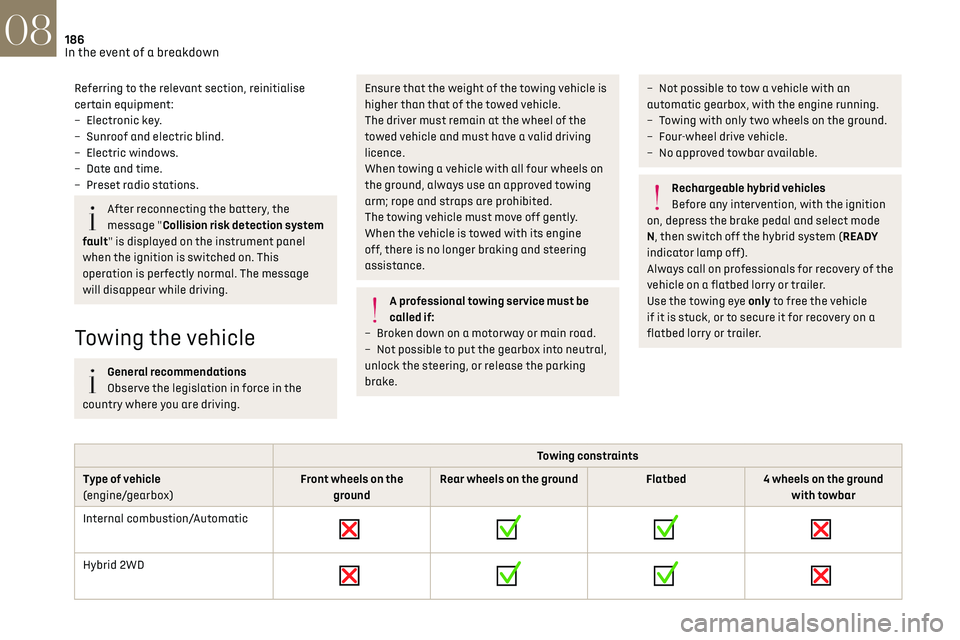
Towing the vehicle
General recommendations
Observe the legislation in force in the
country where you are driving.
Ensure that the weight of the towing vehicle is
higher than that of the towed vehicle.
The driver must remain at the wheel of the
towed vehicle and must have a valid driving
licence.
When towing a vehicle with all four wheels on
the ground, always use an approved towing
arm; rope and straps are prohibited.
The towing vehicle must move off gently.
When the vehicle is towed with its engine
off, there is no longer braking and steering
assistance.
A professional towing service must be
called if:
–
B
roken down on a motorway or main road.
–
No
t possible to put the gearbox into neutral,
unlock the steering, or release the parking
brake.
– Not possible to tow a vehicle with an
automatic gearbox, with the engine running.
–
T
owing with only two wheels on the ground.
–
Four-wheel driv
e vehicle.
–
No appro
ved towbar available.
Rechargeable hybrid vehicles
Before any intervention, with the ignition
on, depress the brake pedal and select mode
N, then switch off the hybrid system (READY
indicator lamp off).
Always call on professionals for recovery of the
vehicle on a flatbed lorry or trailer.
Use the towing eye only to free the vehicle
if it is stuck, or to secure it for recovery on a
flatbed lorry or trailer.
Towing constraints
Type of vehicle
(engine/gearbox) Front wheels on the
ground Rear wheels on the ground
Flatbed4 wheels on the ground
with towbar
Internal combustion/Automatic
Hybrid 2WD
Page 189 of 244
187
In the event of a breakdown08
Towing constraints
Type of vehicle
(engine/gearbox) Front wheels on the
ground Rear wheels on the ground
Flatbed4 wheels on the ground
with towbar
Hybrid 4WD
2WD: 2-wheel drive.
4WD: 4-wheel drive.
In case of battery or electric parking brake failure, it is essential to call a professional using flatbed recovery vehicles.
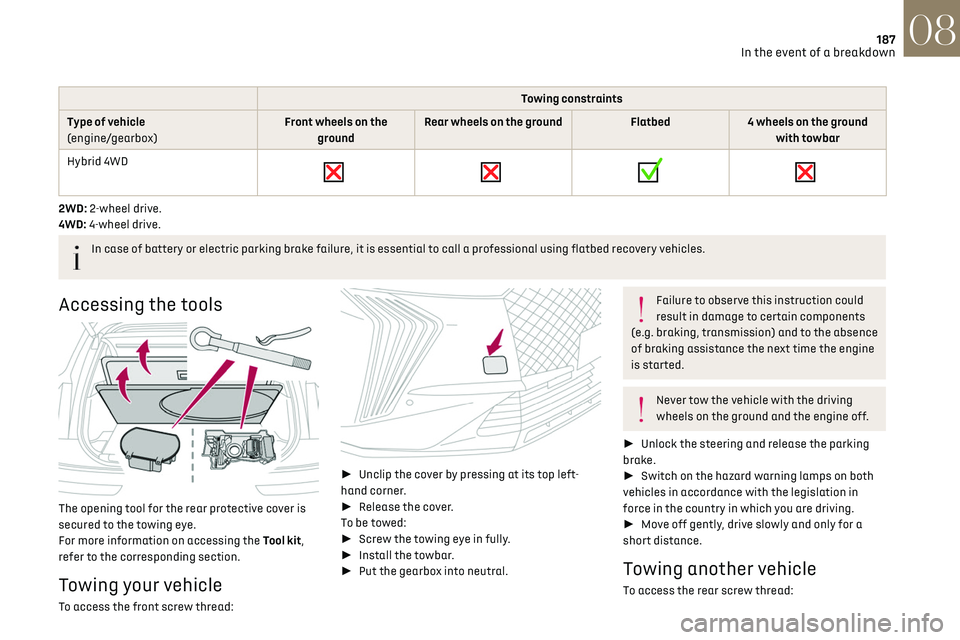
Accessing the tools
The opening tool for the rear protective cover is
secured to the towing eye.
For more information on accessing the Tool kit,
refer to the corresponding section.
Towing your vehicle
To access the front screw thread:
►
Unclip the cover by pressing at its top left-
hand corner.
► Release the cover.
To be towed:
► Screw the towing eye in fully.
► Install the towbar.
► Put the gearbox into neutral.
Failure to observe this instruction could
result in damage to certain components
(e.g. braking, transmission) and to the absence
of braking assistance the next time the engine
is started.
Never tow the vehicle with the driving
wheels on the ground and the engine off.
► Unlock the steering and release the parking
brake.
► Switch on the hazard warning lamps on both
vehicles in accordance with the legislation in
force in the country in which you are driving.
► Move off gently, drive slowly and only for a
short distance.
Towing another vehicle
To access the rear screw thread:
Page 201 of 244
199
DS IRIS SYSTEM - 12" touch screen Infotainment system10
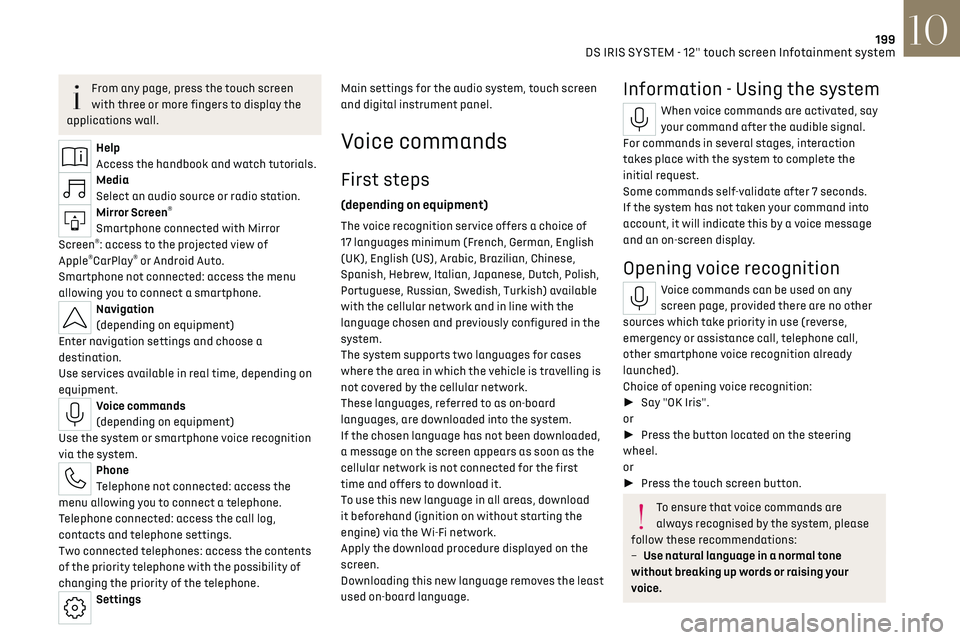
From any page, press the touch screen
with three or more fingers to display the
applications wall.
Help
Access the handbook and watch tutorials.
Media
Select an audio source or radio station.
Mirror Screen®
Smartphone connected with Mirror
Screen®: access to the projected view of
Apple®CarPlay® or Android Auto.
Smartphone not connected: access the menu
allowing you to connect a smartphone.
Navigation
(depending on equipment)
Enter navigation settings and choose a
destination.
Use services available in real time, depending on
equipment.
Voice commands
(depending on equipment)
Use the system or smartphone voice recognition
via the system.
Phone
Telephone not connected: access the
menu allowing you to connect a telephone.
Telephone connected: access the call log,
contacts and telephone settings.
Two connected telephones: access the contents
of the priority telephone with the possibility of
changing the priority of the telephone.
Settings Main settings for the audio system, touch screen
and digital instrument panel.
Voice commands
First steps
(depending on equipment)
The voice recognition service offers a choice of
17 languages
minimum (F rench, German, English
(UK), English (US), Arabic, Brazilian, Chinese,
Spanish, Hebrew, Italian, Japanese, Dutch, Polish,
Portuguese, Russian, Swedish, Turkish) available
with the cellular network and in line with the
language chosen and previously configured in the
system.
The system supports two languages
for c
ases
where the area in which the vehicle is travelling is
not covered by the cellular network.
These languages, referred to as on-board
languages,
are do
wnloaded into the system.
If the chosen language has not been downloaded,
a message on the screen appears as soon as the
cellular network is not connected for the first
time and offers to download it.
To use this new language in all areas, download
it beforehand (ignition on without starting the
engine) via the Wi-Fi network.
Apply the download procedure displayed on the
screen.
Downloading this new language removes the least
used on-board language.
Information - Using the system
When voice commands are activated, say
your command after the audible signal.
For commands in several stages, interaction
takes place with the system to complete the
initial request.
Some commands self-validate after 7 seconds.
If the system has not taken your command into
account, it will indicate this by a voice message
and an on-screen display.
Opening voice recognition
Voice commands can be used on any
screen page, provided there are no other
sources which take priority in use (reverse,
emergency or assistance call, telephone call,
other smartphone voice recognition already
launched).
Choice of opening voice recognition:
► Say "OK Iris".
or
► Press the button located on the steering
wheel.
or
► Press the touch screen button.
To ensure that voice commands are
always recognised by the system, please
follow these recommendations:
–
Use natural language in a normal tone
without breaking up w
ords or raising your
voice.
Page 202 of 244
200
DS IRIS SYSTEM - 12" touch screen Infotainment system10
– After opening voice recognition with
the steering wheel-mounted button or the
button on the touch screen, always wait for
the "beep” (audible signal) before talking.
No "beep" sounds when voice recognition is
opened using "OK Iris".
–
For optimal opera
tion, it is recommended
that you close the windows and the sunroof
(depending on equipment) to avoid any
external interference, and switch the
ventilation off.
–
Before speaking the v
oice commands, ask
the other passengers not to speak.
Voice command example for air
conditioning:
"raise the fan speed"
"Turn on air conditioning"
"i'm too hot"
Voice command example for radio and
media:
"I want to listen to michael jackson"
"switch to radio"
"tune to 88.5"
Media voice commands are only available
with a USB connection.
Voice command example for navigation:
"navigate home"
"Navigate me to gabrielle's house"
"search for public parking nearby"
Depending on the country, give
destination (address) instructions in the
language configured for the system.
Voice command example for telephone:
"Call Matthew's mobile"
"call 0113 345 9869"
"Call jonathan"
If there is no telephone connected by
Bluetooth®, a voice message announces:
"Connect a telephone by Bluetooth®", and the
voice session will be closed.
Voice command example for the weather:
"do i need a raincoat"
"how is the weather tonight"
"what is today's humidity level"
Navigation
Navigation home screen
(depending on equipment)
Access to additional videos
https://www.tomtom.com/
PSAGroup-Connected-Nav
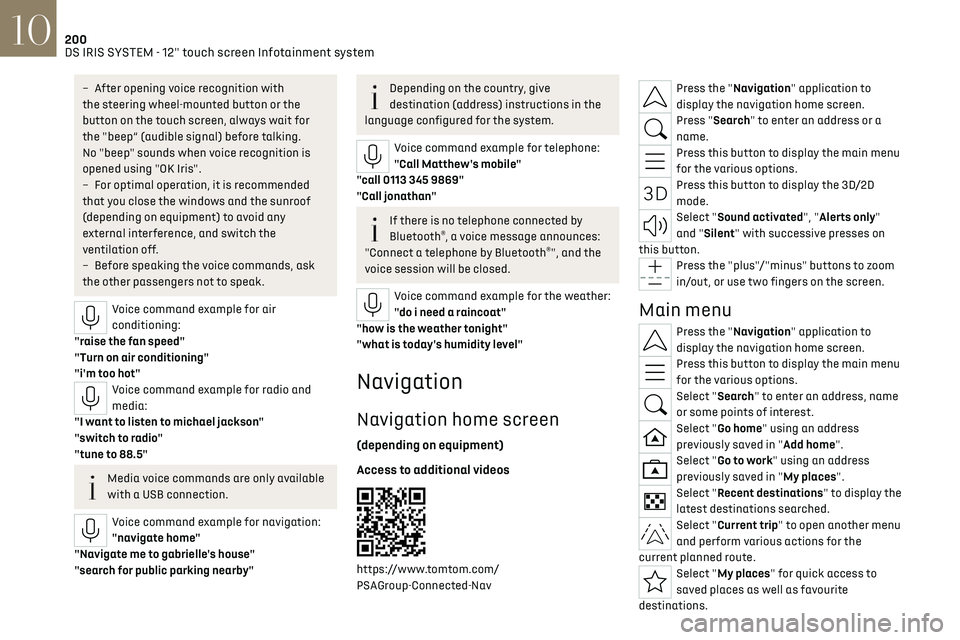
Press the "Navigation" application to
display the navigation home screen.
Press "Search" to enter an address or a
name.
Press this button to display the main menu
for the various options.
Press this button to display the 3D/2D
mode.
Select "Sound activated", "Alerts only"
and "Silent" with successive presses on
this button.
Press the "plus"/"minus" buttons to zoom
in/out, or use two fingers on the screen.
Main menu
Press the "Navigation" application to
display the navigation home screen.
Press this button to display the main menu
for the various options.
Select "Search" to enter an address, name
or some points of interest.
Select "Go home" using an address
previously saved in "Add home".
Select "Go to work" using an address
previously saved in "My places".
Select "Recent destinations" to display the
latest destinations searched.
Select "Current trip" to open another menu
and perform various actions for the
current planned route.
Select "My places" for quick access to
saved places as well as favourite
destinations.