ignition CITROEN DS7 CROSSBACK 2023 Repair Manual
[x] Cancel search | Manufacturer: CITROEN, Model Year: 2023, Model line: DS7 CROSSBACK, Model: CITROEN DS7 CROSSBACK 2023Pages: 244, PDF Size: 6.87 MB
Page 124 of 244
122
Driving06
If the driver takes no action after the vehicle
has been stopped, the electric parking brake is
applied automatically after about 5 minutes.
Cruise control remains active after
changing gear, regardless of the gearbox
type.
When the driver attempts to reactivate
cruise control after the function has been
paused, the message "Activation not possible,
unsuitable conditions" is displayed briefly if
reactivation is not possible (safety conditions
not met).
Changing the programmed speed setting with
the Road signs recognition function
► Press 5-MEM to accept the speed suggested
by the system on the instrument panel, then press
again to confirm.
To prevent sudden acceleration or
deceleration of the vehicle, select a speed
setting relatively close to the vehicle's current
speed.
Changing the inter-vehicle distance
► Press 6 to display the distance setting
thresholds ("Distant", "Normal", "Close"), then
press again to select a threshold.
After a few seconds, the option is accepted and
will be memorised when the ignition is switched
off.
Temporarily exceeding the speed setting
► Press the accelerator pedal fully. Distance
monitoring and cruise control are deactivated
while acceleration is maintained. "Cruise control
on hold" is displayed.
Deactivating the system
► Turn thumbwheel 1 upwards to the OFF
position.
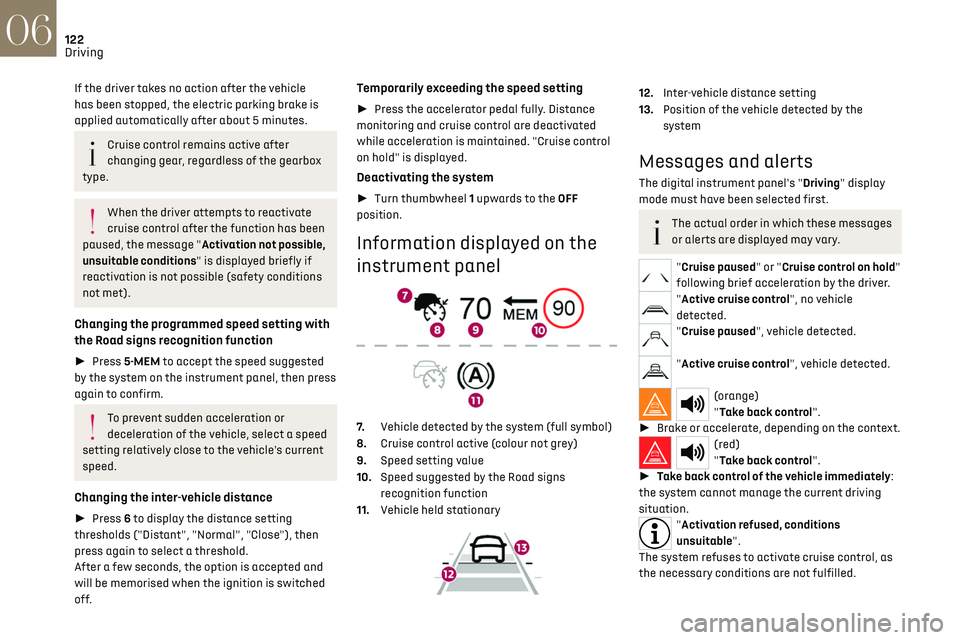
Information displayed on the
instrument panel
7. Vehicle detected by the system (full symbol)
8. Cruise control active (colour not grey)
9. Speed setting value
10. Speed suggested by the Road signs
recognition function
11. Vehicle held stationary
12.Inter-vehicle distance setting
13. Position of the vehicle detected by the
system
Messages and alerts
The digital instrument panel's "Driving" display
mode must have been selected first.
The actual order in which these messages
or alerts are displayed may vary.
"Cruise paused" or "Cruise control on hold"
following brief acceleration by the driver.
"Active cruise control", no vehicle
detected.
"Cruise paused", vehicle detected.
"Active cruise control", vehicle detected.
(orange)
"Take back control".
► Brake or accelerate, depending on the context.
(red)
"Take back control".
► Take back control of the vehicle immediately:
the system cannot manage the current driving
situation.
"Activation refused, conditions
unsuitable".
The system refuses to activate cruise control, as
the necessary conditions are not fulfilled.
Page 127 of 244
125
Driving06
The system status is saved when the
ignition is switched off.
Cruise control
The driver must hold the steering wheel properly.
When cruise control is activated, the symbol is
displayed in green: by small steering actions, the
system directs the vehicle and keeps it in the
position chosen by the driver, in the traffic lane.
This position is not necessarily the centre of the
lane.
The driver can feel movements in the steering
wheel.
The driver can change the position of the vehicle
at any time, by turning the steering wheel. When
the driver feels that the vehicle’s position is
appropriate, whilst keeping hands on the steering
wheel, they must release the pressure to let the
system resume control of the steering, but the
vehicle will not be automatically centred within
the lane.
Pausing/Suspending the
system
The driver must act promptly if they
believe that the traffic conditions or the
state of the road surface require their
intervention, by moving the steering wheel to
temporarily suspend system operation. Any
intervention on the brake pedal that causes
the Adaptive cruise control to pause will also
cause the system to pause.
If the system detects that the driver is not
holding the wheel firmly enough, it
triggers a series of gradual alerts and then
deactivates itself if there is no response from
the driver.
If the function is suspended due to the
prolonged release of the force holding the
steering wheel, the function must be
reactivated by pressing the button again.
Automatic pause
– Triggering o f the ESC.
– Prolonged failure t o detect one of the lane
limit markings. In this case, the Lane keeping
assist function can take over, and the system will
reactivate itself once the operating conditions are
met again.
In response to action by the driver: suspension
– Activation of the direction indicators.
– Tra velling outside the lane limits.
–
T
oo tight a grip on the steering wheel or
dynamic action on the steering wheel.
–
Action on the brak
e pedal (resulting in a pause
until cruise control is reactivated) or accelerator
pedal (suspension for as long as the pedal is
depressed).
–
Pausing o
f Adaptive cruise control.
–
Deactiv
ation of the ASR.
Page 131 of 244

129
Driving06
This is a normal behavior indicating that a
condition is not fulfilled and which does not
request the support of a workshop.
In any situations with ignition on where automatic
braking presents a risk, deactivating the system
via the driving aids touch screen application is
recommended, for instance:
–
T
owing a trailer (particularly a trailer without
its own braking system).
–
Carrying long objects on roo
f bars.
–
D
riving with snow chains.
–
U
sing an automatic car wash.
–
Performing an
y maintenance (e.g. changing a
wheel, working inside the engine compartment).
–
Placing the v
ehicle on a rolling bench in a
workshop.
–
T
owing the vehicle.
–
Follo
wing an impact to the windscreen close to
the detection camera.
The system is automatically deactivated
once the use of a different diameter
"space-saver" type spare wheel is detected, or
if a fault with the two lateral brake lamps is
detected.
The system diagnoses permanently its
capability and may inhibit itself without
specific driver indication, if the system is
outside of the regular operating conditions
(e.g. sensor initialization, board voltage out of
regular range, activation of stability system).
Therefore, the system may not be available
just after starting the vehicle.
It can be dangerous to drive if the brake
lamps are not in perfect working order.
The driver must not overload the vehicle
(keep within the GVW limit and load
height limits for roof bars).
Following an impact (e.g. a collision), the
system is automatically deactivated.
Have it checked by a dealer or a qualified
workshop.
Collision Risk Alert
This function warns the driver if there is a risk
of collision with the preceding vehicle, or with a
pedestrian or cyclist.
Modifying the alert trigger threshold
The trigger threshold determines the sensitivity
with which the function warns of the risk of
collision.
It is configured in the ADAS touch screen
application.
► Select one of the 3 preset
thresholds: "Far ", "Medium" or "Near".
The selected threshold is memorised when the
ignition is switched off.
Operation
Depending on the collision risk detected by the
system and the alert trigger threshold chosen
by the driver, different levels of alert may be
triggered and displayed on the instrument panel.
The system takes into account the vehicle
dynamics, the difference speed of the own vehicle
and the object identified for the collision risk, and
the operation of the vehicle (e.g. actions on the
pedals, steering wheel) to trigger the alert at the
most relevant moment.
(orange)
Level 1: visual alert only, warning that the
preceding vehicle is very close.
The message "Vehicle close" is displayed.
(red)
Level 2: visual and audible alert, warning
that a collision is imminent.
The message "Brake!" is displayed.
Level 3: a micro-braking may be given, confirming
the risk of collision (optional).
While approaching a vehicle too quickly,
the level 2 alert may be displayed directly.
Important: the level 1 alert depends on the
trigger threshold selected. It reacts only on
moving vehicles. It is disabled automatically at
lower speed.
Page 133 of 244

131
Driving06
Malfunction
This warning lamp lights up on the
instrument panel with the message
"Sensor blind" in certain cases.
Version with camera only: the system is
deactivated.
Version with camera and radar: the system may
continue to operate in a degraded mode.
This may be caused by a reduced visibility
(e.g. rain, fog, snow, blinding by low sun) or by a
real sensor blockage. In this case, stop the vehicle
and verify if the front camera or the front radar is
covered by dirt, snow, ice or anything preventing
the sensing.
In the event of a malfunction, this warning
lamp lights up on the instrument panel,
accompanied by the display of a message and an
audible signal.
Have it checked by a dealer or a qualified
workshop.
If these warning lamps come on
after the engine has been switched
off and then restarted, contact a dealer or a
qualified workshop to have the system checked.
These warning lamps light up on
the instrument panel and/or in the
warning lamp display for seat belts and front
passenger airbag to indicate that the driver's and/
or front passenger's seat belt is not fastened
(depending on version). The automatic braking
system is deactivated until the seat belts are
fastened.
Distraction detection
For more information, refer to the General
recommendations on the use of driving
and manoeuvring aids.
The function comprises the "Driver Attention
Warning" and "Driver Attention Warning by
Camera" systems, combined, depending on
version, with the "DS DRIVER ATTENTION
MONITORING" system.
These systems are in no way designed to
keep the driver awake or to prevent the
driver from falling asleep at the wheel.
It is the driver’s responsibility to stop if feeling
tired.
Take a break if you are feeling tired or at least
every 2 hours.
Activation/Deactivation
By default, the function is automatically activated
at every engine start.
The settings are changed via the ADAS
touch screen application.
Driver Attention Warning
The system triggers an alert when it
detects that the driver has not taken a
break after two hours of driving at a speed above
43 mph (70 km/h).
This alert is issued via the display of a message
encouraging the driver to take a break,
accompanied by an audible signal.
If the driver does not follow this advice, the alert
is repeated hourly until the vehicle is stopped.
The system resets itself if one of the following
conditions is met:
–
With the engine running, the v
ehicle has been
stationary for more than 15 minutes.
–
The ignition has been s
witched off for a few
minutes.
–
The driv
er's seat belt is unfastened and their
door is opened.
As soon as the speed of the vehicle drops
below 43 mph (70 km/h), the system goes
into standby.
Driving time starts being counted again once
the speed reaches above 43 mph (70 km/h).
Page 138 of 244

136
Driving06
– flashing, after a delay of about one second,
when overtaking a vehicle slowly, and when the
direction indicator is used.
Activation/Deactivation
It is configured in the ADAS touch screen
application.
When starting the vehicle, the warning lamp
comes on in each mirror to indicate that the
system is activated.
The status of the system is memorised when the
ignition is switched off.
The system is automatically deactivated
when towing with a towing device
approved by the Manufacturer.
Operating conditions
– All vehicles are moving in the same direction
and in adjacent lanes.
–
The speed o
f your vehicle must be between 7
and 87 mph (12 and 140 km/h).
–
When o
vertaking a vehicle, the speed
difference is less than 6 mph (10 km/h).
–
When o
vertaken by a vehicle, the speed
difference is less than 16 mph (25 km/h).
–
Tra
ffic is flowing normally.
–
Ov
ertaking a vehicle over a certain period of
time and the vehicle being overtaken remains in
the blind spot.
–
Y
ou are driving on a straight or slightly curved
road. –
Your vehicle is not pulling a trailer, a caravan, etc.
Operating limits
No alert is triggered in the following conditions:
– pre sence of stationary objects (e.g. parked
vehicles, safety rails, lampposts, signs).
–
v
ehicles travelling in the opposite direction.
–
on winding roads or in c
ase of sharp turns.
–
when o
vertaking or being overtaken by a
very long vehicle (e.g. truck, bus), which is both
detected in a blind spot from behind and present
in the driver's field of vision from the front.
–
quick o
vertaking manoeuvre.
–
v
ery heavy traffic: vehicles detected in
front and behind are confused with a lorry or a
stationary object.
Malfunction
If the event of a malfunction, this warning
lamp lights up on the instrument panel,
accompanied by the display of a message.
Have it checked by a dealer or a qualified
workshop.
The system may be temporarily disturbed
by certain weather conditions (e.g. rain,
hail).
In particular, driving on a wet road or going
from a dry to a wet area can cause false alerts
(e.g. presence of a cloud of water droplets in
the blind spot interpreted as a vehicle).
In bad or wintry weather, ensure that the
sensors are not covered by mud, ice or snow.
Take care not to cover the warning zone in the
door mirrors, or the detection zones on the
front and rear bumpers with adhesive labels
Page 140 of 244
138
Driving06
The sound emitted by the speaker (front
or rear) locates the obstacle relative to
the vehicle, whether in front of or behind it on
its path.
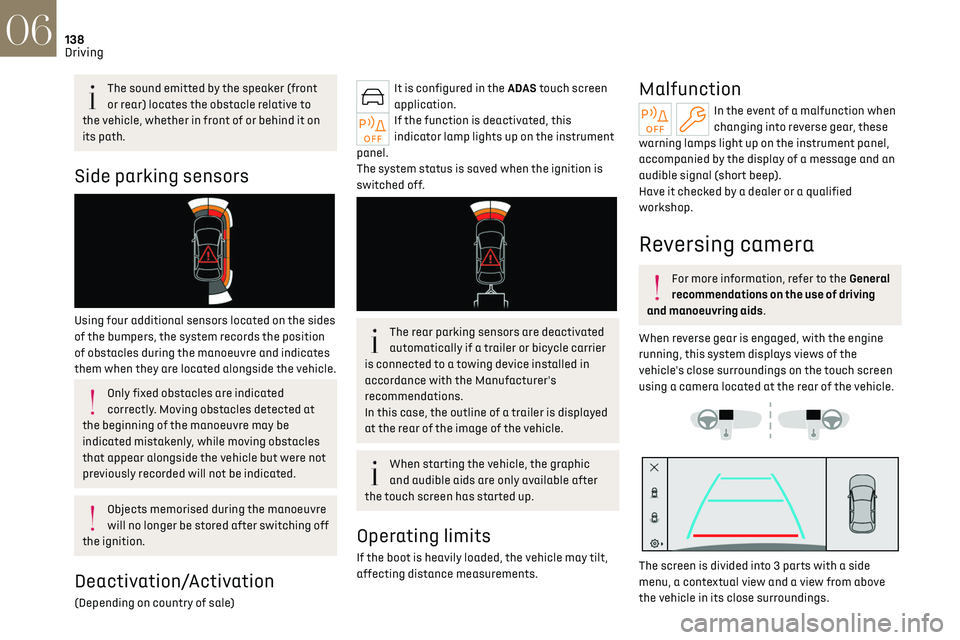
Side parking sensors
Using four additional sensors located on the sides
of the bumpers, the system records the position
of obstacles during the manoeuvre and indicates
them when they are located alongside the vehicle.
Only fixed obstacles are indicated
correctly. Moving obstacles detected at
the beginning of the manoeuvre may be
indicated mistakenly, while moving obstacles
that appear alongside the vehicle but were not
previously recorded will not be indicated.
Objects memorised during the manoeuvre
will no longer be stored after switching off
the ignition.
Deactivation/Activation
(Depending on country of sale)
It is configured in the ADAS touch screen
application.
If the function is deactivated, this
indicator lamp lights up on the instrument
panel.
The system status is saved when the ignition is
switched off.
The rear parking sensors are deactivated
automatically if a trailer or bicycle carrier
is connected to a towing device installed in
accordance with the Manufacturer's
recommendations.
In this case, the outline of a trailer is displayed
at the rear of the image of the vehicle.
When starting the vehicle, the graphic
and audible aids are only available after
the touch screen has started up.
Operating limits
If the boot is heavily loaded, the vehicle may tilt,
affecting distance measurements.
Malfunction
In the event of a malfunction when
changing into reverse gear, these
warning lamps light up on the instrument panel,
accompanied by the display of a message and an
audible signal (short beep).
Have it checked by a dealer or a qualified
workshop.
Reversing camera
For more information, refer to the General
recommendations on the use of driving
and manoeuvring aids.
When reverse gear is engaged, with the engine
running, this system displays views of the
vehicle's close surroundings on the touch screen
using a camera located at the rear of the vehicle.
The screen is divided into 3 parts with a side
menu, a contextual view and a view from above
the vehicle in its close surroundings.
Page 141 of 244
139
Driving06
The parking sensors supplement the information
in the view from above the vehicle.
Different contextual views are available:
–
Aut
omatic zoom view.
–
St
andard view.
–
Panoramic vie
w.
Depending on the context, the system chooses
the best view to display (standard or automatic
zoom).
The view type can be changed at any time during
the manoeuvre.
The system status is not saved when the ignition
is switched off.
Operating principle
Using the camera, the vehicle's close
surroundings are recorded during low speed
manoeuvres.
An image from above the vehicle in its close
surroundings is created in real time (on the side of
the screen), as the vehicle progresses.
This view makes it easier to align the vehicle
when parking and to perceive nearby obstacles. It is automatically deleted if the vehicle remains
stationary for too long.
Settings
In the side menu, this menu allows you to
carry out the following operations:
–
adjust the v
olume of the audible signal.
–
adjust the brigh
tness.
–
adjust the c
ontrast.
Activation/Deactivation
To activate the camera, engage reverse gear.
The system is deactivated:
–
when changing out o
f reverse gear.
–
b
y pressing the cross in the top left-hand corner
of the touch screen.
Automatic zoom view
The rear camera records the vehicle's
surroundings during the manoeuvre in order to
create a view from above the rear of the vehicle in
its close surroundings, allowing the vehicle to be
manoeuvred around nearby obstacles.
Using the sensors located on the rear bumper,
the automatic zoom view is displayed when
approaching an obstacle at the red line (less than
30 cm) during the manoeuvre.
This view is only available automatically.
Obstacles may appear further away than
they actually are.
It is important to monitor the sides of the
vehicle during the manoeuvre, using the
mirrors.
Parking sensors also provide additional
information about the area around the vehicle.
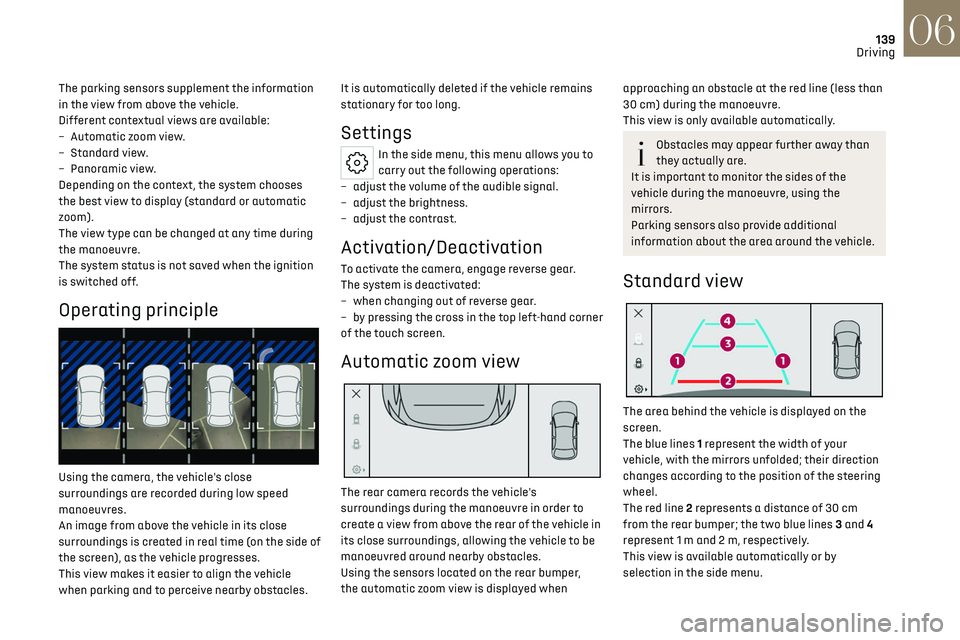
Standard view
The area behind the vehicle is displayed on the
screen.
The blue lines 1 represent the width of your
vehicle, with the mirrors unfolded; their direction
changes according to the position of the steering
wheel.
The red line 2 represents a distance of 30 cm
from the rear bumper; the two blue lines 3 and 4
represent 1 m and 2 m, respectively.
This view is available automatically or by
selection in the side menu.
Page 142 of 244

140
Driving06
Panoramic view
The panoramic view allows you to leave, in
reverse, a parking space by anticipating the
arrival of vehicles, pedestrians or cyclists.
This view is not recommended for carrying out a
complete manoeuvre.
This view is only available by selection in the side
menu.
360 Vision
For more information, refer to the General
recommendations on the use of driving
and manoeuvring aids.
This system allows you to view your vehicle's
close surroundings on the touch screen using
cameras, located at the front and rear of the
vehicle.
The screen is divided into 4 parts with two side
menus, a contextual view and a view from above
the vehicle in its close surroundings.
The parking sensors supplement the information
in the view from above the vehicle.
Depending on the view angle chosen in the left-
hand side menu, the system provides specific
visual assistance in particular driving conditions,
such as entering a blind intersection or
manoeuvring in areas with reduced visibility.
Different contextual views are available for the
rear or for the front:
–
Aut
omatic zoom view.
–
St
andard view.
–
Panoramic vie
w.
Depending on the context, the system chooses
the best view to display (standard or automatic
zoom).
The view type can be changed at any time during
the manoeuvre.
The system status is not saved when the ignition
is switched off.
Operating principle
Reconstructed view
The cameras are activated and a reconstruction
of a view from above your vehicle in its close
surroundings is displayed on the touch screen.
Live view
The front and rear views automatically appear in
the view from above the vehicle.
It is also possible to display any live view by
selecting the corresponding zone.
The front view can be selected in forward gear up
to 10 mph (16 km/h).
Installing the very cold climate screen can
alter the image transmitted by the front
camera.
Settings
In the side menu, this menu allows you to
carry out the following operations:
–
adjust the v
olume of the audible signal.
–
adjust the brigh
tness.
–
adjust the c
ontrast.
Page 145 of 244
143
Practical information07
TAILOR-MADE
LUBRICANTS
FOR HAUTE
COUTURE CARS
* 1L & 5L produced in Europe
Partner\f \fince the brand’\f creation in \b015, DS automobile\f &
TotalEnergie\f \fhare common value\f : excellence, performance and
know-how. TotalEnergie\f equip\f DS vehicle\f with Quartz lubricant\f
from their fir\ft filling in the factory to approved maintenance
network\f to guarantee them optimal performance on a daily ba\fi\f.
Tailor-made for DS vehicle\f, Quartz lubricant\f make them even more
efficient, more fuel efficient and more environmentally friendly.
TotalEnergie\f and DS, official partner\f in\t automotive excellence !
Keep your engine younger for longer \
!
Quartz Ineo Xtra Fir\ft 0W-\b0 i\f a very high performance lubricant
re\fulting from the joint work of the DS Automobile\f and
TotalEnergie\f R&D team\f. It\f innovative technology extend\f your
engine’\f life while reaching \fignificant fuel \faving\f and thu\f
limiting CO
\b emi\f\fion\f. The product i\f now available in new
packaging* made of 50% recycled material and 100% rec\tyclable.
Compatibility of fuels
Petrol fuels conforming to the EN228 standard
containing up to 5% and 10% ethanol respectively.
Diesel fuels conforming to the EN590, EN16734
and EN16709 standards and containing up to
7%, 10%, 20% and 30% fatty acid methyl ester
respectively. The use of B20 or B30 fuels, even
occasionally, imposes special maintenance
conditions referred to as "Arduous conditions".
Paraffinic Diesel fuel conforming to the EN15940
standard.
The use of any other type of (bio)fuel
(e.g. pure or diluted vegetable or animal
oils, domestic fuel) is strictly prohibited - risk
of damaging the engine and fuel system!
The only fuel additives authorised for use
are those that meet the B715001 (petrol)
or B715000 (Diesel) standards.
Diesel at low temperature
At temperatures below 0 °C (+32 °F), the
formation of paraffins in summer-type Diesel
fuels could prevent the engine from operating correctly. In these temperature conditions, use
winter-type Diesel fuel and keep the fuel tank
more than 50 % full.
At temperatures below -15 °C (+5 °F) to avoid
problems starting, it is best to park the vehicle
under shelter (heated garage).
Travelling abroad
Certain fuels could damage your vehicle’s engine.
In certain countries, the use of a particular fuel
may be required (specific octane rating, specific
trade name, etc.) to ensure correct operation of
the engine.
For all additional information, consult a dealer.
Refuelling
Fuel tank capacity: approximately 55
litres (Diesel), 62 litres (Petrol) or 43 litres
(Rechargeable hybrid).
Reserve level: approximately 6 litres.
Low fuel level
When the low fuel level is reached, this
warning lamp lights up on the instrument
panel, accompanied by the display of a message
and an audible signal. When it first comes on,
about 6 litres of fuel remain.
Until sufficient fuel is added, this warning lamp
appears every time the ignition is switched on,
accompanied by the message and the audible
signal. When driving, this message and audible
signal are repeated with increasing frequency as
the fuel level drops towards 0.
You must refuel as soon as possible to avoid
running out of fuel.
For more information on Running out of fuel
(Diesel), refer to the corresponding section.
A small arrow by the warning lamp
indicates which side of the vehicle the
fuel filler flap is located on.
Stop & Start
Never refuel with the engine in STOP
mode; you must switch off the ignition.
Refuelling
Any addition of fuel must be in quantities of at
least 10 litres, in order to be registered by the fuel
gauge.
Opening the filler flap may create a noise caused
by an inrush of air. This vacuum is entirely normal,
resulting from the sealing of the fuel system.
To refuel in complete safety:
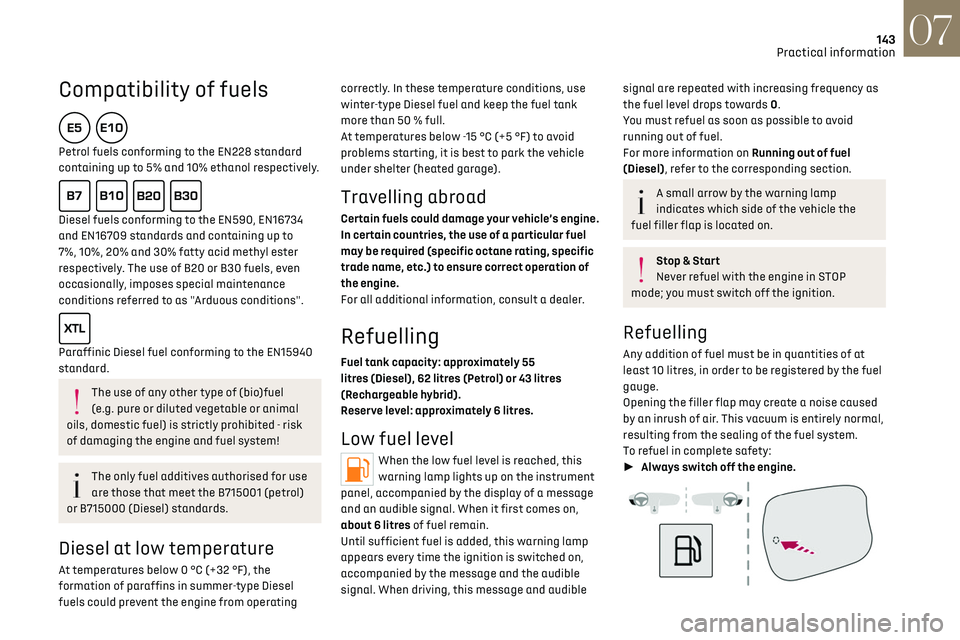
► Always switch off the engine.
Page 147 of 244
145
Practical information07
Before travelling abroad, it is advisable to
check with a dealer if the vehicle is suitable
for the distribution equipment of the countries
visited.
Rechargeable hybrid
system
Electrical system
The electrical circuit of the rechargeable hybrid
system is identified by orange cables and its
components are marked with this symbol:
The rechargeable hybrid powertrain uses
a voltage of between 240 V and 400 V.
This system may be hot both when the ignition
is on and after switching it off.
Comply with the warning messages shown on
the labels, particularly inside the charging flap.
High voltage system voltage is dangerous
and can cause burns or other injuries or
even fatal electric shock.
Since damage to high voltage components is
not visible, the Manufacturer recommends
that you:
–
Ne
ver touch the components, damaged
or not, and never let your jewelry or other
metallic objects come into contact with these
components.
–
Ne
ver work on the orange high voltage
cables or on any other high voltage component
marked with the Electric risk label. Any
intervention on the high voltage system
must be carried out by qualified persons in
workshops qualified and approved to carry out
this type of work.
–
Ne
ver damage, modify or remove the orange
high voltage cables or disconnect them from
the high voltage network.
–
Ne
ver open, modify or remove the cover of
the traction battery.
–
Ne
ver work with cutting and forming tools
or heat sources near high voltage components
and cables.
In case of low level of fluid in the cooling
tank, the refilling shall only be performed in a
qualified and trained workshop to verify that
the leakage is not in the traction battery.
Any intervention on the high voltage system
must be carried out by qualified persons in
workshops qualified and approved to carry out
this type of work.Damage to the vehicle or the traction battery
could result in the leakage of toxic gases
or fluids either immediately or later. The
Manufacturer recommends that you:
–
Alw
ays inform the fire and emergency
services in the event of an incident, warning
that the vehicle is equipped with a traction
battery.
–
Ne
ver touch the liquids leaking from the
traction battery.
–
Do no
t inhale the gases emitted by the
traction battery which are toxic.
–
Mo
ve away from the vehicle in the event of
incident or accident, the gases emitted being
flammable and could cause a fire.
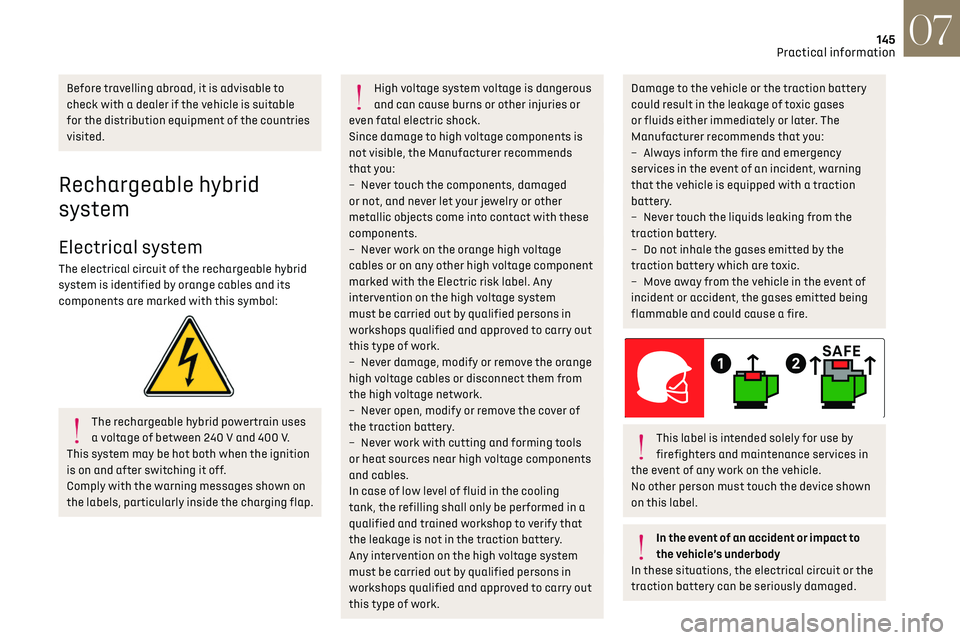
This label is intended solely for use by
firefighters and maintenance services in
the event of any work on the vehicle.
No other person must touch the device shown
on this label.
In the event of an accident or impact to
the vehicle’s underbody
In these situations, the electrical circuit or the
traction battery can be seriously damaged.