low CITROEN DS7 CROSSBACK 2023 Owners Manual
[x] Cancel search | Manufacturer: CITROEN, Model Year: 2023, Model line: DS7 CROSSBACK, Model: CITROEN DS7 CROSSBACK 2023Pages: 244, PDF Size: 6.87 MB
Page 2 of 244
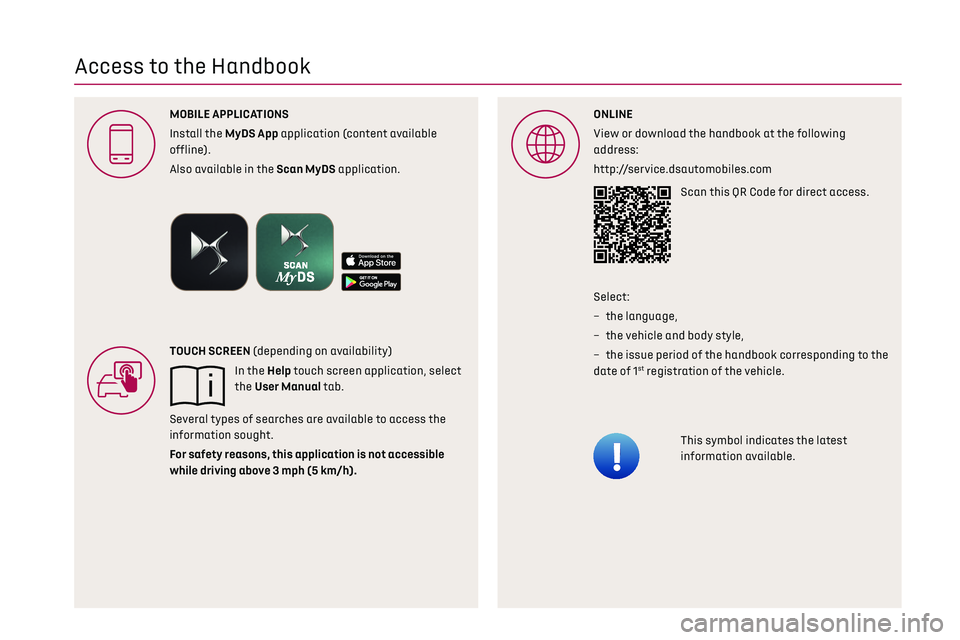
Access to the Handbook
ONLINE
View or download the handbook at the following
address:
http://service.dsautomobiles.comScan this QR Code for direct access.
This symbol indicates the latest
information available.
Select:
–
the language
,
–
the v
ehicle and body style,
–
the is
sue period of the handbook corresponding to the
date of 1
st registration of the vehicle.
MOBILE APPLICA
Install the MyDS App application (content available
offline).
Also available in the Scan MyDS application.
TOUCH SCREEN (depending on availability)
In the Help touch screen application, select
the User Manual tab.
Several types of searches are available to access the
information sought.
For safety reason
while driving abo
Page 10 of 244
8Eco-driving
Eco-driving
Eco-driving refers to a range of everyday practices
that allow the motorist to optimise the vehicle's
energy consumption (fuel and/or electricity) and
CO
2 emissions.
Optimise your use of the gearbox
With an automatic gearbox, favour automatic
mode. Do not depress the accelerator pedal
heavily or suddenly.
The gear shift indicator prompts you to engage
the most suitable gear. Whenever this indication
is displayed on the instrument panel, follow it
straight away.
With an automatic gearbox, this indicator
appears only in manual mode.
Drive smoothly
Maintain a safe distance between vehicles, use
engine braking rather than the brake pedal and
press the accelerator gradually. These practices
help to save on energy consumption, reduce CO
2
emissions and decrease general traffic noise.
Favour the use of the "Eco" driving mode by
selecting it using the "DRIVE MODE" control.
When the traffic is flowing smoothly, select the
cruise control.
Control the use of electrical equipment
Before moving off, if the passenger compartment
is too warm, ventilate it by opening the windows
and air vents before using the air conditioning. At speeds above 31 mph (50 km/h), close the
windows and leave the air vents open.
Consider using equipment that can help keep the
temperature in the passenger compartment down
(e.g. sunroof blind, window blinds).
Unless automatically regulated, switch off the air
conditioning as soon as the desired temperature
has been reached.
Switch off the demisting and defrosting
functions, if they are not managed automatically.
Switch off the heated seat as soon as possible.
Adapt your use of the headlamps and/or foglamps
to the level of visibility, in accordance with
current legislation in the country in which you are
driving.
Avoid running the engine before moving off,
particularly in winter (other than in severe wintry
conditions: temperature below -23°C). The vehicle
will warm up much faster while driving.
As a passenger, avoid connecting your multimedia
devices (e.g. film, music, video game) to help
reduce the consumption of energy.
Disconnect all portable devices before leaving the
vehicle.
Limit the causes of excess consumption
Spread loads throughout the vehicle. Place the
heaviest items in the boot as close as possible to
the rear seats.
Limit the loads carried in the vehicle and minimise
wind resistance (e.g. roof bars, roof rack, bicycle
carrier, trailer). Preferably, use a roof box.
Remove roof bars and roof racks after use.At the end of winter, remove snow tyres and refit
summer tyres.
Comply with the servicing instructions
Check tyre pressures regularly, with the tyres
cold, referring to the label in the door aperture on
the driver's side.
Carry out this check in particular:
–
before a long journe
y.
–
a
t each change of season.
–
a
fter a long period out of use.
Do not forget the spare wheel and, where
applicable, the tyres on your trailer or caravan.
Have your vehicle serviced regularly (e.g. engine
oil, oil filter, air filter, passenger compartment
filter, etc.). Observe the schedule of operations in
the manufacturer's service schedule.
With a BlueHDi Diesel engine, if the SCR system
has a fault, your vehicle will emit pollution. Visit a
dealer or a qualified workshop as soon as possible
to restore your vehicle's nitrogen oxide emissions
to legal levels.
When filling the fuel tank, do not continue after
the third cut-out of the nozzle, to avoid overflow.
You will only see the fuel consumption of your new
vehicle settle down to a consistent average after
the first 1,900 miles (3,000 kilometres).
Optimising the driving range (rechargeable
hybrid vehicles)
Connect the vehicle as soon as possible.
Favour the ECO zone of the power indicator by
driving smoothly and at a steady speed.
Page 11 of 244
9Eco-driving
Anticipate slowing down as much as possible and,
if possible, favour decelerations with regenerative
braking mode activated (power indicator in the
CHARGE zone).
With the vehicle connected, carry out
temperature pre-conditioning before setting off.
To optimise consumption during a journey:
► Programme a destination in the vehicle’s GPS
navigation system.
► Select the Hybrid driving mode.
► Make sure that the battery charge level is
close to maximum.
► Do not use the e-Save function while driving.
► Use the heating/air conditioning system
wisely.
Page 12 of 244
10
Dashboard instruments01
Driver information
Instrument panel
The instrument panel displays all the information
the driver needs about the status of the vehicle's
various systems.
This information appears in the form of warning
and indicator lamps and messages.
The instrument panel is in the form of a fully
digital screen.
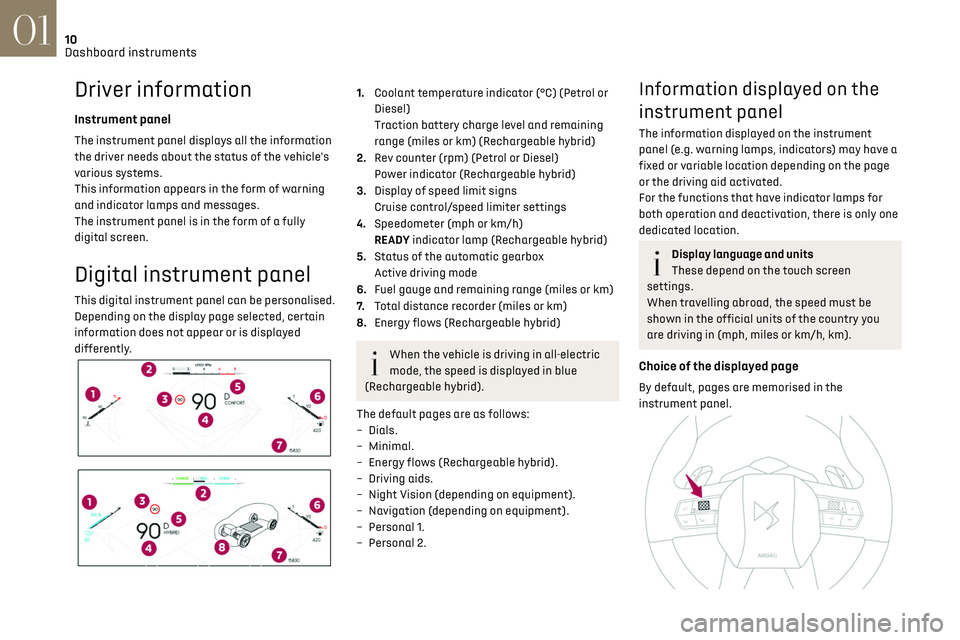
Digital instrument panel
This digital instrument panel can be personalised.
Depending on the display page selected, certain
information does not appear or is displayed
differently.
1.Coolant temperature indicator (°C) (Petrol or
Diesel)
Traction battery charge level and remaining
range (miles or km) (Rechargeable hybrid)
2. Rev counter (rpm) (Petrol or Diesel)
Power indicator (Rechargeable hybrid)
3. Display of speed limit signs
Cruise control/speed limiter settings
4. Speedometer (mph or km/h)
READY indicator lamp (Rechargeable hybrid)
5. Status of the automatic gearbox
Active driving mode
6. Fuel gauge and remaining range (miles or km)
7. Total distance recorder (miles or km)
8. Energy flows (Rechargeable hybrid)
When the vehicle is driving in all-electric
mode, the speed is displayed in blue
(Rechargeable hybrid).
The default pages are as follows:
–
Dials.
–
Minimal.
–
Energy flo
ws (Rechargeable hybrid).
–
D
riving aids.
–
Nigh
t Vision (depending on equipment).
–
Na
vigation (depending on equipment).
–
Personal 1
.
–
Personal 2.
Information displayed on the
instrument panel
The information displayed on the instrument
panel (e.g. warning lamps, indicators) may have a
fixed or variable location depending on the page
or the driving aid activated.
For the functions that have indicator lamps for
both operation and deactivation, there is only one
dedicated location.
Display language and units
These depend on the touch screen
settings.
When travelling abroad, the speed must be
shown in the official units of the country you
are driving in (mph, miles or km/h, km).
Choice of the displayed page
By default, pages are memorised in the
instrument panel.
Page 13 of 244
11
Dashboard instruments01
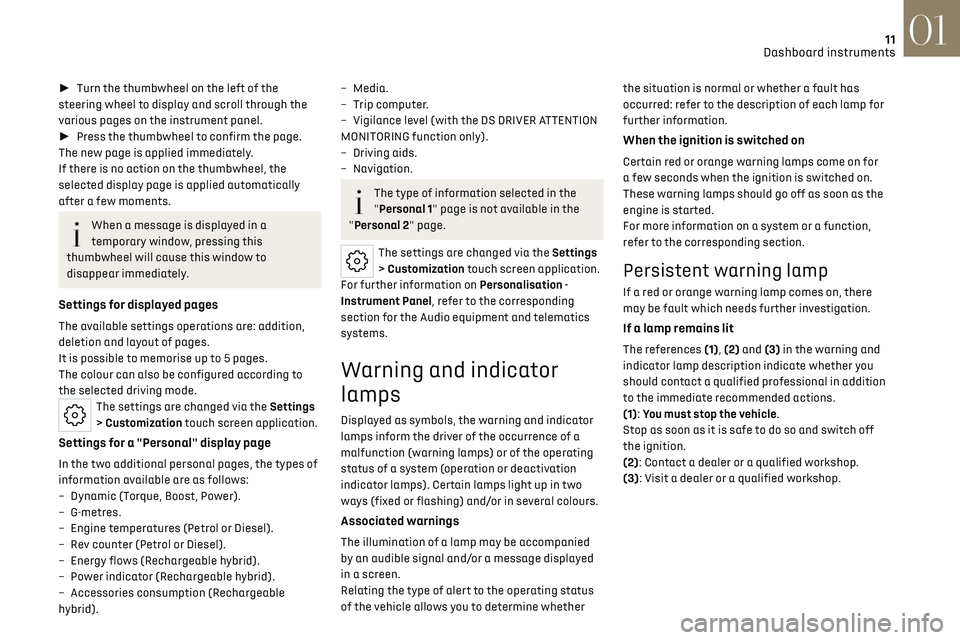
► Turn the thumbwheel on the left of the
steering wheel to display and scroll through the
various pages on the instrument panel.
► Press the thumbwheel to confirm the page.
The new page is applied immediately.
If there is no action on the thumbwheel, the
selected display page is applied automatically
after a few moments.
When a message is displayed in a
temporary window, pressing this
thumbwheel will cause this window to
disappear immediately.
Settings for displayed pages
The available settings operations are: addition,
deletion and layout of pages.
It is possible to memorise up to 5 pages.
The colour can also be configured according to
the selected driving mode.
The settings are changed via the Settings
> Customization touch screen application.
Settings for a "Personal" display page
In the two additional personal pages, the types of
information available are as follows:
–
Dynamic (T
orque, Boost, Power).
–
G-metres.
–
Engine t
emperatures (Petrol or Diesel).
–
R
ev counter (Petrol or Diesel).
–
Energy flo
ws (Rechargeable hybrid).
–
Po
wer indicator (Rechargeable hybrid).
–
Ac
cessories consumption (Rechargeable
hybrid).
– Media.
– Trip c omputer.
–
Vigilanc
e level (with the DS DRIVER ATTENTION
MONITORING function only).
–
D
riving aids.
–
Navigation.
The type of information selected in the
"Personal 1" page is not available in the
"Personal 2" page.
The settings are changed via the Settings
> Customization touch screen application.
For further information on Personalisation -
Instrument Panel, refer to the corresponding
section for the Audio equipment and telematics
systems.
Warning and indicator
lamps
Displayed as symbols, the warning and indicator
lamps inform the driver of the occurrence of a
malfunction (warning lamps) or of the operating
status of a system (operation or deactivation
indicator lamps). Certain lamps light up in two
ways (fixed or flashing) and/or in several colours.
Associated warnings
The illumination of a lamp may be accompanied
by an audible signal and/or a message displayed
in a screen.
Relating the type of alert to the operating status
of the vehicle allows you to determine whether the situation is normal or whether a fault has
occurred: refer to the description of each lamp for
further information.
When the ignition is switched on
Certain red or orange warning lamps come on for
a few seconds when the ignition is switched on.
These warning lamps should go off as soon as the
engine is started.
For more information on a system or a function,
refer to the corresponding section.
Persistent warning lamp
If a red or orange warning lamp comes on, there
may be fault which needs further investigation.
If a lamp remains lit
The references (1), (2) and (3) in the warning and
indicator lamp description indicate whether you
should contact a qualified professional in addition
to the immediate recommended actions.
(1): You must stop the vehicle.
Stop as soon as it is safe to do so and switch off
the ignition.
(2): Contact a dealer or a qualified workshop.
(3): Visit a dealer or a qualified workshop.
Page 16 of 244
14
Dashboard instruments01
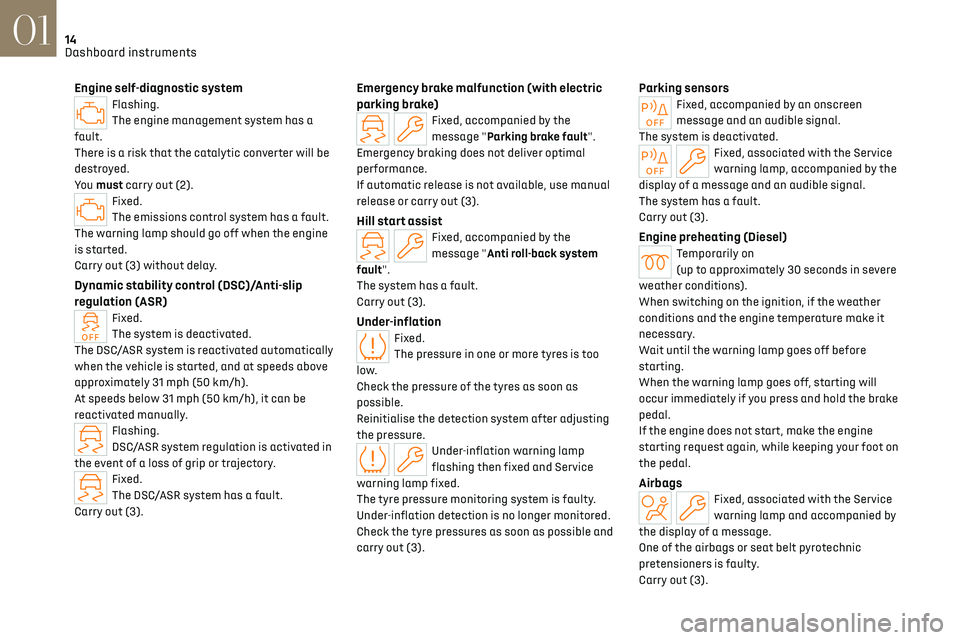
Engine self-diagnostic systemFlashing.
The engine management system has a
fault.
There is a risk that the catalytic converter will be
destroyed.
You must carry out (2).
Fixed.
The emissions control system has a fault.
The warning lamp should go off when the engine
is started.
Carry out (3) without delay.
Dynamic stability control (DSC)/Anti-slip
regulation (ASR)
Fixed.
The system is deactivated.
The DSC/ASR system is reactivated automatically
when the vehicle is started, and at speeds above
approximately 31 mph (50 km/h).
At speeds below 31 mph (50 km/h), it can be
reactivated manually.
Flashing.
DSC/ASR system regulation is activated in
the event of a loss of grip or trajectory.
Fixed.
The DSC/ASR system has a fault.
Carry out (3).
Emergency brake malfunction (with electric
parking brake)
Fixed, accompanied by the
message "Parking brake fault".
Emergency braking does not deliver optimal
performance.
If automatic release is not available, use manual
release or carry out (3).
Hill start assistFixed, accompanied by the
message "Anti roll-back system
fault".
The system has a fault.
Carry out (3).
Under-inflationFixed.
The pressure in one or more tyres is too
low.
Check the pressure of the tyres as soon as
possible.
Reinitialise the detection system after adjusting
the pressure.
Under-inflation warning lamp
flashing then fixed and Service
warning lamp fixed.
The tyre pressure monitoring system is faulty.
Under-inflation detection is no longer monitored.
Check the tyre pressures as soon as possible and
carry out (3).
Parking sensorsFixed, accompanied by an onscreen
message and an audible signal.
The system is deactivated.
Fixed, associated with the Service
warning lamp, accompanied by the
display of a message and an audible signal.
The system has a fault.
Carry out (3).
Engine preheating (Diesel)Temporarily on
(up to approximately 30 seconds in severe
weather conditions).
When switching on the ignition, if the weather
conditions and the engine temperature make it
necessary.
Wait until the warning lamp goes off before
starting.
When the warning lamp goes off, starting will
occur immediately if you press and hold the brake
pedal.
If the engine does not start, make the engine
starting request again, while keeping your foot on
the pedal.
AirbagsFixed, associated with the Service
warning lamp and accompanied by
the display of a message.
One of the airbags or seat belt pyrotechnic
pretensioners is faulty.
Carry out (3).
Page 17 of 244
15
Dashboard instruments01
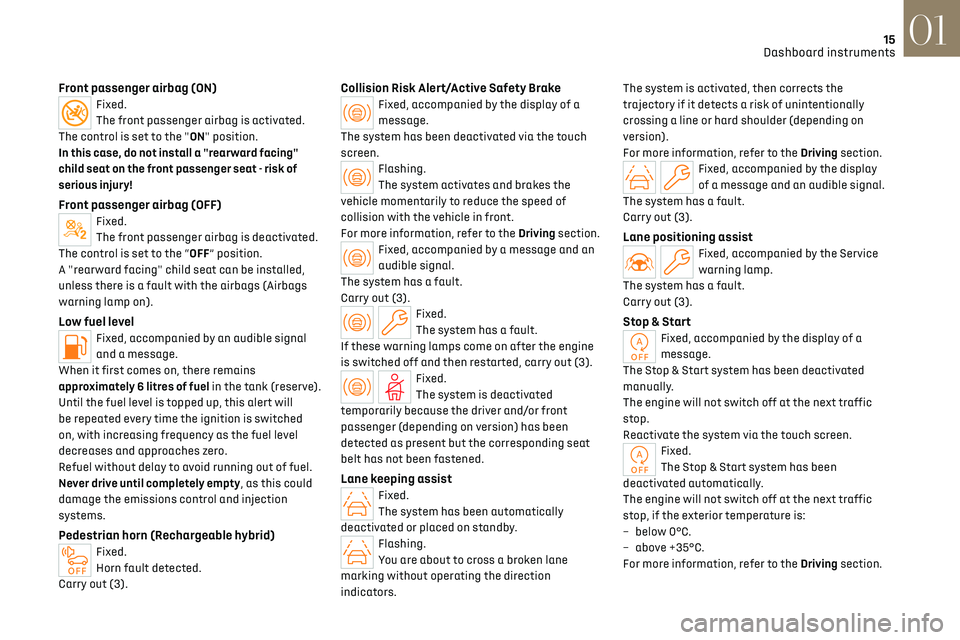
Front passenger airbag (ON)Fixed.
The front passenger airbag is activated.
The control is set to the "ON" position.
In this case, do not install a "rearward facing"
child seat on the front passenger seat - risk of
serious injury!
Front passenger airbag (OFF)Fixed.
The front passenger airbag is deactivated.
The control is set to the “OFF” position.
A "rearward facing" child seat can be installed,
unless there is a fault with the airbags (Airbags
warning lamp on).
Low fuel levelFixed, accompanied by an audible signal
and a message.
When it first comes on, there remains
approximately 6 litres of fuel in the tank (reserve).
Until the fuel level is topped up, this alert will
be repeated every time the ignition is switched
on, with increasing frequency as the fuel level
decreases and approaches zero.
Refuel without delay to avoid running out of fuel.
Never drive until completely empty, as this could
damage the emissions control and injection
systems.
Pedestrian horn (Rechargeable hybrid)Fixed.
Horn fault detected.
Carry out (3).
Collision Risk Alert/Active Safety BrakeFixed, accompanied by the display of a
message.
The system has been deactivated via the touch
screen.
Flashing.
The system activates and brakes the
vehicle momentarily to reduce the speed of
collision with the vehicle in front.
For more information, refer to the Driving section.
Fixed, accompanied by a message and an
audible signal.
The system has a fault.
Carry out (3).
Fixed.
The system has a fault.
If these warning lamps come on after the engine
is switched off and then restarted, carry out (3).
Fixed.
The system is deactivated
temporarily because the driver and/or front
passenger (depending on version) has been
detected as present but the corresponding seat
belt has not been fastened.
Lane keeping assistFixed.
The system has been automatically
deactivated or placed on standby.
Flashing.
You are about to cross a broken lane
marking without operating the direction
indicators. The system is activated, then corrects the
trajectory if it detects a risk of unintentionally
crossing a line or hard shoulder (depending on
version).
For more information, refer to the Driving section.
Fixed, accompanied by the display
of a message and an audible signal.
The system has a fault.
Carry out (3).
Lane positioning assistFixed, accompanied by the Service
warning lamp.
The system has a fault.
Carry out (3).
Stop & StartFixed, accompanied by the display of a
message.
The Stop & Start system has been deactivated
manually.
The engine will not switch off at the next traffic
stop.
Reactivate the system via the touch screen.
Fixed.
The Stop & Start system has been
deactivated automatically.
The engine will not switch off at the next traffic
stop, if the exterior temperature is:
–
belo
w 0°C.
–
abo
ve +35°C.
For more information, refer to the Driving section.
Page 20 of 244
18
Dashboard instruments01
The value indicated is calculated
according to the distance covered and the
time elapsed since the last service.
The alert may also be triggered close to a due
date.
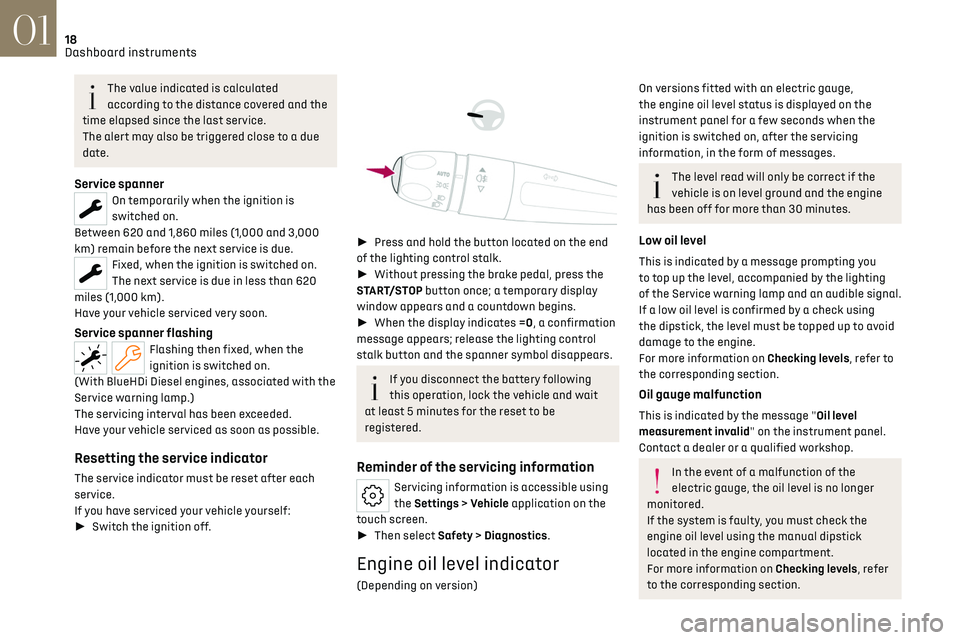
Service spannerOn temporarily when the ignition is
switched on.
Between 620 and 1,860 miles (1,000 and 3,000
km) remain before the next service is due.
Fixed, when the ignition is switched on.
The next service is due in less than 620
miles (1,000 km).
Have your vehicle serviced very soon.
Service spanner flashingFlashing then fixed, when the
ignition is switched on.
(With BlueHDi Diesel engines, associated with the
Service warning lamp.)
The servicing interval has been exceeded.
Have your vehicle serviced as soon as possible.
Resetting the service indicator
The service indicator must be reset after each
service.
If you have serviced your vehicle yourself:
► Switch the ignition off.
► Press and hold the button located on the end
of the lighting control stalk.
► Without pressing the brake pedal, press the
START/STOP button once; a temporary display
window appears and a countdown begins.
► When the display indicates =0, a confirmation
message appears; release the lighting control
stalk button and the spanner symbol disappears.
If you disconnect the battery following
this operation, lock the vehicle and wait
at least 5 minutes for the reset to be
registered.
Reminder of the servicing information
Servicing information is accessible using
the Settings > Vehicle application on the
touch screen.
► Then select Safety > Diagnostics.
Engine oil level indicator
(Depending on version)
On versions fitted with an electric gauge,
the engine oil level status is displayed on the
instrument panel for a few seconds when the
ignition is switched on, after the servicing
information, in the form of messages.
The level read will only be correct if the
vehicle is on level ground and the engine
has been off for more than 30 minutes.
Low oil level
This is indicated by a message prompting you
to top up the level, accompanied by the lighting
of the Service warning lamp and an audible signal.
If a low oil level is confirmed by a check using
the dipstick, the level must be topped up to avoid
damage to the engine.
For more information on Checking levels, refer to
the corresponding section.
Oil gauge malfunction
This is indicated by the message "Oil level
measurement invalid" on the instrument panel.
Contact a dealer or a qualified workshop.
In the event of a malfunction of the
electric gauge, the oil level is no longer
monitored.
If the system is faulty, you must check the
engine oil level using the manual dipstick
located in the engine compartment.
For more information on Checking levels, refer
to the corresponding section.
Page 21 of 244
19
Dashboard instruments01
Coolant temperature indicator
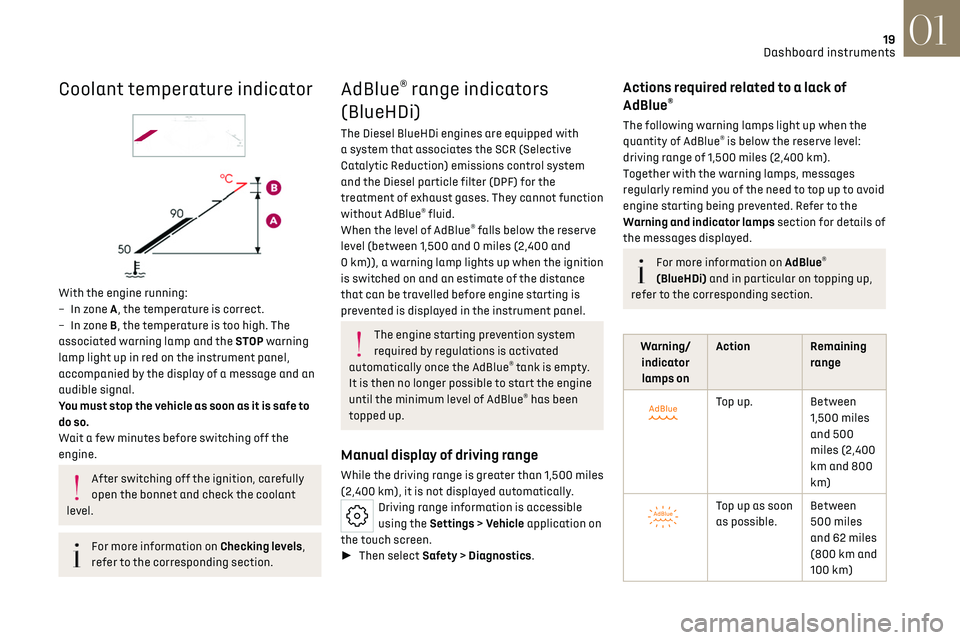
With the engine running:
–
In z one A, the temperature is correct.
–
In z
one B, the temperature is too high. The
associated warning lamp and the STOP warning
lamp light up in red on the instrument panel,
accompanied by the display of a message and an
audible signal.
You must stop the vehicle as soon as it is safe to
do so.
Wait a few minutes before switching off the
engine.
After switching off the ignition, carefully
open the bonnet and check the coolant
level.
For more information on Checking levels,
refer to the corresponding section.
AdBlue® range indicators
(BlueHDi)
The Diesel BlueHDi engines are equipped with
a system that associates the SCR (Selective
Catalytic Reduction) emissions control system
and the Diesel particle filter (DPF) for the
treatment of exhaust gases. They cannot function
without AdBlue
® fluid.
When the level of AdBlue® falls below the reserve
level (between 1,500 and 0 miles (2,400 and
0 km)), a warning lamp lights up when the ignition
is switched on and an estimate of the distance
that can be travelled before engine starting is
prevented is displayed in the instrument panel.
The engine starting prevention system
required by regulations is activated
automatically once the AdBlue
® tank is empty.
It is then no longer possible to start the engine
until the minimum level of AdBlue
® has been
topped up.
Manual display of driving range
While the driving range is greater than 1,500 miles
(2,400 km), it is not displayed automatically.
Driving range information is accessible
using the Settings > Vehicle application on
the touch screen.
► Then select Safety > Diagnostics.
Actions required related to a lack of
AdBlue®
The following warning lamps light up when the
quantity of AdBlue® is below the reserve level:
driving range of 1,500 miles (2,400 km).
Together with the warning lamps, messages
regularly remind you of the need to top up to avoid
engine starting being prevented. Refer to the
Warning and indicator lamps section for details of
the messages displayed.
For more information on AdBlue®
(BlueHDi) and in particular on topping up,
refer to the corresponding section.
Warning/ indicator lamps on Action Remaining
range
Top up. Between 1,500 miles
and 500
miles (2,400
km and 800
km)
Top up as soon
as possible.Between
500 miles
and 62 miles
(800 km and
100 km)
Page 23 of 244
21
Dashboard instruments01
POWER High power demand, using the
combined capabilities of the petrol
engine and the electric motor(s)
(depending on version).
The slider is located in this zone during
more dynamic driving phases when
high levels of performance are being
demanded.
ECO Optimal use of energy (internal combustion or electric).
The slider is located in this zone when
driving under electric power and when
optimal use is being made of the petrol
engine, both accessible by adopting a
suitable driving style.
A symbol indicates the threshold at
which the petrol engine will restart.
The driver can therefore moderate
their acceleration to remain in electric
driving mode.
CHARGE Energy recovery for partly recharging the traction battery.
The slider is located in this zone during
deceleration: taking your foot off the
accelerator pedal or braking.Charge level indicator
(Rechargeable hybrid)
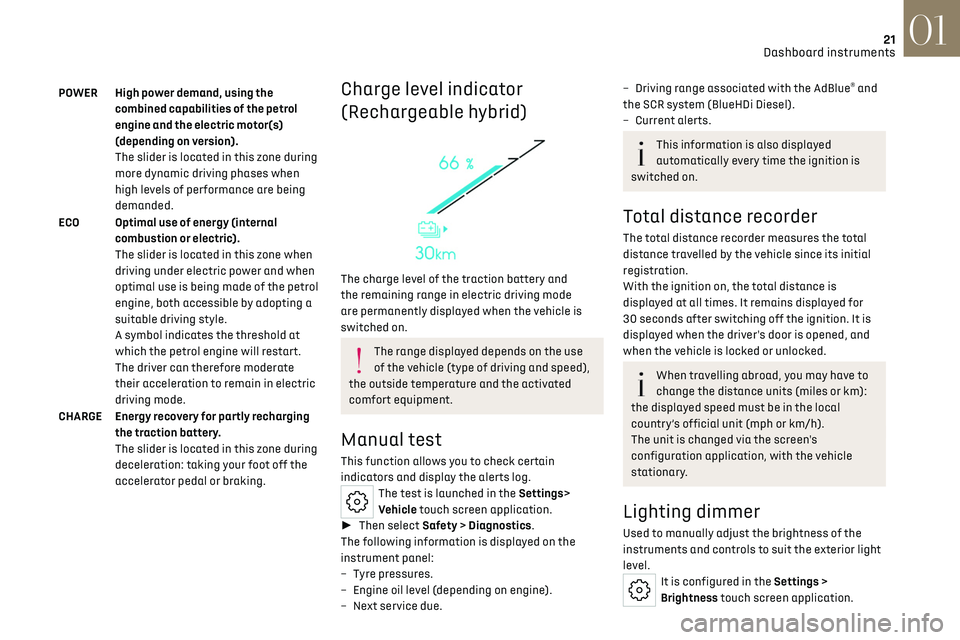
The charge level of the traction battery and
the remaining range in electric driving mode
are permanently displayed when the vehicle is
switched on.
The range displayed depends on the use
of the vehicle (type of driving and speed),
the outside temperature and the activated
comfort equipment.
Manual test
This function allows you to check certain
indicators and display the alerts log.
The test is launched in the Settings>
Vehicle touch screen application.
► Then select Safety > Diagnostics.
The following information is displayed on the
instrument panel:
–
Tyre pre
ssures.
–
Engine oil le
vel (depending on engine).
–
Ne
xt service due.
– Driving range associated with the AdBlue® and
the SCR system (BlueHDi Diesel).
–
Curren
t alerts.
This information is also displayed
automatically every time the ignition is
switched on.
Total distance recorder
The total distance recorder measures the total
distance travelled by the vehicle since its initial
registration.
With the ignition on, the total distance is
displayed at all times. It remains displayed for
30 seconds after switching off the ignition. It is
displayed when the driver's door is opened, and
when the vehicle is locked or unlocked.
When travelling abroad, you may have to
change the distance units (miles or km):
the displayed speed must be in the local
country’s official unit (mph or km/h).
The unit is changed via the screen's
configuration application, with the vehicle
stationary.
Lighting dimmer
Used to manually adjust the brightness of the
instruments and controls to suit the exterior light
level.
It is configured in the Settings >
Brightness touch screen application.