central Citroen JUMPER 2016 2.G Owner's Manual
[x] Cancel search | Manufacturer: CITROEN, Model Year: 2016, Model line: JUMPER, Model: Citroen JUMPER 2016 2.GPages: 276, PDF Size: 8.93 MB
Page 7 of 276
5
jumper_en_Chap01_vue-ensemble_ed01-2015
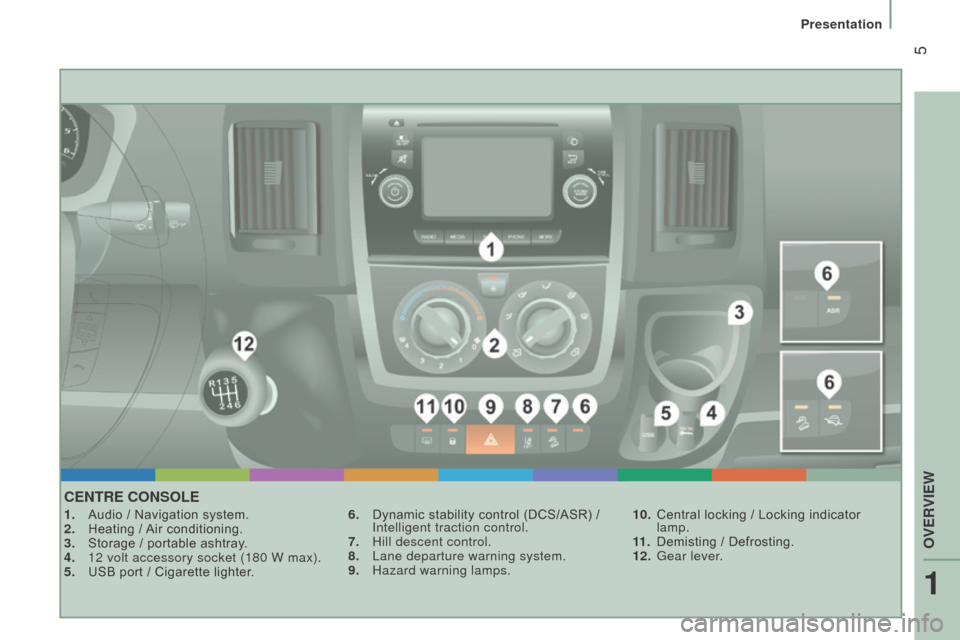
cEntrE cOnSOLE
1. Audio / Navigation system.
2. Heating / Air conditioning.
3.
Storage / portable ashtray
.
4.
12 volt accessory socket (180 W max).
5.
USB port / Cigarette lighter
.6.
Dynamic stability control (DCS/ASR) / i
ntelligent traction control.
7.
Hill descent control.
8.
Lane departure warning system.
9.
Hazard warning lamps.10.
Central locking / Locking indicator
lamp.
11 .
Demisting / Defrosting.
12.
Gear lever
.
1
oVErViEW
Presentation
Page 8 of 276
6
jumper_en_Chap01_vue-ensemble_ed01-2015
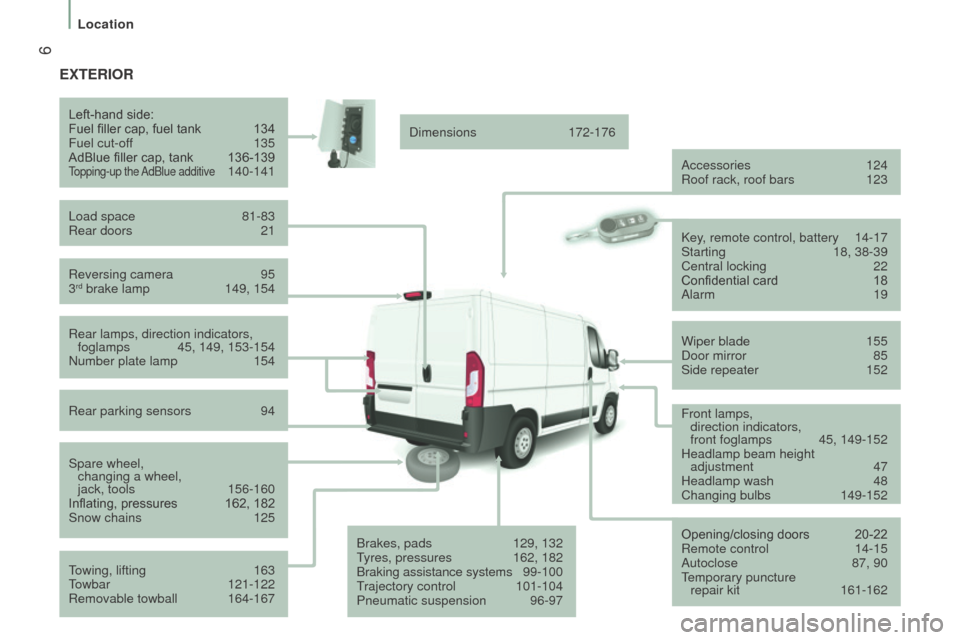
ExtErIOr
reversing camera 95
3rd brake lamp 149, 154
Left-hand side:
Fuel filler cap, fuel tank
134
Fuel cut-of
f
135
AdBlue filler cap, tank
136-139Topping-up the AdBlue additive 140-141
Load space
81-83r
ear doors
21
r
ear lamps, direction indicators,
foglamps
45, 149, 153-154n
umber plate lamp
154
r
ear parking sensors
94
Spare wheel, changing a wheel,
jack, tools
156-160
Inflating, pressures
162, 182
Snow chains
125
T
owing, lifting
163
T
owbar
121-122
r
emovable towball
164-167 Dimensions
172-176
Accessories
124r
oof rack, roof bars 123
Brakes, pads
129, 132
T
yres, pressures
162, 182
Braking assistance systems
9
9-100
Trajectory control
101-104
Pneumatic suspension
96-97Key
, remote control, battery
14-17
Starting
18, 38-39
Central locking
22
Confidential card
18
Alarm
19
Wiper blade
155
Door mirror
85
Side repeater
152
Opening/closing doors
20-22r
emote control
14-15
Autoclose
87, 90
T
emporary puncture repair kit
161-162
Front lamps,
direction indicators,
front foglamps
45, 149-152
Headlamp beam height adjustment
47
Headlamp wash
48
Changing bulbs
149-152
Location
Page 11 of 276
9
jumper_en_Chap01_vue-ensemble_ed01-2015
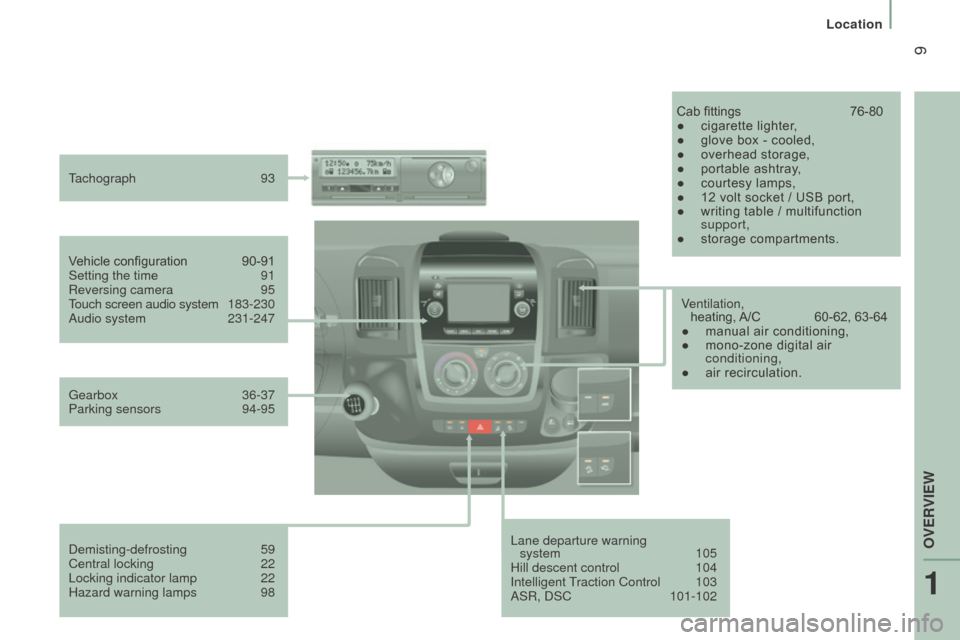
Lane departure warning system 105
Hill descent control
104i
ntelligent Traction Control
103
AS
r , DSC
101-102
V
ehicle configuration
90-91
Setting the time
91r
eversing camera
95
T
ouch screen audio system
1
83-230
Audio system
231-247
T
achograph
93
Cab fittings
76-80
●
cigarette lighter
,
●
glove box - cooled,
●
overhead storage,
●
portable ashtray
,
●
courtesy lamps,
●
12 volt socket / USB port,
●
writing table / multifunction
support,
●
storage compartments.
Gearbox
36-37
Parking sensors
94-95
Demisting-defrosting
59
Central locking
22
Locking indicator lamp
22
Hazard warning lamps
98 V
entilation,
heating, A/C
60-62, 63-64
●
manual air conditioning,
●
mono-zone digital air
conditioning,
●
air recirculation.
1
oVErViEW
Location
Page 16 of 276
14
jumper_en_Chap02_Pret-a-Partir_ed01-2015
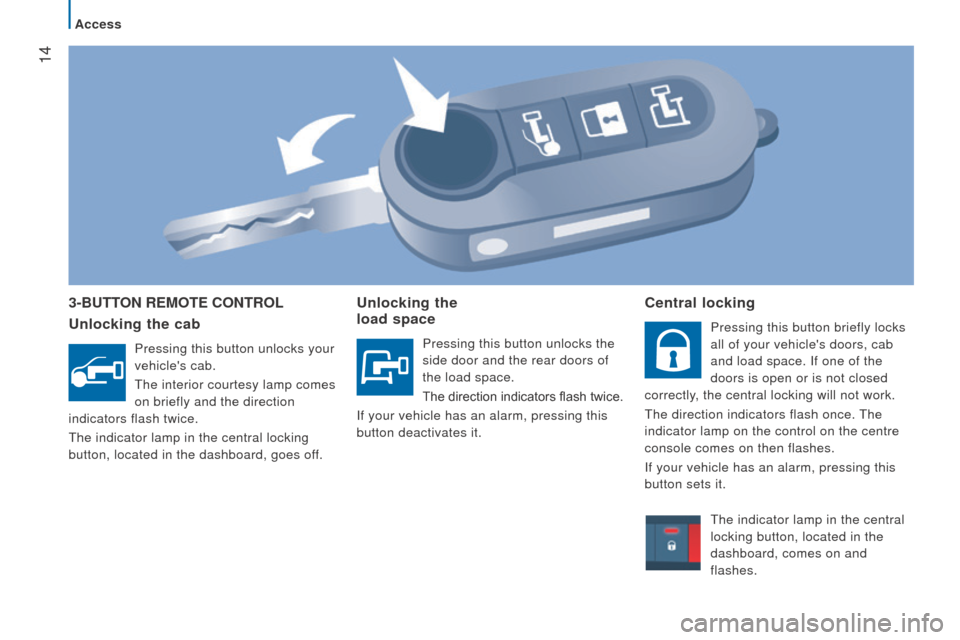
3-ButtOn r EMO t E c O ntr OL
u nlocking the cab
Pressing this button unlocks your
vehicle's cab.
The interior courtesy lamp comes
on briefly and the direction
indicators flash twice.
The indicator lamp in the central locking
button, located in the dashboard, goes off.
unlocking the
load space
Pressing this button unlocks the
side door and the rear doors of
the load space.
The direction indicators flash twice.
i
f your vehicle has an alarm, pressing this
button deactivates it.
central locking
Pressing this button briefly locks
all of your vehicle's doors, cab
and load space.
i f one of the
doors is open or is not closed
correctly, the central locking will not work.
The direction indicators flash once. The
indicator lamp on the control on the centre
console comes on then flashes.
i
f your vehicle has an alarm, pressing this
button sets it.
The indicator lamp in the central
locking button, located in the
dashboard, comes on and
flashes.
Access
Page 17 of 276
15
jumper_en_Chap02_Pret-a-Partir_ed01-2015
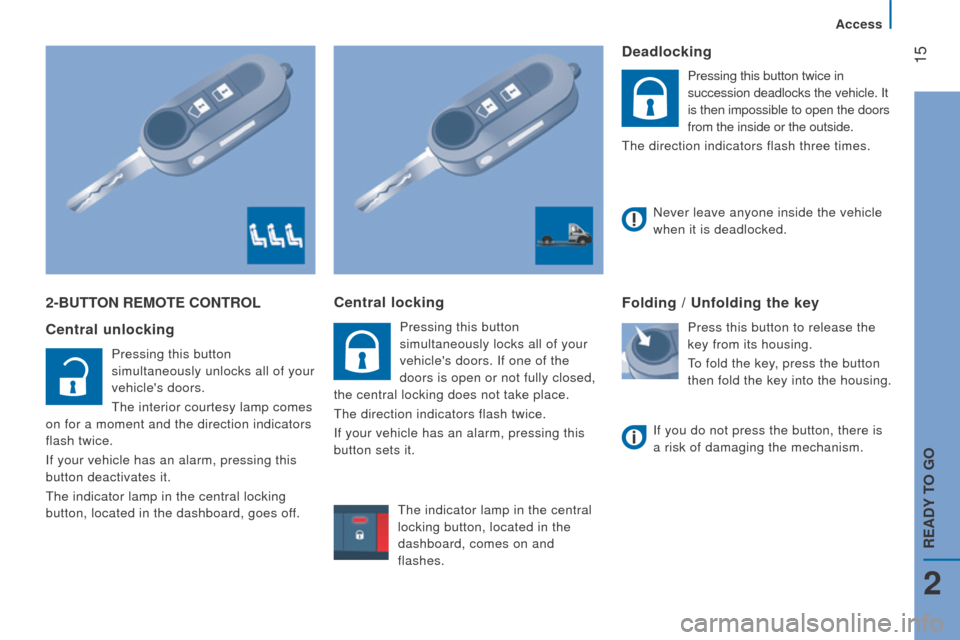
2-ButtOn r EMO t E c O ntr OL
c entral unlocking
Pressing this button
simultaneously unlocks all of your
vehicle's doors.
The interior courtesy lamp comes
on for a moment and the direction indicators
flash twice.
i
f your vehicle has an alarm, pressing this
button deactivates it.
The indicator lamp in the central locking
button, located in the dashboard, goes off.
central locking
Pressing this button
simultaneously locks all of your
vehicle's doors.
i f one of the
doors is open or not fully closed,
the central locking does not take place.
The direction indicators flash twice.
i
f your vehicle has an alarm, pressing this
button sets it.
deadlocking
Pressing this button twice in
succession deadlocks the vehicle. i t
is then impossible to open the doors
from the inside or the outside.
The direction indicators flash three times.
Folding / unfolding the key
Press this button to release the
key from its housing.
To fold the key, press the button
then fold the key into the housing.
n
ever leave anyone inside the vehicle
when it is deadlocked.
i
f you do not press the button, there is
a risk of damaging the mechanism.
The indicator lamp in the central
locking button, located in the
dashboard, comes on and
flashes.
2
Access
rEAdY tO GO
Page 19 of 276
17
jumper_en_Chap02_Pret-a-Partir_ed01-2015
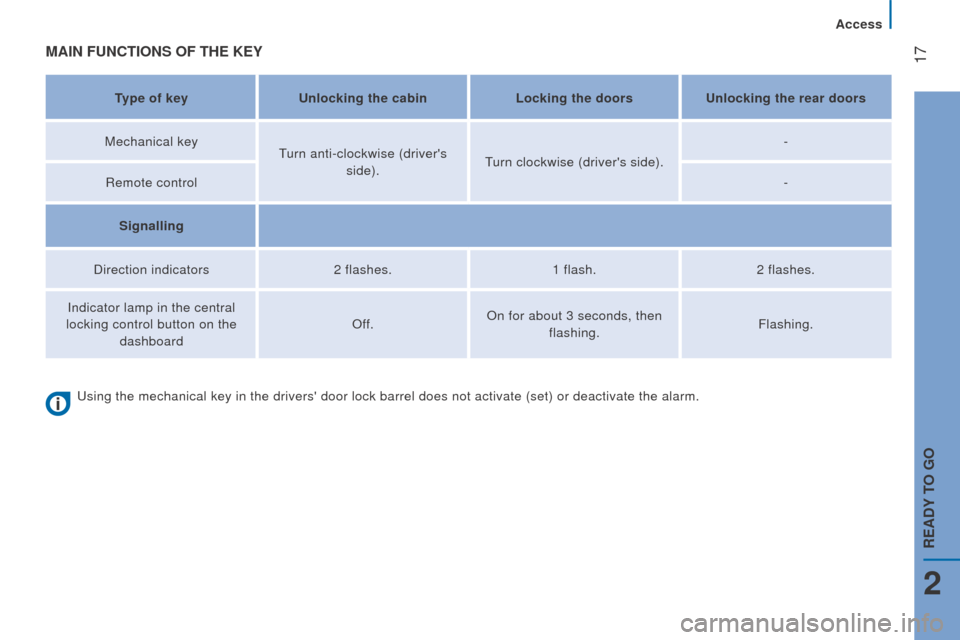
MAIn FunctIOnS OF tHE KEY
type of keyunlocking the cabin Locking the doorsu nlocking the rear doors
Mechanical key Turn anti-clockwise (driver's
side). Turn clockwise (driver's side). -
r
emote control -
Signalling
Direction indicators 2 flashes.1 flash.2 flashes.
i
ndicator lamp in the central
locking control button on the dashboard
o
ff.
o
n for about 3 seconds, then flashing. Flashing.
Using the mechanical key in the drivers' door lock barrel does not activ\
ate (set) or deactivate the alarm.
2
Access
rEAdY tO GO
Page 21 of 276
19
jumper_en_Chap02_Pret-a-Partir_ed01-2015
remote control fault
Unlock the doors by using the key in the
door lock; the alarm is triggered.
Switch on the ignition, recognition of the
key's code turns off the alarm.Locking the doors by using the key in
the door lock does not set the alarm.
deactivation using the remote control
When this button is pressed, the
alarm is deactivated when the
vehicle is unlocked.
deactivation of the anti-tilt
protection*
Press this control to deactivate
the protection (when towing the
vehicle with the alarm on, for
example).
The protection remains active until the doors
are unlocked with the central locking.
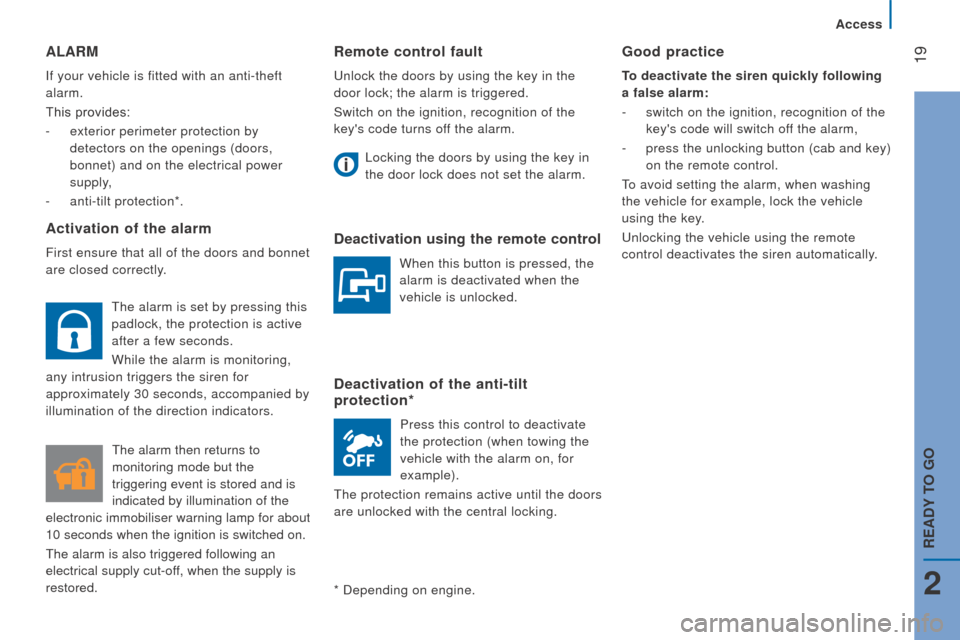
ALArM
if your vehicle is fitted with an anti-theft
alarm.
This provides:
-
exterior perimeter protection by
detectors on the openings (doors,
bonnet) and on the electrical power
supply,
-
anti-tilt protection*.
Activation of the alarm
First ensure that all of the doors and bonnet
are closed correctly.
*
Depending on engine.
Good practice
to deactivate the siren quickly following
a false alarm:
-
switch on the ignition, recognition of the
key's code will switch off the alarm,
-
press the unlocking button (cab and key)
on the remote control.
To avoid setting the alarm, when washing
the vehicle for example, lock the vehicle
using the key.
Unlocking the vehicle using the remote
control deactivates the siren automatically.
The alarm is set by pressing this
padlock, the protection is active
after a few seconds.
While the alarm is monitoring,
any intrusion triggers the siren for
approximately 30 seconds, accompanied by
illumination of the direction indicators.
The alarm then returns to
monitoring mode but the
triggering event is stored and is
indicated by illumination of the
electronic immobiliser warning lamp for about
10
seconds when the ignition is switched on.
The alarm is also triggered following an
electrical supply cut-off, when the supply is
restored.
2
Access
rEAdY tO GO
Page 24 of 276
22
jumper_en_Chap02_Pret-a-Partir_ed01-2015
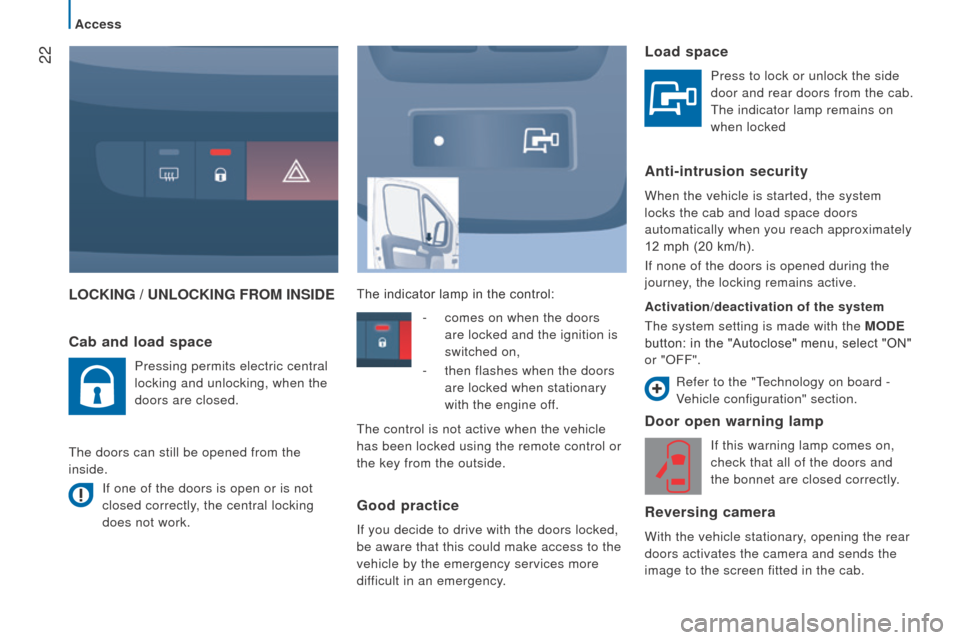
LOcKInG / unLOcKInG FrOM InSIdEd oor open warning lamp
if this warning lamp comes on,
check that all of the doors and
the bonnet are closed correctly.
reversing camera
With the vehicle stationary, opening the rear
doors activates the camera and sends the
image to the screen fitted in the cab.
cab and load space
Pressing permits electric central
locking and unlocking, when the
doors are closed.
The doors can still be opened from the
inside.
i
f one of the doors is open or is not
closed correctly, the central locking
does not work. The indicator lamp in the control:
Load space
Press to lock or unlock the side
door and rear doors from the cab.
The indicator lamp remains on
when locked
Anti-intrusion security
When the vehicle is started, the system
locks the cab and load space doors
automatically when you reach approximately
12 mph (20 km/h).
i
f none of the doors is opened during the
journey, the locking remains active.
Activation/deactivation of the system
The system setting is made with the MO
d E
button: in the "Autoclose" menu, select "ON"
or "
o FF".
-
comes on when the doors
are locked and the ignition is
switched on,
-
then flashes when the doors
are locked when stationary
with the engine off.
The control is not active when the vehicle
has been locked using the remote control or
the key from the outside.
Good practice
if you decide to drive with the doors locked,
be aware that this could make access to the
vehicle by the emergency services more
difficult in an emergency.
r
efer to the "Technology on board -
Vehicle configuration" section.
Access
Page 56 of 276
54
jumper_en_Chap03_Ergo-et-confort_ed01-2015
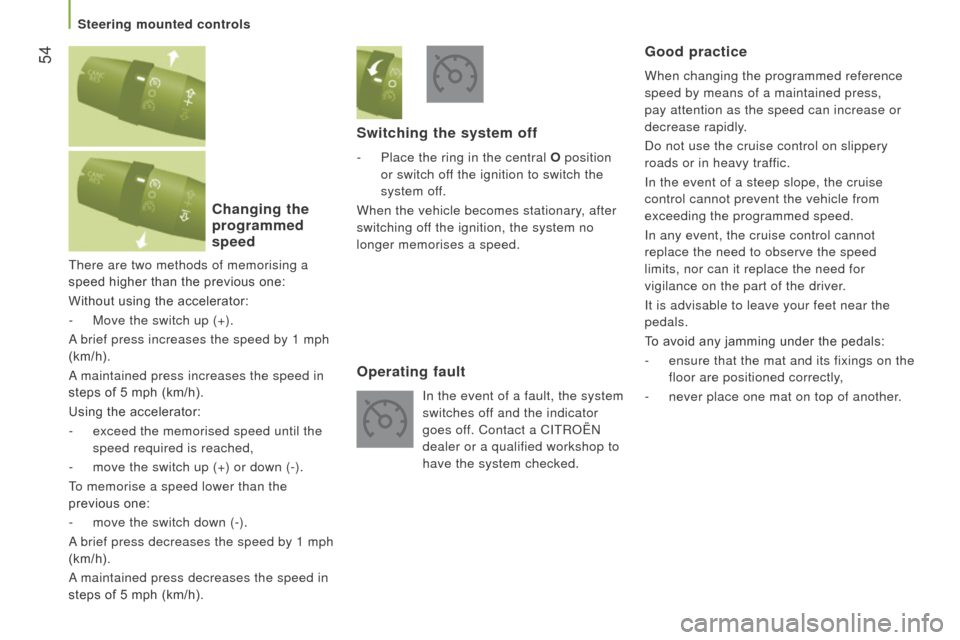
There are two methods of memorising a
speed higher than the previous one:
Without using the accelerator:
-
Move the switch up (+).
A
brief press increases the speed by 1 mph
(km/h).
A maintained press increases the speed in
steps of 5 mph (km/h).
Using the accelerator:
-
exceed the memorised speed until the
speed required is reached,
-
move the switch up (+) or down (-).
T
o memorise a speed lower than the
previous one:
-
move the switch down (-).
A
brief press decreases the speed by 1 mph
(km/h).
A maintained press decreases the speed in
steps of 5 mph (km/h).
changing the
programmed
speed Switching the system off
- Place the ring in the central
O position
or switch off the ignition to switch the
system off.
When the vehicle becomes stationary, after
switching off the ignition, the system no
longer memorises a speed.
Operating fault
in the event of a fault, the system
switches of f and the indicator
goes off. Contact a C
i T roën
dealer or a qualified workshop to
have the system checked.
Good practice
When changing the programmed reference
speed by means of a maintained press,
pay attention as the speed can increase or
decrease rapidly.
Do not use the cruise control on slippery
roads or in heavy traffic.
i
n the event of a steep slope, the cruise
control cannot prevent the vehicle from
exceeding the programmed speed.
i
n any event, the cruise control cannot
replace the need to observe the speed
limits, nor can it replace the need for
vigilance on the part of the driver.
i
t is advisable to leave your feet near the
pedals.
To avoid any jamming under the pedals:
-
ensure that the mat and its fixings on the
floor are positioned correctly,
-
never place one mat on top of another
.
Steering mounted controls
Page 59 of 276
57
jumper_en_Chap03_Ergo-et-confort_ed01-2015
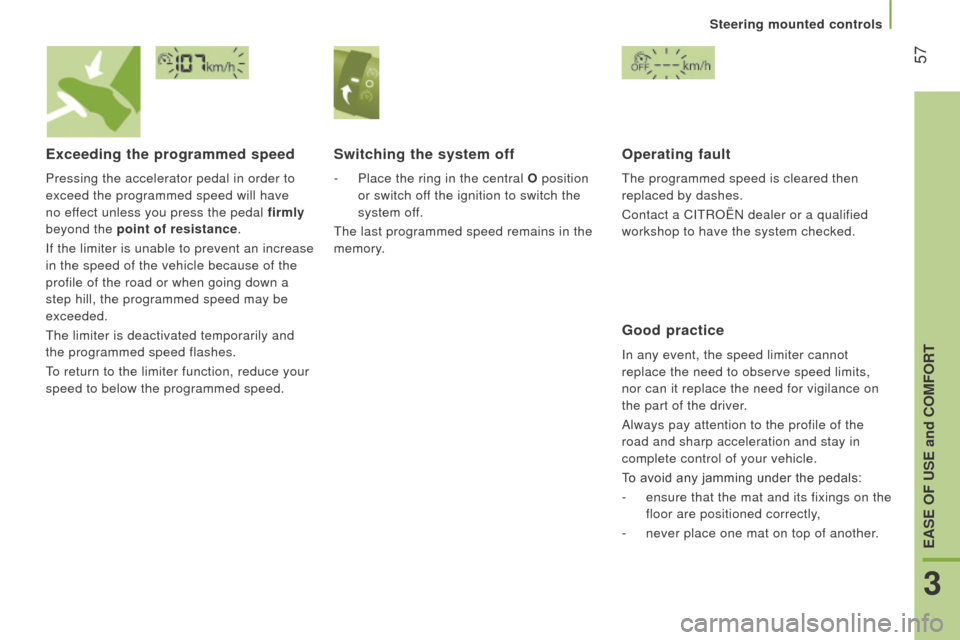
Exceeding the programmed speed
Pressing the accelerator pedal in order to
exceed the programmed speed will have
no effect unless you press the pedal firmly
beyond the point of resistance.
i
f the limiter is unable to prevent an increase
in the speed of the vehicle because of the
profile of the road or when going down a
step hill, the programmed speed may be
exceeded.
The limiter is deactivated temporarily and
the programmed speed flashes.
To return to the limiter function, reduce your
speed to below the programmed speed.
Switching the system off
- Place the ring in the central O position
or switch off the ignition to switch the
system off.
The last programmed speed remains in the
memory.
Operating fault
The programmed speed is cleared then
replaced by dashes.
Contact a C
i T roën dealer or a qualified
workshop to have the system checked.
Good practice
in any event, the speed limiter cannot
replace the need to observe speed limits,
nor can it replace the need for vigilance on
the part of the driver.
Always pay attention to the profile of the
road and sharp acceleration and stay in
complete control of your vehicle.
To avoid any jamming under the pedals:
-
ensure that the mat and its fixings on the
floor are positioned correctly,
-
never place one mat on top of another
.
3
EASE OF uSE and cOMFOrt
Steering mounted controls