CD changer Citroen JUMPY 2010 2.G User Guide
[x] Cancel search | Manufacturer: CITROEN, Model Year: 2010, Model line: JUMPY, Model: Citroen JUMPY 2010 2.GPages: 225, PDF Size: 10.84 MB
Page 189 of 225

01
9.43
RADIO: selection of the previous stored station. MP3/WMA SD CARD: selection of the previous directory. CD CHANGER: selection of the previous CD. Selection of the previous entry in the address book.
RADIO: selection of the next stored station. MP3/WMA SD CARD: selection of the next directory. CD CHANGER: selection of the next CD. Selection of the next entry in the address book.
RADIO: change to the next radio station on the list. Long press: automatic search for a higher frequency. CD/MP3 SD CARD/CD CHANGER: selection of the next track. CD/MP3 SD CARD/CD CHANGER: continuous press: fast forward play.
RADIO: change to the previous radio station on the List. Long press: automatic search for a lower frequency. CD/MP3 SD CARD/CD CHANGER: selection of the previous track. CD/MP3 SD CARD/CD CHANGER: continuous press: fast backward play.
- Change the sound source. - Make a call from the address book. - Pick up/Hang up the telephone. - Press for more than 2 seconds: access to the address book.
Volume increase.
Volume decrease .
STEERING WHEEL CONTROLS
Mute: function activated by pressing the volume increase and decrease buttons simultaneously.
Restore the sound by pressing one of the two volume buttons.
FIRST STEPS
Page 203 of 225
1
2
3
4
1
4
06
2
3
5
9.57
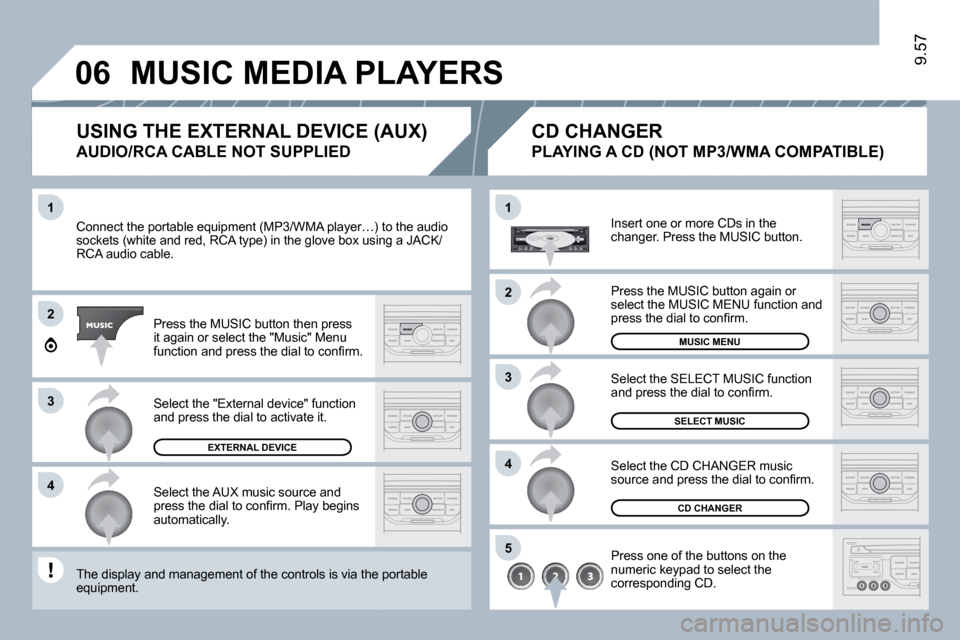
Connect the portable equipment (MP3/WMA player…) ter…) to the audio sockets (white and red, RCA type) in the glove box usinx using a JACK/RCA audio cable.
Press the MUSIC button then press it again or select the "Music" Menu function and press the dial to confi rm.
Select the AUX music source and press the dial to confi rm. Play begins automatically.
Select the "External device" function and press the dial to activate it.
EXTERNAL DEVICE
Insert one or more CDs in the changer. Press the MUSIC button.
Press one of the buttons on the numeric keypad to select the corresponding CD.
Select the CD CHANGER music source and press the dial to confi rm.
The display and management of the controls is via the pa the portable equipment.
CD CHANGER
Select the SELECT MUSIC function and press the dial to confi rm.
USING THE EXTERNAL DEVICE (AUX)
AUDIO/RCA CABLE NOT SUPPLIED
CD CHANGER
PLAYING A CD (NOT MP3/WMA COMPATIBLE)
SELECT MUSIC
Press the MUSIC button again or select the MUSIC MENU function and press the dial to confi rm.
MUSIC MENU
MUSIC MEDIA PLAYERS
Page 212 of 225

9.68
01 FIRST STEPS
CD eject.
On - Off. Volume dial.
Mode: Selection of the screen display mode. Dark: Hide the screen display, until completely black, by successive presses. Pressing again reactivates the display.
Source:Selection of the source; radio, CD and CD changer. Band: Selection of the FM1, FM2, FMast and AM wavebands. : Setting the audio options: Front/rear balance, left/right balance, loudness, sound ambiences. List: Displaying of the local stations, of the tracks on the CD or of the MP3 directories. - Storing of a station. - Selection of a stored radio station. - Selection of a CD in the CD changer. Updating of the stations received.
ESC: Abandon current operation. Menu: Displaying of the general menu.
Navigator which selects the choices above or the step by step or rapid advances. Pressing the navigation dial confi rms the choice, but does not store it.
A long press is required.
For a detailed global view of the menus available, refer to the "Display fl ow chart" section of this chapter.
Page 213 of 225

01
9.69
RADIO: selection of the next stored station. CD CHANGER: selection of the next CD. USB: selection of the next genre/artist/folder from the classifi cation list. Selection of the next item on a menu.
RADIO: selection of the previous stored station. CD CHANGER: selection of the previous CD. USB: selection of the previous genre/artist/folder from the classifi cation list. Selection of the previous item on a menu.
RADIO: automatic search for a higher frequency. CD/CD CHANGER/MP3/USB: selection of the next track. CD/CD CHANGER/USB: continuous press: fast forwards play. Selection of the previous item.
RADIO: automatic search for a lower frequency. CD/CD CHANGER/MP3/USB: selection of the previous track. CD/CD CHANGER/USB: continuous press: fast backwards play. Selection of the next item.
Volume increase.
Volume decrease.
FIRST STEPS
Mute: by pressing the volume increase and decrease buttons simultaneously.
Restore the sound: by pressing one of the two volume buttons.
- Change of sound source. - Confi rmation of a selection. - Pick up/Hang up the telephone. - Press for more than 2 seconds: access to the telephone menu.
STEERING WHEEL CONTROLS
Page 217 of 225

11
22
11
22
33
9.73
Insert an MP3 compilation in the player. The audio equipment searches for all of the music tracks, which may take anything between a few seconds and several tens of seconds, before play begins.
On a single disc, the CD player can read up to 255 MP3 fi les spread over 8 directory levels. However, it is advisable to keep to a limit of two levels to reduce the access time before the CD is played.
To play a disc which has already been inserted, press the SOURCE button several times in succession and select CD.
Press one of the buttons to select a track on the CD. Press the LIST REFRESH button to display the list of directories of the MP3 compilation.
* According to level of fi nish.
PLAYING AN MP3 COMPILATION *
CD
PLAYING A CD (MP3 COMPATIBLE)
Insert the CDs in the changer one by one. Press the SOURCE button several times in succession and select CD CHANGER.
Press one of the buttons on the numeric keypad to select the corresponding CD.
Press one of the buttons to select a track on the CD. Press and hold one of the buttons for fast forward or backward play.
CD CHANGER