phone Citroen JUMPY 2010 2.G User Guide
[x] Cancel search | Manufacturer: CITROEN, Model Year: 2010, Model line: JUMPY, Model: Citroen JUMPY 2010 2.GPages: 225, PDF Size: 10.84 MB
Page 149 of 225
02
9.7
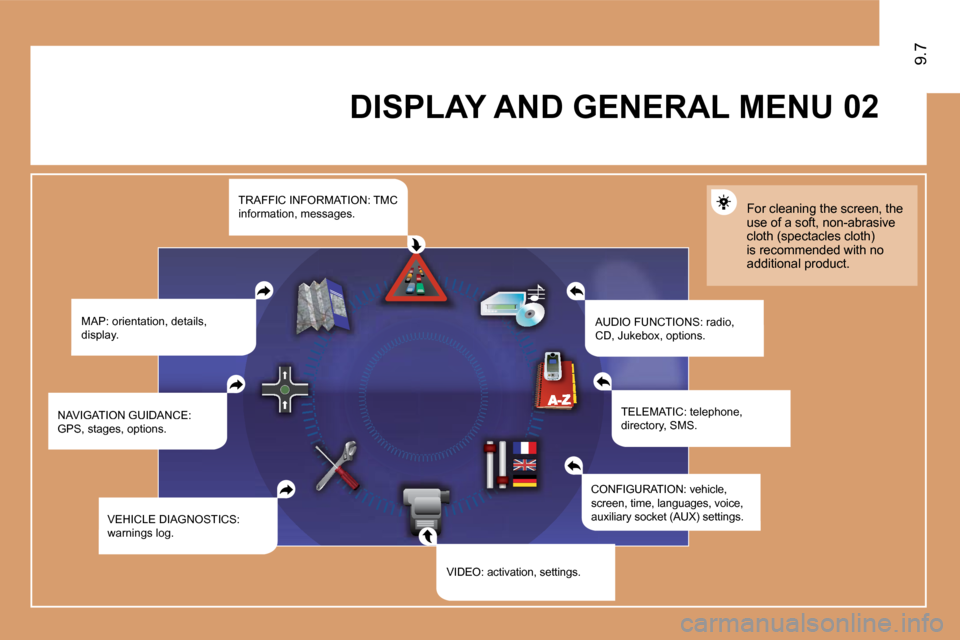
DISPLAY AND GENERAL MENU
MAP: orientation, details, display. AUDIO FUNCTIONS: radio, CD, Jukebox, options.
For cleaning the screen, the use of a soft, non-abrasive cloth (spectacles cloth) is recommended with no additional product.
TELEMATIC: telephone, directory, SMS.
CONFIGURATION: vehicle, screen, time, languages, voice, auxiliary socket (AUX) settings.
VIDEO: activation, settings.
VEHICLE DIAGNOSTICS: warnings log.
NAVIGATION GUIDANCE: GPS, stages, options.
TRAFFIC INFORMATION: TMC information, messages.
Page 170 of 225

9.28
11
22
33
11
22
06MAKING TELEPHONE CALLS
ENTERING THE PIN CODE
Access the slot by pressing the button using the tip of a pen.
Install the SIM card in the holder and then insert it in the slot.
To remove the SIM card, repeat step 1.
Your SIM card must be installed and removed with the NaviDrive audio and telematics system switched off and the ig nition off.
Enter the PIN code on the keypad.
Confi rm the PIN code by pressing button #.
PIN CODE
When entering your PIN code, tick the STORE PIN ta b to gain access to the telephone without having to enter this code when it is used subsequently.
INSTALLING YOUR SIM CARD
(NOT SUPPLIED)
Page 171 of 225

33
22
11
44
06
The services offered by the telephone depend on the network, the SIM card and the compatibility of the Bluetooth equipment used. Refer to your telepho ne's manual and your operator to check which services you have access to. A list of mobile telephones which offer the best range of services is available from dealers.
BLUETOOTH TELEPHONE
CONNECTING A BLUETOOTH
TELEPHONE
For reasons of safety, the driver should only carr y out operations which require prolonged attention when the vehicle is stationary (pairing the Bluetooth mobile telephone to the hands-free kit).
Activate the telephone's Bluetooth function. The last telephone connected is reconnected automatically.
Select BLUETOOTH ACTIVATION MODE, then ACTIVATED AND VISIBLE. Press the dial to confi rm each operation.
Press the MENU button, select TELEMATICS, then BLUETOOTH FUNCTIONS. Press the dial to confi rm each operation.
On your telephone, select the name of the CITROËN audio/telephone. On your telephone, select the name
Enter the authentication code (0000 by default).
To fi nd and change the name of the CITROËN audio/t elephone, To fi nd and change the name of the CITROËN audio/telephone, repeat step 2 then select CHANGE AUDIO/TELEPHONPHONE NAME.
9.29
Page 172 of 225

9.30
06
To change the authentication code, repeat step 2 then select AUTHENTICATION CODE and save the code of your choic e.
BLUETOOTH TELEPHONE
CONNECTING A
BLUETOOTH TELEPHONE
To change the telephone connected, repeat step 2 then select LIST OF MATCHED TELEPHONES and press OK to confi rm. The list of previously connected telephones (10 maximum) appears. Select the telephone of your choice, confi rm, then select CONNECT and press the dial to confi rm.
Once the telephone has been connected, the system catem can synchronise the address book and the call list. Repeat speat step 2 then select PHONE BOOK SYNCHRONISATION MODE. SeE. Select the synchronisation of your choice and press the dial to confi rm. synchronisation of your choice and press the dial to confi rm.
The synchronisation may take a few minutes.
The call list consists of calls made from the vehicle's audiotelephone only.
Page 173 of 225
11
22
33
55
66
44
06
9.31
DIAL
MAKING TELEPHONE CALLS
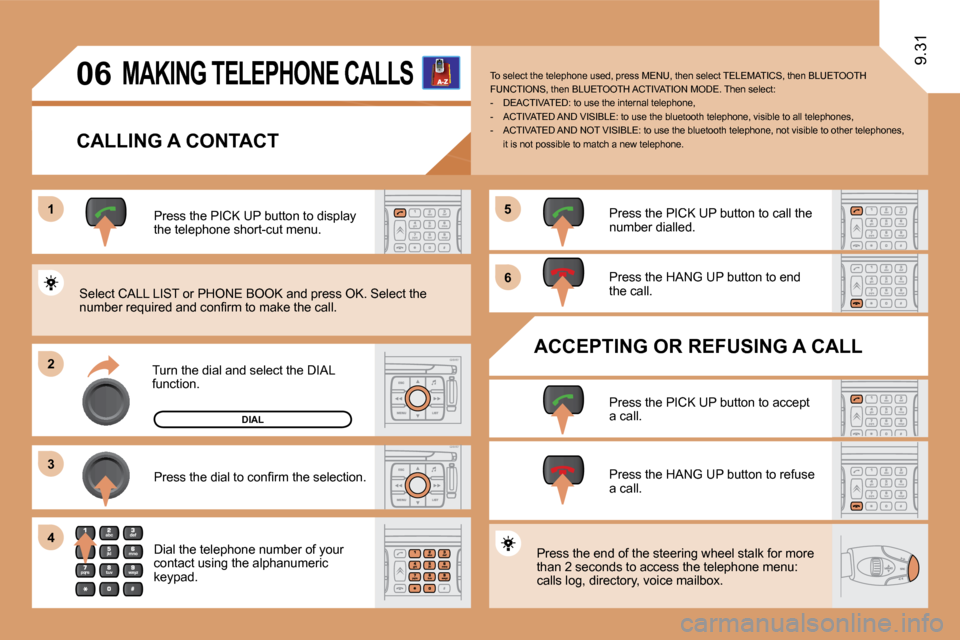
CALLING A CONTACT
Turn the dial and select the DIAL function.
Press the PICK UP button to display the telephone short-cut menu.
Press the dial to confi rm the selection.
Dial the telephone number of your contact using the alphanumeric keypad.
Press the PICK UP button to call the number dialled.
Press the HANG UP button to end the call.
ACCEPTING OR REFUSING A CALL
Press the PICK UP button to accept a call.
Press the HANG UP button to refuse a call.
Press the end of the steering wheel stalk for more than 2 seconds to access the telephone menu: calls log, directory, voice mailbox.
To select the telephone used, press MENU, then select TELEMATICS, then BLUETOOTH FUNCTIONS, then BLUETOOTH ACTIVATION MODE. Then sel ect: - DEACTIVATED: to use the internal telephone, - ACTIVATED AND VISIBLE: to use the bluetooth telephone, visible to all telephones, - ACTIVATED AND NOT VISIBLE: to use the bluetoo th telephone, not visible to other telephones, it is not possible to match a new telephone.
Select CALL LIST or PHONE BOOK and press OK. Selec t the number required and confi rm to make the call.
Page 176 of 225
9.34
22
11
08
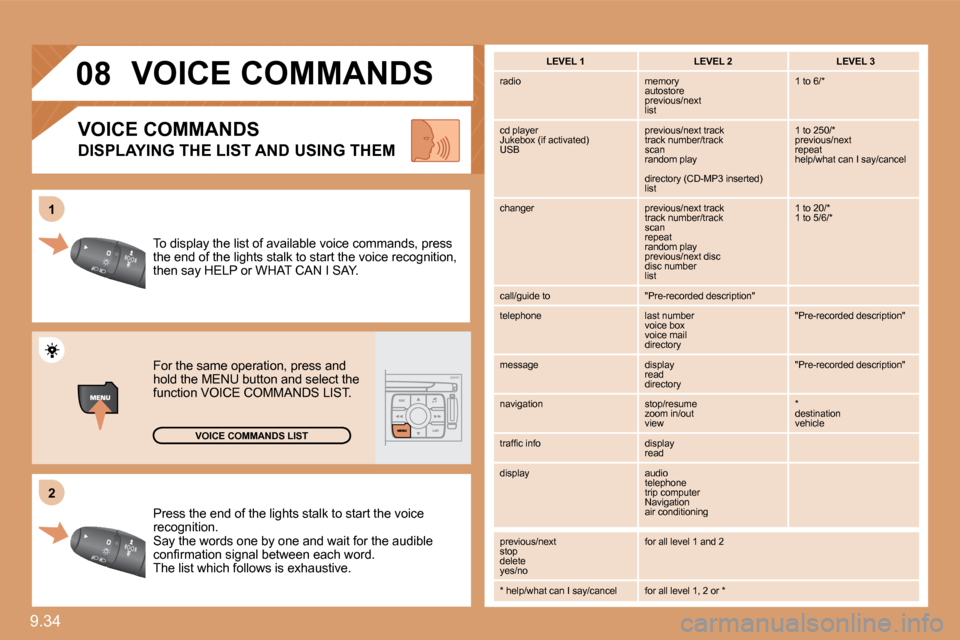
Press the end of the lights stalk to start the voice recognition. Say the words one by one and wait for the audible confi rmation signal between each word. The list which follows is exhaustive.
To display the list of available voice commands, p ress the end of the lights stalk to start the voice recognition, then say HELP or WHAT CAN I SAY.
For the same operation, press and hold the MENU button and select the function VOICE COMMANDS LIST.
VOICE COMMANDS LIST
VOICE COMMANDS
DISPLAYING THE LIST AND USING THEM
LEVEL 1 LEVEL 2 LEVEL 3
radio memory autostore previous/next list
1 to 6/*
cd player Jukebox (if activated) USB
previous/next track track number/track scan random play
directory (CD-MP3 inserted) list
1 to 250/* previous/next repeat help/what can I say/cancel
changer previous/next track track number/track scan repeat random play previous/next disc disc number list
1 to 20/* 1 to 5/6/*
call/guide to "Pre-recorded description"
telephone last number voice box voice mail directory
"Pre-recorded description"
message display read directory
"Pre-recorded description"
navigation stop/resume zoom in/out view
* destination vehicle
traffi c info display read
display audio telephone trip computer Navigation air conditioning
previous/next stop delete yes/no
for all level 1 and 2
* help/what can I say/cancel for all level 1, 2 or *
VOICE COMMANDS
Page 180 of 225

9.38
4
4
3
1
4
2
3
3
3
4
4
2
4
3
4
4
4
2
3
4
4
4
4
3
3
3
3
4
4
3
3
5
5
5
3
3
2
3
5
5
3
2
4
3
5
4
3
4
3
4
4
3
3
4
4
4
4
4
3
5
4
5
5
2
3
4
4
current album
current track
eject CD
receive by infrared
exchange with SIM card
send all records to SIM
send one record to SIM
receive all SIM fi les
receive a SIM fi le
exchange with Bluetooth
TELEMATICS
call list
dial
directory
mailbox
services
customer contact centre
CITROËN assistance
CITROËN service
messages received
USB
copy USB to Jukebox
complete disc
multiple selection
current album
current track
eject USB
CALL
DIRECTORY
managing directory fi les
consult or modify a fi le
add a fi le
delete a fi le
delete all fi les
confi gure directory
select a directory
name directory
select starting directory
fi le transfer
exchange by infrared
send all records
send one record
TEXT MESSAGES (SMS)
read received text messages
send a text message
write a text message
delete list of text messages
TELEPHONE FUNCTIONS
network
network search mode
automatic mode
manual mode
networks available
length of calls
reset
manage PIN code
activate/deactivate
save PIN code
JUKEBOX
jukebox management
jukebox confi guration
hi-fi (320 kbps)
high (192 kbps)
normal (128 kbps)
playlist management
delete jukebox data
Jukebox status
Page 181 of 225

1
3
2
3
1
2
3
3
2
2
2
6
3
3
3
4
1
2
3
3
3
3
2
3
3
4
4
4
3
2
2
4
5
5
4
5
5
2
3
4
3
4
4
3
3
3
4
4
4
4
9.399.39
Display short cuts version 8.2
modify PIN code
call options
confi gure calls
display my number
automatic reply after x ring(s)
ring options
for voice calls
for text messages (SMS)
text message ring
calls diversion to mailbox n°
delete calls log
CONFIGURATION
voice commands setting
speech synthesis setting
guidance instructions volume
other message volume
select female/male voice
activate/deactivate auxiliary source
SELECT LANGUAGE
VEHICLE DIAGNOSTICS
DISPLAY CONFIGURATION
choose colour
adjust luminosity
set date and time
select units
SOUND
VIDEO
VIDEO PARAMETERS
display formats
adjust luminosity
set colours
set contrasts
ALERT LOG
STATUS OF FUNCTIONS *
RESET TYRE PRESS. DETEC. SYS. * * The parameters vary according to vehicle.
BLUETOOTH FUNCTIONS
activation mode
deactivated
activated and visible
activated and not visible
list of matched peripheral equipment
change the name of the audio/telephone
authentication code
phone book synchronisation mode
no synchronisation
view telephone phone book
view SIM card phone book
view all phone books
DEFINE VEHICLE PARAMETERS *
ACTIVATE VIDEO MODE
Page 182 of 225

9.40
1
2
2
2
1
1
1
Press the MENU button for more than 2 seconds to access the following fl ow chart.
VOICE COMMANDS LIST
Press the Music button several times in succession to access the following settings.
AUTO VOLUME CORRECTION
Each audio source (Radio, CD, MP3, Jukebox, CD changer) has its own separate settings.
AUDIO/TELEPHONE DIAGNOSTICS
GPS COVERAGE
UNIT BACKUP POWER
UNIT DESCRIPTION
NAVIGATION DEMONSTRATION
SERVICES CONFIGURATION
LOUDNESS CORRECTION TREBLE BASS MUSICAL AMBIENCE
FR - RR BALANCE LH - RH BALANCE
Page 185 of 225
9.84
QUESTION SOLUTION RESPONSE
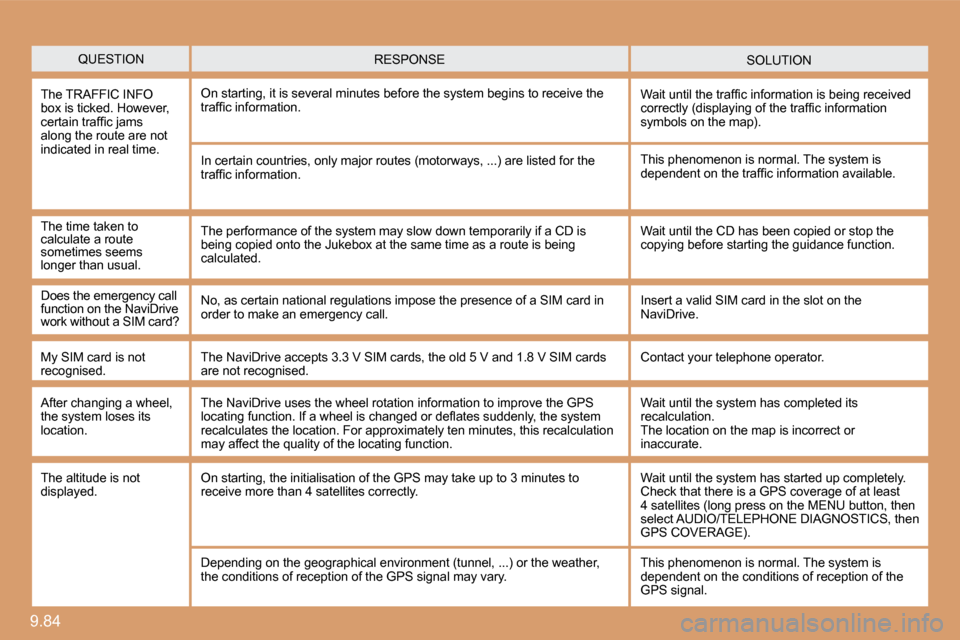
The TRAFFIC INFO box is ticked. However, certain traffi c jams along the route are not indicated in real time.
On starting, it is several minutes before the system begins to receive the traffi c information. Wait until the traffi c information is being received correctly (displaying of the traffi c information symbols on the map).
In certain countries, only major routes (motorways , ...) are listed for the traffi c information.
The time taken to calculate a route sometimes seems longer than usual.
This phenomenon is normal. The system is dependent on the traffi c information available.
The performance of the system may slow down tempor arily if a CD is being copied onto the Jukebox at the same time as a route is being calculated.
Wait until the CD has been copied or stop the copying before starting the guidance function.
Does the emergency call function on the NaviDrive work without a SIM card?
No, as certain national regulations impose the presence of a SIM card in order to make an emergency call. Insert a valid SIM card in the slot on the NaviDrive.
My SIM card is not recognised. The NaviDrive accepts 3.3 V SIM cards, the old 5 V and 1.8 V SIM cards are not recognised. Contact your telephone operator.
After changing a wheel, the system loses its location.
The NaviDrive uses the wheel rotation information to improve the GPS locating function. If a wheel is changed or defl ates suddenly, the system recalculates the location. For approximately ten mi nutes, this recalculation may affect the quality of the locating function.
Wait until the system has completed its recalculation. The location on the map is incorrect or inaccurate.
The altitude is not displayed. On starting, the initialisation of the GPS may take up to 3 minutes to receive more than 4 satellites correctly. Wait until the system has started up completely. Check that there is a GPS coverage of at least 4 satellites (long press on the MENU button, then select AUDIO/TELEPHONE DIAGNOSTICS, then GPS COVERAGE).
Depending on the geographical environment (tunnel, ...) or the weather, the conditions of reception of the GPS signal may vary. This phenomenon is normal. The system is dependent on the conditions of reception of the GPS signal.