ad blue Citroen JUMPY 2011 2.G User Guide
[x] Cancel search | Manufacturer: CITROEN, Model Year: 2011, Model line: JUMPY, Model: Citroen JUMPY 2011 2.GPages: 260, PDF Size: 9.5 MB
Page 187 of 260
9.43
10
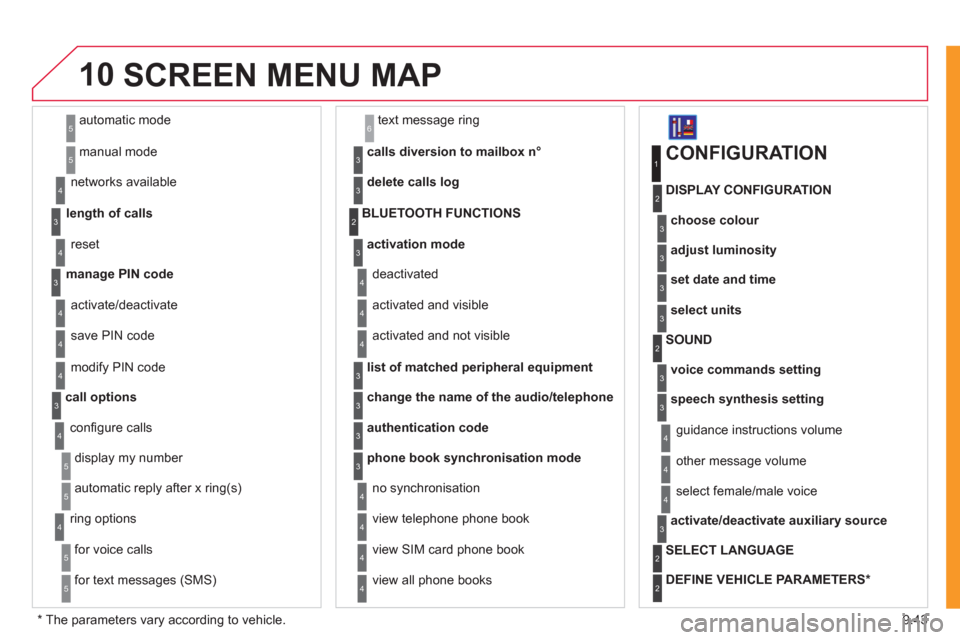
automatic mode
manual mode
5
5
length of calls n
etworks available
3
4
reset 4
manage PIN code3
activate/deactivate
save PIN code 4
4
modify PIN code 4
call options3
confi gure calls
display my number
automatic repl
y after x ring(s)
5
5
4
ring options
for voice calls
for text messa
ges (SMS)
5
5
4
calls diversion to mailbox n°
text message ring 6
3
delete calls log3
activation mode3
BLUETOOTH FUNCTIONS2
deactivated
activated and visible
activated and not visible
4
4
4
list of matched peripheral equipment3
change the name of the audio/telephone3
authentication code3
phone book synchronisation mode3
no synchronisation
view telephone phone book
view
SIM card phone book
4
4
4
view all phone books 4
CONFIGURATION
choose colour
DISPLAY CONFIGURATION
1
2
3
adjust luminosity3
set date and time3
select units3
voice commands setting
SOUND2
3
speech synthesis setting3
guidance instructions volume
ot
her message volume
4
4
select female/male voice 4
activate/deactivate auxiliary source3
SELECT LANGUAGE2
DEFINE VEHICLE PARAMETERS *
2
SCREEN MENU MAP
*
The parameters vary according to vehicle.
Page 191 of 260
9.47
ANSWERSOLUTION
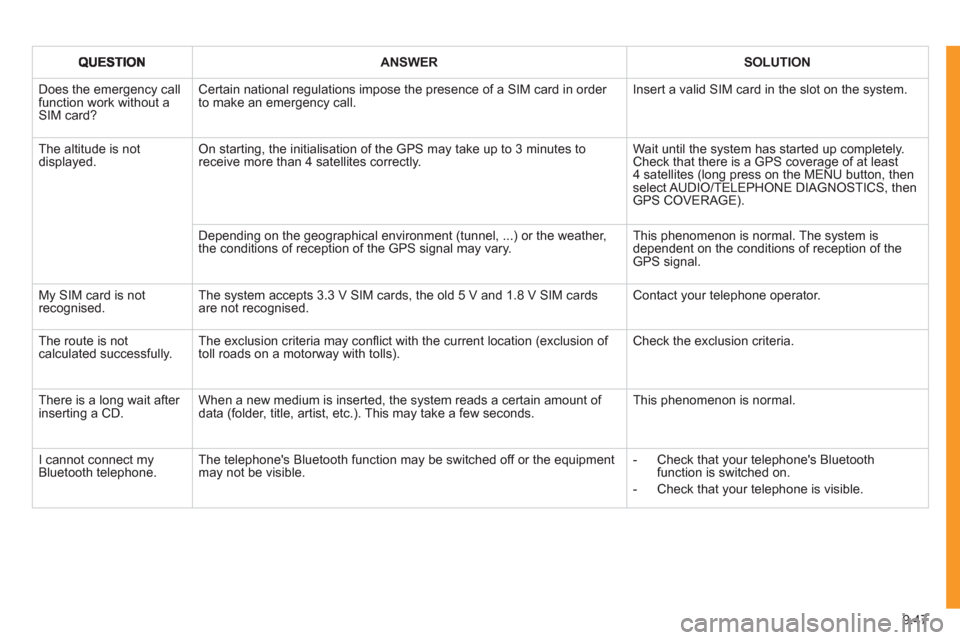
Does the emergency call function work without a SIM card?
Certain national regulations impose the presence of a SIM card in order to make an emergency call. Insert a valid SIM card in the slot on the system.
The altitude is not displayed. On starting, the initialisation of the GPS may take up to 3 minutes toreceive more than 4 satellites correctly.
Wait until the system has started up completely. Check that there is a GPS coverage of at least4 satellites (long press on the MENU button, then select AUDIO/TELEPHONE DIAGNOSTICS, thenGPS COVERAGE).
Depending on the geographical environment (tunnel, ...) or the weather, the conditions of reception of the GPS signal may vary.
This phenomenon is normal. The system isdependent on the conditions of reception of the GPS signal.
My SIM card is not recognised. The system accepts 3.3 V SIM cards, the old 5 V and 1.8 V SIM cardsare not recognised.
Contact your telephone operator.
The route is notcalculated successfully.The exclusion criteria may confl ict with the current location (exclusion of toll roads on a motorway with tolls). Check the exclusion criteria.
There is a long wait after inserting a CD.When a new medium is inserted, the system reads a certain amount of data (folder, title, artist, etc.). This may take a few seconds.
This phenomenon is normal.
I cannot connect myBluetooth telephone.The telephone's Bluetooth function may be switched off or the equipmentmay not be visible.
- Check that your telephone's Bluetoothfunction is switched on.
- Check that your telephone is visible.
Page 193 of 260
9.49
The MyWay is protected in such a way that it will onlyoperate in your vehicle. If it is to be installed in another vehicle, contact a CITROËN dealer for confi guration of py
the system.
Certain functions described in this handbook will
become available during the year.
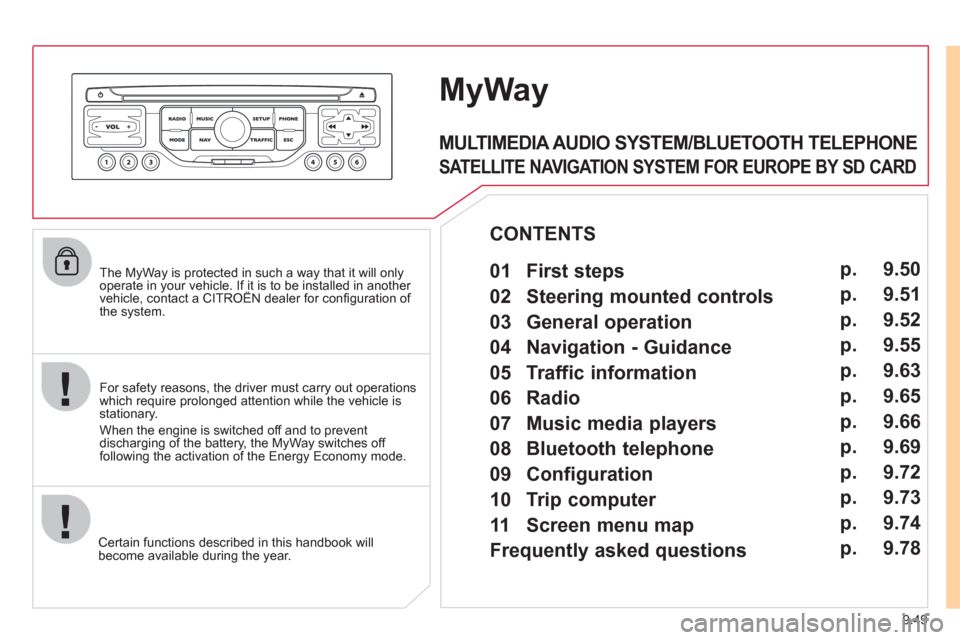
MyWay
For safety reasons, the driver must carry out operations which require prolonged attention while the vehicle is stationary.
When the en
gine is switched off and to prevent
discharging of the battery, the MyWay switches off
following the activation of the Energy Economy mode.
MULTIMEDIA AUDIO SYSTEM/BLUETOOTH TELEPHONE
SATELLITE NAVIGATION SYSTEM FOR EUROPE BY SD CARD
01 First steps
CONTENTS
02 Steering mounted controls
03 General operation
04 Navigation - Guidance
05 Traffic information
06 Radio
07 Music media players
08 Bluetooth telephone
09 Configuration
10 Trip computer p.
p.
p.
p.
p.
p.
p.
p.
p.
p.
11 Screen menu map
Frequently asked questions p.
p. 9.50
9.51
9.52
9.55
9.63
9.65
9.66
9.69
9.72
9.73
9.74
9.78
Page 208 of 260
9.64
05
2 1
3
2 1
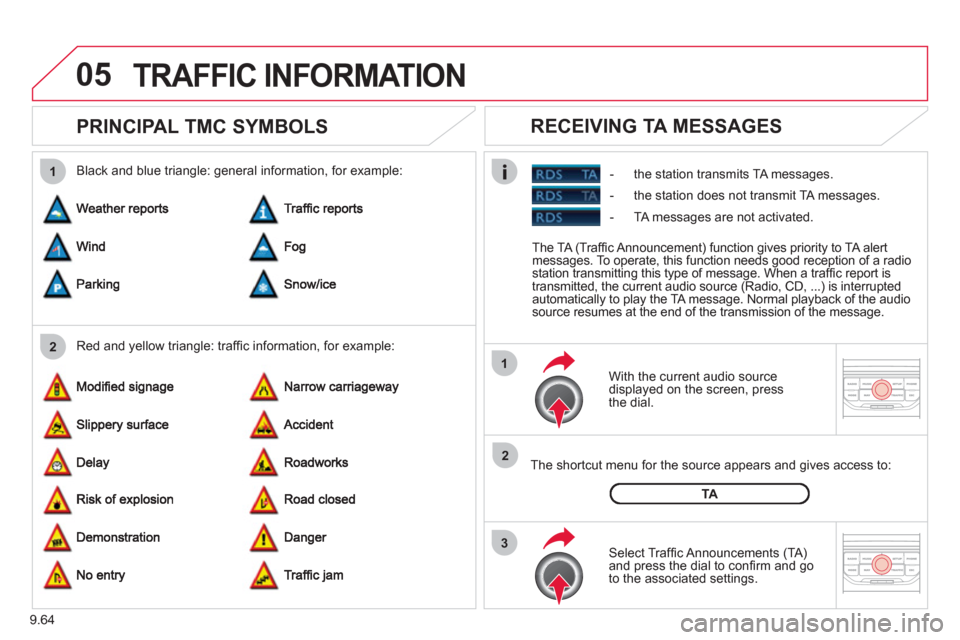
PRINCIPAL TMC SYMBOLS
With the current audio source
displayed on the screen, press
th
e dial.
The shortcut menu
for the source appears and gives access to:
Select Traffi c Announcements
(TA)and press the dial to confi rm and go
to the associated settings.
TA
- the station transmits TA messages.
RECEIVING TA MESSAGES
Red and yellow triangle: traffi c information, for example: Black and blue triangle: general in
formation, for example:
TRAFFIC INFORMATION
The TA (Traffi c Announcement) function gives priority to TA alert messages. To operate, this function needs good reception of a radio station transmitting this type of message. When a traffi c report is
transmitted, the current audio source (Radio, CD, ...) is interrupted
automatically to play the TA message. Normal playback of the audiosource resumes at the end of the transmission of the message.
- the station does not transmit TA messa
ges.
-
TA messages are not activated.
Page 213 of 260
9.69
08
1
2
3
4
BLUETOOTH TELEPHONE
*
The services available depend on the network, the SIM card and thecompatibility of the Bluetooth telephone used. Check the telephone
manual and with your network provider for details of the servicesavailable to you.
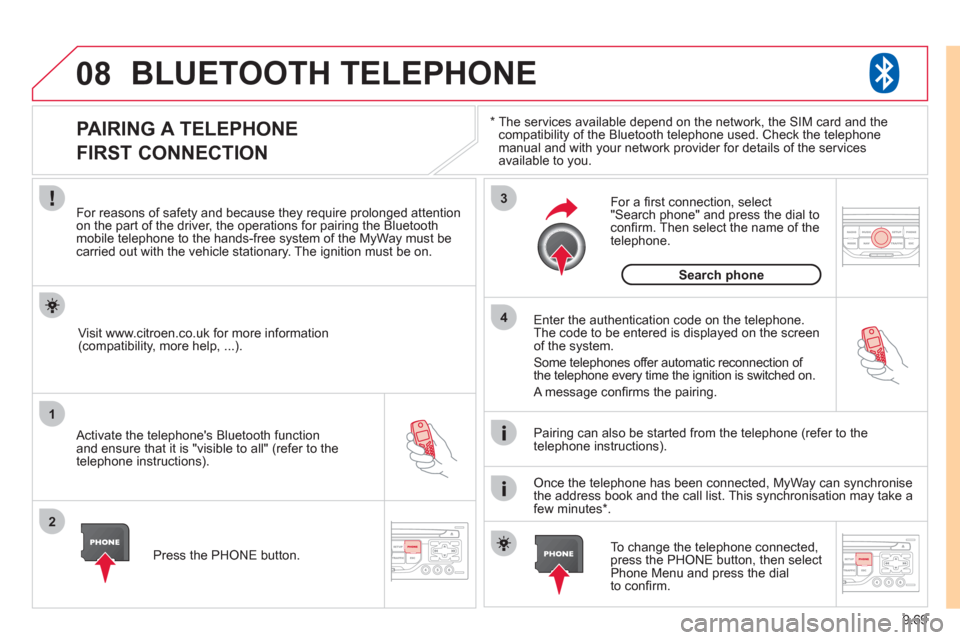
PAIRING A TELEPHONE
FIRST CONNECTION
For reasons of safety and because they require prolonged attentionon the part of the driver, the operations for pairing the Bluetooth mobile telephone to the hands-free system of the MyWay must be carried out with the vehicle stationary. The ignition must be on.
Activate the telephone's Bluetooth
function
and ensure that it is "visible to all" (refer to the
telephone instructions). Enter the authentication code on the tele
phone.
The code to be entered is displayed on the screen
of the system.
Some telephones offer automatic reconnection o
f
the telephone every time the ignition is switched on.
A messa
ge confi rms the pairing.
To change the telephone connected, press the PHONE button, then select Phone Menu and press the dial
to confi rm.
Once the telephone has been connected, MyWay can synchronise
the address book and the call list. This synchronisation may take a few minutes * . Pairin
g can also be started from the telephone (refer to the
telephone instructions). Vi
sit www.citroen.co.uk for more information (compatibility, more help, ...).
Press the PH
ONE button.
For a
fi rst connection, select"Search phone" and press the dial to confi rm. Then select the name of thetelephone.
Search
phone
Page 214 of 260
9.70
08
1
2
2
1
*
The services available depend on the network, the SIM card and the compatibility of the Bluetooth telephone used. Check the telephone manual and with your network provider for details of the services
available to you.
BLUETOOTH TELEPHONE
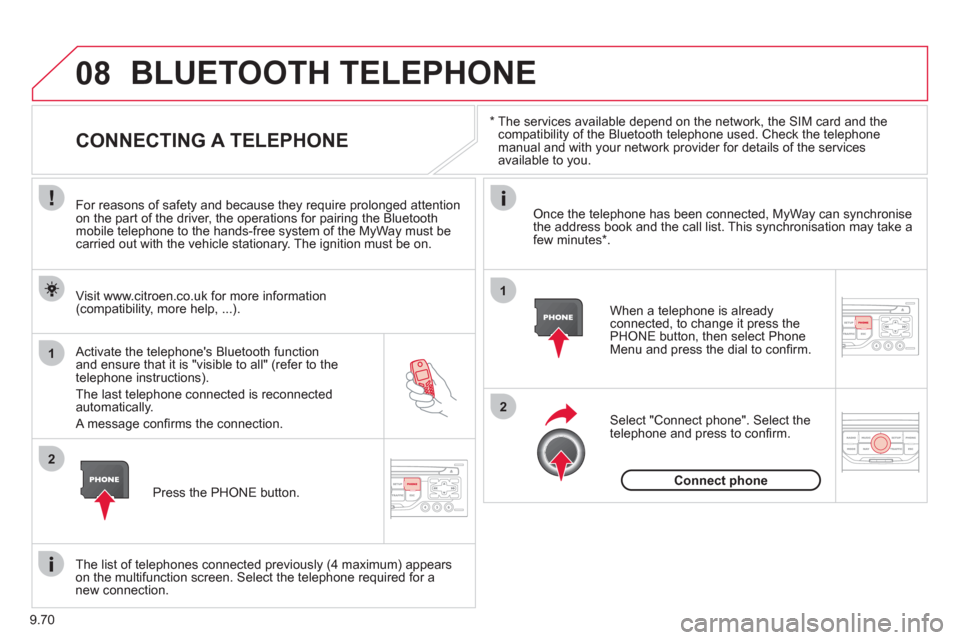
CONNECTING A TELEPHONE
For reasons of safety and because they require prolonged attention
on the part of the driver, the operations for pairing the Bluetooth
mobile telephone to the hands-free system of the MyWay must becarried out with the vehicle stationary. The ignition must be on.
Activate the tele
phone's Bluetooth function and ensure that it is "visible to all" (refer to the
telephone instructions).
The last telephone connected is reconnected automatically.
A messa
ge confi rms the connection. When a telephone is alread
yconnected, to change it press the
PHONE button, then select PhoneMenu and press the dial to confi rm.
Once the telephone has been connected, MyWay can synchronise
the address book and the call list. This synchronisation may take afew minutes * .
The list o
f telephones connected previously (4 maximum) appearson the multifunction screen. Select the telephone required for a
new connection. Vi
sit www.citroen.co.uk for more information (compatibility, more help, ...).
Press the PH
ONE button.Select "Connect
phone". Select the
telephone and press to confi rm.
Connect
phone
Page 215 of 260
9.71
08
1
3 2
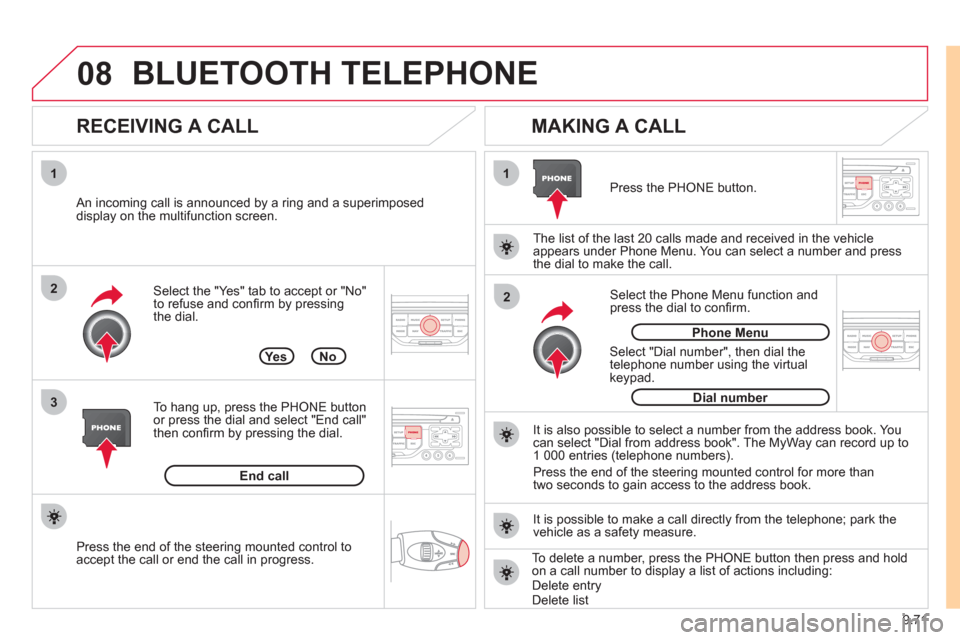
2 1Select the "Yes" tab to accept or "No"
to refuse and confi rm by pressing
the dial.
RECEIVING A CALL
MAKING A CALL
An incoming call is announced by a ring and a superimposed
display on the multifunction screen.
Yes
To han
g up, press the PHONE button
or press the dial and select "End call"then confi rm by pressing the dial.
End callPress the PH
ONE button.
Select "Dial number"
, then dial the
telephone number using the virtualkeypad.
Select the Phone Menu function and
press the dial to confi rm.
The list of the last 2
0 calls made and received in the vehicle
appears under Phone Menu. You can select a number and press
the dial to make the call.
No
It is also possible to select a number from the address book. Youcan select "Dial from address book". The MyWay can record up to
1 000 entries (telephone numbers).
Press the end o
f the steering mounted control for more than
two seconds to gain access to the address book.
Phone Menu
Dial number
It is possible to make a call directl
y from the telephone; park the
vehicle as a safety measure.
BLUETOOTH TELEPHONE
Press the end of the steering mounted control to
accept the call or end the call in progress.To delete a number, press the PHONE button then press and hold
on a call number to display a list of actions including:Delete entryDelete list
Page 221 of 260
9.77
*
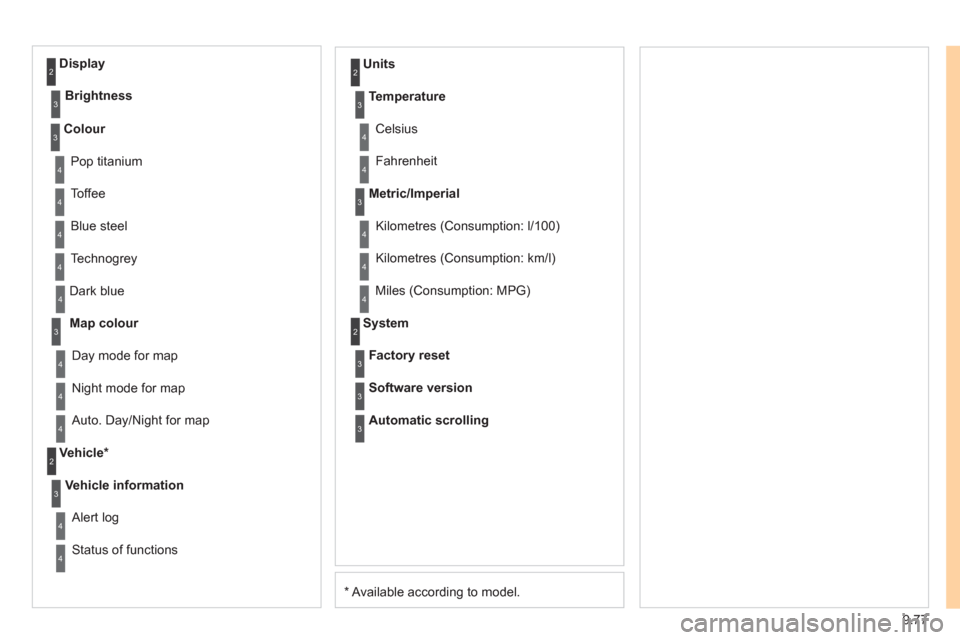
Available according to model. D
ark blue
Map colour
Ni
ght mode for map
Units
Da
y mode for map
Vehicle *
Vehicle information
Alert log
Status of functions
Temperature
Celsius
F
ahrenheit
Metric/Imperial
Kilometres (Consumption: l/100)
Kilometres
(Consumption: km/l)
Miles
(Consumption: MPG)
System
Auto. Day/Night for map Factor
y reset
Software version
Automatic scrolling
3
4
4
2
4
3
4
4
2
3
4
4
3
4
4
4
2
4
3
3
3
Colour
Pop titanium
T
offee
Bl
ue steel
Techno
grey
3
4
4
4
4
Display
Brightness
2
3
Page 225 of 260
9.81
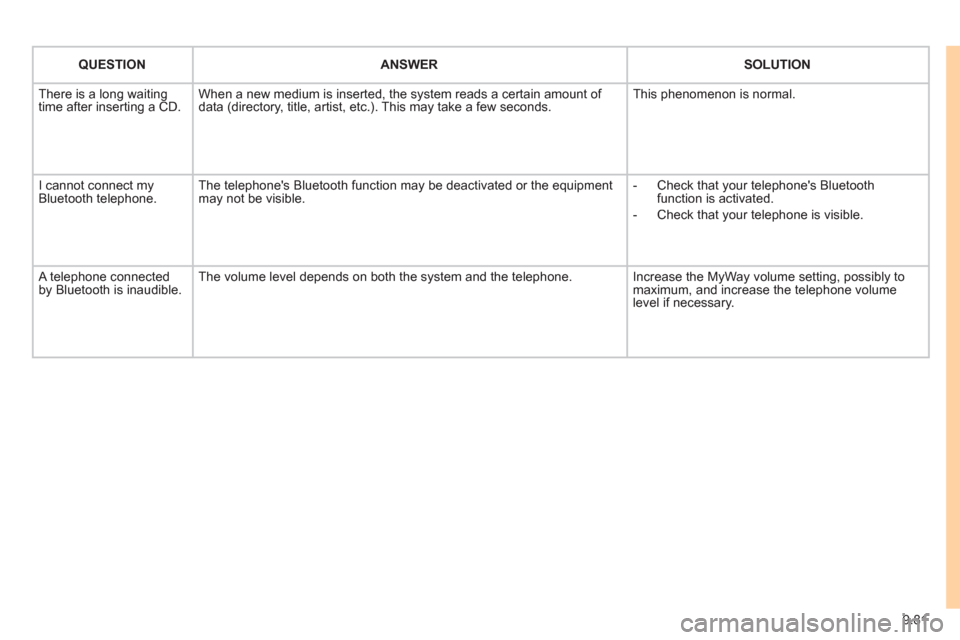
QUESTIONANSWER SOLUTION
There is a long waiting
time after inserting a CD. When a new medium is inserted, the system reads a certain amount of
data (directory, title, artist, etc.). This may take a few seconds. This phenomenon is normal.
I cannot connect myBluetooth telephone.The telephone's Bluetooth function may be deactivated or the equipment
may not be visible.
- Check that your telephone's Bluetoothfunction is activated.
-
Check that your telephone is visible.
A telephone connected by Bluetooth is inaudible.The volume level depends on both the system and the telephone. Increase the MyWay volume setting, possibly to maximum, and increase the telephone volume level if necessary.
Page 227 of 260
9.83
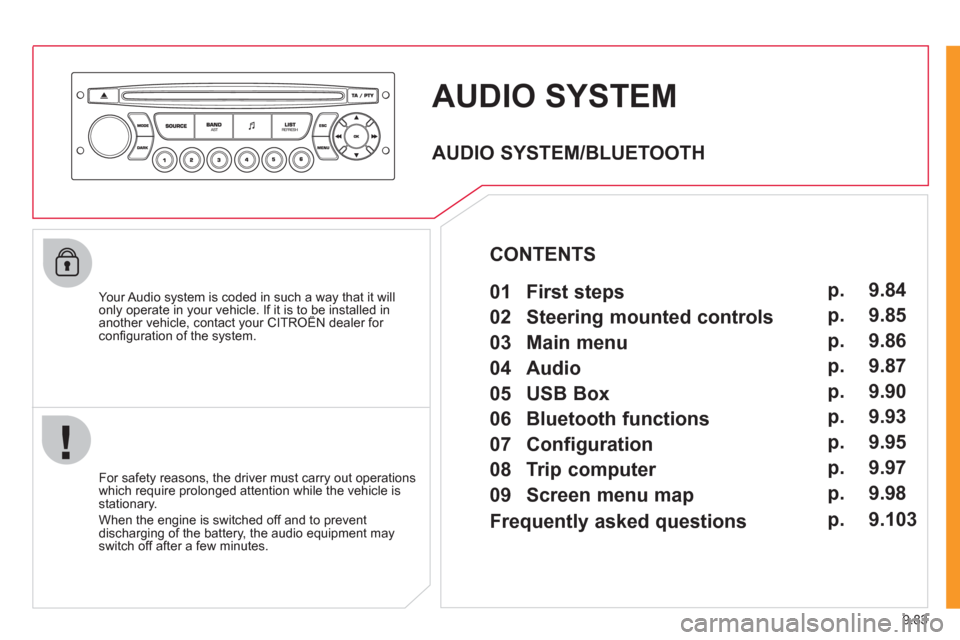
AUDIO SYSTEM
Your Audio system is coded in such a way that it willonly operate in your vehicle. If it is to be installed inanother vehicle, contact your CITROËN dealer for yp y
confi guration of the system.
For safet
y reasons, the driver must carry out operations
which require prolonged attention while the vehicle is stationary.
When the en
gine is switched off and to prevent
discharging of the battery, the audio equipment mayswitch off after a few minutes.
AUDIO SYSTEM/BLUETOOTH
01 First steps
02 Steering mounted controls
03 Main menu
04 Audio
05 USB Box
06 Bluetooth functions
07 Configuration
08 Trip computer
09 Screen menu map p.
p.
p.
p.
p.
p.
p.
p.
p. 9.84
9.85
9.86
9.87
9.90
9.93
9.95
9.97
9.98
CONTENTS
Frequently asked questions p. 9.103