phone Citroen JUMPY 2011 2.G User Guide
[x] Cancel search | Manufacturer: CITROEN, Model Year: 2011, Model line: JUMPY, Model: Citroen JUMPY 2011 2.GPages: 260, PDF Size: 9.5 MB
Page 174 of 260
9.30
06
1
2
AUDIO/VIDEO
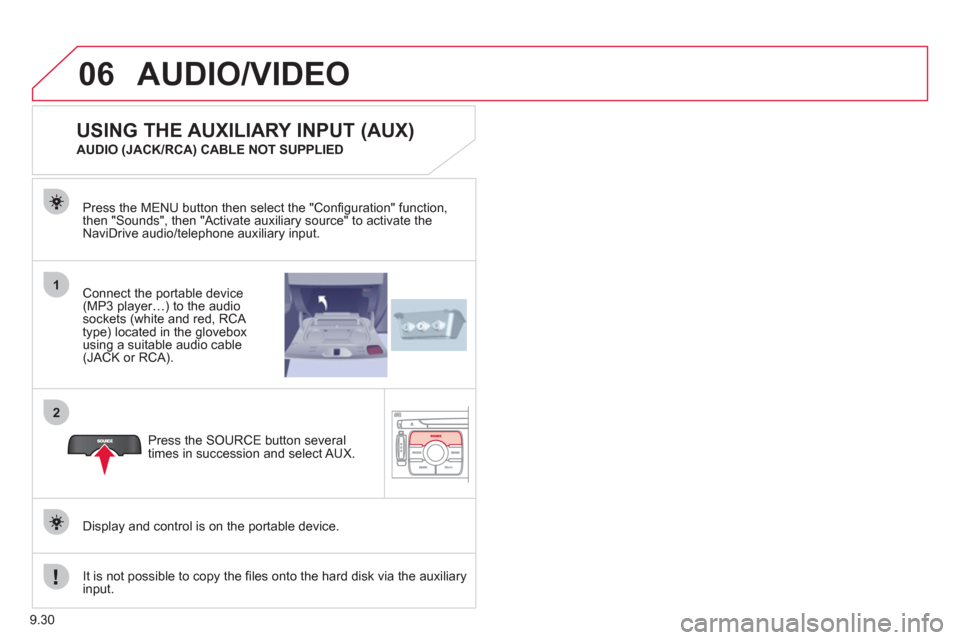
Connect the portable device (MP3 player…) to the audio
sockets (white and red, RCA
type) located in the glovebox using a suitable audio cable (JACK or RCA). Press the MENU button then select the "
Confi guration" function,
then "Sounds", then "Activate auxiliary source" to activate the
NaviDrive audio/telephone auxiliary input.
It is not possible to cop
y the fi les onto the hard disk via the auxiliary input.Pr
ess the SOURCE button several
times in succession and select AUX.
USING THE AUXILIARY INPUT (AUX)
AUDIO (JACK/RCA) CABLE NOT SUPPLIED
Displa
y and control is on the portable device.
Page 176 of 260
9.32
07
1
2
1
2
3
INTERNAL TELEPHONE
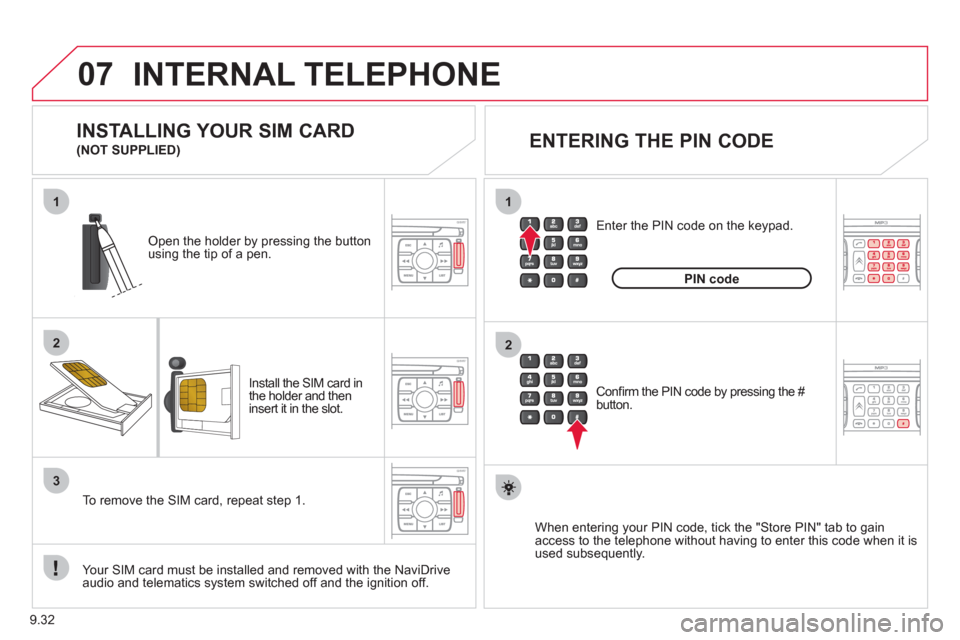
Install the SIM card in
the holder and then
insert it in the slot.
Open the holder by pressing the buttonusing the tip of a pen.
Your
SIM card must be installed and removed with the NaviDrive
audio and telematics system switched off and the ignition off.
To remove the
SIM card, repeat step 1.
Confi rm the PIN code by pressing the # button.
Enter the PIN code on the ke
ypad.
When enterin
g your PIN code, tick the "Store PIN" tab to gain
access to the telephone without having to enter this code when it is
used subsequently.
INSTALLING YOUR SIM CARD
(NOT SUPPLIED)
ENTERING THE PIN CODE
PINcode
Page 177 of 260
9.33
07
1
2
3
4
INTERNAL TELEPHONE
CONNECTING A BLUETOOTH
TELEPHONE
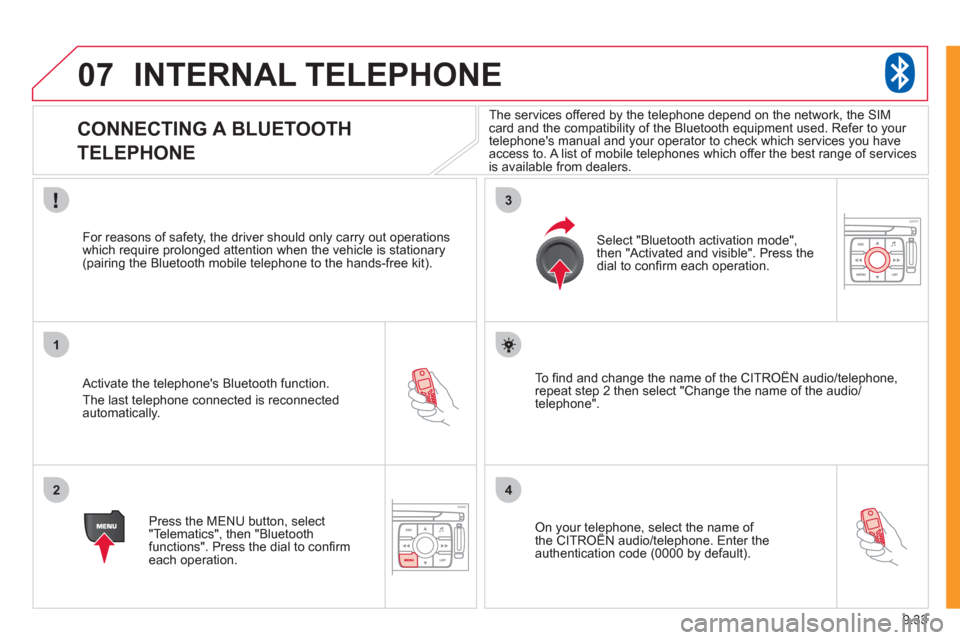
Activate the telephone's Bluetooth function.
The last telephone connected is reconnectedautomatically.
For reasons o
f safety, the driver should only carry out operations
which require prolonged attention when the vehicle is stationary (pairing the Bluetooth mobile telephone to the hands-free kit).
Press the MENU button, select
"Telematics", then "Bluetoothfunctions". Press the dial to confi rmeach operation.
To fi nd and chan
ge the name of the CITROËN audio/telephone,
repeat step 2 then select "Change the name of the audio/
telephone".
Select "Bluetooth activation mode"
,
then "Activated and visible". Press thedial to confi rm each operation.
On your telephone, select the name of the CITROÀN audio/telephone. Enter the yp,
authentication code (0000 by default).
The services offered b
y the telephone depend on the network, the SIM card and the compatibility of the Bluetooth equipment used. Refer to your
telephone's manual and your operator to check which services you have
access to. A list of mobile telephones which offer the best range of services
is available from dealers.
Page 178 of 260
9.34
07INTERNAL TELEPHONE
CONNECTING A BLUETOOTH
TELEPHONE
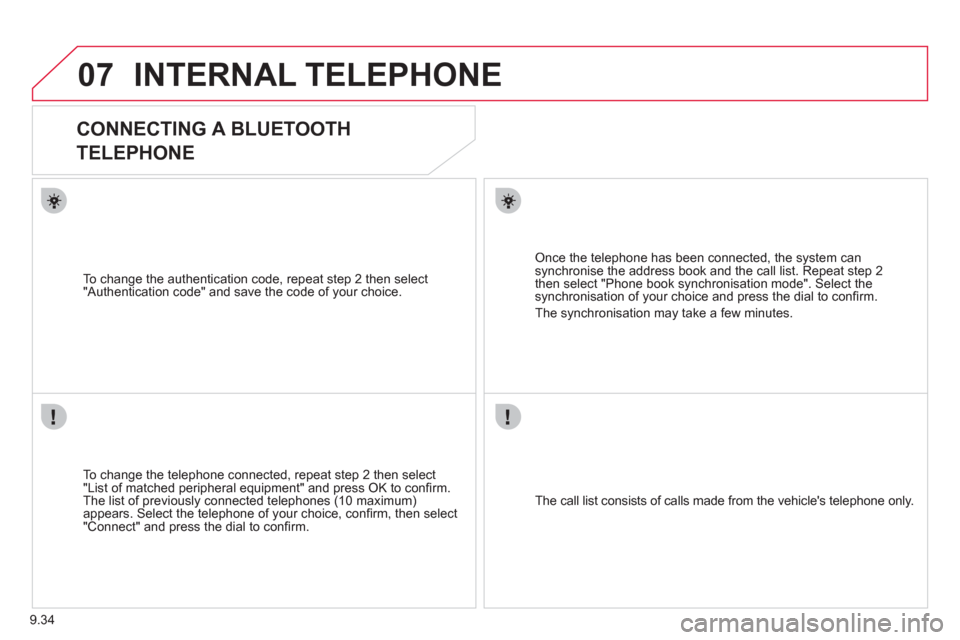
To change the telephone connected, repeat step 2 then select
"List of matched peripheral equipment" and press OK to confi rm.
The list of previously connected telephones (10 maximum)appears. Select the telephone of your choice, confi rm, then select
"Connect" and press the dial to confi rm.
To chan
ge the authentication code, repeat step 2 then select
"Authentication code" and save the code of your choice.
The call list consists of calls made from the vehicle's telephone onl
y.
Once the telephone has been connected, the system can synchronise the address book and the call list. Repeat step 2then select "Phone book synchronisation mode". Select thesynchronisation of your choice and press the dial to confi rm.
The s
ynchronisation may take a few minutes.
Page 179 of 260
9.35
07
1
2
4
3
6
5
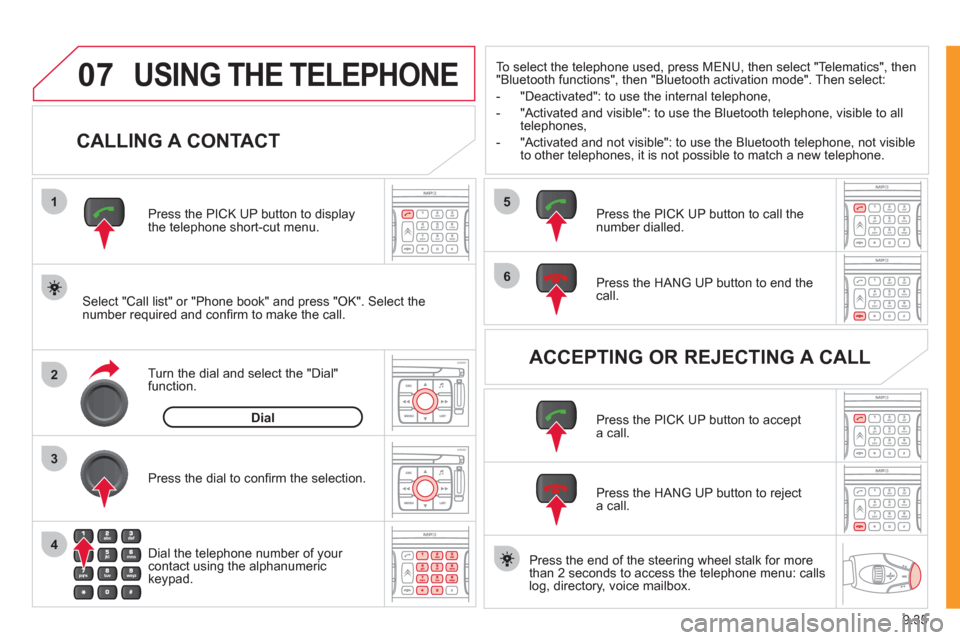
USING THE TELEPHONE
CALLING A CONTACT
Select "Call list" or "Phone book" and press "OK". Select thenumber required and confi rm to make the call. Press the PICK UP button to displa
ythe telephone short-cut menu.
Dial the telephone number of
your contact using the alphanumeric keypad. Pr
ess the dial to confi rm the selection.
Press the HAN
G UP button to end the call.
Press the PI
CK UP button to call thenumber dialled.
Press the HANG UP button to re
ject a call.
Press the PI
CK UP button to accept a call.
ACCEPTING OR REJECTING A CALL Turn the dial and select the "Dial" function.
Dial
To select the telephone used, press MENU, then select "Telematics", then
"Bluetooth functions", then "Bluetooth activation mode". Then select:
-
"Deactivated": to use the internal telephone,
- "Activated and visible": to use the Bluetooth telephone, visible to all
telephones,
- "Activated and not visible": to use the Bluetooth tele
phone, not visible
to other telephones, it is not possible to match a new telephone.
Press the end of the steerin
g wheel stalk for more
than 2 seconds to access the telephone menu: calls
log, directory, voice mailbox.
Page 186 of 260

9.42
10
playlist management
hi-fi (320 kbps)
delete
jukebox data
Jukebox status
high (192 kbps)
normal
(128 kbps)
3
3
3
4
4
4
TELEMATICS
call list
CALL
1
2
3
dial3
directory3
mailbox3
services3
customer contact centre4
CITROËN assistance
CITROËN service
messa
ges received
4
4
4
managing directory fi les3
DIRECTORY 2
consult or modify a fi le
add a fi le
delete a fi le
4
4
4
confi gure directory
delete all fi les
3
4
select a directory
name director
y 4
4
fi le transfer select startin
g directory
3
4
exchange by infrared
send all records
send one record
receive by infrared
5
5
5
4
exchange with SIM card
send all records to
SIM
send one record to SIM
5
5
4
receive all SIM fi les
receive a
SIM fi le
5
5
exchange with Bluetooth
4
read received text messages
TEXT MESSAGES
(SMS)2
3
send a text message3
write a text message3
delete list of text messages3
network
TELEPHONE FUNCTIONS 2
3
network search mode 4
SCREEN MENU MAP
jukebox confi guration3
Page 187 of 260
9.43
10
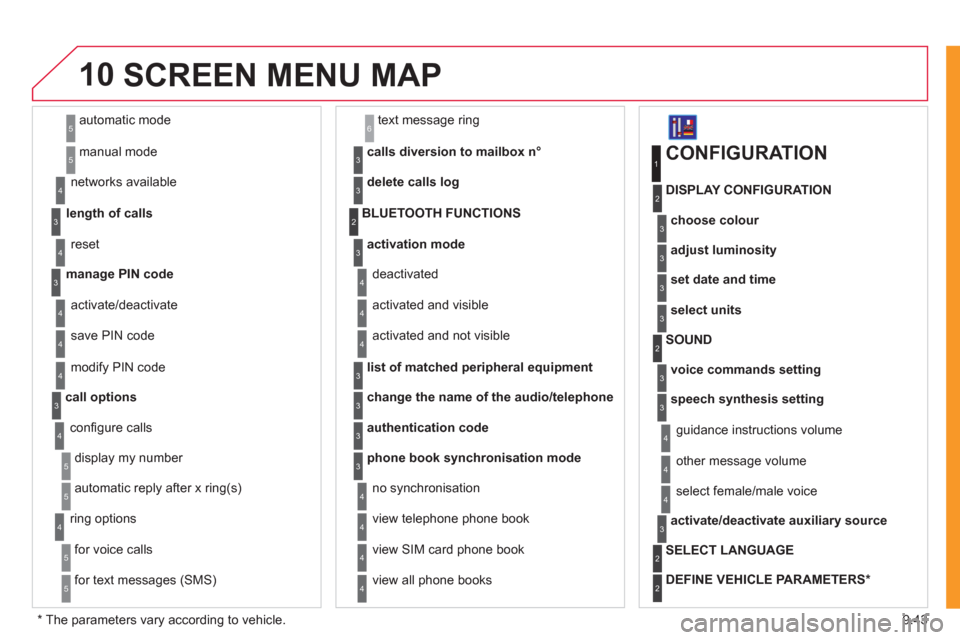
automatic mode
manual mode
5
5
length of calls n
etworks available
3
4
reset 4
manage PIN code3
activate/deactivate
save PIN code 4
4
modify PIN code 4
call options3
confi gure calls
display my number
automatic repl
y after x ring(s)
5
5
4
ring options
for voice calls
for text messa
ges (SMS)
5
5
4
calls diversion to mailbox n°
text message ring 6
3
delete calls log3
activation mode3
BLUETOOTH FUNCTIONS2
deactivated
activated and visible
activated and not visible
4
4
4
list of matched peripheral equipment3
change the name of the audio/telephone3
authentication code3
phone book synchronisation mode3
no synchronisation
view telephone phone book
view
SIM card phone book
4
4
4
view all phone books 4
CONFIGURATION
choose colour
DISPLAY CONFIGURATION
1
2
3
adjust luminosity3
set date and time3
select units3
voice commands setting
SOUND2
3
speech synthesis setting3
guidance instructions volume
ot
her message volume
4
4
select female/male voice 4
activate/deactivate auxiliary source3
SELECT LANGUAGE2
DEFINE VEHICLE PARAMETERS *
2
SCREEN MENU MAP
*
The parameters vary according to vehicle.
Page 188 of 260
9.44
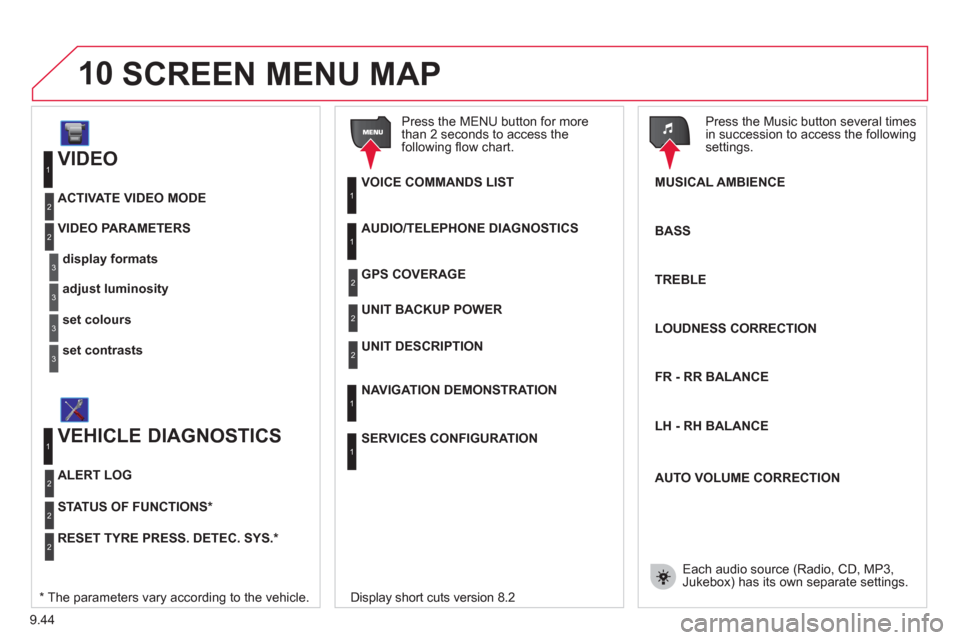
10
VIDEO
display formats
VIDEO PARAMETERS
1
2
3
adjust luminosity3
set colours3
set contrasts3
ACTIVATE VIDEO MODE 2
VEHICLE DIAGNOSTICS
STATUS OF FUNCTIONS *
1
2
ALERT LOG 2
RESET TYRE PRESS. DETEC. SYS. *2
AUDIO/TELEPHONE DIAGNOSTICS
UNIT BACKUP POWER
1
2
GPS COVERAGE2
UNIT DESCRIPTION2
VOICE COMMANDS LIST1
SERVICES CONFIGURATION
1
NAVIGATION DEMONSTRATION 1
Press the MENU button for more
than 2 seconds to access the following fl ow chart.
Press the Music button several times
in succession to access the followingsettings.
MUSICAL AMBIENCE
SCREEN MENU MAP
BASS
TREBLE
LOUDNESS CORRECTION
FR - RR BALAN
CE
Displa
y short cuts version 8.2
LH - RH BALAN
CE
AUTO VOLUME CORRECTION
Each audio source
(Radio, CD, MP3,Jukebox) has its own separate settings.* The parameters vary according to the vehicle.
Page 191 of 260
9.47
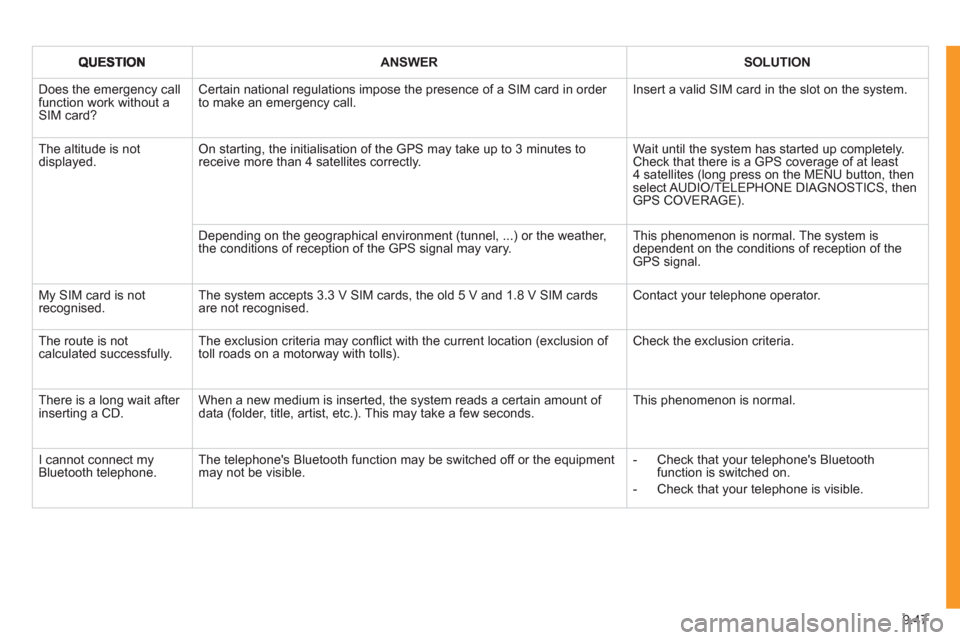
ANSWERSOLUTION
Does the emergency call function work without a SIM card?
Certain national regulations impose the presence of a SIM card in order to make an emergency call. Insert a valid SIM card in the slot on the system.
The altitude is not displayed. On starting, the initialisation of the GPS may take up to 3 minutes toreceive more than 4 satellites correctly.
Wait until the system has started up completely. Check that there is a GPS coverage of at least4 satellites (long press on the MENU button, then select AUDIO/TELEPHONE DIAGNOSTICS, thenGPS COVERAGE).
Depending on the geographical environment (tunnel, ...) or the weather, the conditions of reception of the GPS signal may vary.
This phenomenon is normal. The system isdependent on the conditions of reception of the GPS signal.
My SIM card is not recognised. The system accepts 3.3 V SIM cards, the old 5 V and 1.8 V SIM cardsare not recognised.
Contact your telephone operator.
The route is notcalculated successfully.The exclusion criteria may confl ict with the current location (exclusion of toll roads on a motorway with tolls). Check the exclusion criteria.
There is a long wait after inserting a CD.When a new medium is inserted, the system reads a certain amount of data (folder, title, artist, etc.). This may take a few seconds.
This phenomenon is normal.
I cannot connect myBluetooth telephone.The telephone's Bluetooth function may be switched off or the equipmentmay not be visible.
- Check that your telephone's Bluetoothfunction is switched on.
- Check that your telephone is visible.
Page 193 of 260
9.49
The MyWay is protected in such a way that it will onlyoperate in your vehicle. If it is to be installed in another vehicle, contact a CITROËN dealer for confi guration of py
the system.
Certain functions described in this handbook will
become available during the year.
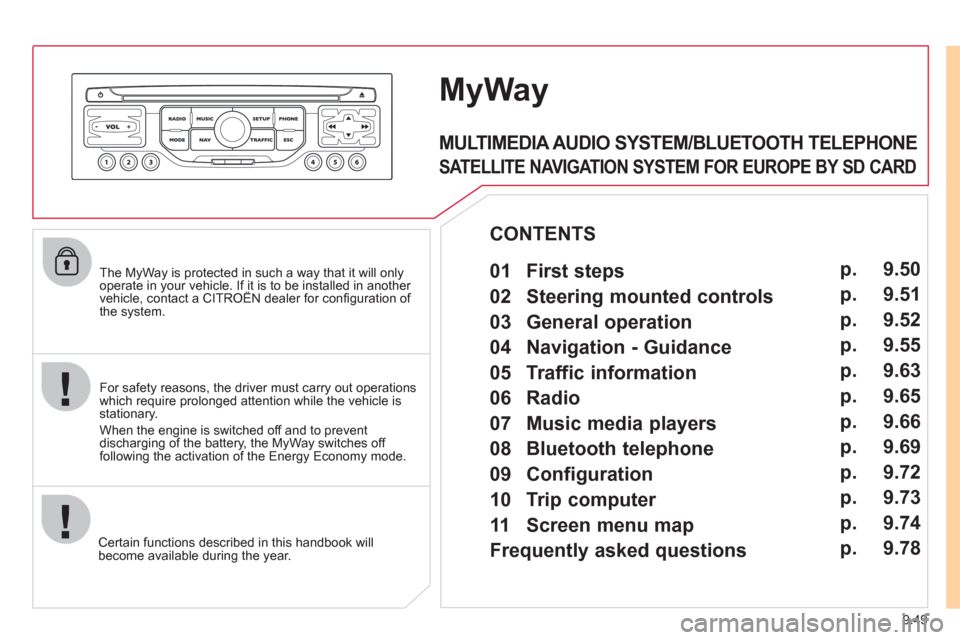
MyWay
For safety reasons, the driver must carry out operations which require prolonged attention while the vehicle is stationary.
When the en
gine is switched off and to prevent
discharging of the battery, the MyWay switches off
following the activation of the Energy Economy mode.
MULTIMEDIA AUDIO SYSTEM/BLUETOOTH TELEPHONE
SATELLITE NAVIGATION SYSTEM FOR EUROPE BY SD CARD
01 First steps
CONTENTS
02 Steering mounted controls
03 General operation
04 Navigation - Guidance
05 Traffic information
06 Radio
07 Music media players
08 Bluetooth telephone
09 Configuration
10 Trip computer p.
p.
p.
p.
p.
p.
p.
p.
p.
p.
11 Screen menu map
Frequently asked questions p.
p. 9.50
9.51
9.52
9.55
9.63
9.65
9.66
9.69
9.72
9.73
9.74
9.78