ad blue Citroen JUMPY 2016 2.G Owner's Guide
[x] Cancel search | Manufacturer: CITROEN, Model Year: 2016, Model line: JUMPY, Model: Citroen JUMPY 2016 2.GPages: 595, PDF Size: 12.47 MB
Page 261 of 595
259
Jumpy _en_Chap06_conduite_ed01-2016
180° rear vision
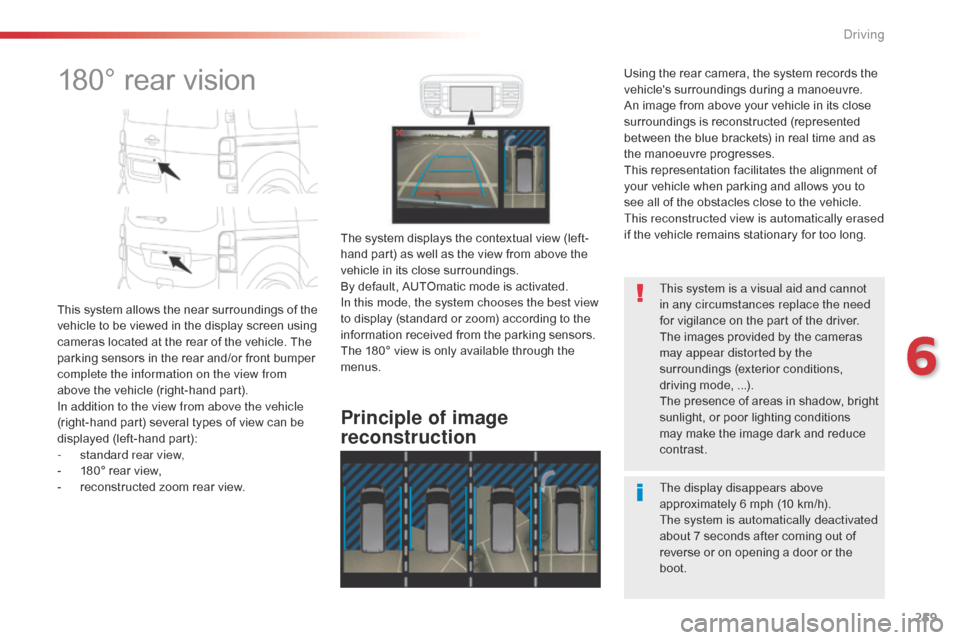
This system allows the near surroundings of the
vehicle to be viewed in the display screen using
cameras located at the rear of the vehicle. The
parking sensors in the rear and/or front bumper
complete the information on the view from
above the vehicle (right-hand part).
In addition to the view from above the vehicle
(right-hand part) several types of view can be
displayed (left-hand part):
-
s
tandard rear view,
-
1
80° rear view,
-
r
econstructed zoom rear view.
Principle of image
reconstruction
The system displays the contextual view (left-
hand part) as well as the view from above the
vehicle in its close surroundings.
By default, AUTOmatic mode is activated.
In this mode, the system chooses the best view
to display (standard or zoom) according to the
information received from the parking sensors.
The 180° view is only available through the
menus. The display disappears above
approximately 6 mph (10 km/h).
The system is automatically deactivated
about 7 seconds after coming out of
reverse or on opening a door or the
boot. This system is a visual aid and cannot
in any circumstances replace the need
for vigilance on the part of the driver.
The images provided by the cameras
may appear distorted by the
surroundings (exterior conditions,
driving mode, ...).
The presence of areas in shadow, bright
sunlight, or poor lighting conditions
may make the image dark and reduce
contrast.
Using the rear camera, the system records the
vehicle's surroundings during a manoeuvre.
An image from above your vehicle in its close
surroundings is reconstructed (represented
between the blue brackets) in real time and as
the manoeuvre progresses.
This representation facilitates the alignment of
your vehicle when parking and allows you to
see all of the obstacles close to the vehicle.
This reconstructed view is automatically erased
if the vehicle remains stationary for too long.
6
Driving
Page 262 of 595
260
Jumpy _en_Chap06_conduite_ed01-2016
"Standard view""180° view"
"Zoom view" (reconstructed)
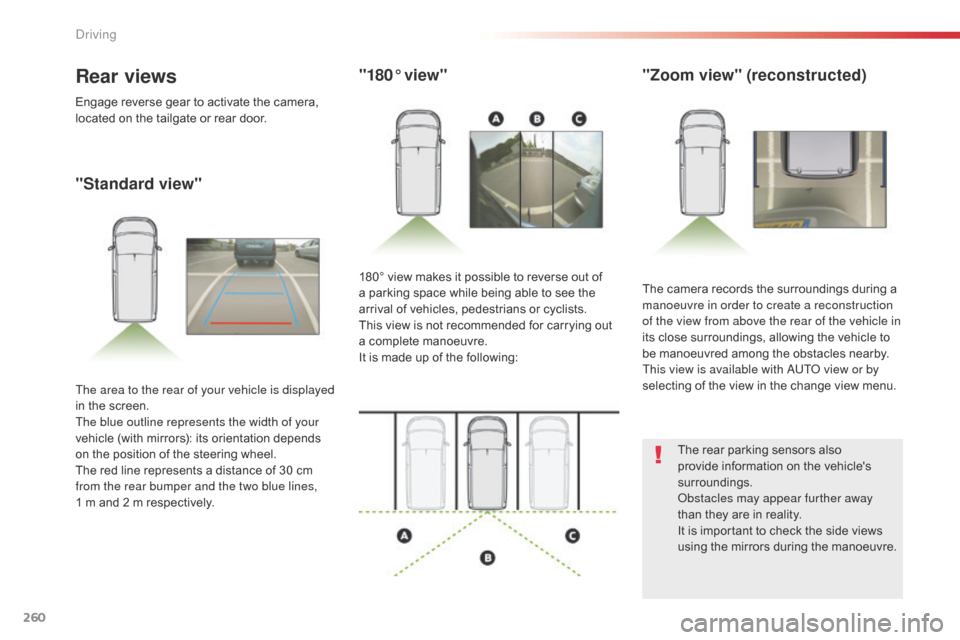
The camera records the surroundings during a
manoeuvre in order to create a reconstruction
of the view from above the rear of the vehicle in
its close surroundings, allowing the vehicle to
be manoeuvred among the obstacles nearby.
This view is available with AUTO view or by
selecting of the view in the change view menu.
180° view makes it possible to reverse out of
a parking space while being able to see the
arrival of vehicles, pedestrians or cyclists.
This view is not recommended for carrying out
a complete manoeuvre.
It is made up of the following:
The area to the rear of your vehicle is displayed
in the screen.
The blue outline represents the width of your
vehicle (with mirrors): its orientation depends
on the position of the steering wheel.
The red line represents a distance of 30
cm
from the rear bumper and the two blue lines,
1
m and 2 m respectively.
Rear views
Engage reverse gear to activate the camera,
located on the tailgate or rear door.
The rear parking sensors also
provide information on the vehicle's
surroundings.
Obstacles may appear further away
than they are in reality.
It is important to check the side views
using the mirrors during the manoeuvre.
Driving
Page 272 of 595
270
Jumpy _en_Chap07_info-pratiques_ed01-2016
Energy economy mode
System which manages the duration of use of certain functions to conserve a sufficient level of
charge in the battery.
After the engine has stopped, you can still use functions such as the audio and telematics
system, windscreen wipers, dipped beam headlamps, courtesy lamps, etc. for a maximum
combined duration of about forty minutes.
Switching to economy
mode
A message appears in the instrument panel
screen indicating that the vehicle has switched
to economy mode and the active functions are
put on standby.
If a telephone call is being made at this time, it
will be maintained for around 10 minutes with
the Bluetooth hands-free system of your audio
system.
Exiting economy mode
These functions are reactivated automatically
next time the vehicle is driven.
In order to restore the use of these functions
immediately, start the engine and let it run:
-
f
or less than ten minutes, to use the
equipment for approximately five minutes,
-
f
or more than ten minutes, to use the
equipment for up to approximately
thirty
m
inutes.
Let the engine run for the duration specified to
ensure that the battery charge is sufficient.
Do not repeatedly and continuously restart the
engine in order to charge the battery.
A flat battery prevents the engine from starting.
For more information on the 12 V batter y , refer
to the corresponding section.
Load reduction mode
System which manages the use of certain
functions according to the level of charge
remaining in the battery.
When the vehicle is being driven, the load
reduction function temporarily deactivates
certain functions, such as the air conditioning,
the heated rear screen...
The deactivated functions are reactivated
automatically as soon as conditions permit.
Practical information
Page 274 of 595
272
Jumpy _en_Chap07_info-pratiques_ed01-2016
By visiting a CITROËN dealer, you can
also obtain products for cleaning and
maintenance (exterior and interior) -
including ecological products in the
"TECHNATURE" range, topping-up
products (screenwash...), touch-up pens
and paint aerosols for the exact colour
of your vehicle, refills (cartridge for the
temporary puncture repair kit...), ...
"Multimedia"
Smartphone support, table support or semi-
integral navigation support, range of audio
systems and portable navigation systems,
driving recorder, Bluetooth hands-free kit, DVD
player, multimedia support, driving aids, vehicle
tracking system, ...
Range of trade equipment
Another range is also available, structured
around comfort, leisure and maintenance:
Anti-theft alarm, window engraving, first aid kit,
high visibility safety vest, rear parking sensors,
warning triangle...
Seat covers compatible with airbags for front
seat, bench seat, rubber mats, carpet mats,
snow chains.
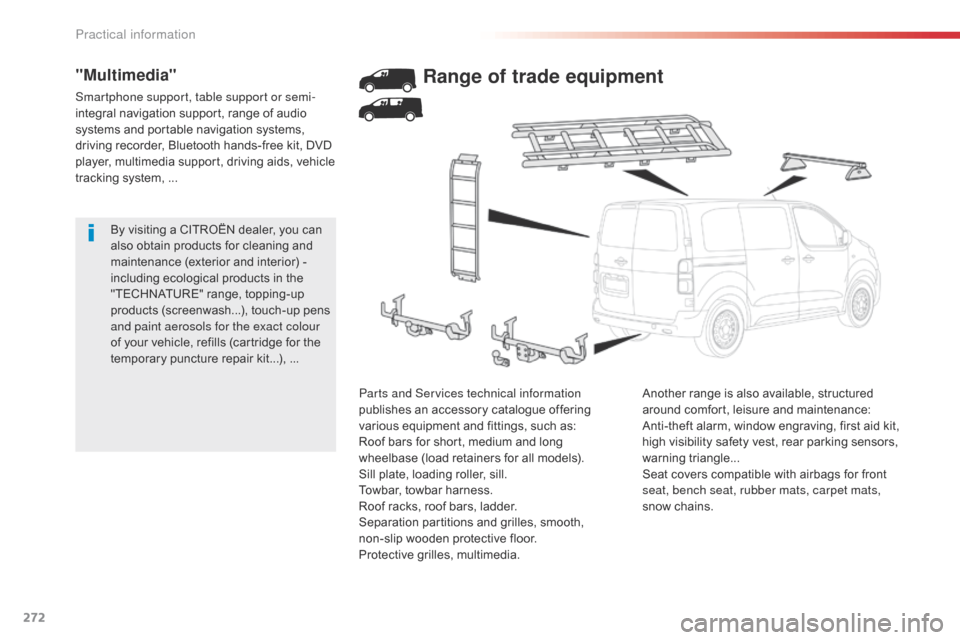
Parts and Services technical information
publishes an accessory catalogue offering
various equipment and fittings, such as:
Roof bars for short, medium and long
wheelbase (load retainers for all models).
Sill plate, loading roller, sill.
Towbar, towbar harness.
Roof racks, roof bars, ladder.
Separation partitions and grilles, smooth,
non-slip wooden protective floor.
Protective grilles, multimedia.
Practical information
Page 285 of 595
283
Jumpy _en_Chap07_info-pratiques_ed01-2016
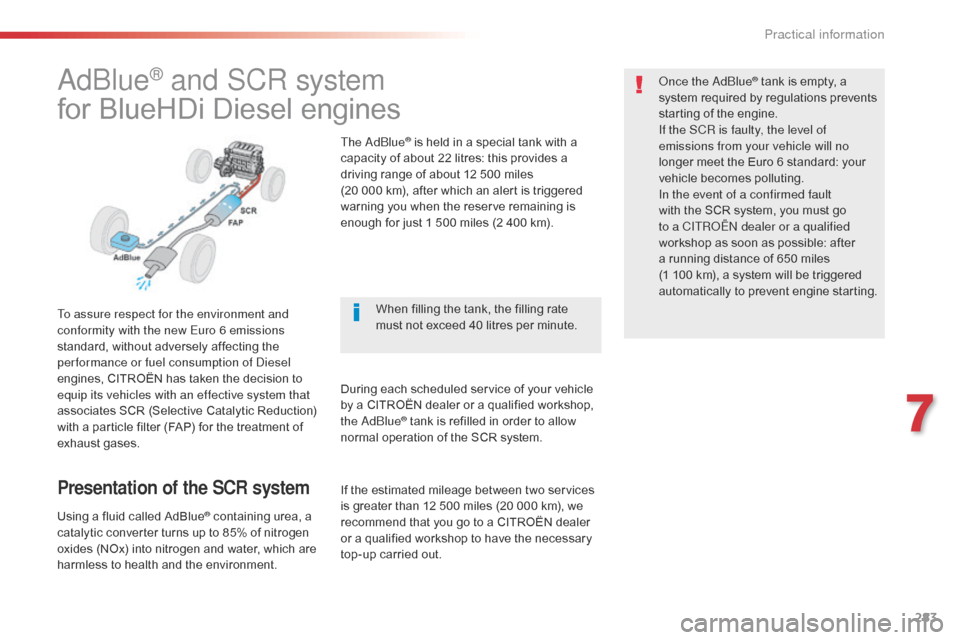
AdBlue® and SCR system
for BlueHDi Diesel engines
To assure respect for the environment and
conformity with the new Euro 6 emissions
standard, without adversely affecting the
per formance or fuel consumption of Diesel
engines, CITROËN has taken the decision to
equip its vehicles with an effective system that
associates SCR (Selective Catalytic Reduction)
with a particle filter (FAP) for the treatment of
exhaust gases.
Presentation of the SCR system
Using a fluid called AdBlue® containing urea, a
catalytic converter turns up to 85% of nitrogen
oxides (NOx) into nitrogen and water, which are
harmless to health and the environment. The AdBlue
® is held in a special tank with a
capacity of about 22 litres: this provides a
driving range of about 12 500 miles
(20 000 km), after which an alert is triggered
warning you when the reserve remaining is
enough for just 1 500 miles (2 400 km).
During each scheduled service of your vehicle
by a CITROËN dealer or a qualified workshop,
the AdBlue
® tank is refilled in order to allow
normal operation of the SCR system. Once the AdBlue
® tank is empty, a
s
ystem required by regulations prevents
starting of the engine.
If the SCR
is faulty, the level of
emissions from your vehicle will no
longer meet the Euro 6 standard: your
vehicle becomes polluting.
In the event of a confirmed fault
with the SCR system, you must go
to a CITROËN dealer or a qualified
workshop as soon as possible: after
a running distance of 650 miles
(1
100 km), a system will be triggered
automatically to prevent engine starting.
When filling the tank, the filling rate
must not exceed 40 litres per minute.
If the estimated mileage between two services
is greater than 12 500 miles (20 000 km), we
recommend that you go to a CITROËN dealer
or a qualified workshop to have the necessary
top-up carried out.
7
Practical information
Page 286 of 595

284
Jumpy _en_Chap07_info-pratiques_ed01-2016
Topping-up the AdBlue®
Filling the AdBlue® tank is an operation
included in every routine service on your
vehicle by a CITROËN dealer or a qualified
workshop.
Nevertheless, given the capacity of the tank, it
may be necessary to top-up the fluid between
services, more particularly if an alert (warning
lamps and a message) signals the requirement.
You can go to a CITROËN dealer or a qualified
workshop.
If you envisage topping-up yourself, please
read the following warnings carefully.
Precautions in use
Keep AdBlue® out of the reach of
children, in its original bottle.
Never transfer AdBlue
® to another
container: it would lose its purity. Use only AdBlue
® fluid that meets the
ISO
22241 standard.
Never dilute AdBlue
® with water.
Never pour AdBlue® into the Diesel fuel
tank.
The supply in a non-drip bottle simplifies
topping-up. You can obtain 1.89 litre (half a
US gallon) bottles from a CITROËN
dealer or a
qualified workshop.
Never top-up from an AdBlue
®
dispenser reserved for heavy goods
vehicles.
AdBlue
® is a urea-based solution. This liquid is
non-flammable, colourless and odourless (kept
in a cool area).
In the event of contact with the skin, wash
the affected area with soap and water. In the
event of contact with the eyes, wash (irrigate)
the eyes with large amounts of water or with
an eye wash solution for at least 15 minutes.
If a burning sensation or irritation persists, get
medical attention.
If swallowed, immediately wash out the mouth
with clean water and then drink plenty of water.
In certain conditions (high ambient
temperature, for example), the risk of release of
ammonia cannot be excluded: do not inhale the
fluid. Ammonia vapour has an irritant effect on
mucous membranes (eyes, nose and throat).
Important
If your vehicle's AdBlue
® tank is
c
ompletely empty (which is confirmed
by the alert messages and the
impossibility of starting the engine)
you must add at least 3.8 litres
(so two 1.89 litre bottles).
Practical information
Page 287 of 595
285
Jumpy _en_Chap07_info-pratiques_ed01-2016
Recommendations on storage
Never store bottles of AdBlue® in your
vehicle.
AdBlue
® freezes at about -11°C and
deteriorates above 25°C. It is recommended
that bottles be stored in a cool area and
protected from direct sunlight.
Under these conditions, the fluid can be kept
for at least a year.
If the additive has frozen, it can be used once it
has completely thawed out.
Procedure
Before starting the top-up procedure, ensure
that the vehicle is parked on a flat and level
sur face.
F
S
witch off the ignition and remove the
key, or if your vehicle has one, press the
START/STOP button to switch off the
engine.
F
F
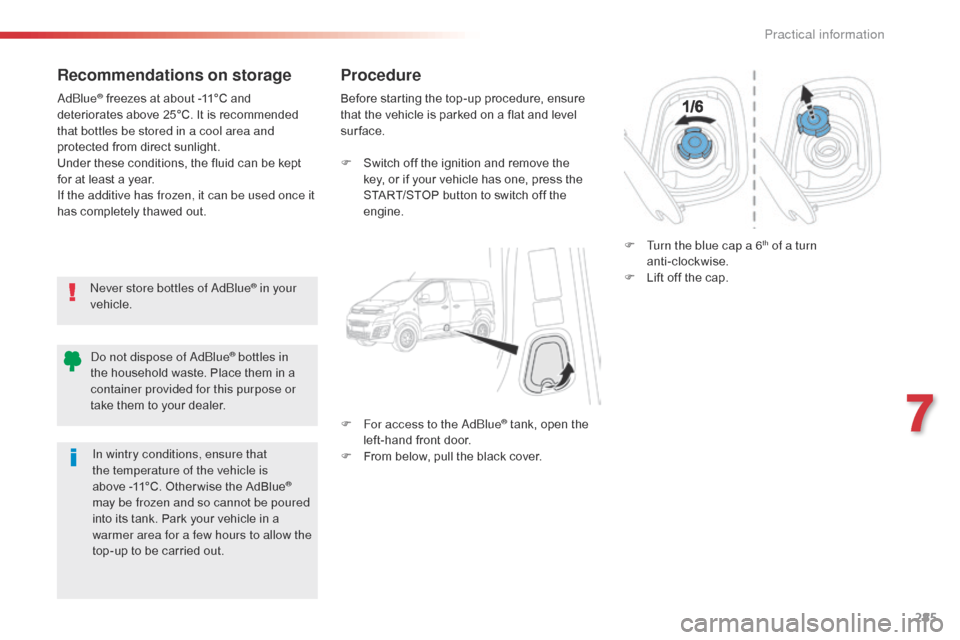
or access to the AdBlue
® tank, open the
left-hand front door.
F
F
rom below, pull the black cover. F
T
urn the blue cap a 6
th of a turn
anti-clockwise.
F
L
ift off the cap.
Do not dispose of AdBlue
® bottles in
the household waste. Place them in a
container provided for this purpose or
take them to your dealer.
In wintry conditions, ensure that
the temperature of the vehicle is
above
-11°C. Other wise the AdBlue
®
may be frozen and so cannot be poured
into its tank. Park your vehicle in a
warmer area for a few hours to allow the
top-up to be carried out.
7
Practical information
Page 288 of 595
286
Jumpy _en_Chap07_info-pratiques_ed01-2016
F After emptying the bottle, wipe away any spillage around the tank filler using a damp
cloth. If any additive is split or splashed, wash
immediately with cold water or wipe with
a damp cloth.
If the additive has crystallised, clean it
off using a sponge and hot water.
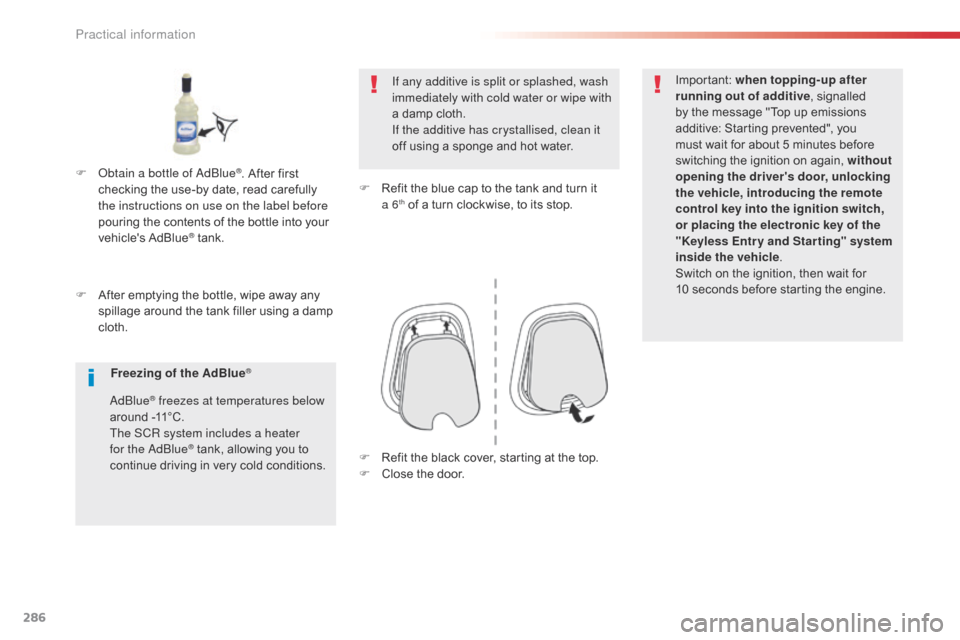
F
R
efit the blue cap to the tank and turn it
a 6
th of a turn clockwise, to its stop.Important:
when topping-up after
running out of additive , signalled
by the message "Top up emissions
additive: Starting prevented", you
must wait for about 5 minutes before
switching the ignition on again, without
opening the driver's door, unlocking
the vehicle, introducing the remote
control key into the ignition switch,
or placing the electronic key of the
"Keyless Entr y and Star ting" system
inside the vehicle .
Switch on the ignition, then wait for
10
seconds before starting the engine.
F
O
btain a bottle of AdBlue
®. After first
checking the use-by date, read carefully
the instructions on use on the label before
pouring the contents of the bottle into your
vehicle's AdBlue
® tank.
Freezing of the AdBlue
®
AdBlue® freezes at temperatures below
around -11°C.
The SCR system includes a heater
for the AdBlue
® tank, allowing you to
continue driving in very cold conditions. F
R efit the black cover, starting at the top.
F
C
lose the door.
Practical information
Page 329 of 595
327
Jumpy _en_Chap08_En-cas-de-panne_ed01-2016
On vehicles fitted with Diesel engines, the fuel
system must be primed if you run out of fuel.
For all versions other than BlueHDi, refer to the
corresponding engine compartment view.
Running out of fuel (Diesel)
For more information on Diesel misfuel
prevention, refer to the corresponding
section. F
A dd at least five litres of Diesel fuel to
the
tank.
F
O
pen the bonnet.
F
I
f necessary, unclip the styling cover for
access to the priming pump.
F
S
queeze and release the priming pump
repeatedly until resistance is felt (there
may be resistance at the first press).
F
O
perate the starter to start the engine
(if the engine does not start at the first
attempt, wait around 15 seconds before
trying again).
F
I
f the engine does not start after a few
attempts, operate the priming pump again
then start the engine.
F
R
efit the styling cover and clip it in place.
F
C
lose the bonnet.
1.6 HDi engine
(except BlueHDi)
If the engine does not start first time,
don't keep trying but start the procedure
again from the beginning.
BlueHDi engine
F Fill the fuel tank with at least five litres of Diesel.
F
S
witch on the ignition (without starting the
engine).
F
W
ait around 6 seconds and switch off the
ignition.
F
R
epeat the operation 10 times.
F
O
perate the starter to run the engine.
Other engines
F Add at least five litres of Diesel fuel to the tank.
F
O
pen the bonnet.
F
I
f necessary, unclip the styling cover for
access to the priming pump.
F
S
queeze and release the priming pump
repeatedly until resistance is felt (there
may be resistance at the first press).
F
O
perate the starter to start the engine
(if the engine does not start at the first
attempt, wait around 15 seconds before
trying again).
F
I
f the engine does not start after a few
attempts, operate the priming pump again
then start the engine.
F
R
efit the styling cover and clip it in place.
F
C
lose the bonnet.
8
In the event of a breakdown
Page 336 of 595
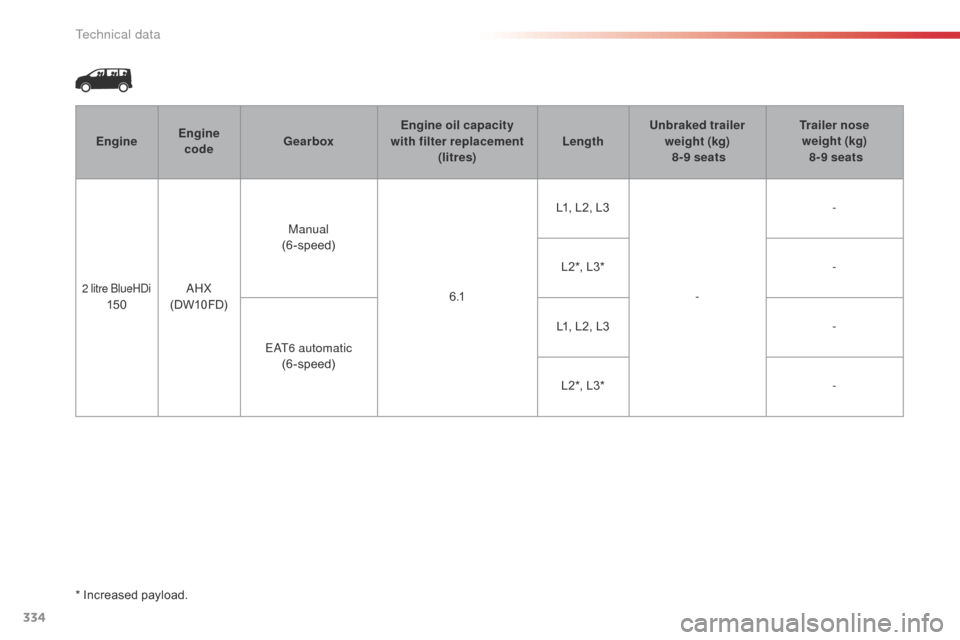
334
Jumpy _en_Chap09_caracteristiques-techniques_ed01-2016
EngineEngine
code Gearbox Engine oil capacity
with filter replacement (litres) LengthUnbraked trailer
weight (kg)
8-9 seats Trailer nose
weight (kg)
8-9 seats
2 litre BlueHDi 150 AHX
(DW10FD) Manual
(6-speed)
6 .1L1, L2, L3
--
L2*, L3* -
EAT6 automatic (6-speed) L1, L2, L3
-
L2*, L3* -
*
Increased payload.
Technical data