battery Citroen JUMPY RHD 2012 2.G User Guide
[x] Cancel search | Manufacturer: CITROEN, Model Year: 2012, Model line: JUMPY RHD, Model: Citroen JUMPY RHD 2012 2.GPages: 270, PDF Size: 9.6 MB
Page 113 of 270
Checks
CHECK
S
6
CHECKS
Battery
At the start of winter, have your battery
checked by a CITROËN dealer or a qualified
workshop.
Brake pads
Brake pad wear depends on the style of
driving, in particular for vehicles which are
used in town, over short distances. It may
be necessary to check the thickness of the
pads, even between services.
Unless there is a leak in the system, a drop
in the brake fluid level indicates that the
brake pads are worn.
Brake disc/drum wear
For any information on checking the brake
disc / drum wear, contact a CITROËN dealer
or a qualified workshop.
Parking brake
Where the parking brake travel is too great
or there is a reduction in the performance
of the system, the parking brake should be
adjusted, even between services.
Have the system checked by a CITROËN
dealer or a qualified workshop.
Oil filter
Change the filter regularly, in accordance
with the servicing schedule.
Carbon filter and passenger
compartment filter
The carbon filter permits continuous and
effective filtering of dust.
If the passenger compartment filter becomes
clogged, this may reduce the performance
of the air conditioning system and generate
unpleasant odours.
We recommend the use of a combined
passenger compartment filter. By means of
its second special active filter, it contributes
to the purification of the air breathed by
the occupants and the cleanness of the
passenger compartment (reduction of
allergic symptoms, unpleasant odours and
greasy deposits).
Refer to the servicing booklet to find out the
replacement interval for these components.
Depending on the environment (dusty
atmosphere...) and the use of the vehicle
(urban driving...), change them twice as
often if necessary.
Particle emission filter (Diesel)
This filter actively contributes
to the preservation of air quality
by trapping unburnt polluting
particles. It is controlled
completely and automatically by the engine
management system.
This warning lamp comes on if there is a risk
of blockage of the filter.
This alert signals the start of saturation of
the particle emissions filter (exceptionally
prolonged driving in urban conditions:
reduced speed, traffic jams…).
If this alert persists, contact a CITROËN
dealer or a qualified workshop.
On acceleration after the vehicle has been
running for a prolonged period at very low
speed or at idle, you may, in exceptional
circumstances, notice the emission of water
vapour at the exhaust. This water vapour
does not have any adverse effect on vehicle
handling or the environment.
To regenerate the filter, it is recommended
that as soon as driving conditions permit,
you drive at a speed of at least 36 mph
(60 km/h) for at least 5 minutes (until the
warning lamp goes off and/or the message
disappears). Refer to "Under the bonnet" in section 6.
Page 119 of 270

11
7
Battery
QUICK HEL
P
7
BATTERY
This is housed in a compartment located
underneath the fl oor, in front of the front right seat.
Before disconnecting the battery, you must wait
for 2 minutes after switching off the ignition.
Never disconnect a terminal when the engine
is running.
Never charge a battery without first
disconnecting the terminals.
After every reconnection of the battery,
switch on the ignition and wait 1 minute
before starting to allow the electronic
systems to be initialised. If some problems
persist after this operation, please contact a
CITROËN dealer or a qualified workshop.
It is advisable to disconnect the battery
if the vehicle is not to be used for a
period of more than one month.
To charge the battery using a battery
charger
- Disconnect the battery,
- Follow the instructions for use given by
the battery charger manufacturer,
- Reconnect starting with the negative (-)
terminal,
- Check that the terminals and connectors
are clean. If they are covered with
sulphate (white or greenish deposit),
disconnect them and clean them.
To start the vehicle from another
battery
- Connect the red cable to the positive (+)
terminals of the two batteries,
- Connect one end of the green or black
cable to the negative (-) terminal of the
slave battery,
- Connect the other end of the green or
black cable to an earth point on the
broken down vehicle as far as possible
from the battery,
- Operate the starter, let the engine run,
- Wait for the engine to return to idle, then
disconnect the cables.
The presence of this label indicates
the use of a 12 V lead-acid battery
with special technology and specification, for
which the involvement of a CITROËN dealer
or qualified workshop is required when
replacing or disconnecting the battery.
Failure to observe this recommendation may
cause premature ageing of the battery.
Page 120 of 270

118
Battery
ECONOMY MODE
After the engine has stopped, with the key
in the ignition position, certain functions
(windscreen wiper, electric windows, courtesy
lamps, audio equipment, etc.) can only
be used for a cumulative duration of thirty
minutes, to prevent discharging of the battery.
Once the thirty minutes are over, the active
functions are put on standby and the battery
warning lamp flashes accompanied by a
message in the screen.
To resume the use of these functions
immediately, start the engine and let it run
for a few minutes.
The time available will then be double
the time for which the engine was left
running. However, this time will always be
between five and thirty minutes.
A flat battery will prevent the engine from
starting.
Page 133 of 270
131
Changing a fuse
QUICK HEL
P
7
CHANGING A FUSE
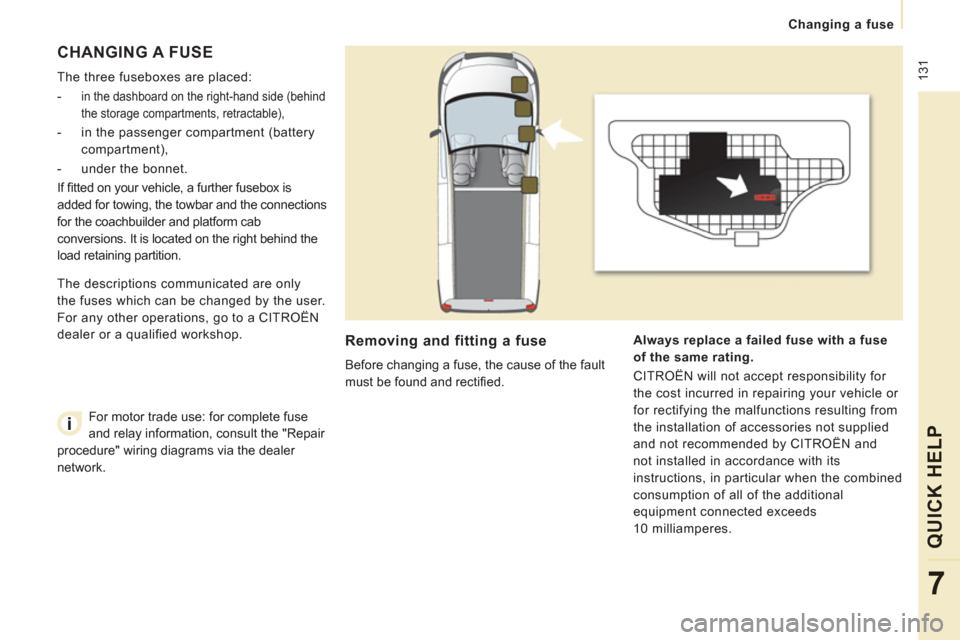
The three fuseboxes are placed:
-
in the dashboard on the right-hand side (behind
the storage compartments, retractable),
- in the passenger compartment (battery
compartment),
- under the bonnet.
If fi tted on your vehicle, a further fusebox is
added for towing, the towbar and the connections
for the coachbuilder and platform cab
conversions. It is located on the right behind the
load retaining partition.
Removing and fitting a fuse
Before changing a fuse, the cause of the fault
must be found and rectifi ed.
Always replace a
failed
fuse with a fuse
of the same rating.
CITROËN will not accept responsibility for
the cost incurred in repairing your vehicle or
for rectifying the malfunctions resulting from
the installation of accessories not supplied
and not recommended by CITROËN and
not installed in accordance with its
instructions, in particular when the combined
consumption of all of the additional
equipment connected exceeds
10 milliamperes. The descriptions communicated are only
the fuses which can be changed by the user.
For any other operations, go to a CITROËN
dealer or a qualified workshop.
For motor trade use: for complete fuse
and relay information, consult the "Repair
procedure" wiring diagrams via the dealer
network.
Page 135 of 270
133
Changing a fuse
QUICK HEL
P
7
PASSENGER COMPARTMENT
FUSES
- Unclip the battery compartment cover.
- Remove the red battery terminal (+).
When you have finished, close the cover
carefully.
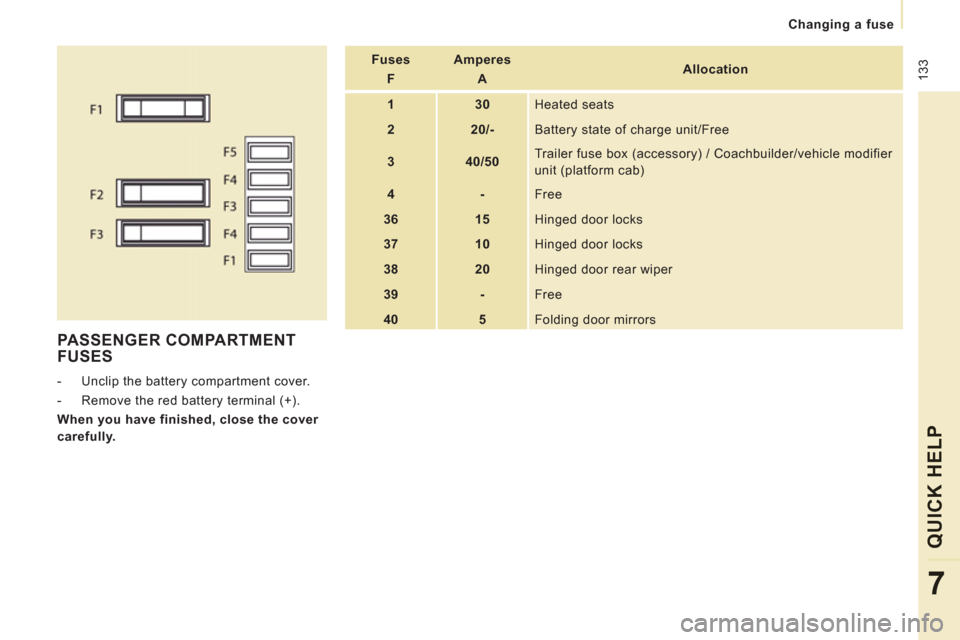
Fuses
F
Amperes
A
Allocation
1
30
Heated seats
2
20/-
Battery state of charge unit/Free
3
40/50 Trailer fuse box (accessory) / Coachbuilder/vehicle modifier
unit (platform cab)
4
-
Free
36
15
Hinged door locks
37
10
Hinged door locks
38
20
Hinged door rear wiper
39
-
Free
40
5
Folding door mirrors
Page 153 of 270
9.3
EMERGENCY OR ASSISTANCE CALL
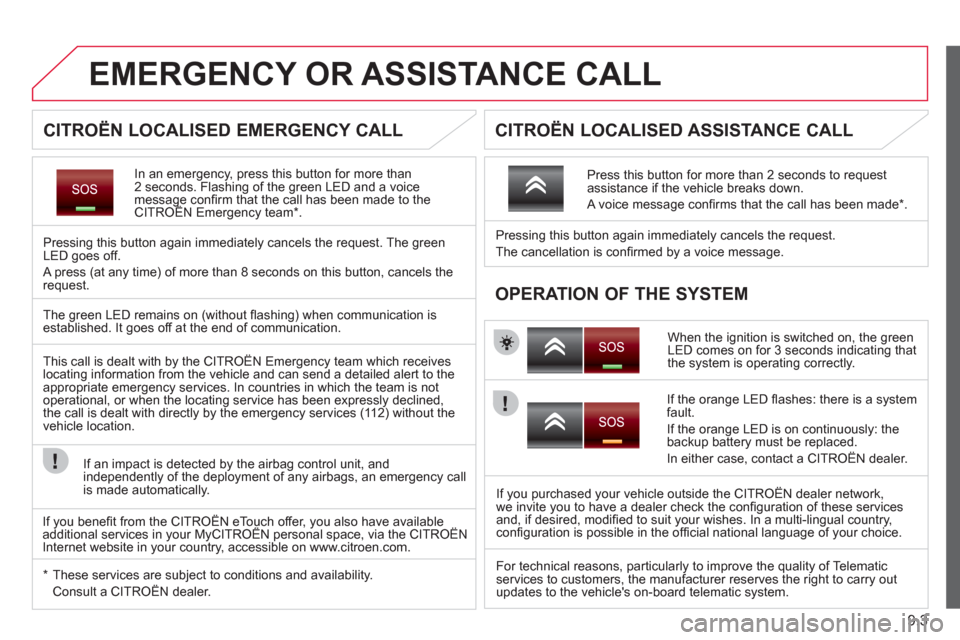
In an emergency, press this button for more than2 seconds. Flashing of the green LED and a voice message confi rm that the call has been made to the CITROËN Emergency team * .gg
Pressing this button again immediately cancels the request. The green LED goes off.
A press
(at any time) of more than 8 seconds on this button, cancels the
request.
When the ignition is switched on, the green
LED comes on for 3 seconds indicating that
the system is operating correctly. Pressin
g this button again immediately cancels the request.
The cancellation is confi rmed b
y a voice message.
Press this button for more than 2 seconds to request
assistance if the vehicle breaks down.
A voice message confi rms that the call has been made *
.
OPERATION OF THE SYSTEM
The green LED remains on (without fl ashing) when communication is established. It goes off at the end of communication.
This call is dealt with b
y the CITROÀN Emergency team which receiveslocating information from the vehicle and can send a detailed alert to theappropriate emergency services. In countries in which the team is not
operational, or when the locating service has been expressly declined,
the call is dealt with directly by the emergency services (11 2) without the
vehicle location.
I
f an impact is detected by the airbag control unit, and
independently of the deployment of any airbags, an emergency call
is made automatically.
*
These services are subject to conditions and availability.
Consult a CITROÀN dealer.
If the oran
ge LED fl ashes: there is a system
fault.
If the oran
ge LED is on continuously: the backup battery must be replaced.
In either case, contact a CITRO
ËN dealer.
If you purchased your vehicle outside the CITRO
ËN dealer network,
we invite you to have a dealer check the confi guration of these services
and, if desired, modifi ed to suit your wishes. In a multi-lingual country,confi guration is possible in the offi cial national language of your choice.
For technical reasons, particularl
y to improve the quality of Telematic services to customers, the manufacturer reserves the right to carry out
updates to the vehicle's on-board telematic system.
CITROËN LOCALISED EMERGENCY CALL
CITROËN LOCALISED ASSISTANCE CALL
If you benefi t from the CITROËN eTouch offer, you also have availableadditional services in your MyCITROËN personal space, via the CITROËNy,y
Internet website in your country, accessible on www.citroen.com.
Page 155 of 270

9.5
NaviDrive
The NaviDrive is coded in such a way that it will onlyoperate in your vehicle.
For safet
y reasons, it is imperative that the driver carries
out operations which require prolonged attention while
the vehicle is stationary.
When the en
gine is switched off and to prevent
discharging of the battery, the NaviDrive may switch off after a few minutes.
MULTIMEDIA AUDIO / TELEPHONE SYSTEM
JUKEBOX FUNCTION (10 GB) / GPS (EUROPE)
01 First steps
02 Voice commands and steering
mounted controls
03 Screen and main menu
04 Navigation - Guidance
05 Traffic information
06 Audio / Video
07 Telephone
08 Trip computer
09 Configuration
10 Screen menu map p.
p.
p.
p.
p.
p.
p.
p.
p.
p. 9.6
9.7
9.9
9.13
9.23
9.25
9.34
9.38
9.40
9.41
CONTENTS
Frequently asked questions p. 9.47
Page 190 of 270
9.40
09
1
2
3
4
5
6
7
8
CONFIGURATION
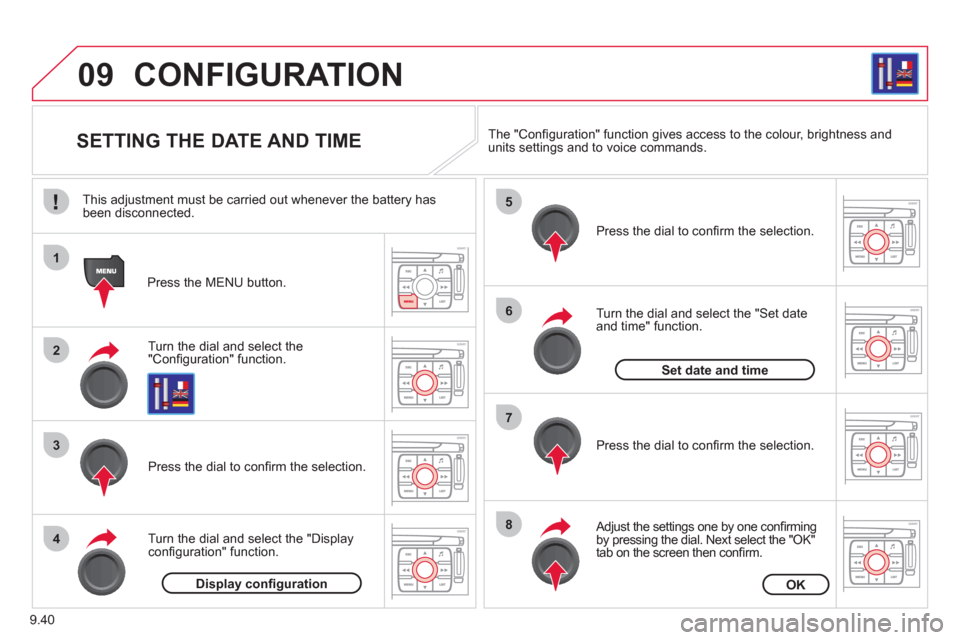
SETTING THE DATE AND TIME
Turn the dial and select the"Confi guration" function.
Press the MENU button.
Pr
ess the dial to confi rm the selection.
Turn the dial and select the "Displa
yconfi guration" function.
Pr
ess the dial to confi rm the selection.
Turn the dial and select the "
Set dateand time" function.
Adjust the settings one by one confi rmingby pressing the dial. Next select the "OK"
tab on the screen then confi rm.
Pr
ess the dial to confi rm the selection. The "
Confi guration" function gives access to the colour, brightness and units settings and to voice commands.
Display confi gurationOK
Set date and time
This adjustment must be carried out whenever the battery has been disconnected.
Page 198 of 270

9.48
QUESTIONANSWERSOLUTION
The stored stations donot function (no sound, 87.5 Mhz is displayed...).
An incorrect waveband is selected. Press the BAND AST button to return to the waveband (AM, FM1, FM2, FMAST) on which thestations are stored.
The quality of receptionof the radio station listened to graduallydeteriorates or the stored stations do not function(no sound, 87.5 Mhz is displayed...).
The vehicle is too far from the transmitter used by the station listenedto or there is no transmitter in the geographical area through which the vehicle is travelling.
Activate the RDS function to enable the system to check whether there is a more powerful transmitter in the geographical area.
The environment (hills, buildings, tunnels, basement car parks...) block reception, including in RDS mode.
This phenomenon is normal and does not indicate a failure of the audio equipment.
The aerial is absent or has been damaged (for example when goingthrough a car wash or into an underground car park).
Have the aerial checked by a CITROËN dealer.
Sound cut-outs of 1 to2 seconds in radio mode.During this brief sound cut-out, the RDS searches for any frequency permitting better reception of the station.
Deactivate the RDS function if the phenomenon is too frequent and always on the same route.
With the engine off, the audio equipment switches off after a few minutes of use.
When the engine is switched off, the audio equipment operating timedepends on the battery charge.
The switch-off is normal: the audio equipment switches to economy mode and switches off to prevent discharging of the vehicle's battery.
Start the vehicle's engine to increase the batterycharge.
TRAFFIC INFO is selected. However,certain traffi c jams along the route are notindicated in real time.
On starting, it is several minutes before the system begins to receive thetraffi c information.
Wait until the traffi c information is being received correctly (displaying of the traffi c information symbols on the map).
In certain countries, only major routes (motorways, ...) are listed for thetraffi c information.
This phenomenon is normal. The system isdependent on the traffi c information available.
The time taken to calculate a route sometimes seems longer than usual.
The performance of the system may slow down temporarily if a CD isbeing copied onto the Jukebox at the same time as a route is being calculated.
Wait until the CD has been copied or stop the copying before starting the guidance function.
Page 201 of 270

9.51
operate in your vehicle.
MyWay
For safety reasons, the driver must carry out operations which require prolonged attention while the vehicle is stationary.
When the en
gine is switched off and to prevent
discharging of the battery, the MyWay switches off
following the activation of the Energy Economy mode.
MULTIMEDIA AUDIO SYSTEM / BLUETOOTH ®
TELEPHONE
SATELLITE NAVIGATION SYSTEM FOR EUROPE BY SD CARD
01 First steps
CONTENTS
02 Steering mounted controls
03 General operation
04 Navigation - Guidance
05 Traffic information
06 Radio
07 Music media players
08 Bluetooth
® telephone
09 Configuration
10 Trip computer p.
p.
p.
p.
p.
p.
p.
p.
p.
p.
11 Screen menu map p. 9.52
9.53
9.54
9.57
9.65
9.67
9.68
9.71
9.74
9.75
9.76
Frequently asked questions p. 9.80