ECO mode Citroen NEMO 2015 1.G User Guide
[x] Cancel search | Manufacturer: CITROEN, Model Year: 2015, Model line: NEMO, Model: Citroen NEMO 2015 1.GPages: 192, PDF Size: 7.84 MB
Page 63 of 192
61
- with a manual gearbox, with the vehicle
stationary, put the gear lever into neutral,
then release the clutch pedal,
-
with an electronic gearbox
, with the
vehicle stationary, hold the brake pedal
down. Special cases: STOP mode unavailable
The STOP mode is not invoked when:
-
the driver's door is open,
-
the driver's seat belt is not fastened,
-
reverse gear is engaged,
-
some special conditions (battery
charge, engine temperature, particle
filter regeneration, braking assistance,
ambient temperature...) where the engine
is needed to assure control of a system.
In this case, a message appears
in the instrument panel screen,
accompanied by the "S" warning
lamp, which flashes for a few
seconds, then goes off.
This operation is perfectly normal.
STOP & S TART
The Stop & Start system puts the engine
temporarily into standby - ST OP mode -
during stops in the traffic (red lights, traffic
jams, or other...). The engine restarts
automatically - START mode - as soon as
you want to move off. The restart takes
place instantly, quickly and silently.
Perfect for urban use, the Stop & Start
system reduces fuel consumption, exhaust
emissions and the noise level when
stationary.
Operation
Going into engine STOP mode
The "S" warning lamp comes on
in the instrument panel and the
engine goes into standby: Automatic stopping of the engine is
only possible after the vehicle has
exceed a speed of about 6 mph (10 km/h),
to avoid repeated stopping of the engine
when driving slowly.
In the ST
o
P mode Stop & Start, hill
start assist is inactive.
n
ever leave your vehicle with out first
turning off the ignition with the key.
Never refuel with the engine in STOP
mode; you must switch off the ignition
with the key.
3
READY TO GO
Starting and stopping
Page 64 of 192
62Special cases: START invoked
automatically
The START mode is invoked automatically
when:
-
the vehicle's is free wheeling on a slope,
-
the engine has been stopped for around
3 minutes with Stop & Start,
-
some special conditions (battery charge,
engine temperature, braking assistance,
ambient temperature...) where the engine
is needed to assure control of a system. Good practice
With a manual gearbox in STOP mode, if a
gear is engaged without fully depressing the
clutch pedal, restarting may not take place.
A warning lamp or message is displayed
in the instrument panel asking you to fully
depress the clutch pedal to allow restarting.
With the engine stopped in STOP mode,
if the driver unfasten's their seat belt and
opens a front door, the engine can only
be restarted using the ignition key. This is
indicated by an audible signal, accompanied
by flashing of the service warning lamp and
a message in the instrument panel screen.
If following an automatic restart in START
mode, the driver takes no action on the
the vehicle during the next
3 minutes, the
system stops the engine definitively. The
engine can then only be restarted using the
key.
Going into engine START mode
The "S" warning lamp goes off and
the engine starts:
-
with a manual gearbox
, depress the
clutch pedal,
-
with an electronic gearbox
:
●
gear lever in position
A or M, release the
brake pedal,
●
or engage rever
se gear. In this case, a message appears
in the instrument panel screen,
accompanied by the "S" warning
lamp, which flashes for a few
seconds, then goes off.
This operation is perfectly normal.
In STOP mode, moving the gear lever
on an electronic gearbox starts the
engine, in anticipation of moving off.
If the engine stops automatically when
the vehicle is on a slope, as hill start
is only active with the engine running, it is
necessary to restart the engine by engaging
a forward gear and releasing the brake
pedal.
Starting and stopping
Page 87 of 192
85
Menu...Press...Sub-
menu...Press... Select... Confirm
and exitEnables you to...
1 Speed beep
onIncrease
Activate/Deactivate the audible
signal indicating exceeding of the
programmed speed.
Modify the speed setting.
d
ecrease
o
FF
2
a
ctivate Trip
b on
a
ctivate
d
isplay a second trip, "Trip b ".
o
FF
d
eactivate
3 Set time Hours
Increase
Adjust the clock
d
ecrease
Format 24 h
Select the display mode for the
clock.
12 h
4 Set date Year /
Month /
d
ayIncrease
Adjust the date.
d
ecrease
This button enables
you to:
-
access the menus and
sub-menus, This button enables you to:
-
scroll up through a menu,
-
increase a value.
This button enables you to: -
scroll down through a menu,
-
decrease a value.
-
confirm your selections within a menu,
-
exit from the menus.
A
long press enables you to return to the
home screen.
5
TECHNOLOGY on BOARD
Vehicle configuration
Page 109 of 192
107
Audio tracks in .mp3, .wma, .wav format
and playlists with the extension .wpl are
recognised by the system.Selecting tracks
PORTABLE AUDIO
DEVICE PLAYER
Autoplay
USB port Connect the device to the
USB port directly or using an
appropriate cable (not provided).
Ignition on: -
activates the recognition connection and
automatically starts the playlist,
-
or activates automatic play if the system
is programmed to autoplay.
Otherwise, select the track to be
played via the menu.
a
ctivate the main menu.
Select SETTI
n GS then ME d I a
PL
a
YER then
TR a C k PL a
Y
.
Confirm.
Select RE
ad ER or RE ad ER
o
FF.
Confirm.
a
ctivate the main menu.
Select ME
d I a
PL
a
YER.
Confirm.
Choose one of the selection
modes:
F
o L d ERS, a RTISTS, GE n RES,
a
L b UMS, PL a
YLISTS, SHUFFLE
(random play of tracks in the
playlist).
"Media player", then "US
b
options" and finally choose
"Folders", "
a rtists", ...
The PLAY ALL function enables you
to listen to the entire content of a
selection mode (folders, artists, ...).
TECHnoLoGY on boaRd
bluetooth hands-free system
5
Page 140 of 192
138
In certain cases of particularly arduous
use (towing the maximum load up a steep
slope in high temperatures), the engine
automatically limits its power. In this case,
automatic cutting off of the air conditioning
allows the engine power to be saved.If the coolant temperature
warning lamp comes on, stop the
vehicle and switch off the engine
as soon as possible.
ChecksSee the "Levels" section of
chapter 7.
Tyres: check the tyre pressures on the
towing vehicle and the trailer, observing the
recommended pressures.
Brakes: towing increases the braking
distance.
d rive at a moderate speed,
change down early and brake gradually. Side wind: sensitivity to side wind is
increased.
d rive smoothly and at a
moderate speed.
ABS: the system only controls the vehicle,
not the trailer.
Distribution of loads
distribute the load in the trailer so that the
heaviest objects are as close as possible
to the axle and the nose weight is close to
the maximum authorised without, however,
exceeding it. The air density decreases with
altitude, so reducing the performance of the
engine. The maximum towed load must be
reduced by 10 % for each 1 000 metres of
altitude.
Refer to the "Technical data -
Identification markings" section. Rear parking sensors: the sensors will be
deactivated automatically when an genuine
CITR
o Ë n towbar is used.
Towbar
We recommend the use of genuine
CITR
o Ë n towbars and their harnesses,
which have been tested and approved from
the design stage of your vehicle, and that
the fitting of this equipment is entrusted to a
CITROËN dealer or a qualified workshop.
If this equipment is not fitted by a CITR
o Ë n
dealer
, it is essential that it is fitted using
the electrical pre-equipment located at
the rear of the vehicle and following the
manufacturer's instructions.
The operation of the rear parking sensors is
deactivated automatically when the trailer
cable connector is inserted in the towbar
socket.
When the trailer cable is removed, the rear
parking sensors are re-activated.
Refer to the "Technology on board -
Parking sensors" section.
For information on the maximum
weights and towed loads applicable to
your vehicle, refer to the "Technical data -
Weights" section.
Towing a trailer
Page 146 of 192
144
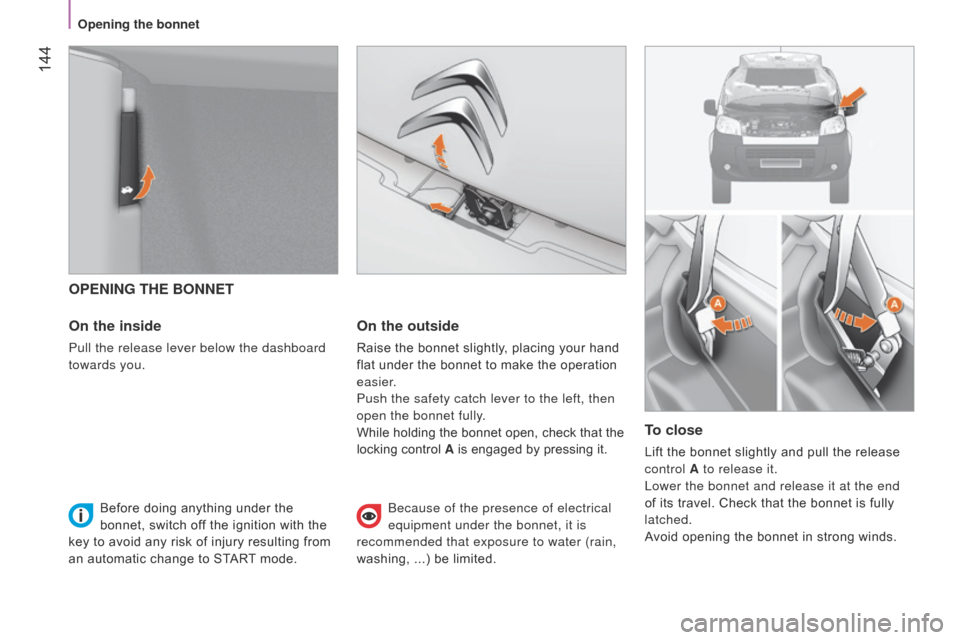
OPENING THE BONNET
On the inside
Pull the release lever below the dashboard
towards you.
On the outside
Raise the bonnet slightly, placing your hand
flat under the bonnet to make the operation
easier.
Push the safety catch lever to the left, then
open the bonnet fully.
While holding the bonnet open, check that the
locking control A is engaged by pressing it.
To close
Lift the bonnet slightly and pull the release
control A to release it.
Lower the bonnet and release it at the end
of its travel. Check that the bonnet is fully
latched.
Avoid opening the bonnet in strong winds.
Before doing anything under the
bonnet, switch off the ignition with the
key to avoid any risk of injury resulting from
an automatic change to START mode.
b
ecause of the presence of electrical
equipment under the bonnet, it is
recommended that exposure to water (rain,
washing, ...) be limited.
Opening the bonnet
Page 154 of 192
152
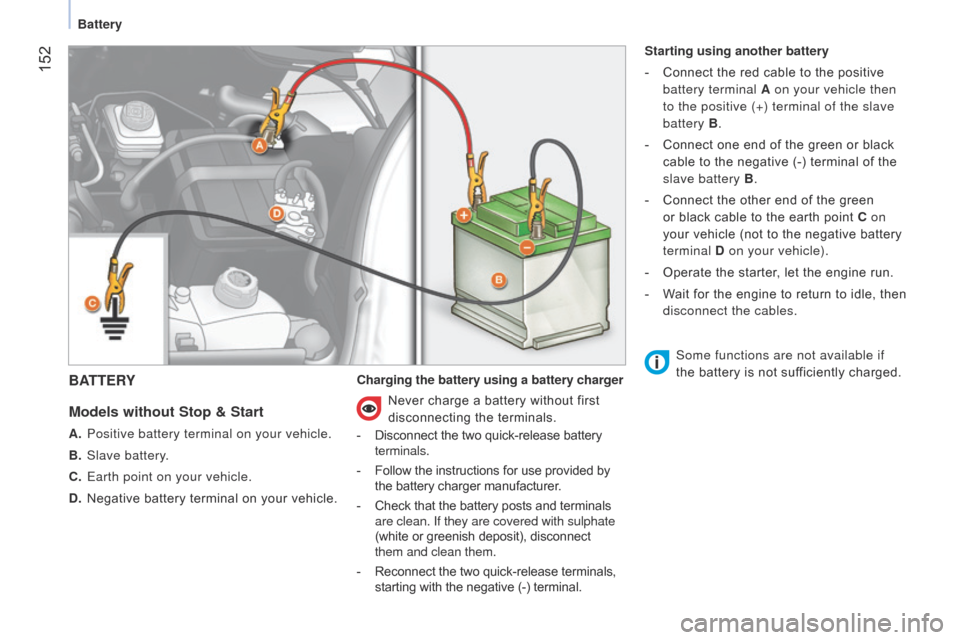
BATTERY
Models
without Stop & Start
A. Positive battery terminal on your vehicle.
B.
Slave battery
.
C.
Earth point on your vehicle.
D.
Negative battery terminal on your vehicle. Charging the battery using a battery charger Starting using another battery
-
Connect the red cable to the positive
battery terminal A on your vehicle then
to the positive (+) terminal of the slave
battery B.
-
Connect one end of the green or black
cable to the negative (-) terminal of the
slave battery B .
-
Connect the other end of the green
or black cable to the earth point C on
your vehicle (not to the negative battery
terminal D on your vehicle).
-
Operate the starter
, let the engine run.
-
W
ait for the engine to return to idle, then
disconnect the cables.
Never charge a battery without first
disconnecting the terminals.
- Disconnect the two quick-release battery
terminals.
-
Follow the instructions for use provided by
the battery charger manufacturer.
-
Check that the battery posts and terminals
are clean. If they are covered with sulphate
(white or greenish deposit), disconnect
them and clean them.
-
Reconnect the two quick-release terminals,
starting with the negative (-) terminal. Some functions are not available if
the battery is not sufficiently charged.
Battery
Page 155 of 192
153
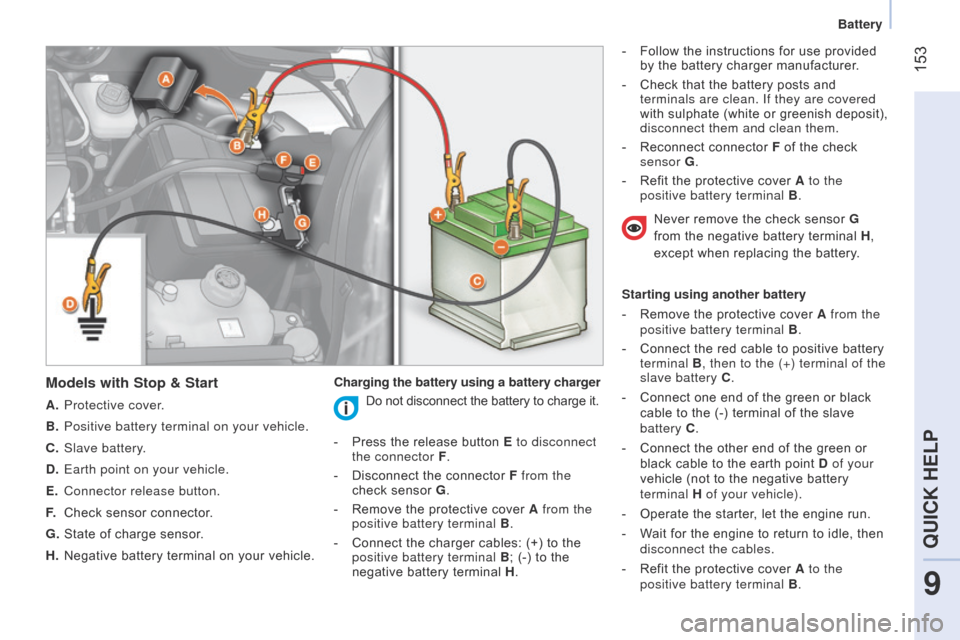
Models with Stop & Start
A. Protective cover.
B.
Positive battery terminal on your vehicle.
C.
Slave battery
.
D.
Earth point on your vehicle.
E.
Connector release button.
F.
Check sensor connector
.
G.
State of charge sensor
.
H.
Negative battery terminal on your vehicle. Charging the battery using a battery charger -
Follow the instructions for use provided
by the battery charger manufacturer.
-
Check that the battery posts and
terminals are clean. If they are covered
with sulphate (white or greenish deposit),
disconnect them and clean them.
-
Reconnect connector
F
of the check
sensor G.
-
Refit the protective cover
A
to the
positive battery terminal B .
Starting using another battery
-
Remove the protective cover
A
from the
positive battery terminal B .
-
Connect the red cable to positive battery
terminal B, then to the (+) terminal of the
slave battery C .
- Connect one end of the green or black
cable to the (-) terminal of the slave
battery C.
-
Connect the other end of the green or
black cable to the earth point D of your
vehicle (not to the negative battery
terminal H of your vehicle).
-
Operate the starter
, let the engine run.
-
W
ait for the engine to return to idle, then
disconnect the cables.
-
Refit the protective cover
A to the
positive battery terminal B .
Do not disconnect the battery to charge it.
-
Press the release button
E to disconnect
the connector F .
-
Disconnect the connector
F from the
check sensor G .
-
Remove the protective cover
A from the
positive battery terminal B .
-
Connect the charger cables: (+) to the
positive battery terminal B ; (-) to the
negative battery terminal H .Never remove the check sensor G
from the negative battery terminal H
,
except when replacing the battery.
9
QUICK HELP
Battery
Page 156 of 192
154
batteries contain harmful substances
such as sulphuric acid and lead. They
must be disposed of in accordance with the
law and must not, in any circumstances be
discarded with household waste.
Take used batteries to an authorised waste
disposal site.
It is advisable to disconnect the battery
if the vehicle is not to be used for a
period of more than one month. To do
this on models with Stop & Start:
-
press the release button
E
to
disconnect connector F ,
-
disconnect connector
F
of check
sensor G.
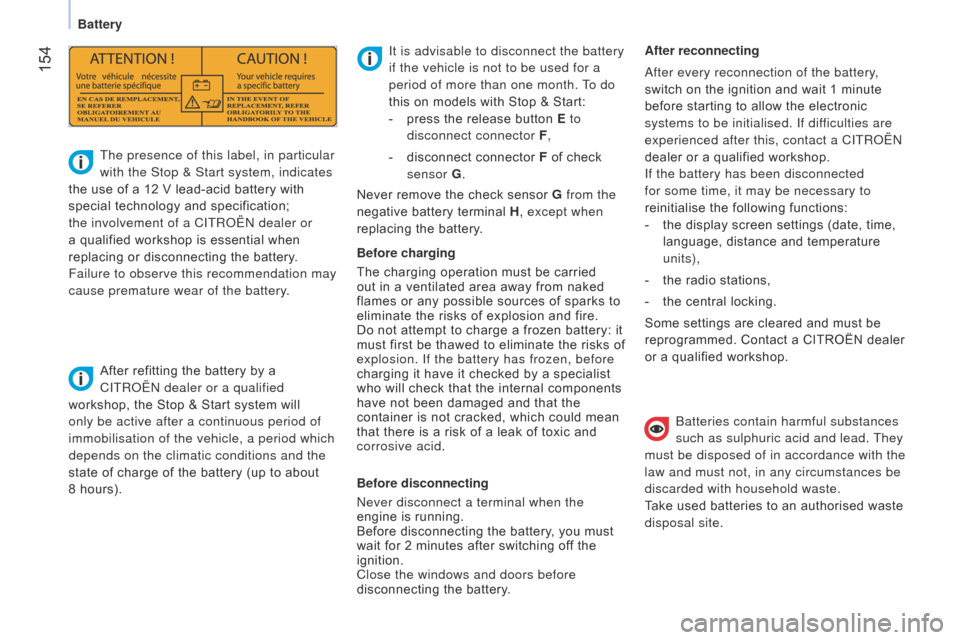
The presence of this label, in particular
with the Stop & Start system, indicates
the use of a 12 V lead-acid battery with
special technology and specification;
the involvement of a CITR
o
Ë
n
dealer or
a qualified workshop is essential when
replacing or disconnecting the battery.
Failure to observe this recommendation may
cause premature wear of the battery.
After refitting the battery by a
CITR
o
Ë
n
dealer or a qualified
workshop, the Stop & Start system will
only be active after a continuous period of
immobilisation of the vehicle, a period which
depends on the climatic conditions and the
state of charge of the battery (up to about
8 hours). Before charging
The charging operation must be carried
out in a ventilated area away from naked
flames or any possible sources of sparks to
eliminate the risks of explosion and fire.
Do not attempt to charge a frozen battery: it
must first be thawed to eliminate the risks of
explosion. If the battery has frozen, before
charging it have it checked by a specialist
who will check that the internal components
have not been damaged and that the
container is not cracked, which could mean
that there is a risk of a leak of toxic and
corrosive acid.
Before disconnecting
n
ever disconnect a terminal when the
engine is running.
Before disconnecting the battery, you must
wait for 2 minutes after switching off the
ignition.
Close the windows and doors before
disconnecting the battery. After reconnecting
a
fter every reconnection of the battery,
switch on the ignition and wait 1 minute
before starting to allow the electronic
systems to be initialised. If difficulties are
experienced after this, contact a CITR o Ë n
dealer or a qualified workshop.
If the battery has been disconnected
for some time, it may be necessary to
reinitialise the following functions:
-
the display screen settings (date, time,
language, distance and temperature
units),
-
the radio stations,
-
the central locking.
Some settings are cleared and must be
reprogrammed. Contact a CITROËN dealer
or a qualified workshop.
Never remove the check sensor G
from the
negative battery terminal H , except when
replacing the battery.
Battery