light Citroen NEMO RHD 2015 1.G User Guide
[x] Cancel search | Manufacturer: CITROEN, Model Year: 2015, Model line: NEMO RHD, Model: Citroen NEMO RHD 2015 1.GPages: 193, PDF Size: 8.3 MB
Page 33 of 193
31
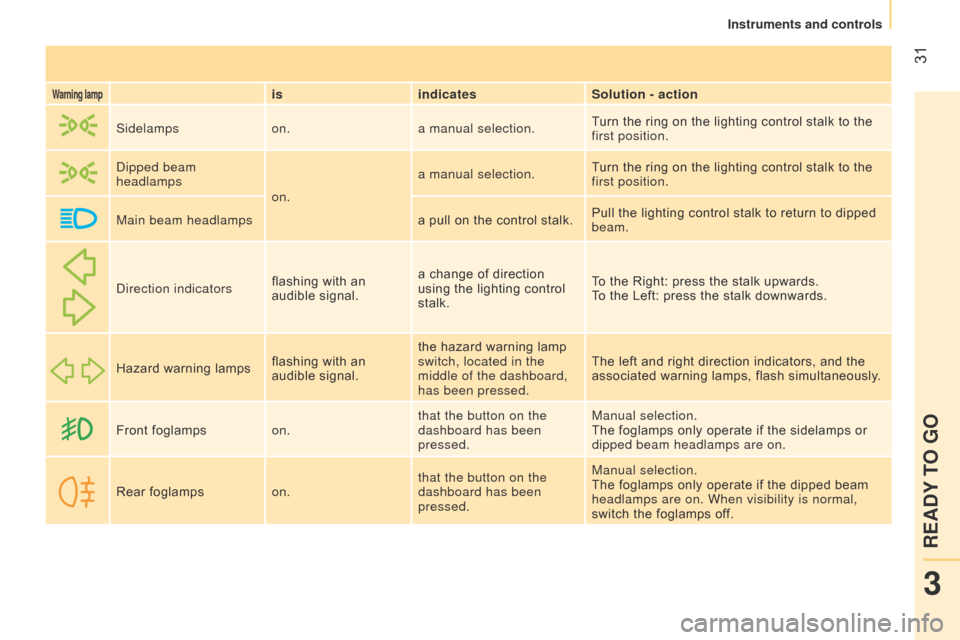
Warning lampisindicates Solution - action
Sidelamps on.a manual selection. Turn the ring on the lighting control stalk to the
first position.
d
ipped beam
headlamps
on.a manual selection.
Turn the ring on the lighting control stalk to the
first position.
Main beam headlamps a pull on the control stalk.Pull the lighting control stalk to return to dipped
beam.
d
irection indicators flashing with an
audible signal. a change of direction
using the lighting control
stalk. To the Right: press the stalk upwards.
To the Left: press the stalk downwards.
Hazard warning lamps flashing with an
audible signal.the hazard warning lamp
switch, located in the
middle of the dashboard,
has been pressed. The left and right direction indicators, and the
associated warning lamps, flash simultaneously.
Front foglamps on.that the button on the
dashboard has been
pressed. Manual selection.
The foglamps only operate if the sidelamps or
dipped beam headlamps are on.
Rear foglamps on.that the button on the
dashboard has been
pressed. Manual selection.
The foglamps only operate if the dipped beam
headlamps are on. When visibility is normal,
switch the foglamps off.
3
READY TO GO
Instruments and controls
Page 37 of 193
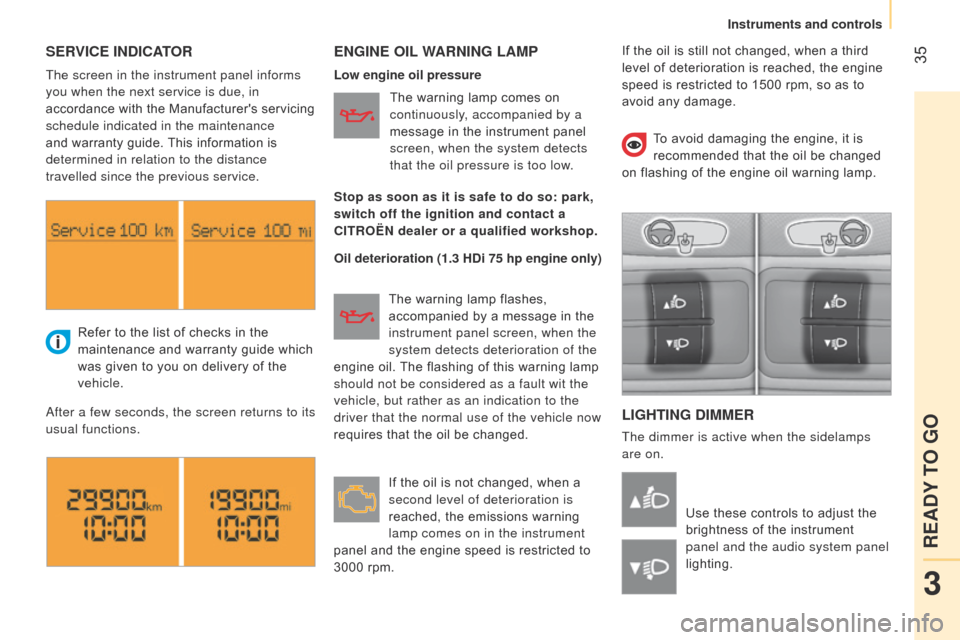
35SERVICE INDICATORENGINE OIL WARNING LAMP
L IGHTING DIMMER
The dimmer is active when the sidelamps
are on.
Refer to the list of checks in the
maintenance and warranty guide which
was given to you on delivery of the
vehicle.
a
fter a few seconds, the screen returns to its
usual functions.
Use these controls to adjust the
brightness of the instrument
panel and the audio system panel
lighting.
The screen in the instrument panel informs
you when the next service is due, in
accordance with the Manufacturer's servicing
schedule indicated in the maintenance
and warranty guide. This information is
determined in relation to the distance
travelled since the previous service.
Low engine oil pressure
Oil deterioration (1.3 HDi 75 hp engine only)The warning lamp comes on
continuously, accompanied by a
message in the instrument panel
screen, when the system detects
that the oil pressure is too low.
The warning lamp flashes,
accompanied by a message in the
instrument panel screen, when the
system detects deterioration of the
engine oil. The flashing of this warning lamp
should not be considered as a fault wit the
vehicle, but rather as an indication to the
driver that the normal use of the vehicle now
requires that the oil be changed.
If the oil is not changed, when a
second level of deterioration is
reached, the emissions warning
lamp comes on in the instrument
panel and the engine speed is restricted to
3000 rpm. To avoid damaging the engine, it is
recommended that the oil be changed
on flashing of the engine oil warning lamp.
Stop as soon as it is safe to do so: park,
switch off the ignition and contact a
CITROËN dealer or a qualified workshop. If the oil is still not changed, when a third
level of deterioration is reached, the engine
speed is restricted to 1500 rpm, so as to
avoid any damage.
3
READY TO GO
Instruments and controls
Page 38 of 193
36
Central lockingFolding/unfolding the key
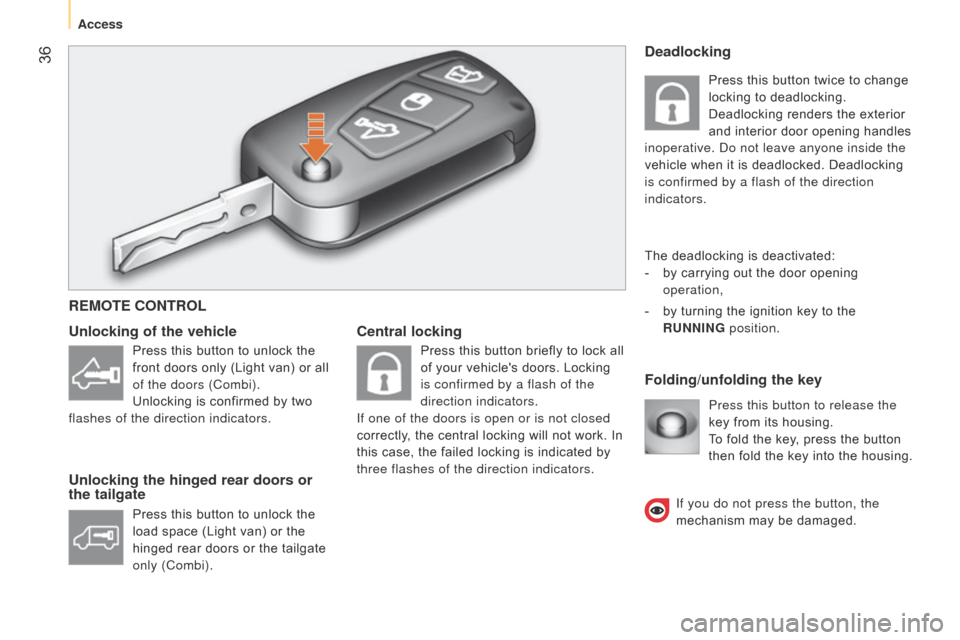
Unlocking of the vehicle
Unlocking the hinged rear doors or
the tailgate
Press this button to release the
key from its housing.
To fold the key, press the button
then fold the key into the housing.
Deadlocking
The deadlocking is deactivated:
-
by carrying out the door opening
operation,
-
by turning the ignition key to the
RUNNING position.
REMOTE CONTROL
Press this button to unlock the
front doors only (Light van) or all
of the doors (Combi).
Unlocking is confirmed by two
flashes of the direction indicators.
Press this button to unlock the
load space (Light van) or the
hinged rear doors or the tailgate
only (Combi). Press this button briefly to lock all
of your vehicle's doors. Locking
is confirmed by a flash of the
direction indicators.
If one of the doors is open or is not closed
correctly, the central locking will not work. In
this case, the failed locking is indicated by
three flashes of the direction indicators. Press this button twice to change
locking to deadlocking.
Deadlocking renders the exterior
and interior door opening handles
inoperative. d o not leave anyone inside the
vehicle when it is deadlocked. Deadlocking
is confirmed by a flash of the direction
indicators.
If you do not press the button, the
mechanism may be damaged.
Access
Page 45 of 193

43
Good practice
When opening, take care not to obstruct the
guide space on the floor to allow the door to
slide correctly.
Do not block traffic.Load space
Sliding side door (Combi)
Pull the handle A towards the rear, slide the
door fully to pass the point of resistance in
the open position.
Side-hinged rear doors
To open, slide the control B to the right.
If your vehicle is parked on a slope,
guide the side door as it slides. The
door could open or close more quickly due
to the incline of the ground, risking injury.
As a safety precaution and to guarantee
correct operation, do not drive with the
sliding side door open. Press once to unlock the sliding
side doors and the rear doors
(Light van) from the driving
position.
Tailgate (Combi)
In the event of a battery or central
locking fault, the tailgate can be released
mechanically from inside the boot.
Open the sliding side door and fold the rear
seats fully.
From inside the boot, press the lever to
release the tailgate.
3
READY TO GO
Access
Page 46 of 193
44
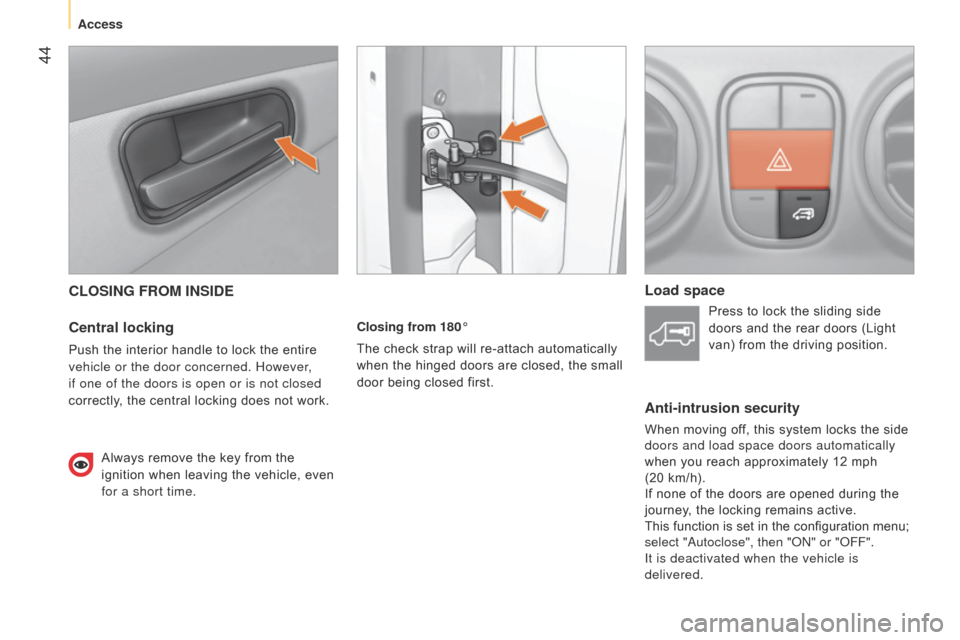
CLOSING FROM INSIDE
Central locking
Push the interior handle to lock the entire
vehicle or the door concerned. However,
if one of the doors is open or is not closed
correctly, the central locking does not work.Always remove the key from the
ignition when leaving the vehicle, even
for a short time. Closing from 180°
The check strap will re-attach automatically
when the hinged doors are closed, the small
door being closed first.
Load space
Press to lock the sliding side
doors and the rear doors (Light
van) from the driving position.
Anti-intrusion security
When moving off, this system locks the side
doors and load space doors automatically
when you reach approximately 12 mph
(20 km/h).
If none of the doors are opened during the
journey, the locking remains active.
This function is set in the configuration menu;
select "
a utoclose", then " on " or " o FF".
It is deactivated when the vehicle is
delivered.
Access
Page 47 of 193

45
Sliding side door (Combi)
Use the grab handle to pass the point of
resistance and start the movement. Then
use the handle to guide the door closed.Child safety
This prevents either of the rear doors being
opened from inside.
F
T
urn the switch on each rear door a
quarter of a turn using the ignition key.
CLOSING FROM THE OUTSIDE
Sliding side door
Pull the handle towards you then towards
the front to pass the point of resistance
(Light van) or to release the door retaining
device (Combi).
Slide the door fully until it is closed.
Hinged rear doors
Start by closing the small hinged door, this is
secured automatically when closed.
Close the large door using its handle.
Tailgate (Combi)
Lower the tailgate using the interior grab
handle.
If your vehicle is on a slope, guide the
sliding door all the way until closed.
This is because the door could open or close
itself more quickly because of the incline
and result in injuries.
3
READY TO GO
Access
Page 48 of 193

46
LIGHTING STALK
Selection is by rotation of the white mark
on the ring, when the ignition key is in the
RUNNING position.
All lamps off
Sidelamps on
This is indicated on the
instrument panel by illumination
of the warning lamp.
Dipped / main beam headlamps on
Dipped / main beam headlamps
change
Pull the lighting stalk fully towards you.
Headlamp flash
Direction indicators"Motorway" function
System which indicates a change of lane on
high-speed roads.
Press the lighting stalk up or down once,
without passing the point of resistance; the
corresponding direction indicators will flash
three times.
Pull the lighting stalk towards you
gently, regardless of the position
of the ring. Left: push downwards. The green
direction arrow warning lamp
flashes in the instrument panel.
Right: push upwards. The green
direction arrow warning lamp flashes in the
instrument panel. Turn the ring into position.
Parking lamps
Side markers for the vehicle by illumination
of the sidelamps on the traffic side only.
Ignition key in the STOP position or removed
from the ignition switch:
F
turn the ring to the "Lighting of
f" position,
then to the "Sidelamps" position,
F
operate the lighting control stalk up
or down depending on the traffic side
(for example: when parking on the left;
lighting control stalk upwards; the right
hand sidelamps are on).
This is confirmed by illumination of the
sidelamps warning lamp in the instrument
panel.
To switch off the parking lamps, return the
lighting control stalk to the middle position
and the ring to the "Lighting off" position.
Steering mounted controls
Page 49 of 193
47Headlamp beam
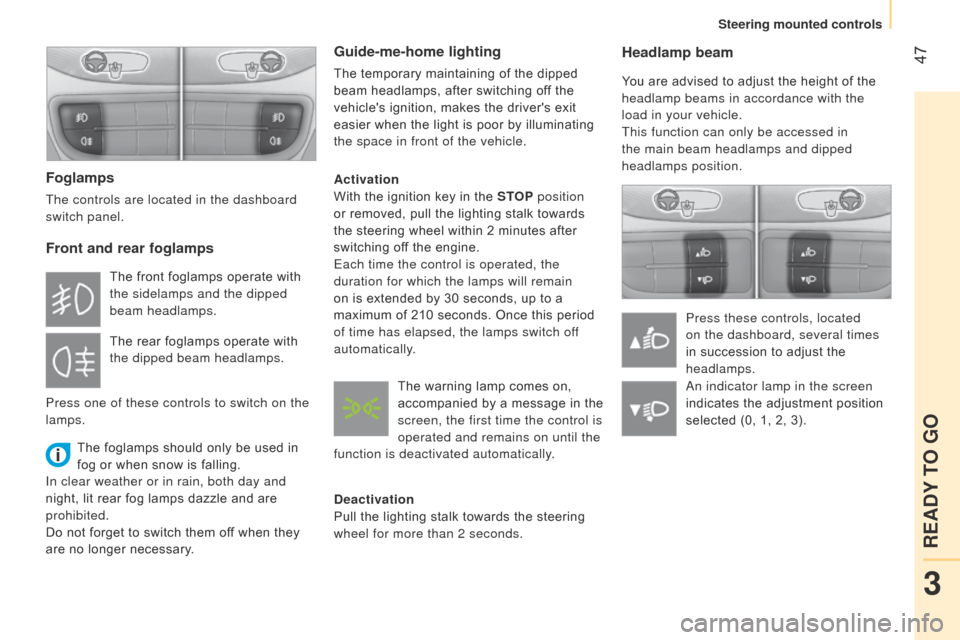
You are advised to adjust the height of the
headlamp beams in accordance with the
load in your vehicle.
This function can only be accessed in
the main beam headlamps and dipped
headlamps position.Press these controls, located
on the dashboard, several times
in succession to adjust the
headlamps.
Foglamps
The controls are located in the dashboard
switch panel.
Front and rear foglamps
The foglamps should only be used in
fog or when snow is falling.
In clear weather or in rain, both day and
night, lit rear fog lamps dazzle and are
prohibited.
Do not forget to switch them off when they
are no longer necessary.
Guide-me-home lighting
The temporary maintaining of the dipped
beam headlamps, after switching off the
vehicle's ignition, makes the driver's exit
easier when the light is poor by illuminating
the space in front of the vehicle.
Activation
With the ignition key in the STOP position
or removed, pull the lighting stalk towards
the steering wheel within 2 minutes after
switching off the engine.
Each time the control is operated, the
duration for which the lamps will remain
on is extended by 30 seconds, up to a
maximum of 210 seconds. Once this period
of time has elapsed, the lamps switch off
automatically.
Deactivation
Pull the lighting stalk towards the steering
wheel for more than 2 seconds.
The front foglamps operate with
the sidelamps and the dipped
beam headlamps.
The rear foglamps operate with
the dipped beam headlamps.
Press one of these controls to switch on the
lamps. The warning lamp comes on,
accompanied by a message in the
screen, the first time the control is
operated and remains on until the
function is deactivated automatically.
a
n indicator lamp in the screen
indicates the adjustment position
selected (0, 1, 2, 3).
3
READY TO GO
Steering mounted controls
Page 55 of 193
53Good practice
To change gear smoothly, always press the
clutch pedal fully down.
To prevent the mat from becoming caught under
the pedal:
-
ensure that the mat is positioned correctly,
-
never fit one mat on top of another
.
Avoid leaving your hand on the gear knob as
the force exerted, even if slight, may cause
wear of the internal components of the
gearbox over time.
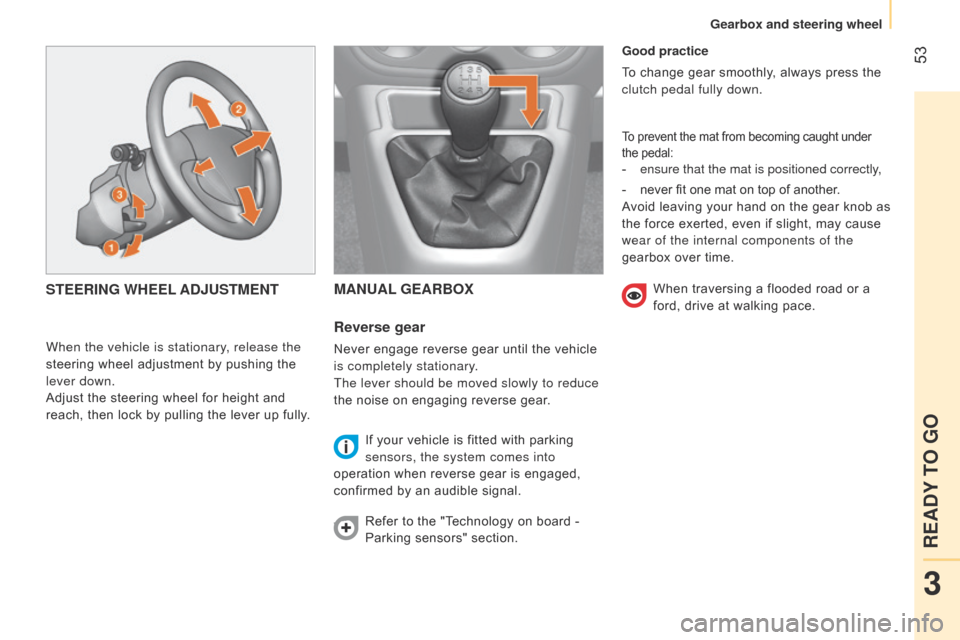
MANUAL GEARBOX
Reverse
gear
Never engage reverse gear until the vehicle
is completely stationary.
The lever should be moved slowly to reduce
the noise on engaging reverse gear.
If your vehicle is fitted with parking
sensors, the system comes into
operation when reverse gear is engaged,
confirmed by an audible signal.
Refer to the "Technology on board -
Parking sensors" section.
STEERING WHEEL ADJUSTMENT
When the vehicle is stationary, release the
steering wheel adjustment by pushing the
lever down.
Adjust the steering wheel for height and
reach, then lock by pulling the lever up fully. When traversing a flooded road or a
ford, drive at walking pace.
3
READY TO GO
Gearbox and steering wheel
Page 58 of 193
56Stopping the vehicle
To switch off the engine, with your foot on
the brake pedal, you should:
-
select first gear or reverse.
-
apply the parking brake to immobilise the
vehicle.
-
switch of
f the ignition.
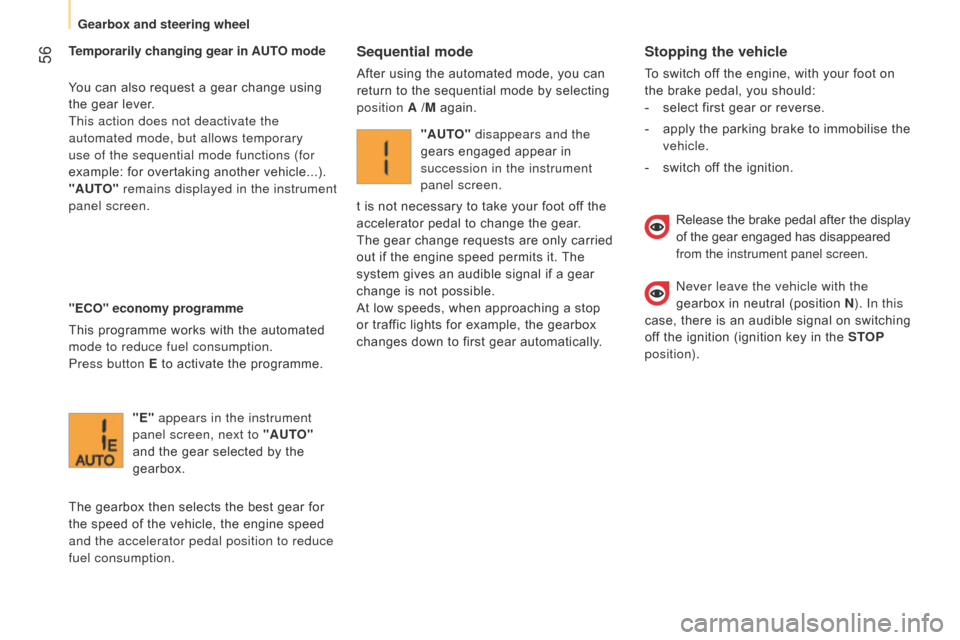
Temporarily changing gear in AUTO mode
You can also request a gear change using
the gear lever.
This action does not deactivate the
automated mode, but allows temporary
use of the sequential mode functions (for
example: for overtaking another vehicle...).
"AUTO" remains displayed in the instrument
panel screen.
"ECO" economy programme
This programme works with the automated
mode to reduce fuel consumption.
Press button E
to activate the programme.
Sequential mode
After using the automated mode, you can
return to the sequential mode by selecting
position A /M again.
"E" appears in the instrument
panel screen, next to "AUTO"
and the gear selected by the
gearbox.
The gearbox then selects the best gear for
the speed of the vehicle, the engine speed
and the accelerator pedal position to reduce
fuel consumption. "AUTO" disappears and the
gears engaged appear in
succession in the instrument
panel screen.
t is not necessary to take your foot off the
accelerator pedal to change the gear.
The gear change requests are only carried
out if the engine speed permits it. The
system gives an audible signal if a gear
change is not possible.
At low speeds, when approaching a stop
or traffic lights for example, the gearbox
changes down to first gear automatically.
Release the brake pedal after the display
of the gear engaged has disappeared
from the instrument panel screen.
n
ever leave the vehicle with the
gearbox in neutral (position N ). In this
case, there is an audible signal on switching
off the ignition (ignition key in the STOP
position).
Gearbox and steering wheel