door lock CITROEN RELAY 2016 Handbook (in English)
[x] Cancel search | Manufacturer: CITROEN, Model Year: 2016, Model line: RELAY, Model: CITROEN RELAY 2016Pages: 308, PDF Size: 10.98 MB
Page 164 of 308

162
- If a pressure of at least 3 bar is not
reached within 5 minutes, disconnect
the compressor from the valve and the
power socket, then move the vehicle
forward by approximately 10 metres to
distribute the sealant fluid inside the
tyre.
-
Then repeat the inflation operation:
●
if a pressure of at least
3 bar is not
reached within 10 minutes, switch off
your vehicle: the tyre has suffered
too much damage and repair has not
been possible. Contact a CITROËN
dealer or a qualified workshop.
●
if the tyre has been inflated to a
pressure of 5 bar, set off again
immediately.
After driving for approximately 10 minutes,
stop and check the pressure of the tyre
again.
Adjust the pressure to the value given on the
label on the driver's door pillar, and contact
a CITROËN dealer or a qualified workshop
as soon as possible.
checking and adjusting the
pressure
The compressor can only be used to check
and adjust the pressure.
-
Disconnect the hose
I and connect it to
the tyre valve directly; the cartridge will
then be connected to the compressor
and the filling fluid will not be injected.
If it is necessary to deflate the tyre, connect
the hose I to the tyre valve and press the
yellow button, placed in the centre of the
switch on the compressor.
replacing the cartridge
To replace the sealant cartridge, carry out
the following operations:
-
disconnect the hose
I,
-
turn the cartridge to be replaced
anticlockwise and lift it,
-
insert the new cartridge and turn it
clockwise,
-
reconnect the hose
I and connect the
hose B in its location.
The cartridge contains ethylene-glycol,
a product which is harmful if swallowed
and which causes irritation to the eyes.
Keep out of reach of children.
After use, do not discard the cartridge in the
environment, take it to a CITROËN
dealer or
an appropriate waste disposal organisation.
This puncture repair kit and
replacement cartridges are available
from CITROËN dealers.
Puncture
Page 219 of 308

217Level 1Level 2 Level 3co mment
Settings
Safety /Help
re
versing camera On
Display the reversing camera in reverse.
Off
ca
mera delay On
Maintain the display in the screen of the image
from the reversing camera for a maximum of
10
seconds or up to 8 mph (18 km/h).
Off
Settings Lamps
da
ytime lighting On
Activate or deactivate the automatic illumination
of headlamps when starting.
Off
Settings
d
oors and
locking Autoclose On
Activate or deactivate the automatic locking of
doors when the vehicle is moving.
Off
Touch Screen Audio - Telematic System
AUDIO and TELEMATICS
10
Page 281 of 308

3
2
READY
TO GO
Starting and switching off
BATTERY STANDBY SYSTEM
If the vehicle is not to be used for a
prolonged period, such as for winter storage,
for example, it is strongly recommended that
the battery be placed on standby in order to
protect it and optimise its service life.
To place the battery on standby:
- Switch off the engine ( STOP position).
- Press the red button, then turn the key
to the BATT position.
The battery goes into standby about
7 minutes later.
This time is necessary to:
- Allow the user to get out of the vehicle
and lock the doors with the remote
control.
- Ensure that all of the vehicle's electrical
systems are deactivated.
When the battery is on standby,
access to the vehicle is only possible
by unlocking the vehicle using the key in the
lock barrel in the driver's door.
After placing the battery on standby,
settings (time, date, radio station
presets...) are memorised.
To take the battery out of standby:
- Turn the key to the MAR position.
- Start the engine normally ( AV V position).
Page 285 of 308

7
4
TECHNOLOGY
on
BOARD
Vehicle configuration
Menu... Press... Sub-menu… Press... Select… Confirm
and quit Enables you to...
1 Speed
beep
ON Increase Activate / Deactivate the audible
signal indicating exceeding of
the programmed speed and
select the speed.
Decrease
OFF
2 Headlamp
sensor
Increase Set the sensitivity of the
sunshine sensor (1 to 3). Decrease
3 Activation
Trip B
Activate Display a second distance
"Trip B". Deactivate
4 Traffic Sign Activate Activate / Deactivate the reading
of traffic signs. Deactivate
5 Setting
the time
Hours/
Minutes
Increase Set the clock. Decrease
Time format 24 Select the clock display mode. 12
6 Setting the
date
Year/Month/
Day
Activate Set the date. Deactivate
7 Autoclose While moving ON Activate / Deactivate automatic
door locking above approx
12 mph (20 km/h) OFF
Page 288 of 308

10
Vehicle configuration
Using the touch screen audio system
This audio system control panel, located in
the middle of the dashboard, gives access to
personalisation menus for certain systems.
The corresponding information appears in
the touch screen.
Nine languages are offered: Dutch, English,
French, German, Italian, Polish, Portuguese,
Spanish and Turkish.
As a safety precaution, some menus
can only be accessed when the ignition
is off.
This control panel button gives
access to the "Settings" menu.
"Settings" menu
1. "Display".
2. "Voice commands".
3. "Time and Date".
4. "Safety / Help".
5. "Lighting".
6. "Doors & locking".
7. "Audio".
8. "Telephone / Bluetooth".
9. "Radio settings".
10. "Restore Settings" to return to factory
settings.
11 . "Del. pers. data" to delete all of your
personal data, related to the Bluetooth
equipment in the audio system.
This button in the screen allows
you to go up a level in a menu or
increase a value.
This button in the screen allows
you to go down a level in a menu
or decrease a value.
For more information on the audio
system, the telephone, the radio and the
navigation system, the sub-menus 2 , 7 ,
8 , 9 and 11 are described in detail in the
"Audio and telematics" section.
The settings for sub-menus 4 , 5 and
6 vary according to the equipment
installed on the vehicle.
Page 289 of 308

11
4
TECHNOLOGY
on
BOARD
Vehicle configuration
From the "Safety / Help" sub menu, you can:
- select "Parkview Camera", then
"Reversing camera" to activate or
deactivate its use (On, Off),
- select "Parkview Camera", then
"Camera delay" to activate or
deactivate the maintaining of the
display for 10 seconds or up to 11 mph
(18 km/h) (On, Off),
- select "Traffic Sign" to activate or
deactivate its use (On, Off),
- select "Passenger airbag" to activate or
deactivate its use (On, Off).
From the "Lighting" sub-menu, you can:
- select "Daytime running lamps" to
activate or deactivate their use (On, Off),
- select "Auto headlamp dipping" to
activate or deactivate its use (On, Off),
- select "Headlamp sensor" to adjust its
sensitivity (1, 2, 3).
From the "Doors & locking" sub-menu, you
can:
- select "Autoclose" to activate or
deactivate its use (On, Off).
From the "Display" sub-menu, you can:
- select "Languages" and choose one of
the languages listed above,
- select "Units of measurement" to
choose the units for fuel consumption
(l/100 km, mpg), distance (miles, km)
and temperature (°C, °F),
- select "Display Trip B" to switch trip B
On or Off in the trip computer.
From the "Time and Date" sub-menu, you
can:
- select "Adjust time and format" to set the
hour, minutes and seconds and choose
the format (24 h, 12 h with am or pm),
- select "Adjust Date" to set the day,
month and year.
To set the time manually, "Synch Time"
must be Off.
Page 297 of 308

3
2
READY
TO GO
Starting and switching off
BATTERY STANDBY SYSTEM
If the vehicle is not to be used for a
prolonged period, such as for winter storage,
for example, it is strongly recommended that
the battery be placed on standby in order to
protect it and optimise its service life.
To place the battery on standby:
- Switch off the engine ( STOP position).
- Press the red button, then turn the key
to the BATT position.
The battery goes into standby about
7 minutes later.
This time is necessary to:
- Allow the user to get out of the vehicle
and lock the doors with the remote
control.
- Ensure that all of the vehicle's electrical
systems are deactivated.
When the battery is on standby,
access to the vehicle is only possible
by unlocking the vehicle using the key in the
lock barrel in the driver's door.
After placing the battery on standby,
settings (time, date, radio station
presets...) are memorised.
To take the battery out of standby:
- Turn the key to the MAR position.
- Start the engine normally ( AV V position).
Page 301 of 308

7
4
TECHNOLOGY
on
BOARD
Vehicle configuration
Menu... Press... Sub-menu… Press... Select… Confirm
and quit Enables you to...
1 Speed
beep
ON Increase Activate / Deactivate the audible
signal indicating exceeding of
the programmed speed and
select the speed.
Decrease
OFF
2 Headlamp
sensor
Increase Set the sensitivity of the
sunshine sensor (1 to 3). Decrease
3 Activation
Trip B
Activate Display a second distance
"Trip B". Deactivate
4 Traffic Sign Activate Activate / Deactivate the reading
of traffic signs. Deactivate
5 Setting
the time
Hours/
Minutes
Increase Set the clock. Decrease
Time format 24 Select the clock display mode. 12
6 Setting the
date
Year/Month/
Day
Activate Set the date. Deactivate
7 Autoclose While moving ON Activate / Deactivate automatic
door locking above approx
12 mph (20 km/h) OFF
Page 304 of 308
10
Vehicle configuration
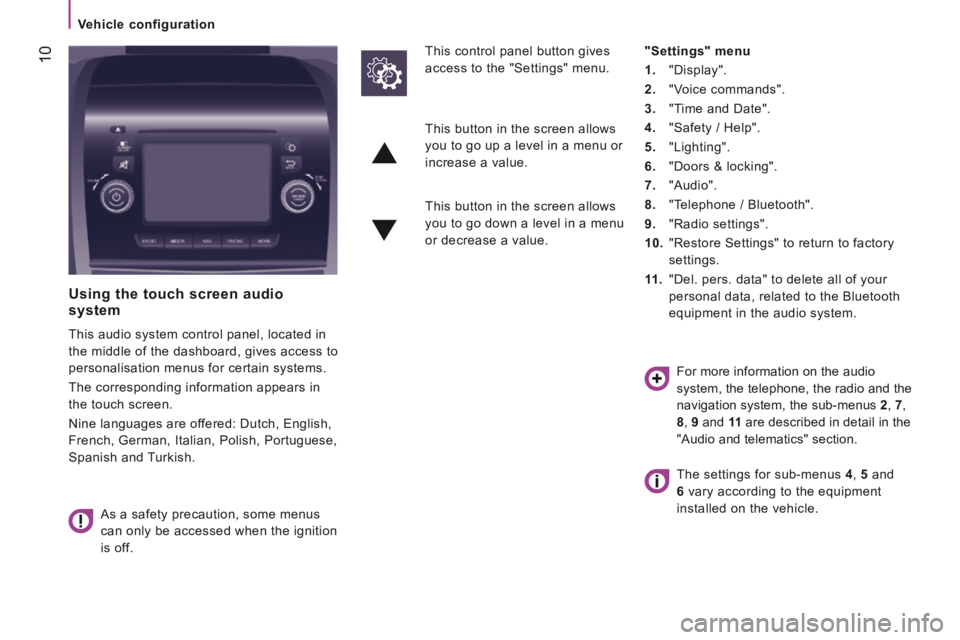
Using the touch screen audio system
This audio system control panel, located in
the middle of the dashboard, gives access to
personalisation menus for certain systems.
The corresponding information appears in
the touch screen.
Nine languages are offered: Dutch, English,
French, German, Italian, Polish, Portuguese,
Spanish and Turkish.
As a safety precaution, some menus
can only be accessed when the ignition
is off.
This control panel button gives
access to the "Settings" menu.
"Settings" menu
1. "Display".
2. "Voice commands".
3. "Time and Date".
4. "Safety / Help".
5. "Lighting".
6. "Doors & locking".
7. "Audio".
8. "Telephone / Bluetooth".
9. "Radio settings".
10. "Restore Settings" to return to factory
settings.
11 . "Del. pers. data" to delete all of your
personal data, related to the Bluetooth
equipment in the audio system.
This button in the screen allows
you to go up a level in a menu or
increase a value.
This button in the screen allows
you to go down a level in a menu
or decrease a value.
For more information on the audio
system, the telephone, the radio and the
navigation system, the sub-menus 2 , 7 ,
8 , 9 and 11 are described in detail in the
"Audio and telematics" section.
The settings for sub-menus 4 , 5 and
6 vary according to the equipment
installed on the vehicle.
Page 305 of 308

11
4
TECHNOLOGY
on
BOARD
Vehicle configuration
From the "Safety / Help" sub menu, you can:
- select "Parkview Camera", then
"Reversing camera" to activate or
deactivate its use (On, Off),
- select "Parkview Camera", then
"Camera delay" to activate or
deactivate the maintaining of the
display for 10 seconds or up to 11 mph
(18 km/h) (On, Off),
- select "Traffic Sign" to activate or
deactivate its use (On, Off),
- select "Passenger airbag" to activate or
deactivate its use (On, Off).
From the "Lighting" sub-menu, you can:
- select "Daytime running lamps" to
activate or deactivate their use (On, Off),
- select "Auto headlamp dipping" to
activate or deactivate its use (On, Off),
- select "Headlamp sensor" to adjust its
sensitivity (1, 2, 3).
From the "Doors & locking" sub-menu, you
can:
- select "Autoclose" to activate or
deactivate its use (On, Off).
From the "Display" sub-menu, you can:
- select "Languages" and choose one of
the languages listed above,
- select "Units of measurement" to
choose the units for fuel consumption
(l/100 km, mpg), distance (miles, km)
and temperature (°C, °F),
- select "Display Trip B" to switch trip B
On or Off in the trip computer.
From the "Time and Date" sub-menu, you
can:
- select "Adjust time and format" to set the
hour, minutes and seconds and choose
the format (24 h, 12 h with am or pm),
- select "Adjust Date" to set the day,
month and year.
To set the time manually, "Synch Time"
must be Off.