instrument panel CITROEN RELAY 2019 Handbook (in English)
[x] Cancel search | Manufacturer: CITROEN, Model Year: 2019, Model line: RELAY, Model: CITROEN RELAY 2019Pages: 232, PDF Size: 8.21 MB
Page 26 of 232
24
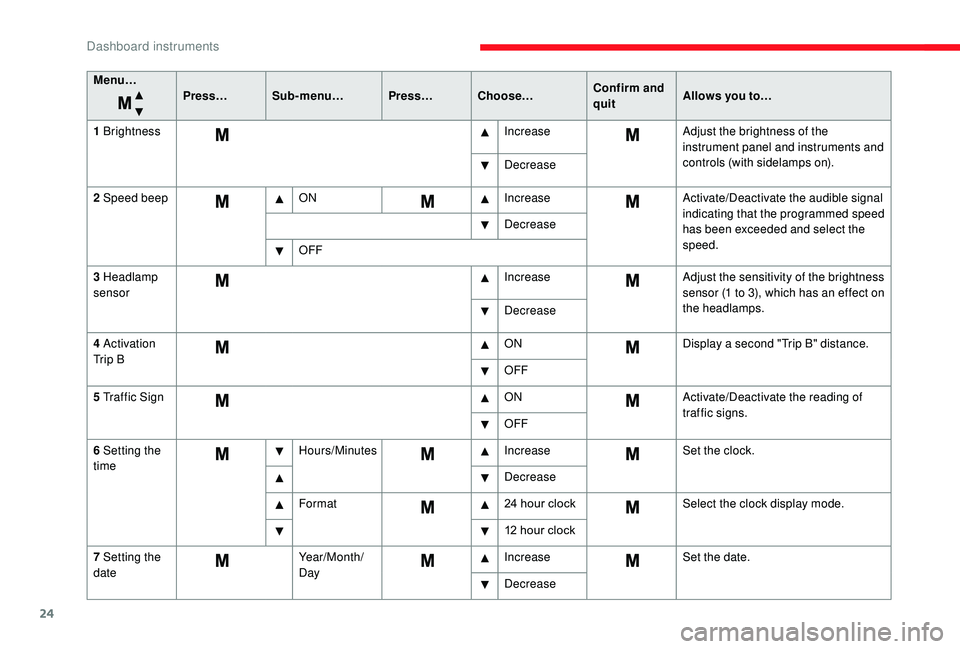
Menu…Press…Sub-menu… Press…Choose… Confirm and
quitAllows you to…
1
Brightness IncreaseAdjust the brightness of the
instrument panel and instruments and
controls (with sidelamps on).
Decrease
2
Speed beep ON IncreaseActivate/Deactivate the audible signal
indicating that the programmed speed
has been exceeded and select the
speed.
Decrease
OFF
3
Headlamp
sensor Increase
Adjust the sensitivity of the brightness
sensor (1
to 3), which has an effect on
the headlamps.
Decrease
4
Activation
Tr i p B ON
Display a
second "Trip B" distance.
OFF
5
Traffic Sign ONActivate/Deactivate the reading of
traffic signs.
OFF
6
Setting the
time Hours/Minutes
IncreaseSet the clock.
Decrease
Format 24
hour clockSelect the clock display mode.
12
hour clock
7
Setting the
date Year/Month/
DayIncrease
Set the date.
Decrease
Dashboard instruments
Page 29 of 232
27
Using the touch screen
audio system
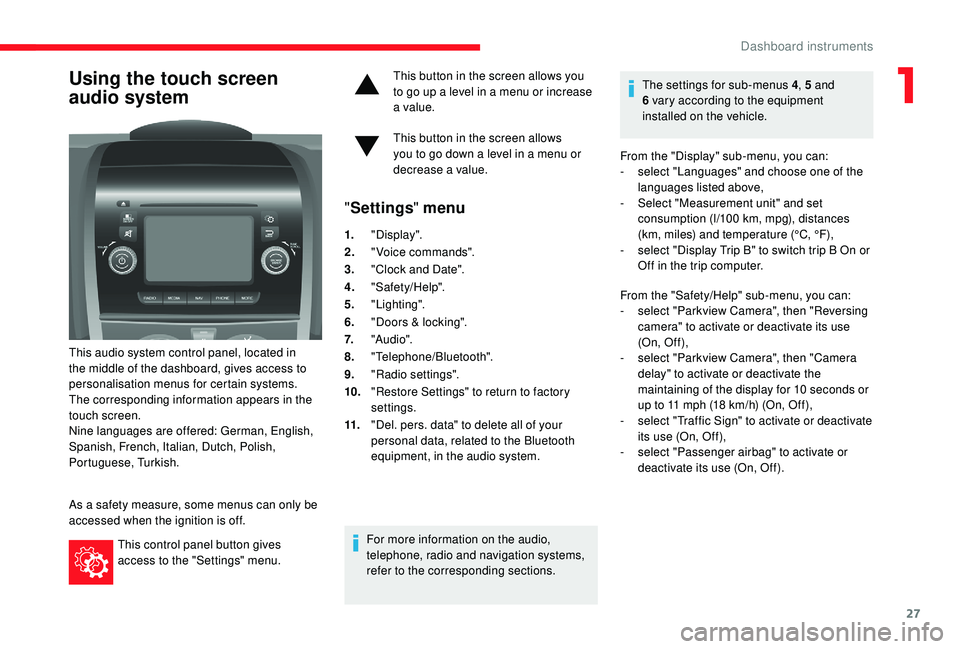
This audio system control panel, located in
the middle of the dashboard, gives access to
personalisation menus for certain systems.
The corresponding information appears in the
touch screen.
Nine languages are offered: German, English,
Spanish, French, Italian, Dutch, Polish,
Portuguese, Turkish.
As a
safety measure, some menus can only be
accessed when the ignition is off.
This control panel button gives
access to the "Settings" menu. This button in the screen allows you
to go up a
level in a menu or increase
a value.
This button in the screen allows
you to go down a level in a menu or
decrease a
value.
"
Settings " menu
1."Display".
2. "Voice commands".
3. "Clock and Date".
4. "Safety/Help".
5. "Lighting".
6. "Doors & locking".
7. "Audi o".
8. "Telephone/Bluetooth".
9. "Radio settings".
10. "Restore Settings" to return to factory
settings.
11. "Del. pers. data" to delete all of your
personal data, related to the Bluetooth
equipment, in the audio system.
For more information on the audio,
telephone, radio and navigation systems,
refer to the corresponding sections. The settings for sub-menus 4
, 5 and
6 vary according to the equipment
installed on the vehicle.
From the "Display" sub-menu, you can:
-
s
elect "Languages" and choose one of the
languages listed above,
-
S
elect "Measurement unit" and set
consumption (l/100 km, mpg), distances
(km, miles) and temperature (°C, °F),
- s elect "Display Trip B" to switch trip B On or
Off in the trip computer.
From the "Safety/Help" sub-menu, you can:
-
s
elect "Parkview Camera", then "Reversing
camera" to activate or deactivate its use
(On, Of f ),
-
s
elect "Parkview Camera", then "Camera
delay" to activate or deactivate the
maintaining of the display for 10
seconds or
up to 11
mph (18 km/h) (On, Off),
-
s
elect "Traffic Sign" to activate or deactivate
its use (On, Off),
-
s
elect "Passenger airbag" to activate or
deactivate its use (On, Off).
1
Dashboard instruments
Page 30 of 232
28
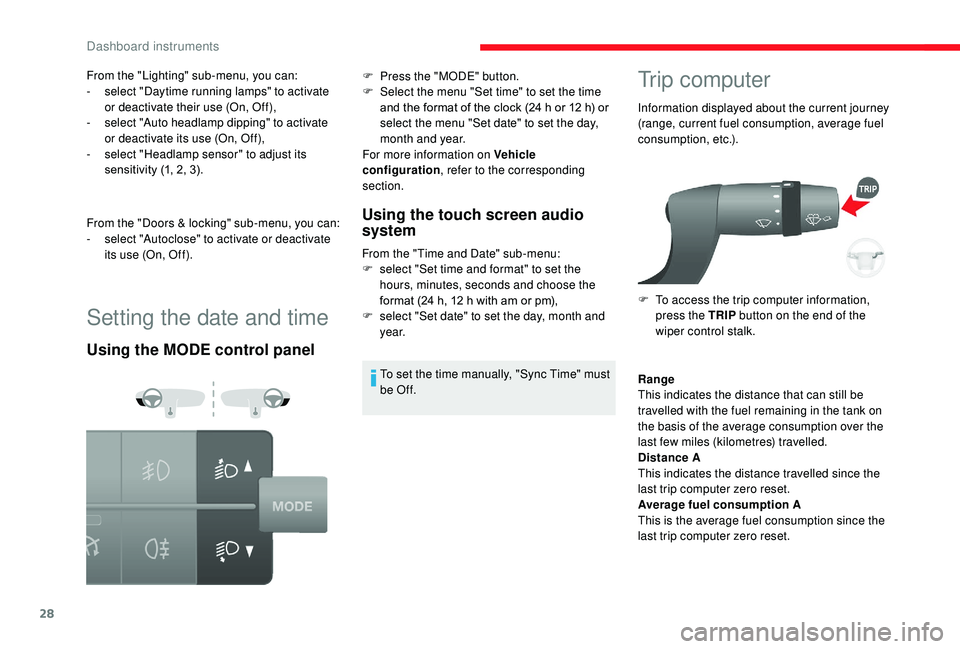
Setting the date and time
Using the MODE control panelUsing the touch screen audio
system
From the "Time and Date" sub-menu:
F
s elect "Set time and format" to set the
hours, minutes, seconds and choose the
format (24
h, 12 h with am or pm),
F
s
elect "Set date" to set the day, month and
ye a r.
To set the time manually, "Sync Time" must
be Of f.
Trip computer
Information displayed about the current journey
(range, current fuel consumption, average fuel
consumption, etc.).
F
T
o access the trip computer information,
press the TRIP button on the end of the
wiper control stalk.
From the "Lighting" sub-menu, you can:
-
s
elect "Daytime running lamps" to activate
or deactivate their use (On, Off),
-
s
elect "Auto headlamp dipping" to activate
or deactivate its use (On, Off),
-
s
elect "Headlamp sensor" to adjust its
sensitivity (1, 2, 3).
From the "Doors & locking" sub-menu, you can:
-
s
elect "Autoclose" to activate or deactivate
its use (On, Off). F
P
ress the "MODE" button.
F
S
elect the menu "Set time" to set the time
and the format of the clock (24
h or 12
h) or
select the menu "Set date" to set the day,
month and year.
For more information on Vehicle
configuration , refer to the corresponding
section.
Range
This indicates the distance that can still be
travelled with the fuel remaining in the tank on
the basis of the average consumption over the
last few miles (kilometres) travelled.
Distance A
This indicates the distance travelled since the
last trip computer zero reset.
Average fuel consumption A
This is the average fuel consumption since the
last trip computer zero reset.
Dashboard instruments
Page 64 of 232

62
Front foglamps
Rear foglamps
F
P
ress one of these controls to switch on the
lamps.
The foglamps may only be used in fog or
when snow is falling.
In clear weather or in rain, both day and
night, rear foglamps dazzle and their use
is prohibited.
Do not forget to switch them off when they
are no longer necessary.
LED daytime running
lamps
On starting the vehicle, in daylight the LED
daytime running lamps come on automatically.
If the sidelamps, dipped or main beam
headlamps are switched on manually or
automatically, the daytime running lamps
"go out.
Programming
For countries where exterior lighting by day is
not a legal requirement, you can activate or
deactivate the function via the configuration
menu.
Automatic illumination of
headlamps
If your vehicle is fitted with this function, the
dipped beam headlamps are switched on
automatically if the light is poor.
In fog or snow, the sunshine sensor may
detect sufficient light. In this case, the
lighting will not come on automatically. If
necessary, you must switch on the dipped
beam headlamps manually.
They are switched off when the light
returns to a
sufficient level.
Do not cover the sunshine sensor at the
top centre of the windscreen.
Activation
F Turn the ring to this position.
The lamps are switched off automatically when
the ignition is switched off.
Guide-me-home lighting
If your vehicle is fitted with this function: when
you leave your vehicle, the dipped beam
headlamps remain on for the selected duration
(when leaving a car park for example).
Ignition off or key in the
STOP position
F Within 2 minutes after switching off the
engine, position the ignition key in the STOP
position or remove it.
F
P
ull the lighting control stalk towards the
steering wheel.
This indicator lamp lights up in
the instrument panel.
Every time the lighting control stalk is pulled
towards the steering wheel, the guide-me-
home lighting is extended by 30
seconds
You can adjust the sensitivity of the
sunshine sensor.
For more information on
Vehicle
configuration , refer to the corresponding
section.
Lighting and visibility
Page 65 of 232

63
up to approximately 3 minutes. When this
t ime has elapsed, the lamps are switched off
automatically.
Deactivate this control by keeping the stalk
pulled towards the steering wheel for more than
2
seconds.
Automatic headlamps
System which automatically changes to main
beam according to the ambient light level and
the driving conditions, using a camera located
at the top of the windscreen.
This system is a
driving aid.
The driver remains responsible for the
vehicle's lighting, its correct use for the
prevailing conditions of light, visibility
and traffic, and obser vation of driving
regulations.
Activation
F Turn the lighting control stalk ring to this position.
F
A
ctivate the function with the MODE button;
in the "Automatic headlamp dipping" menu,
select "ON". For more information on Vehicle
configuration
, refer to the corresponding
section.
F
F
lash the headlamps (going beyond the
point of resistance) to activate the function.
Operation
Once activated, the system operates as
follows:
If the ambient light level is sufficient and/or if
the traffic conditions do not allow illumination of
the main beam headlamps:
-
D
ipped beam is maintained; this
indicator lamp lights up in the
instrument panel.
4
Lighting and visibility
Page 66 of 232

64
If the ambient light level is very low and the
traffic conditions permit:
If the situation requires a change of headlamp
beam, the driver can take over at any time.
Flashing the headlamps again pauses the
function and the system changes to "automatic
illumination of headlamps" mode.
The function is disabled automatically below
9
mph (15 km/h).
If main beam is nevertheless necessary, flash
the headlamps again; main beam will then
remain on until the vehicle reaches a
speed of
25
mph (40 km/h).
Above 25
mph (40 km/h), the function is
reactivated automatically (provided that the
headlamps have not been flashed again in the
meantime, to change to dipped beam).
Deactivation
F Turn the lighting control stalk ring to the " Dipped beam "
position. The system may suffer inter ference or not
work correctly:
-
u
nder conditions of poor visibility
(falling snow, heavy rain or thick fog,
e t c .),
-
i
f the windscreen in front of the
camera is dirty, misted or obscured (by
a sticker, etc.),
-
i
f the vehicle is facing highly reflective
signs.
The system is not able to detect:
-
r
oad users that do not have their own
lighting, such as pedestrians,
-
v
ehicles whose lighting is obscured,
such as when driving behind a safety
barrier on a motor way, for example,
-
v
ehicles at the top or bottom of
a steep slope, on winding roads, on
crossroads.
Parking lamps
This system enables you to leave the lamps on
when parked; with the ignition off, key in the
STOP position or key removed.
This indicator lamp comes on in
the instrument panel.
The lamps will remain on while you
are parked.
Leaving the lighting on for long periods
may significantly reduce the state of
charge of your vehicle's battery.
-
M
ain beam comes on
automatically: these indicator
lamps come on in the instrument
panel.
F
M
ove the ring on the lighting control stalk
to position O then to dipped or main beam
headlamps.
Lighting and visibility
Page 71 of 232

69
Dynamic stability control (DSC)
If there is a difference between the path
f ollowed by the vehicle and that required by
the driver, the DSC monitors each wheel and
automatically acts on the brake of one or more
wheels and on the engine to return the vehicle
to the required path, within the limits of the laws
of physics.
Anti-lock braking system
(ABS) and electronic brake
force distribution (EBFD)
If this warning lamp comes on,
accompanied by an audible signal
and a
message in the instrument
panel screen, it indicates a
fault with
the anti-lock braking system (ABS)
which could result in loss of control
of the vehicle when braking.
If these warning lamps come on,
accompanied by a
message in the
instrument panel screen, it indicates
a
fault with the electronic brake force
distribution (EBFD) system which
could result in loss of control of the
vehicle when braking.
You must stop as soon as it is safe to do so.
In both cases, contact a
CITROËN dealer or
a
qualified workshop. For maximum braking efficiency, a
bedding-in period of around 310
miles
(500 kilometres) is needed. During this
period, it is advisable to avoid any sudden,
repeated and prolonged braking.
The ABS does not provide shorter braking
distances. On very slippery sur faces (ice,
oil, etc.) the ABS may extend braking
distances.
When changing wheels (tyres and rims),
make sure that these are approved for
your vehicle.
For emergency braking, press the
brake pedal ver y hard and do not
release it, even on a
slipper y sur face;
you will then be able to continue
steering the vehicle to avoid an
obstacle.
After an impact, have these systems
checked by a
CITROËN dealer or
a
qualified workshop.
Dynamic stability control
(DSC)
Switching on
The DSC system is activated automatically
each time the vehicle is started.
It comes into operation in the event of a grip or
trajectory problem.
This is indicated by this warning
lamp flashing in the instrument
panel.
Deactivation
This system cannot be deactivated by the
driver.
Malfunction
Illumination of this warning lamp,
accompanied by an audible signal
and confirmed by a message in the
instrument panel screen, indicates
a
fault with the DSC system.
Have it checked by a
CITROËN dealer or by
a
qualified workshop.
5
5
Safety
Page 72 of 232
70
Anti-slip regulation (ASR)
Switching on
This system is activated automatically every
time the vehicle is started.
In the event of a grip or trajectory problem, this
system comes into play.
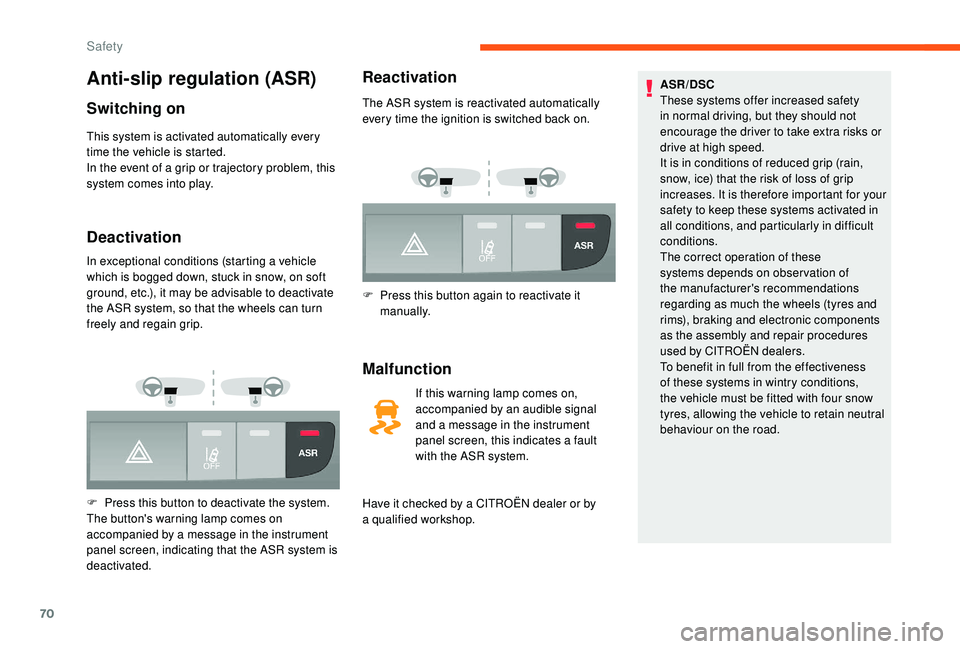
Deactivation
In exceptional conditions (starting a vehicle
w hich is bogged down, stuck in snow, on soft
ground, etc.), it may be advisable to deactivate
the ASR system, so that the wheels can turn
freely and regain grip.
F
P
ress this button to deactivate the system.
The button's warning lamp comes on
accompanied by a
message in the instrument
panel screen, indicating that the ASR system is
deactivated.
Reactivation
The ASR system is reactivated automatically
every time the ignition is switched back on.
F
P
ress this button again to reactivate it
manually.
Malfunction
If this warning lamp comes on,
accompanied by an audible signal
and a
message in the instrument
panel screen, this indicates a
fault
with the ASR system.
Have it checked by a
CITROËN dealer or by
a
qualified workshop. ASR/DSC
These systems offer increased safety
in normal driving, but they should not
encourage the driver to take extra risks or
drive at high speed.
It is in conditions of reduced grip (rain,
snow, ice) that the risk of loss of grip
increases. It is therefore important for your
safety to keep these systems activated in
all conditions, and particularly in difficult
conditions.
The correct operation of these
systems depends on obser vation of
the manufacturer's recommendations
regarding as much the wheels (tyres and
rims), braking and electronic components
as the assembly and repair procedures
used by CITROËN dealers.
To benefit in full from the effectiveness
of these systems in wintry conditions,
the vehicle must be fitted with four snow
tyres, allowing the vehicle to retain neutral
behaviour on the road.
Safety
Page 94 of 232

92
Releasing
When the vehicle is being driven,
this warning lamp coming on
indicates that the parking brake is
still applied or has not been fully
released.
Manual gearbox
To change gear easily, always depress the
clutch pedal fully.
To prevent the mat from becoming caught
under the pedal:
-
e
nsure that the mat is positioned
correctly,
-
n
ever fit one mat on top of another.
Avoid leaving your hand on the gear knob as
the force exerted, even if slight, may wear the
internal components of the gearbox over time.
Engaging reverse gear
Never engage reverse gear before the
vehicle is completely stationary.
If your vehicle is fitted with parking
sensors, the system comes into operation
when reverse gear is engaged; an audible
signal is heard.
For more information on Rear parking
sensors , refer to the corresponding
section.
F
P
ull the lever up slightly and press the
button to release the parking brake lever.
Gear efficiency indicator
Depending on the engine or model, this system
allows fuel consumption to be reduced by
suggesting when to change up.
Gear efficiency recommendations are only
optional. In fact, the road configuration,
the traffic density and safety remain the
determining factors when choosing the best
gear. Therefore, the driver remains responsible
for deciding whether or not to follow the
system's advice.
The system cannot be deactivated.
Operation
The information appears in the
instrument panel screen in the form
of the SHIFT indicator, accompanied
by an upward arrow to signal to the
driver that they can change up.
The system adapts its gear shift
recommendation according to the driving
conditions (slope, load, etc.) and the
driver's requirements (power, acceleration,
b r a k i n g , e t c .) .
The system never recommends engaging
first gear or reverse, or changing down.
F
R
aise the collar under the gear knob to
engage reverse gear.
The lever should be moved slowly to reduce the
noise on engaging reverse gear.
Driving
Page 95 of 232

93
Stop & Start
The Stop & Start system puts the engine
temporarily into standby – STOP mode – during
stops in the traffic (red lights, traffic jams, etc.).
The engine restarts automatically – START
mode – as soon as you wish to move off.
Restart is instantaneous, quick and silent.
Per fect for urban use, the Stop & Start system
reduces fuel consumption and exhaust
emissions and offers the comfort of complete
silence when stationary.
Going into engine STOP
mode
With the vehicle stationary, put the gear lever
into neutral, then release the clutch pedal.This indicator lamp comes on in the
instrument panel and the engine
goes into standby.
Automatic stopping of the engine is only
possible after the vehicle has exceeded
a
speed of about 6 mph (10 km/h), to avoid
repeated stopping of the engine when
driving slowly. Never leave your vehicle before turning off
the ignition with the key.
Never refuel with the engine in STOP
mode; you must switch off the ignition
using the key.
Special cases: STOP mode
not available
STOP mode is not triggered when:
-
t he system is initialising,
-
t
he driver's door is open,
-
t
he driver's seat belt is not fastened,
-
t
he air conditioning is on,
-
t
he rear screen demisting is on,
-
t
he windscreen wipers are on fast wipe,
-
r
everse gear is engaged for a parking
manoeuvre,
-
s
ome special conditions (battery charge,
engine temperature, particle filter
regeneration, braking assistance, exterior
temperature, etc.) where the engine is
needed to assure control of a
system.-
d
uring intensive use of Stop & Start, it
may be deactivated to conser ve starting
ability; go to a CITROËN dealer to have the
function reactivated.
This indicator lamp in the instrument
panel flashes for a few seconds,
then goes off.
This operation is perfectly normal.
Going into engine START
mode
With the vehicle in gear, automatic engine
restarting is only allowed by fully depressing
the clutch pedal.
This indicator lamp goes off and the
engine restarts.
If the driver takes no action on the vehicle for
3
minutes after an automatic restart in START
mode, the system stops the engine definitively.
The engine can then only be restarted using
t h e key.
6
Driving