6
Instruments
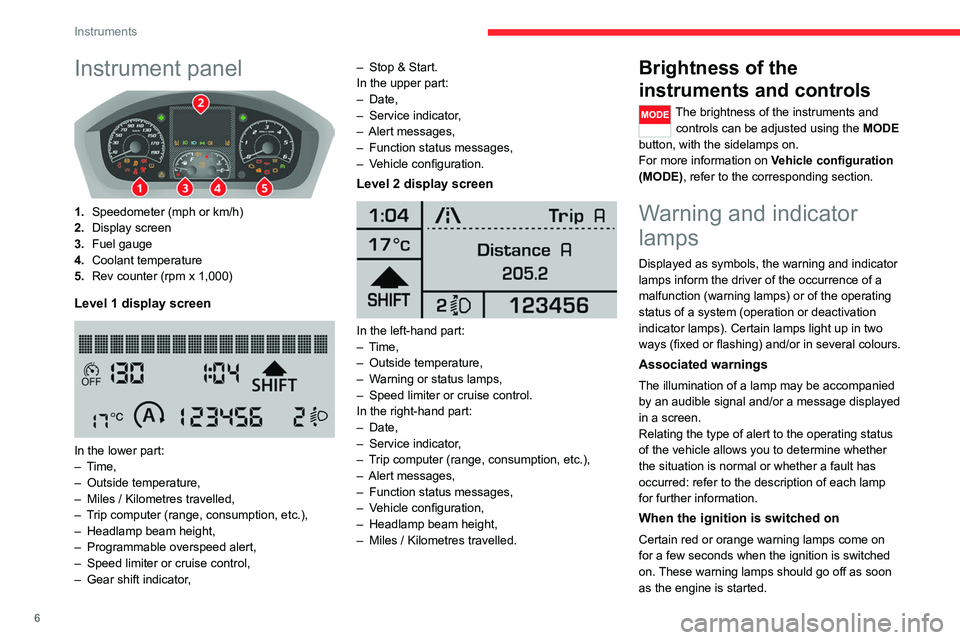
Instrument panel
1.Speedometer (mph or km/h)
2. Display screen
3. Fuel gauge
4. Coolant temperature
5. Rev counter (rpm x 1,000)
Level 1 display screen
In the lower part:
– Time,
– Outside temperature,
– Miles / Kilometres travelled,
– Trip computer (range, consumption, etc.),
– Headlamp beam height,
– Programmable overspeed alert,
– Speed limiter or cruise control,
– Gear shift indicator, –
Stop & Start.
In the upper part:
– Date,
– Service indicator,
– Alert messages,
– Function status messages,
– Vehicle configuration.
Level 2 display screen
In the left-hand part:
– Time,
– Outside temperature,
– Warning or status lamps,
– Speed limiter or cruise control.
In the right-hand part:
– Date,
– Service indicator,
– Trip computer (range, consumption, etc.),
– Alert messages,
– Function status messages,
– Vehicle configuration,
– Headlamp beam height,
– Miles / Kilometres travelled.
Brightness of the
instruments and controls
The brightness of the instruments and
controls can be adjusted using the MODE
button, with the sidelamps on.
For more information on Vehicle configuration
(MODE), refer to the corresponding section.
Warning and indicator
lamps
Displayed as symbols, the warning and indicator
lamps inform the driver of the occurrence of a
malfunction (warning lamps) or of the operating
status of a system (operation or deactivation
indicator lamps). Certain lamps light up in two
ways (fixed or flashing) and/or in several colours.
Associated warnings
The illumination of a lamp may be accompanied
by an audible signal and/or a message displayed
in a screen.
Relating the type of alert to the operating status
of the vehicle allows you to determine whether
the situation is normal or whether a fault has
occurred: refer to the description of each lamp
for further information.
When the ignition is switched on
Certain red or orange warning lamps come on
for a few seconds when the ignition is switched
on. These warning lamps should go off as soon
as the engine is started.