rev DACIA DUSTER 2011 Owner's Manual
[x] Cancel search | Manufacturer: DACIA, Model Year: 2011, Model line: DUSTER, Model: DACIA DUSTER 2011Pages: 244, PDF Size: 3.57 MB
Page 117 of 244
Downloaded from www.Manualslib.com manuals search engine JauneNoir Noir texte
2.35
ENG_UD33904_1
Boîte de vitesses automatique (H79 Ph2 - Dacia)
ENG_NU_1079-3_H79Ph2_Dacia_2
AUTOMATIC TRANSMISSION (1/3)
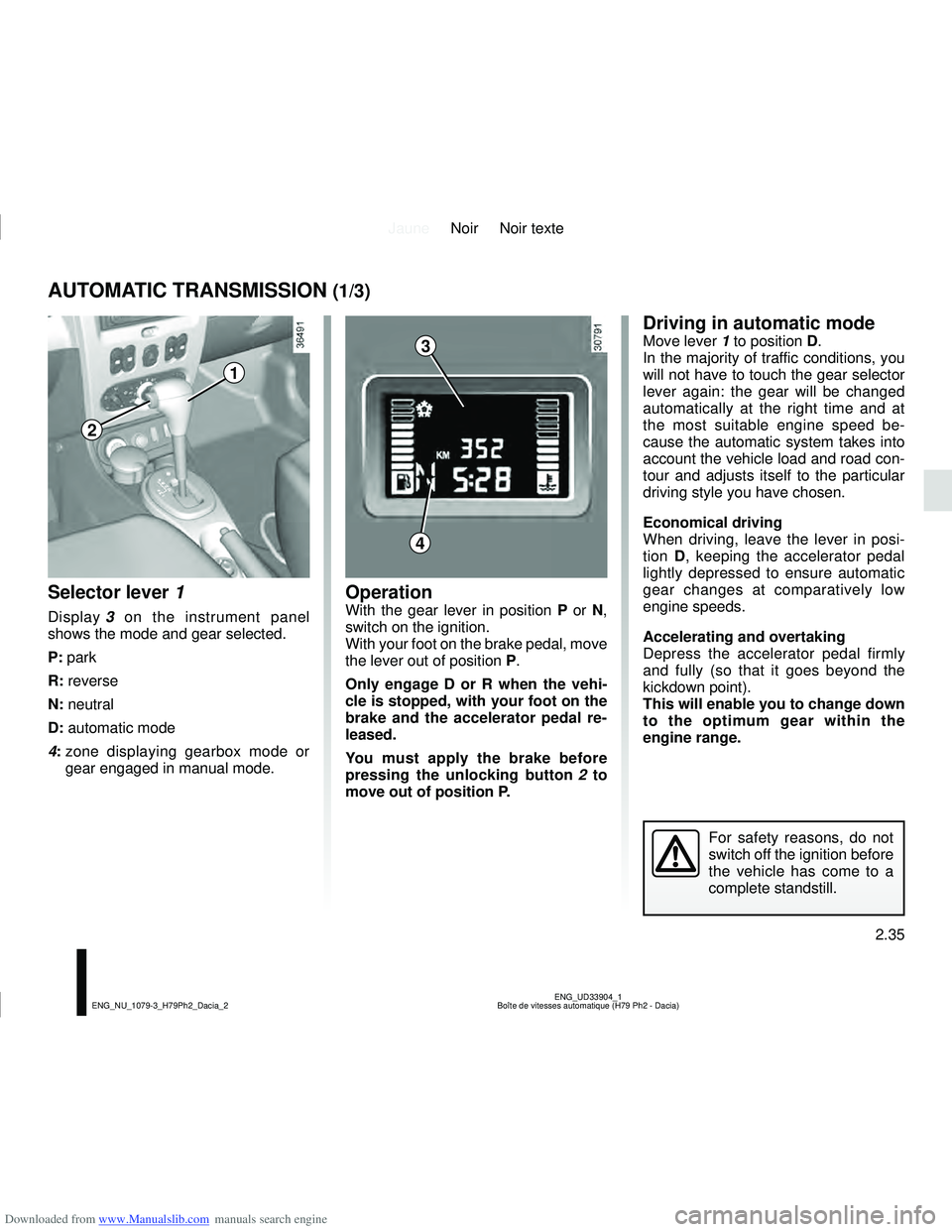
Selector lever 1
Display 3 on the instrument panel
shows the mode and gear selected.
P: park
R: reverse
N: neutral
D: automatic mode
4: zone displaying gearbox mode or
gear engaged in manual mode.
OperationWith the gear lever in position P or N,
switch on the ignition.
With your foot on the brake pedal, move
the lever out of position P.
Only engage D or R when the vehi-
cle is stopped, with your foot on the
brake and the accelerator pedal re-
leased.
You must apply the brake before
pressing the unlocking button 2 to
move out of position P.
Driving in automatic modeMove lever 1 to position D.
In the majority of traffic conditions, you
will not have to touch the gear selector
lever again: the gear will be changed
automatically at the right time and at
the most suitable engine speed be-
cause the automatic system takes into
account the vehicle load and road con-
tour and adjusts itself to the particular
driving style you have chosen.
Economical driving
When driving, leave the lever in posi-
tion D, keeping the accelerator pedal
lightly depressed to ensure automatic
gear changes at comparatively low
engine speeds.
Accelerating and overtaking
Depress the accelerator pedal firmly
and fully (so that it goes beyond the
kickdown point).
This will enable you to change down
to the optimum gear within the
engine range.
For safety reasons, do not
switch off the ignition before
the vehicle has come to a
complete standstill.
3
4
1
2
Page 118 of 244
Downloaded from www.Manualslib.com manuals search engine JauneNoir Noir texte
2.36
ENG_UD33904_1
Boîte de vitesses automatique (H79 Ph2 - Dacia)
ENG_NU_1079-3_H79Ph2_Dacia_2
AUTOMATIC TRANSMISSION (2/3)
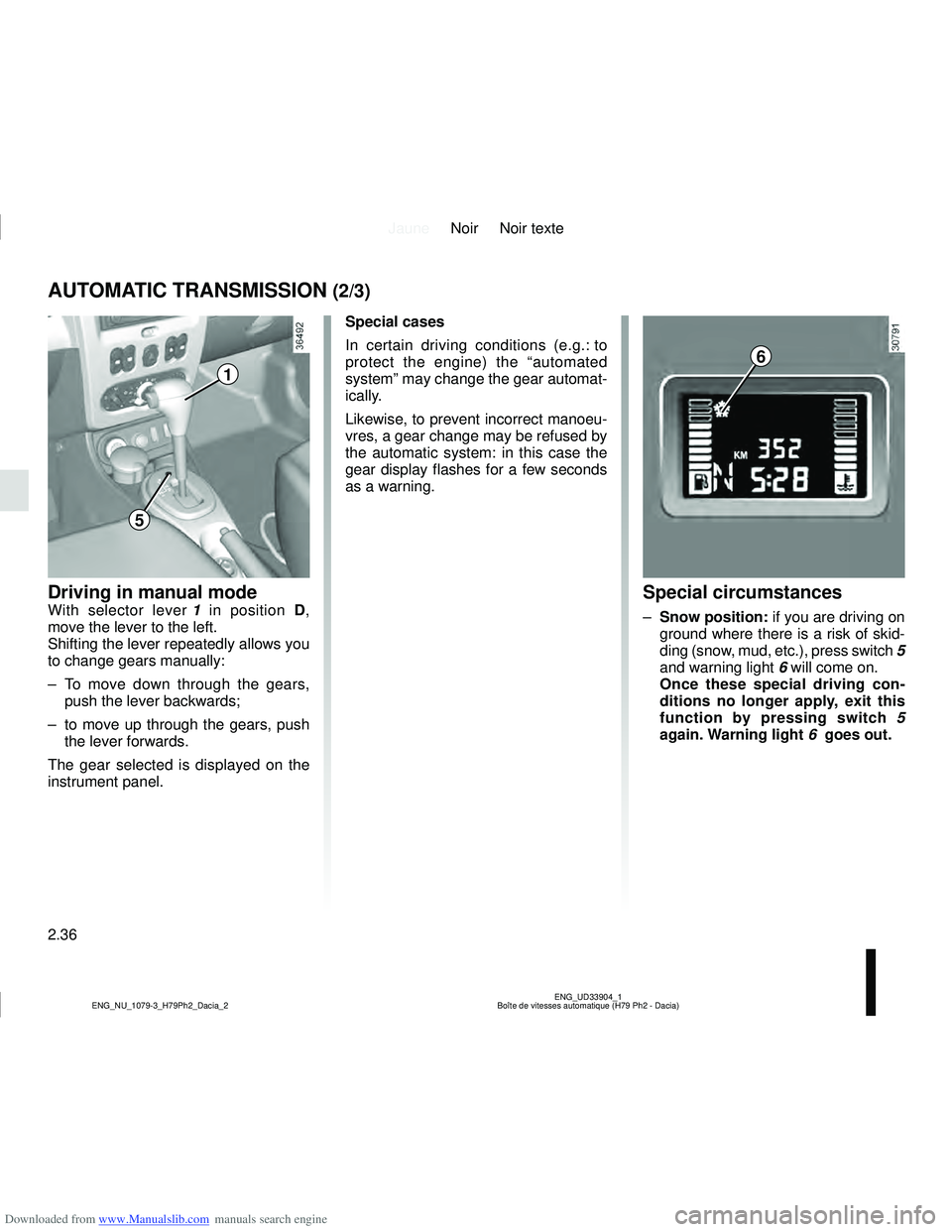
Driving in manual modeWith selector lever 1 in position D,
move the lever to the left.
Shifting the lever repeatedly allows you
to change gears manually:
– To move down through the gears, push the lever backwards;
– to move up through the gears, push the lever forwards.
The gear selected is displayed on the
instrument panel.Special circumstances
– Snow position: if you are driving on
ground where there is a risk of skid-
ding (snow, mud, etc.), press switch 5
and warning light 6 will come on.
Once these special driving con-
ditions no longer apply, exit this
function by pressing switch 5
again. Warning light 6 goes out.
Special cases
In certain driving conditions (e.g.: to
protect the engine) the “automated
system” may change the gear automat-
ically.
Likewise, to prevent incorrect manoeu-
vres, a gear change may be refused by
the automatic system: in this case the
gear display flashes for a few seconds
as a warning.
6
1
5
Page 119 of 244
Downloaded from www.Manualslib.com manuals search engine JauneNoir Noir texte
2.37
ENG_UD33904_1
Boîte de vitesses automatique (H79 Ph2 - Dacia)
ENG_NU_1079-3_H79Ph2_Dacia_2
AUTOMATIC TRANSMISSION (3/3)
– If the road contour and bends in
the road do not allow you to stay in
automatic mode (e.g.: in mountain-
ous areas), it is recommended that
you switch to manual mode.
This will prevent the automatic gear-
box from changing gears repeatedly
when climbing, and permit engine
braking on long descents.
– In cold weather, start the engine
and wait a few seconds before
moving the selector lever from posi-
tion P or N and engaging it in D or R
to prevent the engine stalling.
– Vehicles not fitted with traction
control: on a slippery surface or
surface with a low level of adhesion,
change to manual mode and select
second gear (or even third) before
starting the engine to avoid wheel-
spin when accelerating.Parking the vehicleWhen the vehicle is stopped, move the
lever to position P while keeping your
foot on the brake pedal: the gearbox is
in neutral and the drive wheels are me-
chanically locked by the driveshaft.
Apply the handbrake.
Operating faults
If a vehicle with an automatic gear-
box breaks down, please refer to the
information on “Towing” in Section 5.
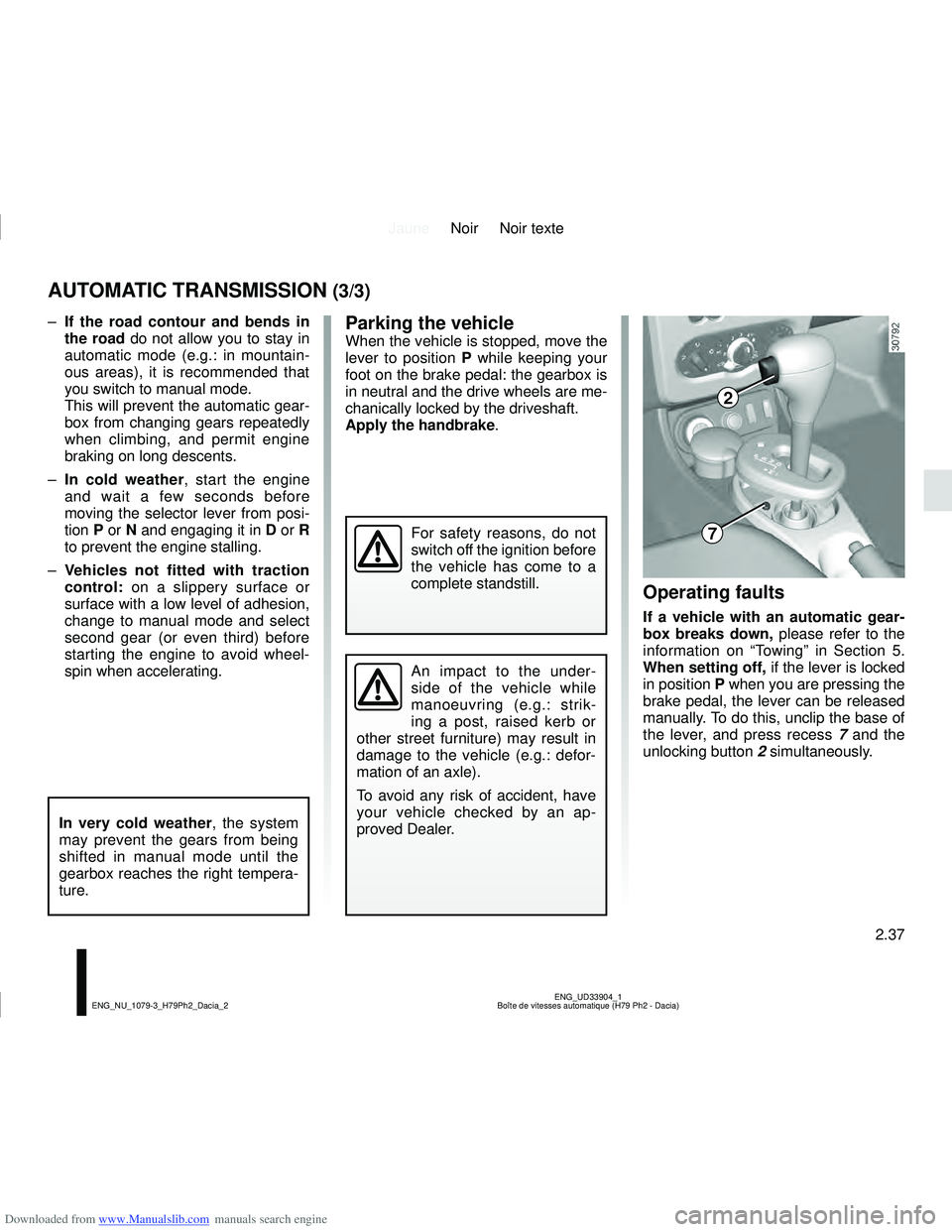
When setting off, if the lever is locked
in position P when you are pressing the
brake pedal, the lever can be released
manually. To do this, unclip the base of
the lever, and press recess 7 and the
unlocking button 2 simultaneously.
In very cold weather, the system
may prevent the gears from being
shifted in manual mode until the
gearbox reaches the right tempera-
ture.
An impact to the under-
side of the vehicle while
manoeuvring (e.g.: strik-
ing a post, raised kerb or
other street furniture) may result in
damage to the vehicle (e.g.: defor-
mation of an axle).
To avoid any risk of accident, have
your vehicle checked by an ap-
proved Dealer.
For safety reasons, do not
switch off the ignition before
the vehicle has come to a
complete standstill.
2
7
Page 120 of 244
Downloaded from www.Manualslib.com manuals search engine JauneNoir Noir texte
2.38
ENG_UD32147_1
Aide au parking (H79 - Dacia)
ENG_NU_1079-3_H79Ph2_Dacia_2
This function is an addi-
tional aid that indicates the
distance between the vehi-
cle and an obstacle whilst
reversing, using sound signals.
Under no circumstances should it
replace the driver’s care or respon-
sibility whilst reversing.
The driver should always look out
for sudden hazards during driving:
always ensure that there are no
moving obstacles (such as a child,
animal, pram, bicycle, etc.) or small,
narrow objects such as stones or
posts in your path when manoeu-
vring.
Operating principle
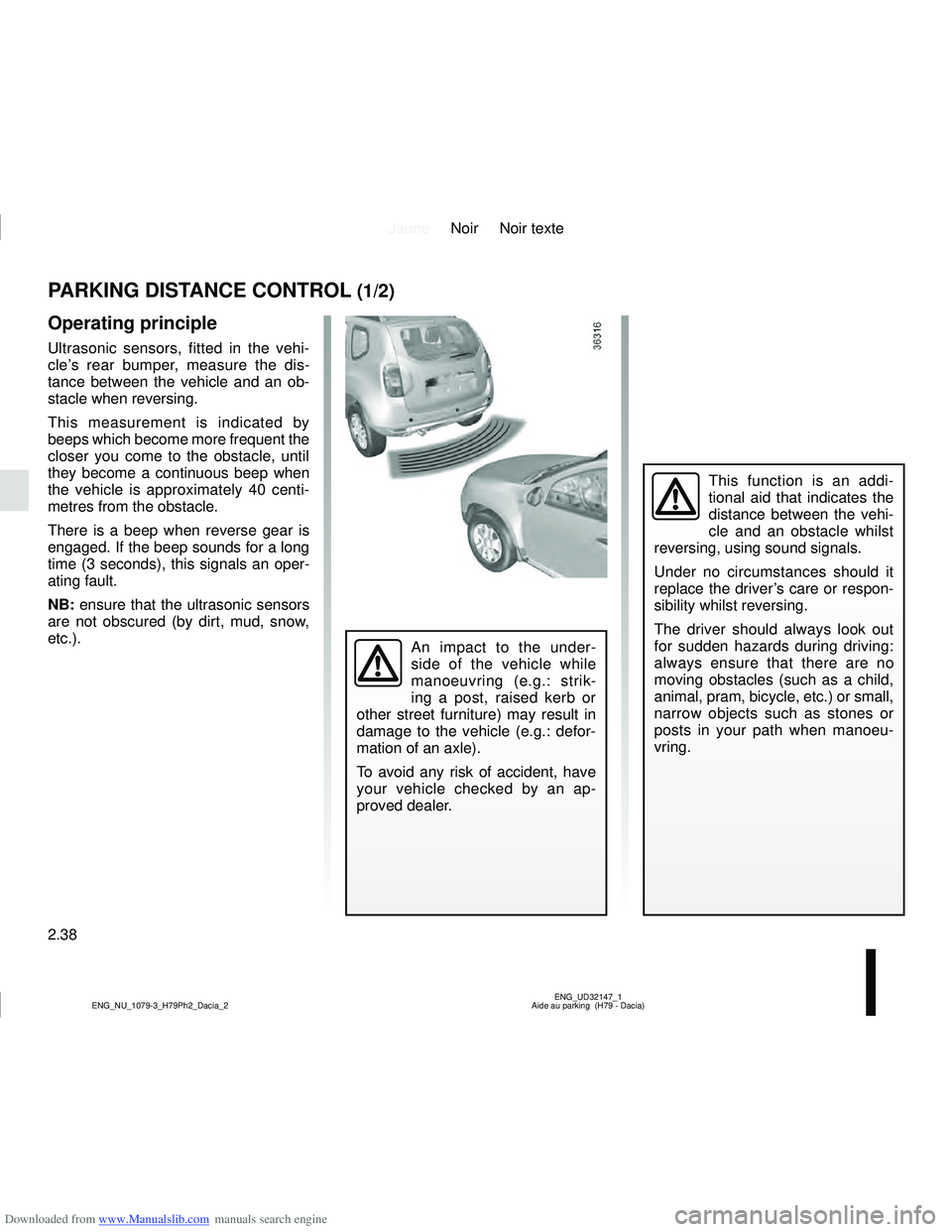
Ultrasonic sensors, fitted in the vehi-
cle’s rear bumper, measure the dis-
tance between the vehicle and an ob-
stacle when reversing.
This measurement is indicated by
beeps which become more frequent the
closer you come to the obstacle, until
they become a continuous beep when
the vehicle is approximately 40 centi-
metres from the obstacle.
There is a beep when reverse gear is
engaged. If the beep sounds for a long
time (3 seconds), this signals an oper-
ating fault.
NB: ensure that the ultrasonic sensors
are not obscured (by dirt, mud, snow,
etc.).
PARKING DISTANCE CONTROL (1/2)
An impact to the under-
side of the vehicle while
manoeuvring (e.g.: strik-
ing a post, raised kerb or
other street furniture) may result in
damage to the vehicle (e.g.: defor-
mation of an axle).
To avoid any risk of accident, have
your vehicle checked by an ap-
proved dealer.
Page 132 of 244
Downloaded from www.Manualslib.com manuals search engine JauneNoir Noir texte
3.10
ENG_UD32154_1
Lève-vitres (H79 - Dacia)
ENG_NU_1079-3_H79Ph2_Dacia_3
ELECTRIC WINDOWS (2/3)
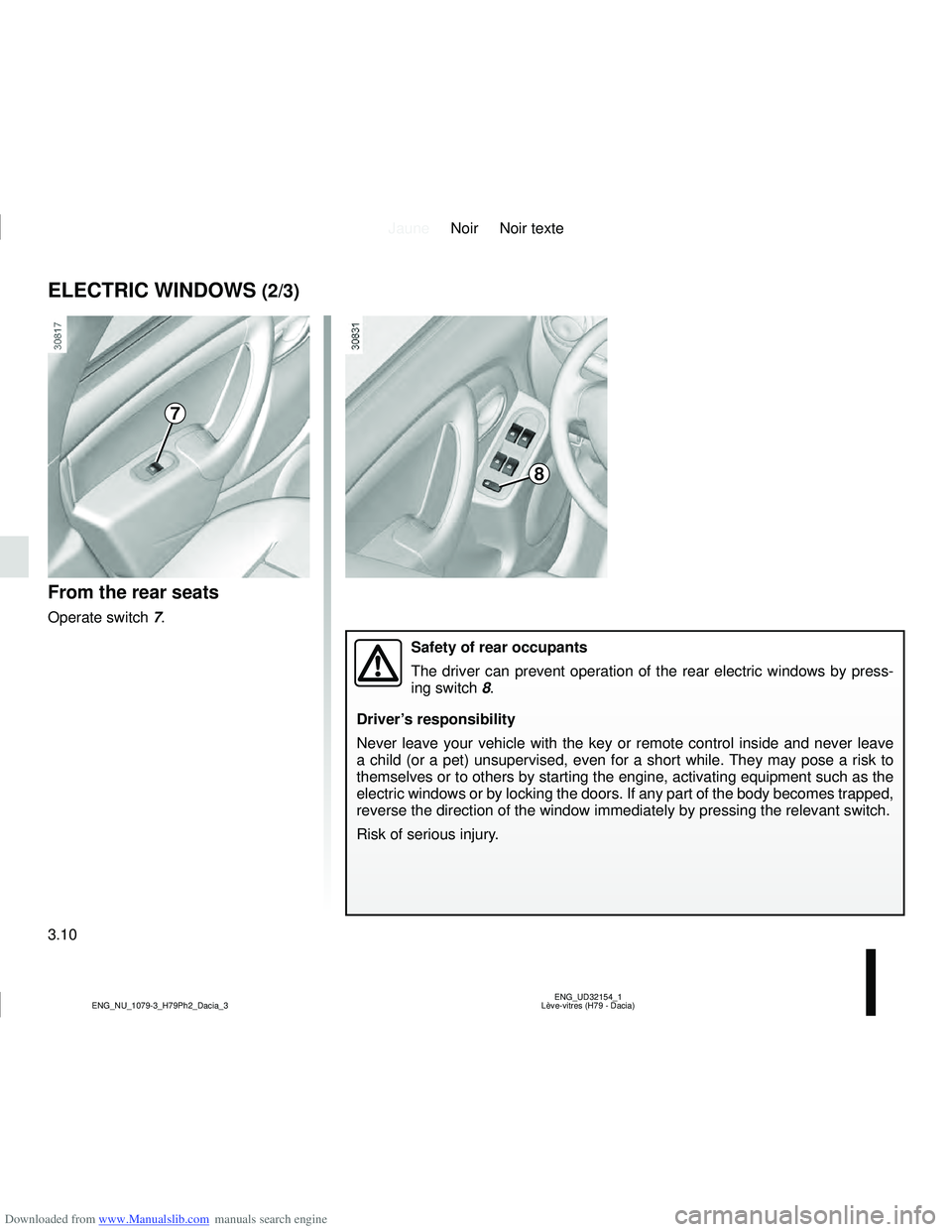
From the rear seats
Operate switch 7.
7
8
Safety of rear occupants
The driver can prevent operation of the rear electric windows by press-
ing switch 8.
Driver’s responsibility
Never leave your vehicle with the key or remote control inside and never\
leave
a child (or a pet) unsupervised, even for a short while. They may pose a risk to
themselves or to others by starting the engine, activating equipment such as the
electric windows or by locking the doors. If any part of the body become\
s trapped,
reverse the direction of the window immediately by pressing the relevant\
switch.
Risk of serious injury.
Page 133 of 244
Downloaded from www.Manualslib.com manuals search engine JauneNoir Noir texte
3.11
ENG_UD32154_1
Lève-vitres (H79 - Dacia)
ENG_NU_1079-3_H79Ph2_Dacia_3
ELECTRIC WINDOWS (3/3)
One-touch windows
When the vehicle is equipped with this
function, the one-touch mode works in
addition to the operation of the electric
windows described previously.
It is only fitted to the driver’s window.
– Fully and briefly press down on the
relevant switch down: the window
will open completely.
– Fully and briefly lift the relevant
switch: the window will close com-
pletely.
Pressing the switch again while the
window is moving will stop its move-
ment.
Special features
If the window detects resistance when
closing (e.g.: fingers, branch of a tree,
etc.) it stops and then lowers again by a
few centimetres.
If you use the switch while the window
is moving, it stops working.
Operating faults
In case of a fault when closing a window,
the system reverts to normal mode: pull
the switch concerned up to fully close
the window, then hold the switch (still
on the closure side) for three seconds
then lower and raise the window fully to
reinitialise the system.
If necessary, contact an approved
Dealer.
Closing windows can cause
serious injury.
Avoid resting any objects against
a half-open window: there is a risk
that the electric window could be
damaged.
Page 144 of 244
Downloaded from www.Manualslib.com manuals search engine JauneNoir Noir texte
3.22
ENG_UD35970_2
Banquette arrière (H79 - Dacia)
ENG_NU_1079-3_H79Ph2_Dacia_3
REAR BENCH SEAT (2/3)
When refitting the seat-
back, make sure it is cor-
rectly locked in place.
If seat covers are fitted ,
make sure these do not prevent the
seatback latch from locking in.
Make sure that the seat belts are
positioned correctly.
Reposition the headrests.
Check that the rear seat
belts are positioned and
operating correctly each
time the rear bench seat is
moved.For safety reasons, carry
out any adjustments when
the vehicle is not being
driven.
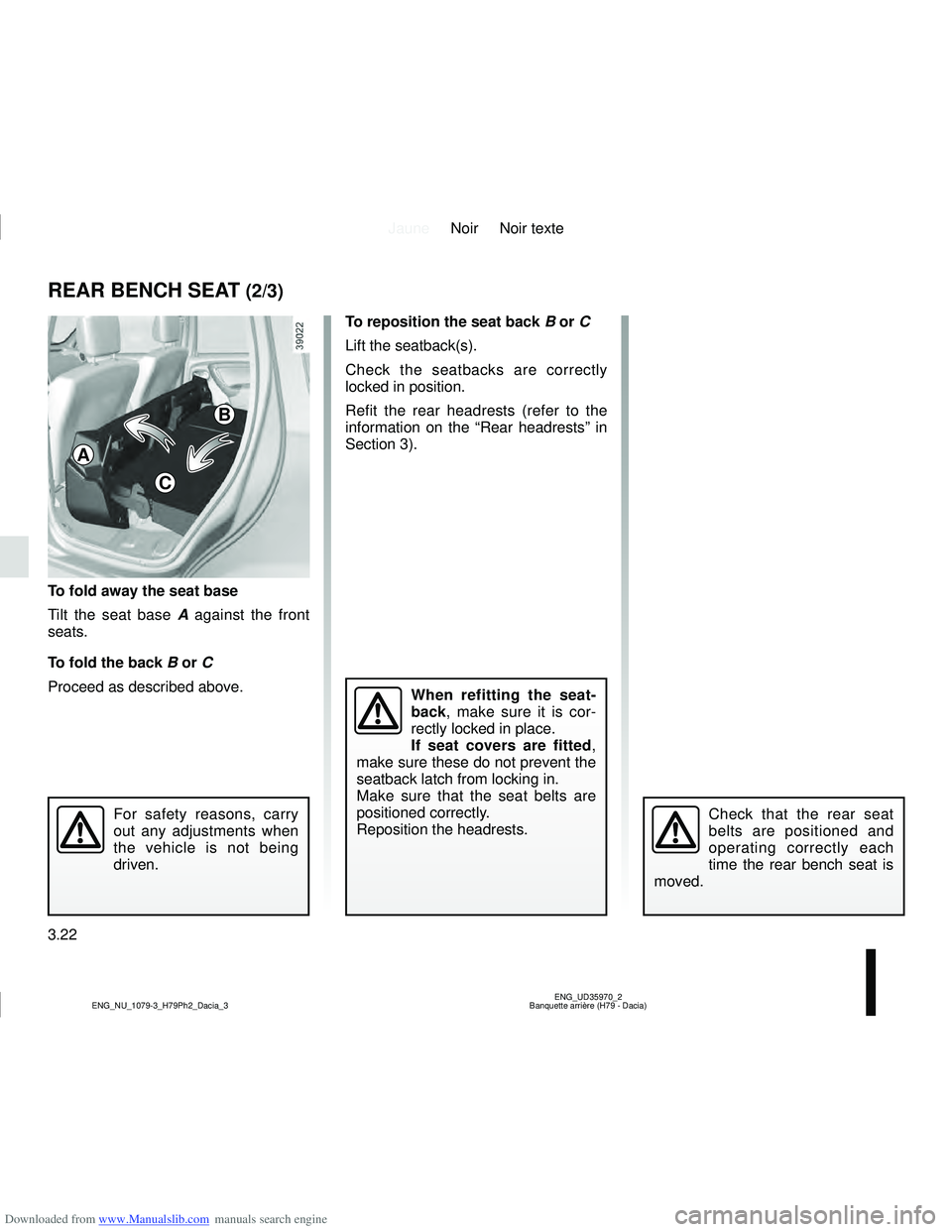
To reposition the seat back B or C
Lift the seatback(s).
Check the seatbacks are correctly
locked in position.
Refit the rear headrests (refer to the
information on the “Rear headrests” in
Section 3).
To fold away the seat base
Tilt the seat base A against the front
seats.
To fold the back B or C
Proceed as described above.
A
B
C
Page 150 of 244
Downloaded from www.Manualslib.com manuals search engine JauneNoir Noir texte
3.28
ENG_UD32163_1
Cache-bagages (H79 - Dacia)
ENG_NU_1079-3_H79Ph2_Dacia_3
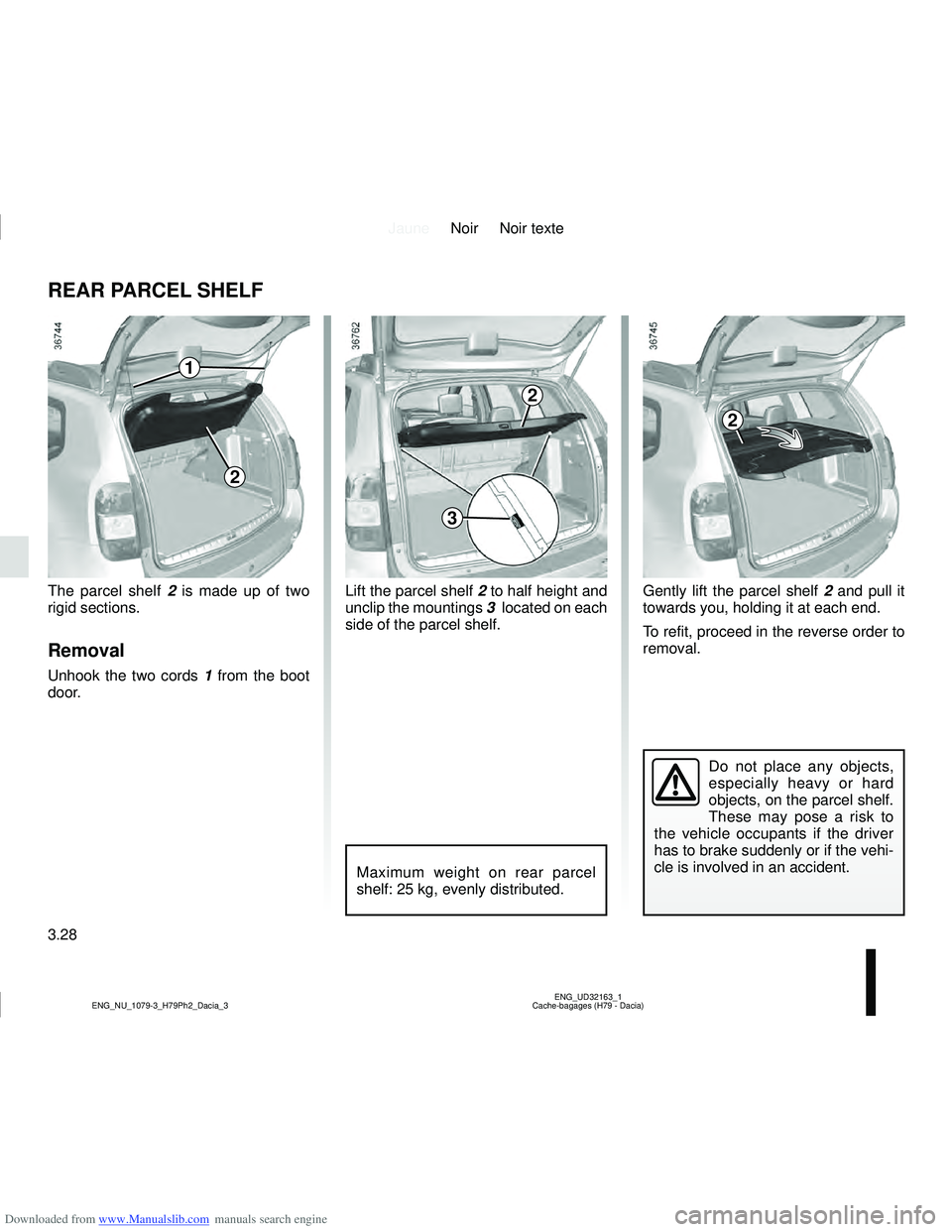
Lift the parcel shelf 2 to half height and
unclip the mountings 3 located on each
side of the parcel shelf.
REAR PARCEL SHELF
Do not place any objects,
especially heavy or hard
objects, on the parcel shelf.
These may pose a risk to
the vehicle occupants if the driver
has to brake suddenly or if the vehi-
cle is involved in an accident.
Maximum weight on rear parcel
shelf: 25 kg, evenly distributed.
1
2
The parcel shelf 2 is made up of two
rigid sections.
Removal
Unhook the two cords 1 from the boot
door.
2
3
Gently lift the parcel shelf 2 and pull it
towards you, holding it at each end.
To refit, proceed in the reverse order to
removal.
2
Page 154 of 244
Downloaded from www.Manualslib.com manuals search engine JauneNoir Noir texte
4.2
ENG_UD32168_1
Capot moteur (H79 Ph2 - Dacia)
ENG_NU_1079-3_H79Ph2_Dacia_4
BONNET
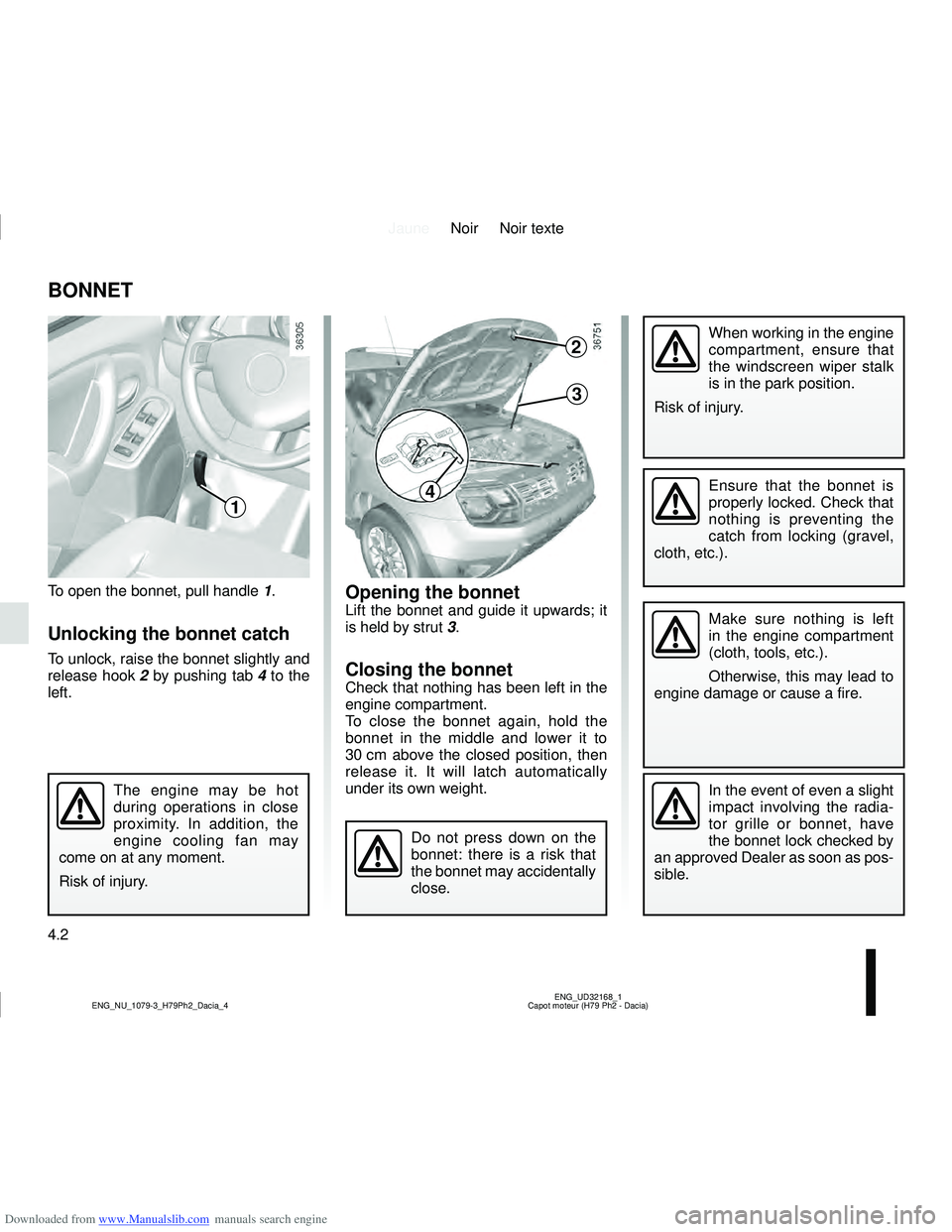
To open the bonnet, pull handle 1.
Unlocking the bonnet catch
To unlock, raise the bonnet slightly and
release hook 2 by pushing tab 4 to the
left.
Opening the bonnetLift the bonnet and guide it upwards; it
is held by strut 3.
Closing the bonnetCheck that nothing has been left in the
engine compartment.
To close the bonnet again, hold the
bonnet in the middle and lower it to
30 cm above the closed position, then
release it. It will latch automatically
under its own weight.
The engine may be hot
during operations in close
proximity. In addition, the
engine cooling fan may
come on at any moment.
Risk of injury.In the event of even a slight
impact involving the radia-
tor grille or bonnet, have
the bonnet lock checked by
an approved Dealer as soon as pos-
sible.
Do not press down on the
bonnet: there is a risk that
the bonnet may accidentally
close.
1
When working in the engine
compartment, ensure that
the windscreen wiper stalk
is in the park position.
Risk of injury.2
3
4Ensure that the bonnet is
properly locked. Check that
nothing is preventing the
catch from locking (gravel,
cloth, etc.).
Make sure nothing is left
in the engine compartment
(cloth, tools, etc.).
Otherwise, this may lead to
engine damage or cause a fire.
Page 155 of 244
Downloaded from www.Manualslib.com manuals search engine JauneNoir Noir texte
4.3
ENG_UD35427_4
Niveau huile moteur : généralités (X52 - H79 Ph2 - Dacia)
ENG_NU_1079-3_H79Ph2_Dacia_4
ENGINE OIL LEVEL: general information
Reading the oil level
The oil level should be read with the
vehicle on level ground, after the engine
has been switched off for some time.
The dipstick must be used to read
the exact oil level and make sure
that the maximum level has not been
exceeded (risk of engine damage).
Refer to the following pages.
C
A
B
A
B
Exceeding the maximum
engine oil level
Under no circumstances
must the maximum fill
level B be exceeded: risk of damage
to the engine and catalytic con-
verter.
If the oil level exceeds the maximum
level, do not start your vehicle .
Contact an authorised dealer.
It is normal for an engine to use oil for
lubrication and cooling of moving parts
and it is normal to top up the level
between oil changes.
However, contact your approved Dealer
if more than 0.5 litres is being consu-
med every 600 miles (1,000 km) after
the running in period.
Oil change frequency: check the oil
level from time to time and certainly
before any long journey to avoid the
risk of damaging your engine.
Consult your approved dealer at
once if you notice an abnormal or
repeated drop in any of the fluid
levels.
In order to prevent splashback, it is
recommended that a funnel be used
when topping up/filling with oil.
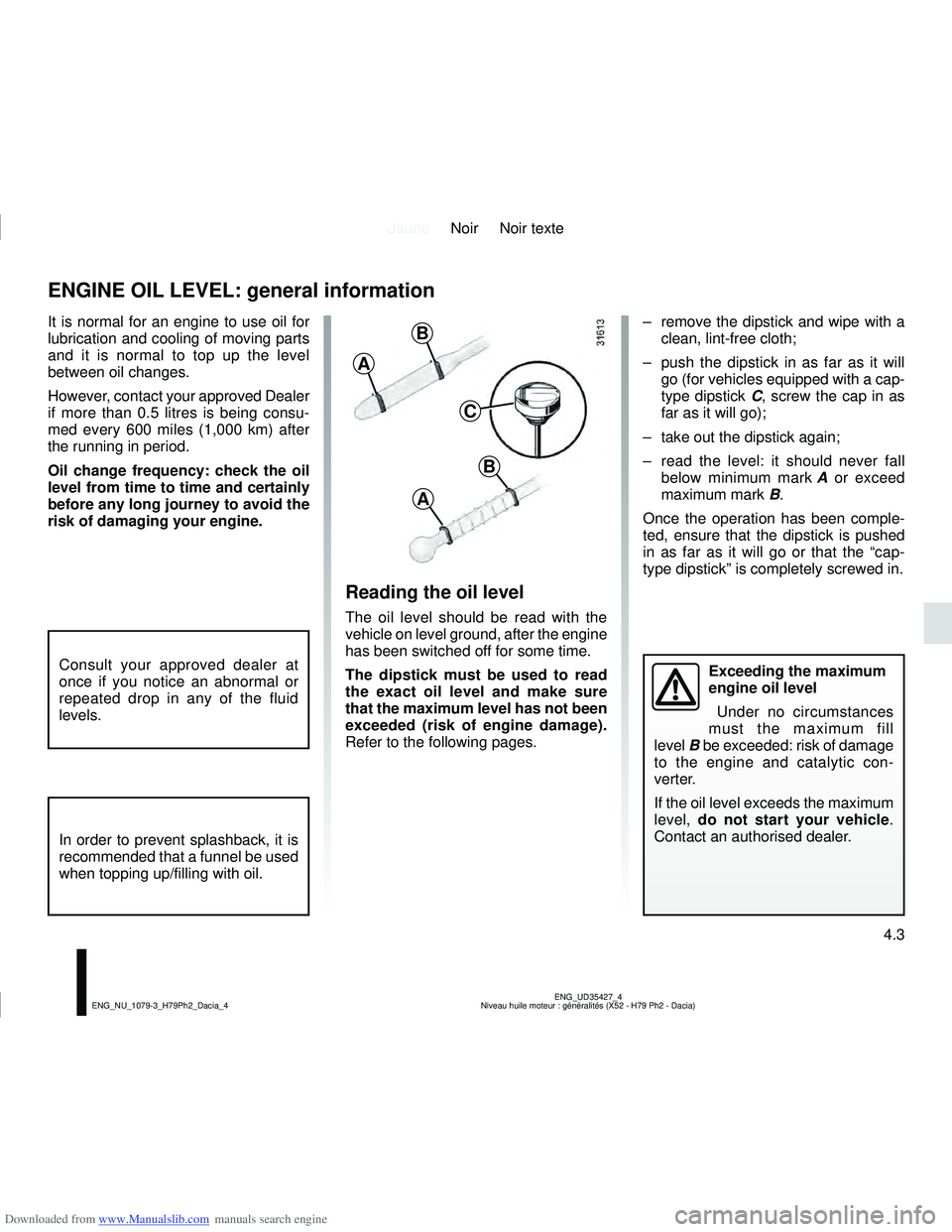
– remove the dipstick and wipe with a clean, lint-free cloth;
– push the dipstick in as far as it will go (for vehicles equipped with a cap-
type dipstick C, screw the cap in as
far as it will go);
– take out the dipstick again;
– read the level: it should never fall below minimum mark A or exceed
maximum mark B.
Once the operation has been comple-
ted, ensure that the dipstick is pushed
in as far as it will go or that the “cap-
type dipstick” is completely screwed in.