exterior DACIA DUSTER 2021 Owners Manual
[x] Cancel search | Manufacturer: DACIA, Model Year: 2021, Model line: DUSTER, Model: DACIA DUSTER 2021Pages: 244, PDF Size: 3.57 MB
Page 7 of 244
Downloaded from www.Manualslib.com manuals search engine JauneNoir Noir texte
1.1
ENG_UD35424_5
Sommaire 1 (H79 - Dacia)
ENG_NU_1079-3_H79Ph2_Dacia_1
Section 1: Getting to know your vehicle
Keys, radio frequency remote control: general information . . . . . . . . . . . . . . . . . . . . . . . . . . . . . . . . 1.2
Locking and unlocking the doors . . . . . . . . . . . . . . . . . . . . . . . . . . . . . . . . . . . . \
. . . . . . . . . . . . . . . . 1.5
Automatic locking when driving . . . . . . . . . . . . . . . . . . . . . . . . . . . . . . . . . . . . \
. . . . . . . . . . . . . . . . . 1.8
Opening and closing the doors . . . . . . . . . . . . . . . . . . . . . . . . . . . . . . . . . . . .\
. . . . . . . . . . . . . . . . . 1.9
Engine immobiliser system . . . . . . . . . . . . . . . . . . . . . . . . . . . . . . . . . . . .\
. . . . . . . . . . . . . . . . . . . . 1.11
Front headrests . . . . . . . . . . . . . . . . . . . . . . . . . . . . . . . . . . . . \
. . . . . . . . . . . . . . . . . . . . . . . . . . . . . 1.12
Front seats. . . . . . . . . . . . . . . . . . . . . . . . . . . . . . .\
. . . . . . . . . . . . . . . . . . . . . . . . . . . . . . . . . . . . . . 1.13
Seat belts. . . . . . . . . . . . . . . . . . . . . . . . . . . . . . . \
. . . . . . . . . . . . . . . . . . . . . . . . . . . . . . . . . . . . . . . 1.15
Methods of restraint in addition to the front seat belts . . . . . . . . . . . . . . . . . . . . . . . . . . . . . . . . . . . . 1.20
Side protection devices . . . . . . . . . . . . . . . . . . . . . . . . . . . . . . . . . . . . \
. . . . . . . . . . . . . . . . . . . . . . . 1.23
Additional methods of restraint . . . . . . . . . . . . . . . . . . . . . . . . . . . . . . . . . . . .\
. . . . . . . . . . . . . . . . . 1.24
Child safety: general information . . . . . . . . . . . . . . . . . . . . . . . . . . . . . . . . . . . . \
. . . . . . . . . . . . . . . . 1.25 mounting a child seat . . . . . . . . . . . . . . . . . . . . . . . . . . . . . . . . . . . . \
. . . . . . . . . . . . . . . . . . . 1.28
fitting a child seat . . . . . . . . . . . . . . . . . . . . . . . . . . . . . . . . . . . . \
. . . . . . . . . . . . . . . . . . . . . . 1.30
deactivating/activating the front passenger airbag . . . . . . . . . . . . . . . . . . . . . . . . . . . . . . . . . 1.36
Rear view mirrors . . . . . . . . . . . . . . . . . . . . . . . . . . . . . . . . . . . .\
. . . . . . . . . . . . . . . . . . . . . . . . . . . 1.39
Driving position . . . . . . . . . . . . . . . . . . . . . . . . . . . . . . . . . . . .\
. . . . . . . . . . . . . . . . . . . . . . . . . . . . . 1.40
Instrument panel: warning lights . . . . . . . . . . . . . . . . . . . . . . . . . . . . . . . . . . . .\
. . . . . . . . . . . . . . . . 1.44
Display and indicators . . . . . . . . . . . . . . . . . . . . . . . . . . . . . . . . . . . . \
. . . . . . . . . . . . . . . . . . . . . . . . 1.51
On-board computer . . . . . . . . . . . . . . . . . . . . . . . . . . . . . . . . . . . . \
. . . . . . . . . . . . . . . . . . . . . . . . . . 1.54
Steering wheel, Power-assisted steering . . . . . . . . . . . . . . . . . . . . . . . . . . . . . . . . . . . .\
. . . . . . . . . 1.60
Time . . . . . . . . . . . . . . . . . . . . . . . . . . . . . . . . . . . . \
. . . . . . . . . . . . . . . . . . . . . . . . . . . . . . . . . . . . . . 1.61
Audible and visual signals . . . . . . . . . . . . . . . . . . . . . . . . . . . . . . . . . . . . \
. . . . . . . . . . . . . . . . . . . . . 1.62
Exterior lighting and signals. . . . . . . . . . . . . . . . . . . . . .\
. . . . . . . . . . . . . . . . . . . . . . . . . . . . . . . . . . 1.64
Adjusting the headlight beam height . . . . . . . . . . . . . . . . . . . . . . . . . . . . . . . . . . . . \
. . . . . . . . . . . . . 1.66
Screen washer, wiper . . . . . . . . . . . . . . . . . . . . . . . . . . . . . . . . . . . .\
. . . . . . . . . . . . . . . . . . . . . . . . 1.68
Fuel tank (filling with fuel) . . . . . . . . . . . . . . . . . . . . . . . . . . . . . . . . . . . .\
. . . . . . . . . . . . . . . . . . . . . 1.70
Page 47 of 244
Downloaded from www.Manualslib.com manuals search engine JauneNoir Noir texte
1.41
ENG_UD32123_1
Poste de conduite direction à gauche (H79 - Dacia)
ENG_NU_1079-3_H79Ph2_Dacia_1
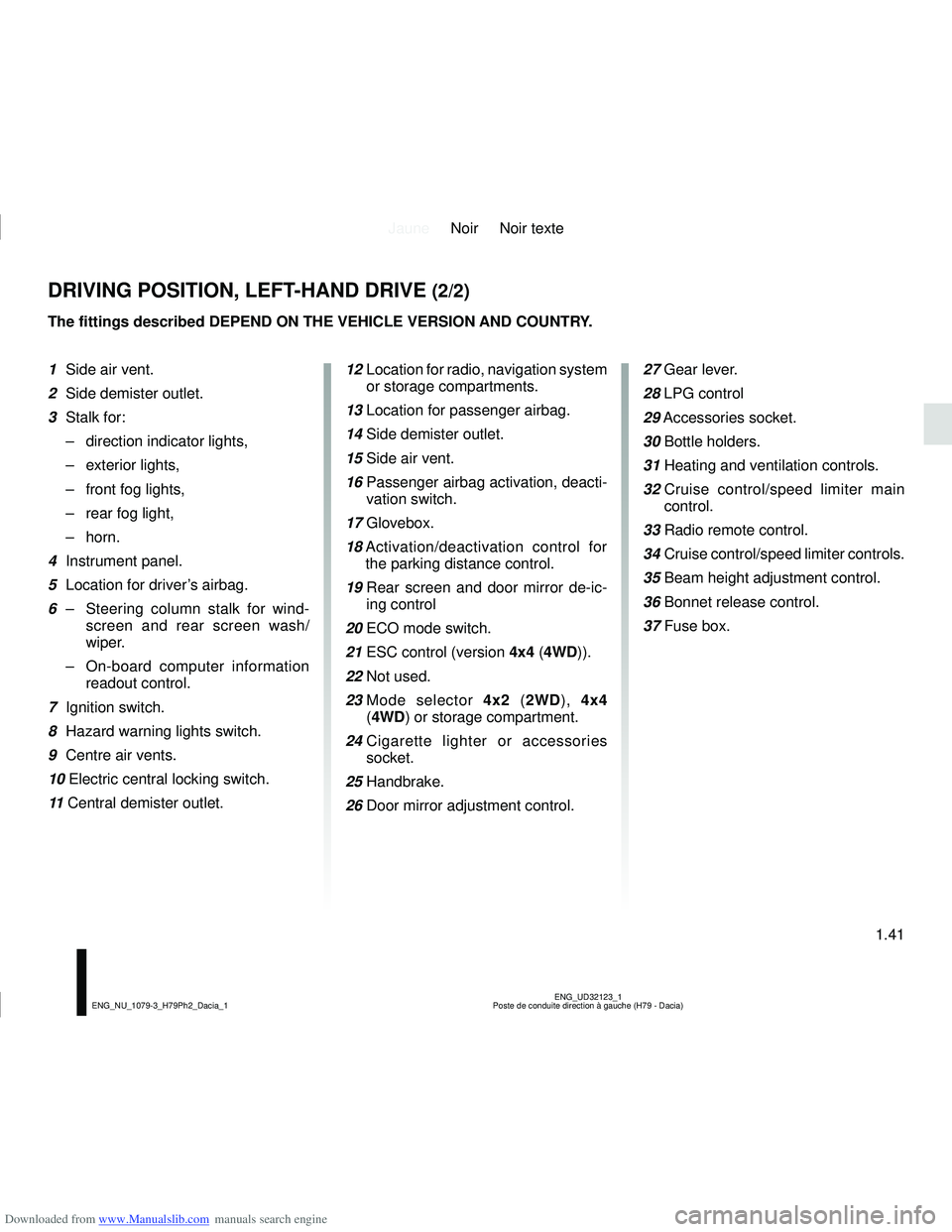
DRIVING POSITION, LEFT-HAND DRIVE (2/2)
The fittings described DEPEND ON THE VEHICLE VERSION AND COUNTRY.
1 Side air vent.
2 Side demister outlet.
3 Stalk for:
– direction indicator lights,
– exterior lights,
– front fog lights,
– rear fog light,
– horn.
4 Instrument panel.
5 Location for driver’s airbag.
6 – Steering column stalk for wind-
screen and rear screen wash/
wiper.
– On-board computer information
readout control.
7 Ignition switch.
8 Hazard warning lights switch.
9 Centre air vents.
10 Electric central locking switch.
11 Central demister outlet. 12
Location for radio, navigation system
or storage compartments.
13 Location for passenger airbag.
14 Side demister outlet.
15 Side air vent.
16 Passenger airbag activation, deacti-
vation switch.
17 Glovebox.
18 Activation/deactivation control for
the parking distance control.
19 Rear screen and door mirror de-ic-
ing control
20 ECO mode switch.
21 ESC control (version 4x4 (4WD)).
22 Not used.
23 Mode selector 4x2 (2WD), 4x4
(4WD) or storage compartment.
24 Cigarette lighter or accessories
socket.
25 Handbrake.
26 Door mirror adjustment control. 27 Gear lever.
28 LPG control
29
Accessories socket.
30 Bottle holders.
31 Heating and ventilation controls.
32 Cruise control/speed limiter main
control.
33 Radio remote control.
34 Cruise control/speed limiter controls.
35 Beam height adjustment control.
36 Bonnet release control.
37 Fuse box.
Page 49 of 244
Downloaded from www.Manualslib.com manuals search engine JauneNoir Noir texte
1.43
ENG_UD32124_1
Poste de conduite direction à droite (H79 - Dacia)
ENG_NU_1079-3_H79Ph2_Dacia_1
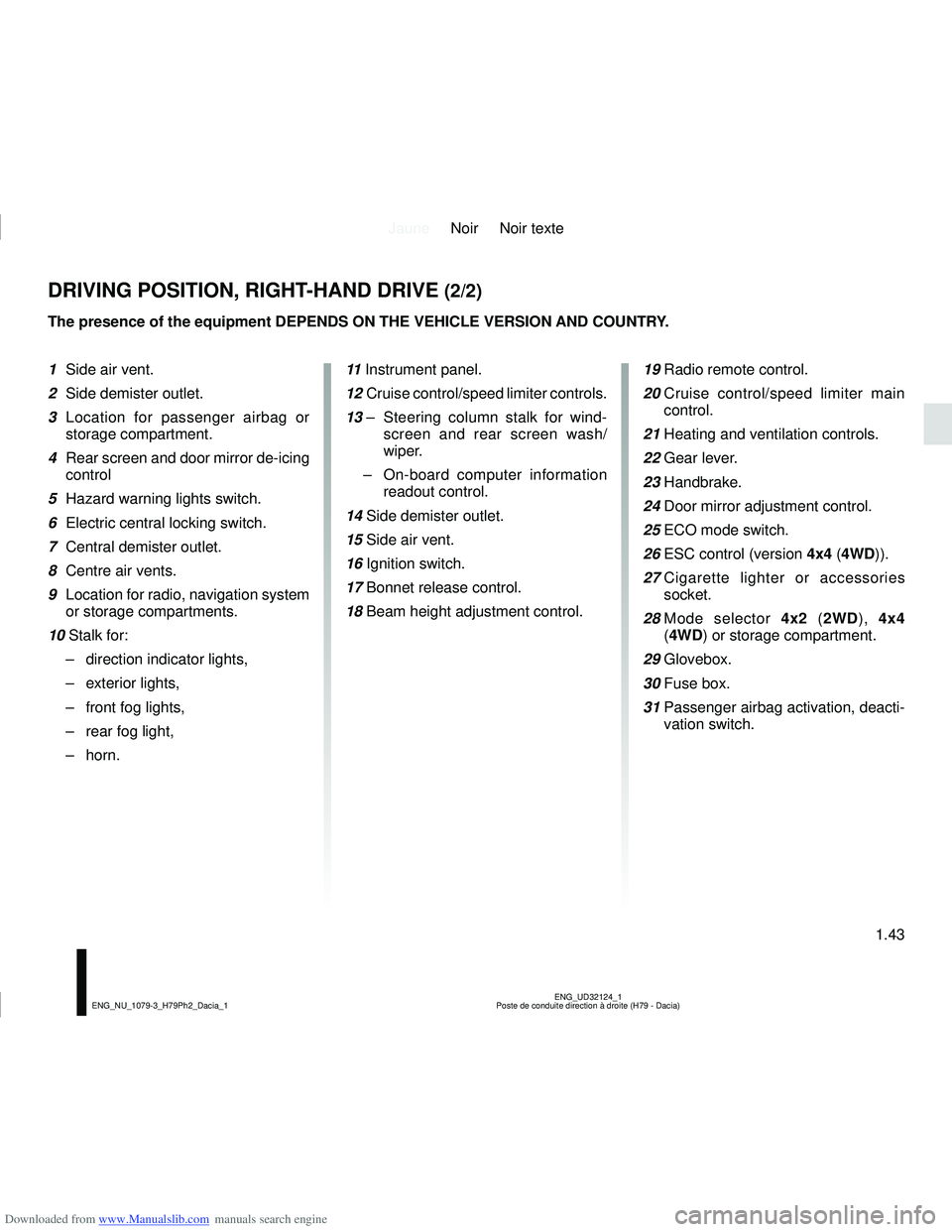
DRIVING POSITION, RIGHT-HAND DRIVE (2/2)
The presence of the equipment DEPENDS ON THE VEHICLE VERSION AND COUNTRY.
1 Side air vent.
2 Side demister outlet.
3 Location for passenger airbag or
storage compartment.
4 Rear screen and door mirror de-icing control
5 Hazard warning lights switch.
6 Electric central locking switch.
7 Central demister outlet.
8 Centre air vents.
9 Location for radio, navigation system or storage compartments.
10 Stalk for: – direction indicator lights,
– exterior lights,
– front fog lights,
– rear fog light,
– horn. 11
Instrument panel.
12 Cruise control/speed limiter controls.
13 – Steering column stalk for wind-
screen and rear screen wash/
wiper.
– On-board computer information
readout control.
14 Side demister outlet.
15 Side air vent.
16 Ignition switch.
17 Bonnet release control.
18 Beam height adjustment control.
19 Radio remote control.
20 Cruise control/speed limiter main
control.
21 Heating and ventilation controls.
22 Gear lever.
23 Handbrake.
24 Door mirror adjustment control.
25 ECO mode switch.
26 ESC control (version 4x4 (4WD)).
27 Cigarette lighter or accessories
socket.
28 Mode selector 4x2 (2WD), 4x4
(4WD) or storage compartment.
29 Glovebox.
30 Fuse box.
31 Passenger airbag activation, deacti-
vation switch.
Page 60 of 244
Downloaded from www.Manualslib.com manuals search engine JauneNoir Noir texte
1.54
ENG_UD34963_2
Ordinateur de bord (H79 Ph2 - Dacia)
ENG_NU_1079-3_H79Ph2_Dacia_1
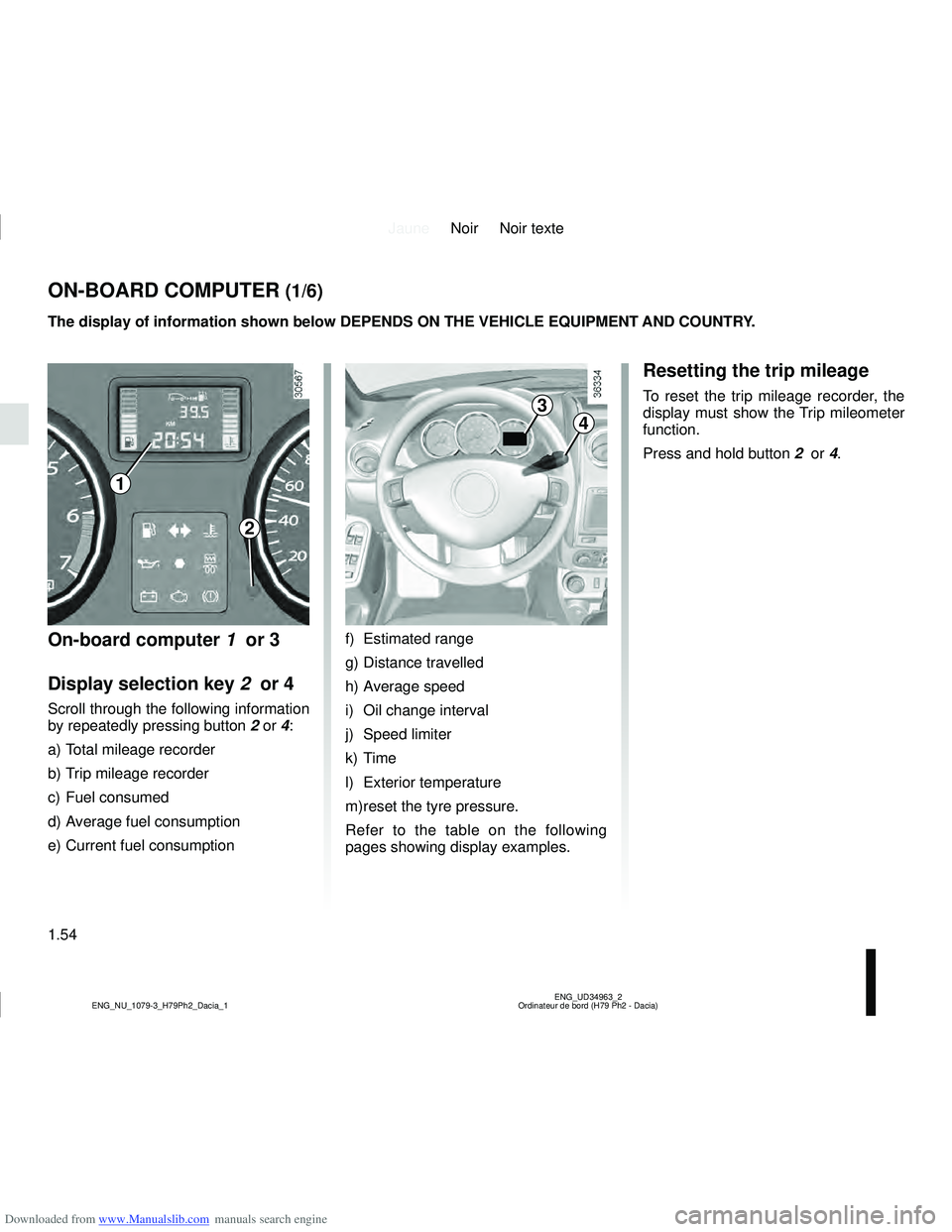
ON-BOARD COMPUTER (1/6)
2
3
4
The display of information shown below DEPENDS ON THE VEHICLE EQUIPMENT \
AND COUNTRY.
On-board computer 1 or 3
Display selection key 2 or 4
Scroll through the following information
by repeatedly pressing button 2 or 4:
a) Total mileage recorder
b) Trip mileage recorder
c) Fuel consumed
d) Average fuel consumption
e) Current fuel consumption f) Estimated range
g) Distance travelled
h) Average speed
i) Oil change interval
j) Speed limiter
k) Time
l) Exterior temperature
m) reset the tyre pressure.
Refer to the table on the following
pages showing display examples.
Resetting the trip mileage
To reset the trip mileage recorder, the
display must show the Trip mileometer
function.
Press and hold button
2 or 4.
1
Page 65 of 244
Downloaded from www.Manualslib.com manuals search engine JauneNoir Noir texte
1.59
ENG_UD34963_2
Ordinateur de bord (H79 Ph2 - Dacia)
ENG_NU_1079-3_H79Ph2_Dacia_1
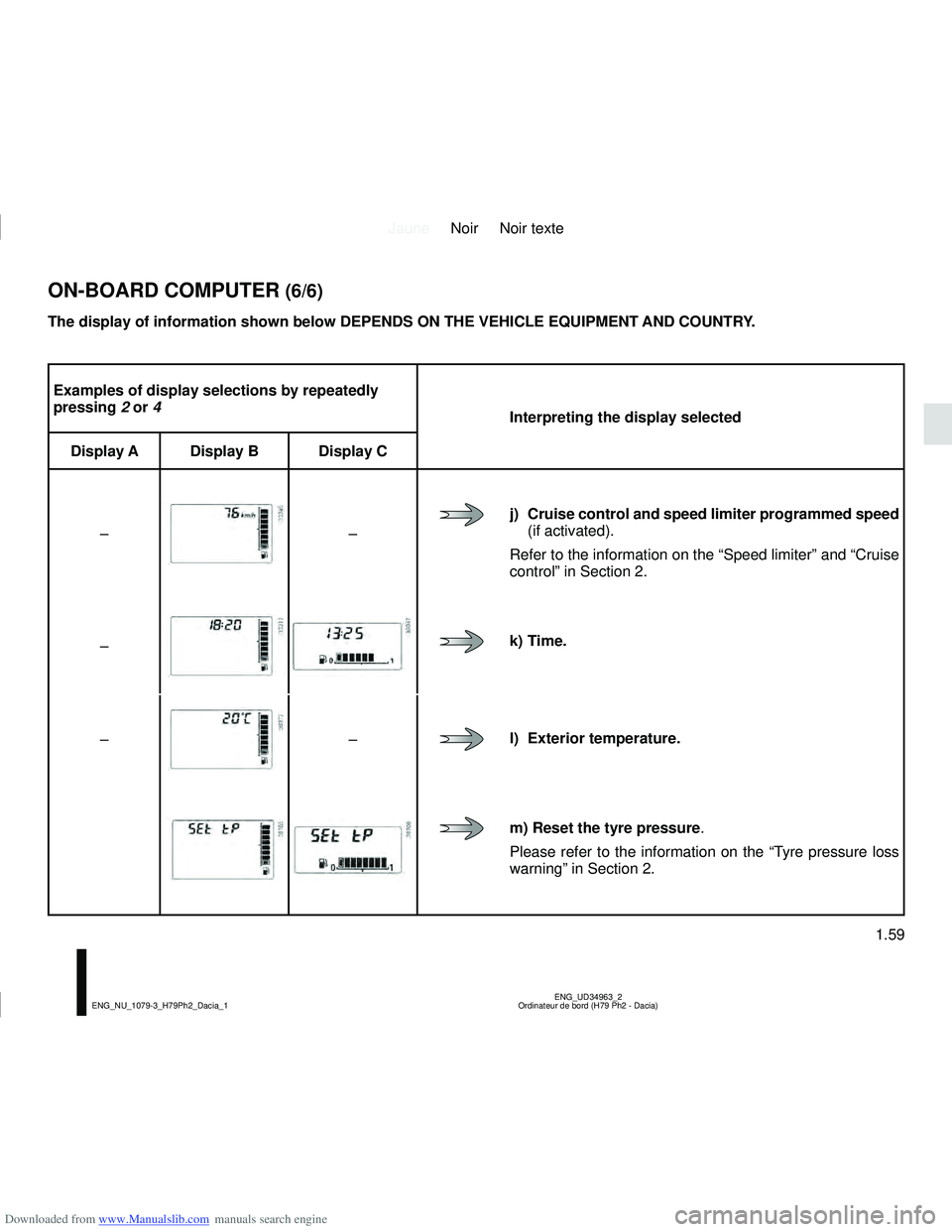
Examples of display selections by repeatedly
pressing 2 or 4
Interpreting the display selected
Display A Display B Display C
–
–
j) Cruise control and speed limiter programmed speed
(if activated).
Refer to the information on the “Speed limiter” and “Cruise
control” in Section 2.
–
k) Time.
–
–l) Exterior temperature.
m) Reset the tyre pressure .
Please refer to the information on the “Tyre pressure loss
warning” in Section 2.
ON-BOARD COMPUTER (6/6)
The display of information shown below DEPENDS ON THE VEHICLE EQUIPMENT \
AND COUNTRY.
Page 70 of 244
Downloaded from www.Manualslib.com manuals search engine JauneNoir Noir texte
1.64
ENG_UD33916_2
Éclairages et signalisations extérieures (H79 Ph2 - Dacia)
ENG_NU_1079-3_H79Ph2_Dacia_1
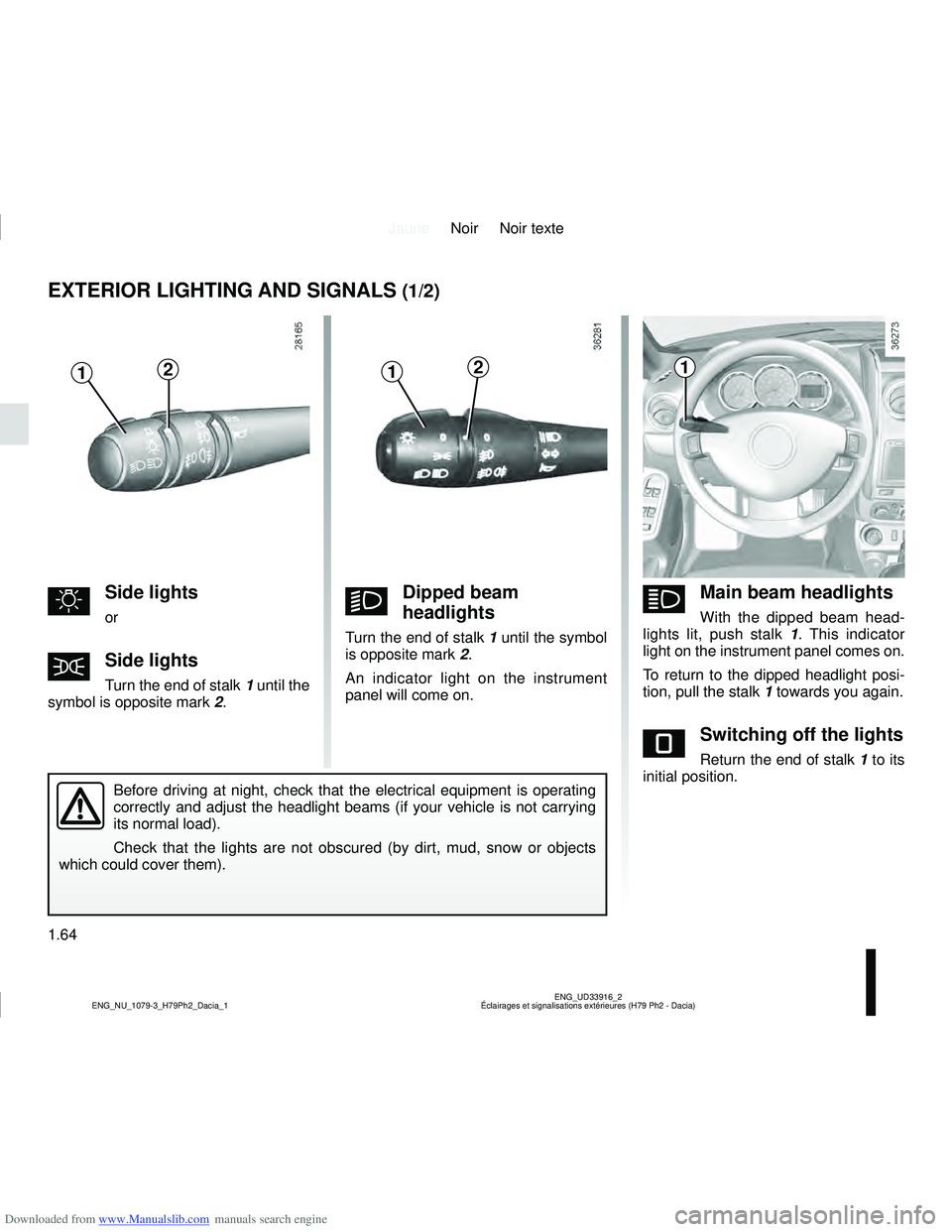
EXTERIOR LIGHTING AND SIGNALS (1/2)
uSide lights
or
šSide lights
Turn the end of stalk 1 until the
symbol is opposite mark 2.
kDipped beam
headlights
Turn the end of stalk 1 until the symbol
is opposite mark 2.
An indicator light on the instrument
panel will come on.
áMain beam headlights
With the dipped beam head-
lights lit, push stalk 1 . This indicator
light on the instrument panel comes on.
To return to the dipped headlight posi-
tion, pull the stalk 1 towards you again.
eSwitching off the lights
Return the end of stalk 1 to its
initial position.
Before driving at night, check that the electrical equipment is operatin\
g
correctly and adjust the headlight beams (if your vehicle is not carryi\
ng
its normal load).
Check that the lights are not obscured (by dirt, mud, snow or objects
which could cover them).
11212
Page 71 of 244
Downloaded from www.Manualslib.com manuals search engine JauneNoir Noir texte
1.65
ENG_UD33916_2
Éclairages et signalisations extérieures (H79 Ph2 - Dacia)
ENG_NU_1079-3_H79Ph2_Dacia_1
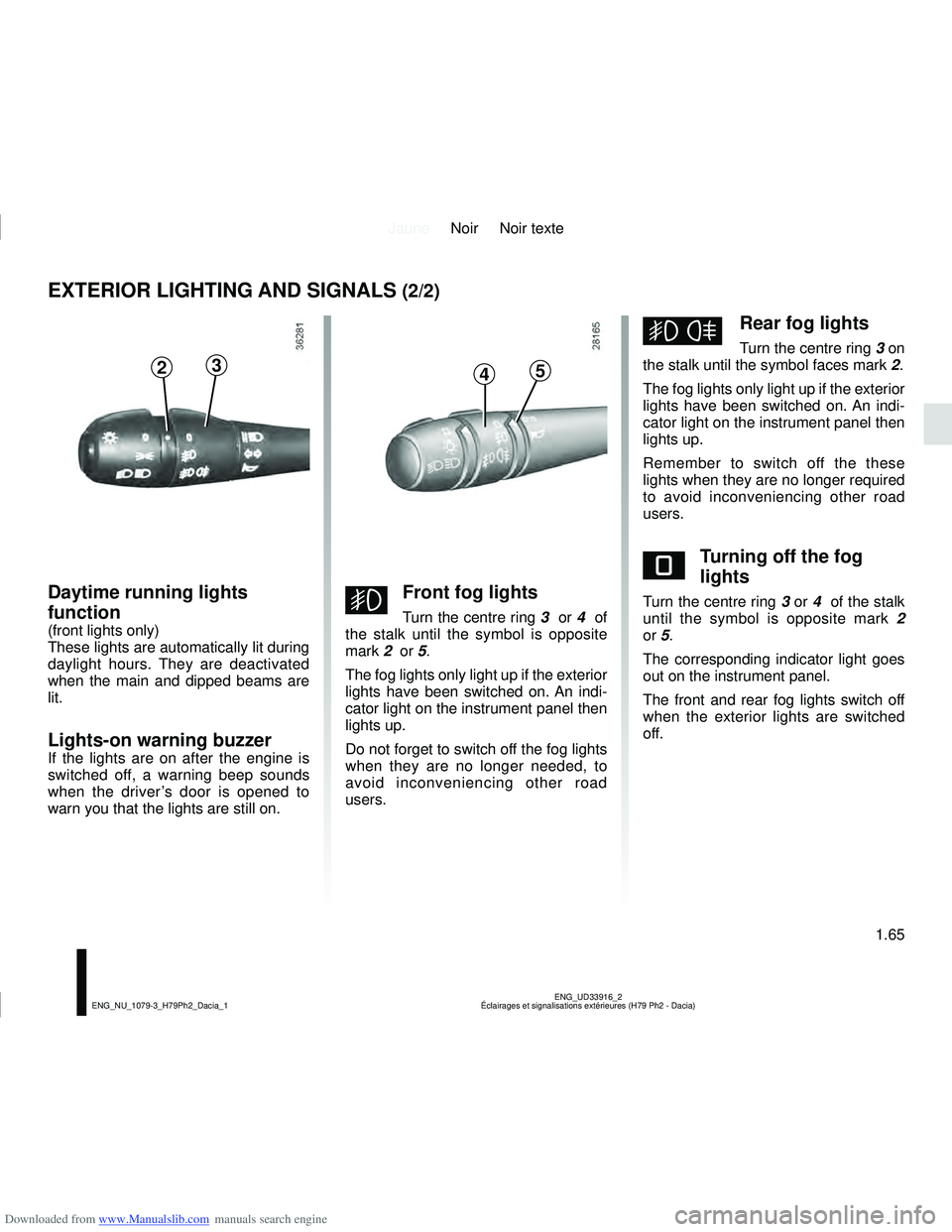
EXTERIOR LIGHTING AND SIGNALS (2/2)
gFront fog lights
Turn the centre ring 3 or 4 of
the stalk until the symbol is opposite
mark 2 or 5.
The fog lights only light up if the exterior
lights have been switched on. An indi-
cator light on the instrument panel then
lights up.
Do not forget to switch off the fog lights
when they are no longer needed, to
avoid inconveniencing other road
users.
hRear fog lights
Turn the centre ring 3 on
the stalk until the symbol faces mark 2.
The fog lights only light up if the exterior
lights have been switched on. An indi-
cator light on the instrument panel then
lights up.
Remember to switch off the these
lights when they are no longer required
to avoid inconveniencing other road
users.
eTurning off the fog
lights
Turn the centre ring 3 or 4 of the stalk
until the symbol is opposite mark 2
or 5.
The corresponding indicator light goes
out on the instrument panel.
The front and rear fog lights switch off
when the exterior lights are switched
off.
2345
Daytime running lights
function
(front lights only)
These lights are automatically lit during
daylight hours. They are deactivated
when the main and dipped beams are
lit.
Lights-on warning buzzer
If the lights are on after the engine is
switched off, a warning beep sounds
when the driver’s door is opened to
warn you that the lights are still on.
Page 128 of 244
Downloaded from www.Manualslib.com manuals search engine JauneNoir Noir texte
3.6
ENG_UD32151_1
Chauffage - Ventilation - Air conditionné (H79 - Dacia)
ENG_NU_1079-3_H79Ph2_Dacia_3
HEATING, VENTILATION, AIR CONDITIONING (3/3)
2
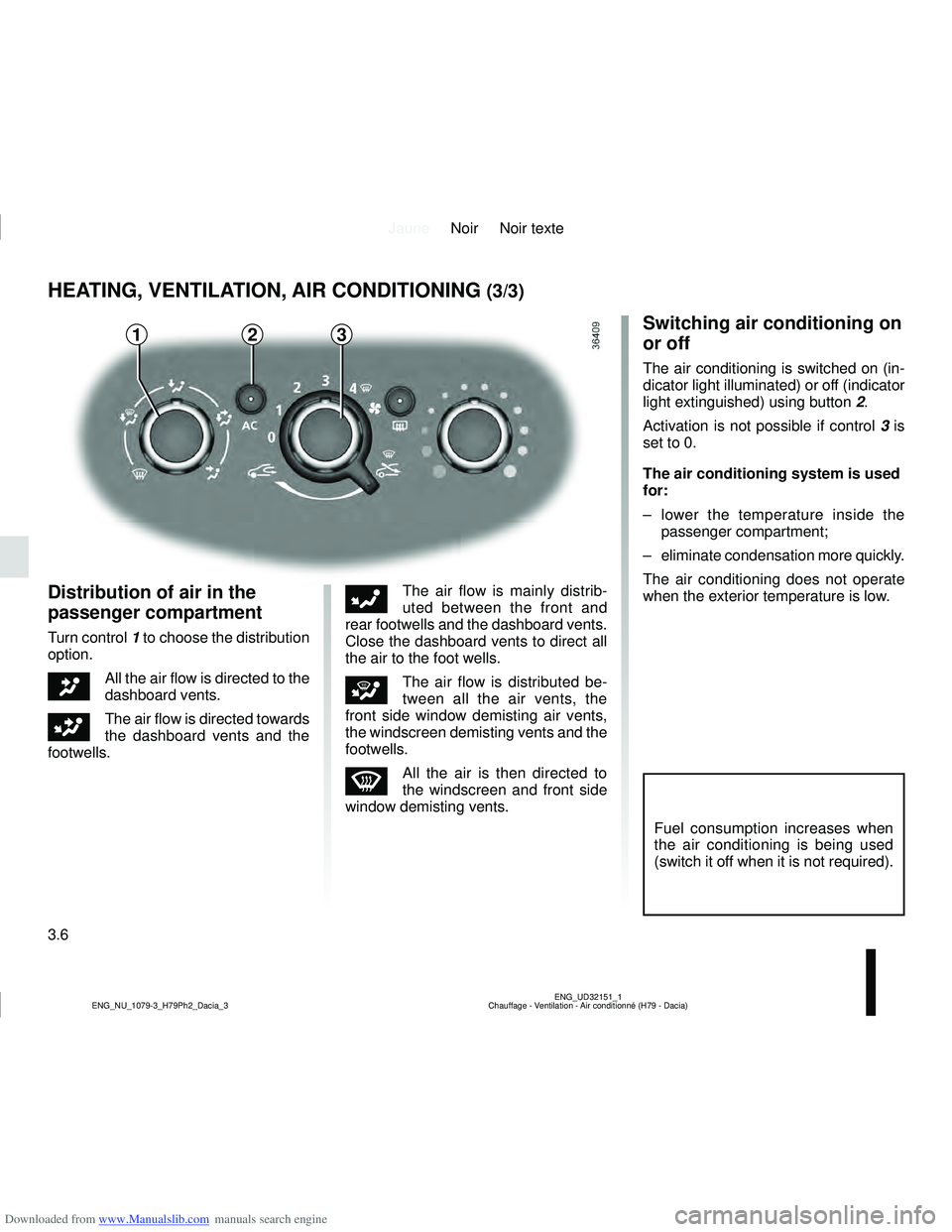
Distribution of air in the
passenger compartment
Turn control 1 to choose the distribution
option.
JAll the air flow is directed to the
dashboard vents.
GThe air flow is directed towards
the dashboard vents and the
footwells.
FThe air flow is mainly distrib-
uted between the front and
rear footwells and the dashboard vents.
Close the dashboard vents to direct all
the air to the foot wells.
iThe air flow is distributed be-
tween all the air vents, the
front side window demisting air vents,
the windscreen demisting vents and the
footwells.
WAll the air is then directed to
the windscreen and front side
window demisting vents.
Switching air conditioning on
or off
The air conditioning is switched on (in-
dicator light illuminated) or off (indicator
light extinguished) using button 2.
Activation is not possible if control 3 is
set to 0.
The air conditioning system is used
for:
– lower the temperature inside the passenger compartment;
– eliminate condensation more quickly.
The air conditioning does not operate
when the exterior temperature is low.
Fuel consumption increases when
the air conditioning is being used
(switch it off when it is not required).
13
Page 165 of 244
 (X44 - X77 - J77 - X85 - \
B90 - X61 - TEST - X77 ph2 - X95")
Downloaded from www.Manualslib.com manuals search engine JauneNoir Noir texte
4.13
ENG_UD26811_2
Entretien de la carrosserie (peinture mate) (X44 - X77 - J77 - X85 - \
B90 - X61 - TEST - X77 ph2 - X95 - B95 - D95 - K95 - J95 - R95 - L90 Ph2 - F90 Ph2 - R90 Ph2 - X62
ENG_NU_1079-3_H79Ph2_Dacia_4
BODYWORK MAINTENANCE (1/2)
You should
Wash your car frequently, with the
engine off , with cleaning products rec-
ommended by the manufacturer (never
use abrasive products). Rinse thor-
oughly beforehand with a jet:
– spots of tree resin and industrial
grime;
– mud in the wheel arches and under-
neath the body which forms damp
patches;
– bird droppings , which cause a
chemical reaction with the paint that
rapidly discolours paintwork and
may even cause the paint to peel
off;
wash the vehicle immediately to
remove these marks since it is im-
possible to remove them by polish-
ing;
– salt, particularly in the wheel arches
and underneath the body after driv-
ing in areas where the roads have
been gritted.
Remove any plant matter (resin, leaves,
etc.) from the vehicle regularly.
What you should not doDo not degrease or clean mechani-
cal components (e.g. the engine com-
partment), underneath the body, parts
with hinges (e.g. inside the doors) and
painted plastic external fittings (e.g.
bumpers) using high-pressure clean-
ing equipment or by spraying on prod-
ucts not approved by our Technical
Department. Doing this could give rise
to corrosion or operational faults.
Wash the vehicle in bright sunlight or
freezing temperatures.
Do not scrape off mud or dirt without
pre-wetting.
Allow dirt to accumulate on the exterior.
Allow rust to form following minor im-
pacts.
Do not use solvents not approved by
our Technical Department to remove
stains as this could damage the paint-
work.
Do not drive in snow or muddy condi-
tions without washing the vehicle, par-
ticularly under the wheel arches and
body.
A well-maintained vehicle will last
longer. It is therefore recommended to
maintain the exterior of the vehicle reg-
ularly.
Your vehicle has been treated with very
effective anti-corrosion products. It is
nevertheless subject to various outside
influences.
Corrosive agents in the atmosphere
–
atmospheric pollution (built-up and
industrial areas),
– saline atmospheres (near the sea,
particularly in hot weather),
– seasonal and damp weather condi-
tions (e.g. road salt in winter, water
from road cleaners, etc.).
Minor impacts
Abrasive action
Dust and sand in the air, mud, road grit
thrown up by other vehicles, etc.
You should take a number of minor pre-
cautions in order to safeguard your ve-
hicle against such risks.
Page 167 of 244

Downloaded from www.Manualslib.com manuals search engine JauneNoir Noir texte
4.15
ENG_UD22866_8
Entretien des garnitures intérieures (X35 - X45 - X65 - J77 - X81 - \
J81 - X85 - X91 - B91 - K91 - D91 - X83 - X61 - X77 ph2 - X95 - B95 - D95 - E95 - K95 - J95 - R95 -
ENG_NU_1079-3_H79Ph2_Dacia_4
Glass instrument panel(e.g. instrument panel, clock, exterior
temperature display, radio display, etc.)
Use a soft cloth (or cotton wool).
If this does not clean it properly, use a
soft cloth (or cotton wool) slightly mois-
tened with soapy water and then wipe
clean with a soft damp cloth or cotton
wool.
Finally, carefully dry off with a soft dry
cloth.
Cleaning products containing alco-
hol must not be used under any cir-
cumstances.
Seat belts
These must be kept clean.
Use products selected by our Technical
Department (Approved outlets) or
warm, soapy water and a sponge and
wipe with a dry cloth.
Detergents or dyes must not be used
under any circumstances.
INTERIOR TRIM MAINTENANCE (1/2)
Textiles (seats, door trim, etc)
Vacuum-clean the textiles regularly.
Liquid stain
Use soapy water.
Dab lightly (never rub) with a soft cloth,
rinse and remove the excess.
Solid or pasty stain
Carefully remove the excess solid or
pasty material immediately with a
spatula (working from the edges to the
centre to avoid spreading the stain).
Clean as for a liquid stain.
Special instructions for sweets or
chewing gum
Put an ice cube on the stain to solidify
it, then proceed as for a solid stain.
A well-maintained vehicle will last
longer. It is therefore recommended to
maintain the interior of the vehicle regu-
larly.
A stain should always be dealt with
swiftly.
Whatever type of stain is on the trim,
use
cold (or warm) soapy water with
natural soap.
Detergents (washing-up liquid, pow-
dered products, alcohol-based prod-
ucts) should not be used.
Use a soft cloth.
Rinse and soak up the excess.
For further recommendations for
maintaining the interior, and/or for
any unsatisfactory results, please
see an authorised dealer.