button DACIA SANDERO STEPWAY 2016 2.G User Guide
[x] Cancel search | Manufacturer: DACIA, Model Year: 2016, Model line: SANDERO STEPWAY, Model: DACIA SANDERO STEPWAY 2016 2.GPages: 174, PDF Size: 2.78 MB
Page 47 of 174
control instruments ............................... (up to the end of the DU)
trip computer and warning system........ (up to the end of the DU)
warning lights........................................ (up to the end of the DU)
1.45
ENG_UD20446_9
Ordinateur de bord (B90 - L90 Ph2 - F90 Ph2 - R90 Ph2 - Dacia)
ENG_NU_817-10_B90_Dacia_1
Trip computer and warning system
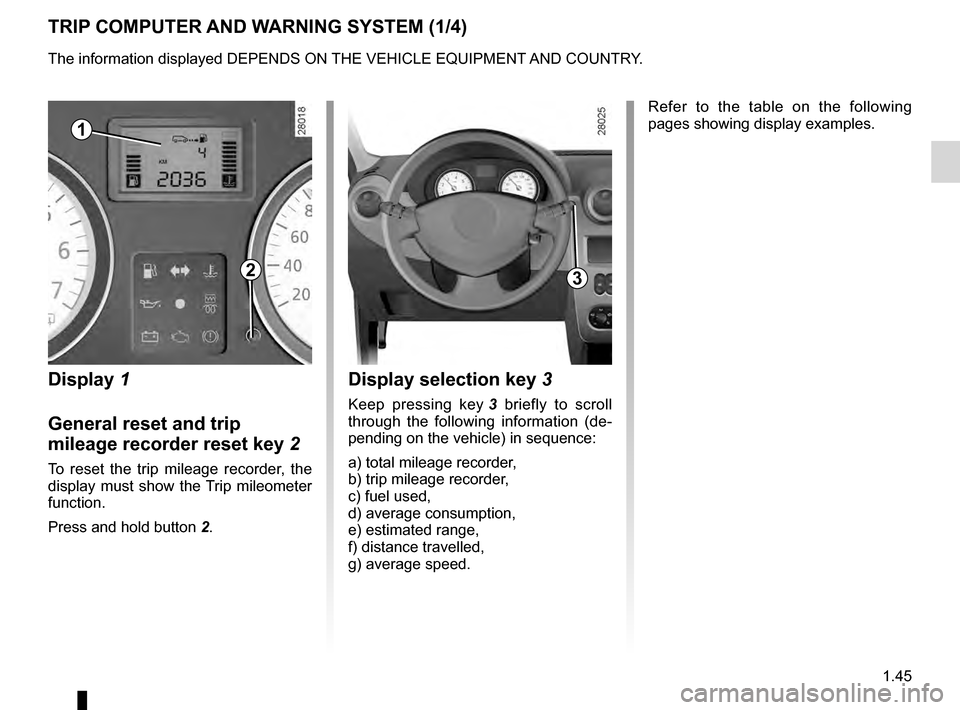
TRIP COMPUTER AND WARNING SYSTEM (1/4)
Display 1
General reset and trip
mileage recorder reset key
2
To reset the trip mileage recorder, the
display must show the Trip mileometer
function.
Press and hold button
2
.
Display selection key 3
Keep pressing key 3 briefly to scroll
through the following information (de-
pending on the vehicle) in sequence:
a) total mileage recorder,
b) trip mileage recorder,
c) fuel used,
d) average consumption,
e) estimated range,
f) distance travelled,
g) average speed. Refer to the table on the following
pages showing display examples.
1
23
The information displayed DEPENDS ON THE VEHICLE EQUIPMENT AND COUNTRY.
Page 48 of 174
1.46
ENG_UD20446_9
Ordinateur de bord (B90 - L90 Ph2 - F90 Ph2 - R90 Ph2 - Dacia)
ENG_NU_817-10_B90_Dacia_1
Jaune NoirNoir texte
Interpreting some of the
values displayed after
resetting
The values showing average fuel con-
sumption, range and average speed
will become more stable and reliable
the further you travel after pressing the
reset button.
For the first few miles after pressing the
reset key you will notice that the range
increases as you travel. This range
takes into account the average fuel con-
sumption since the last time the reset
button was pressed. Therefore, the fuel
consumption may decrease when:
–
the vehicle stops accelerating
;
–
t
he engine reaches its operat-
ing temperature (if the engine
was cold when the reset key was
pressed);
–
d
riving from an urban area onto
the open road;
Therefore,
if the average fuel con-
sumption decreases, the range
will increase. –
Y
ou may also notice that the aver-
age fuel consumption increases
when the vehicle is stationary and
the engine idling.
This is normal, since the computer
takes account of fuel used during
idling.
Manually resetting the journey param-
eters: with the display showing one of
the journey parameters, press button 2
until the display is reset.
Automatically resetting the journey pa-
rameters: the reset is automatic when
the capacity of one of the memories is
exceeded.
TRIP COMPUTER AND WARNING SYSTEM (2/4)
The information displayed DEPENDS ON THE VEHICLE EQUIPMENT AND COUNTRY.
Page 49 of 174
JauneNoirNoir texte
1.47
ENG_UD20446_9
Ordinateur de bord (B90 - L90 Ph2 - F90 Ph2 - R90 Ph2 - Dacia)
ENG_NU_817-10_B90_Dacia_1
TRIP COMPUTER AND WARNING SYSTEM (3/4)
The information displayed DEPENDS ON THE VEHICLE EQUIPMENT AND COUNTRY.
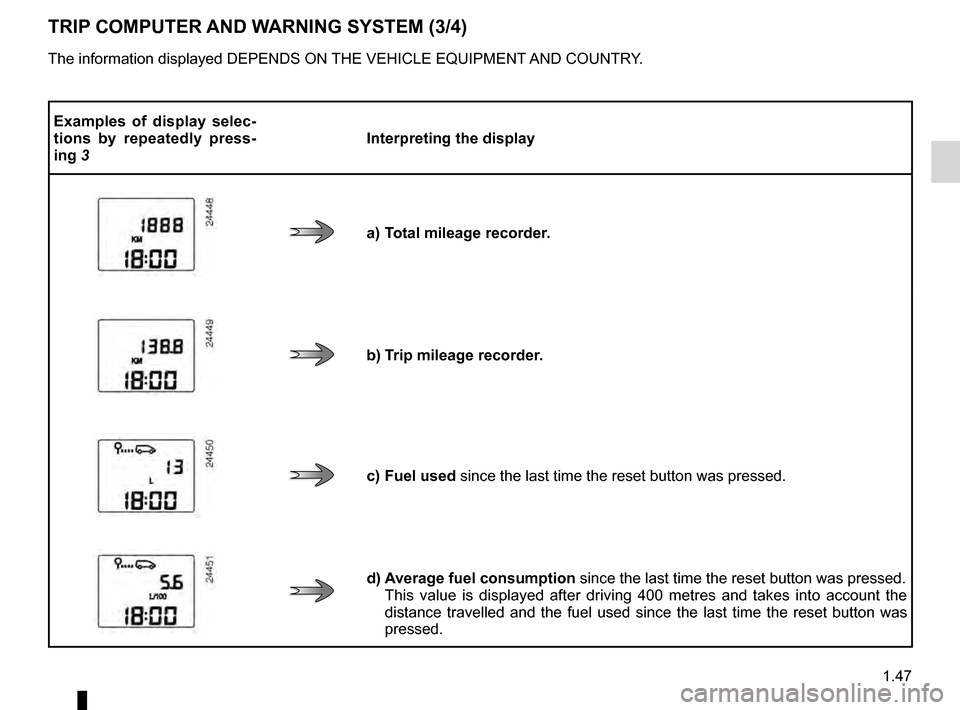
Examples of display selec-
tions by repeatedly press-
ing
3 Interpreting the display
a) Total mileage recorder.
b) Trip mileage recorder.
c) Fuel used since the last time the reset button was pressed.
d) Average fuel consumption
since the last time the reset button was pressed.
This value is displayed after driving 400 metres and takes into account the
distance travelled and the fuel used since the last time the reset button was
pressed.
Page 50 of 174
1.48
ENG_UD20446_9
Ordinateur de bord (B90 - L90 Ph2 - F90 Ph2 - R90 Ph2 - Dacia)
ENG_NU_817-10_B90_Dacia_1
TRIP COMPUTER AND WARNING SYSTEM (4/4)
The information displayed DEPENDS ON THE VEHICLE EQUIPMENT AND COUNTRY.
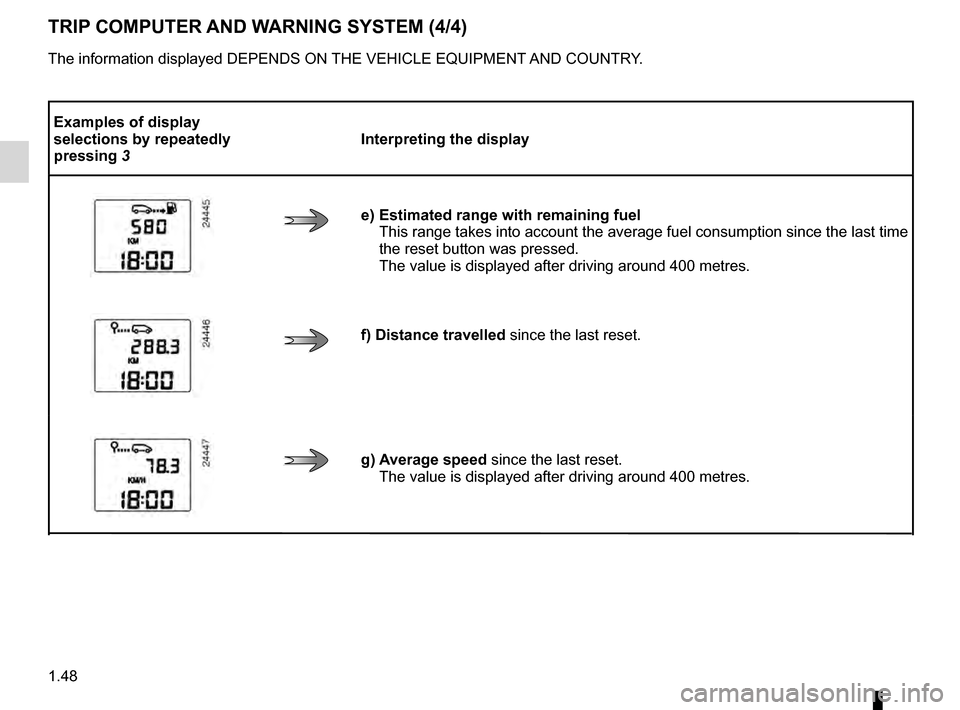
Examples of display
selections by repeatedly
pressing
3 Interpreting the display
e) Estimated range with remaining fuel This
range takes into account the average fuel consumption since the last time
the reset button was pressed.
The value is displayed after driving around 400 metres.
f) Distance travelled since the last reset.
g) Average speed since the last reset. The value is displayed after driving around 400 metres.
Page 57 of 174
de-icingrear screen ....................................................... (current page)
Jaune NoirNoir texte
1.55
ENG_UD25180_9
Essuie-vitre/Lave-vitre/Dégivrage (B90 - Dacia)
ENG_NU_817-10_B90_Dacia_1
WINDSCREEN WASH/WIPE, DE-ICING (3/3)
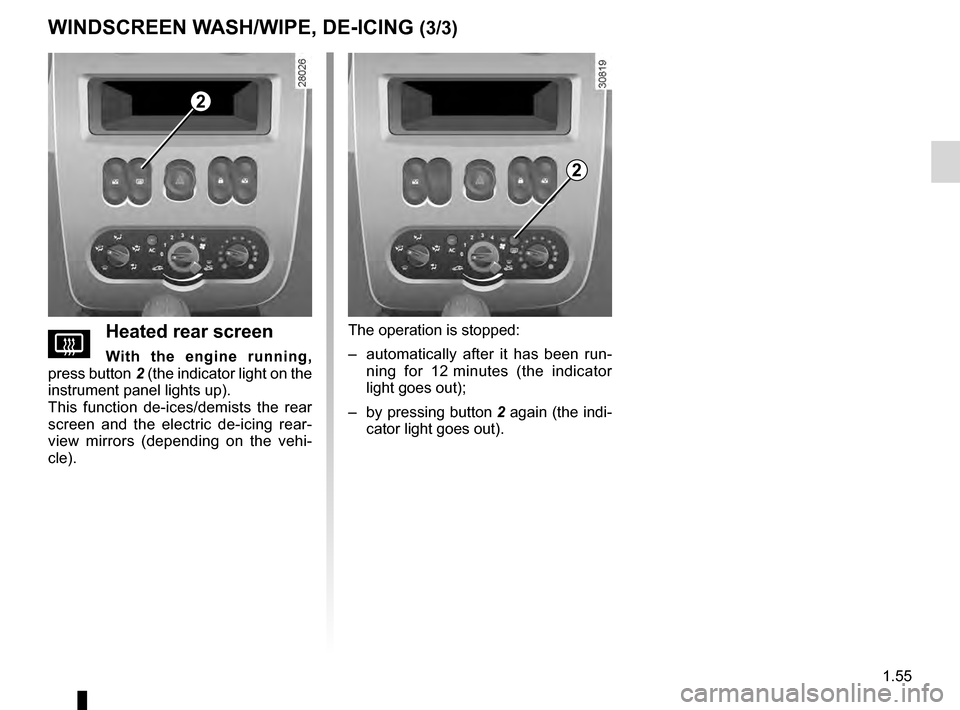
VHeated rear screen
With the engine running,
press button 2 (the indicator light on the
instrument panel lights up).
This function de-ices/demists the rear
screen and the electric de-icing rear-
view mirrors (depending on the vehi-
cle).
The operation is stopped:
–
a
utomatically after it has been run-
ning for 12
m
inutes (the indicator
light goes out);
–
by
pressing button 2 again (the indi-
cator light goes out).
2
2
Page 64 of 174
driving ................................................... (up to the end of the DU)
catalytic converter................................. (up to the end of the DU)
catalytic converter................................. (up to the end of the DU)
special features of petrol vehicles ........ (up to the end of the DU)
2.4
ENG_UD18237_9
Particularités des versions essence (B90 - U90 - L90 Ph2 - F90 Ph2 -\
R90 Ph2 - H79 - Dacia)
ENG_NU_817-10_B90_Dacia_2
Special features of petrol versions
SPECIAL FEATURES OF PETROL VERSIONS
The following operating conditions:
–
driving
for long periods when the low
fuel level warning light is lit;
–
using leaded petrol;
–
u
sing oil or fuel additives which are
not approved by the manufacturer.
Or operating faults such as:
–
faulty
ignition system, running out of
fuel or disconnected spark plugs re-
sulting in the engine misfiring or cut-
ting out when driving;
–
loss of power
,
may cause the catalytic converter to
overheat, reducing its efficiency which
may irreparably damage it and cause
heat damage to the vehicle. If you notice any of the above operating
faults, have the necessary repairs car-
ried out as soon as possible by an ap-
proved Dealer.
These faults may be avoided by reg-
ularly taking your vehicle to your ap-
proved dealer at the intervals speci-
fied in your Maintenance Service
Document.
Starting problems
To avoid damaging the catalytic con-
verter,
do not keep trying to start the
engine (using the start button, or by
pushing or towing the vehicle) without
having identified and corrected the
starting fault.
If the fault cannot be identified, do not
continue to try and start the engine, but
contact an approved dealer.
Do not park the vehicle or
run the engine in locations
where combustible sub-
stances or materials such
as grass or leaves can come into
contact with a hot exhaust system.
Page 71 of 174
power-assisted steering......................................... (current page)
driving .................................................................... (current page)
power-assisted steering......................................... (current page)
handbrake.............................................................. (current page)
2.11
ENG_UD18241_6
Frein à main / Direction assistée (B90 - L90 Ph2 - F90 Ph2 - R90 \
Ph2 - Dacia)
ENG_NU_817-10_B90_Dacia_2
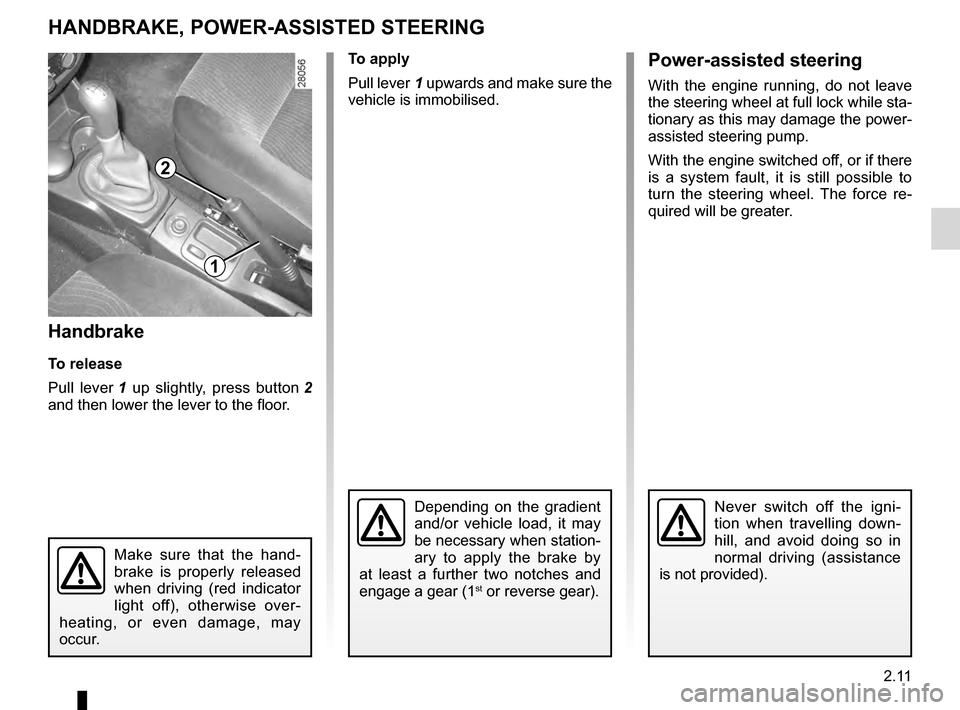
Handbrake
To release
Pull lever
1
up slightly, press button
2
and then lower the lever to the floor.
Handbrake/Power-assisted steering
HANDBRAKE, POWER-ASSISTED STEERING
To apply
Pull lever
1 upwards and make sure the
vehicle is immobilised.
Depending on the gradient
and/or vehicle load, it may
be necessary when station-
ary to apply the brake by
at least a further two notches and
engage a gear (1
st or reverse gear).
Never switch off the igni-
tion when travelling down-
hill, and avoid doing so in
normal driving (assistance
is not provided).
Make sure that the hand-
brake is properly released
when driving (red indicator
light off), otherwise over-
heating, or even damage, may
occur.
1
2
Power-assisted steering
With the engine running, do not leave
the steering wheel at full lock while sta-
tionary as this may damage the power-
assisted steering pump.
With the engine switched off, or if there
is a system fault, it is still possible to
turn the steering wheel. The force re-
quired will be greater.
Page 74 of 174
automatic gearbox (use) ....................... (up to the end of the DU)
changing gear ....................................... (up to the end of the DU)
driving ................................................... (up to the end of the DU)
automatic gearbox selector lever.......... (up to the end of the DU)
2.14
ENG_UD22554_10
Boîte automatique (B90 - L90 Ph2 - F90 Ph2 - R90 Ph2 - Dacia)
ENG_NU_817-10_B90_Dacia_2
Jaune NoirNoir texte
Automatic gearbox
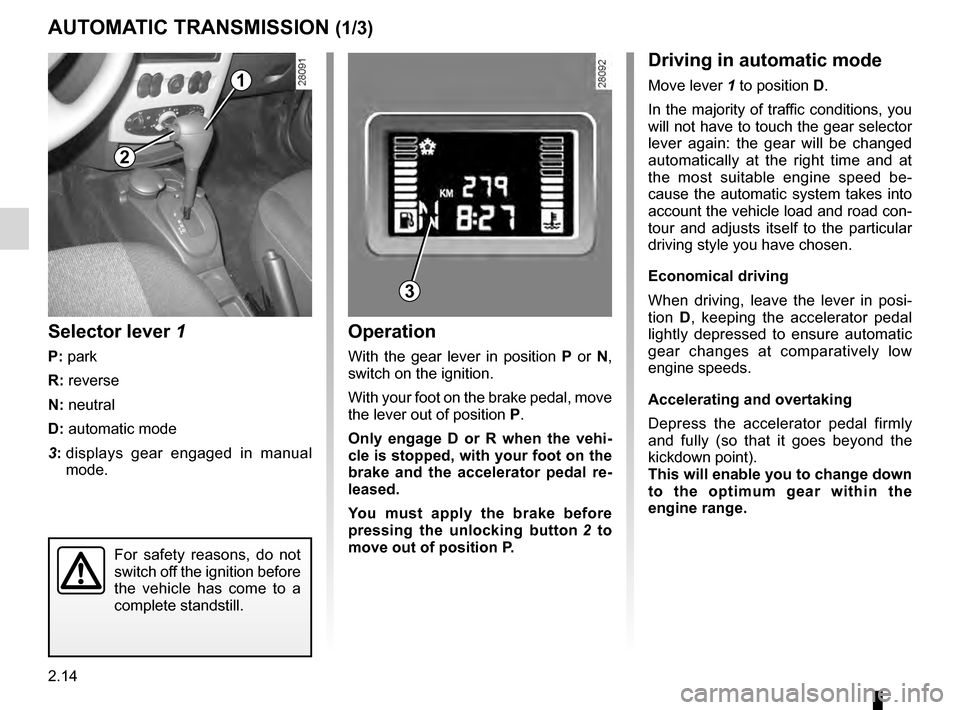
Selector lever 1
P: park
R: reverse
N: neutral
D: automatic mode
3:
d
isplays gear engaged in manual
mode.
Operation
With the gear lever in position P or N,
switch on the ignition.
With your foot on the brake pedal, move
the lever out of position P.
Only engage D or R when the vehi-
cle is stopped, with your foot on the
brake and the accelerator pedal re-
leased.
You must apply the brake before
pressing the unlocking button
2 t
o
move out of position P.
AUTOMATIC TRANSMISSION (1/3)
2
1
Driving in automatic mode
Move lever 1 to position D.
In the majority of traffic conditions, you
will not have to touch the gear selector
lever again: the gear will be changed
automatically at the right time and at
the most suitable engine speed be-
cause the automatic system takes into
account the vehicle load and road con-
tour and adjusts itself to the particular
driving style you have chosen.
Economical driving
When driving, leave the lever in posi-
tion D, keeping the accelerator pedal
lightly depressed to ensure automatic
gear changes at comparatively low
engine speeds.
Accelerating and overtaking
Depress the accelerator pedal firmly
and fully (so that it goes beyond the
kickdown point).
This will enable you to change down
to the optimum gear within the
engine range.
3
For safety reasons, do not
switch off the ignition before
the vehicle has come to a
complete standstill.
Page 76 of 174
2.16
ENG_UD22554_10
Boîte automatique (B90 - L90 Ph2 - F90 Ph2 - R90 Ph2 - Dacia)
ENG_NU_817-10_B90_Dacia_2
Parking the vehicleWhen the vehicle is stopped, move the
lever to position P while keeping your
foot on the brake pedal: the gearbox is
in neutral and the drive wheels are me-
chanically locked by the driveshaft.
Apply the handbrake.
AUTOMATIC TRANSMISSION (3/3)
An impact to the under-
side of the vehicle while
manoeuvring (e.g.: strik-
ing a post, raised kerb or
other street furniture) may result in
damage to the vehicle (e.g.: defor-
mation of an axle).
To avoid any risk of accident, have
your vehicle checked by an ap-
proved Dealer.
2
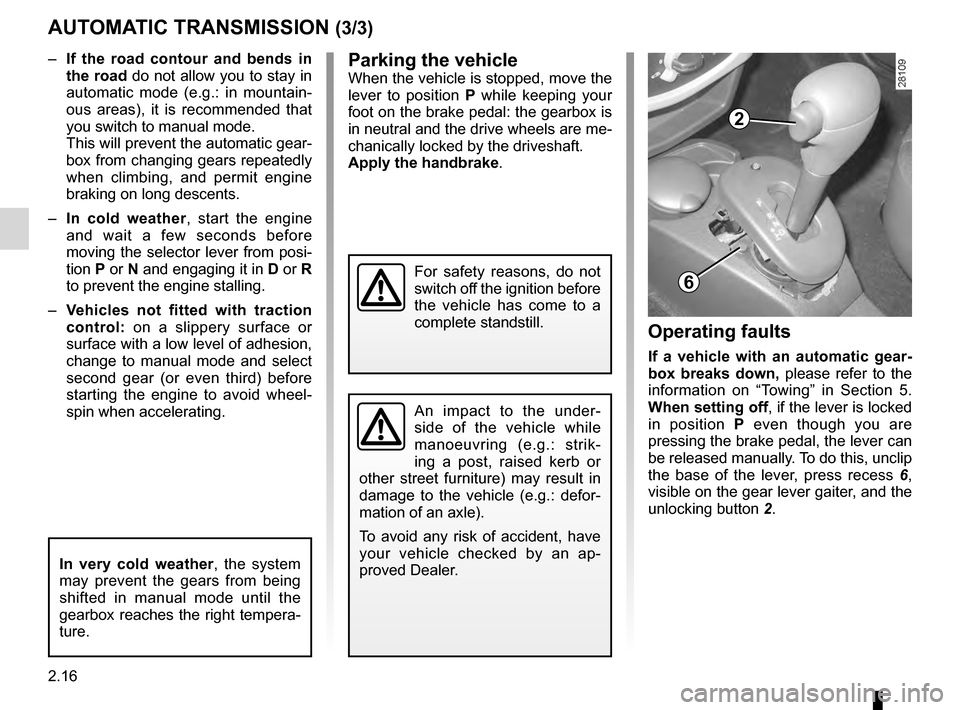
6
Operating faults
If a vehicle with an automatic gear-
box breaks down, please refer to the
information on “Towing” in Section 5.
When setting off, if the lever is locked
in position P even though you are
pressing the brake pedal, the lever can
be released manually. To do this, unclip
the base of the lever, press recess
6 ,
visible
on the gear lever gaiter, and the
unlocking button
2
.
–
I
f the road contour and bends in
the road do not allow you to stay in
automatic mode (e.g.: in mountain-
ous areas), it is recommended that
you switch to manual mode.
This will prevent the automatic gear-
box from changing gears repeatedly
when climbing, and permit engine
braking on long descents.
–
I
n cold weather
, start the engine
and wait a few seconds before
moving the selector lever from posi-
tion P or N and engaging it in D or R
to prevent the engine stalling.
–
V
ehicles not fitted with traction
control: on a slippery surface or
surface with a low level of adhesion,
change to manual mode and select
second gear (or even third) before
starting the engine to avoid wheel-
spin when accelerating.
In very cold weather , the system
may prevent the gears from being
shifted in manual mode until the
gearbox reaches the right tempera-
ture.
For safety reasons, do not
switch off the ignition before
the vehicle has come to a
complete standstill.
Page 80 of 174
air conditioning ..................................... (up to the end of the DU)
heating and air conditioning system ..... (up to the end of the DU)
heating system ..................................... (up to the end of the DU)
air conditioning ..................................... (up to the end of the DU)
ventilation ............................................. (up to the end of the DU)
temperature regulation ......................... (up to the end of the DU)
3.4
ENG_UD25116_1
Chauffage - Ventilation - Air conditionné (B90 - L90 Ph2 - Dacia)
ENG_NU_817-10_B90_Dacia_3
Jaune NoirNoir texte
Heating, Ventilation, Air conditioning
HEATING, VENTILATION, AIR CONDITIONING (1/2)
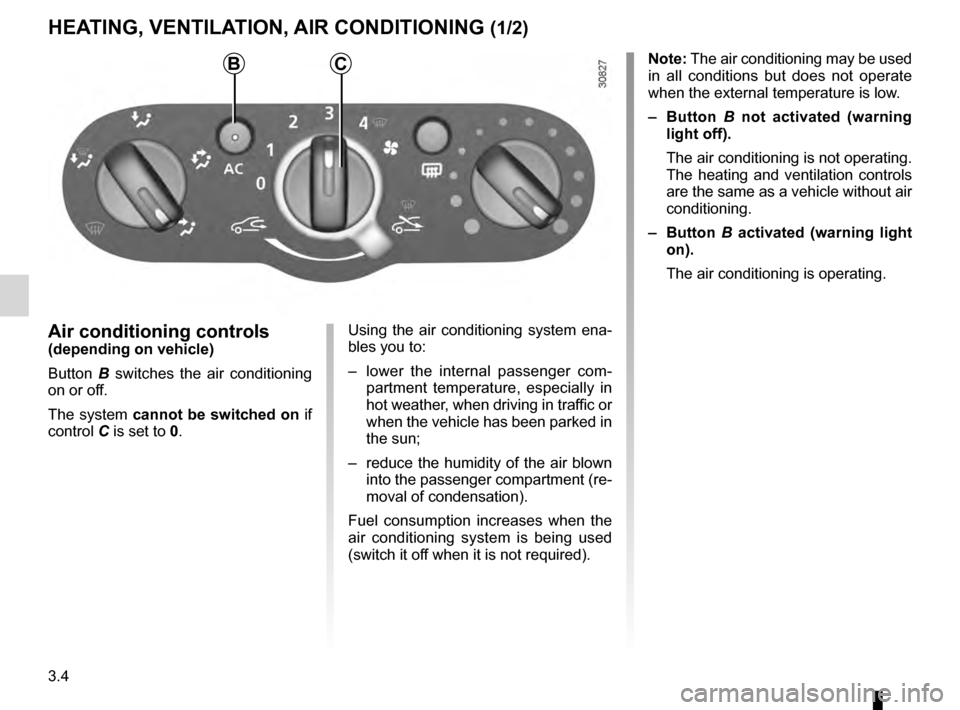
Air conditioning controls(depending on vehicle)
Button
B
switches the air conditioning
on or off.
The system cannot be switched on if
control
C is set to 0. Using the air conditioning system ena-
bles you to:
–
l
ower the internal passenger com-
partment temperature, especially in
hot weather, when driving in traffic or
when the vehicle has been parked in
the sun;
–
reduce
the humidity of the air blown
into the passenger compartment (re-
moval of condensation).
Fuel consumption increases when the
air conditioning system is being used
(switch it off when it is not required). Note: The air conditioning may be used
in all conditions but does not operate
when the external temperature is low.
–
B
utton
B
n
ot activated (warning
light off).
The air conditioning is not operating.
The heating and ventilation controls
are the same as a vehicle without air
conditioning.
–
B
utton
B
a
ctivated (warning light
on).
The air conditioning is operating.
CB