brake sensor DAEWOO LACETTI 2004 Service User Guide
[x] Cancel search | Manufacturer: DAEWOO, Model Year: 2004, Model line: LACETTI, Model: DAEWOO LACETTI 2004Pages: 2643, PDF Size: 80.54 MB
Page 691 of 2643

ENGINE CONTROLS 1F – 445
DAEWOO V–121 BL4
DIAGNOSTIC TROUBLE CODE (DTC) P0317
ROUGH ROAD SENSOR SOURCE NOT DETECTED
System Description
The Engine Control Module (ECM) identifies engine mis-
fire by detecting variations in crankshaft speed. Crank-
shaft speed variations can also occur when a vehicle is op-
erating over a rough road. The ECM receives rough road
signal by gravity sensing rough road (G) sensor or Elec-
tronic Brake Control Module (EBCM) if equipped with the
Anti–Lock Brake System (ABS). The ABS can detect if the
vehicle is on the rough surface based on wheel accelera-
tion/deceleration data supplied by each wheel speed sen-
sor. This information sent to the ECM by EBCM through
serial data line. The G sensor is vertical low g–accelera-
tion sensor. By sensing vertical acceleration caused by
bumps or portholes in the road, the ECM determine if the
changes in crankshaft speed are due to engine misfire or
are driveline induced. If the ECM can not receive any of
those signal, a historic Diagnostic Trouble Code (DTC) will
be stored.
Conditions for Setting the DTCS ECM can not detect any rough road source.
S Vehicle speed is greater than 5km/h (3.1 mph).
Action Taken When the DTC Sets
S The MIL will not illuminate.
S The ECM will record operating conditions at the
time the diagnostic fails. This information will be
stored in the Failure Records buffers.
S A history DTC is stored.
Conditions for Clearing the MIL/DTC
S A history DTC will clear after 40 consecutive warm–
up cycles without a fault.
S The DTC(s) can be cleared by using the scan tool.
S Disconnecting the ECM battery feed for more than
10 seconds.
Diagnostic Aids
An open signal circuit of G sensor or open serial data line
between the ECM and the EBCM will be the cause of this
DTC.
Page 692 of 2643

1F – 446IENGINE CONTROLS
DAEWOO V–121 BL4
DTC P0317 – Rough Road Sensor Source Not Detected
StepActionValue(s)YesNo
1Perform an On–Board Diagnostic (EOBD) System
Check.
Was the check complete?–Go to Step 2Go to
”On–Board
Diagnostic Sys-
tem Check”
21. Install a scan tool to the Data Link Connector
(DLC).
2. Turn the ignition ON, with the engine OFF.
3. Request Diagnostic Trouble Codes (DTCs)
Are DTCs P1380, P1381, P1391, P1392 or P1393
set?–Go to
Applicable DTCGo to Step 3
3Is the vehicle equipped with the Anti–lock Brake
System (ABS)?–Go to Step 8Go to Step 4
41. Disconnect the gravity sensing rough road (G)
sensor connector.
2. Disconnect the Engine control Module (ECM)
connector.
3. Measure resistance between terminal B of the
G sensor and terminal K21 of the ECM.
Is the resistance within the specified value?0 ΩGo to Step 6Go to Step 5
5Repair open circuit.
Is the repair complete?–Go to Step 11Go to Step 6
61. Reconnect the ECM and G sensor connectors.
2. Turn the ignition ON.
3. Probe the voltage at terminal B of G sensor.
Is the voltage within the specified value?2.35–2.65 VGo to Step 10Go to Step 7
71. Turn the ignition OFF.
2. Replace the G sensor.
Is the repair complete?–Go to Step 11–
81. Turn the ignition OFF.
2. Disconnect the Electronic Brake Control Mod-
ule EBCM) connector and the ECM connector.
3. Measure the resistance between terminal 25 of
the EBCM and terminal K7 of the ECM.
Is the resistance within the specified value?0 ΩGo to Step 10Go to Step 9
9Repair open circuit.
Is the repair complete?–Go to Step 11Go to Step 10
101. Turn the ignition OFF.
2. Replace the ECM.
Is the repair complete?–Go to Step 11–
111. Using the scan tool, clear the DTCs.
2. Start the engine and idle at normal operating
temperature.
3. Operate the vehicle within the conditions for
setting this DTC as supported in the text.
Does the scan tool indicate that this diagnostic ran
and passed?–Go to Step 12Go to Step 2
12Check if any additional DTCs are set.
Are any DTCs displayed that have not been diag-
nosed?–Go to
Applicable DTC
tableSystem OK
Page 796 of 2643

1F – 550IENGINE CONTROLS
DAEWOO V–121 BL4
DIAGNOSTIC TROUBLE CODE (DTC) P1336
58X CRANK POSITION TOOTH ERROR NOT LEARNED
Circuit Description
In order to detect engine misfire at higher engine speeds,
the Engine Control Module (ECM) must know of any varia-
tion between the crankshaft sensor pulses. Most varia-
tions are due to the machining of the crankshaft reluctor
wheel. However, other sources of variation are also pos-
sible. A Crankshaft Position (CKP) system variation learn-
ing procedure must be performed any time a change is
made to the crankshaft sensor to crankshaft relationship
of if the ECM is replaced or reprogrammed. The ECM
measures the variations and then calculates compensa-
tion factors needed to enable the ECM to accurately de-
tect engine misfire at all speeds and loads. A scan tool
must be used to command the ECM to learn these varia-
tions. If for any reason the ECM is unable to learn these
variations or they are out of an acceptable range, the ECM
will set Diagnostic Trouble Code (DTC) P1336. An ECM
that has not had the CKP system variation learning proce-
dure performed due to replacement or reprogramming will
also set DTC P1336.
Conditions for Setting the DTC
S Tooth error not learned if the manufacture enable
counter is set to zero.
S DTCs P0106, P0107, P0108, P0117, P0118,
P0122, P0123, P0132, P0201, P0202, P0203,
P0204, P0325 , 0327, P0336, P0337, P0341,
P0342, P0351, P0352, P0402, P1404, P0404,
P0405, P0406 and P0502 are not set.
Action Taken When the DTC Sets
S The Malfunction Indicator Lamp (MIL) will illumi-
nate.
S The ECM will record operating conditions at the
time the diagnostic fails. This information will be
stored in the Freeze Frame and Failure Records
buffer.
S A history DTC is stored.
Conditions for Clearing the MIL/DTC
S The MIL will turn OFF after four consecutive igni-
tion cycles in which the diagnostic runs without a
fault.
S A history DTC will clear after 40 consecutive warm
up cycles without a fault.
S Disconnecting the ECM battery feed for more than
10 seconds.
S DTC(s) can be cleared by using the scan tool.Diagnostic Aids
CAUTION : To avoid personal injury when performing
the crankshaft position system variation learning
procedure, always set the vehice parking brake and
block the drive wheels. Release the throttle immedi-
ately when the engine starts to decelerate. Once the
learn procedure is completed, engine control will be
returned to the operator, and the engine will respond
to throttle position.
DTC P1336 will only set if the ECM has not learned the
CKP system variation. The ECM only needs to learn this
variation once per life cycle of the vehicle unless the crank
sensor to crankshaft relationship is disturbed. Removing
a part is considered a disturbance. A fully warmed engine
is critical to learning the variation correctly. If a valid learn
occurs, no other learns can be completed that ignition
cycle.
If the engine cuts out before the specified learn procedure
engine speed or at normal fuel cutoff rpm, the ECM is not
in the learn procedure mode.
Test Description
The number(s) below refer to step(s) on the diagnostic
table.
1. The On–Board Diagnostic (EOBD) System Check
prompts the technician to complete some basic
checks and store the freeze frame and failure re-
cords data on the scan tool if applicable. This
creates an electronic copy of the data taken when
the fault occurred. The information is then stored on
the scan tool for later reference.
2. Engine temperature is critical to properly learn the
CKP system variation. Failure to properly warm the
engine before performing this procedure will result
in an inaccurate measurement of the CKP system
variation. The ECM learns this variation as the en-
gine is decelerating and then allows engine control
to be returned to the operator. All accessories must
be OFF when learning the CKP system angle varia-
tion. If the A/C is not disabled when the learn pro-
cedure is enabled, the ECM will disable the A/C.
3. If after the specified number attempts the ECM
cannot learn the CKP system variation, then the
variation is too large and no further attempts should
be made until the variation problem is corrected.
4. Being unable to learn the procedure indicates that
the variation is out of range.
5. After the CKP system variation has been learned,
wait above 10 seconds with ignition switch OFF to
prevent being cleared the learned value.
Page 928 of 2643
FRONT SUSPENSION 2C – 11
DAEWOO V–121 BL4
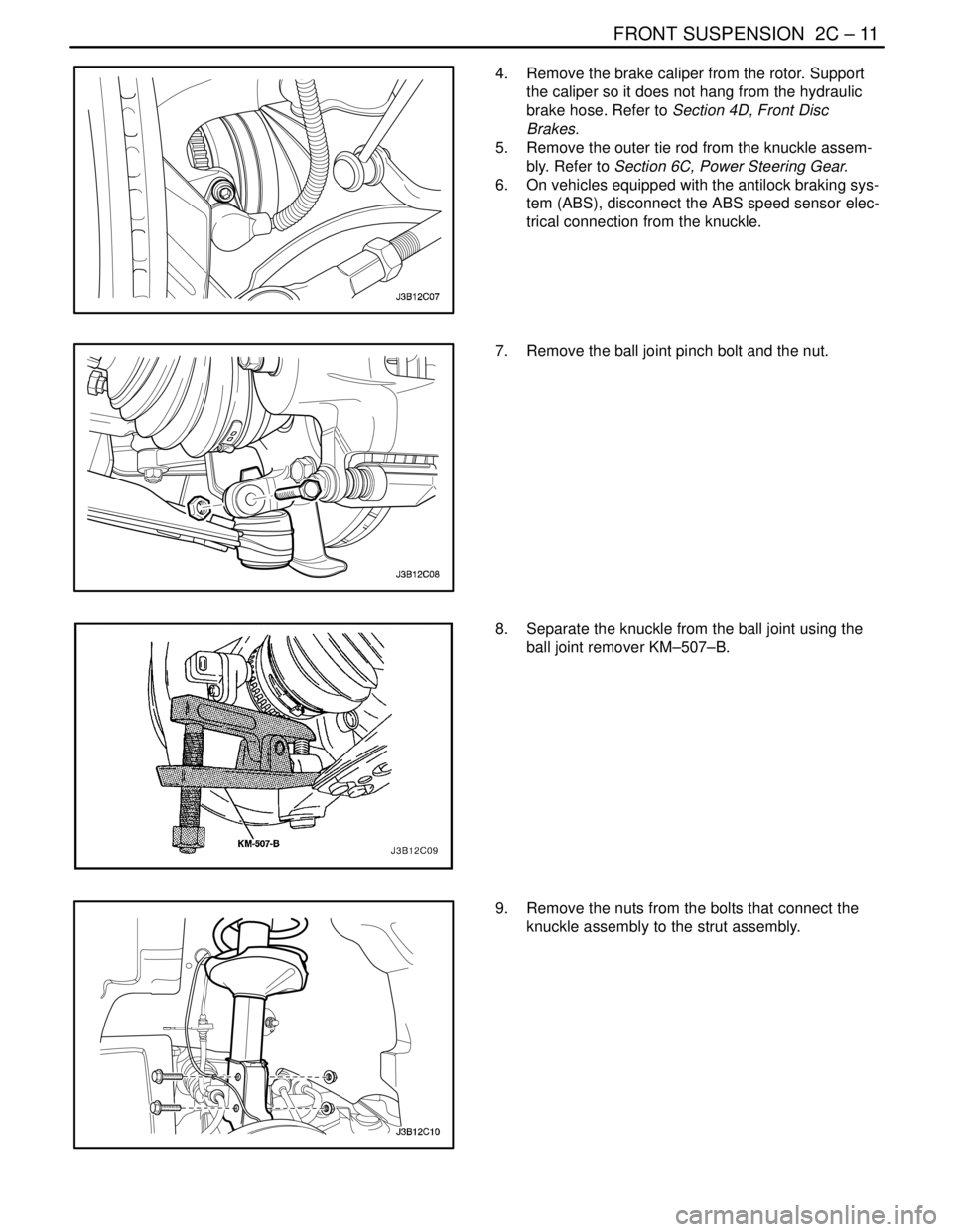
4. Remove the brake caliper from the rotor. Support
the caliper so it does not hang from the hydraulic
brake hose. Refer to Section 4D, Front Disc
Brakes.
5. Remove the outer tie rod from the knuckle assem-
bly. Refer to Section 6C, Power Steering Gear.
6. On vehicles equipped with the antilock braking sys-
tem (ABS), disconnect the ABS speed sensor elec-
trical connection from the knuckle.
7. Remove the ball joint pinch bolt and the nut.
8. Separate the knuckle from the ball joint using the
ball joint remover KM–507–B.
9. Remove the nuts from the bolts that connect the
knuckle assembly to the strut assembly.
Page 933 of 2643
2C – 16IFRONT SUSPENSION
DAEWOO V–121 BL4
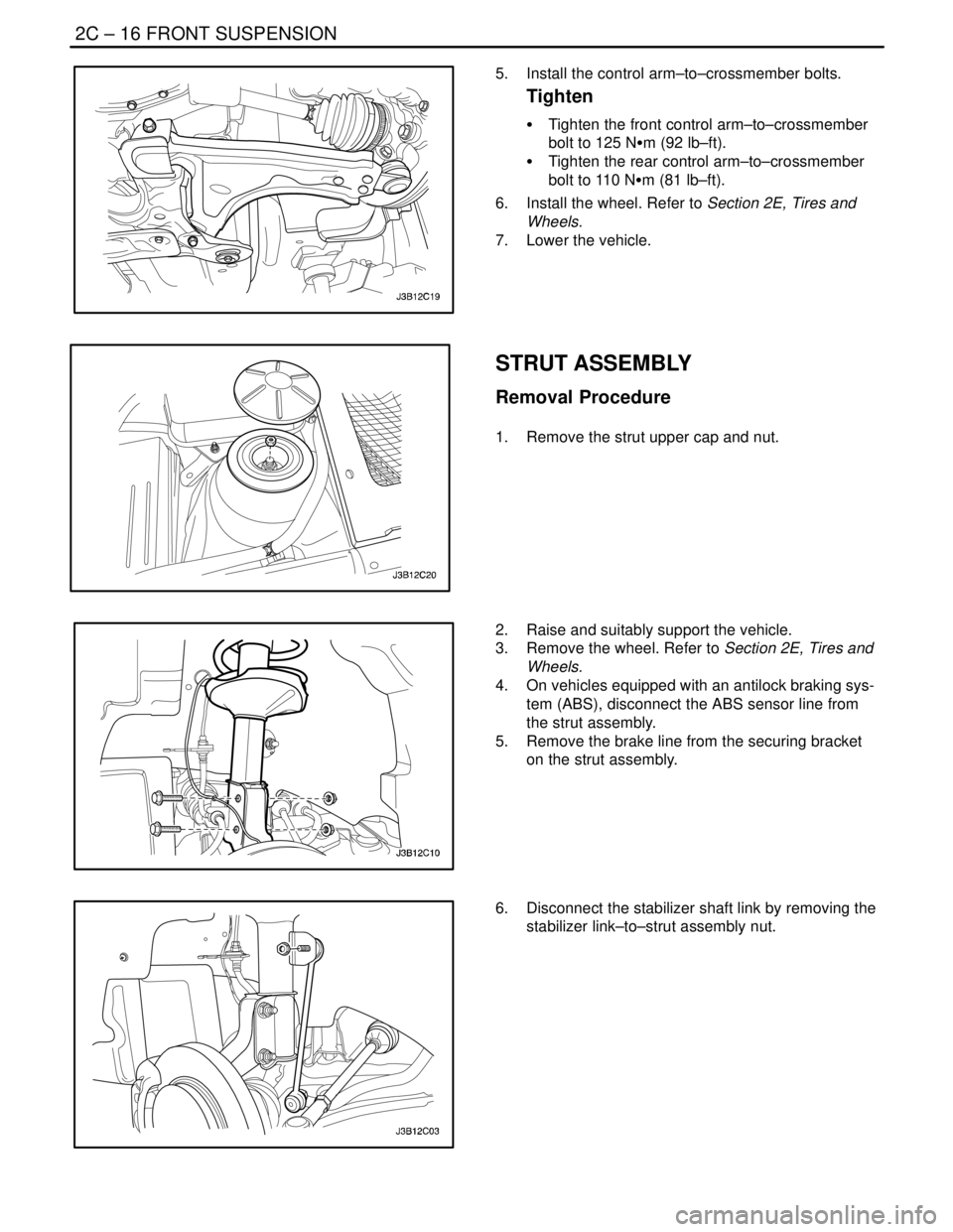
5. Install the control arm–to–crossmember bolts.
Tighten
S Tighten the front control arm–to–crossmember
bolt to 125 NSm (92 lb–ft).
S Tighten the rear control arm–to–crossmember
bolt to 110 NSm (81 lb–ft).
6. Install the wheel. Refer to Section 2E, Tires and
Wheels.
7. Lower the vehicle.
STRUT ASSEMBLY
Removal Procedure
1. Remove the strut upper cap and nut.
2. Raise and suitably support the vehicle.
3. Remove the wheel. Refer to Section 2E, Tires and
Wheels.
4. On vehicles equipped with an antilock braking sys-
tem (ABS), disconnect the ABS sensor line from
the strut assembly.
5. Remove the brake line from the securing bracket
on the strut assembly.
6. Disconnect the stabilizer shaft link by removing the
stabilizer link–to–strut assembly nut.
Page 935 of 2643
2C – 18IFRONT SUSPENSION
DAEWOO V–121 BL4
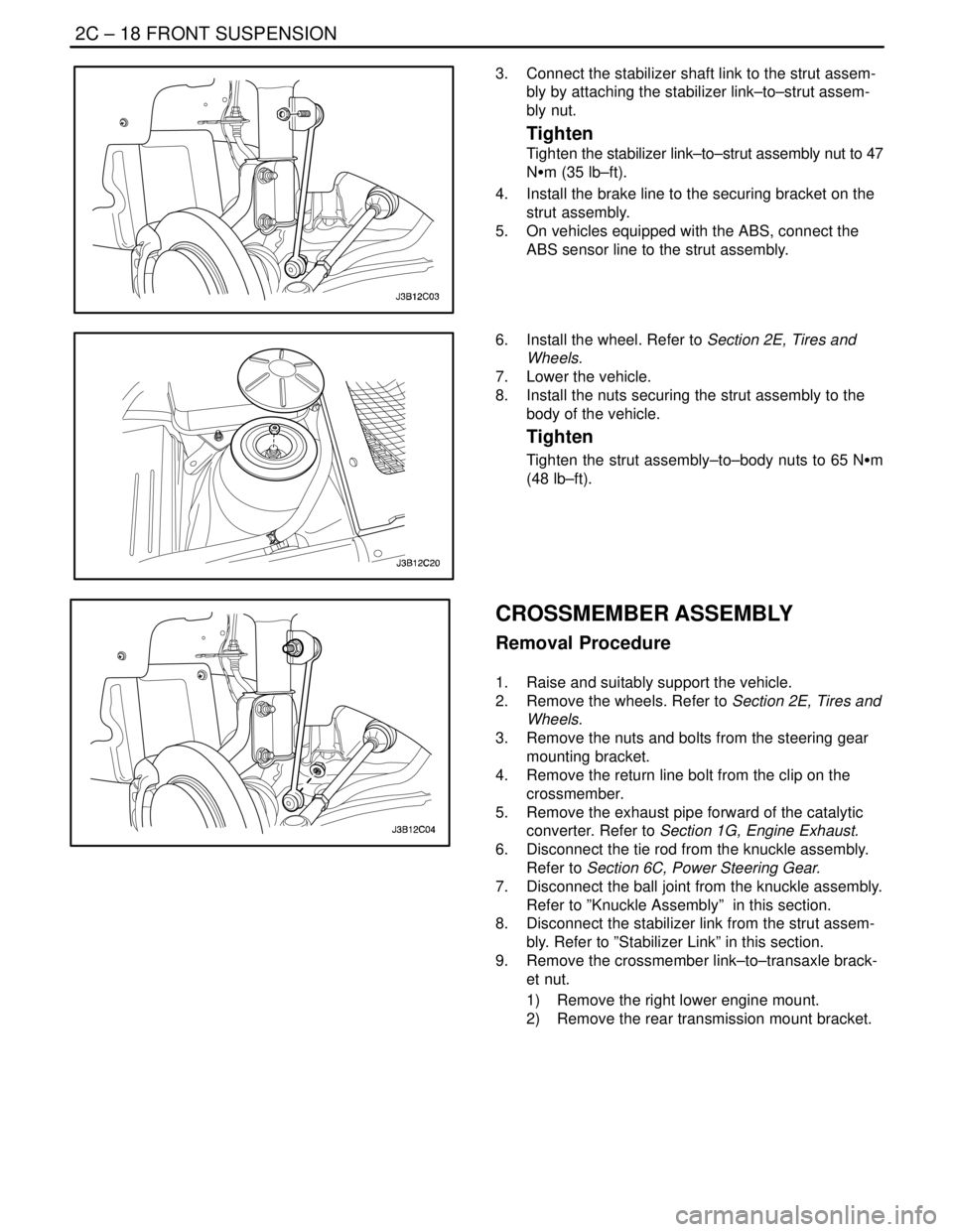
3. Connect the stabilizer shaft link to the strut assem-
bly by attaching the stabilizer link–to–strut assem-
bly nut.
Tighten
Tighten the stabilizer link–to–strut assembly nut to 47
NSm (35 lb–ft).
4. Install the brake line to the securing bracket on the
strut assembly.
5. On vehicles equipped with the ABS, connect the
ABS sensor line to the strut assembly.
6. Install the wheel. Refer to Section 2E, Tires and
Wheels.
7. Lower the vehicle.
8. Install the nuts securing the strut assembly to the
body of the vehicle.
Tighten
Tighten the strut assembly–to–body nuts to 65 NSm
(48 lb–ft).
CROSSMEMBER ASSEMBLY
Removal Procedure
1. Raise and suitably support the vehicle.
2. Remove the wheels. Refer to Section 2E, Tires and
Wheels.
3. Remove the nuts and bolts from the steering gear
mounting bracket.
4. Remove the return line bolt from the clip on the
crossmember.
5. Remove the exhaust pipe forward of the catalytic
converter. Refer to Section 1G, Engine Exhaust.
6. Disconnect the tie rod from the knuckle assembly.
Refer to Section 6C, Power Steering Gear.
7. Disconnect the ball joint from the knuckle assembly.
Refer to ”Knuckle Assembly” in this section.
8. Disconnect the stabilizer link from the strut assem-
bly. Refer to ”Stabilizer Link” in this section.
9. Remove the crossmember link–to–transaxle brack-
et nut.
1) Remove the right lower engine mount.
2) Remove the rear transmission mount bracket.
Page 951 of 2643
REAR SUSPENSION 2D – 9
DAEWOO V–121 BL4
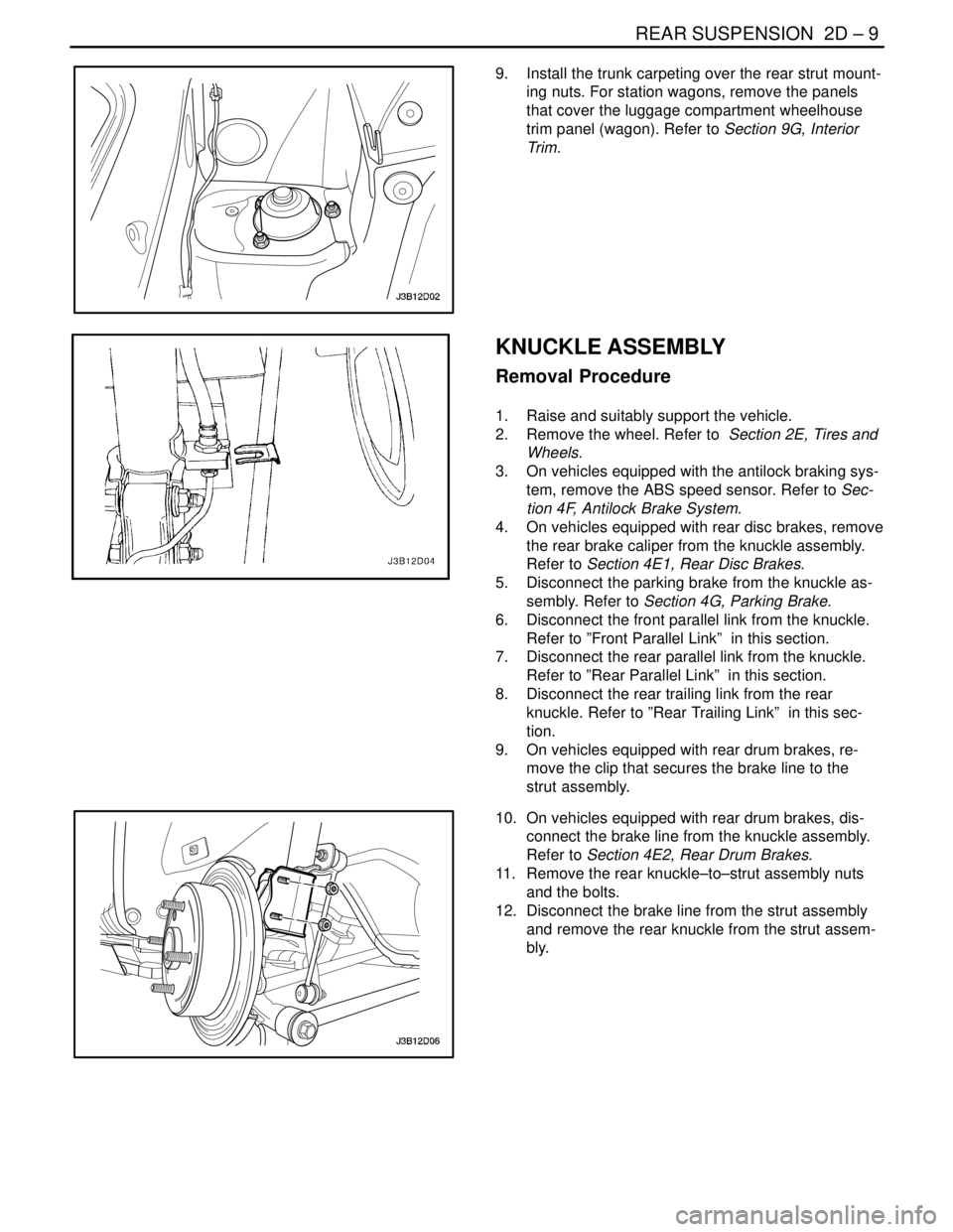
9. Install the trunk carpeting over the rear strut mount-
ing nuts. For station wagons, remove the panels
that cover the luggage compartment wheelhouse
trim panel (wagon). Refer to Section 9G, Interior
Trim.
KNUCKLE ASSEMBLY
Removal Procedure
1. Raise and suitably support the vehicle.
2. Remove the wheel. Refer to Section 2E, Tires and
Wheels.
3. On vehicles equipped with the antilock braking sys-
tem, remove the ABS speed sensor. Refer to Sec-
tion 4F, Antilock Brake System.
4. On vehicles equipped with rear disc brakes, remove
the rear brake caliper from the knuckle assembly.
Refer to Section 4E1, Rear Disc Brakes.
5. Disconnect the parking brake from the knuckle as-
sembly. Refer to Section 4G, Parking Brake.
6. Disconnect the front parallel link from the knuckle.
Refer to ”Front Parallel Link” in this section.
7. Disconnect the rear parallel link from the knuckle.
Refer to ”Rear Parallel Link” in this section.
8. Disconnect the rear trailing link from the rear
knuckle. Refer to ”Rear Trailing Link” in this sec-
tion.
9. On vehicles equipped with rear drum brakes, re-
move the clip that secures the brake line to the
strut assembly.
10. On vehicles equipped with rear drum brakes, dis-
connect the brake line from the knuckle assembly.
Refer to Section 4E2, Rear Drum Brakes.
11. Remove the rear knuckle–to–strut assembly nuts
and the bolts.
12. Disconnect the brake line from the strut assembly
and remove the rear knuckle from the strut assem-
bly.
Page 952 of 2643
2D – 10IREAR SUSPENSION
DAEWOO V–121 BL4
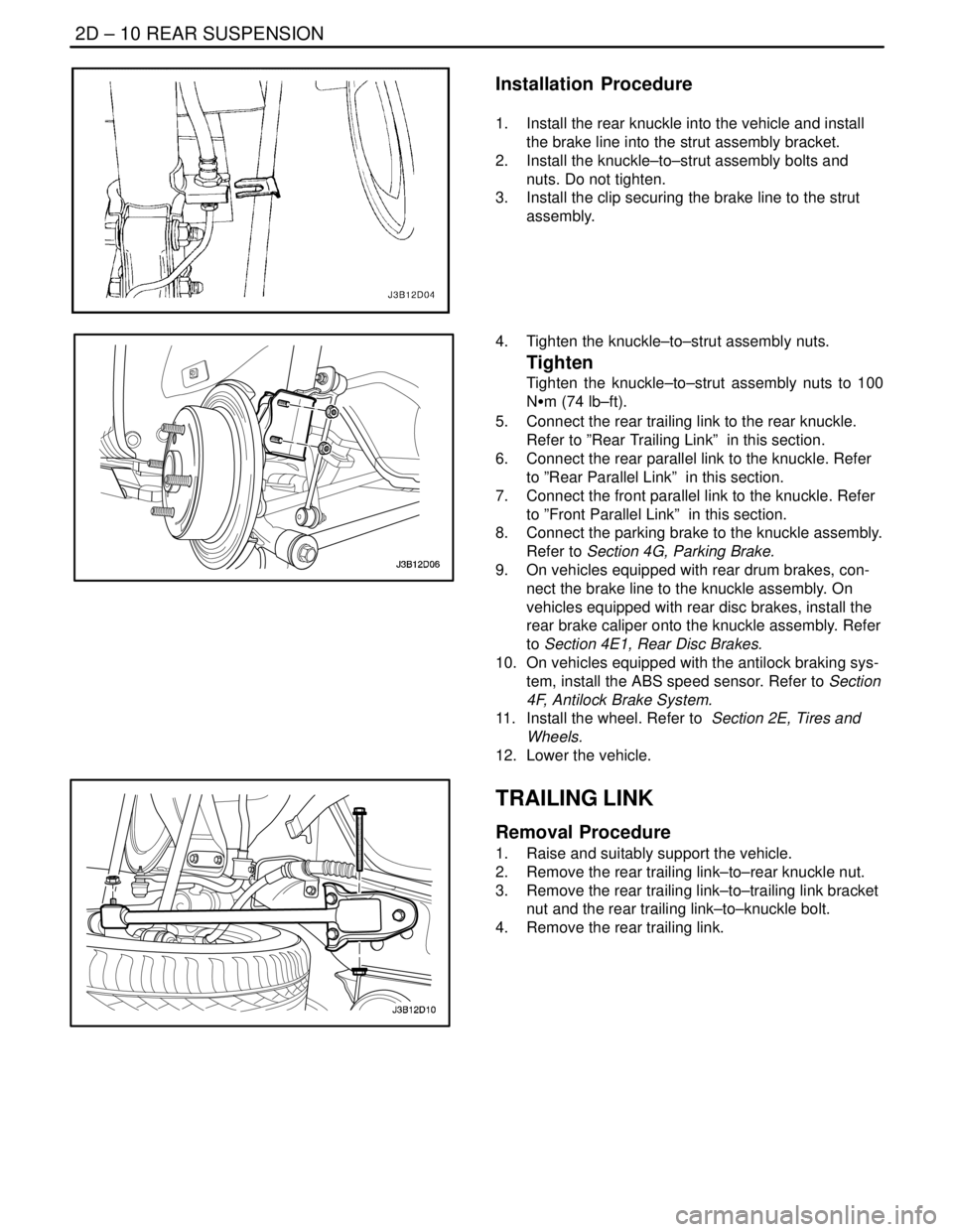
Installation Procedure
1. Install the rear knuckle into the vehicle and install
the brake line into the strut assembly bracket.
2. Install the knuckle–to–strut assembly bolts and
nuts. Do not tighten.
3. Install the clip securing the brake line to the strut
assembly.
4. Tighten the knuckle–to–strut assembly nuts.
Tighten
Tighten the knuckle–to–strut assembly nuts to 100
NSm (74 lb–ft).
5. Connect the rear trailing link to the rear knuckle.
Refer to ”Rear Trailing Link” in this section.
6. Connect the rear parallel link to the knuckle. Refer
to ”Rear Parallel Link” in this section.
7. Connect the front parallel link to the knuckle. Refer
to ”Front Parallel Link” in this section.
8. Connect the parking brake to the knuckle assembly.
Refer to Section 4G, Parking Brake.
9. On vehicles equipped with rear drum brakes, con-
nect the brake line to the knuckle assembly. On
vehicles equipped with rear disc brakes, install the
rear brake caliper onto the knuckle assembly. Refer
to Section 4E1, Rear Disc Brakes.
10. On vehicles equipped with the antilock braking sys-
tem, install the ABS speed sensor. Refer to Section
4F, Antilock Brake System.
11. Install the wheel. Refer to Section 2E, Tires and
Wheels.
12. Lower the vehicle.
TRAILING LINK
Removal Procedure
1. Raise and suitably support the vehicle.
2. Remove the rear trailing link–to–rear knuckle nut.
3. Remove the rear trailing link–to–trailing link bracket
nut and the rear trailing link–to–knuckle bolt.
4. Remove the rear trailing link.
Page 957 of 2643
REAR SUSPENSION 2D – 15
DAEWOO V–121 BL4
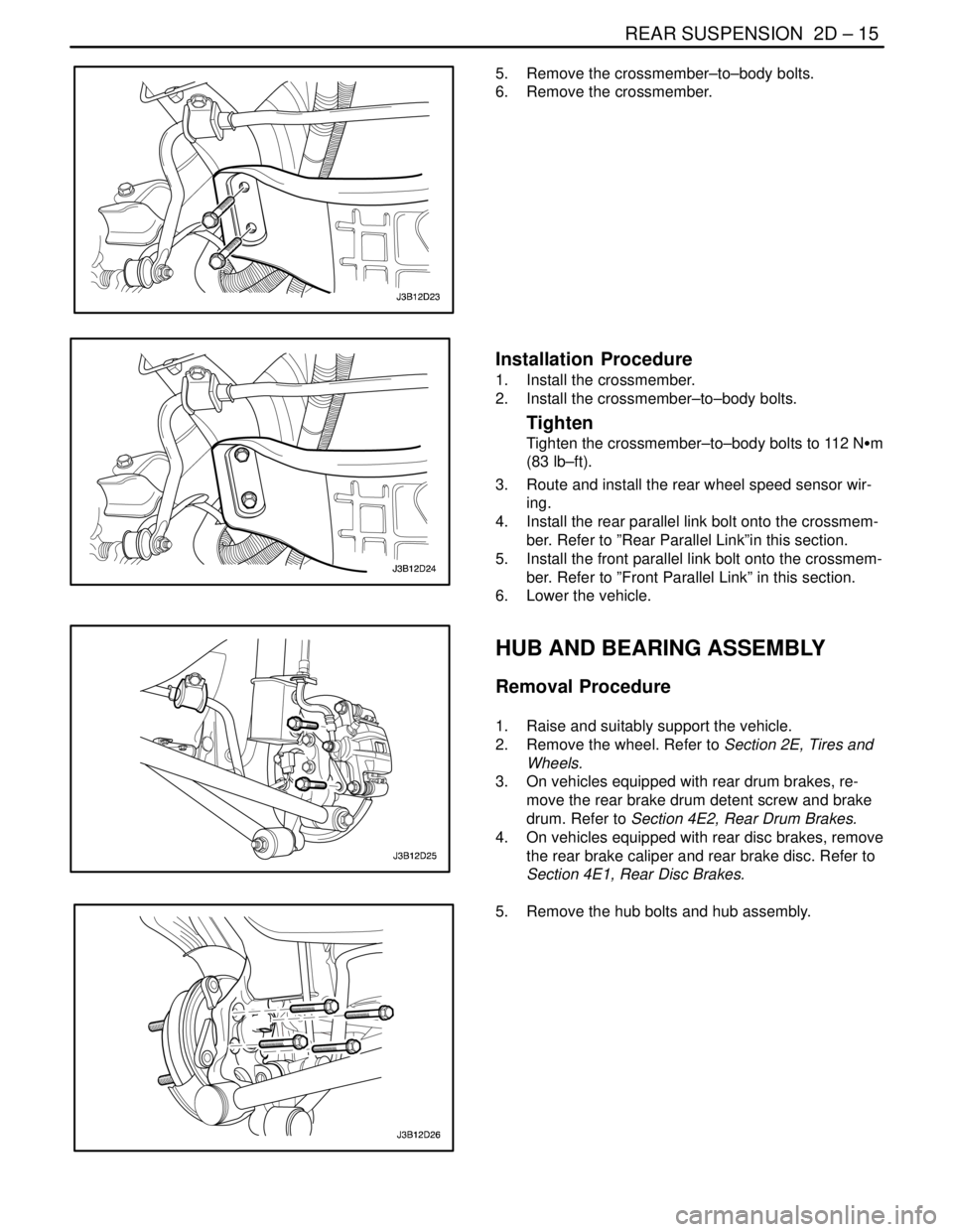
5. Remove the crossmember–to–body bolts.
6. Remove the crossmember.
Installation Procedure
1. Install the crossmember.
2. Install the crossmember–to–body bolts.
Tighten
Tighten the crossmember–to–body bolts to 112 NSm
(83 lb–ft).
3. Route and install the rear wheel speed sensor wir-
ing.
4. Install the rear parallel link bolt onto the crossmem-
ber. Refer to ”Rear Parallel Link”in this section.
5. Install the front parallel link bolt onto the crossmem-
ber. Refer to ”Front Parallel Link” in this section.
6. Lower the vehicle.
HUB AND BEARING ASSEMBLY
Removal Procedure
1. Raise and suitably support the vehicle.
2. Remove the wheel. Refer to Section 2E, Tires and
Wheels.
3. On vehicles equipped with rear drum brakes, re-
move the rear brake drum detent screw and brake
drum. Refer to Section 4E2, Rear Drum Brakes.
4. On vehicles equipped with rear disc brakes, remove
the rear brake caliper and rear brake disc. Refer to
Section 4E1, Rear Disc Brakes.
5. Remove the hub bolts and hub assembly.
Page 1015 of 2643

USAGE AND CAPACITY OF FUSES IN FUSE BLOCKW4–3
2. I.P FUSE BLOCK
1) POSITION OF FUSE AND RELAY
2) USAGE OF FUSE IN I.P FUSE BLOCK
Power
Supply
ClassificationFuse
NoCapacityUsage
IGN1 (15)Blade TypeF110ASDM
FuseF210ATCM, ECM, Generator, VGIS,VSS
F315AHazard Switch
F410ACluster, Chime Bell, Brake Switch, SSPS Module,
A/C Control Switch
–F5––
IGN2 (15A)F610AA/C Comp. Relay, Defog Relay, Power Window
Relay, Head Lamp Relay
F720ABlower Relay, A/C Control Switch, FATC
F815AElectric Mirror Switch, Folding Mirror, Sun Roof
Module
IGN1 (15)F925AWiper Motor, Wiper Switch
–F10––
IGN1 (15)F1110AEBCM, Oil Feeding Connector
F1210AImmobilizer, Anti Theft Control Unit, Rain Sensor
Unit
30 BAT(+)F1310ATCM
F1415AHazard Switch
F1515AAnti Theft Control Unit
F1610ADLC
ACC (15C)F1710AAudio, Clock
F1815AExtra Power Jack
F1915ACigar Lighter
IGN1 (15)F2010AReverse Lamp Switch, PNP Switch
30 BAT(+)F2115ARear Fog Relay
F2215AClock, FATC, A/C Control Switch
F2315AAudio
F2410AImmobilizer