display DAEWOO LACETTI 2004 Service Repair Manual
[x] Cancel search | Manufacturer: DAEWOO, Model Year: 2004, Model line: LACETTI, Model: DAEWOO LACETTI 2004Pages: 2643, PDF Size: 80.54 MB
Page 1676 of 2643

5A2 – 86IAISIN AUTOMATIC TRANSAXLE
DAEWOO V–121 BL4
DTC P0785 Timing Solenoid (ST) Electrical
StepActionValue(s)YesNo
11. Turn the ignition OFF.
2. Install the Scan tool.
3. With the engine OFF, turn the ignition switch to
the ON position.
4. Select Store Freeze Frame/Failure Records
from the Diagnostic Trouble Codes Information
menu.
5. Store Freeze Frame/Failure Records.
6. Select Clear DTC Information from the Diag-
nostic Trouble Codes Information menu.
7. Clear DTC Information.
8. Perform one vehicle drive cycle.
Is the Malfunction Indicator Lamp (MIL) ON?–Go to Step 2Repair the tem-
porary connec-
tion failure of
connector (Re-
fer to ”Wiring
Harness and
Connector In-
spection” in this
section.)
21. Select Request DTC by Status from the Diag-
nostic Trouble Codes Information menu.
2. Request DTC by Status.
Is DTC P0785 displayed?–Go to Step 3Repair the tem-
porary connec-
tion failure of
connector (Re-
fer to ”Wiring
Harness and
Connector In-
spection” in this
section.)
31. Turn the ignition OFF.
2. Inspect the resistance between the vehicle har-
ness and Timing Solenoid (ST). Refer to ”Unit
Inspection” in this section.
3. Disconnect the TCM connector (X–1) and in-
spect the resistance between the terminal A24
and A23.
Is the measurement within the specified value?20°C (68°F)
11–16 WGo to Step 4Go to Step 5
41. Estimate the failure of between the vehicle wir-
ing harness connector and TCM.
2. Inspect the connector. Refer to ”Wiring Har-
ness and Connector Inspection” in this section.
3. Inspect the connection condition between the
connectors (C–1).
Is the connection condition OK?–Go to Step 6Repair the wir-
ing harness
connectors.
51. Estimate the failure of between the vehicle har-
ness and ST.
2. Disconnect the connector (X–3) of T/M wire
and inspect the resistance between ST con-
nector terminal 2 and ground.
Is the measurement within the specified value?20°C (68°F)
11–16 WGo to Step 7Go to Step 8
61. Replace the master TCM.
2. Perform the reproducing test under user condi-
tion after confirming no DTC.
Is DTC displayed?–Repair the tem-
porary connec-
tion failure of
connector (Re-
fer to ”Wiring
Harness and
Connector In-
spection” in this
section.)Replace the
TCM
Page 1679 of 2643

AISIN AUTOMATIC TRANSAXLE 5A2 – 89
DAEWOO V–121 BL4
DTC P1781 Engine Torque Signal Error
StepActionValue(s)YesNo
11. Turn the ignition OFF.
2. Install the Scan tool.
3. With the engine OFF, turn the ignition switch to
the ON position.
4. Select Store Freeze Frame/Failure Records
from the Diagnostic Trouble Codes Information
menu.
5. Store Freeze Frame/Failure Records.
6. Select Clear DTC Information from the Diag-
nostic Trouble Codes Information menu.
7. Clear DTC Information.
8. Perform one vehicle drive cycles.
Is the Malfunction Indicator Lamp (MIL) ON?–Go to Step 2Repair the tem-
porary connec-
tion failure of
connector.
21. Select Request DTC by Status from the Diag-
nostic Trouble Codes Information menu.
2. Request DTC by Status.
Is DTC P1781 displayed?–Go to Step 3Repair the tem-
porary connec-
tion failure of
connector.
31. Turn the ignition OFF.
2. Disconnect the TCM wiring connector and
ECM wiring connector.
3. Measure the resistance between terminal A17
of the TCM wiring connector and terminal 88 of
the ECM wiring connector.
4. Measure the resistance between terminal A7 of
the TCM wiring connector and terminal 57 of
the ECM wiring connector.
Is the resistance within the values shown?0 WGo to Step 5Go to Step 4
4Repair the malfunctioning terminals as necessary.
Is the action complete?–System OK–
51. Turn the ignition ON.
2. Measure the voltage of terminal A17.
3. Measure the voltage of terminal A7.
Is the voltage within the values shown?11–14 vGo to Step 6Go to Step 7
6Repair the malfunctioning terminals as necessary.
Is the action complete?–System OK–
71. Inspect the ”Engine Speed”. Refer to Section
1F, Diagnosis.
Was a problem found?–Refer to Sec-
tion 1F, Diagno-
sis.Go to Step 8
81. Replace the TCM.
2. Turn the ignition OFF.
3. Turn the ignition ON.
4. Check if P1781 DTC is set.
Is the DTC set?–Go to Step 9Go to Step 10
Page 1682 of 2643

5A2 – 92IAISIN AUTOMATIC TRANSAXLE
DAEWOO V–121 BL4
DTC 1791 Throttle Position Signal Error
StepActionValue(s)YesNo
11. Turn the ignition OFF.
2. Install the Scan tool.
3. With the engine OFF, turn the ignition switch to
the ON position.
4. Select Store Freeze Frame/Failure Records
from the Diagnostic Trouble Codes Information
menu.
5. Store Freeze Frame/Failure Records.
6. Select Clear DTC Information from the Diag-
nostic Trouble Codes Information menu.
7. Clear DTC Information.
8. Perform one vehicle drive cycle.
Is the Malfunction Indicator Lamp (MIL) ON?–Go to Step 2Repair the tem-
porary connec-
tion failure of
connector.
21. Select Request DTC by Status from the Diag-
nostic Trouble Codes Information menu.
2. Request DTC by Status.
Is DTC P1791 displayed?–Go to Step 3Repair the tem-
porary connec-
tion failure of
connector.
31. Turn the ignition OFF.
2. Disconnect the TCM wiring connector and
ECM wiring connector.
3. Measure the resistance between terminal A17
of the TCM wiring connector and terminal 88 of
the ECM wiring connector.
4. Measure the resistance between terminal A7 of
the TCM wiring connector and terminal 57 of
the ECM wiring connector.
Is the resistance within the values shown?0 WGo to Step 5Go to Step 4
4Repair the malfunctioning terminals as necessary.
Is the action complete?–System OK–
51. Turn the ignition ON.
2. Measure the voltage of terminal A17.
3. Measure the voltage of terminal A7.
Is the voltage within the values shown?11–14 vGo to Step 6Go to Step 7
6Repair the malfunctioning terminals as necessary.
Is the action complete?–System OK–
71. Replace the TCM.
2. Turn the ignition OFF.
3. Turn the ignition ON.
4. Check if P1791 DTC is set.
Is the DTC set?–Go to Step 8Go to Step 9
8Replace the ECM.
Is the action complete?–Go to Step 9–
91. After the repair, use a scan tool ”clear info”
function and road test the vehicle.
2. Review the ”DTC info”.
Has the last test failed or is the current DTC dis-
played?–Begin diagno-
sis againRepair verified
exit DTC chart
Page 1684 of 2643

5A2 – 94IAISIN AUTOMATIC TRANSAXLE
DAEWOO V–121 BL4
DTC P1792 Engine Coolant Temperature (ECT) Signal Error
StepActionValue(s)YesNo
11. Turn the ignition OFF.
2. Install the Scan tool.
3. With the engine OFF, turn the ignition switch to
the ON position.
4. Select Clear DTC Information from the Diag-
nostic Trouble Codes Information menu.
5. Clear DTC Information.
6. Perform one vehicle drive cycle.
7. Select Request DTC by Status from the Diag-
nostic Trouble Codes Information menu.
8. Request DTC by Status.
Is DTC P1792 displayed?–Go to Step 2Repair the tem-
porary connec-
tion failure of
connector.
21. Turn the ignition OFF.
2. Disconnect the TCM wiring connector and
ECM wiring connector.
3. Measure the resistance between terminal A17
of the TCM wiring connector and terminal 88 of
the ECM wiring connector.
4. Measure the resistance between terminal A7 of
the TCM wiring connector and terminal 57 of
the ECM wiring connector.
Is the resistance within the values shown?0 WGo to Step 4Go to Step 3
3Repair the malfunctioning terminals as necessary.
Is the action complete?–System OK–
41. Turn the ignition ON.
2. Measure the voltage of terminal A17.
3. Measure the voltage of terminal A7.
Is the voltage within the values shown?11–14 vGo to Step 5Go to Step 6
5Repair the malfunctioning terminals as necessary.
Is the action complete?–System OK–
61. Replace the TCM.
2. Turn the ignition OFF.
3. Turn the ignition ON.
4. Check if P1792 DTC is set.
Is the DTC set?–Go to Step 7Go to Step 8
7Replace the ECM.
Is the action complete?–Go to Step 8–
81. After the repair, use a scan tool ”clear info”
function and road test the vehicle.
2. Review the ”DTC info”.
Has the last test failed or is the current DTC dis-
played?–Begin diagno-
sis againRepair verified
exit DTC chart
Page 1686 of 2643

5A2 – 96IAISIN AUTOMATIC TRANSAXLE
DAEWOO V–121 BL4
DTC U2105 CAN Error
StepActionValue(s)YesNo
11. Turn the ignition OFF.
2. Install the Scan tool.
3. With the engine OFF, turn the ignition switch to
the ON position.
4. Select Store Freeze Frame/Failure Records
from the Diagnostic Trouble Codes Information
menu.
5. Store Freeze Frame/Failure Records.
6. Select Clear DTC Information from the Diag-
nostic Trouble Codes Information menu.
7. Clear DTC Information.
8. Perform one vehicle drive cycle.
Is the Malfunction Indicator Lamp (MIL) ON?–Go to Step 2Repair the tem-
porary connec-
tion failure of
connector.
21. Select Request DTC by Status from the Diag-
nostic Trouble Codes Information menu.
2. Request DTC by Status.
Is DTC U2105 displayed?–Go to Step 3Repair the tem-
porary connec-
tion failure of
connector.
31. Turn the ignition OFF.
2. Disconnect the TCM wiring connector and
ECM wiring connector.
3. Measure the resistance between terminal A17
of the TCM wiring connector and terminal 88 of
the ECM wiring connector.
4. Measure the resistance between terminal A7 of
the TCM wiring connector and terminal 57 of
the ECM wiring connector.
Is the resistance within the values shown?0 WGo to Step 5Go to Step 4
4Repair the malfunctioning terminals as necessary.
Is the action complete?–System OK–
51. Turn the ignition ON.
2. Measure the voltage of terminal A17.
3. Measure the voltage of terminal A7.
Is the voltage within the values shown?11–14 vGo to Step 6Go to Step 7
6Repair the malfunctioning terminals as necessary.
Is the action complete?–System OK–
71. Replace the TCM.
2. Turn the ignition OFF.
3. Turn the ignition ON.
4. Check if U2105 DTC is set.
Is the DTC set?–Go to Step 8Go to Step 9
8Replace the ECM.
Is the action complete?–Go to Step 9–
91. After the repair, use a scan tool ”clear info”
function and road test the vehicle.
2. Review the ”DTC info”.
Has the last test failed or is the current DTC dis-
played?–Begin diagno-
sis againRepair verified
exit DTC chart
Page 1924 of 2643

POWER STEERING GEAR 6C – 7
DAEWOO V–121 BL4
SPEED SENSITIVE POWER STEERING SYSTEM
OPERATING WITH FULL ASSIST AT ALL TIMES
StepActionValue(s)YesNo
1Perform an initial inspection of the power steering
system.
Is the system operational?–Go to Step 2Go to
Section 6A,
Power Steering
System
2Check the speedometer.
Is the speedometer inoperative?–Go to
Section5,
TransaxleGo to Step 3
3Check the diagnostic trouble codes at the engine
control module (ECM).
Is the ECM code 24 set?–Go to
Section1F,
Engine
ControlsGo to Step 4
41. Turn the ignition ON.
2. Disconnect the electronic variable orifice (EVO)
solenoid actuator electrical connector at the
power steering pump.
3. Probe terminal 1 of the EVO actuator connec-
tor with a voltmeter.
Does the voltmeter display the specified value?–Go to Step 6Go to Step 5
5Repair the open or short in the circuit between termi-
nal 1 of the EVO solenoid actuator electrical connec-
tor and terminal 2 on the speed sensitive power
steering (SSPS) control module connector.
Is the repair complete?–System OK–
61. Remove the EVO solenoid actuator from the
power steering pump.
2. Turn the actuator upside down to position the
pintle.
3. Stimulate the actuator by connecting it to the
battery.
Does the actuator click?–Go to Step 8Go to Step 7
7Replace the EVO solenoid actuator.
Is the repair complete?–System OK–
81. Turn the ignition OFF.
2. Remove the SSPS control module from the
control module bracket.
3. Disconnect the SSPS control module connec-
tor.
4. Connect a test light from terminal 8 on the
SSPS control module connector to the ground.
5. Turn the ignition ON.
Is the test light on?–Go to Step 14Go to Step 9
9Check the ignition fuse.
Is the ignition fuse open?–Go to Step 10Go to Step 11
10Replace the ignition fuse.
Is the repair complete?–System OK–
11Check for an open or short in the circuit between ter-
minal 8 of the control module connector and the I/P
fuse block.
Is the connection faulty?–Go to Step 12Go to Step 13
Page 2022 of 2643

7B – 20IMANUAL CONTROL HEATING, VENTILATION AND AIR CONDITIONING SYSTEM
DAEWOO V–121 BL4
S Dip new O–rings in clean polyalkaline glycol refrig-
erant oil before installation.
MAINTAINING CHEMICAL STABILITY
IN THE REFRIGERATION SYSTEM
The efficient operation and the life of the air conditioning
(A/C) system is dependent upon the chemical stability of
the refrigeration system. When foreign materials, such as
dirt, air, or moisture, contaminate the refrigeration system,
they will change the stability of the refrigerant and the poly-
alkaline glycol (PAG) compressor oil. They will also affect
the pressure–temperature relationship, reduce efficient
operation, and can possibly cause interior corrosion and
abnormal wear of moving parts.
Observe the following practices to ensure chemical stabil-
ity in the system:
S Wipe away dirt or oil at and near any connection
before opening that connection. This will reduce the
chance of dirt entering the system.
S Cap, plug, or tape both sides of a connection as
soon as possible after opening the connection. This
will prevent the entry of dirt, foreign material, and
moisture.
S Keep all tools clean and dry, including the manifold
gauge set and all replacement parts.
S Use a clean and dry transfer device and container
to add polyalkaline glycol refrigerant oil. This will
ensure that the oil remains as moisture–free as
possible. Refer to ”Discharging, Adding Oil, Eva-
cuating, and Charging Procedures for A/C System”
in this section.
S Have everything you need ready to allow you to
perform all operations quickly when opening an A/C
system. Do not leave the A/C system open any lon-
ger than necessary.
S Evacuate and recharge any A/C system that has
been opened. Refer to ”Discharging, Adding Oil,
Evacuating, and Charging Procedures for A/C Sys-
tem” in this section for the instructions to perform
this procedure properly.
All service parts are dehydrated and sealed before ship-
ping. They should remain sealed until just before making
connections. All the parts should be at room temperature
before uncapping. This prevents condensation of mois-
ture from the air from entering the system. Reseal all parts
as soon as possible.
DISCHARGING, ADDING OIL,
EVACUATING, AND CHARGING
PROCEDURES FOR A/C SYSTEM
CAUTION : Use only refillable refrigerant tanks that
are authorized for the charging station being used.
The use of other tanks may cause personal injury or
void the warranty. Refer to the manufacturer’s in-
structions for the charging station.CAUTION : To avoid personal injury, always wear
goggles and gloves when performing work that in-
volves opening the refrigeration system.
A charging station discharges, evacuates, and recharges
an air–conditioning (A/C) system with one hookup. Filter-
ing the refrigerant during the recovery cycle together with
filtering during the evacuation cycle ensures a supply of
clean, dry refrigerant for A/C system charging.
S Never use the R–134a charging station on a sys-
tem charged with R–12. The refrigerants and the
oils from each system are not compatible with
those from the other system and must never be
mixed, even in the smallest amount. Mixing refriger-
ant residue will damage the equipment.
S Never use adapters which convert from one size
fitting to another. Such use allows contamination,
which may cause system failure.
Charging Station Setup and Maintenance
There are many charging stations available. All perform
the various tasks required to discharge the system and re-
cover refrigerant, evacuate the system, add a measured
amount of oil, and recharge an A/C system with a mea-
sured amount of refrigerant. Refer to the manufacturer’s
instructions for all initial setup procedures and all mainte-
nance procedures.
Control Panel Functions
A charging station will have controls and indicators to allow
the operator to control and monitor the operation in prog-
ress. Refer to the manufacturer’s instructions for details.
These can be expected to include the following:
1. Main Power Switch
S Supplies electrical power to the control panel.
2. Display
S Shows the time programmed for vacuum.
S Shows the weight of the refrigerant programmed
for recharging.
S Refer to the manufacturer’s instructions for de-
tailed programming information.
3. Low–Side Manifold Gauge
S Shows the system’s low–side pressure.
4. High–Side Manifold Gauge
S Shows the system’s high–side pressure.
5. Controls Panel
S Controls the various operating functions.
6. Low–Side Valve
S Connects the low side of the A/C system to the
unit.
7. Moisture Indicator
S Shows whether the refrigerant is wet or dry.
8. High–Side Valve
S Connects the high side of the A/C system to the
unit.
Page 2063 of 2643

7D – 8IAUTOMATIC TEMPERATURE CONTROL HEATING, VENTILATION, AND AIR CONDITIONING SYSTEM
DAEWOO V–121 BL4
NO HOT AIR FROM BLOWER
StepActionValue(s)YesNo
1Check the coolant level.
Is the coolant level correct?–Go to Step 3Go to Step 2
2Add coolant as needed.
Is the heater operating?–System OKGo to Step 3
31. Turn the ignition to ON.
2. Observe the temperature indication screen of
the controller.
Does the digit flash on and off?–Go to Step 4Go to Step 5
4Run a self–diagnosis circuit check.
Does the display indicate a defect code?–Go to the table
for the code
that flashesGo to Step 7
5Observe the blower motor operation.
Is the blower motor functioning at all?–Go to Step 6Go to ”Blower
Motor Does
Not Run at All”
6Use the blower push switch to cycle the blower
through its different speeds.
Does the motor function at different speeds?–Go to Step 7Go to ”Code 6
– Power Tran-
sistor Error”
71. Run the blower and operate the MODE push
switch manually.
2. Check for airflow out the various outlets.
Does the air flow from the different outlets as it
should?–Go to Step 9Go to Step 8
81. Remove the heater outlet and check for ob-
structions.
2. Remove any obstructions found.
Is the heater operating?–System OKGo to Step 9
9Observe the air mix door (AMD) motor while chang-
ing the temperature setting from 18 to 32°C (64 to
90°F) and then from 32 to 18°C (90 to 64°F).
Is the AMD motor functioning properly?–Go to Step 10Go to”Code 4 –
Air Mix Door
Error”
10Check the coolant hoses for leaks or kinks.
Are the coolant hoses in good condition?–Go to Step 12Go to Step 11
11Repair any problem with the coolant hoses.
Is the heater operating?–System OKGo to Step 12
12Check the surge tank cap.
Is the surge tank cap in good condition?–Go to Step 14Go to Step 13
13Repair or replace the surge tank cap as needed.
Is the heater operating?–System OKGo to Step 14
141. Set the A/C switch to OFF.
2. Set the temperature control to 32°C (90°F).
3. Set the blower motor speed to full high (all seg-
ments illuminated on the display).
4. Remove the surge tank cap.
5. Start the vehicle and run the engine at idle.
6. Watch for the flow of the coolant when the ther-
mostat opens.
Does the coolant flow?–Go to Step 16Go to Step 15
Page 2065 of 2643

7D – 10IAUTOMATIC TEMPERATURE CONTROL HEATING, VENTILATION, AND AIR CONDITIONING SYSTEM
DAEWOO V–121 BL4
NO COOL AIR FROM BLOWER
StepActionValue(s)YesNo
11. Turn the ignition to ON.
2. Observe the temperature indication screen of
the controller.
Does the digit flash on and off?–Go to Step 2Go to Step 3
2Run a self–diagnosis circuit check.
Does the display indicate a defect code?–Go to the table
for the code
that flashes.Go to Step 7
3Observe the blower motor operation.
Is the blower motor functioning at all?–Go to Step 4Go to ”Blower
Motor Does
Not Run at All”
4Use the blower push switch to cycle the blower
through its different speeds.
Does the motor function at different speeds?–Go to Step 5Go to”Code 6 –
Power Transis-
tor Error”
51. Run the blower and operate the MODE push
switch manually.
2. Check for airflow out the various outlets.
Does the air flow from the different outlets as it
should?–Go to Step 7Go to Step 6
61. Remove the heater outlet and check for ob-
structions.
2. Remove any obstructions found.
Is the heater operating?–System OKGo to Step 9
7Observe the air mix door motor (AMD) while chang-
ing the temperature setting from 18 to 32°C (64 to
90°F) and then from 32 to 18°C (90 to 64°F).
Is the AMD motor functioning properly?–Go to Step 8Go to”Code 3 –
Air Mix Door
Error”
8Perform the checks found in ”Insufficient Cooling
Diagnosis.”
Is the system operating normally now?–System OKGo to Step 9
9Place the controller in the AUTO mode.
Is smoke taken into the intake port of the in–car sen-
sor?–Go to Step 12Go to Step 10
10Check the intake hose for the in–car sensor.
Is the hose in good condition?–Go to Step 12Go to Step 11
11Repair or replace the intake hose.
Is the repair complete?–System OK–
12Check the in–car sensor using the tests in ”Code 1
– In–Car Sensor Error.”
Is there a problem indicated in the sensor, the sensor
wiring, or the controller?–Go to Step 13Go to Step 14
13Repair or replace the sensor, the wiring, or the con-
troller as required.
Is the repair complete?–System OK–
14Check the ambient air temperature sensor using the
tests in ”Code 2 – Ambient Air Temperature Sensor
Error.”
Is there a problem indicated in the sensor, the sensor
wiring, or the controller?–Go to Step 15Go to Step 16
Page 2067 of 2643
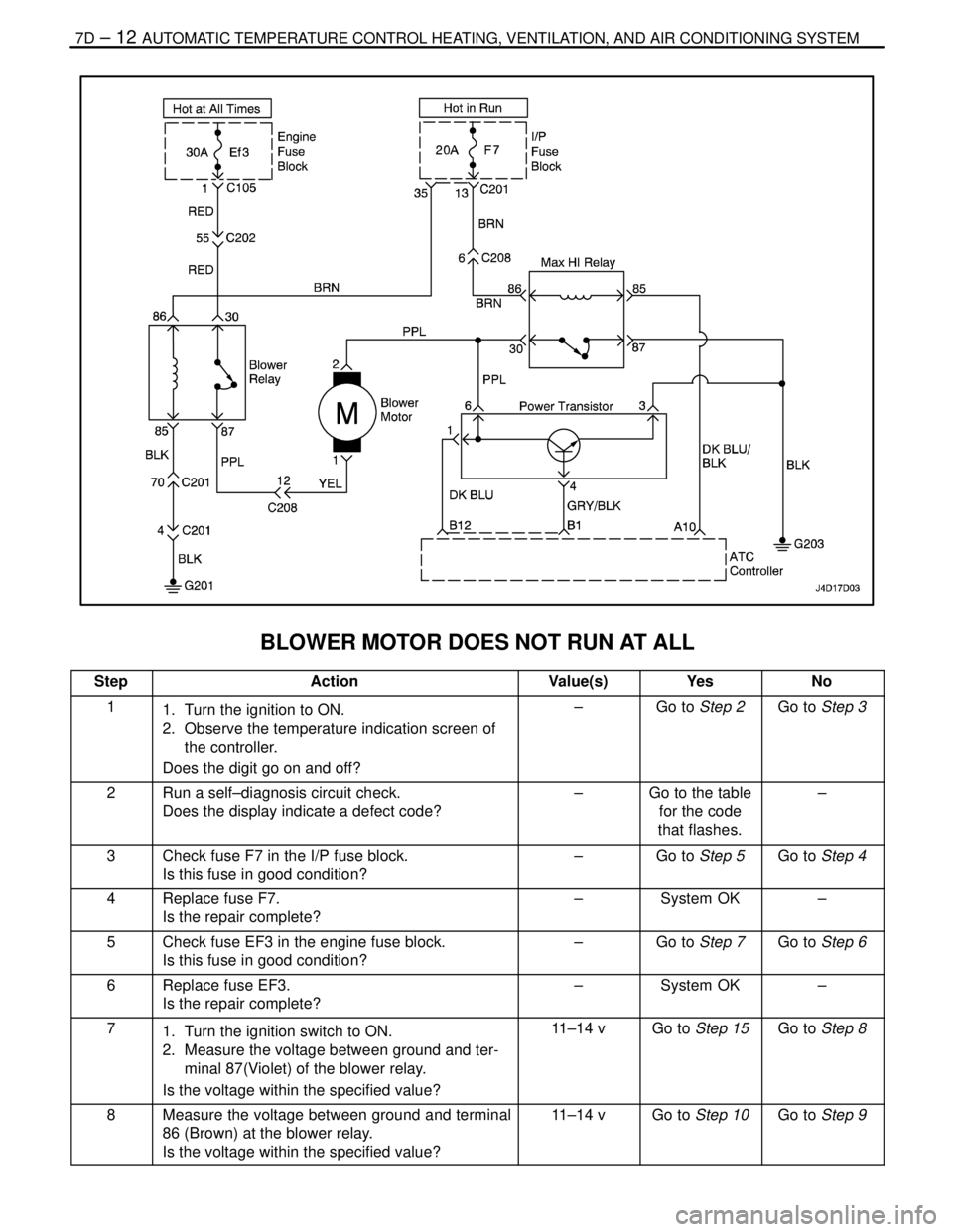
7D – 12IAUTOMATIC TEMPERATURE CONTROL HEATING, VENTILATION, AND AIR CONDITIONING SYSTEM
DAEWOO V–121 BL4
BLOWER MOTOR DOES NOT RUN AT ALL
StepActionValue(s)YesNo
11. Turn the ignition to ON.
2. Observe the temperature indication screen of
the controller.
Does the digit go on and off?–Go to Step 2Go to Step 3
2Run a self–diagnosis circuit check.
Does the display indicate a defect code?–Go to the table
for the code
that flashes.–
3Check fuse F7 in the I/P fuse block.
Is this fuse in good condition?–Go to Step 5Go to Step 4
4Replace fuse F7.
Is the repair complete?–System OK–
5Check fuse EF3 in the engine fuse block.
Is this fuse in good condition?–Go to Step 7Go to Step 6
6Replace fuse EF3.
Is the repair complete?–System OK–
71. Turn the ignition switch to ON.
2. Measure the voltage between ground and ter-
minal 87(Violet) of the blower relay.
Is the voltage within the specified value?11–14 vGo to Step 15Go to Step 8
8Measure the voltage between ground and terminal
86 (Brown) at the blower relay.
Is the voltage within the specified value?11–14 vGo to Step 10Go to Step 9