transmission DODGE CALIBER 2006 1.G User Guide
[x] Cancel search | Manufacturer: DODGE, Model Year: 2006, Model line: CALIBER, Model: DODGE CALIBER 2006 1.GPages: 322, PDF Size: 5.99 MB
Page 123 of 322

Use the EVIC button to display one of the following
choices:
Language
When in this display you may select different languages
for all display nomenclature, including the trip functions.
Pressing the EVIC button while in this display selects
English, Espanol, Deutsch, Italiano, or Francais depend-
ing on availability. As you continue the displayed infor-
mation will be shown in the selected language.
NOTE:UConnectŸ language will not change using the
EVIC. Please refer to ªLanguage Selectionº in the
HANDS±FREE COMMUNICATION (UConnectŸ) Ð IF
EQUIPPED section of this manual for details.
Lock Doors Automatically at 15 MPH (24 Km/h)
When ON is selected all doors lock automatically when
the speed of the vehicle reaches 15 mph (24 km/h). Press
and hold the EVIC button when in this display until
ªONº or ªOFFº appears to make your selection.
Auto Unlock On Exit
When ON is selected all the vehicle's doors will unlock
when the driver's door is opened if the vehicle is stopped
(manual transmissions) or the vehicle is stopped and the
transmission is in P (Park) or N (Neutral) position
(automatic transmissions). Press and hold the EVIC but-
ton when in this display until ªONº or ªOFFº appears to
make your selection.
Remote Unlock Driver's Door 1st
WhenDRIVER'S DOOR 1STis selected only the driv-
er's door will unlock on the first press of the remote
keyless entry unlock button and require a second press to
unlock the remaining locked doors. WhenREMOTE
UNLOCK ALL DOORSis selected all of the doors will
unlock at the first press of the remote keyless entry
unlock button. Press and hold the EVIC button when in
this display until ªDRIVER'S DOOR 1STº or ªALL
DOORSº appears to make your selection.
UNDERSTANDING YOUR INSTRUMENT PANEL 123
4
Page 127 of 322

Compass Calibration
The Compass will automatically calibrate if the Cal
indicator is flashing, by driving around slowly (under 5
mph / 8 km/h) in one or more complete circles in an area
free from large metallic objects or power lines, until the
Cal indicator turns off. If during normal use the compass
appears erratic, inaccurate or abnormal, you may wish to
calibrate the compass. Prior to calibrating the compass
make sure the proper zone is selected.
To manually calibrate the Compass:start the engine and
leave the transmission in the PARK position. With a short
button press (less than one second) press and release the
EVIC button several times until the EVIC displays the
Personal Settings (Customer Programmable Features)
menu. Once in the Personal Settings (Customer Program-
mable Features) menu, press and release (less than one
second) the EVIC button several times until ªCalibrate
Compass (Yes)º is displayed. A long (longer than two
seconds) EVIC button Press will place the Compass in
calibration mode. The Cal indicator will come on con-
tinuously in the EVIC display to indicate that the com-
pass is now in the calibration mode and that the vehiclecan now be driven to calibrate. (A short EVIC button
press from the9Calibrate Compass (Yes)9screen will exit
the EVIC Customer Programmable features, and return it
to its normal operating mode). To complete the compass
calibration, drive the vehicle in one or more complete 360
degree circles under 5 mph (8 km/h) in an area free from
power lines, large metallic objects, until the CAL indica-
tor turns off. The compass will now function normally.
RADIO GENERAL INFORMATION
Radio Broadcast Signals
Your new radio will provide excellent reception under
most operating conditions. Like any system, however, car
radios have performance limitations, due to mobile op-
eration and natural phenomena, which might lead you to
believe your sound system is malfunctioning. To help
you understand and save you concern about these ªap-
parentº malfunctions, you must understand a point or
two about the transmission and reception of radio sig-
nals.
UNDERSTANDING YOUR INSTRUMENT PANEL 127
4
Page 128 of 322

Two Types of Signals
There are two basic types of radio signals... AM or
Amplitude Modulation, in which the transmitted sound
causes the amplitude, or height, of the radio waves to
vary... and FM or Frequency Modulation, in which the
frequency of the wave is varied to carry the sound.
Electrical Disturbances
Radio waves may pick up electrical disturbances during
transmission. They mainly affect the wave amplitude,
and thus remain a part of the AM reception. They
interfere very little with the frequency variations that
carry the FM signal.
AM Reception
AM sound is based on wave amplitude, so AM reception
can be disrupted by such things as lightning, power lines
and neon signs.
FM Reception
Because FM transmission is based on frequency varia-
tions, interference that consists of amplitude variations
can be filtered out, leaving the reception relatively clear,
which is the major feature of FM radio.
NOTE:On vehicles so equipped the radio, steering
wheel radio controls and 6 disc CD/DVD changer will
remain active for up to 45 seconds after the ignition
switch has been turned off. Opening a vehicle front door
will cancel this feature.
ELECTRONIC DIGITAL CLOCK
The clock and radio each use the display panel built into
the radio. A digital readout shows the frequency and/or
time in hours and minutes (depending on your radio
model) whenever the ignition switch is in the ªONº or
ªACCº position.
When the ignition switch is in the ªOFFº position, or
when the radio frequency is being displayed, time keep-
ing is accurately maintained.
On the AM/FM/CD (6-disc) radio the time button alter-
nates the location of the time and frequency on the
display. On the AM/FM/CD (single-disc) radio only one
of the two, time or frequency is displayed.
128 UNDERSTANDING YOUR INSTRUMENT PANEL
Page 171 of 322

STARTING AND OPERATING
CONTENTS
mStarting Procedures....................174
NAutomatic Transaxle...................174
NManual Transaxle.....................174
NNormal Starting......................174
NExtremely Cold Weather
(Below220ÉF Or229ÉC)................175
NIf Engine Fails To Start.................175
NAfter Starting........................176
mAutomatic Transaxle Ð If Equipped........176
NBrake/Transmission Interlock System.......177
NAutomatic Transaxle Ignition Interlock
System.............................177NGear Ranges For Continuously Variable Automatic
Transaxle (Cvt).......................177
mAutoStick Ð If Equipped................179
NAutoStick Operation...................179
NAutoStick General Information............179
mManual Transaxle Operation..............180
NRecommended Shift Speeds..............181
NDownshifting........................182
mAll Wheel Drive System Ð If Equipped.....183
mParking Brake.........................183
mBrake System.........................185
5
Page 177 of 322

Brake/Transmission Interlock System
This system prevents you from moving the gear shift out
of Park and into any gear unless the brake pedal is
pressed. This system is active only while the ignition
switch is in the ON or ACC positions. Always depress the
brake pedal first,before moving the gear selector out of
PARK.
NOTE:If a malfunction occurs, the transaxle will not
shift out of park. Battery power is required to release the
brake/transmission interlock system. There is a remov-
able plug in the right side of the shifter housing that
allows you to insert your finger to override the system. If
this occurs obtain service as soon as possible.
Automatic Transaxle Ignition Interlock System
This system prevents the key from being removed unless
the shift lever is in PARK. It also prevents shifting out of
PARK unless the key is in the ACC or ON positions, and
the brake pedal is depressed.
NOTE:If a malfunction occurs, the system will trap the
key in the ignition cylinder to warn you that this safety
feature is inoperable. The engine can be started and
stopped but the key cannot be removed until you obtain
service.
Gear Ranges For Continuously Variable
Automatic Transaxle (CVT)
DO NOT race the engine when shifting from PARK or
NEUTRAL positions into another gear range.
ªPº Park
Supplements the parking brake by locking the transmis-
sion. The engine can be started in this range. Never use P
(Park) while the vehicle is in motion. Apply the parking
brake when leaving the vehicle in this range. Always
apply the parking brake first, and then place the selector
in P (Park) position.
STARTING AND OPERATING 177
5
Page 178 of 322
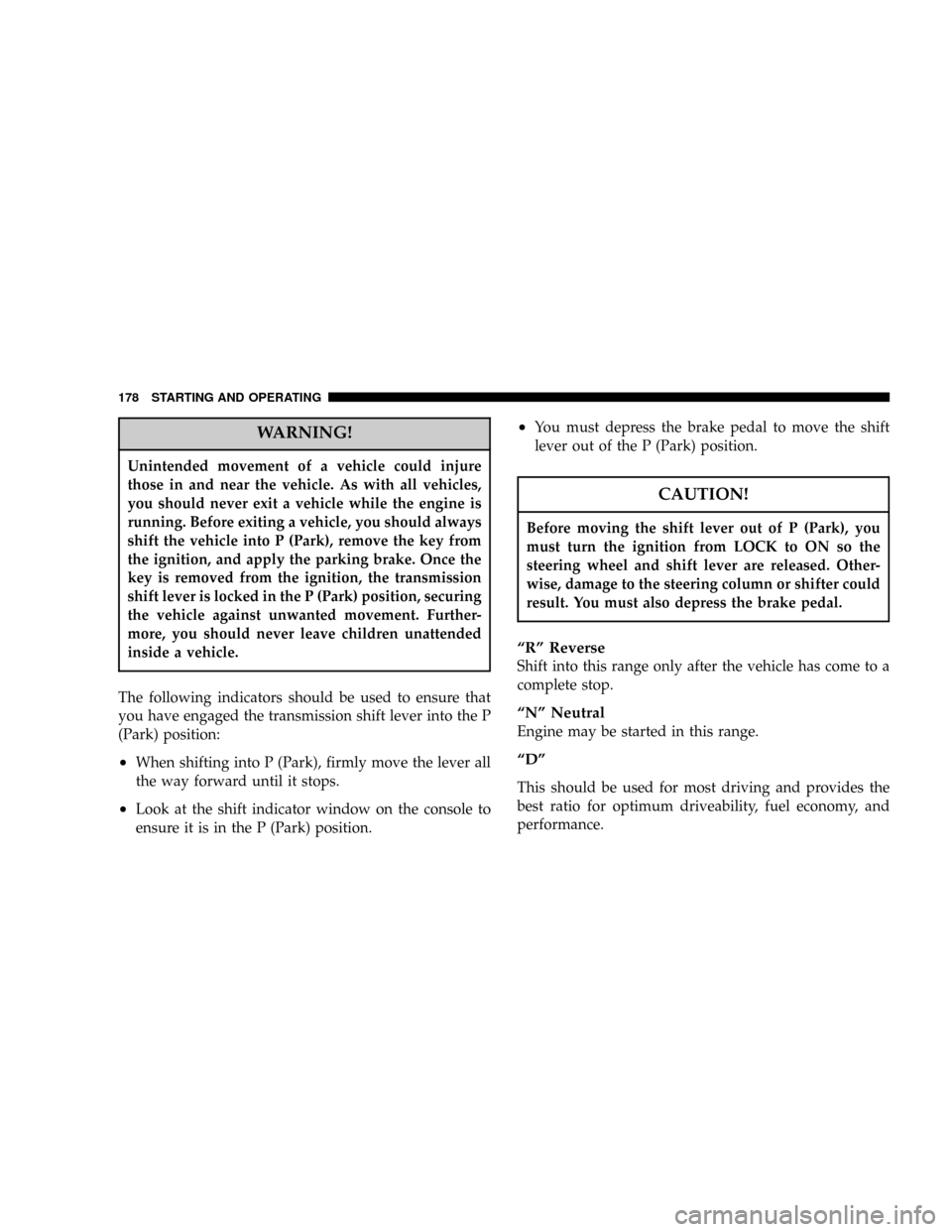
WARNING!
Unintended movement of a vehicle could injure
those in and near the vehicle. As with all vehicles,
you should never exit a vehicle while the engine is
running. Before exiting a vehicle, you should always
shift the vehicle into P (Park), remove the key from
the ignition, and apply the parking brake. Once the
key is removed from the ignition, the transmission
shift lever is locked in the P (Park) position, securing
the vehicle against unwanted movement. Further-
more, you should never leave children unattended
inside a vehicle.
The following indicators should be used to ensure that
you have engaged the transmission shift lever into the P
(Park) position:
²When shifting into P (Park), firmly move the lever all
the way forward until it stops.
²Look at the shift indicator window on the console to
ensure it is in the P (Park) position.
²You must depress the brake pedal to move the shift
lever out of the P (Park) position.
CAUTION!
Before moving the shift lever out of P (Park), you
must turn the ignition from LOCK to ON so the
steering wheel and shift lever are released. Other-
wise, damage to the steering column or shifter could
result. You must also depress the brake pedal.
ªRº Reverse
Shift into this range only after the vehicle has come to a
complete stop.
ªNº Neutral
Engine may be started in this range.
ªDº
This should be used for most driving and provides the
best ratio for optimum driveability, fuel economy, and
performance.
178 STARTING AND OPERATING
Page 179 of 322

ªLº Low
This range should be used for maximum engine braking
when descending steep grades. In this range, the trans-
axle will ratio up only to prevent transaxle damage or
engine over speed while ratioing down will occur as
early as possible
AUTOSTICK Ð IF EQUIPPED
Autostick is a driver-interactive transmission that offers
six manual ratio changes to provide you with more
control. Autostick allows you to maximize engine brak-
ing, eliminate undesirable upshifts and downshifts, and
improve overall vehicle performance. This system can
also provide you with more control during passing, city
driving, cold slippery conditions, mountain driving,
trailer towing, and many other situations. Automatic
ratio changes upward will only occur to protect the
Continuously Variable Automatic Transaxle (CVT) and or
the engine from overspeed and changes down will only
happen at minimum engine speed to prevent stalling.
Autostick Operation
Autostick operation is activated in the9D9position by
moving the shift lever side to side. Moving the lever to
the (+) side will activate Autostick and shift up to the
next higher manual ratio, unless you are already operat-
ing in or near overdrive in which case, 6th ratio will be
selected. In like manner, moving the lever to (-) will
activate Autostick and shift to the next lower manual
ratio. After Autostick is activated, the manual ratio
selected is displayed in the transmission ratio display
and tipping the lever to the (+) or (-) direction will cause
an upshift or downshift by one ratio. Holding the lever to
(+) momentarily will deactivate Autostick. Autostick is
also deactivated when the lever is shifted out of9D.9
Autostick General Information
²
If a ratio other than 1st is selected and the vehicle is
brought to a stop, the transaxle control logic will
automatically select the 1st gear ratio.
²²If a low range is selected and the engine accelerates
to the rev limit, the transaxle will automatically select
the next higher ratio.
STARTING AND OPERATING 179
5
Page 180 of 322

²If a downshift would cause the engine to overspeed,
that shift will not occur until it is safe for the engine.
Mostly the CVT will stay in the manually selected
ratio, however.
²If the system detects powertrain overheating, the
transmission will revert to the automatic shift mode
and remain in that mode until the powertrain cools off.
²If the system detects a problem it will disable the
Autostick mode and the transmission will return to the
automatic mode until the problem is corrected.
MANUAL TRANSAXLE OPERATION
NOTE:
The parking brake should be engaged and the
gear selector placed in REVERSE before leaving the
vehicle, especially on an incline.
Fully depress the clutch pedal before you shift gears. As
you release the clutch pedal, lightly depress the accelera-
tor pedal.Use each gear in numerical order - do not skip a gear. Be
sure the transaxle is in FIRST gear, (not THIRD), when
starting from a standing position. Damage to the clutch
can result from starting in THIRD.
For most city driving you will find it easier to use only
the lower gears. For steady highway driving with light
accelerations, 5th gear is recommended.
180 STARTING AND OPERATING
Page 182 of 322
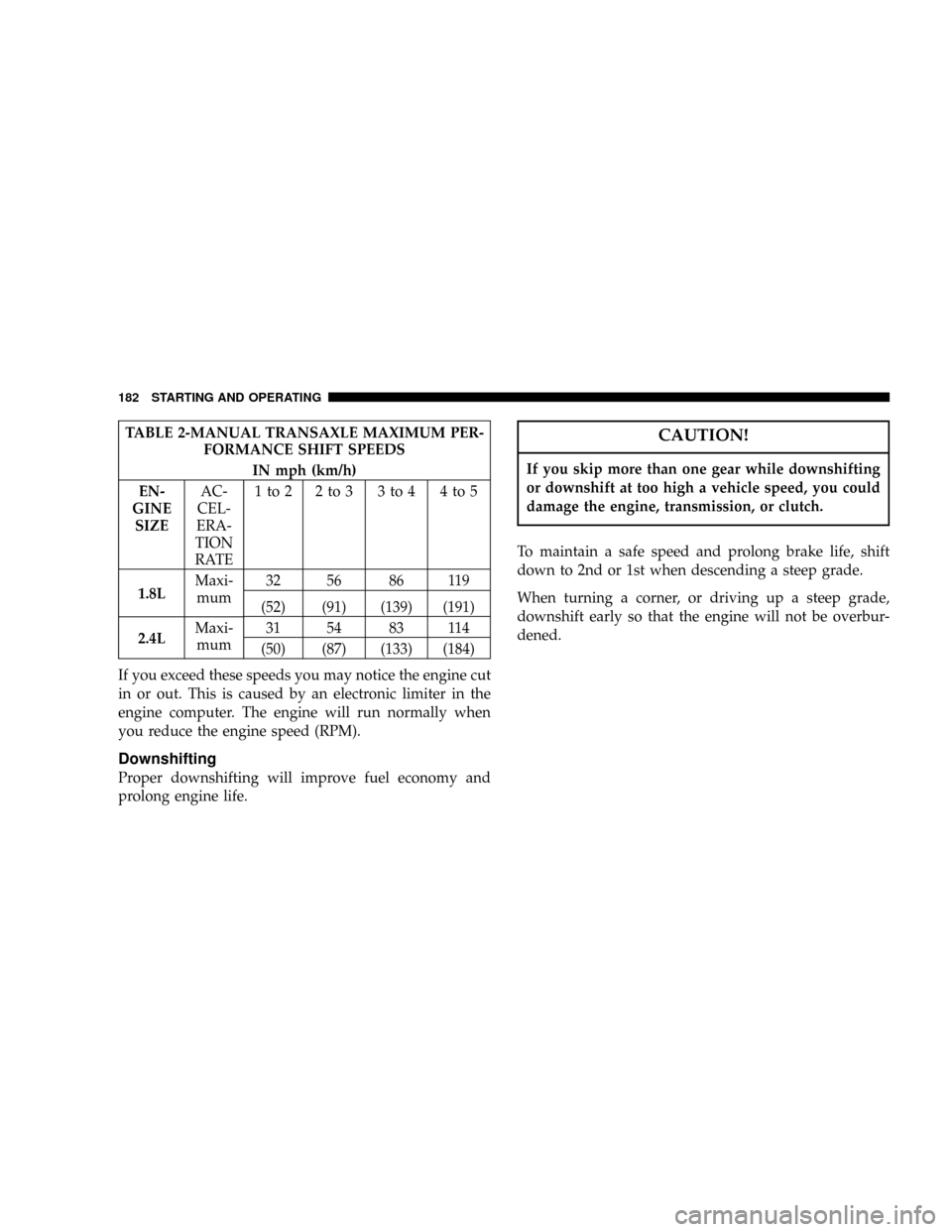
TABLE 2-MANUAL TRANSAXLE MAXIMUM PER-
FORMANCE SHIFT SPEEDS
IN mph (km/h)
EN-
GINE
SIZEAC-
CEL-
ERA-
TION
RATE1to2 2to3 3to4 4to5
1.8LMaxi-
mum32 56 86 119
(52) (91) (139) (191)
2.4LMaxi-
mum31 54 83 114
(50) (87) (133) (184)
If you exceed these speeds you may notice the engine cut
in or out. This is caused by an electronic limiter in the
engine computer. The engine will run normally when
you reduce the engine speed (RPM).
Downshifting
Proper downshifting will improve fuel economy and
prolong engine life.
CAUTION!
If you skip more than one gear while downshifting
or downshift at too high a vehicle speed, you could
damage the engine, transmission, or clutch.
To maintain a safe speed and prolong brake life, shift
down to 2nd or 1st when descending a steep grade.
When turning a corner, or driving up a steep grade,
downshift early so that the engine will not be overbur-
dened.
182 STARTING AND OPERATING
Page 220 of 322
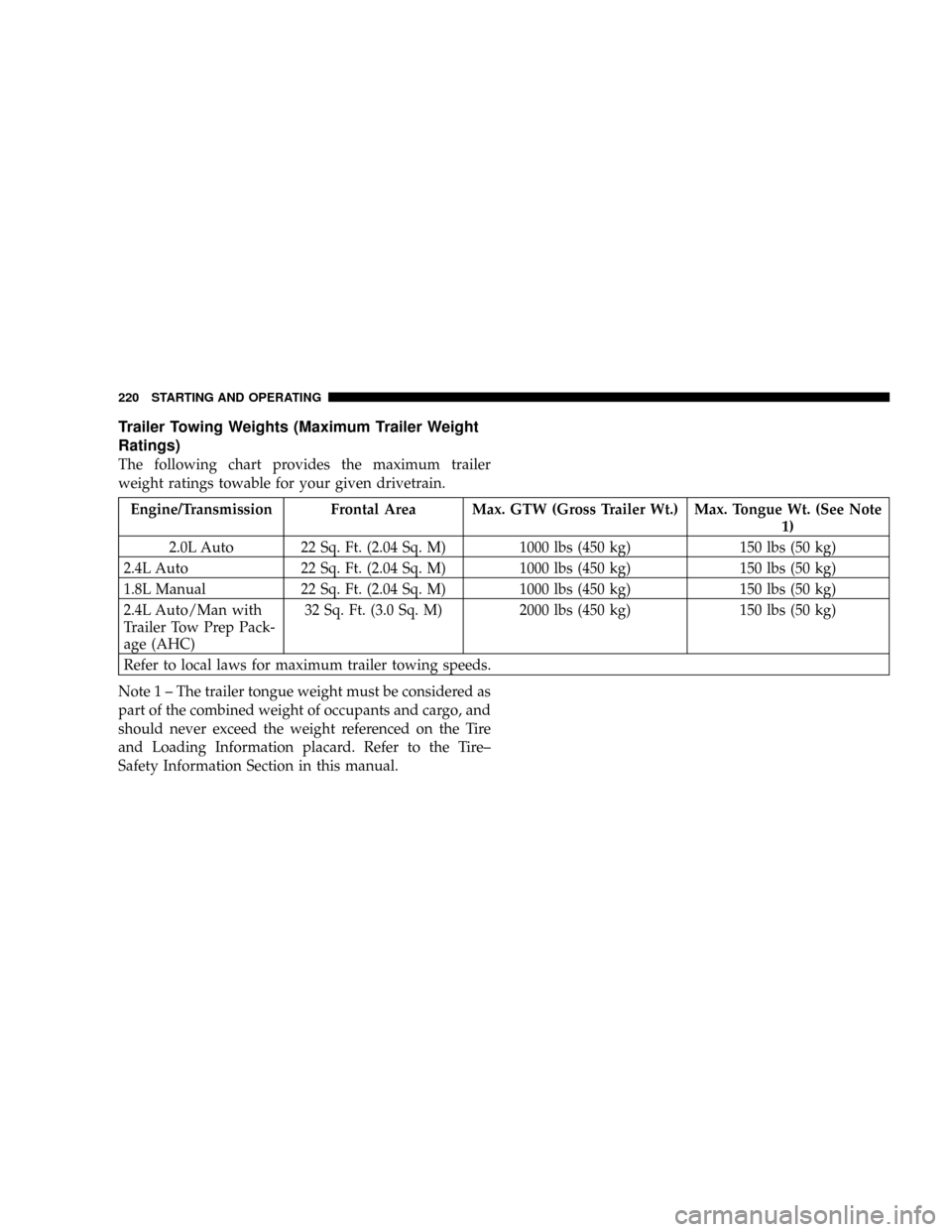
Trailer Towing Weights (Maximum Trailer Weight
Ratings)
The following chart provides the maximum trailer
weight ratings towable for your given drivetrain.
Engine/Transmission Frontal Area Max. GTW (Gross Trailer Wt.) Max. Tongue Wt. (See Note
1)
2.0L Auto 22 Sq. Ft. (2.04 Sq. M) 1000 lbs (450 kg) 150 lbs (50 kg)
2.4L Auto 22 Sq. Ft. (2.04 Sq. M) 1000 lbs (450 kg) 150 lbs (50 kg)
1.8L Manual 22 Sq. Ft. (2.04 Sq. M) 1000 lbs (450 kg) 150 lbs (50 kg)
2.4L Auto/Man with
Trailer Tow Prep Pack-
age (AHC)32 Sq. Ft. (3.0 Sq. M) 2000 lbs (450 kg) 150 lbs (50 kg)
Refer to local laws for maximum trailer towing speeds.
Note 1 ± The trailer tongue weight must be considered as
part of the combined weight of occupants and cargo, and
should never exceed the weight referenced on the Tire
and Loading Information placard. Refer to the Tire±
Safety Information Section in this manual.
220 STARTING AND OPERATING