light DODGE CALIBER 2007 1.G Workshop Manual
[x] Cancel search | Manufacturer: DODGE, Model Year: 2007, Model line: CALIBER, Model: DODGE CALIBER 2007 1.GPages: 360, PDF Size: 1.73 MB
Page 156 of 360

Language
When in this display you may select different languages
for all display nomenclature, including the trip functions.
Pressing the EVIC button while in this display selects
English, Espanol, Deutsch, Italiano, or Francais depend-
ing on availability. As you continue the displayed infor-
mation will be shown in the selected language.
NOTE:UConnect™ language will not change using the
EVIC. Please refer to “Language Selection” in the
HANDS–FREE COMMUNICATION (UConnect™) — IF
EQUIPPED section of this manual for details.
Lock Doors Automatically at 15 mph (24 km/h)
When ON is selected all doors lock automatically when
the speed of the vehicle reaches 15 mph (24 km/h). Press
and hold the EVIC button when in this display until
“ON” or “OFF” appears to make your selection.
Auto Unlock On Exit
When ON is selected all the vehicle’s doors will unlock
when the driver’s door is opened if the vehicle is stopped
(manual transmissions) or the vehicle is stopped and the
transmission is in P (Park) or N (Neutral) position(automatic transmissions). Press and hold the EVIC but-
ton when in this display until “ON” or “OFF” appears to
make your selection.
Remote Unlock Driver’s Door 1st
WhenDRIVER’S DOOR 1STis selected only the driv-
er’s door will unlock on the first press of the remote
keyless entry unlock button and require a second press to
unlock the remaining locked doors. WhenREMOTE
UNLOCK ALL DOORSis selected all of the doors will
unlock at the first press of the remote keyless entry
unlock button. Press and hold the EVIC button when in
this display until “DRIVER’S DOOR 1ST” or “ALL
DOORS” appears to make your selection.
Sound Horn with Remote Key Lock
When ON is selected a short horn sound will occur when
the remote keyless entry “Lock” button is pressed. This
feature may be selected with or without the flash lights
on lock/unlock feature. Press and hold the EVIC button
when in this display until “ON” or “OFF” appears to
make your selection.
156 UNDERSTANDING YOUR INSTRUMENT PANEL
Page 157 of 360

Flash Lights with Remote Key Lock
When ON is selected, the front and rear turn signals will
flash when the doors are locked or unlocked using the
remote keyless entry transmitter. This feature may be
selected with or without the sound horn on lock feature
selected. Press and hold the EVIC button when in this
display until “ON” or “OFF” appears to make your
selection.
Delay Turning Headlamps Off
When this feature is selected the driver can choose to
have the headlamps remain on for 0, 30, 60, or 90 seconds
when exiting the vehicle. Press and hold the EVIC button
when in this display until 0, 30, 60, or 90 appears to make
your selection.
Headlamps On With Wipers (Available with Auto
Headlights Only)
When ON is selected and the headlight switch is in the
AUTO position, the headlights will turn on approxi-
mately 10 seconds after the wipers are turned on. The
headlights will also turn off when the wipers are turnedoff if they were turned on by this feature. Press and hold
the EVIC button when in this display until “ON” or
“OFF” appears to make your selection.
NOTE:Turning the headlights on during the daytime
causes the instrument panel lights to dim. To increase the
brightness, refer to “Lights” in this section.
Delay Power Off to Accessories Until Exit
When this feature is selected, the power window
switches, radio, hands–free system, power sunroof, and
power outlets will remain active for up to 60 minutes
after the ignition switch has been turned off. Opening a
vehicle door will cancel this feature. Press and hold the
EVIC button when in this display until “Off”, “45 sec.”,
“5 min.”, or “10 min.” appears to make your selection.
Turn Headlamps on with Remote Key Unlock
When this feature is selected the headlamps will activate
and remain on for up to 90 seconds when the doors are
unlocked using the remote keyless entry transmitter.
Press and hold the EVIC button when in this display until
“OFF”, “30 sec.”, “60 sec.”, or “90 sec.” appears to make
your selection.
UNDERSTANDING YOUR INSTRUMENT PANEL 157
4
Page 159 of 360

To set the variance:with the ignition in the ON position,
with a short button press (less than one second) press and
release the EVIC button several times until you have
displayed the Personal Settings (Customer Program-
mable Features) menu. Once in the Personal Settings
(Customer Programmable Features) menu, press and
release (less than one second) the EVIC button several
times until “Compass Variance” is highlighted. The
“Compass Variance” message and the current variance
zone number will be displayed. To change the zone, press
and hold (longer than two seconds) the EVIC button to
increment the variance one step. Repeat as necessary,
with individual long (for at least 1 second) EVIC button
presses for each increment, until the desired variance is
achieved. To exit the Variance Programming, press the
EVIC button with a short (less than one second) button
press.
NOTE:The factory default Zone is 8. During program-
ming, the Zone value will wrap around from Zone 15 to
Zone 1.
UNDERSTANDING YOUR INSTRUMENT PANEL 159
4
Page 161 of 360

Two Types of Signals
There are two basic types of radio signals... AM or
Amplitude Modulation, in which the transmitted sound
causes the amplitude, or height, of the radio waves to
vary... and FM or Frequency Modulation, in which the
frequency of the wave is varied to carry the sound.
Electrical Disturbances
Radio waves may pick up electrical disturbances during
transmission. They mainly affect the wave amplitude,
and thus remain a part of the AM reception. They
interfere very little with the frequency variations that
carry the FM signal.
AM Reception
AM sound is based on wave amplitude, so AM reception
can be disrupted by such things as lightning, power lines
and neon signs.
FM Reception
Because FM transmission is based on frequency varia-
tions, interference that consists of amplitude variations
can be filtered out, leaving the reception relatively clear,
which is the major feature of FM radio.
NOTE:The radio, steering wheel radio controls (if
equipped), and 6 disc CD/DVD changer (if equipped)
will remain active for up to 10 minutes after the ignition
switch has been turned off. Opening a vehicle front door
will cancel this feature.
ELECTRONIC DIGITAL CLOCK
The clock and radio each use the display panel built into
the radio. A digital readout shows the frequency and/or
time in hours and minutes (depending on your radio
model) whenever the ignition switch is in the “ON” or
“ACC” position.
When the ignition switch is in the “OFF” position, or
when the radio frequency is being displayed, time keep-
ing is accurately maintained.
On the AM/FM/CD (6-disc) radio the time button alter-
nates the location of the time and frequency on the
display. On the AM/FM/CD (single-disc) radio only one
of the two, time or frequency is displayed.
UNDERSTANDING YOUR INSTRUMENT PANEL 161
4
Page 185 of 360

Scan Button
Press this button to play 10 seconds of each selection.
Press the scan button a second time to cancel the feature.
Changing Tape Direction
If you wish to change the direction of tape travel (side
being played), press Preset 6. The lighted arrow in the
display window will show the new direction.
Metal Tape Selection
If a standard metal tape is inserted into the player, the
player will automatically select the correct equalization.
Pinch Roller Release
If ignition power or the radio ON/OFF switch is turned
off, the pinch roller will automatically retract to protect
the tape from any damage. When power is restored to the
tape player, the pinch roller will automatically reengage
and the tape will resume play.
Noise Reduction
The Dolby Noise Reduction System* is on whenever the
tape player is on, but may be switched off.To turn off the Dolby Noise reduction System: Press
Preset 1 after you insert the tape. The NR light in the
display will go off when the Dolby System is off.
* ”Dolby” noise reduction is manufactured under license
from Dolby Laboratories Licensing Corporation. Dolby
and the double-D symbol are trademarks of Dolby Labo-
ratories Licensing Corporation.
Operation Instructions - (CD MODE for CD Audio
Play)
NOTE:
The ignition switch must be in the ON or ACC
position to operate the radio.
NOTE:Note: This Radio is capable of playing compact
discs (CD), recordable compact discs (CD-R), rewritable
compact discs (CD-RW) compact discs with MP3 tracks
and multisession compact discs with CD and MP3 tracks
and WMA.
UNDERSTANDING YOUR INSTRUMENT PANEL 185
4
Page 197 of 360

CD Player
Pressing the top of the switch once will go to the next
track on the CD. Pressing the bottom of the switch once
will go to the beginning of the current track or to the
beginning of the previous track if it is within one second
after the current track begins to play.
If you press the switch up or down twice it plays the
second track, three times, it will play the third, etc.
The button in the center of the left hand switch changes
CD’s on the 6–Disc in-dash CD changer radio. This
button does not function for all other radios.
CD/DVD DISC MAINTENANCE
To keep the CD/DVD discs in good condition, take the
following precautions:
1. Handle the disc by its edge; avoid touching the
surface.
2. If the disc is stained, clean the surface with a soft cloth,
wiping from center to edge.
3. Do not apply paper, paper CD labels, or tape to the
disc; avoid scratching the disc.
4. Do not use solvents such as benzine, thinner, cleaners,
or antistatic sprays.
5. Store the disc in its case after playing.
6. Do not expose the disc to direct sunlight.
7. Do not store the disc where temperatures may become
too high.
UNDERSTANDING YOUR INSTRUMENT PANEL 197
4
Page 216 of 360
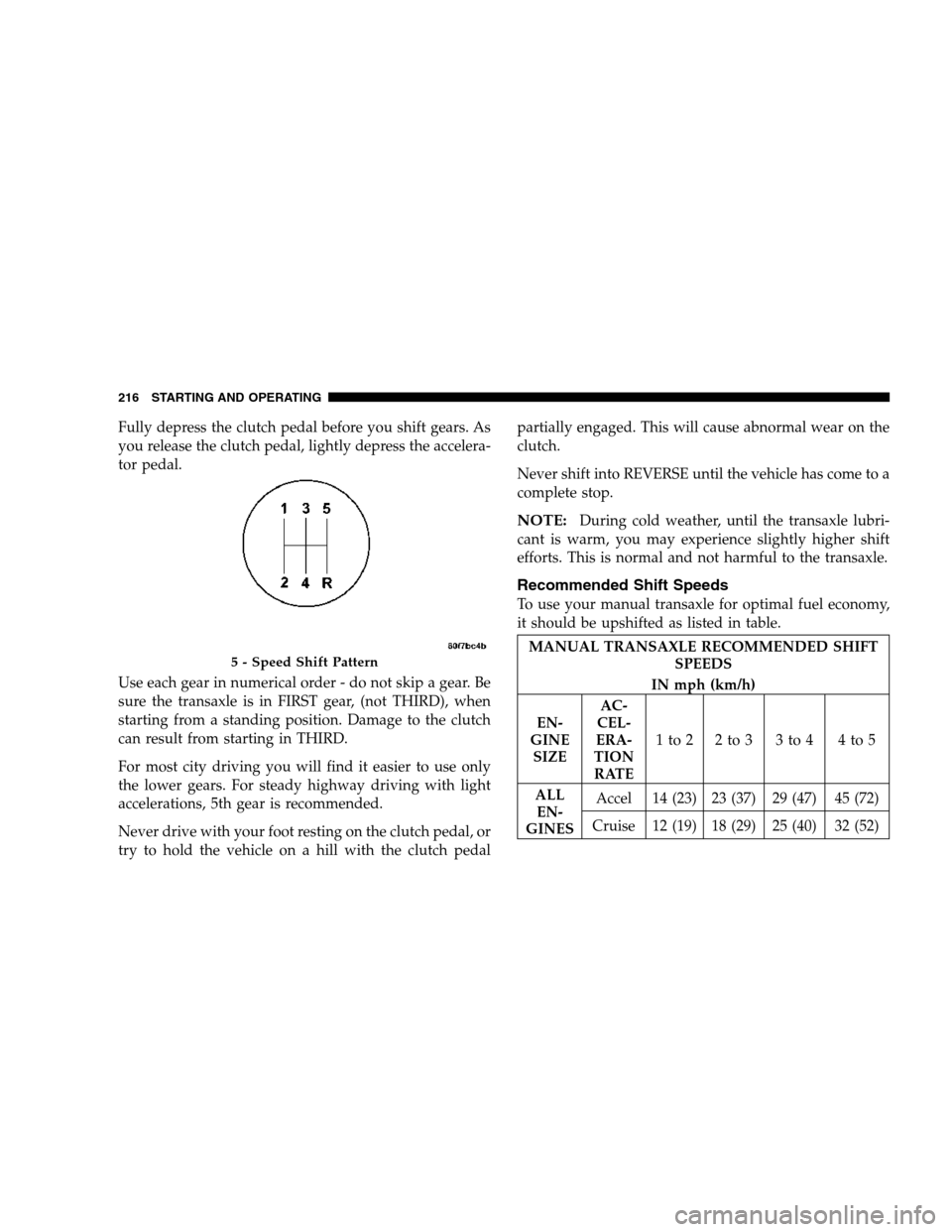
Fully depress the clutch pedal before you shift gears. As
you release the clutch pedal, lightly depress the accelera-
tor pedal.
Use each gear in numerical order - do not skip a gear. Be
sure the transaxle is in FIRST gear, (not THIRD), when
starting from a standing position. Damage to the clutch
can result from starting in THIRD.
For most city driving you will find it easier to use only
the lower gears. For steady highway driving with light
accelerations, 5th gear is recommended.
Never drive with your foot resting on the clutch pedal, or
try to hold the vehicle on a hill with the clutch pedalpartially engaged. This will cause abnormal wear on the
clutch.
Never shift into REVERSE until the vehicle has come to a
complete stop.
NOTE:During cold weather, until the transaxle lubri-
cant is warm, you may experience slightly higher shift
efforts. This is normal and not harmful to the transaxle.
Recommended Shift Speeds
To use your manual transaxle for optimal fuel economy,
it should be upshifted as listed in table.
MANUAL TRANSAXLE RECOMMENDED SHIFT
SPEEDS
IN mph (km/h)
EN-
GINE
SIZEAC-
CEL-
ERA-
TION
RATE1to2 2to3 3to4 4to5
ALL
EN-
GINESAccel 14 (23) 23 (37) 29 (47) 45 (72)
Cruise 12 (19) 18 (29) 25 (40) 32 (52)5 - Speed Shift Pattern
216 STARTING AND OPERATING
Page 218 of 360

PARKING BRAKE
When the parking brake is applied with the
ignition on, the Brake Light in the instrument
cluster will come on.
NOTE:This light only shows that the parking brake is
on. It does not show the degree of brake application.
If the parking brake is applied while the vehicle is
moving, a chime will sound to alert the driver. The
chime will sound up to 10 times or until the vehicle
has returned to a stop.
Before leaving the vehicle, make sure that the parking
brake is set. To set the parking brake, pull up firmly on
the lever. Also place the gear selector in the Park position
(automatic transaxle) or Reverse (manual transaxle). To
release the parking brake, apply the brake pedal, pull up
slightly on the lever, then depress the button on the end
of the lever and push the lever fully down toward the
floor.
NOTE:The parking brake lever will not release unless
the lever is pulled up slightly past its applied position.When parking on a hill, it is important to set the parking
brake before placing the gear selector in Park, otherwise
the load on the automatic transaxle locking mechanism
may make it difficult to move the selector out of Park. As
an added precaution, turn the front wheels toward the
curb on a downhill grade and away from the curb on a
uphill grade.
You should always apply the parking brake before leav-
ing the vehicle.
Parking Brake Lever
218 STARTING AND OPERATING
Page 220 of 360

malfunction is caused by an internal leak, as the brake
fluid in the master cylinder drops, the brake warning
indicator will light.
WARNING!
Driving a vehicle with the brake light on is danger-
ous. A significant decrease in braking performance
or vehicle stability during braking may occur. It will
take you longer to stop the vehicle or will make your
vehicle harder to control. You could have an acci-
dent. Have the vehicle checked immediately.
Anti-Lock Brake System (ABS) — If Equipped
The Anti-Lock Brake System provides increased vehicle
stability and brake performance under most braking
conditions. The system automatically “pumps” the
brakes during severe braking conditions to prevent
wheel lock-up.
WARNING!
Pumping of the Anti-Lock Brakes will diminish
their effectiveness and may lead to an accident.
Pumping makes the stopping distance longer. Just
press firmly on your brake pedal when you need to
slow down or stop.
220 STARTING AND OPERATING
Page 221 of 360
WARNING!
•Anti-lock system (ABS) cannot prevent the natu-
ral laws of physics from acting on the vehicle, nor
can it increase braking or steering efficiency be-
yond that afforded by the condition of the vehicle
brakes and tires or the traction afforded.
•The ABS cannot prevent accidents, including
those resulting from excessive speed in turns,
following another vehicle too closely, or hydro-
planing. Only a safe, attentive, and skillful driver
can prevent accidents.
•The capabilities of an ABS equipped vehicle must
never be exploited in a reckless or dangerous
manner which could jeopardize the user’s safety
or the safety of others.
The ABS light monitors the Anti-Lock Brake
System. The light will come on when the
ignition switch is turned to the ON position
and may stay on for as long as four seconds.If the ABS light remains on or comes on while driving, it
indicates that the Anti-Lock portion of the brake system
is not functioning and that service is required. However,
the conventional brake system will continue to operate
normally if the BRAKE warning light is not on.
If the ABS light is on, the brake system should be serviced
as soon as possible to restore the benefits of Anti-Lock
brakes. If the ABS light does not come on when the
Ignition switch is turned to the ON position, have the
bulb repaired as soon as possible.
If both the Brake Warning Light and the ABS Light
remain on, the Anti-Lock brakes (ABS) and Electronic
Brake Force Distribution (EBD) systems are not function-
ing. Immediate repair to the ABS system is required.
When the vehicle is driven over 7 mph (11 km/h), you
may also hear a slight clicking sound as well as some
related motor noises. These noises are the system per-
forming its self check cycle to ensure that the ABS system
is working properly. This self check occurs each time the
vehicle is started and accelerated past 7 mph (11 km/h).
STARTING AND OPERATING 221
5