wheel DODGE CALIBER 2008 1.G User Guide
[x] Cancel search | Manufacturer: DODGE, Model Year: 2008, Model line: CALIBER, Model: DODGE CALIBER 2008 1.GPages: 402, PDF Size: 6.37 MB
Page 128 of 402
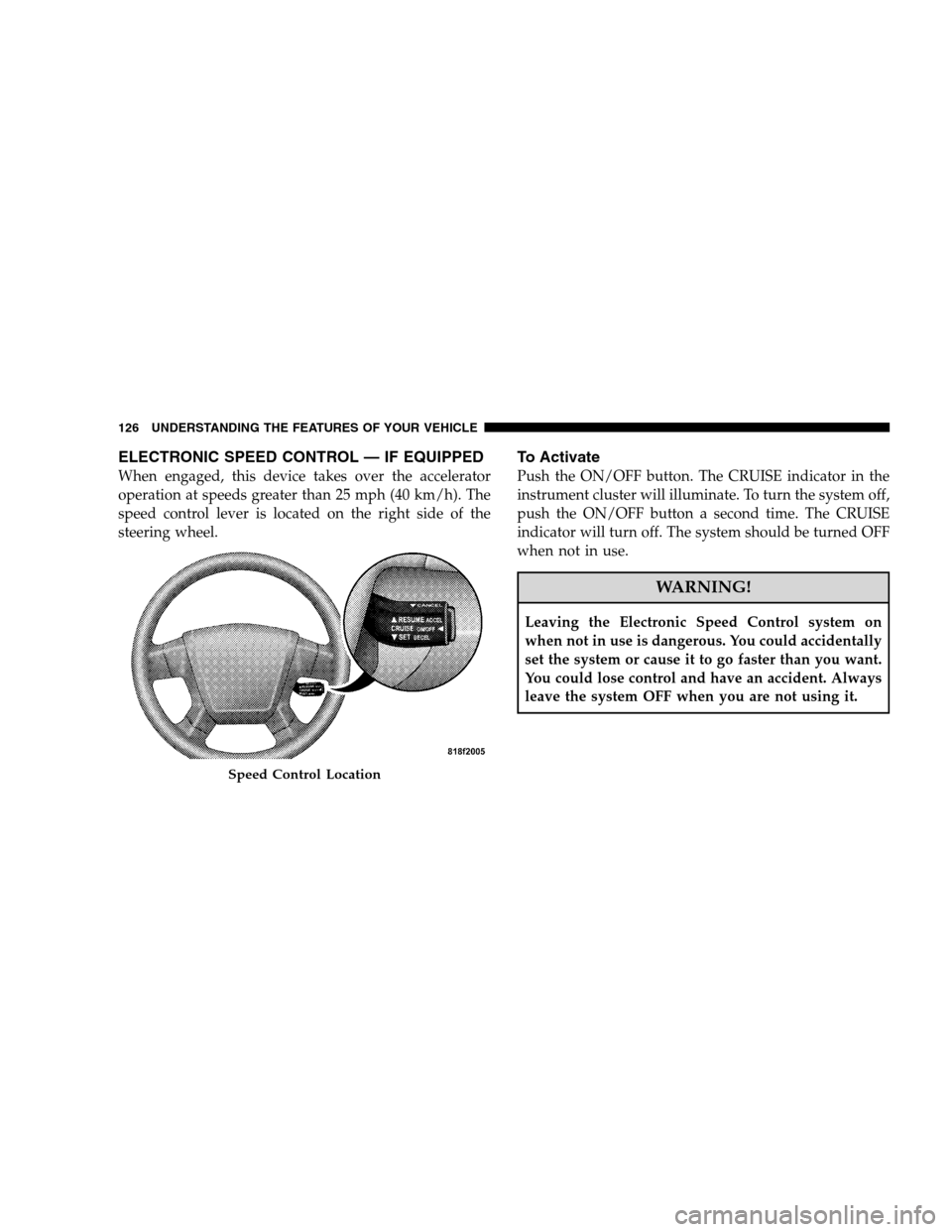
ELECTRONIC SPEED CONTROL — IF EQUIPPED
When engaged, this device takes over the accelerator
operation at speeds greater than 25 mph (40 km/h). The
speed control lever is located on the right side of the
steering wheel.
To Activate
Push the ON/OFF button. The CRUISE indicator in the
instrument cluster will illuminate. To turn the system off,
push the ON/OFF button a second time. The CRUISE
indicator will turn off. The system should be turned OFF
when not in use.
WARNING!
Leaving the Electronic Speed Control system on
when not in use is dangerous. You could accidentally
set the system or cause it to go faster than you want.
You could lose control and have an accident. Always
leave the system OFF when you are not using it.
Speed Control Location
126 UNDERSTANDING THE FEATURES OF YOUR VEHICLE
Page 130 of 402
Manual Transaxle
Depressing the clutch pedal will disengage the speed
control. A slight increase in engine RPM before the speed
control disengages is normal.
Vehicles equipped with manual transaxles may need to
be shifted into a lower gear to climb hills without speed
loss.
WARNING!
Speed control can be dangerous where the system
can’t maintain a constant speed. Your vehicle could
go too fast for the conditions, and you could lose
control. An accident could be the result. Don’t use
speed control in heavy traffic or on roads that are
winding, icy, snow-covered, or slippery.
To Accelerate For Passing
Depress the accelerator as you would normally. When the
pedal is released, the vehicle will return to the set speed.
Using Speed Control On Hills
NOTE:The speed control system maintains speed, up
and down hills. A slight speed change on moderate hills
is normal.
On steep hills, a greater speed loss or gain may occur so
it may be preferable to drive without speed control.
ANTI-LOCK BRAKE SYSTEM (ABS) — IF
EQUIPPED
This system aids the driver in maintaining vehicle control
under adverse braking conditions. The system controls
hydraulic brake pressure to prevent wheel lockup and
help avoid skidding on slippery surfaces during braking.
128 UNDERSTANDING THE FEATURES OF YOUR VEHICLE
Page 131 of 402
WARNING!
•The Anti-Lock Brake System (ABS) cannot prevent
the natural laws of physics from acting on the
vehicle, nor can it increase the traction afforded by
prevailing road conditions.
•The ABS cannot prevent accidents, including
those resulting from excessive speed in turns,
driving on very slippery surfaces, or hydroplan-
ing. Only a safe, attentive, and skillful driver can
prevent accidents.
•The capabilities of an ABS equipped vehicle must
never be exploited in a reckless or dangerous
manner which could jeopardize the user’s safety
or the safety of others.
ELECTRONIC BRAKE CONTROL SYSTEM
Your vehicle may be equipped with an optional ad-
vanced electronic brake control system that includes
Anti-Lock Brake System (ABS), Brake Assist System
(BAS), Traction Control System (TCS), and Electronic
Stability Program (ESP). All systems work together to
enhance vehicle stability and control in various driving
conditions and are commonly referred to as ESP.
Anti-Lock Brake System (ABS)
This system aids the driver in maintaining vehicle control
under adverse braking conditions. The system controls
hydraulic brake pressure to prevent wheel lockup and
help avoid skidding on slippery surfaces during braking.
Refer to “Anti-Lock Brake System” in this Section of the
manual for more information about ABS.
UNDERSTANDING THE FEATURES OF YOUR VEHICLE 129
3
Page 133 of 402
Traction Control System (TCS)
This system monitors the amount of wheel spin of each of
the driven wheels. If wheel spin is detected, brake
pressure is applied to the slipping wheel(s) and engine
power is reduced to provide enhanced acceleration and
stability. A feature of the TCS system functions similar to
a limited slip differential and controls the wheel spin
across a driven axle. If one wheel on a driven axle is
spinning faster than the other, the system will apply the
brake of the spinning wheel. This will allow more engine
torque to be applied to the wheel that is not spinning.
This feature remains active even if TCS and ESP are in the
“Partial Off” mode. Refer to “Electronic Stability Pro-
gram (ESP)” in this Section of this manual.
Electronic Stability Program (ESP)
This system enhances directional control and stability of
the vehicle under various driving conditions. ESP cor-
rects for over-steering or under-steering of the vehicle by
applying the brake of the appropriate wheel to assist in
counteracting the over-steering or under-steering condi-
tion. Engine power may also be reduced to help the
vehicle maintain the desired path. ESP uses sensors in the
vehicle to determine the vehicle path intended by the
driver and compares it to the actual path of the vehicle.
When the actual path does not match the intended path,
ESP applies the brake of the appropriate wheel to assist in
counteracting the over-steer or under-steer condition.
•Over-steer - when the vehicle is turning more than
appropriate for the steering wheel position.
•Under-steer - when the vehicle is turning less than
appropriate for the steering wheel position.
UNDERSTANDING THE FEATURES OF YOUR VEHICLE 131
3
Page 135 of 402
Full On
This is the normal operating mode for ESP. Whenever the
vehicle is started the ESP system will be in this “On”
mode. This mode should be used for most driving
situations. ESP should only be turned to “Partial Off” for
specific reasons as noted below.
Partial Off
This mode is entered by momentarily depressing the ESP
OFF switch. This mode is intended to be used if the
vehicle is in deep snow, sand or gravel conditions and
more wheel spin than ESP would normally allow is
required to gain traction.
To turn ESP on again, momentarily depress the ESP OFF
switch. This will restore the normal “ESP On” mode of
operation.
NOTE:To improve the vehicle’s traction when driving
with snow chains, or starting off in deep snow, sand or
gravel, it may be desirable to switch to the “Partial Off”mode by pressing the ESP OFF switch. Once the situation
requiring ESP to be switched to the “Partial Off” mode is
overcome, turn ESP back on by momentarily depressing
the ESP OFF switch. This may be done while the vehicle
is in motion.
ESP/BAS Warning Light and ESP Indicator Light
The malfunction indicator for the ESP is combined with
the BAS indicator. The yellow “ESP/BAS Warning
Lamp” and the yellow “ESP Indicator Light” in the
instrument cluster both come on when the ignition
switch is turned to the ON position. They should both go
out with the engine running. If the “ESP/BAS Warning
Lamp” comes on continuously with the engine running,
a malfunction has been detected in either the ESP or BAS
system, or both. If this light remains on after several
ignition cycles, and the vehicle has been driven several
miles/kilometers at speeds greater than 30 mph (48
km/h), see your authorized dealer as soon as possible to
have the problem diagnosed and corrected.
UNDERSTANDING THE FEATURES OF YOUR VEHICLE 133
3
Page 157 of 402
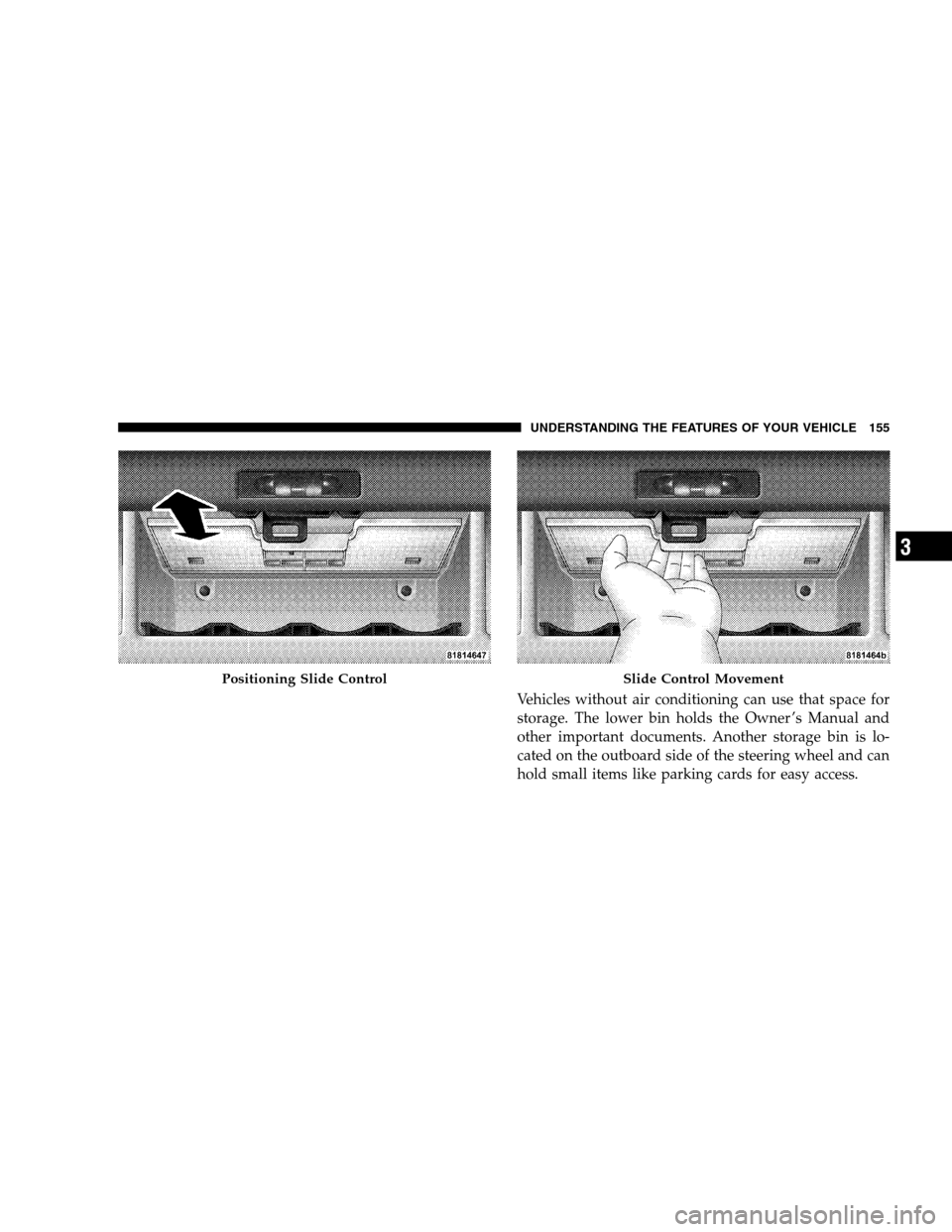
Vehicles without air conditioning can use that space for
storage. The lower bin holds the Owner ’s Manual and
other important documents. Another storage bin is lo-
cated on the outboard side of the steering wheel and can
hold small items like parking cards for easy access.
Positioning Slide ControlSlide Control Movement
UNDERSTANDING THE FEATURES OF YOUR VEHICLE 155
3
Page 169 of 402
that illuminates a low tire pressure telltale when one or
more of your tires is significantly under-inflated. Accord-
ingly, when the low tire pressure telltale illuminates, you
should stop and check your tires as soon as possible, and
inflate them to the proper pressure. Driving on a signifi-
cantly under-inflated tire causes the tire to overheat and
can lead to tire failure. Under-inflation also reduces fuel
efficiency and tire tread life, and may affect the vehicle’s
handling and stopping ability.
Please note that the TPMS is not a substitute for proper
tire maintenance, and it is the driver ’s responsibility to
maintain correct tire pressure, even if under-inflation has
not reached the level to trigger illumination of the TPMS
low tire pressure telltale.
Your vehicle has also been equipped with a TPMS
malfunction indicator to indicate when the system is not
operating properly. The TPMS malfunction indicator is
combined with the low tire pressure telltale. When thesystem detects a malfunction, the telltale will flash for
approximately one minute and then remain continuously
illuminated. This sequence will continue upon subse-
quent vehicle start-ups as long as the malfunction exists.
When the malfunction indicator is illuminated, the sys-
tem may not be able to detect or signal low tire pressure
as intended. TPMS malfunctions may occur for a variety
of reasons, including the installation of replacement or
alternate tires or wheels on the vehicle that prevent the
TPMS from functioning properly. Always check the
TPMS malfunction telltale after replacing one or more
tires or wheels on your vehicle to ensure that the replace-
ment or alternate tires and wheels allow the TPMS to
continue to function properly.
UNDERSTANDING YOUR INSTRUMENT PANEL 167
4
Page 170 of 402
CAUTION!
The TPMS has been optimized for the original
equipment tires and wheels. TPMS pressures and
warning have been established for the tire size
equipped on your vehicle. Undesirable system opera-
tion or sensor damage may result when using re-
placement equipment that is not of the same size,
type, and/or style. Aftermarket wheels can cause
sensor damage. Do not use aftermarket tire sealants
or balance beads if your vehicle is equipped with a
TPMS, as damage to the sensors may result.
15. Odometer/Trip Odometer
This display indicates the total distance the vehicle has
been driven. Also, the cluster will display, replacing the
odometer/trip odometer, vehicle warning messages such
as: “door/gate ajar” and “gASCAP” (loose gas cap) and“Change Oil” message. Loose gas cap (gASCAP) will be
displayed from the Odometer/Trip Odometer on all
models.
NOTE:If the vehicle is equipped with the optional
Electronic Vehicle Information Center (EVIC) in the in-
strument cluster, all warnings including “door” and
“gATE” and “Oil Change Required” will only be dis-
played in the EVIC display. For additional information,
refer to “Electronic Vehicle Information Center — If
Equipped” in Section 3.
Change Oil Message
Your vehicle is equipped with an engine oil change
indicator system. The “Change Oil” message will flash in
the instrument cluster odometer for approximately 12
seconds after a single chime has sounded to indicate the
next scheduled oil change interval. The engine oil change
168 UNDERSTANDING YOUR INSTRUMENT PANEL
Page 173 of 402
20. Electronic Stability Program (ESP) Indicator
Light/Traction Control System (TCS) Indicator Light —
If Equipped
If this indicator light flashes during accelera-
tion, apply as little throttle as possible. While
driving, ease up on the accelerator. Adapt your
speed and driving to the prevailing road con-
ditions, and do not switch off the ESP, or TCS — if
equipped.
21. Turn Signal Indicators
The arrows will flash in unison with the exterior
turn signal when using the turn signal lever.
22. Front Fog Light Indicator — If Equipped
This light shows when the front fog lights are ON.23. Electronic Stability Program (ESP) Indicator Light
The malfunction light for the ESP is combined
with BAS. The yellow “ESP/BAS Warning
Light” comes on when the ignition switch is
turned to the ON position. They should go out
with the engine running. If the “ESP/BAS Warning
Light” comes on continuously with the engine running, a
malfunction has been detected in either the ESP or the
BAS system. If this light remains on after several ignition
cycles, and the vehicle has been driven several miles/
kilometers at speeds greater than 30 mph (48 km/h), see
your authorized dealer as soon as possible.
24. All-Wheel Drive Failure Indicator Light
This light monitors the All-Wheel Drive (AWD)
system. The light will come on for a bulb check
when the ignition key is turned to the ON
position, and may stay on for as long as three
seconds.
UNDERSTANDING YOUR INSTRUMENT PANEL 171
4
Page 174 of 402
When lit solid:There is an AWD system fault. AWD
performance will be at a reduced level. Service the AWD
system soon.
When blinking:The AWD system is temporarily dis-
abled due to overload condition.
25. Anti-Lock Warning Light (ABS) — If Equipped
This light monitors the Anti-Lock Brake System
(ABS) described elsewhere in this manual. This
light will come on when the ignition key is
turned to the ON position and may stay on for
as long as four seconds.
If the ABS light remains on or comes on during driving,
it indicates that the Anti-Lock portion of the brake system
is not functioning and that service is require; however,
the conventional brake system will continue to operate
normally provided that the BRAKE warning light is not
on.If the ABS light is on, the brake system should be serviced
as soon as possible to restore the benefit of Anti-Lock
Brakes.
The warning light should be checked frequently to assure
that it is operating properly. Turn the ignition key to the
ON position, but do not start the vehicle. The light
should come on. If the light does not come on, have the
system checked by an authorized dealer.
26. High Beam Indicator
This light shows that the headlights are on high
beam. Push the turn signal lever away from the
steering wheel to switch the headlights from high or low
beam.
27. Brake System Warning Light
This light monitors various brake functions, in-
cluding brake fluid level and parking brake appli-
cation. If the brake light turns on, it may indicate that the
172 UNDERSTANDING YOUR INSTRUMENT PANEL