instrument cluster DODGE CALIBER 2011 1.G User Guide
[x] Cancel search | Manufacturer: DODGE, Model Year: 2011, Model line: CALIBER, Model: DODGE CALIBER 2011 1.GPages: 486, PDF Size: 2.88 MB
Page 198 of 486
13. Shift Lever Indicator
The Shift Lever Indicator is self-contained within the
instrument cluster. It displays the gear position of the
automatic transmission.
14. Odometer / Trip Odometer Display Area
This display indicates the total distance the vehicle has
been driven.
NOTE:U.S. Federal regulations require that upon trans-
fer of vehicle ownership, the seller certify to the pur-
chaser the correct mileage that the vehicle has been
driven. If your odometer needs to be repaired or serviced,
the repair technician should leave the odometer reading
the same as it was before the repair or service. If s/he
cannot do so, then the odometer must be set at zero, and
a sticker must be placed in the door jamb stating what the
mileage was before the repair or service. It is a good idea
for you to make a record of the odometer reading before the repair/service, so that you can be sure that it is
properly reset, or that the door jamb sticker is accurate if
the odometer must be reset at zero.
Vehicle Odometer Messages
When the appropriate conditions exist, the following
odometer messages will display:
door
............................. Door Ajar
gate .............................. Gate Ajar
gASCAP ....................... Fuel Cap Fault
LoW TirE .................... LowTirePr essure
noFUSE .......................... Fuse Fault
CHAngE OIL ............... Oil Change Required
HOTOIL ............... Engine Oil Temp Too Hot
NOTE: If the vehicle is equipped with the optional
Electronic Vehicle Information Center (EVIC) in the in-
strument cluster, all warnings including “door” and
196 UNDERSTANDING YOUR INSTRUMENT PANEL
Page 199 of 486
“gATE” and “Oil Change Required” will only be dis-
played in the EVIC display. For additional information,
refer to “Electronic Vehicle Information Center (EVIC) —
If Equipped”.
gASCAP
If the vehicle diagnostic system determines that the fuel
filler cap is loose, improperly installed, or damaged, a
“gASCAP” message will display in the odometer display
area. Tighten the fuel filler cap properly and press the
TRIP ODOMETER button to turn off the message. If the
problem continues, the message will appear the next time
the vehicle is started.
A loose, improperly installed, or damaged fuel filler cap
may also turn on the Malfunction Indicator Light (MIL).
LoW TirE
When tire pressure is low, the odometer display will
toggle between LoW and TirE for three cycles.HOTOIL
When this message is displayed there is a engine over-
temperature condition. When this condition occurs, the
“HOTOIL” message will be displayed in the odometer
along with a chime.
Refer to “Engine Oil Overheating” under in “What To Do
In Emergencies”.
noFUSE
If the vehicle diagnostic system determines that the
Ignition Off Draw (IOD) fuse is improperly installed, or
damaged, a “noFUSE” message will display in the odom-
eter display area. For further information on fuses and
fuse locations refer to “Fuses” in “Maintaining Your
Vehicle”.
CHAngE OIL
Your vehicle is equipped with an engine oil change
indicator system. The “CHAngE OIL” message will flash
in the instrument cluster odometer for approximately
4
UNDERSTANDING YOUR INSTRUMENT PANEL 197
Page 200 of 486
five seconds after a single chime has sounded to indicate
the next scheduled oil change interval. The engine oil
change indicator system is duty cycle based, which
means the engine oil change interval may fluctuate
dependent upon your personal driving style.
Unless reset, this message will continue to display each
time you turn the ignition switch to the ON/RUN
position. To turn off the message temporarily, press and
release the Trip Odometer button on the instrument
cluster. To reset the oil change indicator system (after
performing the scheduled maintenance), refer to the
following procedure:1. Turn the ignition switch to the ON/RUN position.
Do not start the engine.
2. Fully depress the accelerator pedal slowly three
times within 10 seconds.
3. Turn the ignition switch to the OFF/LOCK position. NOTE:
If the indicator message illuminates when you
start the vehicle, the oil change indicator system did not
reset. If necessary, repeat this procedure.
15. Cruise Indicator — If Equipped This indicator shows that the Speed Control
system is ON.
16. Trip/Odometer Display Reset Button
Press this button to change the display from odometer to
either of the two trip odometer settings. Trip A or Trip B
will appear when in the trip odometer mode. Push in and
hold the button for two seconds to reset the trip odometer
to 0 miles (0 km). The odometer must be in Trip mode to
reset.
17. Electronic Throttle Control (ETC) Light This light informs you of a problem with the
Electronic Throttle Control (ETC) system. If a
problem is detected, the light will come on
while the engine is running. Cycle the ignition
198 UNDERSTANDING YOUR INSTRUMENT PANEL
Page 202 of 486
21. Vehicle Security Light — If EquippedThis light will flash at a fast rate for approxi-
mately 16 seconds, when the vehicle security
alarm is arming, and then will flash slowly
until the vehicle is disarmed.
22. Electronic Stability Control (ESC) Activation/
Malfunction Indicator Light — If Equipped The “ESC Activation/Malfunction Indicator
Light” in the instrument cluster will come on
when the ignition switch is turned to the
ON/RUN position. It should go out with the
engine running. If the “ESC Activation/Malfunction In-
dicator Light” comes on continuously with the engine
running, a malfunction has been detected in the ESC
system. If this light remains on after several ignition
cycles, and the vehicle has been driven several miles
(kilometers) at speeds greater than 30 mph (48 km/h), see
your authorized dealer as soon as possible to have the
problem diagnosed and corrected. NOTE:
•The “ESC Off Indicator Light” and the “ESC
Activation/Malfunction Indicator Light” come on mo-
mentarily each time the ignition switch is turned to
ON/RUN.
•Each time the ignition is turned to ON/RUN, the ESC
system will be ON, even if it was turned off previously.
•The ESC system will make buzzing or clicking sounds
when it is active. This is normal; the sounds will stop
when ESC becomes inactive following the maneuver
that caused the ESC activation.
23. Front Fog Light Indicator — If Equipped This indicator will illuminate when the front fog
lights are on.
200 UNDERSTANDING YOUR INSTRUMENT PANEL
Page 207 of 486
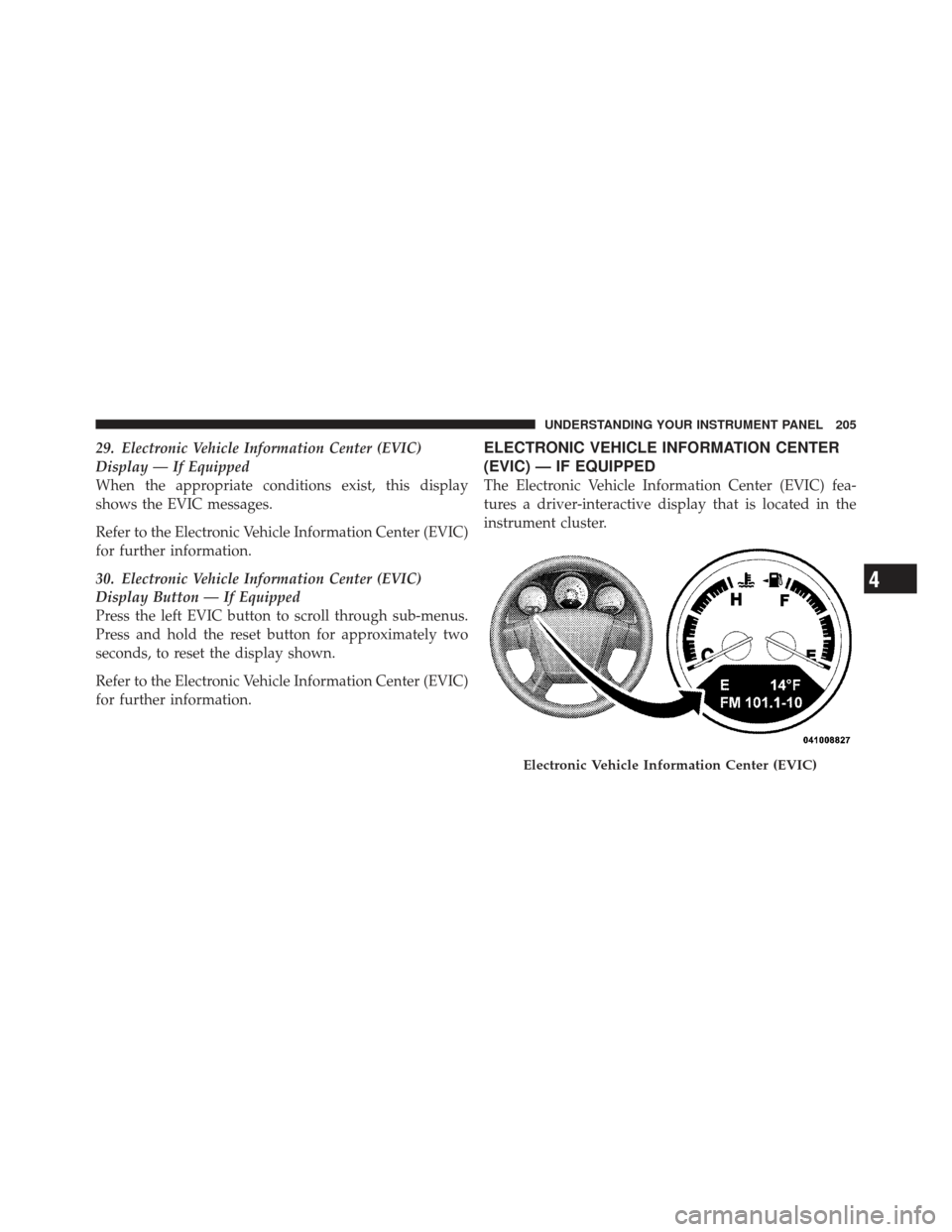
29. Electronic Vehicle Information Center (EVIC)
Display — If Equipped
When the appropriate conditions exist, this display
shows the EVIC messages.
Refer to the Electronic Vehicle Information Center (EVIC)
for further information.
30. Electronic Vehicle Information Center (EVIC)
Display Button — If Equipped
Press the left EVIC button to scroll through sub-menus.
Press and hold the reset button for approximately two
seconds, to reset the display shown.
Refer to the Electronic Vehicle Information Center (EVIC)
for further information.ELECTRONIC VEHICLE INFORMATION CENTER
(EVIC) — IF EQUIPPED
The Electronic Vehicle Information Center (EVIC) fea-
tures a driver-interactive display that is located in the
instrument cluster.
Electronic Vehicle Information Center (EVIC)
4
UNDERSTANDING YOUR INSTRUMENT PANEL 205
Page 209 of 486
•Gate Ajar (with a single chime)
•Headlamps or Park Lamps On
•Key In Ignition
•Check TPM System
•Oil Change Required
Oil Change Required — If Equipped
Your vehicle is equipped with an engine oil change
indicator system. The “Change Oil” message will flash in
the instrument cluster odometer for approximately 5 sec-
onds after a single chime has sounded to indicate the next
scheduled oil change interval. The engine oil change
indicator system is duty cycle based, which means the
engine oil change interval may fluctuate dependent upon
your personal driving style.Unless reset, this message will continue to display each
time you turn the ignition switch to the ON/RUN
position. To turn off the message temporarily, press and
release the Trip Odometer button on the instrument
cluster. To reset the oil change indicator system (after
performing the scheduled maintenance), refer to the
following procedure.
1. Turn the ignition switch to the ON position (do not
start the engine.)
2. Fully depress the accelerator pedal slowly three times
within 10 seconds.
3. Turn the ignition switch to the OFF/LOCK position.
NOTE:
If the indicator message illuminates when you
start the vehicle, the oil change indicator system did not
reset. If necessary, repeat this procedure.
4
UNDERSTANDING YOUR INSTRUMENT PANEL 207
Page 303 of 486
WARNING! (Continued)
•Never leave children alone in a vehicle. Leaving
unattended children in a vehicle is dangerous for a
number of reasons. A child or others could be
seriously or fatally injured. Do not leave the
ignition key in the ignition switch. A child could
operate power windows, other controls, or move
the vehicle.
The following indicators should be used to ensure that
you have engaged the shift lever into the PARK position:
•When shifting into PARK firmly move the shift lever
all the way forward until it stops.
•Look at the instrument cluster to ensure it is in the
PARK position.
CAUTION!
Before moving the shift lever out of PARK, you must
turn the ignition from LOCK to ON so the steering
wheel and shift lever are released. Otherwise, dam-
age to the steering column or shift lever could result.
You must also press the brake pedal.
REVERSE
This range is for moving the vehicle rearward. Use this
range only after the vehicle has come to a complete stop.
NEUTRAL
This range is used when the vehicle is standing for
prolonged periods with the engine running. The engine
may be started in this range. Set the parking brake and
shift the transmission into PARK if you must leave the
vehicle.
5
STARTING AND OPERATING 301
Page 311 of 486
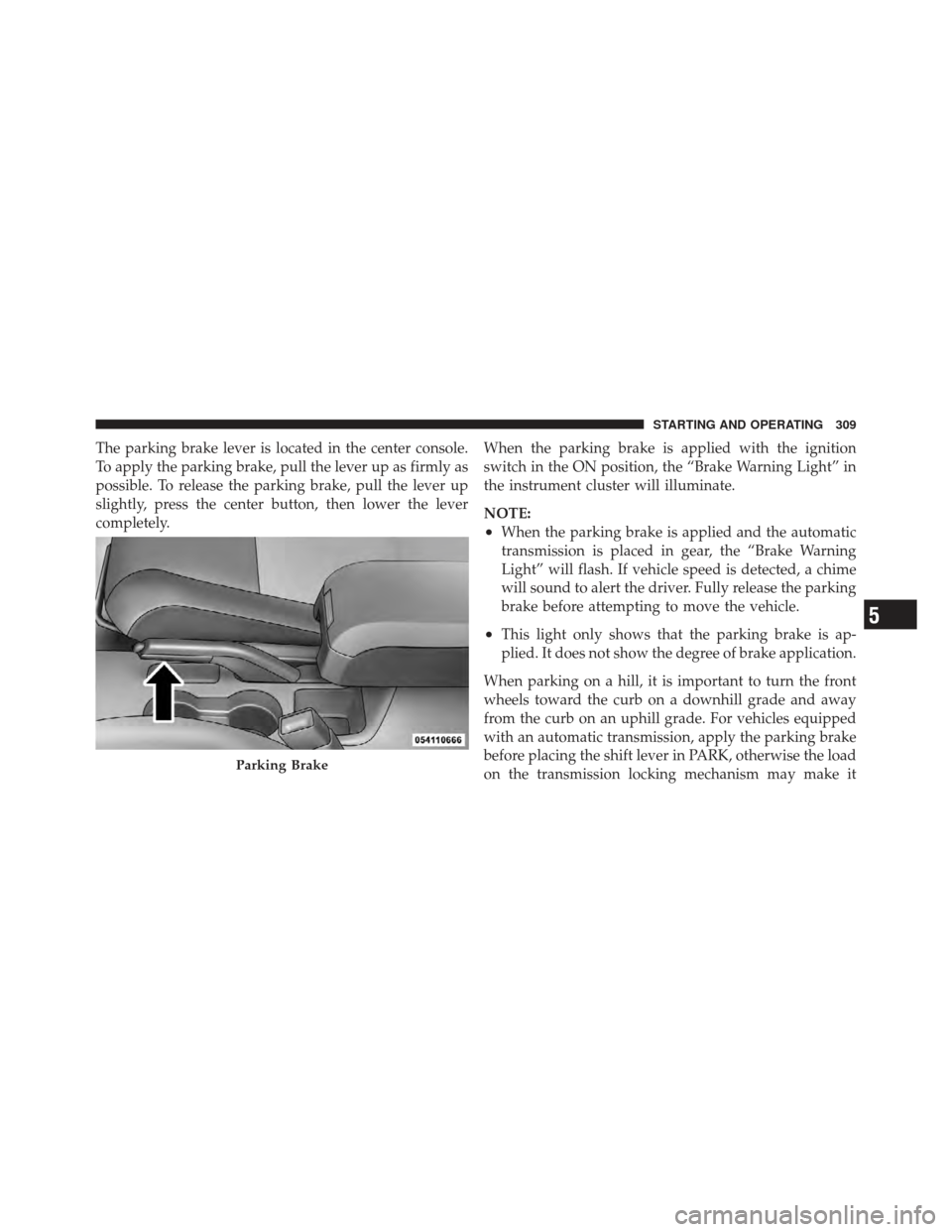
The parking brake lever is located in the center console.
To apply the parking brake, pull the lever up as firmly as
possible. To release the parking brake, pull the lever up
slightly, press the center button, then lower the lever
completely.When the parking brake is applied with the ignition
switch in the ON position, the “Brake Warning Light” in
the instrument cluster will illuminate.
NOTE:
•When the parking brake is applied and the automatic
transmission is placed in gear, the “Brake Warning
Light” will flash. If vehicle speed is detected, a chime
will sound to alert the driver. Fully release the parking
brake before attempting to move the vehicle.
•This light only shows that the parking brake is ap-
plied. It does not show the degree of brake application.
When parking on a hill, it is important to turn the front
wheels toward the curb on a downhill grade and away
from the curb on an uphill grade. For vehicles equipped
with an automatic transmission, apply the parking brake
before placing the shift lever in PARK, otherwise the load
on the transmission locking mechanism may make it
Parking Brake
5
STARTING AND OPERATING 309
Page 321 of 486
mode is overcome, turn ESC back on by momentarily
pressing the “ESC Off” switch. This may be done while
the vehicle is in motion.
WARNING!
The Electronic Stability Control (ESC) cannot pre-
vent the natural laws of physics from acting on the
vehicle, nor can it increase the traction afforded by
prevailing road conditions. ESC cannot prevent acci-
dents, including those resulting from excessive speed
in turns, driving on very slippery surfaces, or hydro-
planing. Only a safe, attentive, and skillful driver can
prevent accidents. The capabilities of an ESC
equipped vehicle must never be exploited in a reck-
less or dangerous manner which could jeopardize the
user ’s safety or the safety of others.
ESC Activation/Malfunction Indicator Light and
ESC OFF Indicator Light
The “ESC Activation/Malfunction Indicator
Light” in the instrument cluster will come on
when the ignition switch is turned to the ON
position. It should go out with the engine
running. If the “ESC Activation/Malfunction Indicator
Light” comes on continuously with the engine running, a
malfunction has been detected in the ESC system. If this
light remains on after several ignition cycles, and the
vehicle has been driven several miles (kilometers) at
speeds greater than 30 mph (48 km/h), see your autho-
rized dealer as soon as possible to have the problem
diagnosed and corrected.
The “ESC Activation/Malfunction Indicator Light” (lo-
cated in the instrument cluster) starts to flash as soon as
the tires lose traction and the ESC system becomes active.
The “ESC Activation/Malfunction Indicator Light” also
flashes when TCS is active. If the “ESC Activation/
5
STARTING AND OPERATING 319
Page 345 of 486
NOTE:
•The TPMS is not intended to replace normal tire care
and maintenance or to provide warning of a tire failure
or condition.
•The TPMS should not be used as a tire pressure gauge
while adjusting your tire pressure.
•Driving on a significantly under-inflated tire causes
the tire to overheat and can lead to tire failure.
Under-inflation also reduces fuel efficiency and tire
tread life, and may affect the vehicle’s handling and
stopping ability.
•The TPMS is not a substitute for proper tire mainte-
nance, and it is the driver ’s responsibility to maintain
correct tire pressure using an accurate tire gauge, even
if under-inflation has not reached the level to trigger
illumination of the Tire Pressure Monitoring Telltale
Light.
•Seasonal temperature changes will affect tire pressure,
and the TPMS will monitor the actual tire pressure in
the tire.
Base System
This is the TPMS warning indicator located in the
instrument cluster.
The TPMS uses wireless technology with wheel rim
mounted electronic sensors to monitor tire pressure lev-
els. Sensors, mounted to each wheel as part of the valve
stem, transmit tire pressure readings to the Receiver
Module.
NOTE: It is particularly important for you to check the
tire pressure in all of the tires on your vehicle regularly
and to maintain the proper pressure.
The TPMS consists of the following components:
•Receiver Module
5
STARTING AND OPERATING 343