instrument cluster DODGE CALIBER SRT 2008 1.G User Guide
[x] Cancel search | Manufacturer: DODGE, Model Year: 2008, Model line: CALIBER SRT, Model: DODGE CALIBER SRT 2008 1.GPages: 373, PDF Size: 3 MB
Page 160 of 373
10. Oil Pressure Light
Shows low engine oil pressure. The light will come
on and remain on when the ignition switch is
turned from the OFF to the ON position, and the light
will turn off after the engine is started. If the bulb does
not come on during starting, have the system checked by
an authorized dealer.
If the light comes on and remains on while driving, stop
the vehicle and shut off the engine. DO NOT OPERATE
THE VEHICLE UNTIL THE CAUSE IS CORRECTED.
The light does not show the quantity of oil in the engine.
This can be determined using the procedure shown in
Section 7.
11. Engine Temperature Warning Light
This light warns of an overheated engine condi-
tion. If the engine is critically hot, a warning chime
will sound 10 times. After the chime turns off, the
engine will still be critically hot until the light goesout. Refer to ªTemperature Gauge' later in this section for
steps that you can take to slow down an impending
overheat condition.
12. Speedometer
Indicates vehicle speed.
13. Odometer/Trip Odometer
This display indicates the total distance the vehicle has
been driven. Also, the cluster will display, replacing the
odometer/trip odometer, vehicle warning messages such
as: door/gate ajar and gASCAP (loose gas cap) and
Change Oil message. Loose gas cap will be displayed
from the Odometer/Trip Odometer on all models.
NOTE:If vehicle is equipped with the optional Elec-
tronic Vehicle Information Center (EVIC) in the instru-
ment cluster, all warnings including ªdoorº, and ªgATEº
and Oil Change Required will only be displayed in the
UNDERSTANDING YOUR INSTRUMENT PANEL 159
4
Page 161 of 373
EVIC display. For additional information, refer to ªElec-
tronic Vehicle Information Center Ð If Equippedº in
Section 3.
Change Oil Message
Your vehicle is equipped with an engine oil change
indicator system. The ªChange Oilº message will flash in
the instrument cluster odometer for approximately 12
seconds after a single chime has sounded to indicate the
next scheduled oil change interval. The engine oil change
indicator system is duty cycle based, which means the
engine oil change interval may fluctuate dependent upon
your personal driving style.
Unless reset, this message will continue to display each
time you turn the ignition switch to the ON/RUN
position. To turn off the message temporarily, press and
release the Trip Odometer button on the instrumentcluster. To reset the oil change indicator system (after
performing the scheduled maintenance) refer to the fol-
lowing procedure.
1. Turn the ignition switch to the ON position(Do not
start the engine).
2. Fully depress the accelerator pedal slowly three
times within 10 seconds.
3. Turn the ignition switch to the OFF/LOCK position.
NOTE:If the indicator message illuminates when you
start the vehicle, the oil change indicator system did not
reset. If necessary repeat this procedure.
14. Cruise Indicator Ð If Equipped
This indicator shows that the Speed Control
System is ON.
160 UNDERSTANDING YOUR INSTRUMENT PANEL
Page 164 of 373
22. Tire Pressure Monitor Light Ð If Equipped
Each tire, including the spare (if provided),
should be checked monthly when cold and
inflated to the inflation pressure recommended
by the vehicle manufacturer on the vehicle
placard or tire inflation pressure label. (If your vehicle
has tires of a different size than the size indicated on the
vehicle placard or tire inflation pressure label, you should
determine the proper tire inflation pressure for those
tires.)
As an added safety feature, your vehicle has been
equipped with a tire pressure monitoring system (TPMS)
that illuminates a low tire pressure telltale when one or
more of your tires are significantly under-inflated. Ac-
cordingly, when the low tire pressure telltale illuminates,
you should stop and check your tires as soon as possible,
and inflate them to the proper pressure. Driving on asignificantly under-inflated tire causes the tire to over-
heat and can lead to tire failure. Under-inflation also
reduces fuel efficiency and tire tread life, and may affect
the vehicle's handling and stopping ability.
Please note that the TPMS is not a substitute for proper
tire maintenance, and it is the driver 's responsibility to
maintain correct tire pressure, even if under-inflation has
not reached the level to trigger illumination of the TPMS
low tire pressure telltale.
The Tire Pressure Monitoring Telltale Lamp will illumi-
nate in the instrument cluster, and an audible chime will
be activated when one or more tire pressures is low. The
Tire Pressure Monitoring Telltale Lamp will flash on and
off for 60 seconds when a system fault is detected. The
flash cycle will repeat every ten minutes or until the fault
condition is removed and reset.
UNDERSTANDING YOUR INSTRUMENT PANEL 163
4
Page 167 of 373
ELECTRONIC VEHICLE INFORMATION CENTER
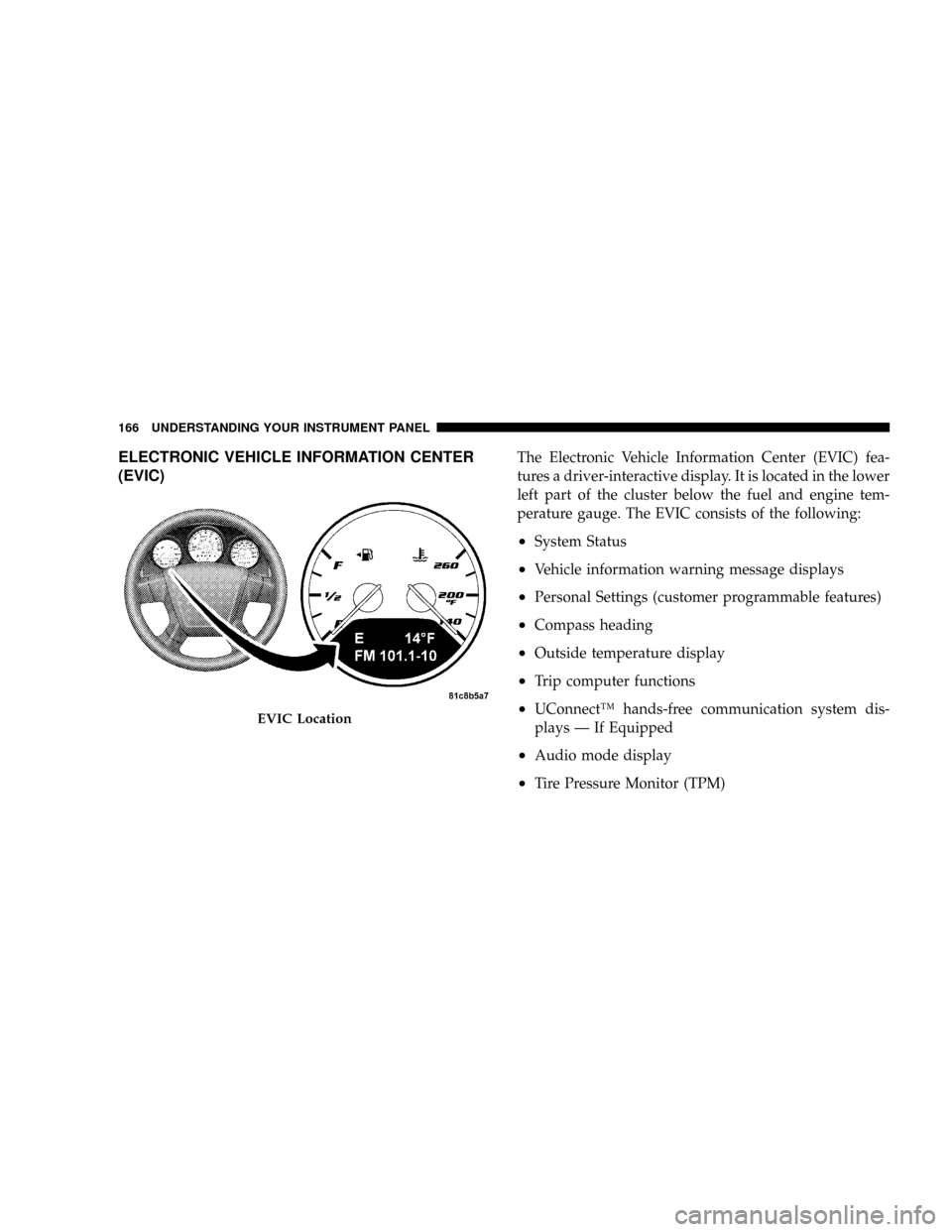
(EVIC)The Electronic Vehicle Information Center (EVIC) fea-
tures a driver-interactive display. It is located in the lower
left part of the cluster below the fuel and engine tem-
perature gauge. The EVIC consists of the following:
²System Status
²Vehicle information warning message displays
²Personal Settings (customer programmable features)
²Compass heading
²Outside temperature display
²Trip computer functions
²UConnectŸ hands-free communication system dis-
plays Ð If Equipped
²Audio mode display
²Tire Pressure Monitor (TPM)
EVIC Location
166 UNDERSTANDING YOUR INSTRUMENT PANEL
Page 229 of 373
CAUTION!
If you skip more than one gear while downshifting
or downshift at too high a vehicle speed, you could
damage the engine, transmission, or clutch.
To maintain a safe speed and prolong brake life, shift
down to 2nd or 1st when descending a steep grade.
When turning a corner, or driving up a steep grade,
downshift early so that the engine will not be overbur-
dened.
PARKING BRAKE
When the parking brake is applied with the
ignition on, the Brake Light in the instrument
cluster will come on.
NOTE:This light only shows that the parking brake is
on. It does not show the degree of brake application.
If the parking brake is applied while the vehicle is
moving, a chime will sound to alert the driver. The chime
will sound up to 10 times or until the vehicle has
returned to a stop.
Before leaving the vehicle, make sure that the parking
brake is set. To set the parking brake, pull up firmly on
the lever. Also place the gear selector in Reverse. To
release the parking brake, apply the brake pedal, pull up
slightly on the lever, then depress the button on the end
of the lever and push the lever fully down toward the
floor.
228 STARTING AND OPERATING
Page 259 of 373
²Seasonal temperature changes will affect tire pressure,
and the TPM system will monitor the actual tire
pressure in the tire.
Base System ± If Equipped
This is the Tire Pressure Monitoring System warn-
ing indicator located in the instrument cluster.
The Tire Pressure Monitor System (TPMS) uses wireless
technology with wheel rim mounted electronic sensors to
monitor tire pressure levels. Sensors, mounted to each
wheel as part of the valve stem, transmit tire pressure
readings to the Receiver Module.
NOTE:It is particularly important for you to check the
tire pressure in all of the tires on your vehicle regularly
and to maintain the proper pressure.The TPMS consists of the following components:
²Receiver Module
²4 Tire Pressure Monitoring Sensors
²Tire Pressure Monitoring Telltale Light
The Tire Pressure Monitoring Telltale Lamp will illumi-
nate in the instrument cluster, and an audible chime will
be activated when one or more of the four active road tire
pressures are low. Should this occur, you should stop as
soon as possible, check the inflation pressure of each tire
on your vehicle, and inflate each tire to the vehicle's
recommended cold placard pressure value. The system
will automatically update and the Tire Pressure Monitor-
ing Lamp will extinguish once the updated tire pressures
have been received. The vehicle may need to be driven
for up to 10 minutes above 15 mph (25 kph) to receive
this information.
258 STARTING AND OPERATING
Page 261 of 373
5. Once you repair or replace the original road tire, and
reinstall it on the vehicle in place of the compact spare
tire, the TPMS will update automatically and the TPM
Telltale Light will turn OFF, as long as no tire pressure is
below the low-pressure warning limit in any of the four
active road tires. The vehicle may need to be driven for
up to 10 minutes above 15 mph (25 km/h) in order for the
TPMS to receive this information.
Premium System ± If Equipped
The Tire Pressure Monitor System (TPMS) uses wireless
technology with wheel rim mounted electronic sensors to
monitor tire pressure levels. Sensors, mounted to each
wheel as part of the valve stem, transmit tire pressure
readings to the Receiver Module.
NOTE:It is particularly important, for you to check the
tire pressure in all of your tires regularly and to maintain
the proper pressure.The TPMS consists of the following components:
²Receiver Module
²4 Tire Pressure Monitoring Sensors
²3 Trigger Modules (mounted in three of the four wheel
wells)
²Various Tire Pressure Monitoring System Messages,
which display in the Electronic Vehicle Information
Center (EVIC)
²Yellow Tire Pressure Monitoring Telltale Light
Tire Pressure Monitoring Low Pressure Warnings
The Tire Pressure Monitoring Telltale Lamp will illumi-
nate in the instrument cluster, and an audible chime will
be activated when one or more of the four active road tire
pressures are low. The audible chime will sound once
every ignition cycle for each condition that it detects. In
260 STARTING AND OPERATING
Page 270 of 373
NOTE:When the fuel nozzle ªclicksº or shuts off, the
fuel tank is full.
WARNING!
²Never have any smoking materials lit in or near
the vehicle when the gas cap is removed or the
tank filled.
²Never add fuel when the engine is running. This is
in violation of most state and federal fire regula-
tions and will cause the malfunction indicator
light to turn on.
NOTE:Tighten the gas cap about 1/4 turn until you
hear one click. This is an indication that cap is properly
tightened.If the gas cap is not tighten properly, the Malfunction
Indicator Light will come on. Be sure the gas cap is
tightened every time the vehicle is refueled.
WARNING!
A fire may result if gasoline is pumped into a
portable container that is inside of a vehicle. You
could be burned. Always place gas containers on the
ground while filling.
Loose Fuel Filler Cap Message
If the vehicle diagnostic system determines that the fuel
filler cap is loose or improperly installed, a ªGASCAPº
message will be displayed in the Odometer/Trip Odom-
eter in the instrument cluster. Refer to ªInstrument
Cluster Descriptionº in Section 4 of this manual. Tighten
the fuel filler cap properly and press the odometer/trip
odometer reset button to turn the message off. If the
STARTING AND OPERATING 269
5
Page 275 of 373
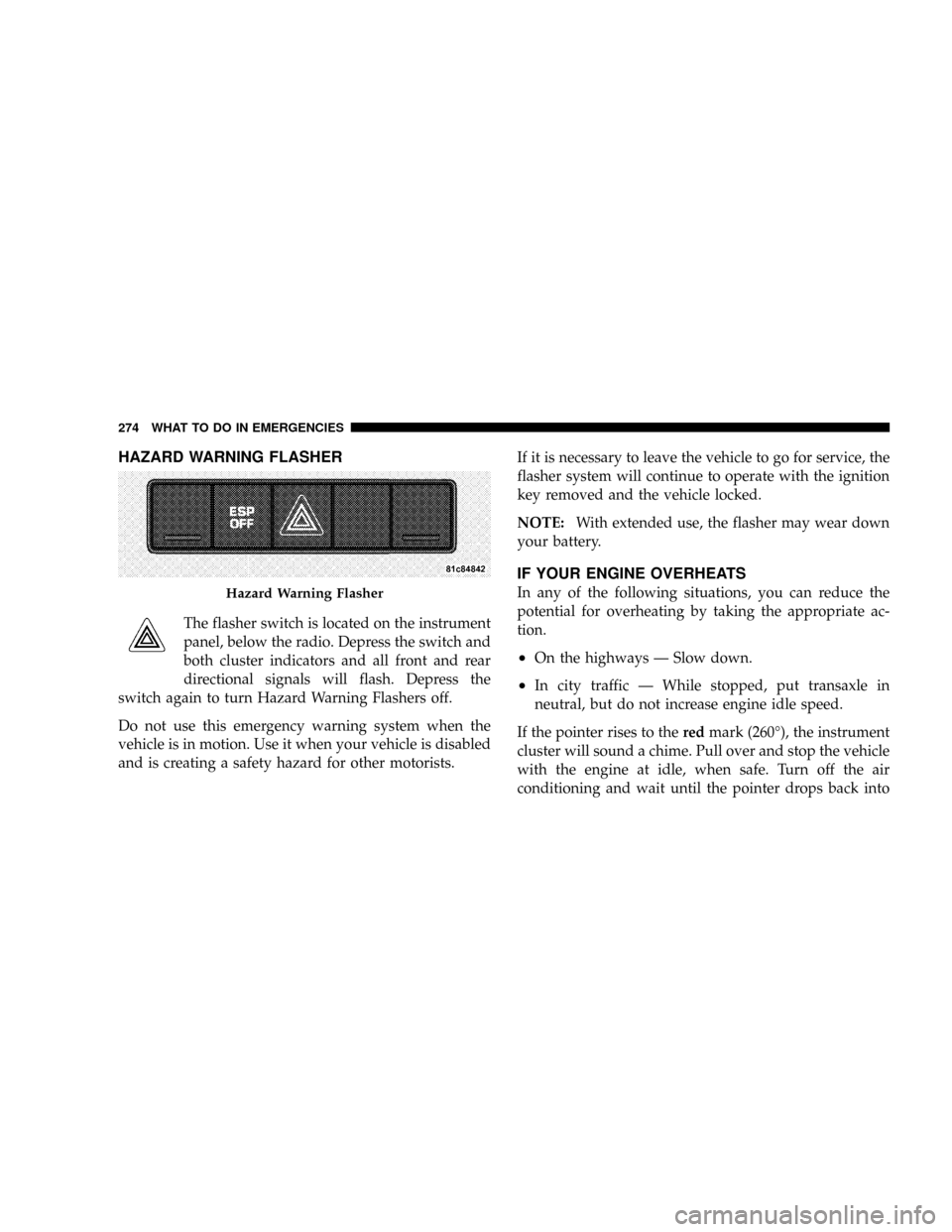
HAZARD WARNING FLASHER
The flasher switch is located on the instrument
panel, below the radio. Depress the switch and
both cluster indicators and all front and rear
directional signals will flash. Depress the
switch again to turn Hazard Warning Flashers off.
Do not use this emergency warning system when the
vehicle is in motion. Use it when your vehicle is disabled
and is creating a safety hazard for other motorists.If it is necessary to leave the vehicle to go for service, the
flasher system will continue to operate with the ignition
key removed and the vehicle locked.
NOTE:With extended use, the flasher may wear down
your battery.
IF YOUR ENGINE OVERHEATS
In any of the following situations, you can reduce the
potential for overheating by taking the appropriate ac-
tion.
²On the highways Ð Slow down.
²In city traffic Ð While stopped, put transaxle in
neutral, but do not increase engine idle speed.
If the pointer rises to theredmark (260É), the instrument
cluster will sound a chime. Pull over and stop the vehicle
with the engine at idle, when safe. Turn off the air
conditioning and wait until the pointer drops back into
Hazard Warning Flasher
274 WHAT TO DO IN EMERGENCIES
Page 294 of 373
Loose Fuel Filler Cap Message
After fuel is added, the vehicle diagnostic system can
determine if the fuel filler cap is possibly loose or
improperly installed. A GASCAP message will be dis-
played in the instrument cluster. Tighten the gas cap until
a9clicking9sound is heard. This is an indication that the
gas cap is properly tightened. Press the trip odometer
reset button to turn off the message. If the problem
persists, the message will appear the next time the
vehicle is started. This might indicate a damaged cap. If
the problem is detected twice in a row, the system will
turn on the Malfunction Indicator Light (MIL). Resolving
the problem will turn the MIL light off.
EMISSIONS INSPECTION AND MAINTENANCE
PROGRAMS
In some localities, it may be a legal requirement to pass
an inspection of your vehicle's emissions control system.
Failure to pass could prevent vehicle registration.
For states, which have an I/M (Inspection and
Maintenance) requirement, this check verifies the
MIL is functioning and is not on when the engine
is running, and that the OBD system is ready for testing.
Normally, the OBD system will be ready. The OBD
system maynotbe ready if your vehicle was recently
serviced, if you recently had a dead battery, or a battery
replacement. If the OBD system should be determined
not ready for the I/M test, your vehicle may fail the test.
MAINTAINING YOUR VEHICLE 293
7