tow DODGE CALIBER SRT 2008 1.G User Guide
[x] Cancel search | Manufacturer: DODGE, Model Year: 2008, Model line: CALIBER SRT, Model: DODGE CALIBER SRT 2008 1.GPages: 373, PDF Size: 3 MB
Page 91 of 373
Please refer to the 24-Hour ªTowing Assistanceº cover-
age details in the Warranty information booklet and on
the 24±Hour Towing Assistance Card.
Paging
To learn how to page refer to9Working with Automated
Systems.9Paging works properly except for pagers of
certain companies which time-out a little too soon to
work properly with the UConnectŸ system.
Voice Mail Calling
To learn how to access your voice mail, refer to9Working
with Automated Systems.9
Working with Automated Systems
This method is designed to be used in instances where
one generally has to press numbers on the cellular phone
keypad while navigating through an automated tele-
phone system.You can use your UConnectŸ system to access a voice-
mail system or an automated service, such as, paging
service or automated customer service. Some services
require immediate response selection, in some instances,
that may be too quick for use of UConnectŸ system.
When calling a number with your UConnectŸ system
that normally requires you to enter in a touch-tone
sequence on your cellular phone keypad, you can push
the ªVoice Recognitionº button and say the sequence you
wish to enter followed by the word9Send.9For example,
if required to enter your pin number followed with a
pound3746#,youcanpresstheªVoice Recognitionº
button and say93746#Send.9Saying a number, or
sequence of numbers, followed by9Send9is also to be
used to navigate through an automated customer service
center menu structure and to leave a number on a pager.
90 UNDERSTANDING THE FEATURES OF YOUR VEHICLE
Page 103 of 373
Voice Commands
Primary Alternate(s)
language
list names
list phones
mobile
mute
mute off
new entry
no
pager
pair a phone
phone pairing pairing
phonebook phone book
previous
record againVoice Commands
Primary Alternate(s)
redial
return to main menu return or main menu
select phone select
send
set up phone settings or phone
set up
towing assistance
transfer call
UConnectŸ Tutorial
try again
voice training
work
yes
102 UNDERSTANDING THE FEATURES OF YOUR VEHICLE
Page 116 of 373
Passing Light
You can signal another vehicle with your headlights by
lightly pulling the Multi-Function Control Lever toward
you. This will cause the headlights to turn on at high
beam and remain on until the lever is released.
NOTE:If the Multi-Function Control Lever is held in
the flash to pass position for more than 15 seconds, the
high beams will shut off. If this occurs, wait 30 seconds
for the next flash to pass operation.
Daytime Running Lights (DRL) Ð If Equipped
Functionality
The high beam lights will come on as Daytime Running
Lights (DRL) at DRL intensity (lower), whenever the
ignition is on, the engine is running, the headlight switch
is off, the parking brake is off, the turn signal is off, and
the gear shift is in any position except park.NOTE:On this vehicle, the daytime running light will
automatically turn off when the turn signals or hazard
warning flashers are in operation and automatically turn
back on when the turn signals or hazard warning flashers
are not operating.
WINDSHIELD WIPERS AND WASHERS
The wipers and washers are operated by a switch
on the control lever. The lever is located on the
right side of the steering column.
Windshield Washers
To use the washer, pull the control lever toward you and
hold while spray is desired. If the lever is pulled while in
the delay range, the wiper will operate in low speed for
two wipe cycles after the lever is released, and then
resume the intermittent interval previously selected.
UNDERSTANDING THE FEATURES OF YOUR VEHICLE 115
3
Page 121 of 373
WARNING!
Leaving the Electronic Speed Control system on
when not in use is dangerous. You could accidentally
set the system or cause it to go faster than you want.
You could lose control and have an accident. Always
leave the system OFF when you are not using it.
To Set At A Desired Speed:
When the vehicle has reached the desired speed, press
down on the lever and release. Release the accelerator
and the vehicle will operate at the selected speed.
NOTE:The vehicle should be traveling at a steady
speed and on level ground before pressing the SET lever.
To Deactivate:
A soft tap on the brake pedal, pulling the speed control
lever towards you ªCANCELº, or normal brake or clutch
pressure while slowing the vehicle will deactivate speed
control without erasing the set speed memory. Pressing
the ON/OFF button or turning off the ignition switch
erases the set speed memory.
To Resume Speed:
To resume a previously set speed, push the ªRESUME
ACCELº lever up and release. Resume can be used at any
speed above 20 mph (32 km/h).
To Vary The Speed Setting:
When the speed control is ON, speed can be increased by
pushing up and holding ªRESUME ACCELº. Release the
lever when the desired speed is reached, and the new
speed will be set.
120 UNDERSTANDING THE FEATURES OF YOUR VEHICLE
Page 137 of 373
held forward again. To ensure sunroof is fully closed,
press and hold switch until sunroof has completely
stopped moving.
Closing Sunroof Ð Express Mode
By pressing the switch forward and releasing, the sunroof
will fully close from any position and stop at the end of
travel automatically. This is called Express Close. During
Express Close, any activation of the sunroof switch will
stop the sunroof.
Pinch Protect Feature
This feature will detect an obstruction in the opening of
the sunroof during Express Close operation. If an ob-
struction in the path of the sunroof is detected, the
sunroof will automatically retract. Next, press the switch
forward and release to Express Close.
Pinch Protect Override
If a known obstruction (ice, debris, etc.) prevents closing,
press the switch forward and hold for two seconds after
the reversal occurs. This allows the sunroof to move
towards the close position.
NOTE:Pinch protection is disabled while the switch is
pressed.
Venting Sunroof Ð Express
Press and release the ªVº button, and the sunroof will
open to the vent position. This is called Express Vent, and
will occur regardless of the sunroof position. During
Express Vent operation, any movement of the switch will
stop the sunroof.
136 UNDERSTANDING THE FEATURES OF YOUR VEHICLE
Page 141 of 373
Electrical Outlet Use With Engine Off
CAUTION!
²Many accessories that can be plugged in draw
power from the vehicle's battery, even when not in
use (i.e. cellular phones, etc.). Eventually, if
plugged in long enough, the vehicle's battery will
discharge sufficiently to degrade battery life
and/or prevent engine starting.
²Accessories that draw higher power (i.e. coolers,
vacuum cleaners, lights, etc.); will degrade the
battery even more quickly. Only use these inter-
mittently and with greater caution.
²After the use of high power draw accessories, or
long periods of the vehicle not being started (with
accessories still plugged in), the vehicle must be
driven a sufficient length of time to allow the
generator to recharge the vehicle's battery.
CONSOLE FEATURES
WARNING!
Do not operate this vehicle with the console compart-
ment lid in the open position. Cell phones, music
players, and other hand held electronic devices
should be stowed while driving. Use of these devices
while driving can cause an accident due to distrac-
tion, resulting in death or injury.
The floor console's sliding armrest moves forward 3
inches to accommodate shorter drivers. The armrest lid
also includes a unique flip pocket for holding or stowing
a phone or an MP3 player. The bin inside the console can
hold up to 10 CD jewel cases or other items securely out
of sight.
140 UNDERSTANDING THE FEATURES OF YOUR VEHICLE
Page 142 of 373
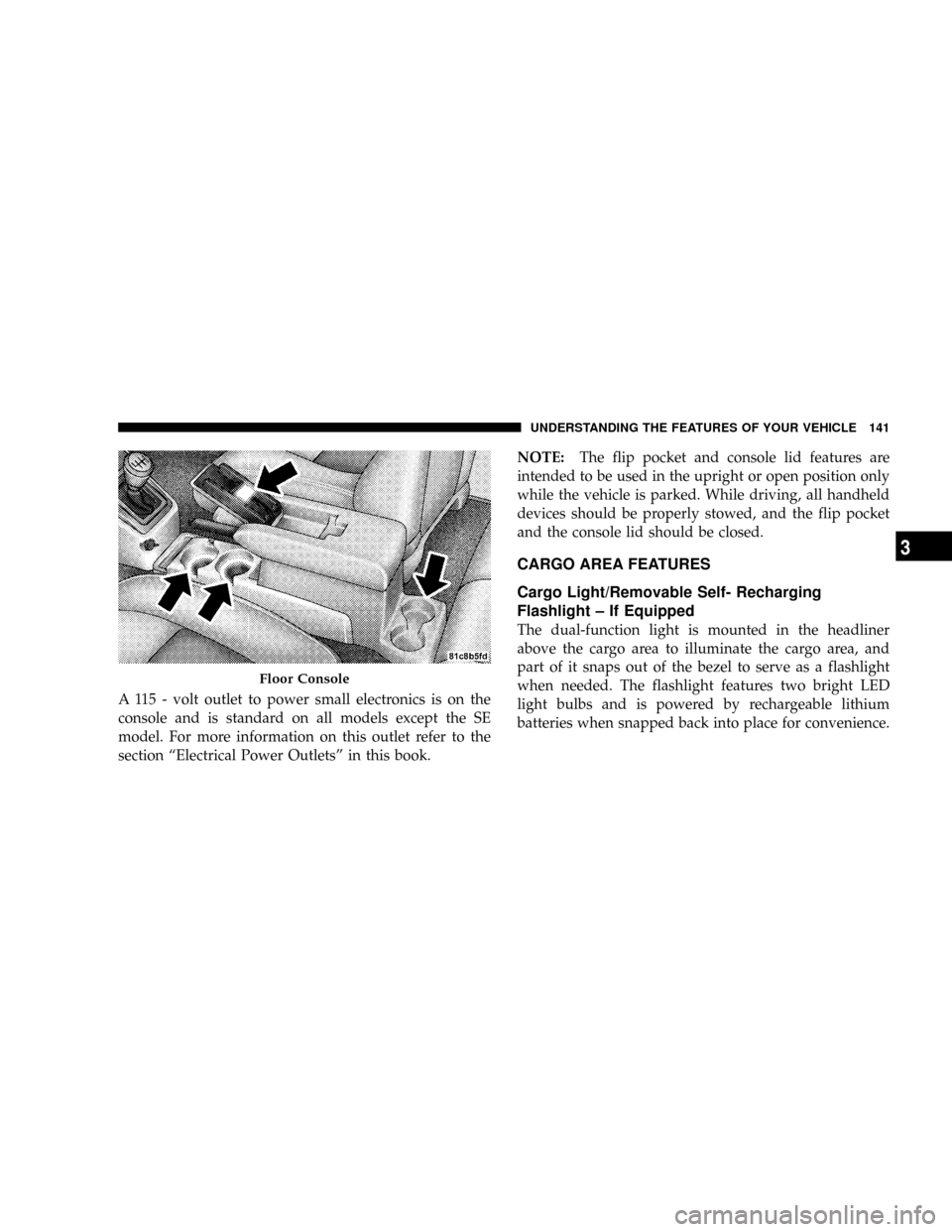
A 115 - volt outlet to power small electronics is on the
console and is standard on all models except the SE
model. For more information on this outlet refer to the
section ªElectrical Power Outletsº in this book.NOTE:The flip pocket and console lid features are
intended to be used in the upright or open position only
while the vehicle is parked. While driving, all handheld
devices should be properly stowed, and the flip pocket
and the console lid should be closed.
CARGO AREA FEATURES
Cargo Light/Removable Self- Recharging
Flashlight ± If Equipped
The dual-function light is mounted in the headliner
above the cargo area to illuminate the cargo area, and
part of it snaps out of the bezel to serve as a flashlight
when needed. The flashlight features two bright LED
light bulbs and is powered by rechargeable lithium
batteries when snapped back into place for convenience.
Floor Console
UNDERSTANDING THE FEATURES OF YOUR VEHICLE 141
3
Page 149 of 373
ROOF LUGGAGE RACK Ð IF EQUIPPED
An optional dealer installed-roof rack with cross rails is
available through MOPAR for added cargo versatility.
COOLED BEVERAGE STORAGE BIN/GLOVE
COMPARTMENT Ð IF EQUIPPED
NOTE:The use of the Cooled Beverage Storage Bin is
for non-perishable beverages only.
The upper storage bin door swings up to present the
contents of the long, shallow bin that can store items out
of sight. Beneath this bin is the glove compartment. The
large glove compartment door swings down on damp-
ened hinges and features two levels of storage: the upperbin functions as a Cooled Beverage Storage Bin for
vehicles equipped with air conditioning for storing up to
four 20 ounce (0.6 Liter) bottles or cans. When desired,
cool air enters the compartment to keep the contents cool,
depending on ambient temperature and A/C settings.
To operate the beverage cooler, pull the slide control
about 1/2 inch (12 mm) toward the passenger compart-
ment. This will allow cool air to enter the beverage cooler.
To shut off the beverage cooler when not in use, push the
slide control back 1/2 inch (12 mm). This will prevent
cool air from entering the passenger compartment when
in heat mode.
148 UNDERSTANDING THE FEATURES OF YOUR VEHICLE
Page 162 of 373
15. Odometer/Trip Odometer Reset Knob
Press this button to change the display from odometer to
either of the two trip odometer settings. Trip A or Trip B
will appear when in the trip odometer mode. Push in and
hold the button for two seconds to reset the trip odometer
to 0 miles or kilometers. The odometer must be in trip
mode to reset.
16. Electronic Throttle Control Indicator Light
This light informs you of a problem with the
Electronic Throttle Control system. If a prob-
lem is detected, the light will come on while the
engine is running. If the light remains lit with
the engine running your vehicle will usually be drivable
and not need towing, however see your dealer for service
as soon as possible.
If the light is flashing when the engine is running you
may experience power loss, an elevated/rough idle, andincreased brake pedal effort, and your vehicle may
require towing. Immediate service is required.
The light will come on when the ignition switch is first
turned on and remain on briefly as a bulb check. This is
normal. If the light does not come on during starting,
have the system checked by an authorized dealer.
17. Electronic Stability Program (ESP) Indicator
Light/Traction Control System (TCS) Indicator Light Ð
If Equipped
If this indicator light flashes during accelera-
tion, apply as little throttle as possible. While
driving, ease up on the accelerator. Adapt your
speed and driving to the prevailing road con-
ditions, and do not switch off the ESP, or TCS Ð if
equipped.
18. Brake Warning Light
The red ªBRAKEº warning light will come on when the
ignition key is first turned on, and stay on briefly as a
UNDERSTANDING YOUR INSTRUMENT PANEL 161
4
Page 165 of 373
CAUTION!
The TPMS has been optimized for the original
equipment tires and wheels. TPMS pressures and
warning have been established for the tire size
equipped on your vehicle. Undesirable system opera-
tion or sensor damage may result when using re-
placement equipment that is not of the same size,
type, and/or style. Aftermarket wheels can cause
sensor damage. Do not use tire sealant from a can, or
balance beads if your vehicle is equipped with a
TPMS, as damage to the sensors may result.
23. Malfunction Indicator Light
This light is part of an onboard diagnostic system
called OBD that monitors emissions, engine, and
automatic transmission control systems. The light
will illuminate when the key is in the ON/RUN positionbefore engine start. If the bulb does not come on when
turning the key from OFF to ON/RUN, have the condi-
tion checked promptly.
Certain conditions such as a loose or missing gas cap,
poor fuel quality, etc. may illuminate the light after
engine start. The vehicle should be serviced if the light
stays on through several of your typical driving cycles. In
most situations the vehicle will drive normally and will
not require towing.
If the Malfunction Indicator Light flashes when the
engine is running, serious conditions may exist that
could lead to immediate loss of power or severe catalytic
converter damage. The vehicle should be serviced as
soon as possible if this occurs.
164 UNDERSTANDING YOUR INSTRUMENT PANEL