clock DODGE CALIBER SRT 2009 1.G User Guide
[x] Cancel search | Manufacturer: DODGE, Model Year: 2009, Model line: CALIBER SRT, Model: DODGE CALIBER SRT 2009 1.GPages: 411, PDF Size: 6.36 MB
Page 220 of 411
3. After adjusting the hours, press the right side Tune/
Scroll control knob to set the minutes. The minutes will
begin to blink.
4. Adjust the minutes using the right side Tune/Scroll
control knob. Press the Tune/Scroll control knob to save
time change.
5. To exit, press any button/knob or wait five seconds.
The clock can also be set by pressing the SETUP button.
For vehicles equipped with satellite radio, press the
SETUP button, use the Tune/Scroll control to select SET
CLOCK, and then follow the above procedure, starting at
Step 2. For vehicles not equipped with satellite radio,
press the SETUP button and then follow the above
procedure, starting at Step 2.INFO Button
Press the INFO button for an RDS station (one with call
letters displayed). The radio will return a Radio Text
message broadcast from an FM station (FM mode only).
RW/FF
Pressing the RW (Rewind) or FF (Fast Forward) buttons
causes the tuner to search for the next frequency in the
direction of the arrows. This feature operates in either
AM or FM frequencies.
TUNE Control
Turn the rotary Tune/Scroll control knob clockwise to
increase or counterclockwise to decrease the frequency.
Setting the Tone, Balance, and Fade
Push the rotary Tune/Scroll control knob and BASS will
display. Turn the Tune/Scroll control knob to the right or
left to increase or decrease the bass tones.
218 UNDERSTANDING YOUR INSTRUMENT PANEL
Page 223 of 411
By pressing the SEEK button when the Music Type icon
is displayed, the radio will be tuned to the next frequency
station with the same selected Music Type name. The
Music Type function only operates when in the FM
mode.
If a preset button is activated while in the Music Type
(Program Type) mode, the Music Type mode will be
exited and the radio will tune to the preset station.
SETUP Button
Pressing the SETUP button allows you to select between
the following items:
•Set Clock— Pressing the SELECT button will allow
you to set the clock. Turn the Tune/Scroll control knob
to adjust the hours and then press and turn the
Tune/Scroll control knob to adjust the minutes. Press
the Tune/Scroll control knob again to save changes.
AM/FM Button
Press the button to select either AM or FM mode.
SET/RND Button — To Set the Pushbutton
Memory
When you are receiving a station that you wish to
commit to pushbutton memory, press the SET/RND
button. The symbol SET 1 will now show in the display
window. Select the button (1 to 6) you wish to lock onto
this station and press and release that button. If a button
is not selected within five seconds after pressing the
SET/RND button, the station will continue to play but
will not be stored into pushbutton memory.
You may add a second station to each pushbutton by
repeating the above procedure with this exception: Press
the SET/RND button twice and SET 2 will show in the
display window. Each button can be set for SET 1 and
SET 2 in both AM and FM. This allows a total of 12 AM
UNDERSTANDING YOUR INSTRUMENT PANEL 221
4
Page 233 of 411
SCAN Button (When Equipped)
Pressing the SCAN button causes the tuner to search for
the next channel, pausing for eight seconds before con-
tinuing to the next. To stop the search, press the SCAN
button a second time.
INFO Button — Except REU Radio
Pressing the INFO button will cycle the display informa-
tion between Artist, Song Title, and Composer (if avail-
able). Also, pressing and holding the INFO button for an
additional three seconds will make the radio display the
Song Title all of the time (press and hold again to return
to normal display).
INFO Button — REU Radio
Pressing the INFO button will display information about
Artist, Song Title, and Composer (if available). Pressing
the INFO button again will close the INFO screen.
RW/FF
Pressing the RW (Rewind) or FF (Fast Forward) buttons
causes the tuner to search for the next channel in the
direction of the arrows.
TUNE Control (Rotary)
Turn the rotary Tune/Scroll control knob clockwise to
increase or counterclockwise to decrease the channel.
MUSIC TYPE Button — Except REU Radio
Pressing this button once will turn on the Music Type
mode for five seconds. Pressing the MUSIC TYPE button
or turning the Tune/Scroll control knob within five
seconds will allow the program format type to be se-
lected.
UNDERSTANDING YOUR INSTRUMENT PANEL 231
4
Page 358 of 411
LIGHT BULBS — Interior Bulb Number
Front Header Light......................T578
Center Dome Light......................T578
Rear Cargo/Flashlight.................8–A35LF
LIGHTS BULBS — Exterior Bulb Number
Low Beam/High Beam Headlight............ H13
Front Park/Turn Signal/Side Marker
Light.......................3157AK or 3157A
Front Fog Light.........................9145
Center High-Mounted Stop Light
(CHMSL)...................... LEDAssembly
Rear Turn/Tail/Stop.....................3157
Backup Light.....................W16W (921)
License Light.......................... W5WBULB REPLACEMENT
Headlights/Front Parking/Front Turn Signal
See your authorized dealer for replacement.
Fog Lights
1. Access light through the lower fascia cutout.
2. Rotate bulb and connector 1/4 turn counterclockwise.
356 MAINTAINING YOUR VEHICLE
Page 360 of 411
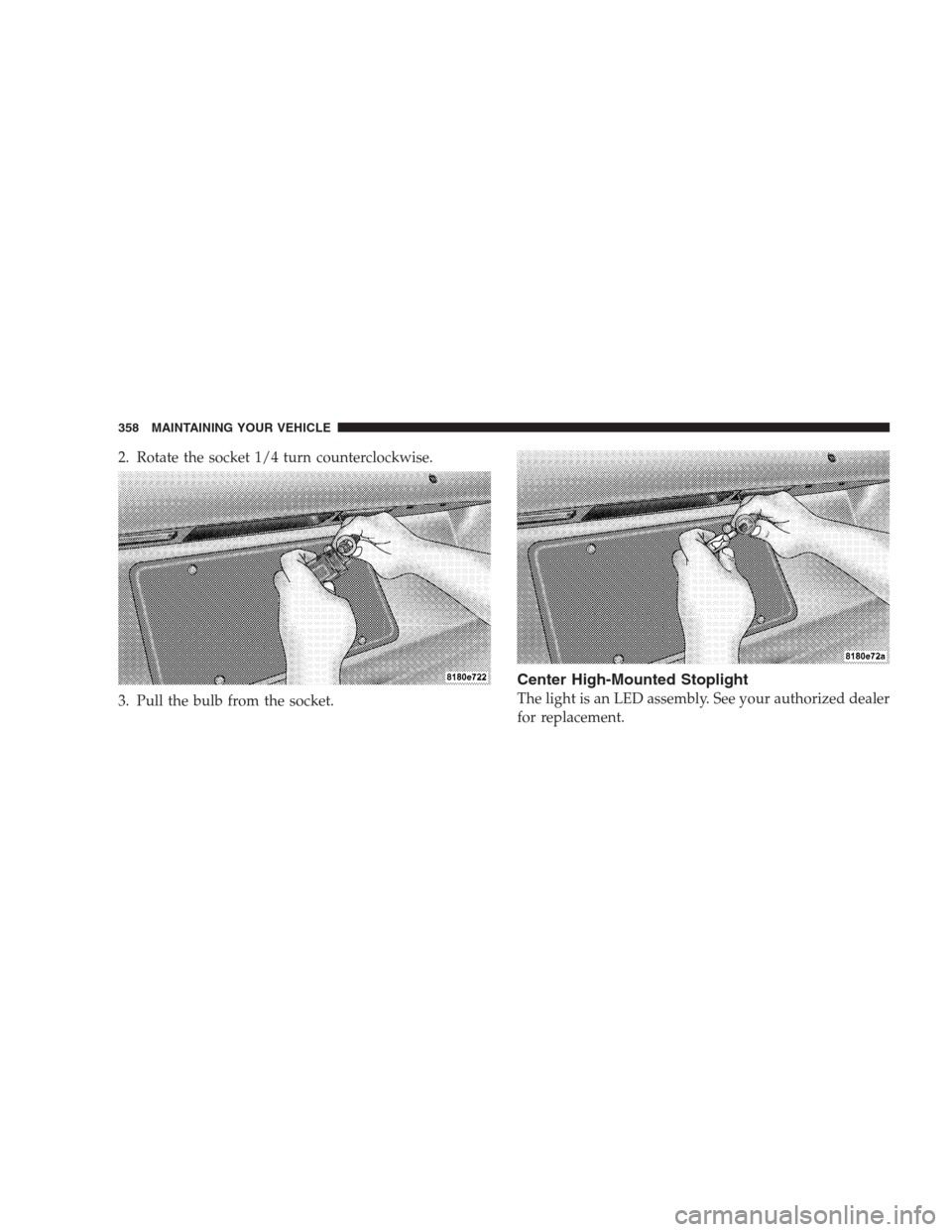
2. Rotate the socket 1/4 turn counterclockwise.
3. Pull the bulb from the socket.
Center High-Mounted Stoplight
The light is an LED assembly. See your authorized dealer
for replacement.
358 MAINTAINING YOUR VEHICLE
Page 396 of 411
Child Restraint with Automatic Belts........... 64
Child Safety Locks........................ 30
Child Seat.............................. 68
Clean Air Gasoline....................... 297
Cleaning
Wheels............................. 349
Climate Control......................... 238
Clock.....................187,190,204,208,217
Coin Holder........................... 146
Compact Disc (CD) Maintenance............. 237
Compass Variance....................... 185
Console.............................. 146
Contract, Service........................ 385
Cool Down, Turbo....................... 252
Coolant (Antifreeze)...................359,360
Cooler, Beverage........................ 154
Cooling System......................... 339
Adding Coolant (Antifreeze).............. 341
Coolant Level......................340,343Disposal of Used Coolant................ 343
Drain, Flush, and Refill.................. 340
Inspection........................... 343
Points to Remember.................342,344
Pressure Cap......................... 342
Selection of Coolant (Antifreeze)........... 340
Corrosion Protection..................... 347
Cruise Light........................... 168
Cupholders............................ 146
Customer Assistance..................... 383
Data Recorder, Event...................... 58
Dealer Service.......................... 329
Defroster, Rear Window................... 153
Defroster, Windshield...................71,240
Delay (Intermittent) Wipers................. 128
Diagnostic System, Onboard................ 326
Dimmer Switch, Headlight................. 125
394 INDEX
Page 405 of 411
Safety Defects, Reporting.................. 386
Safety Information, Tire................... 270
Safety Tips............................. 70
Satellite Radio.......................... 228
Satellite Radio Antenna................... 230
Schedule, Maintenance.................... 364
Seat Belt Maintenance.................... 351
Seat Belt Reminder....................... 46
Seat Belts
Adjustable Shoulder Belt.................. 41
Adjustable Upper Shoulder Anchorage........ 41
And Pregnant Women................... 47
Child Restraint......................... 61
Front Seat............................ 36
Pretensioners.......................... 45
Rear Seat............................. 36
Seat Belts (Sedan)........................ 35
Seats................................. 114
Adjustment.......................... 114Head Restraints....................... 118
Heated.............................. 117
Lumbar Support....................... 116
Rear Folding......................... 119
Rear Folding (Sedan).................... 119
Seatback Release....................... 116
Tilting.............................. 116
Security Alarm (Theft Alarm)................ 19
Selection of Oil......................... 330
Sentry Key (Immobilizer).................16,20
Sentry Key Programming................... 18
Sentry Key Replacement................... 17
Service Assistance....................... 383
Service Contract......................... 385
Service Manuals........................ 387
Setting the Clock.............187,190,204,208,217
Settings, Personal........................ 181
Shoulder Belts........................... 36
Side Airbag............................. 55
INDEX 403
10