tow DODGE CARAVAN 2004 4.G User Guide
[x] Cancel search | Manufacturer: DODGE, Model Year: 2004, Model line: CARAVAN, Model: DODGE CARAVAN 2004 4.GPages: 397, PDF Size: 6.83 MB
Page 135 of 397
CAUTION!
²Many accessories that can be plugged in draw
power from the vehicle's battery, even when not
in use (i.e. cellular phones, etc.). Eventually, if
plugged in long enough, the vehicle's battery will
discharge sufficiently to degrade battery life
and/or prevent engine starting.
²Accessories that draw higher power (i.e. coolers,
vacuum cleaners, lights, etc.), will degrade the
battery even more quickly. Only use these inter-
mittently and with greater caution.
²After the use of high power draw accessories, or
long periods of the vehicle not being started (with
accessories still plugged in), the vehicle must be
driven a sufficient length of time to allow the
generator to recharge the vehicle's battery.
Rear Compartment Storage Bins
Your vehicle may be equipped with open storage bins
located in each rear trim panel or your vehicle may be
equipped with storage bins located under the armrest in
each rear trim panel.
Cargo Area Storage
The seats in your vehicle are in-line which enables you to
stow long objects, such as lumber or skis, on the floor
without moving the seats.
NOTE:With all rear seat backs folded, a 4x8 foot sheet
of building material may be stored in the long-wheelbase
body style on top of the folded seats with the liftgate
closed. The front seats must be moved slightly forward of
the rearmost position. If the rear seats are removed no
front seat adjustment is needed and more than one 4x8
sheet of building material may be stored.
UNDERSTANDING THE FEATURES OF YOUR VEHICLE 135
3
Page 136 of 397
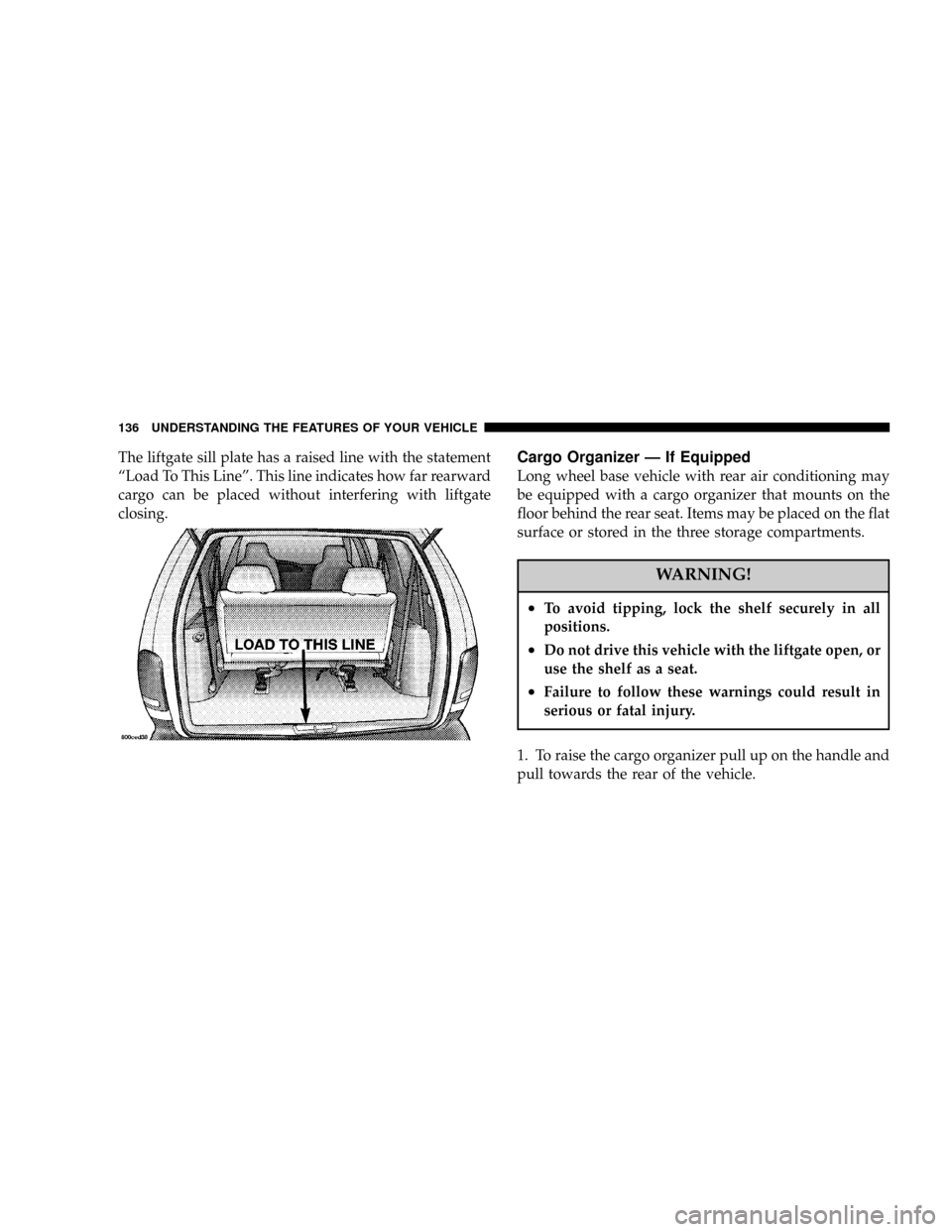
The liftgate sill plate has a raised line with the statement
ªLoad To This Lineº. This line indicates how far rearward
cargo can be placed without interfering with liftgate
closing.Cargo Organizer Ð If Equipped
Long wheel base vehicle with rear air conditioning may
be equipped with a cargo organizer that mounts on the
floor behind the rear seat. Items may be placed on the flat
surface or stored in the three storage compartments.
WARNING!
²To avoid tipping, lock the shelf securely in all
positions.
²Do not drive this vehicle with the liftgate open, or
use the shelf as a seat.
²Failure to follow these warnings could result in
serious or fatal injury.
1. To raise the cargo organizer pull up on the handle and
pull towards the rear of the vehicle.
136 UNDERSTANDING THE FEATURES OF YOUR VEHICLE
Page 154 of 397
12. Engine Temperature Warning Light
This light warns of an overheated engine condi-
tion. If the engine is critically hot, a continuous
chime will sound for 4 minutes. After the chime
turns off, the engine will still be critically hot until the
light turns off.
13. Vehicle Theft Alarm Light Ð If Equipped
This light will flash for approximately 15 sec-
onds when the vehicle theft alarm is arming.
14. Temperature Gauge
The temperature gauge shows engine coolant tempera-
ture. Any reading within the normal range indicates that
the engine cooling system is operating satisfactorily.The gauge pointer will likely indicate a higher tempera-
ture when driving in hot weather, up mountain grades,
or when towing a trailer. It should not be allowed to
exceed the upper limits of the normal operating range.
CAUTION!
Driving with a hot engine cooling system could
damage your vehicle. If temperature gauge reads (H),
pull over and stop the vehicle. Idle the vehicle with
the air conditioner turned off until the pointer drops
back into the normal range. If the pointer remains on
the ªHº, and you hear continuous chimes, turn the
engine off immediately, and call for service.
154 UNDERSTANDING YOUR INSTRUMENT PANEL
Page 156 of 397

engine start. The vehicle should be serviced if the light
stays on through several of your typical driving cycles. In
most situations the vehicle will drive normally and will
not require towing.
The Malfunction Indicator Light flashes to alert to serious
conditions that could lead to immediate loss of power or
severe catalytic converter damage. The vehicle should be
serviced as soon as possible if this occurs.
19. Trac Off Indicator Ð If Equipped
This vacuum fluorescent display indicator should illumi-
nate for approximately four seconds as a bulb check
when the ignition switch is first turned ON.
The ªTRAC OFFº Indicator will flash if the traction
control is in use.
The ªTRAC OFFº Indicator will illuminate if:
²The Traction Control switch has been used to turn
the system OFF.
²There is a Traction Control System malfunction
²The system has been deactivated to prevent damage
to the brake system due to overheated brake tem-
peratures.
NOTE:Extended heavy use of Traction Control may
cause the system to deactivate and turn on the TRAC and
the OFF indicators located in the instrument cluster.
This is to prevent overheating of the brake system and is
a normal condition. The system will remain disabled for
about 4 minutes until the brakes have cooled. The system
will automatically reactivate and turn off the TRAC and
the OFF indicators.
If your vehicle becomes stuck in mud, ice, or snow, turn
the Traction Control System OFF before attempting to
ªrockº the vehicle free.
156 UNDERSTANDING YOUR INSTRUMENT PANEL
Page 158 of 397

When the tire pressure monitoring system warning light
is lit, one or more of your tires is significantly underin-
flated. You should stop and check your tires as soon as
possible, and inflate them to the proper pressure as
indicated on the tire and loading information placard.
Driving on a significantly underinflated tire causes the
tire to overheat and can lead to tire failure. Underinfla-
tion also reduces fuel efficiency and tire tread life, and
may affect the vehicle's handling and stopping ability.
Each tire, including the spare, should be checked
monthly when cold and set to the recommended inflation
pressure as specified in the tire and loading information
placard and owner's manual.24. Turn Signal Indicators Ð Base Cluster Only
The arrow will flash with the exterior turn signal
when the turn signal lever is operated.
If the vehicle electronics sense that the vehicle has
traveled about one mile with the turn signals on, a chime
will sound to alert you to turn the signals off. If either
indicator flashes at a rapid rate, check for a defective
outside light bulb.
25. High Beam Light Ð Base Cluster Only
This light shows that the headlights are on high
beam. Pull the turn signal lever towards the
steering wheel to switch the headlights from high or low
beam.
158 UNDERSTANDING YOUR INSTRUMENT PANEL
Page 159 of 397

INFORMATION CENTER Ð IF EQUIPPED
Turn Signal Indicators
The arrow will flash with the exterior turn signal
when the turn signal lever is operated.
If the vehicle electronics sense that the vehicle has
traveled about one mile with the turn signals on, a chimewill sound to alert you to turn the signals off. If either
indicator flashes at a rapid rate, check for a defective
outside light bulb.
High Beam Light
This light shows that the headlights are on high
beam. Pull the turn signal lever towards the
steering wheel to switch the headlights from high or low
beam.
ELECTRONIC DIGITAL CLOCK
The clock and radio each use the display panel built into
the radio. A digital readout shows the time in hours and
minutes whenever the ignition switch is in the ON or
ACC position and the time button is pressed.
When the ignition switch is in the OFF position, or when
the radio frequency is being displayed, time keeping is
accurately maintained.
UNDERSTANDING YOUR INSTRUMENT PANEL 159
4
Page 165 of 397

To Set The Radio Push-button Memory
When you are receiving a station that you wish to
commit to push-button memory, press the SET button.
SET 1 will show in the display window. Select the
push-button you wish to lock onto this station and press
and release that button. If a station is not selected within
5 seconds after pressing the SET button, the station will
continue to play but will not be locked into push-button
memory.
You may add a second station to each push-button by
repeating the above procedure with this exception: Press
the SET button twice and SET 2 will show in the display
window. Each button can be set for SET 1 and SET 2 in
both AM and FM. This allows a total of 10 AM and 10 FM
stations to be locked into memory. You can recall the
stations stored in SET 2 memory by pressing the push-
button twice.
To Change From Clock To Radio Mode
Press the Time button to change the display between
radio frequency and time.
Operating Instructions Ð Tape Player
Insert the cassette with the exposed tape side toward the
right and the mechanical action of the player will gently
pull the cassette into the play position.
NOTE:When subjected to extremely cold temperatures,
the tape mechanism may require a few minutes to warm
up for proper operation. Sometimes poor playback may
be experienced due to a defective cassette tape. Clean and
demagnetize the tape heads at least twice a year.
Seek Button
Press the SEEK button up for the next selection on the
tape and down to return to the beginning of the current
selection.
UNDERSTANDING YOUR INSTRUMENT PANEL 165
4
Page 194 of 397

Headphone Battery Service
²Using a key or similar flat object insert into the slot.
²Pry on the release tab to open the cover.
²Replace the batteries and reinstall the cover.
The replacement batteries for the headphones are three
AAA batteries.
General Information
This device complies with part 15 of the FCC rules and
RSS 210 of Industry Canada. Operation is subject to the
following two conditions: (1) This device may not cause
harmful interference and (2) This device must accept any
interference received, including interference that may
cause undesired operation.
If you experience static or the headphones will not hold
a channel, check for these two conditions:
1. A weak battery in the headphones.
2. Closeness to a radio transmitter such as a radio station
tower, airport transmitter, and some mobile or CB radios.
Operating Instructions Ð MP3 Player
An MP3 player can be connected to the audio system.
Connect the cables to the RCA jacks located on the front
of the CD/DVD changer.
194 UNDERSTANDING YOUR INSTRUMENT PANEL
Page 207 of 397
speed positions. This allows the second seat occupants to
control the volume of air circulated in the rear of the
vehicle.
CAUTION!
Interior air enters the Manual Rear Zone Climate
Control system through an intake grille located in
the passenger side trim panel behind the third seat.
The heater outlets are located in the passenger side
trim panel just behind the sliding door. Do not block
or place objects directly in front of the inlet grille or
heater outlets. The electrical system could overload
causing damage to the blower motor.
Rear Temperature And Mode Control
When the center knob on the front climate control unit is
set to the ªREARº position, the second seat occupants
also have control of the rear temperature and modes as
follows:
²The rear temperature knob controls both the rear
temperature and mode. When the temperature knob is
in the cold position, cold air will be delivered from the
headliner outlets. As the rear temperature knob is
turned towards hot, the air will get warmer, and the
air will be delivered from both the headliner and floor
outlets. When the rear temperature knob reaches the
full hot position, all of the air will be delivered from
the floor outlets.
²When the center knob on the front climate control unit
is set to any position other than ªREARº, the rear
UNDERSTANDING YOUR INSTRUMENT PANEL 207
4
Page 218 of 397

Window Fogging
Vehicle windows tend to fog on the inside in mild rainy
or humid weather. To clear the windows, use the A/C,
PANEL and blower controls. Direct the panel outlets
toward the side windows. Do not use the Recirculation
mode without A/C for long periods as fogging may
occur.
Interior fogging on the windshield can be quickly re-
moved by using the defrost mode.
Outside Air Intake
Make sure the air intake, located directly in front of the
windshield, is free of obstructions such as leaves. Leaves
collected in the air intake may reduce airflow and if they
enter the plenum they could plug the water drains. In
winter months make sure the air intake is clear of ice,
slush and snow.
Operating Tips
218 UNDERSTANDING YOUR INSTRUMENT PANEL