wheel DODGE CARAVAN 2004 4.G User Guide
[x] Cancel search | Manufacturer: DODGE, Model Year: 2004, Model line: CARAVAN, Model: DODGE CARAVAN 2004 4.GPages: 397, PDF Size: 6.83 MB
Page 106 of 397

To turn the system back ON, press the switch a second
time until the TRAC OFF indicator turns OFF.
NOTE:
²The Traction Control System indicator comes on each
time the ignition switch is turned ON. This will occur
even if you used the switch to turn the system OFF.
²The Traction Control will make buzzing or clicking
sounds when in operation.
ADJUSTABLE PEDALS Ð IF EQUIPPED
This feature allows both the brake and accelerator pedals
to move toward or away from the driver to provide
improved position with the steering wheel. The adjust-
able pedal system is designed to allow a greater range of
driver comfort for steering wheel tilt and seat position.
The switch is located on the right side of the steering
column.Press the button forward to move the pedals forward
(toward the front of the vehicle).
Press the button rearward to move the pedals rearward
(toward the driver).
²The pedals can be adjusted with the ignition OFF.
²The pedals can be adjusted while driving.
106 UNDERSTANDING THE FEATURES OF YOUR VEHICLE
Page 107 of 397

²The pedalscannotbe adjusted when the vehicle is in R
(Reverse) or when the Speed Control System is ON.
The following messages will be displayed on vehicles
equipped with the Electronic Vehicle Information Sys-
tem (EVIC) if the pedals are attempted to be adjusted
when the system is locked out (ªAdjustable Pedal
Disabled Ð Cruise Control Engagedº or ªAdjustable
Pedal Disabled Ð Vehicle In Reverseº).
CAUTION!
Do not place any article under the adjustable pedals
or impede its ability to move as it may cause damage
to the pedal controls. Pedal travel may become
limited if movement is stopped by an obstruction in
the adjustable pedal's path.
ELECTRONIC SPEED CONTROL Ð IF EQUIPPED
When engaged, this device takes over the accelerator
operation at speeds greater than 30 mph (50 km/h). The
speed control switches are located on the steering wheel.
UNDERSTANDING THE FEATURES OF YOUR VEHICLE 107
3
Page 116 of 397

NOTE:Tire pressure menu items are available only on
vehicles equipped with the Tire Pressure Monitor Sys-
tem.
Customer Programmable Features Ð If Equipped
Press the ªMENUº button until one of the display choices
following appears:
Language
When in this display you may select one of five lan-
guages for all display nomenclature, including the trip
computer functions. Press the ªSTEPº button while in
this display selects English, Francaise, Deutsch, Italiano,
or Espanol. As you continue the displayed information
will be shown in the selected language.
US or Metric
Pressing the ªSTEPº button when in this display selects
US or Metric. The overhead console and climate control
displays will be in the selected units.
Service Interval
When this feature is selected a service interval between
2,000 miles (3 200 km) and 6,000 miles (9 600 km) in 500
mile (800 km) increments may be selected. Pressing the
ªSTEPº button when in this display will select distances
between 2,000 miles (3 200 km) and 6,000 miles (9 600
km) in 500 mile (800 km) increments.
Reset Service Distance (Displays Only if Service
Interval was Changed)
When this feature is selected the current accumulated
service distance can be reset to the newly selected service
interval. Pressing the ªSTEPº button when in this display
will select ªYesº or ªNo.º
Retrain Tire Sensors (Available with Tire Pressure
Monitor System Only)
The Tire Pressure Monitor system must be retrained
following a tire rotation or wheel rim mounted sensor
replacement. If you unintentionally choose ªYesº to train
116 UNDERSTANDING THE FEATURES OF YOUR VEHICLE
Page 135 of 397
CAUTION!
²Many accessories that can be plugged in draw
power from the vehicle's battery, even when not
in use (i.e. cellular phones, etc.). Eventually, if
plugged in long enough, the vehicle's battery will
discharge sufficiently to degrade battery life
and/or prevent engine starting.
²Accessories that draw higher power (i.e. coolers,
vacuum cleaners, lights, etc.), will degrade the
battery even more quickly. Only use these inter-
mittently and with greater caution.
²After the use of high power draw accessories, or
long periods of the vehicle not being started (with
accessories still plugged in), the vehicle must be
driven a sufficient length of time to allow the
generator to recharge the vehicle's battery.
Rear Compartment Storage Bins
Your vehicle may be equipped with open storage bins
located in each rear trim panel or your vehicle may be
equipped with storage bins located under the armrest in
each rear trim panel.
Cargo Area Storage
The seats in your vehicle are in-line which enables you to
stow long objects, such as lumber or skis, on the floor
without moving the seats.
NOTE:With all rear seat backs folded, a 4x8 foot sheet
of building material may be stored in the long-wheelbase
body style on top of the folded seats with the liftgate
closed. The front seats must be moved slightly forward of
the rearmost position. If the rear seats are removed no
front seat adjustment is needed and more than one 4x8
sheet of building material may be stored.
UNDERSTANDING THE FEATURES OF YOUR VEHICLE 135
3
Page 136 of 397
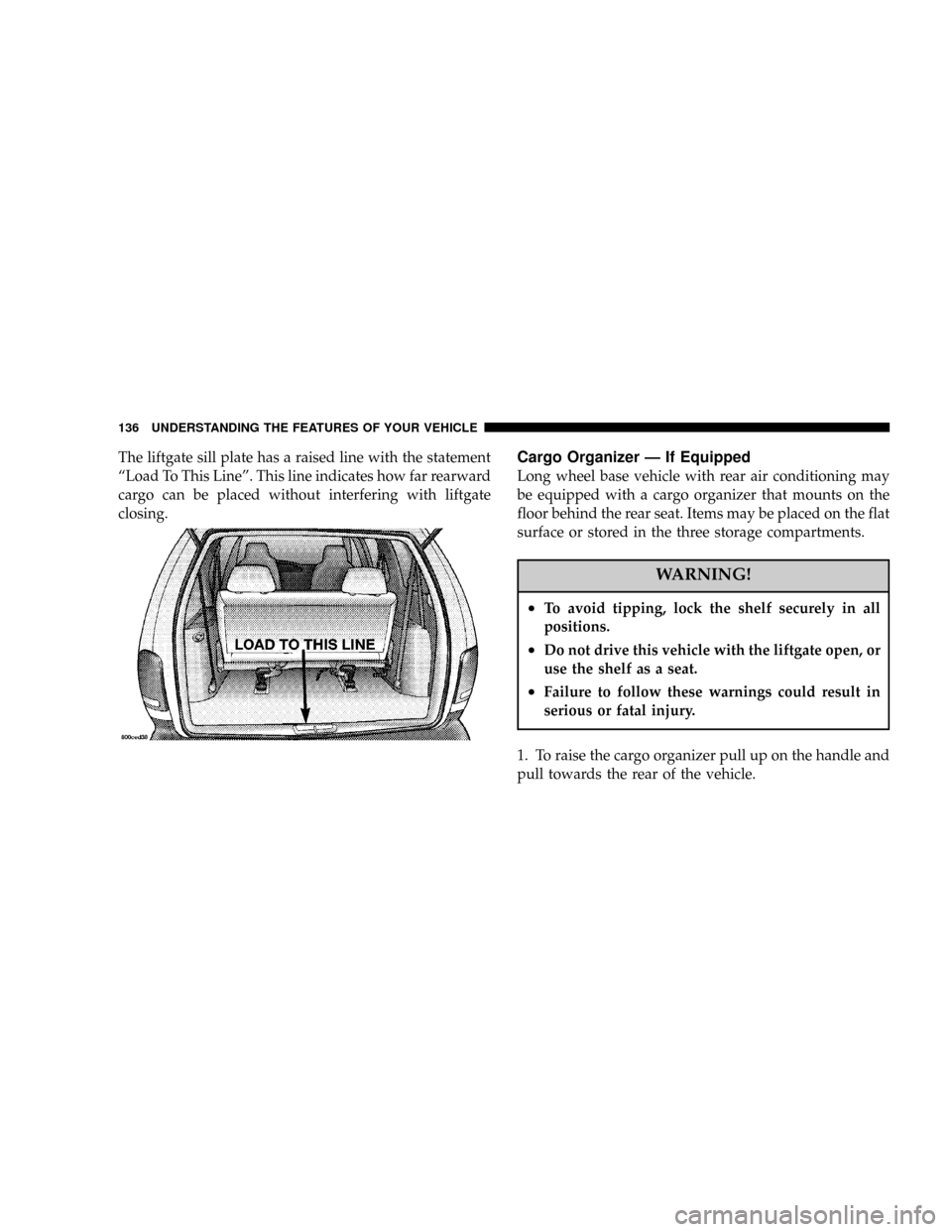
The liftgate sill plate has a raised line with the statement
ªLoad To This Lineº. This line indicates how far rearward
cargo can be placed without interfering with liftgate
closing.Cargo Organizer Ð If Equipped
Long wheel base vehicle with rear air conditioning may
be equipped with a cargo organizer that mounts on the
floor behind the rear seat. Items may be placed on the flat
surface or stored in the three storage compartments.
WARNING!
²To avoid tipping, lock the shelf securely in all
positions.
²Do not drive this vehicle with the liftgate open, or
use the shelf as a seat.
²Failure to follow these warnings could result in
serious or fatal injury.
1. To raise the cargo organizer pull up on the handle and
pull towards the rear of the vehicle.
136 UNDERSTANDING THE FEATURES OF YOUR VEHICLE
Page 158 of 397

When the tire pressure monitoring system warning light
is lit, one or more of your tires is significantly underin-
flated. You should stop and check your tires as soon as
possible, and inflate them to the proper pressure as
indicated on the tire and loading information placard.
Driving on a significantly underinflated tire causes the
tire to overheat and can lead to tire failure. Underinfla-
tion also reduces fuel efficiency and tire tread life, and
may affect the vehicle's handling and stopping ability.
Each tire, including the spare, should be checked
monthly when cold and set to the recommended inflation
pressure as specified in the tire and loading information
placard and owner's manual.24. Turn Signal Indicators Ð Base Cluster Only
The arrow will flash with the exterior turn signal
when the turn signal lever is operated.
If the vehicle electronics sense that the vehicle has
traveled about one mile with the turn signals on, a chime
will sound to alert you to turn the signals off. If either
indicator flashes at a rapid rate, check for a defective
outside light bulb.
25. High Beam Light Ð Base Cluster Only
This light shows that the headlights are on high
beam. Pull the turn signal lever towards the
steering wheel to switch the headlights from high or low
beam.
158 UNDERSTANDING YOUR INSTRUMENT PANEL
Page 159 of 397

INFORMATION CENTER Ð IF EQUIPPED
Turn Signal Indicators
The arrow will flash with the exterior turn signal
when the turn signal lever is operated.
If the vehicle electronics sense that the vehicle has
traveled about one mile with the turn signals on, a chimewill sound to alert you to turn the signals off. If either
indicator flashes at a rapid rate, check for a defective
outside light bulb.
High Beam Light
This light shows that the headlights are on high
beam. Pull the turn signal lever towards the
steering wheel to switch the headlights from high or low
beam.
ELECTRONIC DIGITAL CLOCK
The clock and radio each use the display panel built into
the radio. A digital readout shows the time in hours and
minutes whenever the ignition switch is in the ON or
ACC position and the time button is pressed.
When the ignition switch is in the OFF position, or when
the radio frequency is being displayed, time keeping is
accurately maintained.
UNDERSTANDING YOUR INSTRUMENT PANEL 159
4
Page 161 of 397

AM Reception
AM sound is based on wave amplitude, so AM reception
can be disrupted by such things as lightning, power lines
and neon signs.
FM Reception
Because FM transmission is based on frequency varia-
tions, interference that consists of amplitude variations
can be filtered out, leaving the reception relatively clear,
which is the major feature of FM radio.
NOTE:On vehicles so equipped the radio, steering
wheel radio controls and 6 disc CD/DVD changer if
equipped, will remain active for up to 45 seconds after
the ignition switch has been turned off. Opening a
vehicle front door will cancel this feature.
SALES CODE RAZÐAM/ FM STEREO RADIO
WITH CASSETTE TAPE PLAYER, CD PLAYER
AND CD CHANGER CONTROLS Ð IF EQUIPPED
Operating Instructions Ð Radio
NOTE:Power to operate the radio is controlled by the
ignition switch. It must be in the ON or ACC position to
operate the radio.
UNDERSTANDING YOUR INSTRUMENT PANEL 161
4
Page 195 of 397

NOTE:Follow the manufactures instructions for the
correct colors when connecting the RCA cables.
Operating Instructions Ð Video
Games/Camcorders
A video game unit or camcorder can be connected to the
rear audio/video system. Connect the cables to the RCA
jacks located on the front of the CD/DVD changer.
NOTE:To operate a video game unit a DC to AC
adapter may be required, plug the adapter into any
power outlet.
Follow the manufactures instructions for the correct
colors when connecting the RCA cables.
NOTE:MP3 player's, video game systems, camcorders
connected to the RCA jacks and CD's or DVD's inserted
into the CD/DVD changer can be heard through the
headphones.
REMOTE SOUND SYSTEM CONTROLS Ð IF
EQUIPPED
The remote sound system controls are located on the rear
surface of the steering wheel at the 3 and 9 O'clock
positions.
The right hand rocker switch has a push button in the
center and controls the volume and mode of the sound
UNDERSTANDING YOUR INSTRUMENT PANEL 195
4
Page 201 of 397

Panel Mode
Air comes from the outlets in the instrument panel. Each
of these outlets can be individually adjusted to direct the
flow of air. Moving the air vane knob on the center
outlets down, will close off the air flow from the centeroutlets. The thumbwheel next to the outboard outlets can
be rotated to regulate or shut off the air flow from these
outlets.
Bi-Level Mode
Air comes from both the instrument panel outlets, floor
outlets and defrost. A slight amount of air is also directed
through the side window demister outlets.
UNDERSTANDING YOUR INSTRUMENT PANEL 201
4