change time DODGE CARAVAN 2004 4.G Owner's Manual
[x] Cancel search | Manufacturer: DODGE, Model Year: 2004, Model line: CARAVAN, Model: DODGE CARAVAN 2004 4.GPages: 397, PDF Size: 6.83 MB
Page 188 of 397

Operating Instructions Ð CD/DVD Changer
Loading The CD/DVD Changer
The CD/DVD changer is a multi-disc changer,
and will accept up to six discs. Gently insert
one disc into the CD/DVD changer with the
label facing up. The disc will automatically be
pulled into the CD/DVD changer.
To insert additional discs into the changer, follow the
instructions shown:
1. Select and press any numbered button without an
illuminated light above it.
2. Insert the disc while the light above the chosen button
is flashing and the light below the loading slot is illumi-
nated.
3. Upon insertion, the disc will begin to play, and both
the button light and the light below the loading slot will
illuminate.4. Repeat the process for loading any additional CD/
DVDs. The CD/DVD changer will stop while additional
CD/DVDs are loaded.
If the volume control is ON, the unit will switch from
radio to CD/DVD mode and begin to play. The radio
display will show the chapter number and index time in
hours and minutes of the DVD, and the track number,
minutes and second of the CD. Play will begin automati-
cally in approximately 20 seconds. If the DVD does not
play automatically, press the ªENTERº button on the
remote control or on the side of the video screen to select
play from the menu options.
NOTE:
²You may eject a disc with the radio OFF. The ignition
switch must be in the ON or ACC position to insert a
disc with the radio OFF.
188 UNDERSTANDING YOUR INSTRUMENT PANEL
Page 189 of 397

²If you insert a disc with the ignition ON and the radio
OFF, the DVD will automatically be pulled into the
DVD changer and the display will show the time of
day.
EJECT (EJT) Button
If there is a single disc in the changer, press the EJT
button and the disc will eject. The unit will switch to the
radio mode. If you do not remove the disc within 10
seconds, it will be reloaded and the display will show
PAUSE. The radio mode will continue to operate.
To eject additional discs from the changer, first select the
numbered button where the disc is located and then press
the EJT button.
The disc can be ejected with the radio OFF.
Operating Instructions Ð Remote Control
Power Button (PWR)
Pressing the ªPOWERº button will turn the rear audio/
video system ON/OFF. The headphone symbol will flash
for approximately 5 seconds in the radio display and
sound can be heard from the headphones.
NOTE:
²The power button on the headphones must be turned
ON before sound can be heard from the headphones.
²When the rear audio/video system is ON, sound can
only be heard from the front speakers. The rear
speakers will turn back on when the rear audio/video
system is turned OFF.
UNDERSTANDING YOUR INSTRUMENT PANEL 189
4
Page 190 of 397

MENU Button
This button only functions in the DVD video mode. Press
this button once to go to the on-screen menu, press the
button a second time to go to the main menu. When the
DVD is in stop mode, pressing the menu button for 3
seconds will display the set-up screen.
PAUSE/STOP/ PLAY Button
This button only functions in the DVD video mode. Press
this button once to pause the video, press a second time
to play the video. Press and hold this button for more
than 6 seconds to stop playing the video.
ENTER/ARROW Buttons
These buttons only function in the DVD video mode. Use
the ªENTERº button to play the DVD video or to enter
selections from the menu screens. Use the arrow buttons
to toggle through the menu screen options.
MODE Button
No Function
SEEK Button
²
CD/DVD changer
Press the right side of the ªSEEKº button for the next
chapter or track on the disc. Press the left side to return to
the beginning of the current chapter or track. Press the
left side of the ªSEEKº button twice within 2 seconds to
return to the previous chapter or track. Each press of the
ªSEEKº button up or down will toggle through the
chapters or tracks.
FF/RW Button
²
CD/DVD changer
Press and hold ªFFº (Fast Forward) once and the CD/
DVD changer will begin to fast forward until the FF
button is released. The RW (Reverse) button works in a
similar manner.
Program Button (PROG)
No Function
190 UNDERSTANDING YOUR INSTRUMENT PANEL
Page 196 of 397

system. Pressing the top of the rocker switch will increase
the volume and pressing the bottom of the rocker switch
will decrease the volume. Pressing the center button
changes the operation of the radio from AM to FM to
Tape or CD mode depending on which radio is in the
vehicle.
The left hand rocker switch has a push button in the
center. The function of the left hand switch is different
depending on which mode you are in.
The following describes the left hand rocker switch
operation in each mode:
Radio Operation
Pressing the top of the switch will SEEK up for the next
listenable station and pressing the bottom of the switch
will SEEK down for the next listenable station.The button located in the center of the left hand switch
will tune to the next pre-set station that you have
programmed in the radio pre-set push-button.
Tape Player
Pressing the top of the switch once will go to the next
selection on the cassette. Pressing the bottom of the
switch once will go to the beginning of the current
selection or to the beginning of the previous selection if it
is within the first 5 seconds of the current selection.
If you press the switch up or down twice it plays the
second selection, three times, it will play the third, etc.
The button in the center of the left hand switch has no
function in this mode.
196 UNDERSTANDING YOUR INSTRUMENT PANEL
Page 209 of 397

display along with ªHIº or ªLOº. The system will then
automatically regulate the amount of air flow. Next, dial
in the temperature you would like the system to maintain
by pressing the driver's or passenger's temperature con-
trol button. The rear temperature can only be adjusted
from the front when the ªREAR SYSTEMº knob on the
front ATC unit is in the ªAUTOº position. Once the
desired temperature is displayed, the system will achieve
and maintain that comfort level automatically. When the
system is set up for your comfort level, it is not necessary
to change the settings. You will experience the greatest
efficiency by simply allowing the system to function
automatically.
NOTE:
²It is not necessary to move the temperature settings for
cold or hot vehicles. The system automatically adjusts
the temperature, mode and fan speed to provide
comfort as quickly as possible.
²The temperature can be displayed in U.S. or Metric by
selecting the US/M customer programmable feature.
Refer to the ªOverhead Console-Customer Program-
mable Featuresº in Section 3 of this manual.
To provide you with maximum comfort in the automatic
mode, during cold start-ups the blower fan will remain
off and ªDELAYº will appear in the front ATC display
until the engine warms up. Also, an estimate of the time
remaining until the ªDELAYº is over will appear peri-
odically in the display. However, the fan will engage
immediately if the defrost mode is selected or by rotating
the blower control to any fixed blower speed.
This feature may be disabled using the following proce-
dure:
²Press and hold the Heated Rear Window and Auto LO
buttons for 5 seconds.
UNDERSTANDING YOUR INSTRUMENT PANEL 209
4
Page 317 of 397
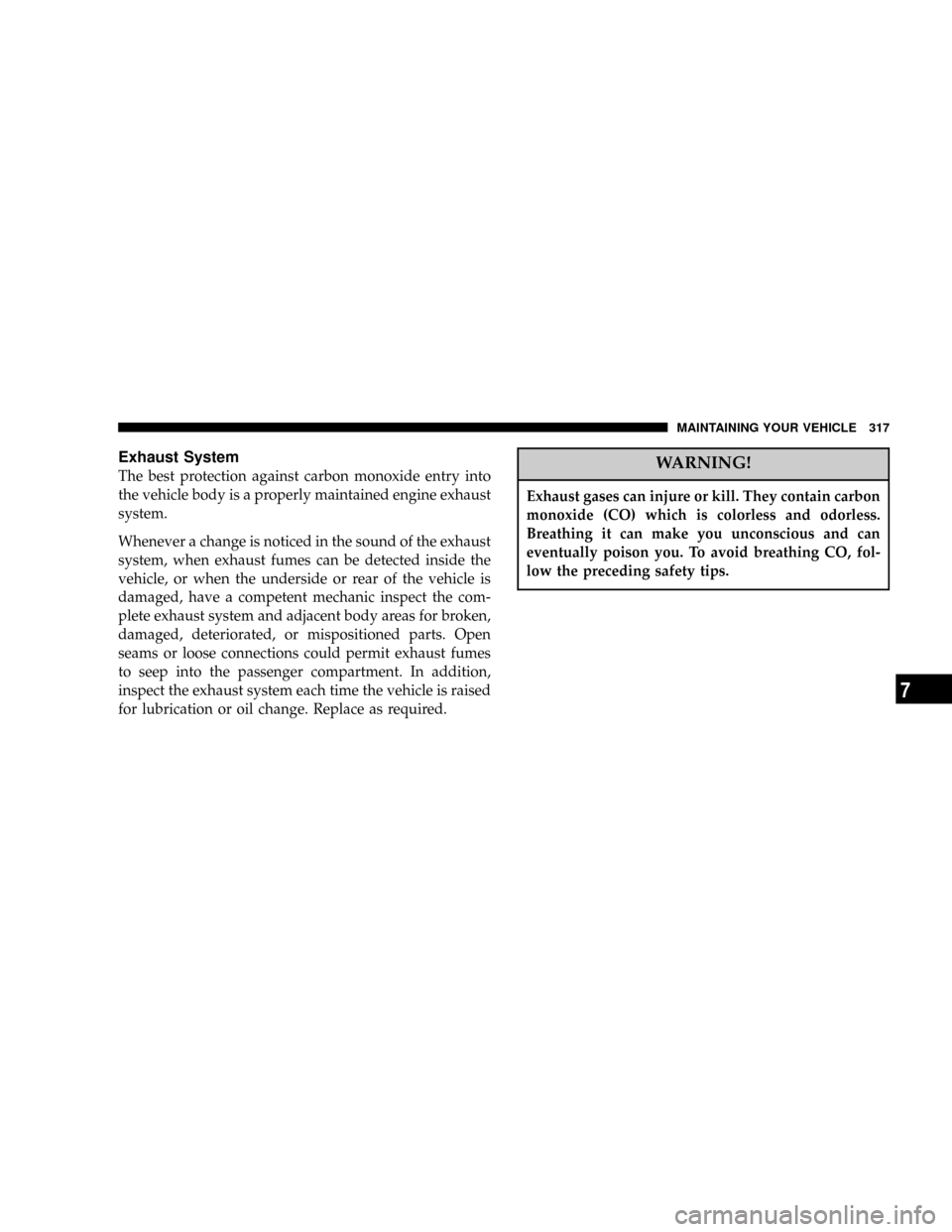
Exhaust System
The best protection against carbon monoxide entry into
the vehicle body is a properly maintained engine exhaust
system.
Whenever a change is noticed in the sound of the exhaust
system, when exhaust fumes can be detected inside the
vehicle, or when the underside or rear of the vehicle is
damaged, have a competent mechanic inspect the com-
plete exhaust system and adjacent body areas for broken,
damaged, deteriorated, or mispositioned parts. Open
seams or loose connections could permit exhaust fumes
to seep into the passenger compartment. In addition,
inspect the exhaust system each time the vehicle is raised
for lubrication or oil change. Replace as required.WARNING!
Exhaust gases can injure or kill. They contain carbon
monoxide (CO) which is colorless and odorless.
Breathing it can make you unconscious and can
eventually poison you. To avoid breathing CO, fol-
low the preceding safety tips.
MAINTAINING YOUR VEHICLE 317
7
Page 362 of 397
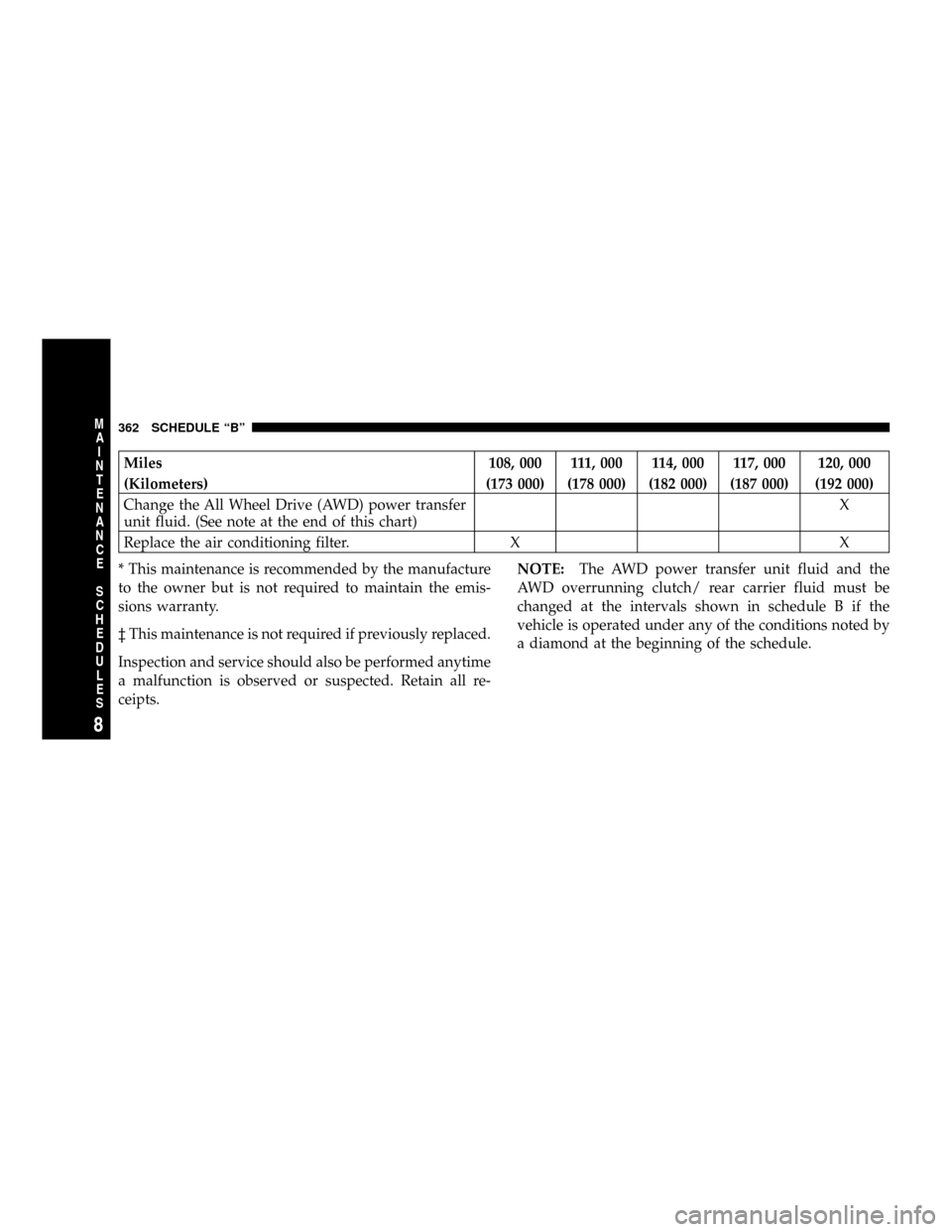
Miles 108, 000 111, 000 114, 000 117, 000 120, 000
(Kilometers) (173 000) (178 000) (182 000) (187 000) (192 000)
Change the All Wheel Drive (AWD) power transfer
unit fluid. (See note at the end of this chart)X
Replace the air conditioning filter. X X
* This maintenance is recommended by the manufacture
to the owner but is not required to maintain the emis-
sions warranty.
³ This maintenance is not required if previously replaced.
Inspection and service should also be performed anytime
a malfunction is observed or suspected. Retain all re-
ceipts.NOTE:The AWD power transfer unit fluid and the
AWD overrunning clutch/ rear carrier fluid must be
changed at the intervals shown in schedule B if the
vehicle is operated under any of the conditions noted by
a diamond at the beginning of the schedule.
362 SCHEDULE ªBº
8
M
A
I
N
T
E
N
A
N
C
E
S
C
H
E
D
U
L
E
S