instrument cluster DODGE CARAVAN 2004 4.G Owners Manual
[x] Cancel search | Manufacturer: DODGE, Model Year: 2004, Model line: CARAVAN, Model: DODGE CARAVAN 2004 4.GPages: 397, PDF Size: 6.83 MB
Page 26 of 397

2. Remove and replace the batteries. Avoid touching the
new batteries with your fingers. Skin oils may cause
battery deterioration. If you touch a battery, clean it with
rubbing alcohol.
3. To reassemble the transmitter case snap two halves
together. Make sure there is an even ªgapº between the
two halves. Test transmitter operation.
VEHICLE THEFT ALARM Ð IF EQUIPPED
This system monitors the vehicle doors and ignition
switch for unauthorized entry or operation. When the
alarm is activated, the system provides both audible and
visual signals. The horn will pulse, headlights/park
lights will flash, the Vehicle Theft Alarm/Immobilizer
light, located in the instrument cluster, will flash, and the
vehicle will not start. If the alarm is triggered and no
action is taken to disarm it, the system will turn off the
horn after three minutes and after 15 minutes of light
only operation the system will then rearm itself.To arm the system:Remove the key from the ignition
switch and either:
1. Press a power door lock button while the driver's or
passenger's door is open.
2. Press the LOCK button on the keyless entry transmit-
ter.
After the last door is closed, or if all doors are closed, the
system will arm itself in about 16 seconds. During that
time, the Vehicle Theft Alarm/Immobilizer light will
flash. If it does not illuminate, the system is not arming.
If you open a door during this arming period, the system
will cancel the arming process. You must repeat one of
the previously described arming sequences to rearm the
system.
To disarm the system:Press the UNLOCK button on the
keyless entry transmitter. Also, using a valid sentry key
26 THINGS TO KNOW BEFORE STARTING YOUR VEHICLE
Page 53 of 397
How The Front Airbag System Works
²
Thefrontairbag control module determines if a frontal
impact is severe enough to require the front airbags to
inflate. Based on the level of collision severity, the front
airbag control module determines the proper rate of
inflation. The front airbag inflators are designed to
provide different rates of airbag inflation. The front
airbag control module will not detect roll over, or rear
collisions.
The front airbag control module also monitors the
readiness of the electronic parts of the system when-
ever the ignition switch is in the START or ON
positions. These include all of the items listed above
except the knee bolster, instrument panel and the
steering wheel and column. If the key is in the OFF
position, in the ACC position, or not in the ignition
switch, the front airbags are not on and will not inflate.The front airbag control module sends a
message to the instrument cluster to turn on
the AIRBAG light in the instrument panel
for 6 to 8 seconds when the ignition switch is
first turned ON, then turns the light off. If the front
control module detects a malfunction in any part of the
system, the airbag light will turn on either momen-
tarily or continuously.
WARNING!
Ignoring the AIRBAG light in your instrument panel
could mean you won't have the airbags to protect
you in a collision. If the light does not come on, stays
on after you start the vehicle, or if it comes on as you
drive, have the airbag system checked right away.
THINGS TO KNOW BEFORE STARTING YOUR VEHICLE 53
2
Page 102 of 397

NOTE:The lights must be turned off within 45 seconds
of turning the ignition off to activate this feature
Front Fog Lights Ð If Equipped
To activate the front fog lights, turn on the park
lights or the low beam headlights and pull out on
the headlight switch control knob. An indicator in
the headlight switch shows that the front fog lights are
on. Pressing the headlight switch control knob in will
turn the front fog lights off.
MULTIFUNCTION LEVER
Turn Signals
Move the Multifunction Lever up or down and the
arrows on each side of the base instrument cluster or
Information Center flash to indicate proper operation of
the front and rear turn signal lights. You can signal a lane
change by moving the lever partially up or down.If either indicator flashes at a rapid rate, check for a
defective outside turn signal light bulb. If one of the
indicators fails to light when the lever is moved, it would
suggest that the indicator light is defective.
102 UNDERSTANDING THE FEATURES OF YOUR VEHICLE
Page 105 of 397
WARNING!
Tilting the steering column while the vehicle is
moving is dangerous. Without a stable steering col-
umn, you could lose control of the vehicle and have
an accident. Adjust the column only while the ve-
hicle is stopped. Be sure it is locked before driving.
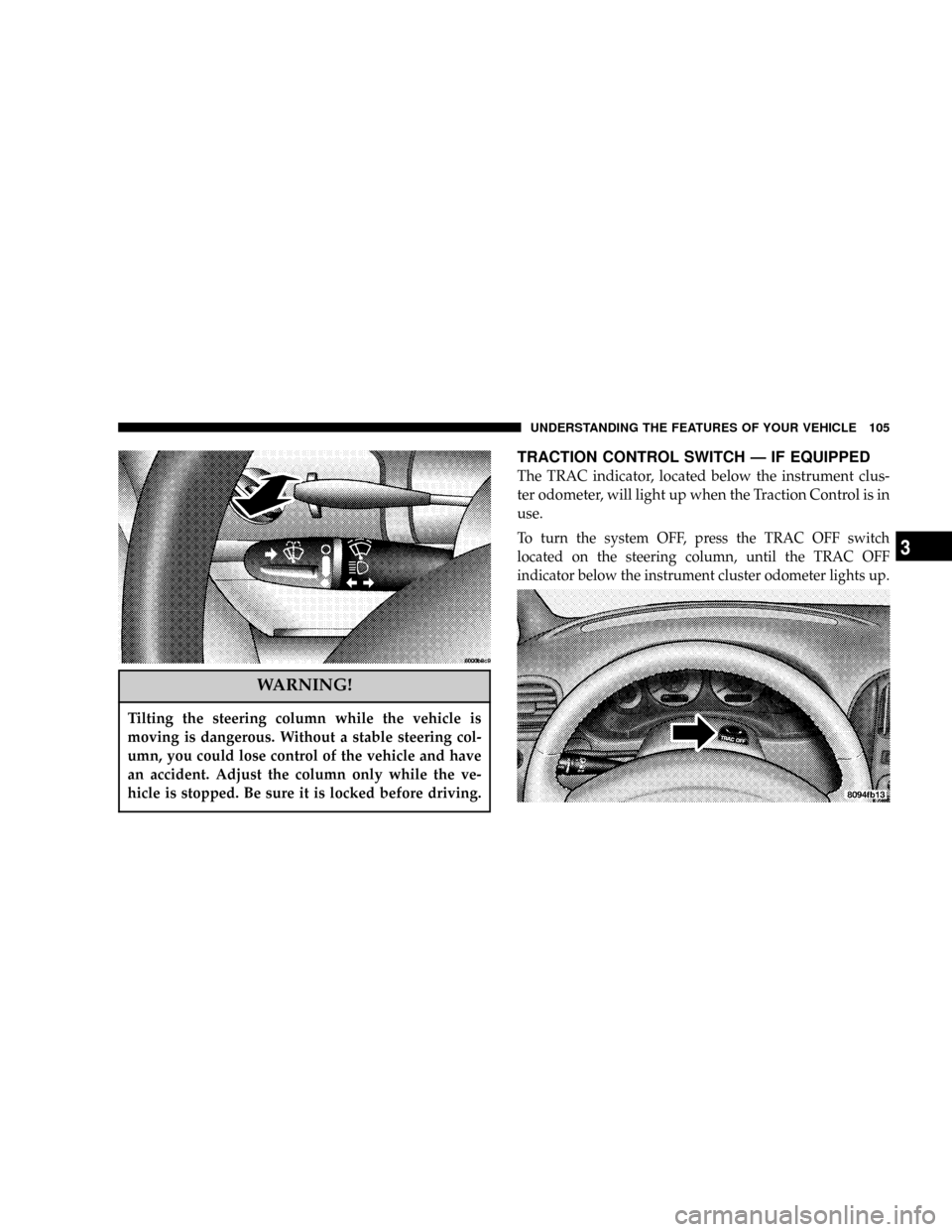
TRACTION CONTROL SWITCH Ð IF EQUIPPED
The TRAC indicator, located below the instrument clus-
ter odometer, will light up when the Traction Control is in
use.
To turn the system OFF, press the TRAC OFF switch
located on the steering column, until the TRAC OFF
indicator below the instrument cluster odometer lights up.
UNDERSTANDING THE FEATURES OF YOUR VEHICLE 105
3
Page 108 of 397
To Activate:
Push the ªON/OFFº button once and the CRUISE indi-
cator located below the instrument cluster odometer will
illuminate showing the electronic speed control system is
on. To turn the system OFF, push the ªON/OFFº button
again and the system and indicator will turn off.
WARNING!
Leaving the Electronic Speed Control system on
when not in use is dangerous. You could accidently
set the system or cause it to go faster than you want.
You could lose control and have an accident. Always
leave the system OFF when you aren't using it.
To Set At A Desired Speed:
When the vehicle has reached the desired speed, press
and release the ªSETº button. Release the accelerator and
the vehicle will operate at the selected speed.
To Deactivate:
A soft tap on the brake pedal, pushing the ªCANCELº
button or normal braking while slowing the vehicle will
deactivate the speed control without erasing the set
speed memory. Pushing the ªON/OFFº button to the
OFF position or turning off the ignition erases the set
speed memory.
To Resume Speed:
To resume a previously set speed, push and release the
ªRESUME/ACCELº button. Resume can be used at any
speed above 40 km/h (25 mph).
108 UNDERSTANDING THE FEATURES OF YOUR VEHICLE
Page 143 of 397

UNDERSTANDING YOUR INSTRUMENT PANEL
CONTENTS
mInstruments And Controls.................148
mBase Instrument Cluster..................149
mInstrument Cluster With Tach..............150
mInstrument Cluster Descriptions............151
mInformation Center Ð If Equipped..........159
NTurn Signal Indicators..................159
NHigh Beam Light.....................159
mElectronic Digital Clock..................159
NClock Setting Procedure.................160mRadio General Information................160
NRadio Broadcast Signals.................160
NTwo Types Of Signals..................160
NElectrical Disturbances..................160
NAM Reception.......................161
NFM Reception........................161
mSales Code RAZÐAM/ FM Stereo Radio With
Cassette Tape Player, CD Player And CD
Changer Controls Ð If Equipped...........161
NOperating Instructions Ð Radio...........1614
Page 149 of 397

BASE INSTRUMENT CLUSTER
UNDERSTANDING YOUR INSTRUMENT PANEL 149
4
Page 150 of 397

INSTRUMENT CLUSTER WITH TACH
150 UNDERSTANDING YOUR INSTRUMENT PANEL
Page 151 of 397

INSTRUMENT CLUSTER DESCRIPTIONS
1. Fuel Gauge
The pointer shows the level of fuel in the fuel tank when
the ignition switch is in the ON position.
2. Low Fuel Light
When the fuel level reaches approximately 3.0
gallons (11.0 liters) this light will turn on and
remain on until fuel is added.
3. Liftgate Ajar
This light turns on if the liftgate is not com-
pletely closed.
4. Door Ajar Light
This light turns on if a door is not completely
closed.5. Speedometer
Indicates vehicle speed.
6. Brake System Warning Light
This light monitors various brake functions,
including brake fluid level and parking brake
application. If the brake light turns on, it may
indicate that the parking brake is applied, there
is a low brake fluid level or there is a problem with the
anit-lock brake system.
The dual brake system provides a reserve braking capac-
ity in the event of a failure to a portion of the hydraulic
system. Failure of either half of the dual brake system is
indicated by the Brake Warning Light which will turn on
when the brake fluid level in the master cylinder has
dropped below a specified level.
The light will remain on until the cause is corrected.
UNDERSTANDING YOUR INSTRUMENT PANEL 151
4
Page 156 of 397

engine start. The vehicle should be serviced if the light
stays on through several of your typical driving cycles. In
most situations the vehicle will drive normally and will
not require towing.
The Malfunction Indicator Light flashes to alert to serious
conditions that could lead to immediate loss of power or
severe catalytic converter damage. The vehicle should be
serviced as soon as possible if this occurs.
19. Trac Off Indicator Ð If Equipped
This vacuum fluorescent display indicator should illumi-
nate for approximately four seconds as a bulb check
when the ignition switch is first turned ON.
The ªTRAC OFFº Indicator will flash if the traction
control is in use.
The ªTRAC OFFº Indicator will illuminate if:
²The Traction Control switch has been used to turn
the system OFF.
²There is a Traction Control System malfunction
²The system has been deactivated to prevent damage
to the brake system due to overheated brake tem-
peratures.
NOTE:Extended heavy use of Traction Control may
cause the system to deactivate and turn on the TRAC and
the OFF indicators located in the instrument cluster.
This is to prevent overheating of the brake system and is
a normal condition. The system will remain disabled for
about 4 minutes until the brakes have cooled. The system
will automatically reactivate and turn off the TRAC and
the OFF indicators.
If your vehicle becomes stuck in mud, ice, or snow, turn
the Traction Control System OFF before attempting to
ªrockº the vehicle free.
156 UNDERSTANDING YOUR INSTRUMENT PANEL