radio DODGE CARAVAN 2005 4.G Workshop Manual
[x] Cancel search | Manufacturer: DODGE, Model Year: 2005, Model line: CARAVAN, Model: DODGE CARAVAN 2005 4.GPages: 480, PDF Size: 14.97 MB
Page 239 of 480
Random Play (RND)
Press the Random button to play the tracks on the
selected disc in random order for an interesting change of
pace.
Random can be cancelled by pressing the button a second
time or by ejecting the CD from the changer.
Operating Instructions - Satellite Radio Mode (If
Equipped)
Refer to the Satellite Radio section of the Owner’s
Manual.
CD Diagnostic Indicators
When driving over a very rough road, the CD player may
skip momentarily. Skipping will not damage the disc or
the player, and play will resume automatically.
As a safeguard and to protect your CD player, one of the
following warning symbols may appear on your display.
A CD HOT symbol indicates the player is too hot.CD HOT will pause the operation. Play can be resumed
when the operating temperature is corrected or another
MODE is selected.
An ERR symbol will appear on the display if the laser is
unable to read the Disc data for the following reasons:
•Excessive vibration
•Disc inserted upside down
•Damaged disc
•Water condensation on optics
UNDERSTANDING YOUR INSTRUMENT PANEL 239
4
Page 240 of 480

SALES CODE RB1—AM/FM STEREO RADIO
WITH DVD/GPS NAVIGATION SYSTEM
The navigation system provides maps, turn identifica-
tion, selection menus and instructions for selecting avariety of destinations and routes. Refer to your“Navi-
gation User’s Manual”for detailed operating instruc-
tions.
NOTE:If your vehicle is not equipped with the CD
Changer option, you will not be able to use the Naviga-
tion system and the CD Player simultaneously. Always
remove the Navigation DVD before inserting another
disc.
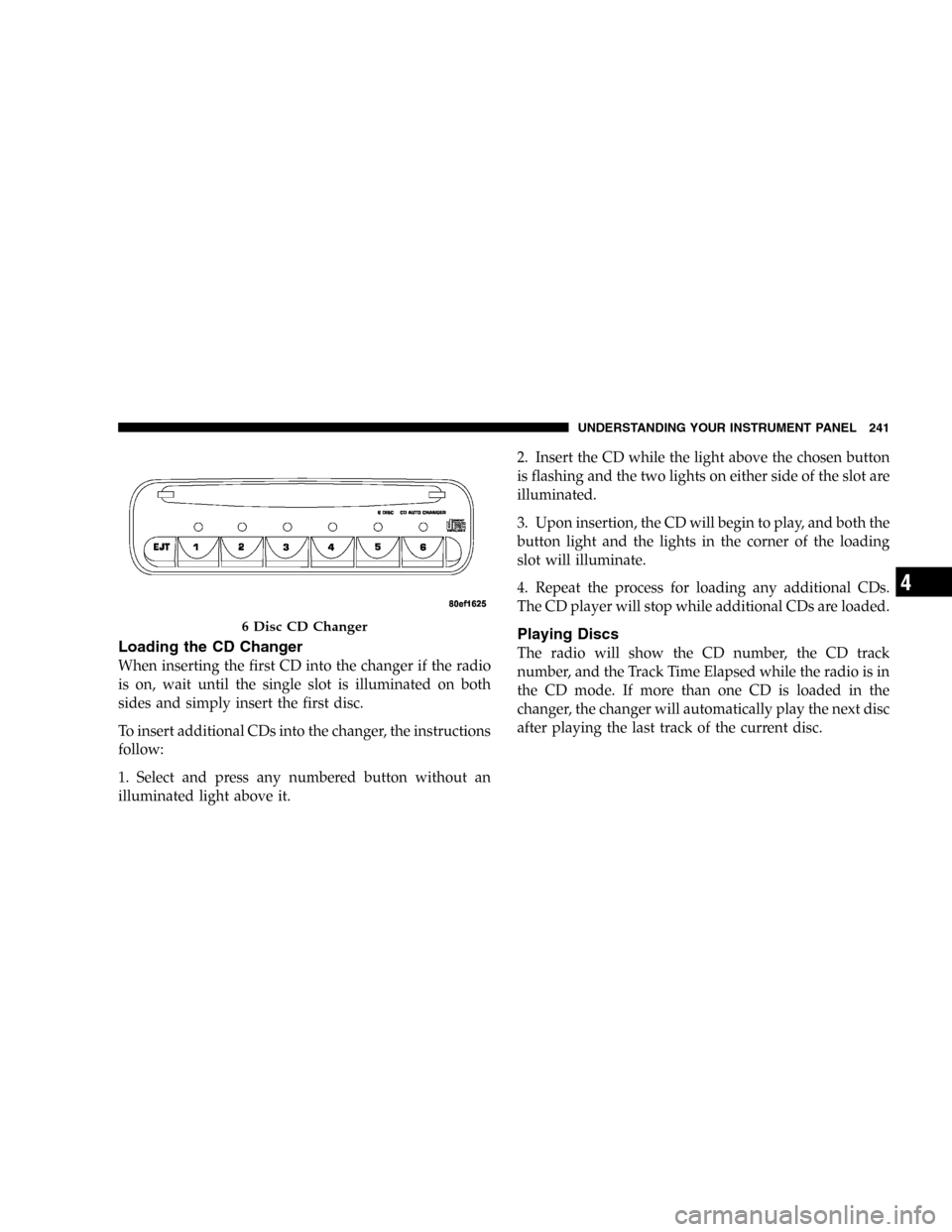
6 DISC CD CHANGER—IF EQUIPPED
The CD changer is located below the radio in the
instrument panel. The changer plays only 434inch (12
cm) discs. The changer holds up to 6 discs. Each disc is
loaded and ejected through a single slot in front of the
changer. Each disc has a numbered button with an amber
light above it which, when illuminated, indicates that a
disc is loaded in that particular chamber.
RB1 Radio
240 UNDERSTANDING YOUR INSTRUMENT PANEL
Page 241 of 480
Loading the CD Changer
When inserting the first CD into the changer if the radio
is on, wait until the single slot is illuminated on both
sides and simply insert the first disc.
To insert additional CDs into the changer, the instructions
follow:
1. Select and press any numbered button without an
illuminated light above it.2. Insert the CD while the light above the chosen button
is flashing and the two lights on either side of the slot are
illuminated.
3. Upon insertion, the CD will begin to play, and both the
button light and the lights in the corner of the loading
slot will illuminate.
4. Repeat the process for loading any additional CDs.
The CD player will stop while additional CDs are loaded.
Playing Discs
The radio will show the CD number, the CD track
number, and the Track Time Elapsed while the radio is in
the CD mode. If more than one CD is loaded in the
changer, the changer will automatically play the next disc
after playing the last track of the current disc.
6 Disc CD Changer
UNDERSTANDING YOUR INSTRUMENT PANEL 241
4
Page 242 of 480

Seek Button
Press the top of this button on the radio once to play the
next track. Press the bottom of the button once to return
to the beginning of the current track. Press the bottom of
the button twice to play the previous track.
FF/TUNE/RW
Press the FF (fast forward) button and the CD player will
fast forward through the tracks until the button is re-
leased. Press the RW (rewind) button and the CD player
will reverse through the tracks until the button is re-
leased.
Mode Button
Press this button to toggle between radio and cd modes.
Program Button 1
Press this button to play the next available disc.
Program Button 4 (Random Play)
Press this button while the CD is playing to activate
Random Play. This feature plays the selections on the
current compact disc in random order to provide an
interesting change of pace. The CD changer stays in the
random play mode when changing to the next disc.
NOTE:The changer will not random play between
discs.
Press the top of the Seek button once to move to the next
randomly selected track. Press the bottom of the Seek
button to go back to the beginning of the track.
Press button 4 a second time to stop random play.
242 UNDERSTANDING YOUR INSTRUMENT PANEL
Page 243 of 480
Program Button 5
Press this button to play the previous disc.
Time Button
Press this button to switch between time of day and CD
track time.
Changing Modes
While in the radio mode, if a cassette is loaded, press the
Mode button to switch to the tape mode. If a CD is
loaded, press the Mode button to select the CD mode. If
neither a tape nor CD is loaded, the radio will ignore the
command.
•Inserting either a tape or CD automatically starts that
mode of play.
•Pressing the AM/FM button while in the tape or CD
mode will select the radio mode.
•If in the CD mode and the last CD is ejected, the radio
will tune to the last station selected.
Removing Discs from the CD Changer
If there is a single CD in the changer, press the EJT button
and the CD will eject. If the CD is not removed within 15
seconds, it will automatically reload into the CD changer.
To eject additional CDs from the changer, first select the
numbered button where the CD is located and then press
the EJT button.
CD Changer Operation with the Changer Off
The CD changer is able to load and eject discs with the
ignition power off. However, while the ignition is off, one
of the six numbered buttons must be pressed first.
6 DISC CD/DVD CHANGER (RDV)—IF EQUIPPED
The Rear Seat Audio/Video System allows passengers to
listen to a CD or DVD from the 6 disc CD/DVD changer
through wireless headphones, while the front seat pas-
sengers listen to either AM/FM, Cassette or CDs from the
radio speakers. A remote control is provided for func-
tions such as changing tracks or DVD functions, as well
UNDERSTANDING YOUR INSTRUMENT PANEL 243
4
Page 245 of 480
To insert disc(s) into the changer, follow the instructions
shown:
1. On vehicles equipped with the premium version,
select and press any numbered button without an illumi-
nated light above it.
2. Gently insert the disc with the label facing up while
the light below the loading slot is illuminated. On
vehicles equipped with the premium version the light
above the chosen button will also be flashing, indicating
which numbered position the disc will be loaded into.
The disc will automatically be pulled into the CD/DVD
changer.
3. Upon insertion, the disc will begin to play, and the
light below the loading slot will turn off. On vehicles
equipped with the premium version the light above the
chosen button will remain illuminated.4. Repeat the process for loading any additional CD/
DVDs into the premium version multi-disc changer. The
CD/DVD changer will stop while additional CD/DVDs
are loaded.
If the radio volume control is ON, the unit will switch
from radio to CD/DVD mode. If the DVD supports the
autoplay feature, play will begin automatically in ap-
proximately 10 seconds, after the DVD disc menu is
displayed. If the DVD does not play automatically, press
the ENTER button on the remote control or on the side of
the video screen to select play from the menu options.
The radio display will show the chapter number and
index time in hours and minutes of the DVD, or the track
number, minutes and second of the CD.
UNDERSTANDING YOUR INSTRUMENT PANEL 245
4
Page 246 of 480

NOTE:
•You may eject a disc with the radio OFF.
•If you insert a disc with the ignition ON and the radio
OFF, the DVD will automatically be pulled into the
DVD changer and the display will show the time of
day.
•It is recommended to label home made burned discs
with a permanent marker instead of adhesive labels.
These types of labels may become loose and cause the
disc to be stuck in the DVD player. This may cause
permanent damage to the DVD mechanism.
EJECT (EJT) Button
If there is a disc in the changer, press the EJT button and
the disc will eject. If you do not remove the disc within 10
seconds, it will be reloaded and the display will show
PAUSE. The radio mode will continue to operate.To eject additional discs from the premium version
multi-disc changer, first select the numbered button
where the disc is located and then press the EJT button.
The disc can be ejected with the radio OFF.
Operating Instructions—Remote Control
NOTE:Aim the remote control at the DVD changer
located on the center of the instrument panel and press
the desired button. Direct sunlight or objects blocking the
line of sight may affect the function of the remote control.
246 UNDERSTANDING YOUR INSTRUMENT PANEL
Page 248 of 480
Remote Control Buttons
17. Enter
18. Light
Headphone Transmitter Button (1)
After a disc is inserted into the DVD changer, both the
headphone transmitter button (1) on the remote control
and the power button on the headphones must be turned
ON before sound can be heard from the headphones. On
some radios the headphone symbol will flash for ap-
proximately 5 seconds in the radio display, indicating the
headphones are in use.
ARROW Buttons (2, 3, 15, 16)
These buttons only function in DVD video mode. Use the
arrow buttons to toggle through the DVD disc menu
screen options.
RTN Button (4)
This button only functions in DVD video mode. Press this
button to return to the previous menu when in the DVD
disc menu mode.
SETUP Button (5)
This button only functions in DVD video mode. Press the
button after pressing the STOP button to access the DVD
changer set up menu. Use the right and left arrows to
move between tabs for language, rating, mark, audio and
aspect. Use the up and down arrows to move between
options within each tab.
To change an item highlighted in blue, press ENTER. This
should cause the highlight to turn yellow. Again, using
the up and down arrows will cause the arrow to move up
or down. Once the arrow is on the desired selection, press
ENTER. When finished, press setup or play to return to
playing the DVD or Menu to return to the DVD disc
menu.
248 UNDERSTANDING YOUR INSTRUMENT PANEL
Page 252 of 480

Operating Instructions—Headphones
1. Power Button
2. Volume Control
3. Power Indicator
Power Button
Pressing the power button will turn the headphones
ON/OFF. An indicator light will illuminate on the head-
phone earpiece to indicate the headphones are ON.
NOTE:
•The headphones will turn off automatically in ap-
proximately 3 minutes if they lose the signal form the
system or when the radio or rear audio/video system
is turned off.
Volume Control
Rotate the volume control to adjust the volume to the
desired listening level.
Headphone Battery Service
•
Press the button at the bottom of each headphone
earpiece and lift the cover upward.
Headphone Controls
252 UNDERSTANDING YOUR INSTRUMENT PANEL
Page 254 of 480

Operating Instructions—MP3 Player, Portable
Walkman
An MP3 player can be connected to the audio system.
Connect the cables to the RCA jacks located on the front
of the CD/DVD changer.
NOTE:Follow the manufactures instructions for the
correct colors when connecting the RCA cables.
Operating Instructions—Video
Games/Camcorders
A video game unit or camcorder can be connected to the
rear audio/video system. Connect the cables to the RCA
jacks located on the front of the CD/DVD changer.
NOTE:To operate a video game unit a DC to AC
adapter may be required, plug the adapter into any
power outlet.
Follow the manufactures instructions for the correct
colors when connecting the RCA cables.NOTE:MP3 player’s, video game systems, camcorders
connected to the RCA jacks and CD’sorDVD’s inserted
into the CD/DVD changer can be heard through the
headphones.
SATELLITE RADIO—IF EQUIPPED
Satellite radio uses direct satellite to receiver broadcast-
ing technology to provide clear digital sound, coast to
coast. The subscription service provider is Sirius™Satel-
lite Radio. This service offers up to 100 channels of music,
sports, news, entertainment, and programming for chil-
dren, directly from its satellites and broadcasting studios.
System Activation
To activate your Sirius Satellite Radio service, call the
toll-free number 888-539-7474, or visit the Sirius web site
at www.sirius.com. Please have the following informa-
tion available when activating your system:
1. The Electronic Serial Number/Sirius Identification
Number (ESN/SID).
254 UNDERSTANDING YOUR INSTRUMENT PANEL