lights DODGE CARAVAN 2008 5.G Owner's Guide
[x] Cancel search | Manufacturer: DODGE, Model Year: 2008, Model line: CARAVAN, Model: DODGE CARAVAN 2008 5.GPages: 531, PDF Size: 7.72 MB
Page 235 of 531
require towing. The light will come on when the ignition
is first turned ON and remain on briefly as a bulb check.
If the light does not come on during starting, have the
system checked by an authorized dealer.
18. Oil Pressure Warning Light
This light shows low engine oil pressure. The light
should turn on momentarily when the engine is
started. If the light turns on while driving, stop the
vehicle and shut off the engine as soon as possible. A
chime will sound for four minutes when this light turns
on.
Do not operate the vehicle until the cause is corrected.
This light does not show how much oil is in the engine.
The engine oil level must be checked under the hood.
19. Front Fog Light Indicator Ð If Equipped
This light shows when the front fog lights are ON.20. Seat Belt Reminder Light
When the ignition switch is first turned ON, this
light will turn on for five to eight seconds as a bulb
check. During the bulb check, if the driver's seat
belt is unbuckled, a chime will sound. After the bulb
check or when driving, if the driver's seat belt remains
unbuckled, the Seat Belt Reminder Light will illuminate
and the chime will sound. Refer to the Occupant Re-
straints section for more information.
21. Vehicle Theft Alarm Light Ð If Equipped
This light will flash for approximately 15 sec-
onds when the vehicle theft alarm is arming.
22. Airbag Light
This light turns on and remains on for four
seconds as a bulb check when the ignition
switch is first turned ON. If the light is not on
UNDERSTANDING YOUR INSTRUMENT PANEL 233
4
Page 251 of 531
Unlock Doors Automatically on Exit
When ON is selected, all doors will unlock when the
vehicle is stopped and the transmission is in the PARK or
NEUTRAL position and the driver's door is opened. To
make your selection, press and release the RESET button
until ON or OFF appears.
Remote Key Unlock
WhenDriver Door 1st Pressis selected, only the driver's
door will unlock on the first press of the remote keyless
entry unlock button. When Driver Door 1st Press is
selected, you must press of the remote keyless entry
unlock button twice to unlock the passenger's doors.
WhenAll Doors 1st Pressis selected, all of the doors will
unlock on the first press of the remote keyless entry
unlock button. To make your selection, press and release
the RESET button until ªDriver Door 1st Pressº or ªAll
Doors 1st Pressº appears.
Sound Horn with Remote Key Lock
When ON is selected, a short horn sound will occur when
the remote keyless entry LOCK button is pressed. This
feature may be selected with or without the flash lights
on lock/unlock feature. To make your selection, press
and release the RESET button until ON or OFF appears.
Flash Lights with Remote Key Lock
When ON is selected, the front and rear turn signals will
flash when the doors are locked or unlocked with the
remote keyless entry transmitter. This feature may be
selected with or without the sound horn on lock feature
selected. To make your selection, press and release the
RESET button until ON or OFF appears.
Automatic High Beams Ð If Equipped
When this feature is selected, the high beam headlights
will deactivate automatically under certain conditions. To
make your selection, press and release the FUNCTION
UNDERSTANDING YOUR INSTRUMENT PANEL 249
4
Page 252 of 531
SELECT button until YES (Y) or NO (N) appears. Refer to
ªLights/SmartBeams Ð If Equippedº in Section 3 of this
manual for more information.
Headlights On with Wipers (Available with Auto
Headlights Only)
When YES (Y) is selected, and the headlight switch is in
the AUTO position, the headlights will turn on approxi-
mately 10 seconds after the wipers are turned on. The
headlights will also turn off when the wipers are turned
off if they were turned on by this feature. To make your
selection, press and release the FUNCTION SELECT
button until YES (Y) or NO (N) appears.
NOTE:Turning the headlights on during the daytime
causes the instrument panel lights to dim. To increase the
brightness, refer to ªLightsº in Section 3 of this manual.
Delay Turning Headlights Off
When this feature is selected, the driver can choose to
have the headlights remain on for 0, 30, 60, or 90 secondswhen exiting the vehicle. To make your selection, press
and release the RESET button until 0, 30, 60, or 90
appears.
Turn Headlights On with Remote Key Unlock
When this feature is selected, the headlights will activate
and remain on for up to 90 seconds when the doors are
unlocked with the remote keyless entry transmitter. To
make your selection, press and release the RESET button
until OFF, 30 sec., 60 sec., or 90 sec. appears.
Delay Power Off to Accessories Until Exit
When this feature is selected, the power window
switches, radio, hands±free system (if equipped), DVD
video system (if equipped), power sunroof (if equipped),
and power outlets will remain active for up to 10 minutes
after the ignition switch is turned off. Opening a vehicle
door will cancel this feature. To make your selection,
press and release the RESET button until Off, 45 sec., 5
min., or 10 min. appears.
250 UNDERSTANDING YOUR INSTRUMENT PANEL
Page 406 of 531
Towing Requirements Ð Trailer Lights and Wiring
Whenever you pull a trailer, regardless of the trailer size,
stop lights and turn signals on the trailer are required for
motoring safety.
The Trailer Tow Package may include a four-pin or a
seven-pin wiring harness. Use a factory approved trailer
harness and connector.
NOTE:Do not cut or splice wiring into the vehicles
wiring harness.
The electrical connections are all complete to the vehicle
but you must mate the harness to a trailer connector.
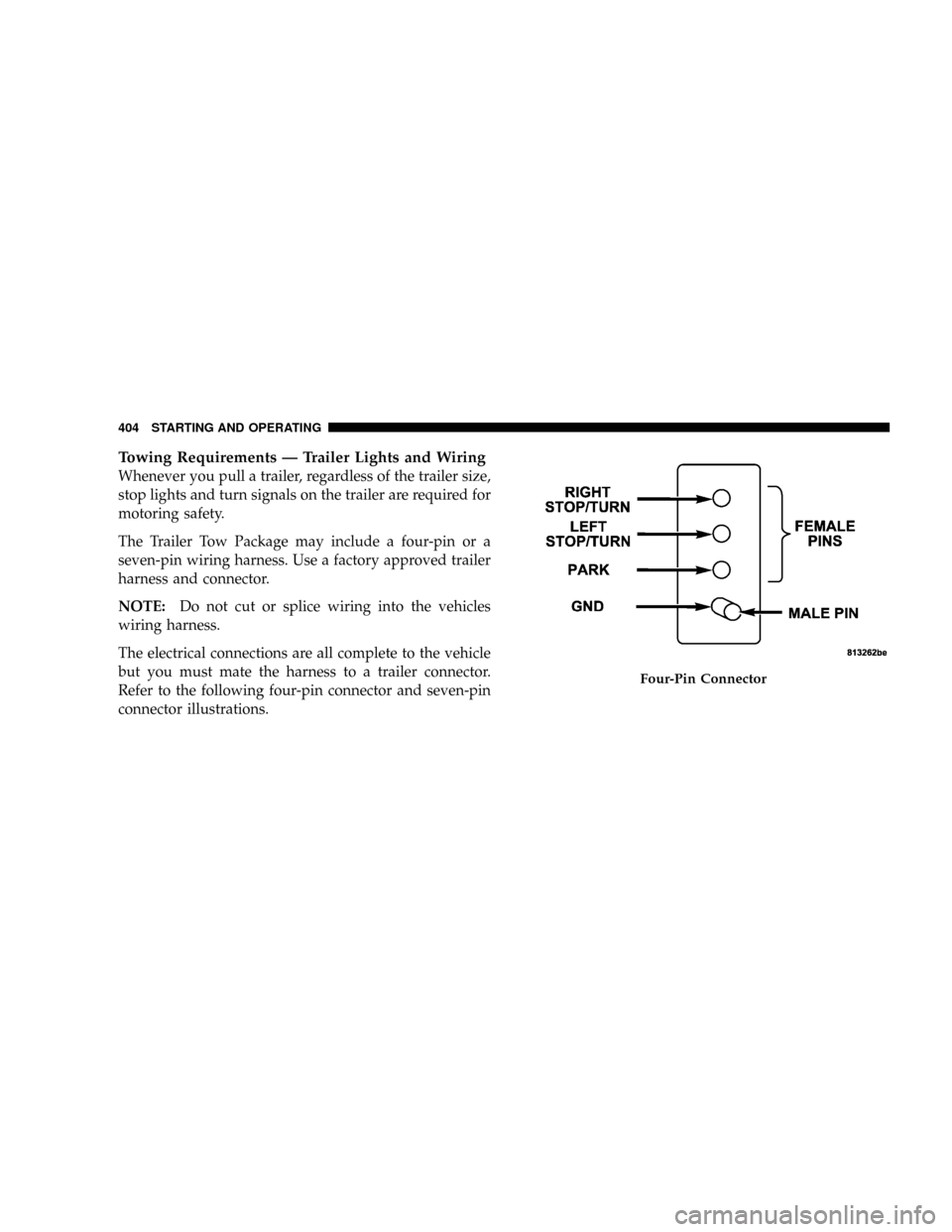
Refer to the following four-pin connector and seven-pin
connector illustrations.
Four-Pin Connector
404 STARTING AND OPERATING
Page 434 of 531
NPower Steering Ð Fluid Check............452
NFront Suspension Ð Ball Joints............453
NSteering Shaft Seal....................453
NDrive Shaft Universal Joints..............454
NBody Lubrication.....................454
NWindshield Wiper Blades................454
NCooling System.......................456
NHoses And Vacuum/Vapor Harnesses.......461
NFuel System Connections................461
NBrakes.............................462
NAutomatic Transaxle...................464
NFront And Rear Wheel Bearings...........467NAppearance Care And Protection From
Corrosion...........................467
NCleaning The Instrument Panel Cup Holders . . 473
mFuses/Totally Integrated Power Module
(TIPM)..............................474
mVehicle Storage........................481
mReplacement Light Bulbs.................481
mBulb Replacement......................482
NHeadlights..........................482
NFront Park/Turn Signal And Side Marker
Lights.............................483
NFog Lights..........................483
NRear Tail, Stop, Turn Signal, Side Marker And
Backup Lights........................484
432 MAINTAINING YOUR VEHICLE
Page 474 of 531
2. To maintain the high gloss shine, apply a scratch and
swirl remover onto a damp cloth and apply to door
applique. Rub the applique with a firm pressure then buff
lightly with a clean cotton cloth until a high gloss shine is
achieved.
Cleaning Headlights
Your vehicle has plastic headlights that are lightweight
and less susceptible to stone breakage than glass head-
lights.
Plastic is not as scratch resistant as glass and therefore
different lens cleaning procedures must be followed.
To minimize the possibility of scratching the lenses and
reducing light output, avoid wiping with a dry cloth. To
remove road dirt, wash with a mild soap solution fol-
lowed by rinsing.
Do not use abrasive cleaning components, solvents, steel
wool or other aggressive material to clean the lenses.
Glass Surfaces
All glass surfaces should be cleaned on a regular basis
with MopartGlass Cleaner or any commercial
household-type glass cleaner. Never use an abrasive type
cleaner. Use caution when cleaning the inside rear win-
dow equipped with electric defrosters or the right rear
quarter window equipped with the radio antenna. Do
not use scrapers or other sharp instruments which may
scratch the elements.
When cleaning the rearview mirror, spray cleaner on the
towel or rag that you are using. Do not spray cleaner
directly on the mirror.
Cleaning Plastic Instrument Cluster Lenses
The lenses in front of the instruments in this vehicle are
molded in clear plastic. When cleaning the lenses, care
must be taken to avoid scratching the plastic.
472 MAINTAINING YOUR VEHICLE
Page 483 of 531
The Heated Mirrors, Lower Instrument Panel Power
Outlet and Removable Floor Console, when in the front
position are fused with self-resetting fuses that are only
serviceable by an authorized dealer. The power seats are
fused by a 30 Amp circuit breaker located under the
driver's seat. The Power Windows are fused by a 25 Amp
circuit breaker located under the instrument panel near
the steering column. If you experience temporary or
permanent loss of these systems, see your authorized
dealer for service.
VEHICLE STORAGE
If you are leaving your vehicle dormant for more than 21
days you may want to take steps to protect your battery.
You may do the following:
²Remove the 20 Amp mini-fuse in the Integrated Power
Module labeled Ignition-Off Draw (IOD).
²Or, disconnect the negative cable from the battery.
²Anytime you store your vehicle, or keep it out of
service for two weeks or more, run the air conditioning
system at idle for about five minutes in the fresh air
and high blower setting. This will ensure adequate
system lubrication to minimize the possibility of com-
pressor damage when the system is started again.
REPLACEMENT LIGHT BULBS
LIGHT BULBS Ð Interior Bulb Number
Center & Rear Dome Light.................. 578
Center & Rear Reading Lights............... 578
Front Door Courtesy Light.................. 578
Front Header Reading Lights Ð If Equipped..... 578
Instrument Cluster Lights.................PC74
Liftgate Light(s).......................... 578
Overhead Console Reading Lights..........PC579
Removable Console Light Ð If Equipped....... 194
Visor Vanity Lights....................6501966
MAINTAINING YOUR VEHICLE 481
7
Page 484 of 531
NOTE:For lighted switches, see your dealer for replace-
ment.
All of the interior bulbs are glass wedge base or glass
cartridge types. Aluminum base bulbs are not approved
and should not be used for replacement.
LIGHT BULBS Ð Exterior Bulb Number
Backup, Tail, Stop Light...................3157
Center High-Mounted Stop Light. . . LED (See Note 1)
Fog Light Ð If Equipped..................9145
Front Side Marker,
Park/Turn Signal............... P27/7Wor3157
Headlight............................. H13
License................................ 168
Note 1: The Center High-Mounted Stop Light (CHMSL)
uses LED lights that are not serviceable separately. The
CHMSL must be replaced as an assembly, see your
authorized Dealer.BULB REPLACEMENT
Headlights
1.Raise the hood to access the rear of the headlight housing.
2. Slide the red lock tab rearward on the connector, then
depress the tab and remove the connector from the bulb.
3. Twist the headlight bulb and pull the bulb from
headlight housing.
4. Install the new headlight bulb and twist until locked
into the headlight housing.
CAUTION!
Do not touch the new bulb with your fingers. Oil
contamination will severely shorten bulb life. If the
bulb comes in contact with an oily surface, clean the
bulb with rubbing alcohol.
482 MAINTAINING YOUR VEHICLE
Page 485 of 531
5. Connect the wiring connector to bulb and slide red
lock tab forward.
Front Park/Turn Signal and Side Marker Lights
1. Raise the hood to access the rear of the headlight
housing.
2. Twist the turn signal socket and remove from the
headlight housing, then pull the bulb out.
3. Push the new bulb into the socket and reinstall the
socket by twisting until locked into the headlight hous-
ing.
Fog Lights
NOTE:Access to the fog light bulb is from the rear of
the fascia. On the left rear side of the fascia, remove the
push pin and lower the hinged access door on the air
dam.1. From behind the bumper fascia, or the access panel on
the air dam, twist the bulb counterclockwise, and remove
bulb.
CAUTION!
Do not touch the new bulb with your fingers. Oil
contamination will severely shorten bulb life. If the
bulb comes in contact with an oily surface, clean the
bulb with rubbing alcohol.
2. Disconnect wire harness from the bulb.
3. Reconnect the wiring harness to the new bulb and
reinstall the bulb by twisting clockwise.
MAINTAINING YOUR VEHICLE 483
7
Page 486 of 531
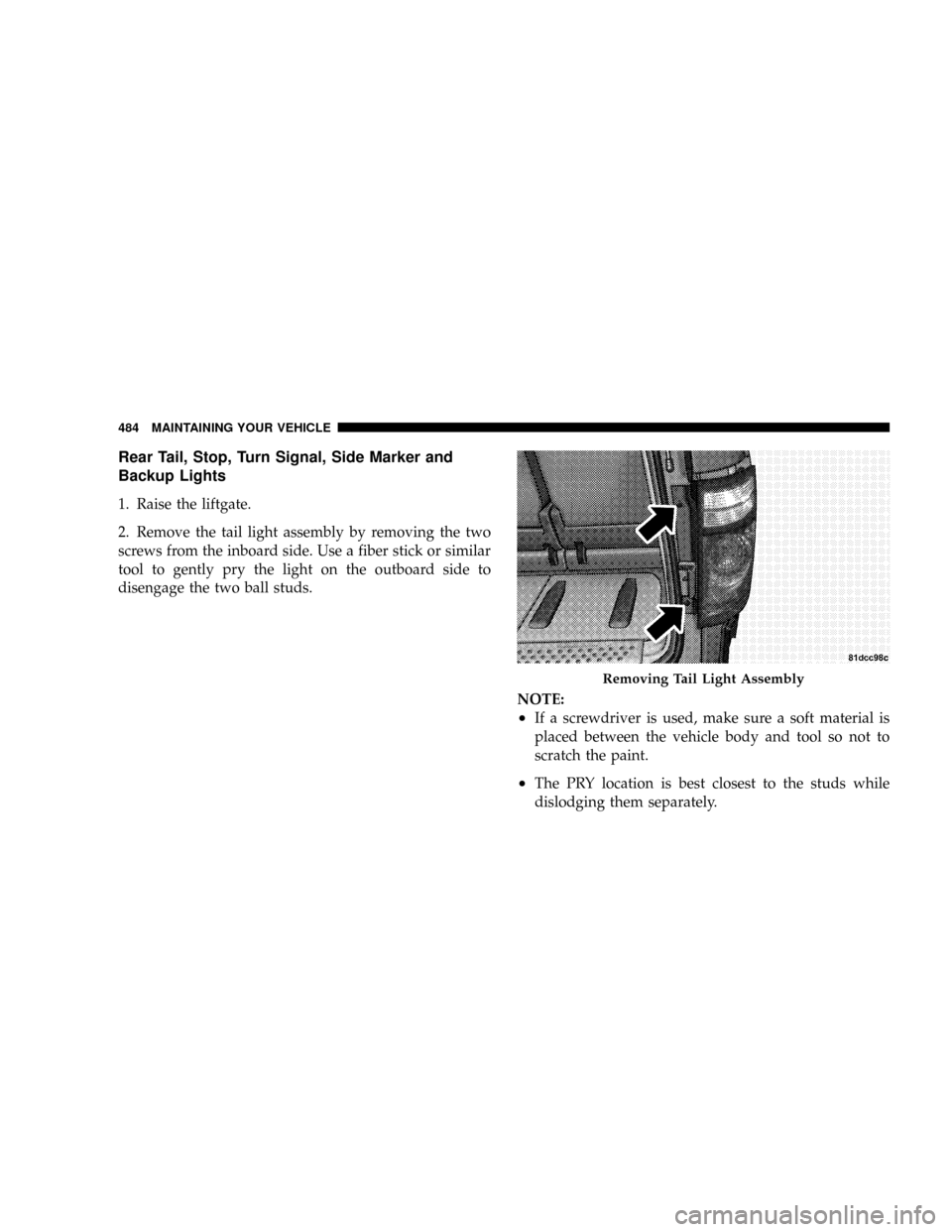
Rear Tail, Stop, Turn Signal, Side Marker and
Backup Lights
1. Raise the liftgate.
2. Remove the tail light assembly by removing the two
screws from the inboard side. Use a fiber stick or similar
tool to gently pry the light on the outboard side to
disengage the two ball studs.
NOTE:
²If a screwdriver is used, make sure a soft material is
placed between the vehicle body and tool so not to
scratch the paint.
²The PRY location is best closest to the studs while
dislodging them separately.
Removing Tail Light Assembly
484 MAINTAINING YOUR VEHICLE