park assist DODGE CARAVAN 2008 5.G Owners Manual
[x] Cancel search | Manufacturer: DODGE, Model Year: 2008, Model line: CARAVAN, Model: DODGE CARAVAN 2008 5.GPages: 531, PDF Size: 7.72 MB
Page 100 of 531
NSetting Memory Positions And Linking RKE
Transmitter To Memory.................156
mTo Open And Close The Hood.............158
NHood Safety Switch Ð If Equipped........159
mLights...............................160
NInterior Lighting......................160
NExterior Lights.......................162
mMultifunction Lever.....................166
NTurn Signals.........................166
mTilt Steering Column Ð If Equipped.........171
mRear Park Assist System Ð If Equipped.......171
NRear Park Assist Sensors................172
mAdjustable Pedals Ð If Equipped...........177mElectronic Speed Control Ð If Equipped......179
NActivating Electronic Speed Control........179
mOverhead Consoles.....................182
NFront Overhead Console Ð If Equipped.....182
mGarage Door Opener Ð If Equipped.........185
NProgramming HomeLinkt...............187
NGate Operator/Canadian Programming.....190
NSecurity............................191
NTroubleshooting Tips...................191
NGeneral Information...................191
mPower Sunroof Ð If Equipped.............192
NPower Sunroof Operation...............192
mElectrical Power Outlets Ð If Equipped.......195
98 UNDERSTANDING THE FEATURES OF YOUR VEHICLE
Page 173 of 531
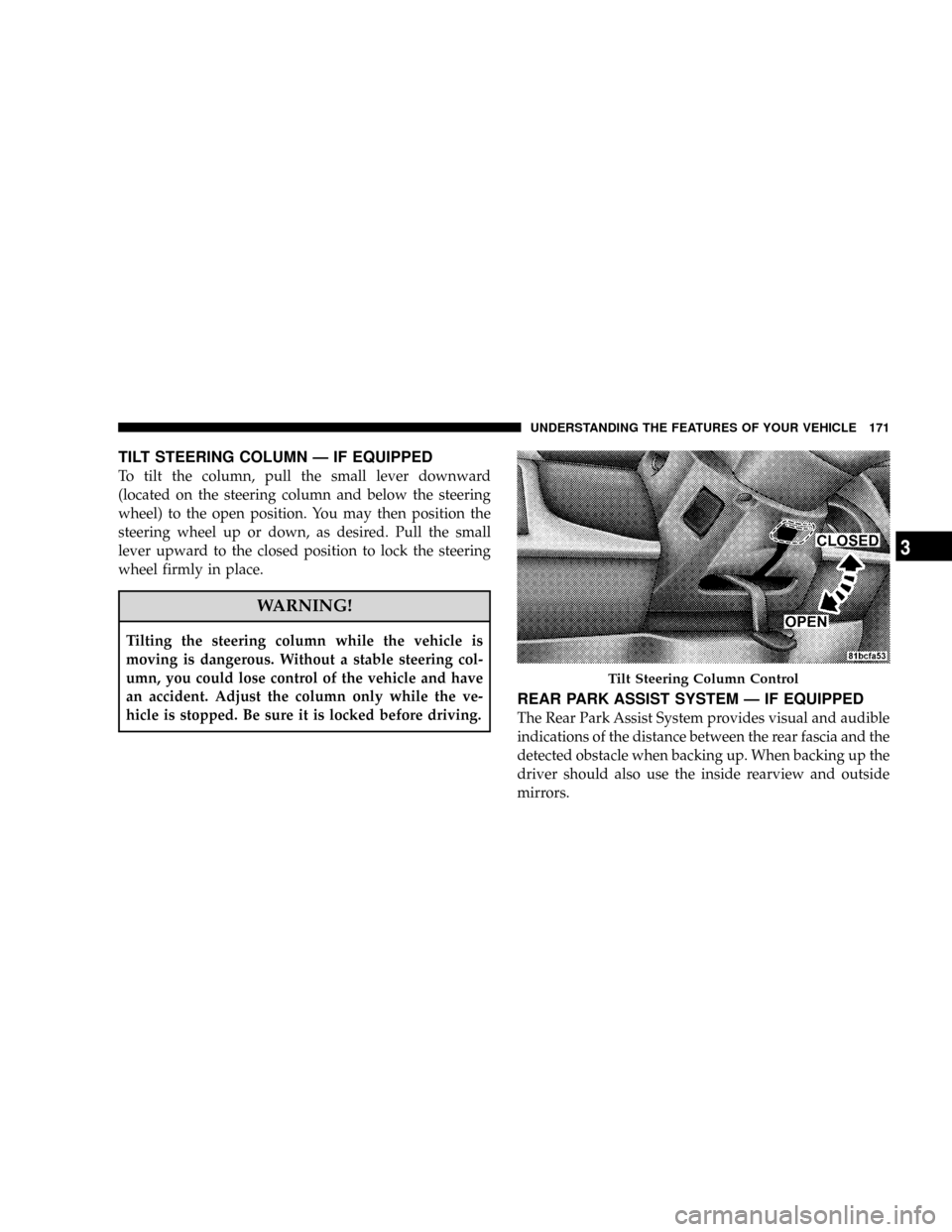
TILT STEERING COLUMN Ð IF EQUIPPED
To tilt the column, pull the small lever downward
(located on the steering column and below the steering
wheel) to the open position. You may then position the
steering wheel up or down, as desired. Pull the small
lever upward to the closed position to lock the steering
wheel firmly in place.
WARNING!
Tilting the steering column while the vehicle is
moving is dangerous. Without a stable steering col-
umn, you could lose control of the vehicle and have
an accident. Adjust the column only while the ve-
hicle is stopped. Be sure it is locked before driving.
REAR PARK ASSIST SYSTEM Ð IF EQUIPPED
The Rear Park Assist System provides visual and audible
indications of the distance between the rear fascia and the
detected obstacle when backing up. When backing up the
driver should also use the inside rearview and outside
mirrors.
Tilt Steering Column Control
UNDERSTANDING THE FEATURES OF YOUR VEHICLE 171
3
Page 174 of 531
The Rear Park Assist System will remember the last
system state (enabled or disabled) from the last ignition
cycle when the ignition is changed to the RUN/ON
position.
The Rear Park Assist System can be active only when the
transaxle gear selector lever is in REVERSE. When in
REVERSE, the system scans for objects behind the vehicle
using four sensors located in the rear bumper.
NOTE:The system will be active until the vehicle speed
is increased to approximately 11 mph (18 km/h) or
above. The system will be active again if the vehicle
speed is decreased to speeds less than approximately 10
mph (16 km/h).Rear Park Assist Sensors
The four Rear Park Assist Sensors, located in the rear
fascia, monitor the area behind the vehicle that is within
the sensors' field of view. The monitored area seems oval
in shape. The sensors can detect obstacles from approxi-
mately 11.8 in (30 cm) up to 78.7 in (200 cm) from the rear
fascia in the horizontal direction, depending on the
location and orientation of the obstacle and the type of
obstacle.
Rear Park Assist Warning Display
The Rear Park Assist Warning Display, located in the
headliner near the liftgate glass, provides both visual and
audible warnings to indicate the distance between the
rear fascia and the detected obstacle.
172 UNDERSTANDING THE FEATURES OF YOUR VEHICLE
Page 175 of 531
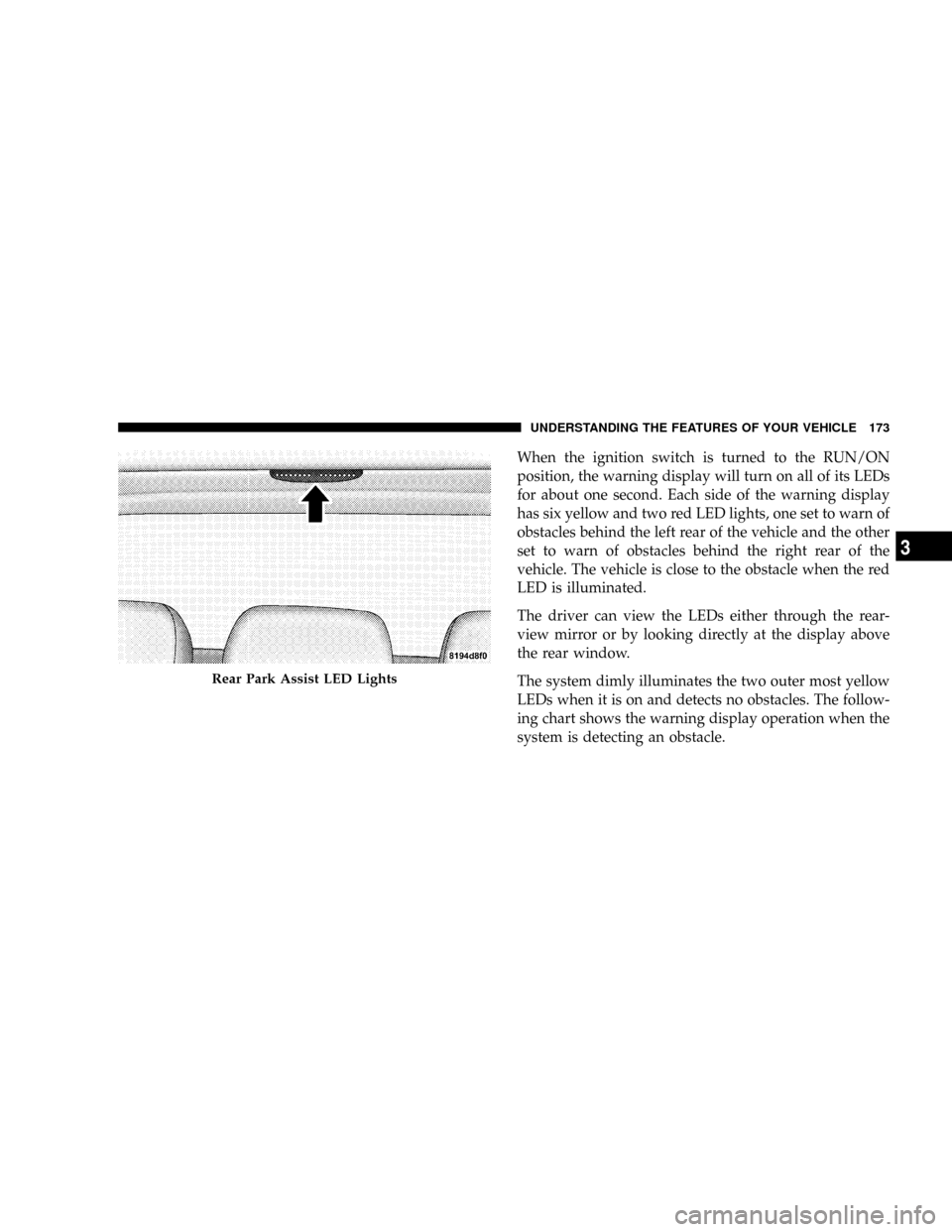
When the ignition switch is turned to the RUN/ON
position, the warning display will turn on all of its LEDs
for about one second. Each side of the warning display
has six yellow and two red LED lights, one set to warn of
obstacles behind the left rear of the vehicle and the other
set to warn of obstacles behind the right rear of the
vehicle. The vehicle is close to the obstacle when the red
LED is illuminated.
The driver can view the LEDs either through the rear-
view mirror or by looking directly at the display above
the rear window.
The system dimly illuminates the two outer most yellow
LEDs when it is on and detects no obstacles. The follow-
ing chart shows the warning display operation when the
system is detecting an obstacle.
Rear Park Assist LED Lights
UNDERSTANDING THE FEATURES OF YOUR VEHICLE 173
3
Page 176 of 531
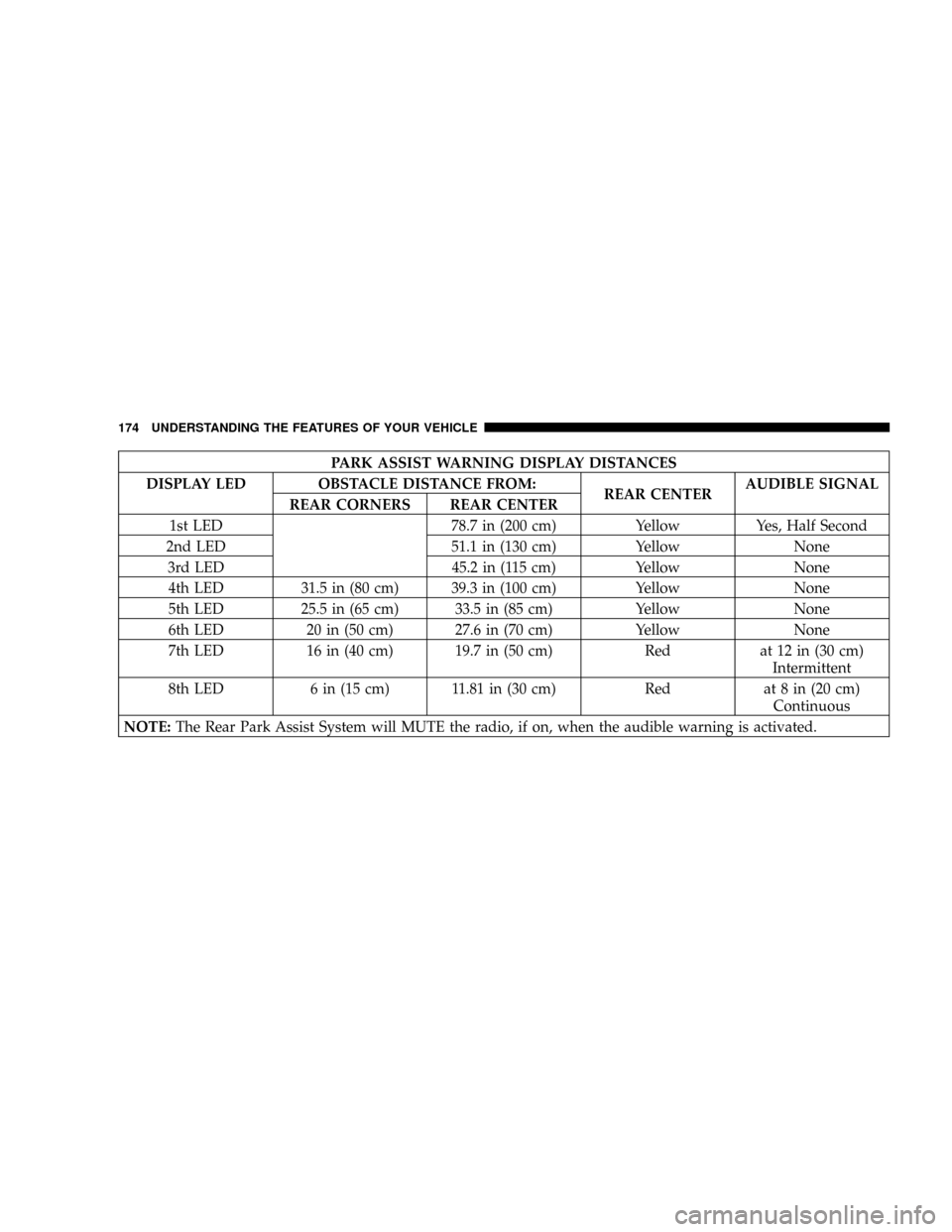
PARK ASSIST WARNING DISPLAY DISTANCES
DISPLAY LED OBSTACLE DISTANCE FROM:
REAR CENTERAUDIBLE SIGNAL
REAR CORNERS REAR CENTER
1st LED 78.7 in (200 cm) Yellow Yes, Half Second
2nd LED 51.1 in (130 cm) Yellow None
3rd LED 45.2 in (115 cm) Yellow None
4th LED 31.5 in (80 cm) 39.3 in (100 cm) Yellow None
5th LED 25.5 in (65 cm) 33.5 in (85 cm) Yellow None
6th LED 20 in (50 cm) 27.6 in (70 cm) Yellow None
7th LED 16 in (40 cm) 19.7 in (50 cm) Red at 12 in (30 cm)
Intermittent
8th LED 6 in (15 cm) 11.81 in (30 cm) Red at 8 in (20 cm)
Continuous
NOTE:The Rear Park Assist System will MUTE the radio, if on, when the audible warning is activated.
174 UNDERSTANDING THE FEATURES OF YOUR VEHICLE
Page 177 of 531
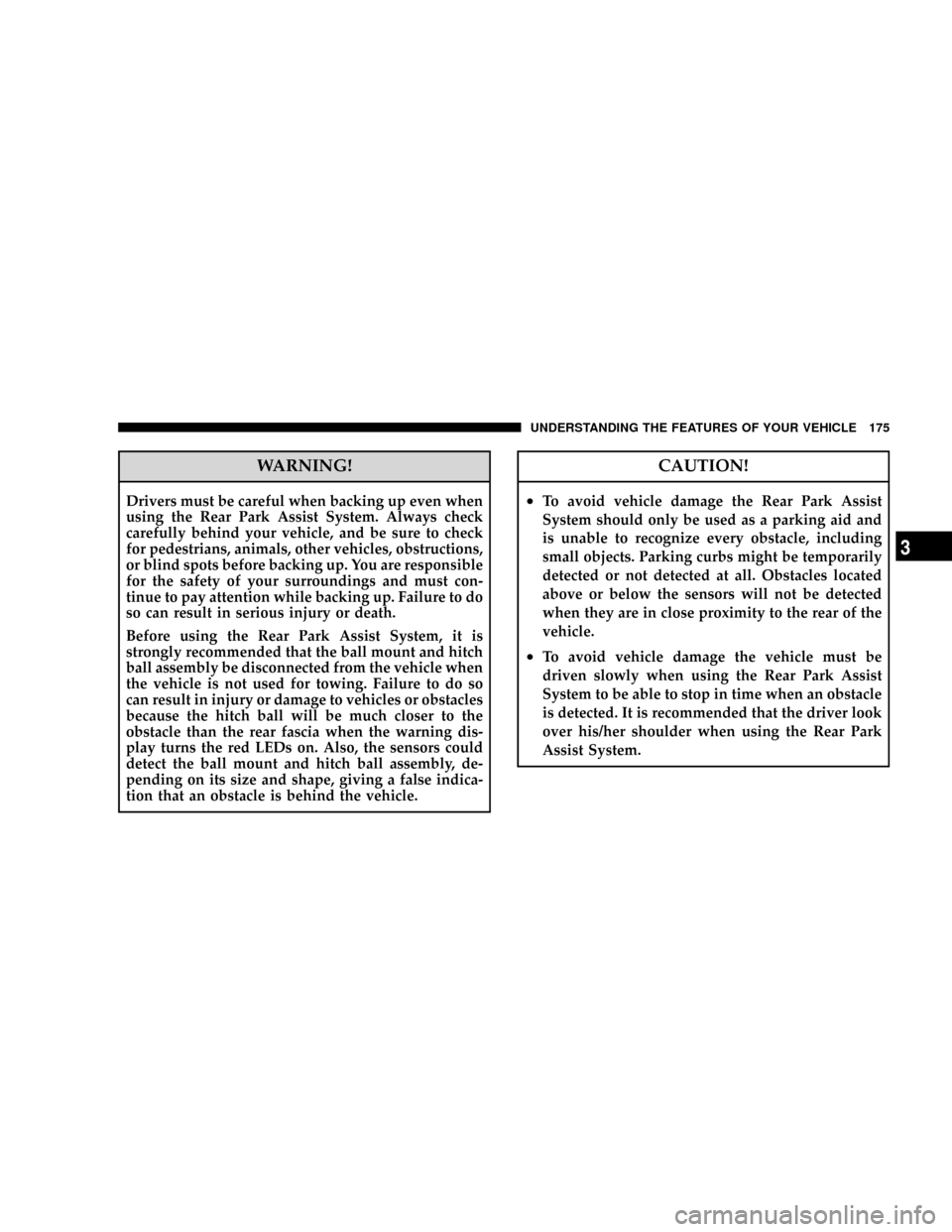
WARNING!
Drivers must be careful when backing up even when
using the Rear Park Assist System. Always check
carefully behind your vehicle, and be sure to check
for pedestrians, animals, other vehicles, obstructions,
or blind spots before backing up. You are responsible
for the safety of your surroundings and must con-
tinue to pay attention while backing up. Failure to do
so can result in serious injury or death.
Before using the Rear Park Assist System, it is
strongly recommended that the ball mount and hitch
ball assembly be disconnected from the vehicle when
the vehicle is not used for towing. Failure to do so
can result in injury or damage to vehicles or obstacles
because the hitch ball will be much closer to the
obstacle than the rear fascia when the warning dis-
play turns the red LEDs on. Also, the sensors could
detect the ball mount and hitch ball assembly, de-
pending on its size and shape, giving a false indica-
tion that an obstacle is behind the vehicle.
CAUTION!
²To avoid vehicle damage the Rear Park Assist
System should only be used as a parking aid and
is unable to recognize every obstacle, including
small objects. Parking curbs might be temporarily
detected or not detected at all. Obstacles located
above or below the sensors will not be detected
when they are in close proximity to the rear of the
vehicle.
²To avoid vehicle damage the vehicle must be
driven slowly when using the Rear Park Assist
System to be able to stop in time when an obstacle
is detected. It is recommended that the driver look
over his/her shoulder when using the Rear Park
Assist System.
UNDERSTANDING THE FEATURES OF YOUR VEHICLE 175
3
Page 178 of 531
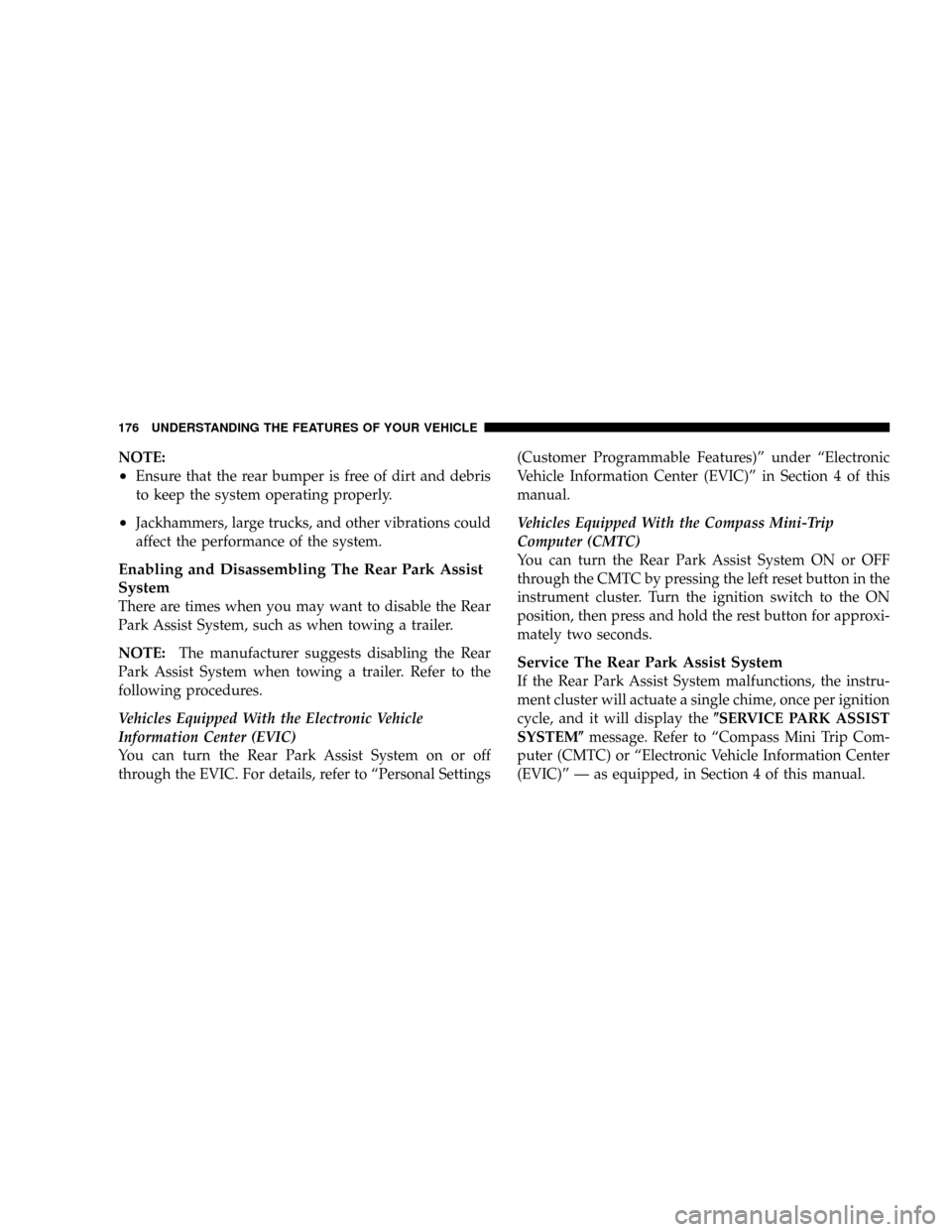
NOTE:
²Ensure that the rear bumper is free of dirt and debris
to keep the system operating properly.
²Jackhammers, large trucks, and other vibrations could
affect the performance of the system.
Enabling and Disassembling The Rear Park Assist
System
There are times when you may want to disable the Rear
Park Assist System, such as when towing a trailer.
NOTE:The manufacturer suggests disabling the Rear
Park Assist System when towing a trailer. Refer to the
following procedures.
Vehicles Equipped With the Electronic Vehicle
Information Center (EVIC)
You can turn the Rear Park Assist System on or off
through the EVIC. For details, refer to ªPersonal Settings(Customer Programmable Features)º under ªElectronic
Vehicle Information Center (EVIC)º in Section 4 of this
manual.
Vehicles Equipped With the Compass Mini-Trip
Computer (CMTC)
You can turn the Rear Park Assist System ON or OFF
through the CMTC by pressing the left reset button in the
instrument cluster. Turn the ignition switch to the ON
position, then press and hold the rest button for approxi-
mately two seconds.
Service The Rear Park Assist System
If the Rear Park Assist System malfunctions, the instru-
ment cluster will actuate a single chime, once per ignition
cycle, and it will display the(SERVICE PARK ASSIST
SYSTEM(message. Refer to ªCompass Mini Trip Com-
puter (CMTC) or ªElectronic Vehicle Information Center
(EVIC)º Ð as equipped, in Section 4 of this manual.
176 UNDERSTANDING THE FEATURES OF YOUR VEHICLE
Page 179 of 531
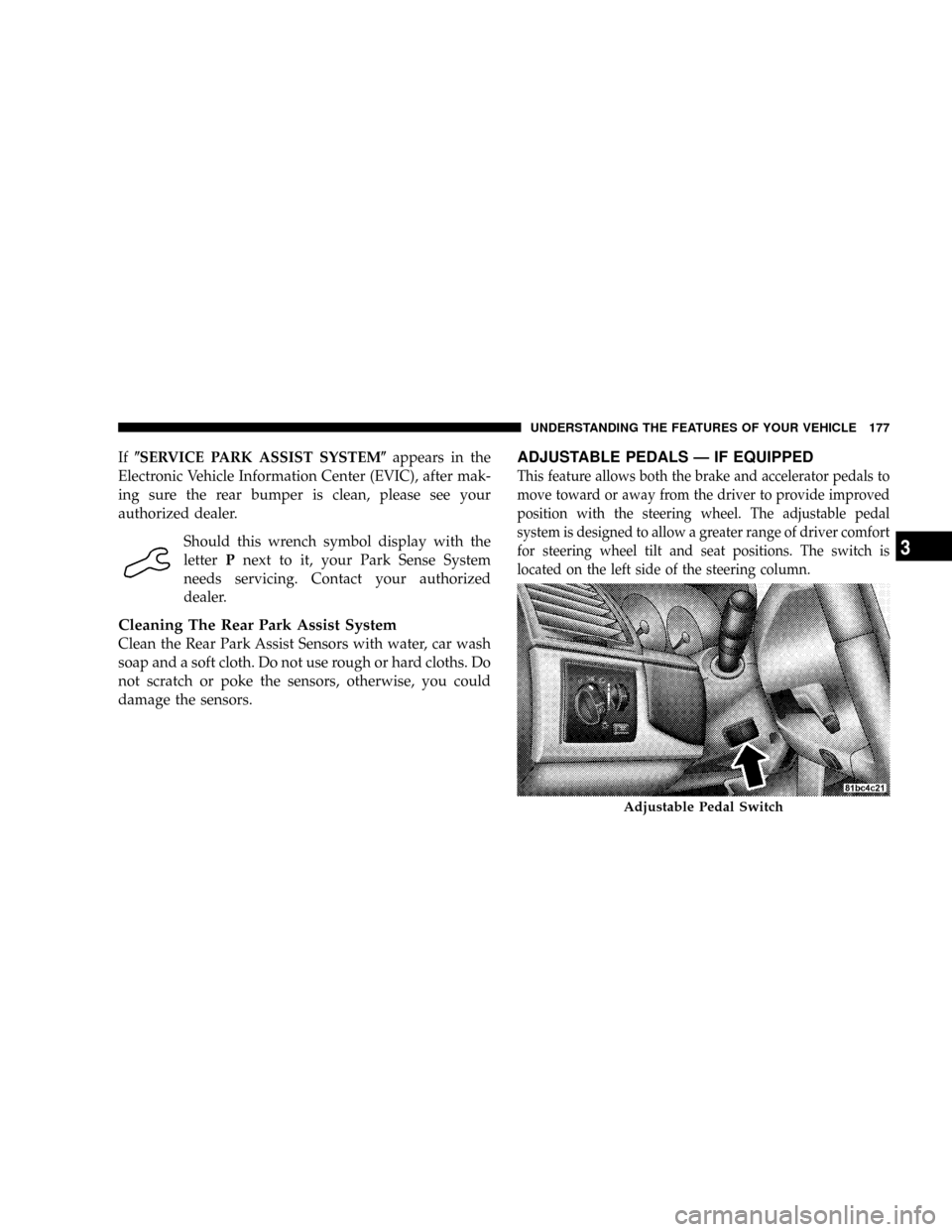
If(SERVICE PARK ASSIST SYSTEM(appears in the
Electronic Vehicle Information Center (EVIC), after mak-
ing sure the rear bumper is clean, please see your
authorized dealer.
Should this wrench symbol display with the
letterPnext to it, your Park Sense System
needs servicing. Contact your authorized
dealer.
Cleaning The Rear Park Assist System
Clean the Rear Park Assist Sensors with water, car wash
soap and a soft cloth. Do not use rough or hard cloths. Do
not scratch or poke the sensors, otherwise, you could
damage the sensors.
ADJUSTABLE PEDALS Ð IF EQUIPPED
This feature allows both the brake and accelerator pedals to
move toward or away from the driver to provide improved
position with the steering wheel. The adjustable pedal
system is designed to allow a greater range of driver comfort
for steering wheel tilt and seat positions. The switch is
located on the left side of the steering column.
Adjustable Pedal Switch
UNDERSTANDING THE FEATURES OF YOUR VEHICLE 177
3
Page 241 of 531
To reset the display shown, turn the ignition switch to the
ON position, then press and hold the reset button for
approximately two seconds.
When the appropriate conditions exist, the following
odometer messages will display:
NE.......Eight-point compass headings are displayed
(N, S, E, W, NE, NW, SE, SW)
14ÉF............ Temperature (Fahrenheit or Celsius)
AV G......... AverageFuel Economy (U.S. or Metric)
DTE.......................Distance to Empty
ET............................Elapsed Time
P.......................... ParkAssist On/Off
Should this wrench symbol display with the
letterPnext to it, your Park Assist System
needs servicing. Contact your authorized
dealer.NOTE:Temperature and Average Fuel Economy can be
changed from U.S. or Metric by pressing and holding the
left CMTC Reset Button located on the instrument cluster
near the temperature gauge.
Compass Mini-Trip Computer (CMTC) Trip
Odometer (ODO)
This display shows the distance traveled since the last
reset. Press and release the right button located on the
instrument cluster to switch from odometer, to trip A or
trip B. Press and hold the right button while the
odometer/trip odometer is displayed to reset.
Trip A
Shows the total distance traveled for Trip A since the last
reset.
Trip B
Shows the total distance traveled for Trip B since the last
reset.
UNDERSTANDING YOUR INSTRUMENT PANEL 239
4
Page 245 of 531
EVIC Displays
When the appropriate conditions exist, the EVIC displays
the following messages:
²Door(s) Ajar (with a single chime if vehicle is in
motion)
²Liftgate Ajar (chime will sound when vehicle starts
moving)
²Hood Ajar (If equipped with hood switch)
²Check TPM System. Refer to ªTire Pressure Monitor-
ing Systemº in Section 5 of this manual.
²Turn Signal On
²RKE Battery Low
²LOW WASHER FLUID
²Oil Change Required
²Left Front Turn Signal Light Out
²Left Rear Turn Signal Light Out
²Right Front Turn Signal Light Out
²Right Rear Turn Signal Light Out
²Park Assist Disabled
²Service Park Assist System
²Personal Settings Not Available ± Vehicle Not in Park
Oil Change Required
Your vehicle is equipped with an engine oil change
indicator system. TheOil Change Requiredmessage will
flash in the EVIC display for approximately 10 seconds
after a single chime has sounded to indicate the next
scheduled oil change interval. The engine oil change
indicator system is duty cycle based, which means the
engine oil change interval may fluctuate dependent upon
your personal driving style.
UNDERSTANDING YOUR INSTRUMENT PANEL 243
4