key DODGE CARAVAN 2009 Owner's Manual
[x] Cancel search | Manufacturer: DODGE, Model Year: 2009, Model line: CARAVAN, Model: DODGE CARAVAN 2009Pages: 534, PDF Size: 9.93 MB
Page 34 of 534
WARNING!
•For personal security and safety in the event of an
accident, lock the vehicle doors as you drive as
well as when you park and leave the vehicle.
•When leaving the vehicle always remove the key
from the ignition switch, and lock your vehicle.
Do not leave unattended children in the vehicle, or
with access to an unlocked vehicle. Unsupervised
use of vehicle equipment may cause severe per-
sonal injuries and death.
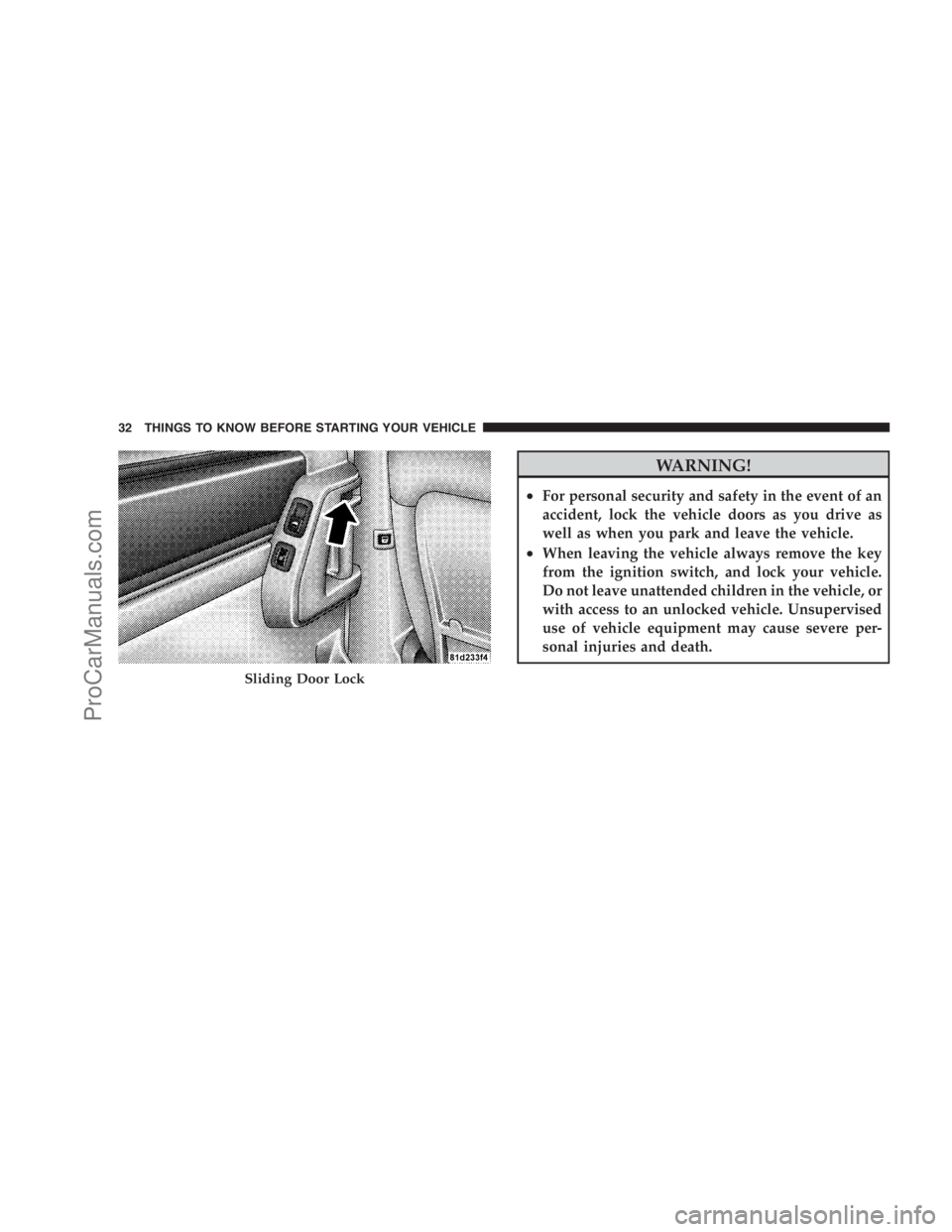
Sliding Door Lock
32 THINGS TO KNOW BEFORE STARTING YOUR VEHICLE
ProCarManuals.com
Page 35 of 534
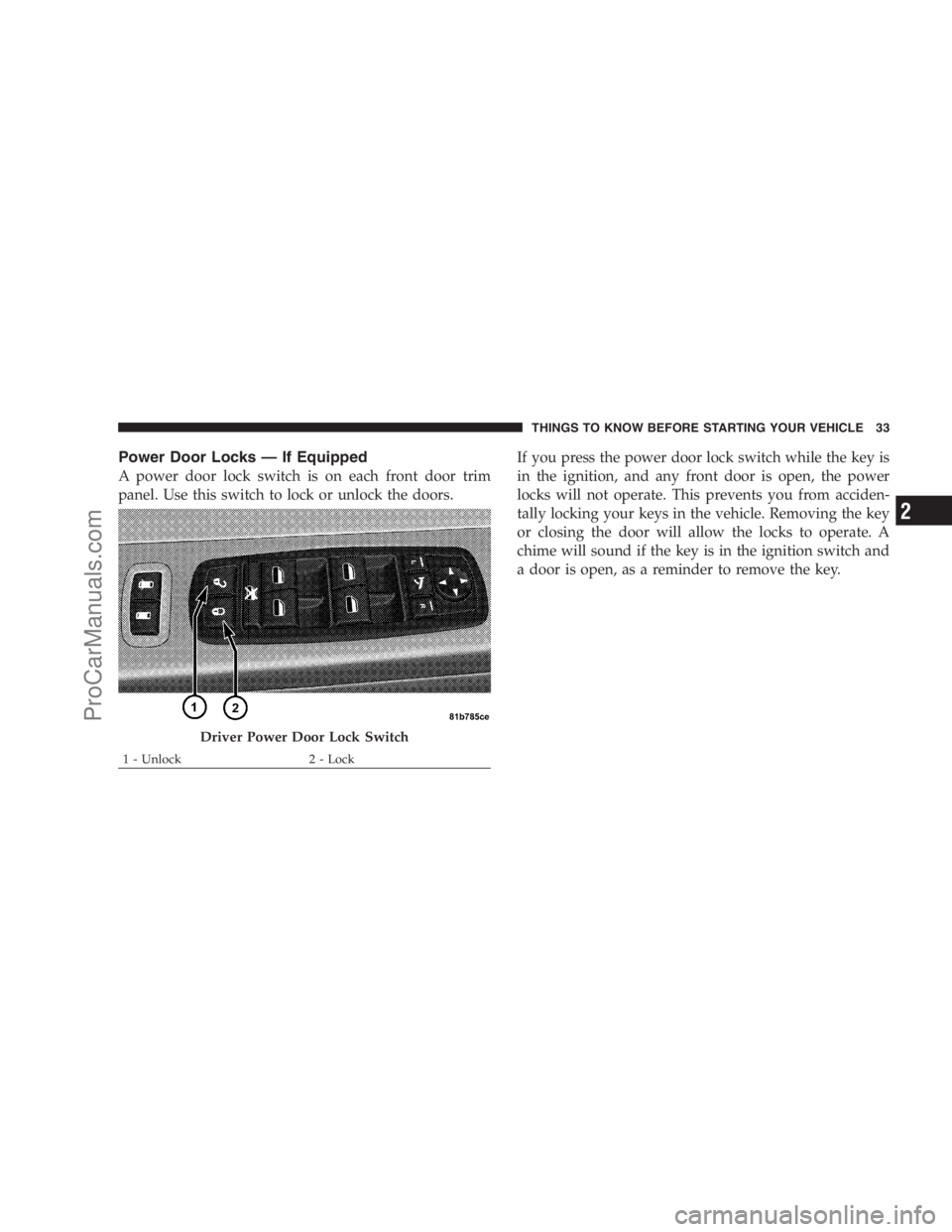
Power Door Locks — If Equipped
A power door lock switch is on each front door trim
panel. Use this switch to lock or unlock the doors.If you press the power door lock switch while the key is
in the ignition, and any front door is open, the power
locks will not operate. This prevents you from acciden-
tally locking your keys in the vehicle. Removing the key
or closing the door will allow the locks to operate. A
chime will sound if the key is in the ignition switch and
a door is open, as a reminder to remove the key.
Driver Power Door Lock Switch
1 - Unlock 2 - LockTHINGS TO KNOW BEFORE STARTING YOUR VEHICLE 33
2
ProCarManuals.com
Page 37 of 534
3. Place the key into the ignition.
4. Within 15 seconds, cycle the ignition key from the
LOCK position to the ON/RUN position a minimum of
four times, ending in the LOCK position(do not start the
engine).
5. Within 30 seconds, press the driver’s door lock switch
in the LOCK direction.
6. A single chime will be heard to indicate the feature has
been disabled.
7. To reactivate this feature, repeat the above steps.
8. If a chime is not heard, the program mode was
canceled before the feature could be disabled. If neces-
sary, repeat the above procedure.The Lock Doors Automatically at 15 mph (24 km/h)
feature can be reactivated by repeating the above men-
tioned procedure or by performing the procedure in the
EVIC (if equipped), Personal Settings (Customer-
Programmable Features) section.
Unlock Doors Automatically On Exit — If
Equipped
The Unlock Doors Automatically On Exit feature unlocks
all of the doors of the vehicle when any door is opened.
This will occur only after the shift lever has been shifted
into the PARK position, after the vehicle has been driven
(the shift lever has been shifted out of PARK and all
doors closed).
The Unlock Doors Automatically On Exit feature will not
operate if there is any manual operation of the power
door locks (lock or unlock).
THINGS TO KNOW BEFORE STARTING YOUR VEHICLE 35
2
ProCarManuals.com
Page 38 of 534
The Unlock Doors Automatically On Exit feature can be
enabled or disabled by performing the following proce-
dure:
1. Enter your vehicle and close all doors.
2. Fasten your seat belt. (Fastening the seat belt will
cancel any chimes that may be confusing during this
programming procedure.)
3. Insert the key into the ignition switch.
4. Within 15 seconds, cycle the ignition key from the
LOCK position to the ON/RUN position a minimum of
four times ending in the LOCK position(do not start the
engine).
5. Within 30 seconds, press the driver’s door lock switch
in the UNLOCK direction.
6. A single chime will sound to indicate the feature has
been changed.7. To reactivate this feature, repeat the above steps.
8. If a chime is not heard, the program mode was
canceled before the feature could be changed. If neces-
sary, repeat the above procedure.
The Unlock Doors Automatically On Exit feature can be
reactivated by repeating the above mentioned procedure
or by performing the procedure in the EVIC, Customer
Programmable Features section on vehicles so equipped.
NOTE:Use the Lock Doors Automatically at 15 mph
(24 km/h) and Unlock Doors Automatically On Exit
features in accordance with local laws.
Remote Power Unlock On First Press — If
Equipped
The Remote Power Unlock On First Press feature lets you
program the system to unlock either the driver’s side
door or all doors on the first press of the UNLOCK
button on the transmitter.
36 THINGS TO KNOW BEFORE STARTING YOUR VEHICLE
ProCarManuals.com
Page 39 of 534
The Remote Power Unlock On First Press feature can be
enabled or disabled by performing the following proce-
dure:
1. Perform this operation while standing outside the
vehicle.
2. Press the LOCK button for five to ten seconds.
3. While the LOCK button is pressed, (after five seconds)
press the UNLOCK button. Release both buttons.
The Remote Power Unlock On First Press feature can be
reactivated by repeating the above procedure or by
performing the procedure in Section Four, “Electronic
Vehicle Information Center (EVIC), Personal Settings
(Customer-Programmable Features)” on vehicles so
equipped.
For other power lock features, refer to “Remote Keyless
Entry (RKE) Transmitter” earlier in this section.WINDOWS
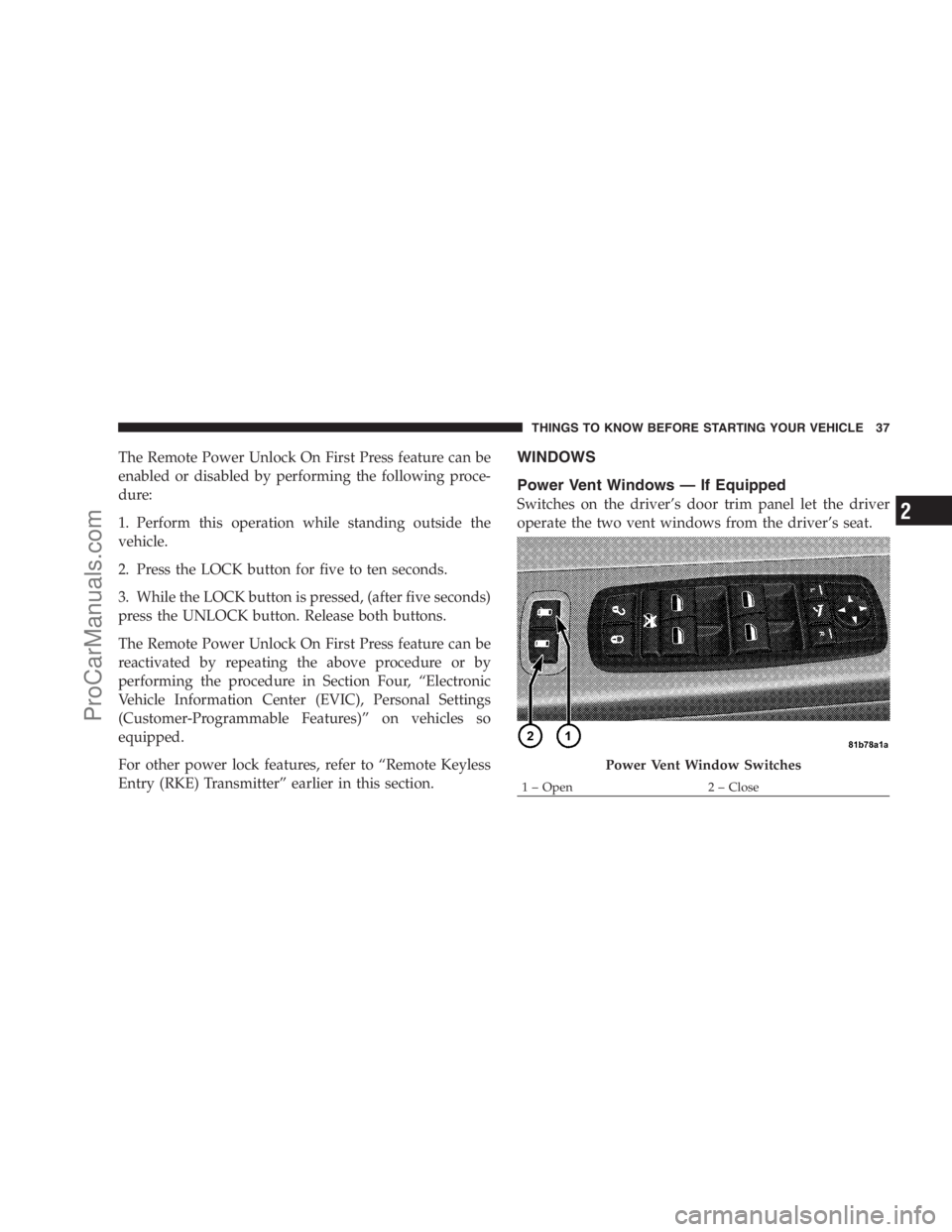
Power Vent Windows — If Equipped
Switches on the driver’s door trim panel let the driver
operate the two vent windows from the driver’s seat.
Power Vent Window Switches
1–Open 2–CloseTHINGS TO KNOW BEFORE STARTING YOUR VEHICLE 37
2
ProCarManuals.com
Page 47 of 534
door switch is pressed. To close the door, wait until it
is fully open and then press the switch again.
•The power sliding side door switches will not operate
if the shift lever is in gear or the vehicle speed is above
0 mph (0 km/h).
•If the power sliding door encounters multiple obstruc-
tions within the same cycle, the system will automati-
cally stop and must be opened or closed manually.
WARNING!
You, or others, could be injured if caught in the path
of the sliding door. Make sure the door path is clear
before closing the door.
Power Sliding Side Door Open Flash
The left and right exterior hazard lights will flash for
12 seconds when either sliding door is opened. This will
alert other drivers in the area that passenger(s) could be
entering or exiting the vehicle.
The Sliding Side Door Open Flash can be enabled or
disabled by performing the following procedure:
1. Place the key in the ignition switch.
2. Cycle the ignition switch ON/OFF four times ending
in the ON position(do not start the engine).
3. Within 10 seconds of the final cycle, press the HAZ-
ARD switch.
4. A single chime will sound to signify that you have
successfully completed the programming.
You can turn the feature back on by repeating the above
mentioned procedure.
THINGS TO KNOW BEFORE STARTING YOUR VEHICLE 45
2
ProCarManuals.com
Page 51 of 534
NOTE:
•After setting the Child Protection Door Lock system,
always test the door from the inside to make certain it
is in the desired position.
•The power sliding side door switches will not operate
if the vehicle is in gear or the vehicle speed is above
0 mph (0 km/h).
•The power sliding door will operate from the outside
door handle, the RKE transmitter, the switches on the
overhead console, or the switches located on the trim
panel just in front of the power sliding door when the
shift lever is in PARK, regardless of the child lock lever
position.
LIFTGATE
On vehicles equipped with power locks, the liftgate can
be unlocked using the Remote Keyless Entry (RKE)
transmitter button, or by activating the power door lock
switches located on the front doors.
To open the liftgate, depress the liftgate release handle
located on the underside of the license plate bar and pull
the liftgate open with one fluid motion.
THINGS TO KNOW BEFORE STARTING YOUR VEHICLE 49
2
ProCarManuals.com
Page 52 of 534

If the liftgate is locked and is not equipped with the
power liftgate feature, pressing the button on the RKE
transmitter will result in the liftgate becoming unlocked
for 30 seconds allowing you to manually access the
liftgate area.
Power Liftgate — If Equipped
The power liftgate may be opened manually or by using
the button on the Remote Keyless Entry (RKE) transmit-
ter. Press the button on the transmitter twice within five
seconds, to open the power liftgate. When the liftgate is
fully open, pressing the button twice within five seconds,
a second time, will close the liftgate.
The power liftgate may also be opened and closed by
pressing the button located on the overhead console.
Liftgate Handle Location
50 THINGS TO KNOW BEFORE STARTING YOUR VEHICLE
ProCarManuals.com
Page 73 of 534
or ON position. These include all of the components
listed above except the steering wheel and column,
instrument panel, and seat belt reminder light. If the key
is in the OFF position, in the ACC position, or not in the
ignition, the airbags are not on and will not inflate.
The ORC contains a backup power supply system that
will deploy the airbags even if the battery loses power or
it becomes disconnected prior to deployment.
Also, the ORC turns on the Airbag Warning
Light in the instrument panel for approxi-
mately four to six seconds for a self-check
when the ignition is first turned on. After the
self-check, the Airbag Warning Light will turn off. If the
ORC detects a malfunction in any part of the system, it
turns on the Airbag Warning Light, either momentarily
or continuously. A single chime will sound if the light
comes on again after initial start up.It also includes diagnostics that will illuminate the instru-
ment cluster Airbag Warning Light if a malfunction is
noted. The diagnostics also record the nature of the
malfunction.
WARNING!
Ignoring the Airbag Warning Light in your instru-
ment panel could mean you won’t have the airbags to
protect you in a collision. If the light does not come
on, stays on after you start the vehicle, or if it comes
on as you drive, have the airbag system checked right
away.
Front and Side Impact Sensors
Impact Sensors trigger airbag deployment in front and
side impacts, and aid the ORC in determining appropri-
ate response to impact events. Additional sensors in the
ORC determine the level of airbag deployment and
provide verification.
THINGS TO KNOW BEFORE STARTING YOUR VEHICLE 71
2
ProCarManuals.com
Page 74 of 534
Acceleration Sensors
Acceleration Sensors trigger airbag deployment based on
dramatic acceleration change of the vehicle.
Pressure Sensors
Pressure Sensors trigger airbag deployment based on
door cavity pressure changes.
Rollover Sensors
Rollover Sensors trigger airbag deployment in the event
of vehicle rollover and aid the ORC in deploying Side
Airbag Inflatable Curtains (SABIC) for rollover events.
Supplemental Side Airbag Inflatable Curtain
(SABIC) — If Equipped
The ORC deploys the SABIC during a collision with
other vehicles and during collisions where the impact is
confined to a particular area of the vehicle, such as,
collisions with poles, trees or similar objects. In these
events, the ORC will deploy the SABIC only on the
impact side of the vehicle.NOTE:The ORC will also detect and protect for rollover
when equipped with SABIC airbags. In a rollover the
SABIC airbags will deploy on both sides of the vehicle.
Enhanced Accident Response System
In the event of an impact causing airbag deployment, and
the vehicle communication network intact, and the
power intact, the Enhanced Accident Response System
performs the following functions:
•Cuts off fuel to the engine.
•Flashes hazard lights.
•Turns on the interior lights, which remain on as long as
the battery has power or until the ignition key is
removed.
•Unlocks the doors automatically.
72 THINGS TO KNOW BEFORE STARTING YOUR VEHICLE
ProCarManuals.com