instrument cluster DODGE CARAVAN 2010 Owner's Manual
[x] Cancel search | Manufacturer: DODGE, Model Year: 2010, Model line: CARAVAN, Model: DODGE CARAVAN 2010Pages: 530, PDF Size: 9.59 MB
Page 331 of 530
CAUTION!
If the transmission operating temperature exceeds
acceptable limits, the vehicle computer will override
DRIVE and select “5” range (on six-speed transmis-
sions) or “3” range (on four-speed transmissions) by
changing shift points. This is done to prevent trans-
mission damage due to overheating.
Electronic Range Select (ERS) Operation
The Electronic Range Select (ERS) shift control allows
you to move the shift lever to the left (-) or right (+) when
the shift lever is in the DRIVE position, this allows the
selection of the desired top gear. For example, if you shift
the transmission into third gear, the transmission will
never shift above third gear, but can shift down into
second or first gear automatically, when needed.Switching from ERS to DRIVE can be done at any vehicle
speed. To shift from DRIVE mode to ERS mode, move the
shift lever to the left (-) once. The current gear will be
maintained as the top gear. To disable ERS, simply press
and hold the shift lever to the right (+) until “D” is
displayed in the instrument cluster odometer.
WARNING!
Do not downshift for additional engine braking on a
slippery surface. The drive wheels could lose their
grip and the vehicle could skid, causing an accident
or personal injury.
330 STARTING AND OPERATING
ProCarManuals.com
Page 338 of 530
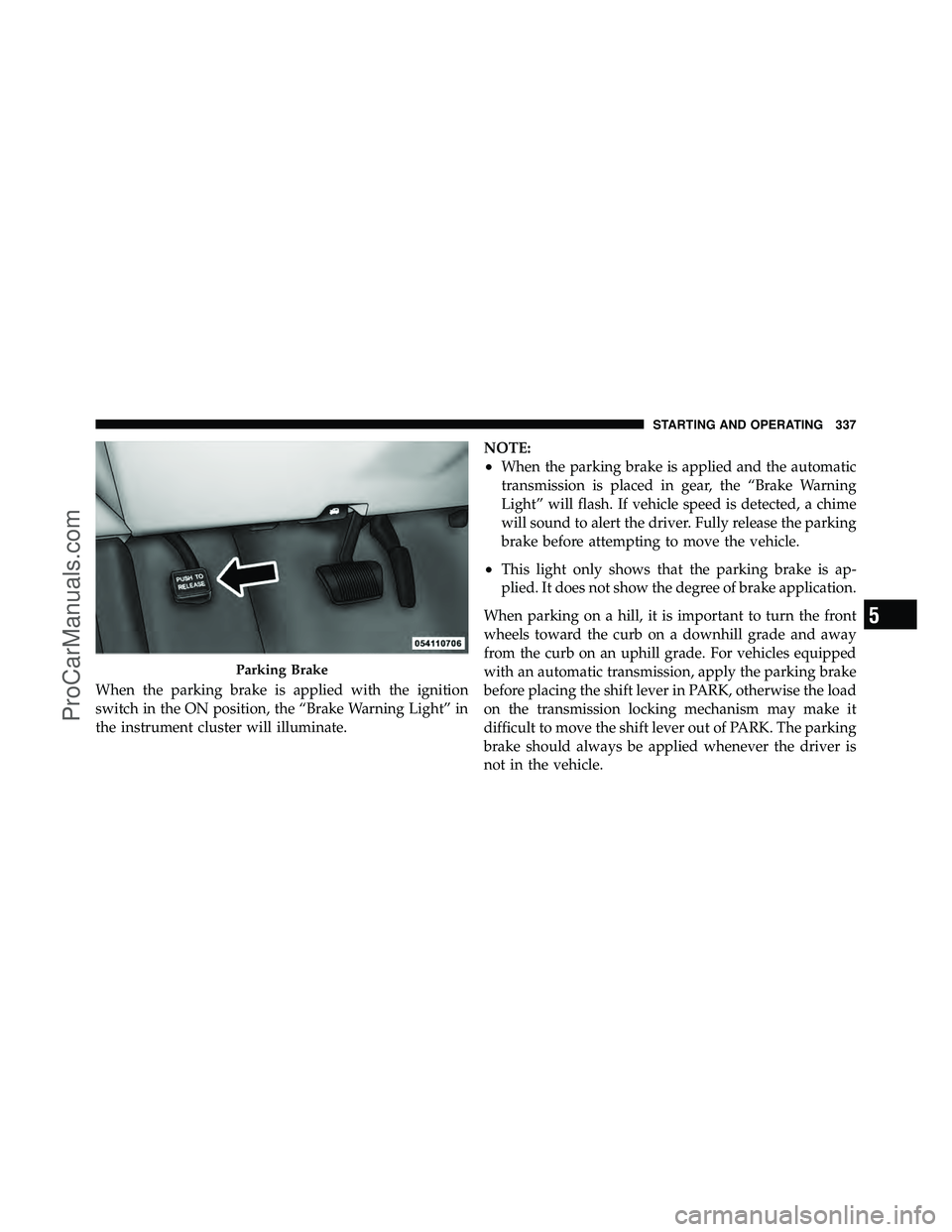
When the parking brake is applied with the ignition
switch in the ON position, the “Brake Warning Light” in
the instrument cluster will illuminate.NOTE:
•When the parking brake is applied and the automatic
transmission is placed in gear, the “Brake Warning
Light” will flash. If vehicle speed is detected, a chime
will sound to alert the driver. Fully release the parking
brake before attempting to move the vehicle.
•This light only shows that the parking brake is ap-
plied. It does not show the degree of brake application.
When parking on a hill, it is important to turn the front
wheels toward the curb on a downhill grade and away
from the curb on an uphill grade. For vehicles equipped
with an automatic transmission, apply the parking brake
before placing the shift lever in PARK, otherwise the load
on the transmission locking mechanism may make it
difficult to move the shift lever out of PARK. The parking
brake should always be applied whenever the driver is
not in the vehicle.
Parking Brake
5
STARTING AND OPERATING 337
ProCarManuals.com
Page 345 of 530
ESP Partial Off
This mode is entered by momentarily pressing the “ESP
OFF” switch (located in the center switch bank, next to
the hazard flasher switch).When in the “Partial Off” mode, the TCS
portion of ESP, except for the “limited slip”
feature described in the TCS section, has been
disabled and the “ESP/TCS Indicator Light”
will be illuminated. When in the “Partial Off” mode, ESP
will operate without engine torque management. This
mode is intended to be used if the vehicle is in deep
snow, sand or gravel conditions and more wheel spin
than ESP would normally allow is required to gain
traction. To turn ESP on again, momentarily press the
“ESP OFF” switch. This will restore the normal “ESP On”
mode of operation. NOTE:
To improve the vehicle’s traction when driving
with snow chains, or starting off in deep snow, sand or
gravel, it may be desirable to switch to the “Partial Off”
mode by pressing the “ESP OFF” switch. Once the
situation requiring ESP to be switched to the “Partial Off”
mode is overcome, turn ESP back on by momentarily
pressing the “ESP OFF” switch. This may be done while
the vehicle is in motion.
ESP/BAS Warning Light
The malfunction indicator light for the ESP is
combined with BAS. The “ESP/BAS Warning
Light” and the “ESP/TCS Indicator Light” (in
the instrument cluster) come on for four sec-
onds when the ignition switch is turned to the ON
position, then goes out. If the “ESP/BAS Warning Light”
comes on continuously with the engine running, a mal-
function has been detected in either the ESP or the BAS
system. If this light remains on after several ignition
cycles, and the vehicle has been driven several miles/
344 STARTING AND OPERATING
ProCarManuals.com
Page 368 of 530
The Basic TPMS consists of the following components:
•Receiver Module
•Four Tire Pressure Monitoring Sensors
•TPMS Telltale Warning Light
Tire Pressure Monitoring Low Tire Pressure
Warnings
The “TPMS Telltale Warning Light” will illu-
minate in the instrument cluster, and an au-
dible chime will be activated when one or more
of the four active road tire pressures are low.
Should this occur, you should stop as soon as possible,
check the inflation pressure of each tire on your vehicle,
and inflate each tire to the vehicle’s recommended cold
tire pressure value (located on the placard on the
driver’s-side B-Pillar). The system will automatically
update and the “TPMS Warning Lamp” will extinguish
once the updated tire pressures have been received. NOTE:
The vehicle may need to be driven for up to
20 minutes above 15 mph (25 km/h) to receive this
information.
The “TPMS Warning Lamp” will flash on and off for
75 seconds, and remain on solid when a system fault is
detected. The system fault will also sound a chime. If the
ignition switch is cycled, this sequence will repeat, pro-
viding the system fault still exists. The “TPMS Warning
Lamp” will turn off when the fault condition no longer
exists. A system fault can occur with any of the following
scenarios:
1. Jamming due to electronic devices or driving next to
facilities emitting the same radio frequencies as the TPMS
sensors.
2. Installing some form of aftermarket window tinting
that affects radio wave signals.
5
STARTING AND OPERATING 367
ProCarManuals.com
Page 370 of 530
NOTE:It is particularly important to regularly check
and maintain proper tire pressure in all the tires.
The Premium TPMS consists of the following compo-
nents:
•Receiver Module
•Four TPMS Sensors
•Three Trigger Modules (mounted in three of the four
wheel wells)
•Various TPMS messages, which display in the Elec-
tronic Vehicle Information Center (EVIC), and graph-
ics displaying tire pressures
•Yellow TPMS Telltale Warning Light
TPMS Low Pressure Warnings
The “TPMS Telltale Warning Light” will illuminate in the
instrument cluster, and an audible chime will be acti-
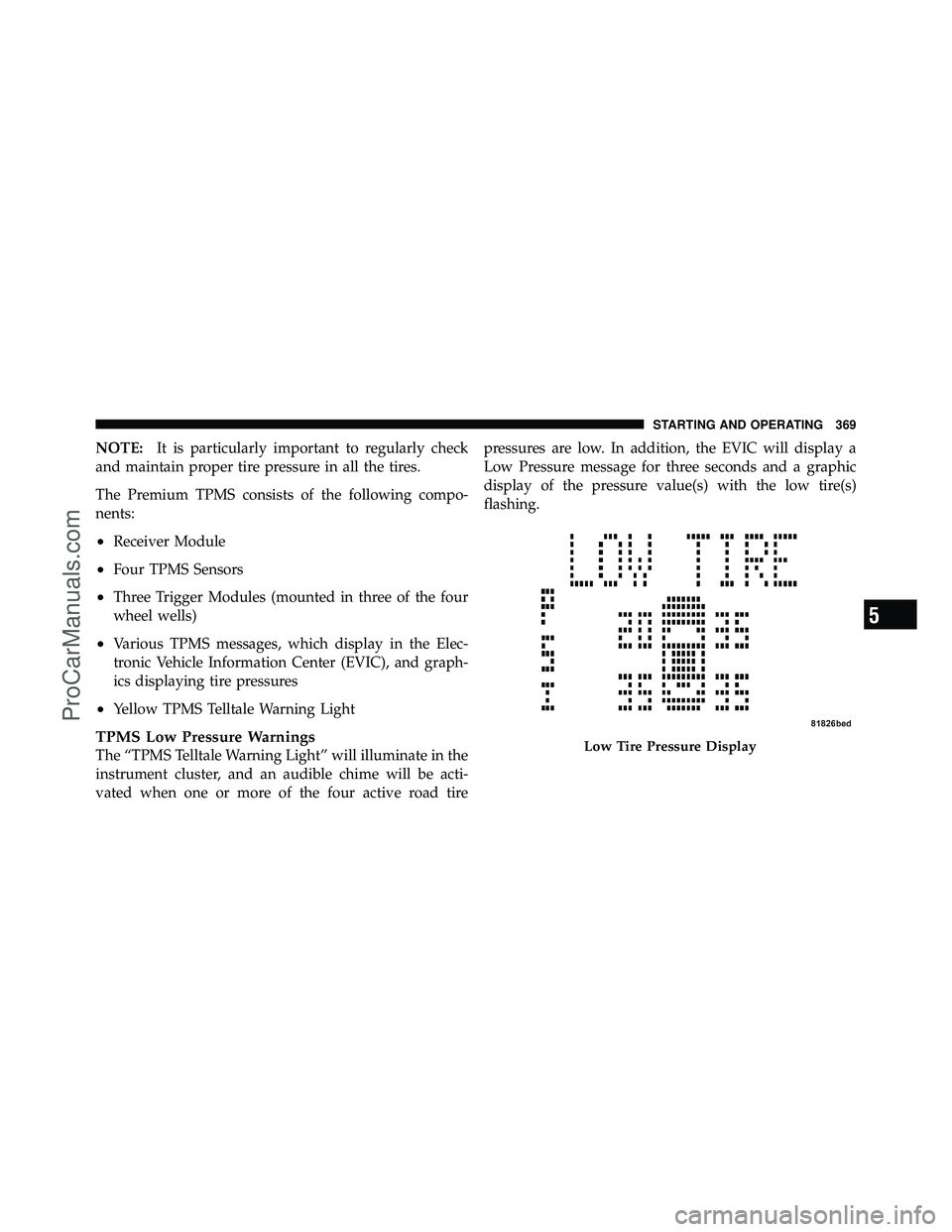
vated when one or more of the four active road tire pressures are low. In addition, the EVIC will display a
Low Pressure message for three seconds and a graphic
display of the pressure value(s) with the low tire(s)
flashing.Low Tire Pressure Display
5
STARTING AND OPERATING 369
ProCarManuals.com
Page 465 of 530
Cleaning Plastic Instrument Cluster Lenses
The lenses in front of the instruments in this vehicle are
molded in clear plastic. When cleaning the lenses, care
must be taken to avoid scratching the plastic.
1. Clean with a wet soft rag. A mild soap solution may be
used, but do not use high alcohol content or abrasive
cleaners. If soap is used, wipe clean with a clean damp
rag.
2. Dry with a soft tissue.
Seat Belt Maintenance
Do not bleach, dye or clean the seat belts with chemical
solvents or abrasive cleaners. This will weaken the fabric.
Sun damage can also weaken the fabric.
If the seat belts need cleaning, use a mild soap solution or
lukewarm water. Do not remove the belts from the car to
wash them.Replace the seat belts if they appear frayed or worn, or if
the buckles do not work properly.
Cleaning the Instrument Panel Cupholders
Removal
Pull the flexible liner from the cupholder drawer starting
at one edge to ease removal.
Cleaning
The liner is top shelf dishwasher safe, or you may follow
the cleaning procedure below.
Soak the liner in a mixture of medium hot tap water and
one teaspoon of mild liquid dish soap. Let soak for
approximately 30 minutes. After 30 minutes, pull the
liner from the water and dip it back into the water about
six times. This will loosen any remaining debris. Rinse
the liner thoroughly under warm running water. Shake
the excess water from the liner and dry the outer surfaces
with a clean soft cloth.
464 MAINTAINING YOUR VEHICLE
ProCarManuals.com
Page 470 of 530
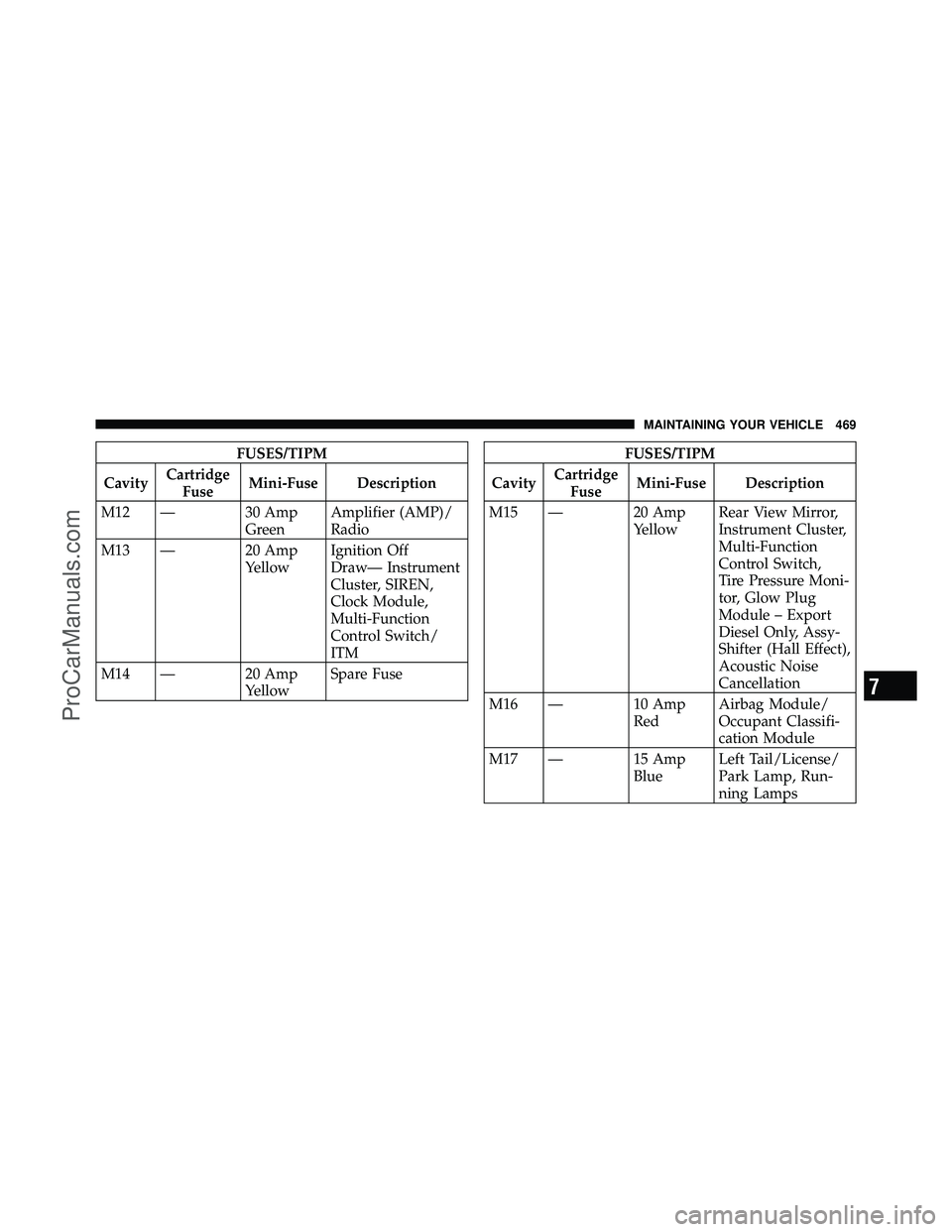
FUSES/TIPM
Cavity Cartridge
Fuse Mini-Fuse Description
M12 — 30 Amp GreenAmplifier (AMP)/
Radio
M13 — 20 Amp YellowIgnition Off
Draw— Instrument
Cluster, SIREN,
Clock Module,
Multi-Function
Control Switch/
ITM
M14 — 20 Amp YellowSpare FuseFUSES/TIPM
Cavity Cartridge
Fuse Mini-Fuse Description
M15 — 20 Amp YellowRear View Mirror,
Instrument Cluster,
Multi-Function
Control Switch,
Tire Pressure Moni-
tor, Glow Plug
Module – Export
Diesel Only, Assy-
Shifter (Hall Effect),
Acoustic Noise
Cancellation
M16 — 10 Amp RedAirbag Module/
Occupant Classifi-
cation Module
M17 — 15 Amp BlueLeft Tail/License/
Park Lamp, Run-
ning Lamps
7
MAINTAINING YOUR VEHICLE 469
ProCarManuals.com
Page 471 of 530
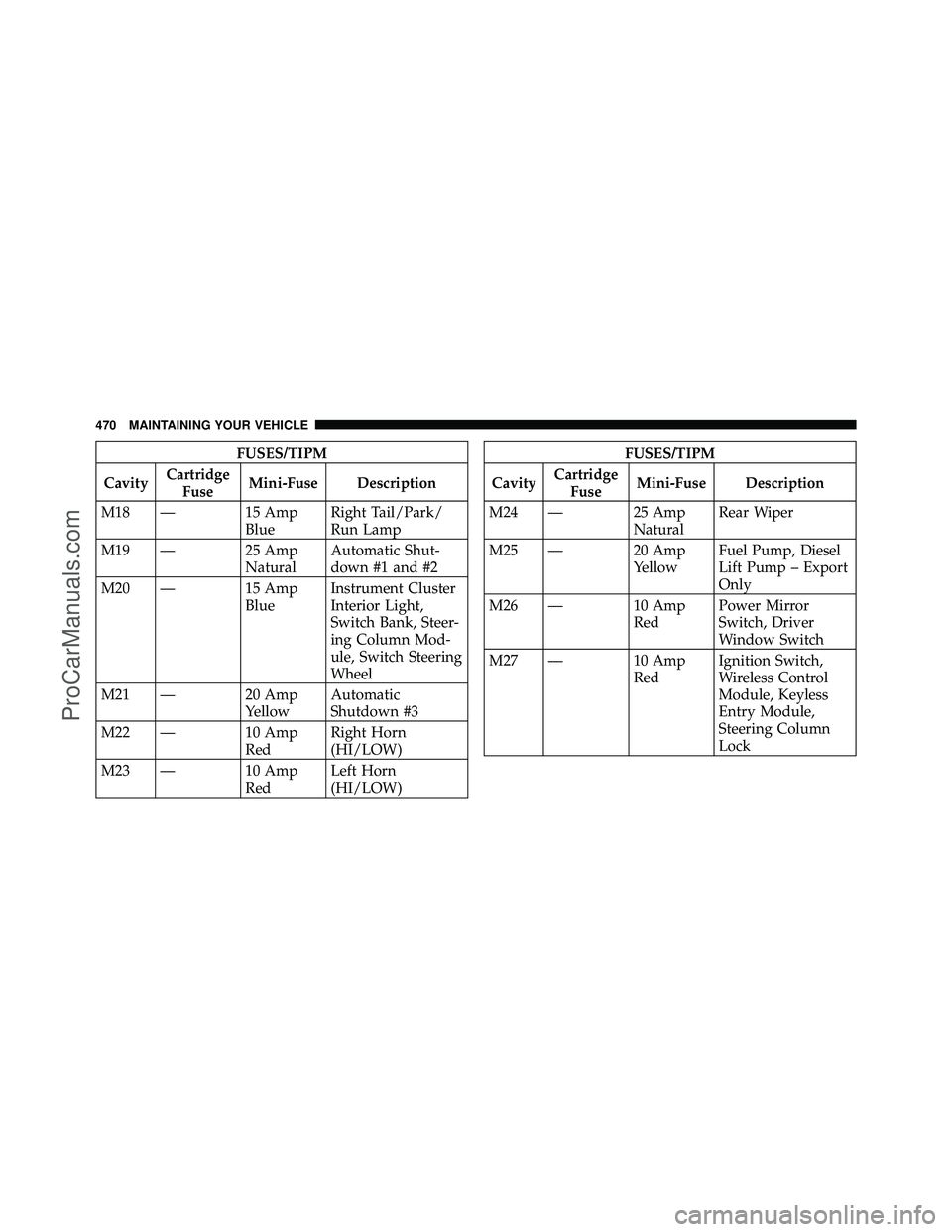
FUSES/TIPM
Cavity Cartridge
Fuse Mini-Fuse Description
M18 — 15 Amp BlueRight Tail/Park/
Run Lamp
M19 — 25 Amp NaturalAutomatic Shut-
down #1 and #2
M20 — 15 Amp BlueInstrument Cluster
Interior Light,
Switch Bank, Steer-
ing Column Mod-
ule, Switch Steering
Wheel
M21 — 20 Amp YellowAutomatic
Shutdown #3
M22 — 10 Amp RedRight Horn
(HI/LOW)
M23 — 10 Amp RedLeft Horn
(HI/LOW)FUSES/TIPM
Cavity Cartridge
Fuse Mini-Fuse Description
M24 — 25 Amp NaturalRear Wiper
M25 — 20 Amp YellowFuel Pump, Diesel
Lift Pump – Export
Only
M26 — 10 Amp RedPower Mirror
Switch, Driver
Window Switch
M27 — 10 Amp RedIgnition Switch,
Wireless Control
Module, Keyless
Entry Module,
Steering Column
Lock
470 MAINTAINING YOUR VEHICLE
ProCarManuals.com
Page 474 of 530
•Anytime you store your vehicle, or keep it out of
service for two weeks or more, run the air conditioning
system at idle for about five minutes in the fresh air
and high blower setting. This will ensure adequate
system lubrication to minimize the possibility of com-
pressor damage when the system is started again.
REPLACEMENT BULBS
LIGHT BULBS – InteriorBulb Number
Center & Rear Dome Lamp ................. 578
Center & Rear Reading Lamps ............... 578
Front Door Courtesy Lamp .................. 578
Front Header Reading Lamps – If Equipped ..... 578
Instrument Cluster Lamps .................PC74
Liftgate Lamp(s) ......................... 578
Overhead Console Reading Lamps ..........PC579
Removable Console Lamp – If Equipped ........ 194
Visor Vanity Lamps .................... 6501966NOTE:
For lighted switches, see your authorized dealer
for replacement instructions.
All of the interior bulbs are glass wedge base or glass
cartridge types. Aluminum base bulbs are not approved
and should not be used for replacement.
LIGHT BULBS – Exterior Bulb Number
Backup, Tail, Stop Lamp ................... 3157
Center High-Mounted Stop Lamp . . . LED (See Note 1)
Fog Lamp – If Equipped ................PSX24W
Front Side Marker, Park/
Turn Signal ................... P27/7Wor 3157
Headlamp ............................. H13
License ................................ 168
Note 1: The Center High-Mounted Stop Lamp (CHMSL)
uses LED lights that are not serviceable separately. The
CHMSL must be replaced as an assembly see your
authorized dealer.
7
MAINTAINING YOUR VEHICLE 473
ProCarManuals.com
Page 483 of 530
EMISSIONS CONTROL SYSTEM MAINTENANCE
The Scheduled Maintenance services listed inbold type
must be done at the times or mileages specified to ensure
the continued proper functioning of the emissions control
system. These and all other maintenance services in-
cluded in this manual, should be done to provide best
vehicle performance and reliability. More frequent main-
tenance may be needed for vehicles in severe operating
conditions, such as dusty areas and very short trip
driving.
Inspection and service should also be done anytime a
malfunction is suspected.
NOTE: Maintenance, replacement or repair of the emis-
sions control devices and systems on your vehicle may be
performed by any automotive repair establishment or
individual using any automotive part that has been
certified pursuant to U.S. EPA or in the State of Califor-
nia, California Air Resources Board regulations.
MAINTENANCE SCHEDULE
The oil change indicator system will remind you that it is
time to take your vehicle in for scheduled maintenance.
On Non-EVIC equipped vehicles, CHAngE OILwill
flash in the instrument cluster odometer and a single
chime will sound, indicating that an oil change is neces-
sary.
On Electronic Vehicle Information Center (EVIC)
equipped vehicles, Oil Change Required will be dis-
played in the EVIC and a single chime will sound,
indicating that an oil change is necessary.
Based on engine operation conditions, the oil change
indicator message will illuminate. This means that ser-
vice is required for your vehicle. Have your vehicle
serviced as soon as possible, within the next 500 miles
(805 km).
8
M A I
N T
E
N A
N CE
S
C
H E
D
U L
E
S482 MAINTENANCE SCHEDULES
ProCarManuals.com