buttons DODGE CARAVAN 2010 Owner's Guide
[x] Cancel search | Manufacturer: DODGE, Model Year: 2010, Model line: CARAVAN, Model: DODGE CARAVAN 2010Pages: 530, PDF Size: 9.59 MB
Page 292 of 530
INFO Button
Pressing the INFO button will cycle the display informa-
tion between Artist, Song Title, and Composer (if avail-
able). Also, pressing and holding the INFO button for an
additional three seconds will make the radio display the
Song Title all of the time (press and hold again to return
to normal display).
RW/FF
Pressing the RW (Rewind) or FF (Fast Forward) buttons
causes the tuner to search for the next channel in the
direction of the arrows.
TUNE Control (Rotary)
Turn the rotary TUNE/SCROLL control knob clockwise
to increase or counterclockwise to decrease the channel.
MUSIC TYPE Button
Pressing this button once will turn on the Music Type
mode for five seconds. Pressing the MUSIC TYPE button
or turning the TUNE/SCROLL control knob within five
seconds will allow the program format type to be se-
lected.
Toggle the MUSIC TYPE button again to select the music
type.
By pressing the SEEK button when the Music Type
function is active, the radio will be tuned to the next
channel with the same selected Music Type name.
If a preset button is activated while in the Music Type
(Program Type) mode, the Music Type mode will be
exited and the radio will tune to the preset channel.
4
UNDERSTANDING YOUR INSTRUMENT PANEL 291
ProCarManuals.com
Page 293 of 530
SETUP Button
Pressing the SETUP button allows you to select the
following items:
•Display Sirius ID number — Press the AUDIO/
SELECT button to display the Sirius ID number. This
number is used to activate, deactivate, or change the
Sirius subscription.
SET Button – To Set the Pushbutton Memory
When you are receiving a channel that you wish to
commit to pushbutton memory, press the SET button.
The symbol SET 1 will now show in the display window.
Select the button (1-6) you wish to lock onto this channel
and press and release that button. If a button is not
selected within five seconds after pressing the SET but-
ton, the channel will continue to play but will not be
stored into pushbutton memory.You may add a second channel to each pushbutton by
repeating the above procedure with this exception: Press
the SET button twice and SET 2 will show in the display
window. Each button can be set for SET 1 and SET 2. This
allows a total of 12 Satellite channels to be stored into
pushbutton memory. The channels stored in SET 2
memory can be selected by pressing the pushbutton
twice.
Every time a preset button is used, a corresponding
button number will display.
Buttons 1 - 6
These buttons tune the radio to the channels that you
commit to pushbutton memory (12 Satellite stations).
Operating Instructions - Uconnect™ Phone
(If Equipped)
Refer to “Uconnect™ Phone” in the Uconnect™ User
Manual located on the DVD for further details.
292 UNDERSTANDING YOUR INSTRUMENT PANEL
ProCarManuals.com
Page 303 of 530
NOTE:The air conditioning compressor will not engage
until the engine has been running for about 10 seconds.
Max A/C
For maximum cooling use the A/C and RECIRCULA-
TION mode buttons at the same time.
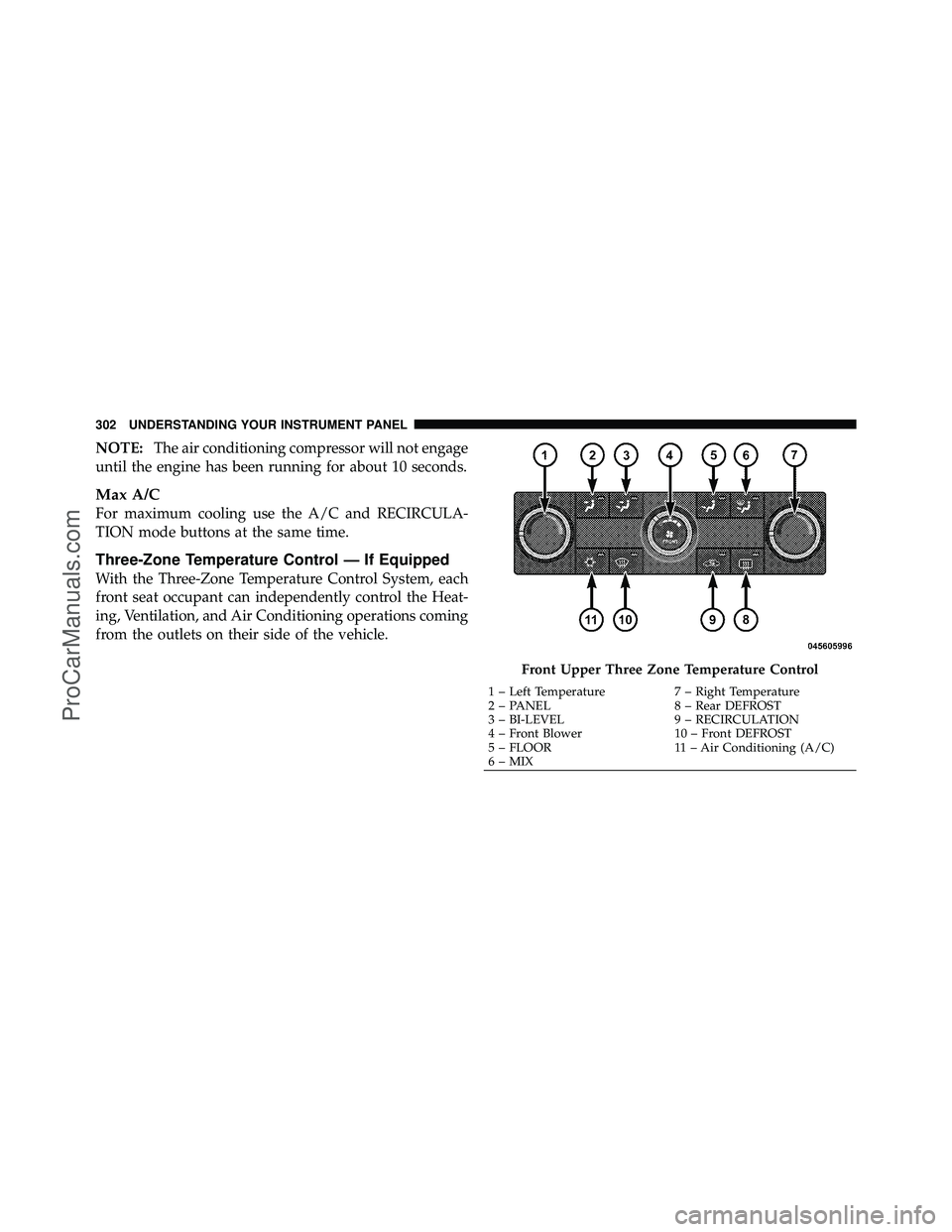
Three-Zone Temperature Control — If Equipped
With the Three-Zone Temperature Control System, each
front seat occupant can independently control the Heat-
ing, Ventilation, and Air Conditioning operations coming
from the outlets on their side of the vehicle.
Front Upper Three Zone Temperature Control
1 – Left Temperature 7 – Right Temperature
2 – PANEL 8 – Rear DEFROST
3 – BI-LEVEL 9 – RECIRCULATION
4 – Front Blower 10 – Front DEFROST
5 – FLOOR 11 – Air Conditioning (A/C)
6 – MIX
302 UNDERSTANDING YOUR INSTRUMENT PANEL
ProCarManuals.com