instrument panel DODGE CHALLENGER 2010 3.G Owners Manual
[x] Cancel search | Manufacturer: DODGE, Model Year: 2010, Model line: CHALLENGER, Model: DODGE CHALLENGER 2010 3.GPages: 477, PDF Size: 4.79 MB
Page 237 of 477
Defrost Mode
Air is directed through the windshield and side
window demist outlets. Use DEFROST mode with
maximum blower and temperature settings for best
windshield and side window defrosting.
NOTE: The air conditioning compressor operates in
MIX and DEFROST, or a blend of these modes even if the
A/C button is not pressed. This dehumidifies the air to
help dry the windshield. To improve fuel economy, use
these modes only when necessary.
Recirculation Control
Press this button to choose between outside air
intake or recirculation of the air inside the
vehicle. A lamp will illuminate when you are in
RECIRCULATION mode. Only use the RECIR-
CULATION mode to temporarily block out any outside
odors, smoke, or dust, and to cool the interior rapidly
upon initial start-up in very hot or humid weather. NOTE:
•If the RECIRCULATION button is pressed when the
system is in MIX, DEFROST, or FLOOR mode the
RECIRCULATION LED indicator will flash 3 times
and then turn off to indicate RECIRCULATION mode
is not allowed.
•Continuous use of the RECIRCULATION mode may
make the inside air stuffy and window fogging may
occur. Extended use of this mode is not recommended.
•In cold or damp weather, the use of the RECIRCULA-
TION mode will cause windows to fog on the inside
because of moisture buildup inside the vehicle. For
maximum defogging, select the outside air position.
•In order to prevent fogging, when the RECIRCULA-
TION button is pressed and the mode control is set to
PANEL, the A/C will engage automatically.
4
UNDERSTANDING YOUR INSTRUMENT PANEL 235
Page 238 of 477
•The A/C can be deselected manually without disturb-
ing the mode control selection.
Economy Mode
If ECONOMY mode is desired, press the A/C button to
turn off the indicator light and the A/C compressor.
Rotate the temperature control knob to the desired
temperature.
Air Conditioning Operation
Push on this button to engage the Air
Conditioning (A/C). A light will illu-
minate when the A/C System is en-
gaged
NOTE: The air conditioning compressor will not engage
until the engine has been running for about 10 seconds.
Max A/C
For maximum cooling use the A/C and RECIRCULA-
TION mode buttons at the same time.
Remote Start — If Equipped
During remote start operation, the climate control soft-
ware may override the climate control settings depend-
ing on the outside ambient temperature. The table below
explains the different scenarios that could occur during
remote start operation.
Once the driver enters the vehicle, the control will return
to the customer selected settings. This feature was de-
signed to ensure maximum comfort during extreme
conditions. To enable the feature, customers must park
their vehicles with the blower control set in any of the
four blower speeds.
236 UNDERSTANDING YOUR INSTRUMENT PANEL
Page 239 of 477
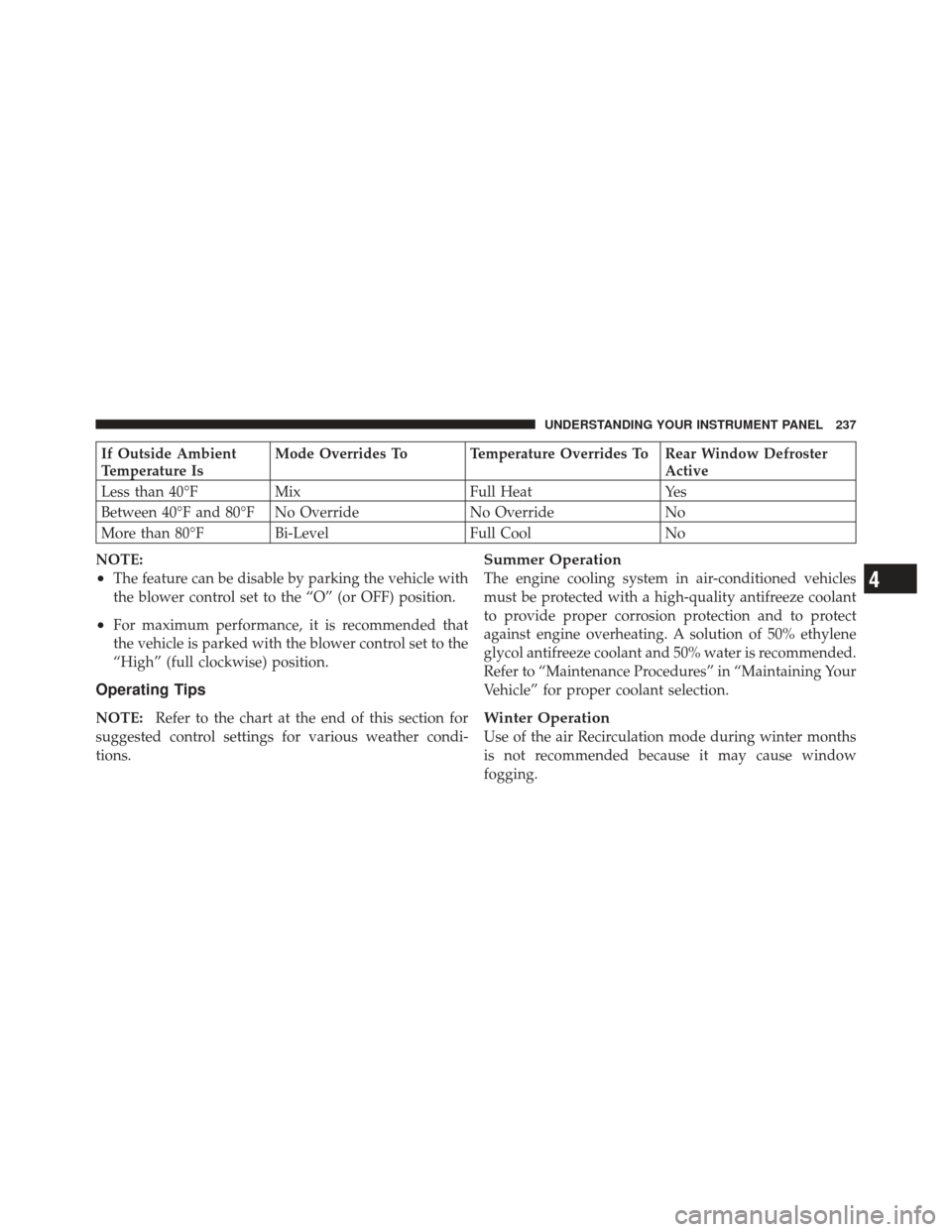
If Outside Ambient
Temperature IsMode Overrides To Temperature Overrides To Rear Window Defroster
Active
Less than 40°F Mix Full HeatYes
Between 40°F and 80°F No Override No Override No
More than 80°F Bi-Level Full Cool No
NOTE:
•The feature can be disable by parking the vehicle with
the blower control set to the “O” (or OFF) position.
•For maximum performance, it is recommended that
the vehicle is parked with the blower control set to the
“High” (full clockwise) position.
Operating Tips
NOTE: Refer to the chart at the end of this section for
suggested control settings for various weather condi-
tions.
Summer Operation
The engine cooling system in air-conditioned vehicles
must be protected with a high-quality antifreeze coolant
to provide proper corrosion protection and to protect
against engine overheating. A solution of 50% ethylene
glycol antifreeze coolant and 50% water is recommended.
Refer to “Maintenance Procedures” in “Maintaining Your
Vehicle” for proper coolant selection.
Winter Operation
Use of the air Recirculation mode during winter months
is not recommended because it may cause window
fogging.
4
UNDERSTANDING YOUR INSTRUMENT PANEL 237
Page 240 of 477
Vacation Storage
Anytime you store your vehicle, or keep it out of service
(i.e., vacation) for two weeks or more, run the air
conditioning system at idle for about five minutes in the
fresh air and high blower settings. This will ensure
adequate system lubrication to minimize the possibility
of compressor damage when the system is started again.
Window Fogging
Interior fogging on the windshield can be quickly re-
moved by turning the mode selector to Defrost. The
Defrost/Floor mode can be used to maintain a clear
windshield and provide sufficient heating. If side win-
dow fogging becomes a problem, increase blower speed.
Vehicle windows tend to fog on the inside in mild but
rainy or humid weather.
NOTE:Recirculation without A/C should not be used
for long periods as fogging may occur.
Side Window Demisters
A side window demister outlet is located at each end of
the instrument panel. These non-adjustable outlets direct
air toward the side windows when the system is in the
Floor, Mix, or Defrost mode. The air is directed at the area
of the windows through which you view the outside
mirrors.
Outside Air Intake
Make sure the air intake, located directly in front of the
windshield, is free of obstructions such as leaves. Leaves
collected in the air intake may reduce airflow, and if they
enter the plenum, they could plug the water drains. In
winter months, make sure the air intake is clear of ice,
slush, and snow.
238 UNDERSTANDING YOUR INSTRUMENT PANEL
Page 241 of 477
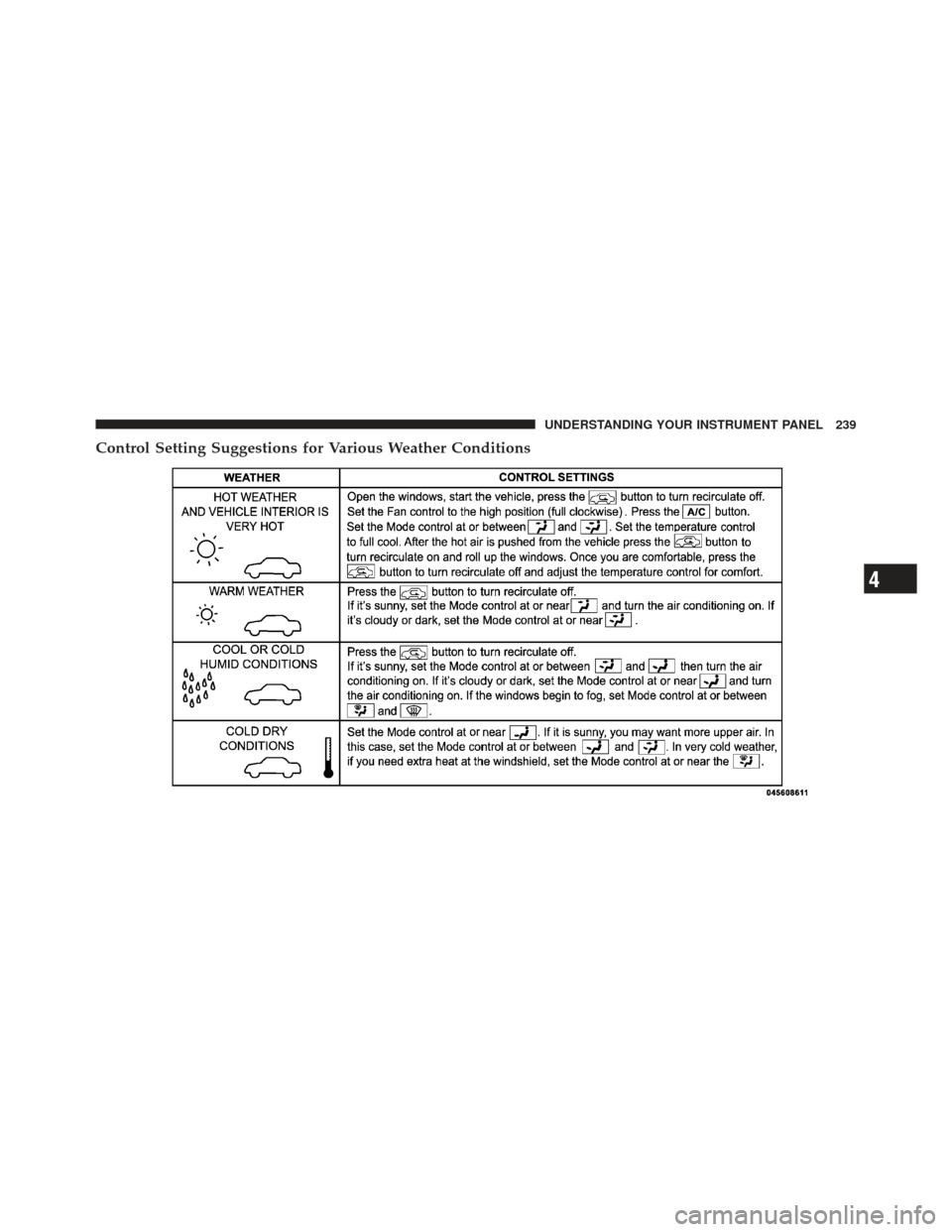
Control Setting Suggestions for Various Weather Conditions
4
UNDERSTANDING YOUR INSTRUMENT PANEL 239
Page 265 of 477
WARNING!
Never use the PARK position as a substitute for the
parking brake. Always apply the parking brake fully
when parked to guard against vehicle movement and
possible injury or damage.
The following indicators should be used to ensure that
you have engaged the shift lever in the PARK position:
•When shifting into PARK, move the shift lever all the
way forward and to the left until it stops and is fully
seated.
•Look at the shift indicator display on the instrument
panel to ensure it is in the PARK position.
CAUTION!
Damage to the shifter could result if the shift lever is
moved out of PARK before the ignition is turned
from the LOCK (OFF position with Keyless Go™) to
the ON position (RUN position with Keyless Go™).
REVERSE
This range is for moving the vehicle backward. Use only
after the vehicle has come to a complete stop.
NEUTRAL
This range is used when vehicle is standing for pro-
longed periods with engine running. Engine may be
started in this range. Set the parking brake if you must
leave the vehicle.
5
STARTING AND OPERATING 263
Page 276 of 477
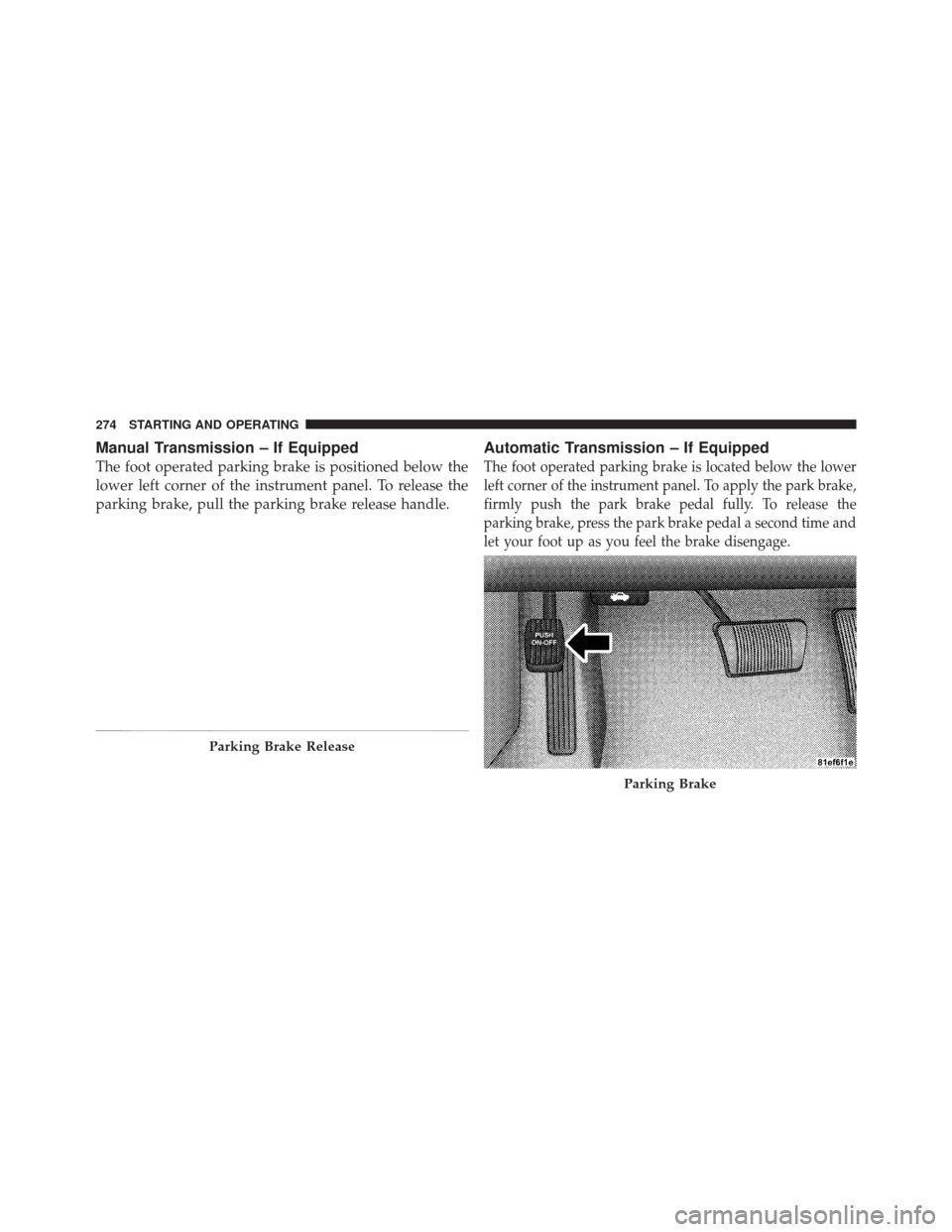
Manual Transmission – If Equipped
The foot operated parking brake is positioned below the
lower left corner of the instrument panel. To release the
parking brake, pull the parking brake release handle.
Automatic Transmission – If Equipped
The foot operated parking brake is located below the lower
left corner of the instrument panel. To apply the park brake,
firmly push the park brake pedal fully. To release the
parking brake, press the park brake pedal a second time and
let your foot up as you feel the brake disengage.
Parking Brake Release
Parking Brake
274 STARTING AND OPERATING
Page 284 of 477
WARNING!
There may be situations on minor hills (i.e., less than
8%), with a loaded vehicle, or while pulling a trailer,
when the system will not activate and slight rolling
may occur. This could cause a collision with another
vehicle or object. Always remember the driver is
responsible for braking the vehicle.
Disabling/Enabling HSA
If you wish to turn on or off the HSA system, it can be
done using the Customer Programmable Features in the
Electronic Vehicle Information Center (EVIC). Refer to
“Electronic Vehicle Information Center (EVIC)” in “Un-
derstanding Your Instrument Panel” for further informa-
tion.
For vehicles not equipped with the EVIC, perform the
following steps:NOTE:
You must complete Steps 1 through 8 within
90 seconds.
1. Center the steering wheel (front wheels pointing
straight forward).
2. Shift the transmission into NEUTRAL.
3. Apply the parking brake.
4. Start the engine.
5. Release the clutch pedal.
6. Rotate the steering wheel one-half turn to the left.
7. Press the “ESP OFF” switch (located in the lower
switch bank below the climate controls) four times within
20 seconds. The “ESP/TCS Indicator Light” should turn
on and turn off two times.
8. Rotate the steering wheel back to center and then an
additional half-turn to the right.
282 STARTING AND OPERATING
Page 286 of 477
WARNING!
The ESP cannot prevent the natural laws of physics
from acting on the vehicle, nor can it increase the
traction afforded by prevailing road conditions. The
ESP cannot prevent accidents, including those result-
ing from excessive speed in turns, driving on very
slippery surfaces, or hydroplaning. The capabilities
of an ESP-equipped vehicle must never be exploited
in a reckless or dangerous manner that could jeopar-
dize the user’s safety or the safety of others.
The ESP system has two available operating modes:
ESP On
This is the normal operating mode for the ESP. Whenever
the vehicle is started, the ESP system will be in this mode.
This mode should be used for most driving situations.
The ESP should only be turned OFF for specific reasons
as noted in the following paragraphs. Partial Off
The “Partial Off” mode is intended for times when a
more spirited driving experience is desired. It is also
intended for driving in deep snow, sand, or gravel. This
mode disables the TCS portion of the ESP and raises the
threshold for ESP activation, which allows for more
wheel spin than what ESP normally allows.
The “ESP OFF” switch is located in the switch bank near
the bottom center of the instrument panel. To enter the
“Partial Off” mode, momentarily press the “ESP OFF”
switch and the “ESP/TCS Indicator Light” will illumi-
nate. To turn the ESP ON again, momentarily press the
“ESP OFF” switch and the “ESP/TCS Indicator Light”
will turn off.
284 STARTING AND OPERATING
Page 341 of 477
HAZARD WARNING FLASHER
The Hazard Warning flasher switch is located in the
switch bank near the bottom center of the instrument
panel.Press the switch to turn on the Hazard Warning
flasher. When the switch is activated, all directional
turn signals will flash on and off to warn oncoming
traffic of an emergency. Press the switch a second time to
turn off the Hazard Warning flasher.
This is an emergency warning system and it should not
be used when the vehicle is in motion. Use it when your
vehicle is disabled and it is creating a safety hazard for
other motorists.
When you must leave the vehicle to seek assistance, the
Hazard Warning flasher will continue to operate even
though the ignition is placed in the OFF position. NOTE:
With extended use the Hazard Warning flasher
may wear down your battery.
IF YOUR ENGINE OVERHEATS
In any of the following situations, you can reduce the
potential for overheating by taking the appropriate ac-
tion.
•On the highways — slow down.
•In city traffic — while stopped, place the transmission
in NEUTRAL, but do not increase engine idle speed.
NOTE: There are steps that you can take to slow down
an impending overheat condition:
•If your air conditioner (A/C) is on, turn it off. The A/C
system adds heat to the engine cooling system and
turning the A/C off can help remove this heat.
6
WHAT TO DO IN EMERGENCIES 339