instrument panel DODGE CHALLENGER 2012 3.G Owners Manual
[x] Cancel search | Manufacturer: DODGE, Model Year: 2012, Model line: CHALLENGER, Model: DODGE CHALLENGER 2012 3.GPages: 494, PDF Size: 8.02 MB
Page 246 of 494
Window Fogging
Interior fogging on the windshield can be quickly re-
moved by turning the mode selector to Defrost. The
Defrost/Floor mode can be used to maintain a clear
windshield and provide sufficient heating. If side win-
dow fogging becomes a problem, increase blower speed.
Vehicle windows tend to fog on the inside in mild but
rainy or humid weather.
NOTE:Recirculate without A/C should not be used for
long periods as fogging may occur.
Side Window Demisters
A side window demister outlet is located at each end of
the instrument panel. These non-adjustable outlets direct
air toward the side windows when the system is in the
FLOOR, MIX, or DEFROST mode. The air is directed at
the area of the windows through which you view the
outside mirrors.
Outside Air Intake
Make sure the air intake, located directly in front of the
windshield, is free of obstructions such as leaves. Leaves
collected in the air intake may reduce airflow, and if they
enter the plenum, they could plug the water drains. In
winter months, make sure the air intake is clear of ice,
slush, and snow.
A/C Air Filter
The A/C Filter prevents most dust and pollen from
entering the cabin. The filter acts on air coming from
outside the vehicle and recirculated air within the pas-
senger compartment. Refer to “Maintenance Procedures”
in “Maintaining Your Vehicle” for A/C Air Filter service
information or see your authorized dealer for service.
Refer to “Maintenance Schedules” for filter service
intervals.
244 UNDERSTANDING YOUR INSTRUMENT PANEL
Page 247 of 494
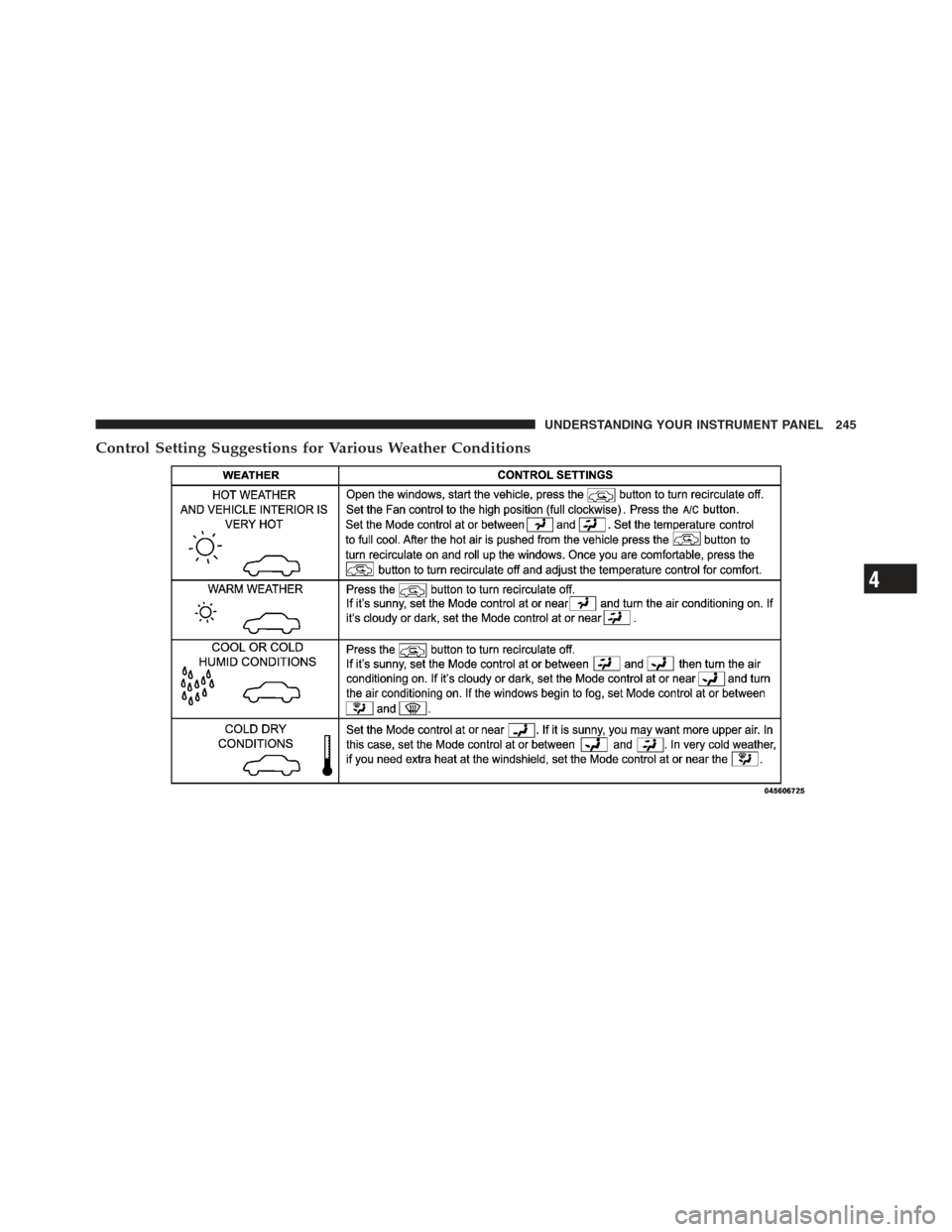
Control Setting Suggestions for Various Weather Conditions
4
UNDERSTANDING YOUR INSTRUMENT PANEL 245
Page 268 of 494
WARNING! (Continued)
•It is dangerous to move the shift lever out of PARK
or NEUTRAL if the engine speed is higher than
idle speed. If your foot is not firmly pressing on
the brake pedal, the vehicle could accelerate
quickly forward or in reverse. You could lose
control of the vehicle and hit someone or some-
thing. Only shift into gear when the engine is
idling normally and when your foot is firmly
pressing on the brake pedal.
Key Ignition Park Interlock
This vehicle is equipped with a Key Ignition Park Inter-
lock which requires the shift lever to be placed in PARK
before the engine can be turned off. This helps the driver
avoid inadvertently leaving the vehicle without placing
the transmission in PARK. This system also locks the shift
lever in PARK whenever the ignition switch is in the OFF
position.
Brake/Transmission Shift Interlock System
This vehicle is equipped with a Brake Transmission Shift
Interlock (BTSI) that holds the shift lever in the PARK
position unless the brakes are applied. To move the shift
lever out of the PARK position, the ignition switch must
be turned to the ON/RUN or START position (engine
running or not) and the brake pedal must be pressed.
Five-Speed Automatic Transmission
The shift lever position display (located in the instrument
panel cluster) indicates the transmission gear range. You
must press the brake pedal to move the shift lever out of
the PARK position (refer to “Brake/Transmission Shift
Interlock System” in this section). To drive, move the shift
lever from PARK or NEUTRAL to the DRIVE position.
266 STARTING AND OPERATING
Page 283 of 494
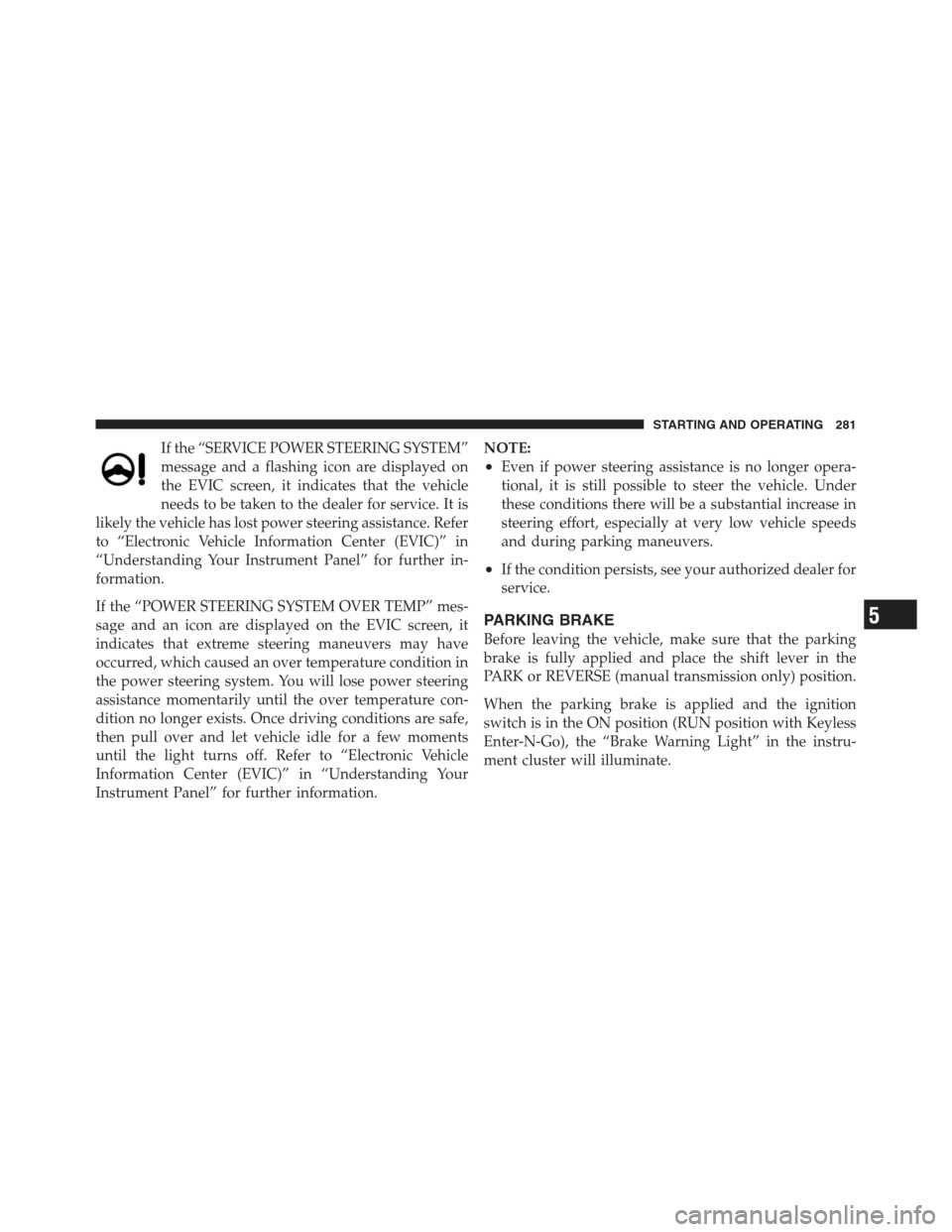
If the “SERVICE POWER STEERING SYSTEM”
message and a flashing icon are displayed on
the EVIC screen, it indicates that the vehicle
needs to be taken to the dealer for service. It is
likely the vehicle has lost power steering assistance. Refer
to “Electronic Vehicle Information Center (EVIC)” in
“Understanding Your Instrument Panel” for further in-
formation.
If the “POWER STEERING SYSTEM OVER TEMP” mes-
sage and an icon are displayed on the EVIC screen, it
indicates that extreme steering maneuvers may have
occurred, which caused an over temperature condition in
the power steering system. You will lose power steering
assistance momentarily until the over temperature con-
dition no longer exists. Once driving conditions are safe,
then pull over and let vehicle idle for a few moments
until the light turns off. Refer to “Electronic Vehicle
Information Center (EVIC)” in “Understanding Your
Instrument Panel” for further information. NOTE:
•Even if power steering assistance is no longer opera-
tional, it is still possible to steer the vehicle. Under
these conditions there will be a substantial increase in
steering effort, especially at very low vehicle speeds
and during parking maneuvers.
•If the condition persists, see your authorized dealer for
service.
PARKING BRAKE
Before leaving the vehicle, make sure that the parking
brake is fully applied and place the shift lever in the
PARK or REVERSE (manual transmission only) position.
When the parking brake is applied and the ignition
switch is in the ON position (RUN position with Keyless
Enter-N-Go), the “Brake Warning Light” in the instru-
ment cluster will illuminate.
5
STARTING AND OPERATING 281
Page 284 of 494
NOTE:
•When the parking brake is applied and the transmis-
sion is placed in gear, the “Brake Warning Light” will
flash. If vehicle speed is detected, a chime will sound
to alert the driver. Fully release the parking brake
before attempting to move the vehicle.
•This light only shows that the parking brake is ap-
plied. It does not show the degree of brake application.
When parking on a hill, it is important to turn the front
wheels toward the curb on a downhill grade and away
from the curb on an uphill grade. For vehicles equipped
with an automatic transmission, apply the parking brake
before placing the shift lever in PARK, otherwise the load
on the transmission locking mechanism may make it
difficult to move the shift lever out of PARK. The parking
brake should always be applied whenever the driver is
not in the vehicle.
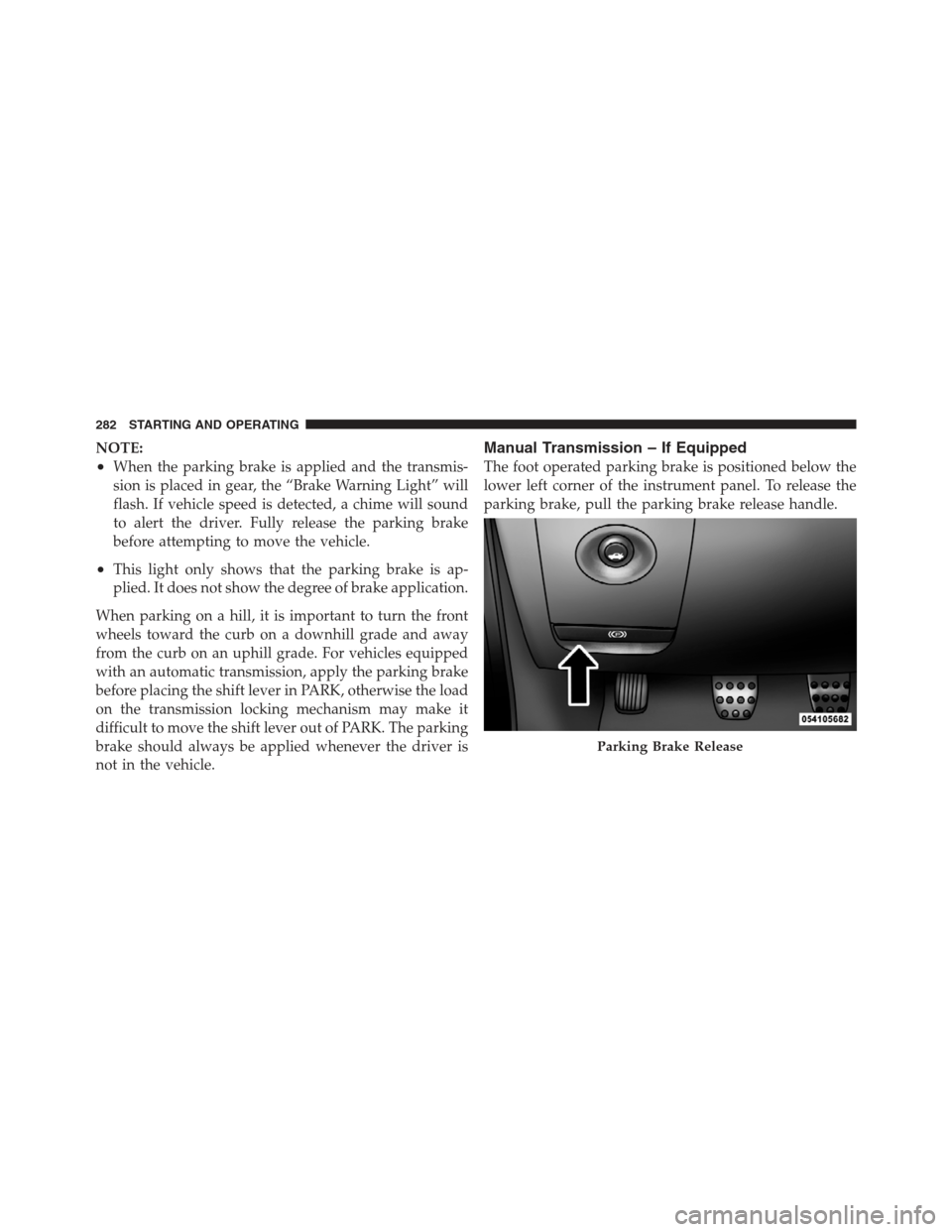
Manual Transmission – If Equipped
The foot operated parking brake is positioned below the
lower left corner of the instrument panel. To release the
parking brake, pull the parking brake release handle.
Parking Brake Release
282 STARTING AND OPERATING
Page 285 of 494
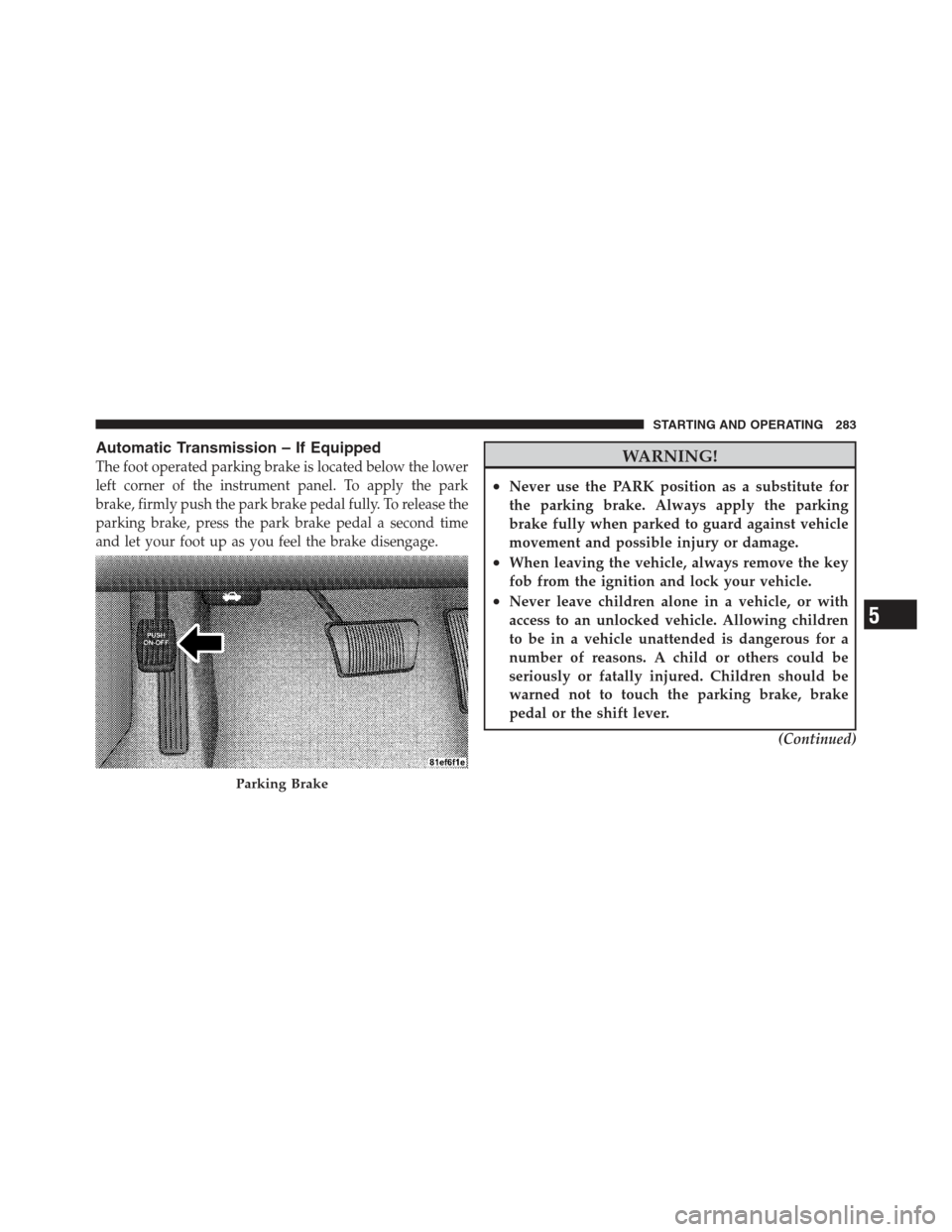
Automatic Transmission – If Equipped
The foot operated parking brake is located below the lower
left corner of the instrument panel. To apply the park
brake, firmly push the park brake pedal fully. To release the
parking brake, press the park brake pedal a second time
and let your foot up as you feel the brake disengage.WARNING!
•Never use the PARK position as a substitute for
the parking brake. Always apply the parking
brake fully when parked to guard against vehicle
movement and possible injury or damage.
•When leaving the vehicle, always remove the key
fob from the ignition and lock your vehicle.
•Never leave children alone in a vehicle, or with
access to an unlocked vehicle. Allowing children
to be in a vehicle unattended is dangerous for a
number of reasons. A child or others could be
seriously or fatally injured. Children should be
warned not to touch the parking brake, brake
pedal or the shift lever.(Continued)
Parking Brake
5
STARTING AND OPERATING 283
Page 292 of 494
brake pedal. If the driver does not apply the throttle
during this short period of time, the system will release
brake pressure and the vehicle will roll down the hill. The
system will release brake pressure in proportion to
amount of throttle applied as the vehicle starts to move in
the intended direction of travel.
HSA Activation Criteria
The following criteria must be met in order for HSA to
activate:
•Vehicle must be stopped.
•Vehicle must be on a 7% grade or greater hill.
•Gear selection matches vehicle uphill direction (i.e.,
vehicle facing uphill is in forward gear; vehicle back-
ing uphill is in REVERSE gear).
WARNING!
There may be situations on minor hills (i.e., less than
8%), with a loaded vehicle, or while pulling a trailer,
when the system will not activate and slight rolling
may occur. This could cause a collision with another
vehicle or object. Always remember the driver is
responsible for braking the vehicle.
Disabling/Enabling HSA
If you wish to turn on or off the HSA system, it can be
done using the Customer Programmable Features in the
Electronic Vehicle Information Center (EVIC). Refer to
“Electronic Vehicle Information Center (EVIC)” in “Un-
derstanding Your Instrument Panel” for further informa-
tion.
For vehicles not equipped with the EVIC, perform the
following steps:
290 STARTING AND OPERATING
Page 295 of 494
ESC Operating Modes
The ESC system has two available operating modes:
ESC On
This is the normal operating mode for the ESC. When-
ever the vehicle is started, the ESC system will be in this
mode. This mode should be used for most driving
situations. The ESC should only be turned OFF for
specific reasons as noted in the following paragraphs.
Partial Off
The “Partial Off” mode is intended for times when a
more spirited driving experience is desired. It is also
intended for driving in deep snow, sand, or gravel. This
mode disables the TCS portion of the ESC and raises the
threshold for ESC activation, which allows for more
wheel spin than what ESC normally allows.The “ESC Off” switch is located in the switch bank near
the bottom center of the instrument panel. To enter the
“Partial Off” mode, momentarily press the “ESC Off”
switch and the “ESC Activation/Malfunction Indicator
Light” will illuminate. To turn the ESC ON again, mo-
mentarily press the “ESC Off” switch and the “ESC
Activation/Malfunction Indicator Light” will turn off.
NOTE:
To improve the vehicle’s traction when driving
with snow chains, or when starting off in deep snow,
sand, or gravel, it may be desirable to switch to the
“Partial Off” mode by momentarily pressing the “ESC
Off” switch. Once the situation requiring “Partial Off”
mode is overcome, turn the ESC ON again by momen-
tarily pressing the “ESC Off” switch. This may be done
while the vehicle is in motion.
5
STARTING AND OPERATING 293
Page 355 of 494
HAZARD WARNING FLASHERS
The Hazard Warning flasher switch is located in the
switch bank near the bottom center of the instrument
panel.Press the switch to turn on the Hazard Warning
flasher. When the switch is activated, all directional
turn signals will flash on and off to warn oncoming
traffic of an emergency. Press the switch a second time to
turn off the Hazard Warning flashers.
This is an emergency warning system and it should not
be used when the vehicle is in motion. Use it when your
vehicle is disabled and it is creating a safety hazard for
other motorists.
When you must leave the vehicle to seek assistance, the
Hazard Warning flashers will continue to operate even
though the ignition is placed in the OFF position.
NOTE: With extended use the Hazard Warning flashers
may wear down your battery.
IF YOUR ENGINE OVERHEATS
In any of the following situations, you can reduce the
potential for overheating by taking the appropriate ac-
tion.
•On the highways — slow down.
•In city traffic — while stopped, place the transmission
in NEUTRAL, but do not increase engine idle speed.
NOTE: There are steps that you can take to slow down
an impending overheat condition:
•If your air conditioner (A/C) is on, turn it off. The A/C
system adds heat to the engine cooling system and
turning the A/C off can help remove this heat.
•You can also turn the temperature control to maximum
heat, the mode control to floor and the blower control
to high. This allows the heater core to act as a
supplement to the radiator and aids in removing heat
from the engine cooling system.
6
WHAT TO DO IN EMERGENCIES 353
Page 364 of 494
If the tire does not inflate to at least 26 psi (1.8 Bar)
pressure within 15 minutes:
•The tire is too badly damaged. Do not attempt to drive
the vehicle further. Call for assistance.
NOTE: If the tire becomes over-inflated, press the
Deflation Button to reduce the tire pressure to the recom-
mended inflation pressure before continuing.
If the tire inflates to the recommended pressure or is at
least 26 psi (1.8 Bar) pressure within 15 minutes:
1. Press the Power Button (4) to turn off the TIREFIT kit.
2. Remove the Speed Limit sticker from the top of the
Sealant Bottle (1) and place the sticker on the instrument
panel.
3. Immediately disconnect the Sealant Hose (6) from the
valve stem, reinstall the cap on the fitting at the end of the hose, and place the TIREFIT kit in the vehicle storage
location. Quickly proceed to (D) “Drive Vehicle”.CAUTION!
•The metal end fitting from Power Plug (8) may get
hot after use, so it should be handled carefully.
•Failure to reinstall the cap on the fitting at the end
of the Sealant Hose (6) can result in sealant con-
tacting your skin, clothing, and the vehicle’s inte-
rior. It can also result in sealant contacting internal
TIREFIT kit components which may cause perma-
nent damage to the kit.
(D) Drive Vehicle:
Immediately after injecting sealant and inflating the tire,
drive the vehicle 5 miles (8 km) or 10 minutes to ensure
distribution of the TIREFIT Sealant within the tire. Do not
exceed 55 mph (88 km/h).
362 WHAT TO DO IN EMERGENCIES