manual transmission DODGE CHALLENGER 2012 3.G User Guide
[x] Cancel search | Manufacturer: DODGE, Model Year: 2012, Model line: CHALLENGER, Model: DODGE CHALLENGER 2012 3.GPages: 124, PDF Size: 4.99 MB
Page 3 of 124
INTRODUCTION/WELCOMEWelcome From Chrysler Group LLC....2
CONTROLS AT A GLANCEDriver Cockpit...............4
Instrument Cluster .............6
GETTING STARTEDKeyFob...................8
Remote Start................9
Keyless Enter-N-Go™ ...........9
Theft Alarm ................13
Seat Belt .................13
Supplemental Restraint System
(SRS) — Air Bags ............14
Child Restraints .............15
Front Seats ................18
Rear Seat .................20
Heated Seats ...............20
Tilt / Telescoping Steering Column ....21
OPERATING YOUR VEHICLEEngine Break-In Recommendations . . . 22
Turn Signal/Wiper/Washer/High
Beam Lever................22
Headlight Switch .............23
Speed Control ..............24
Manual Transmission 1 To 4 Skip Shift.. 25
Manual Climate Controls .........25
Automatic Temperature Controls (ATC).. 26
Power Sunroof ..............26
Wind Buffeting ..............27
ELECTRONICSYour Vehicle's Sound System ......28
Media Center 130 (Sales Code RES) . . 30
Media Center 130 With Satellite Radio
(Sales Code RES + RSC) .........32
Media Center 430/430N (Sales Code
RBZ/RHB) ................34
Media Center 730N (Sales Code RHR).. 43Sirius XM™ Satellite Radio/Travel Link.. 53
Steering Wheel Audio Controls ......56
Uconnect™ Phone ............56
Uconnect™ Voice Command .......59
Bluetooth
®Streaming Audio .......61
iPod®/USB/MP3 Control .........61
Electronic Vehicle Information
Center (EVIC) ...............62
Programmable Features .........63
Universal Garage Door Opener
(HomeLink
®) ...............64
Power Outlets ...............67
UTILITYTrailer Towing Weights (Maximum Trailer
Weight Ratings) ..............68
Recreational Towing (Behind
Motorhome, Etc.) .............69
SRT8AutoStick®................70
Electronic Control Damping System . . . 71
Performance Features ..........72
Summer/Three-Season Tires .......73
WHAT TO DO IN EMERGENCIES24-Hour Towing Assistance.......74
Instrument Cluster Warning Lights . . . 74
If Your Engine Overheats .........78
Jacking And Tire Changing ........79
Battery Location .............84
TIREFIT Kit ................84
Jump-Starting ..............89
Shift Lever Override ...........91
Towing A Disabled Vehicle ........92
Freeing A Stuck Vehicle .........93
Event Data Recorder (EDR) .......94
MAINTAINING YOUR VEHICLEOpening The Hood............95
Engine Compartment ...........96
Fluids And Capacities ..........99
Maintenance Chart ........... 102
Fuses .................. 108
Tire Pressures .............. 111
Wheel And Wheel Trim Care ...... 111
Exterior Bulbs ............. 112
CONSUMER ASSISTANCEChrysler Group LLC Customer
Center.................. 113
Chrysler Canada Inc. Customer Center...113Assistance For The Hearing Impaired. . 113
Publications Ordering ......... 113
Reporting Safety Defects In
The 50 United States And
Washington, D.C. ............ 114
MOPAR ACCESSORIESAuthentic Accessories By MOPAR®. . 115
INDEX................. 116
FAQ (How To?)Frequently Asked Questions ...... 119
TABLE OF CONTENTS
Page 13 of 124
• If a Keyless Enter-N-Go™ door handle has not been used for 72 hours, the KeylessEnter-N-Go™ feature for that handle may time out. Pulling the deactivated front door
handle will reactivate the door handle's Keyless Enter-N-Go™ feature.
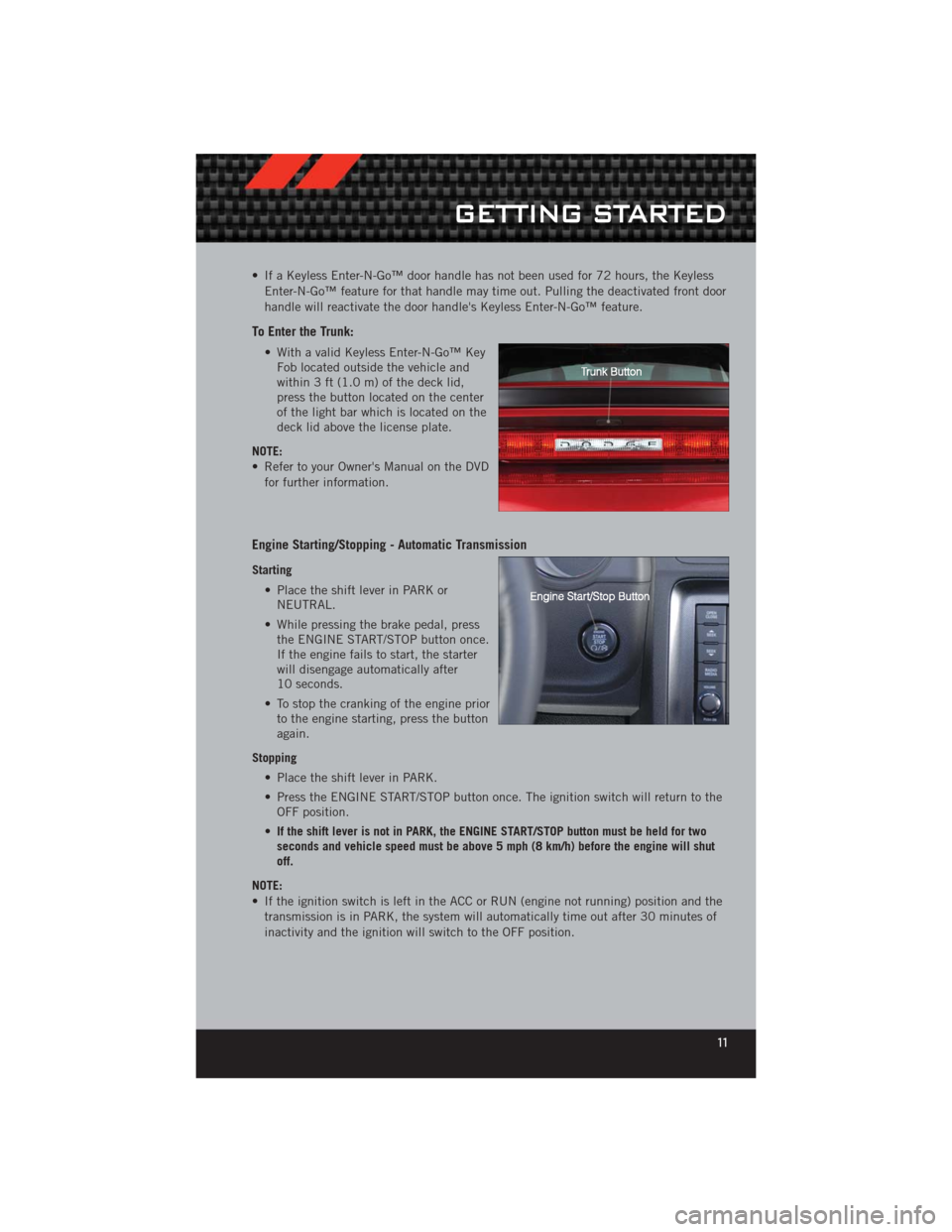
To Enter the Trunk:
• With a valid Keyless Enter-N-Go™ KeyFob located outside the vehicle and
within 3 ft (1.0 m) of the deck lid,
press the button located on the center
of the light bar which is located on the
deck lid above the license plate.
NOTE:
• Refer to your Owner's Manual on the DVD for further information.
Engine Starting/Stopping - Automatic Transmission
Starting
• Place the shift lever in PARK orNEUTRAL.
• While pressing the brake pedal, press the ENGINE START/STOP button once.
If the engine fails to start, the starter
will disengage automatically after
10 seconds.
• To stop the cranking of the engine prior to the engine starting, press the button
again.
Stopping • Place the shift lever in PARK.
• Press the ENGINE START/STOP button once. The ignition switch will return to theOFF position.
• If the shift lever is not in PARK, the ENGINE START/STOP button must be held for two
seconds and vehicle speed must be above 5 mph (8 km/h) before the engine will shut
off.
NOTE:
• If the ignition switch is left in the ACC or RUN (engine not running) position and the transmission is in PARK, the system will automatically time out after 30 minutes of
inactivity and the ignition will switch to the OFF position.
GETTING STARTED
11
Page 14 of 124
Engine Starting/Stopping - Manual Transmission
Starting• Press and hold the clutch pedal while pressing and holding the ENGINESTART/STOP button. Release the button when the engine starts. If the engine fails
to start within 15 seconds, release the button, wait 10 to 15 seconds, then repeat.
• To stop the cranking of the engine prior to the engine starting, release the button.
Stopping • With the vehicle stopped, place the shift lever in NEUTRAL.
• Press the ENGINE START/STOP button once. The ignition switch will return to theOFF position.
• If the vehicle speed is above 5 mph (8 km/h), the ENGINE START/STOP button must be
held for two seconds before the engine will shut off. The ignition switch position will
remain in the ACC position until the vehicle is stopped and the button is pressed twice
to the OFF position.
NOTE:
• If the ignition switch is left in the ACC position, the system will automatically time out after 60 minutes of inactivity and the ignition will switch to the OFF position.
Additional Functions
NOTE:
• The following functions are with the driver’s foot OFF the Brake Pedal/Clutch Pedal(Transmission in PARK or NEUTRAL Position).
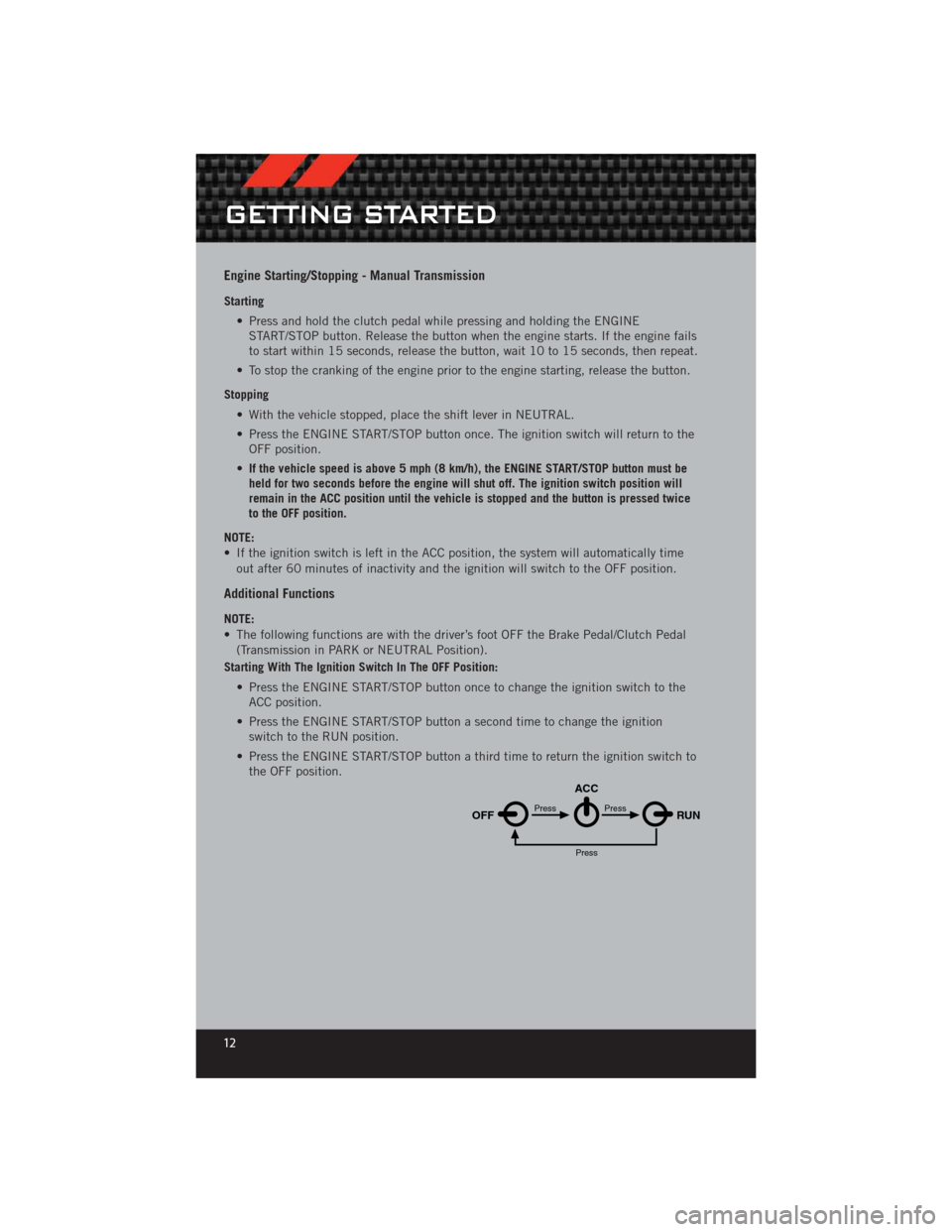
Starting With The Ignition Switch In The OFF Position:
• Press the ENGINE START/STOP button once to change the ignition switch to theACC position.
• Press the ENGINE START/STOP button a second time to change the ignition switch to the RUN position.
• Press the ENGINE START/STOP button a third time to return the ignition switch to the OFF position.
OFF RUN
ACCPress
Press
Press
GETTING STARTED
12
Page 27 of 124
WARNING!
• Leaving the Electronic Speed Control system on when not in use isdangerous. You could accidentally set the system or cause it to go faster than
you want. You could lose control and have a collision. Always leave the
Electronic Speed Control system off when you are not using it.
• Electronic Speed Control can be dangerous where the system cannot maintain a constant speed. Your vehicle could go too fast for the conditions,
and you could lose control. A collision could be the result. Do not use
Electronic Speed Control in heavy traffic or on roads that are winding, icy,
snow-covered or slippery.
MANUAL TRANSMISSION 1 TO 4 SKIP SHIFT
• Skip Shift is enabled when vehicle speed is between 19 MPH (30 km/h) and21 MPH (34 km/h) and the accelerator pedal is at 1/4 throttle or less.
• For optimal fuel economy, under low acceleration conditions, your vehicle will only allow you to shift from first gear to fourth gear. Additionally, the skip shift message
will appear on the Electronic Vehicle Information Center.
• Refer to your Owner's Manual on the DVD for further information.
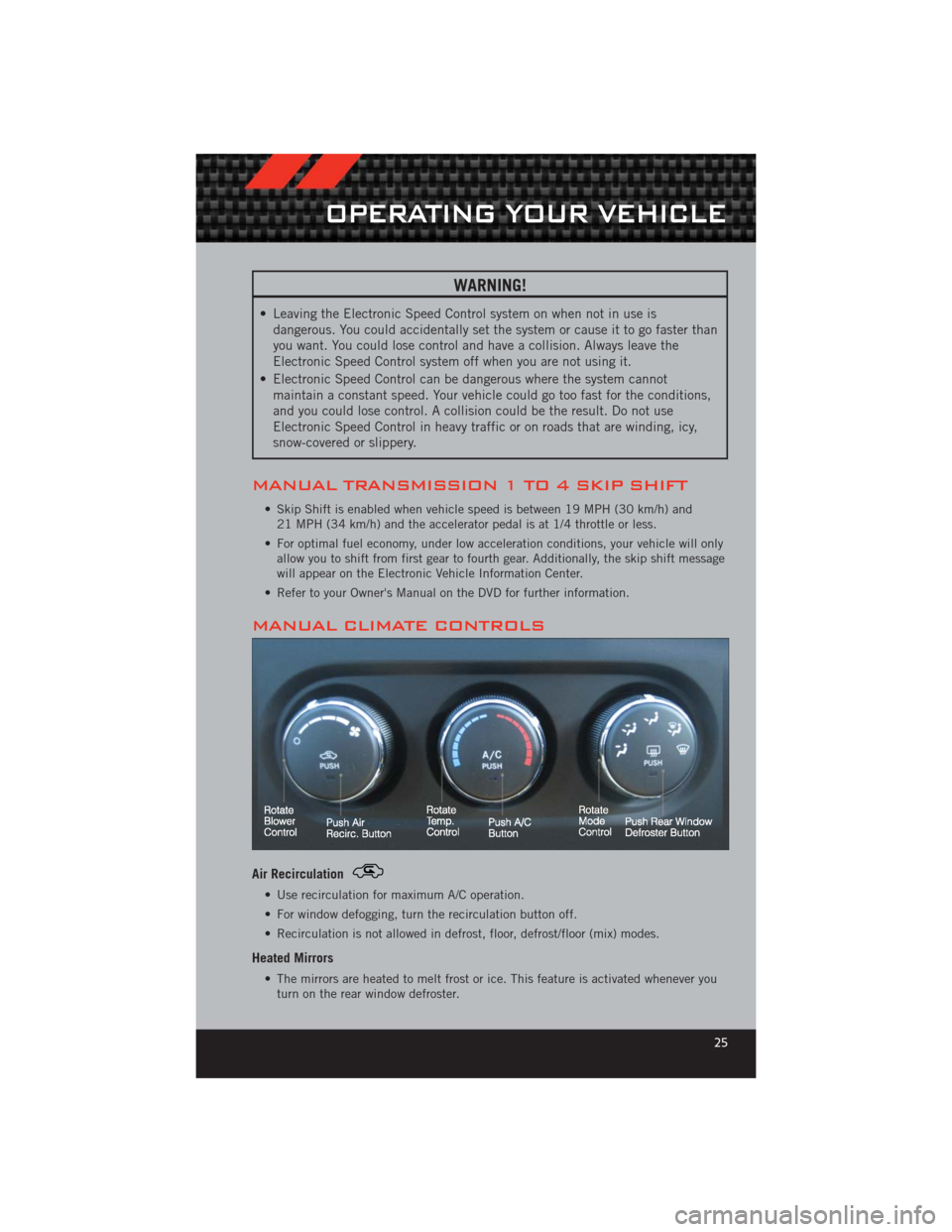
MANUAL CLIMATE CONTROLS
Air Recirculation
• Use recirculation for maximum A/C operation.
• For window defogging, turn the recirculation button off.
• Recirculation is not allowed in defrost, floor, defrost/floor (mix) modes.
Heated Mirrors
• The mirrors are heated to melt frost or ice. This feature is activated whenever you turn on the rear window defroster.
OPERATING YOUR VEHICLE
25
Page 71 of 124
RECREATIONAL TOWING (BEHIND MOTORHOME,
ETC.)
Towing This Vehicle Behind Another Vehicle — Automatic Transmission
• Recreational towing (with all four wheels on the ground, or using a tow dolly) isNOT ALLOWED. The only acceptable method for towing this vehicle (behind another
vehicle) is on a vehicle trailer with all four wheels OFFthe ground
Towing This Vehicle Behind Another Vehicle — Manual Transmission
• Flat towing of vehicles equipped with a manual transmission is permitted within
the following limitations:
• The shift lever must be in NEUTRAL
• There is no limitation on the distance to be traveled
• The towing speed must not exceed 65 mph (104 km/h)
CAUTION!
• Exceeding these towing limits may cause severe transmission damage. Such damage is not covered by the New Vehicle Limited Warranty.
• Towing this vehicle in violation of the above requirements can cause severe transmission damage. Damage from improper towing is not covered under the
New Vehicle Limited Warranty.
UTILITY
69
Page 72 of 124
AUTOSTICK®
Steering Wheel Mounted Paddle Shifters Or Console Mounted Shifter
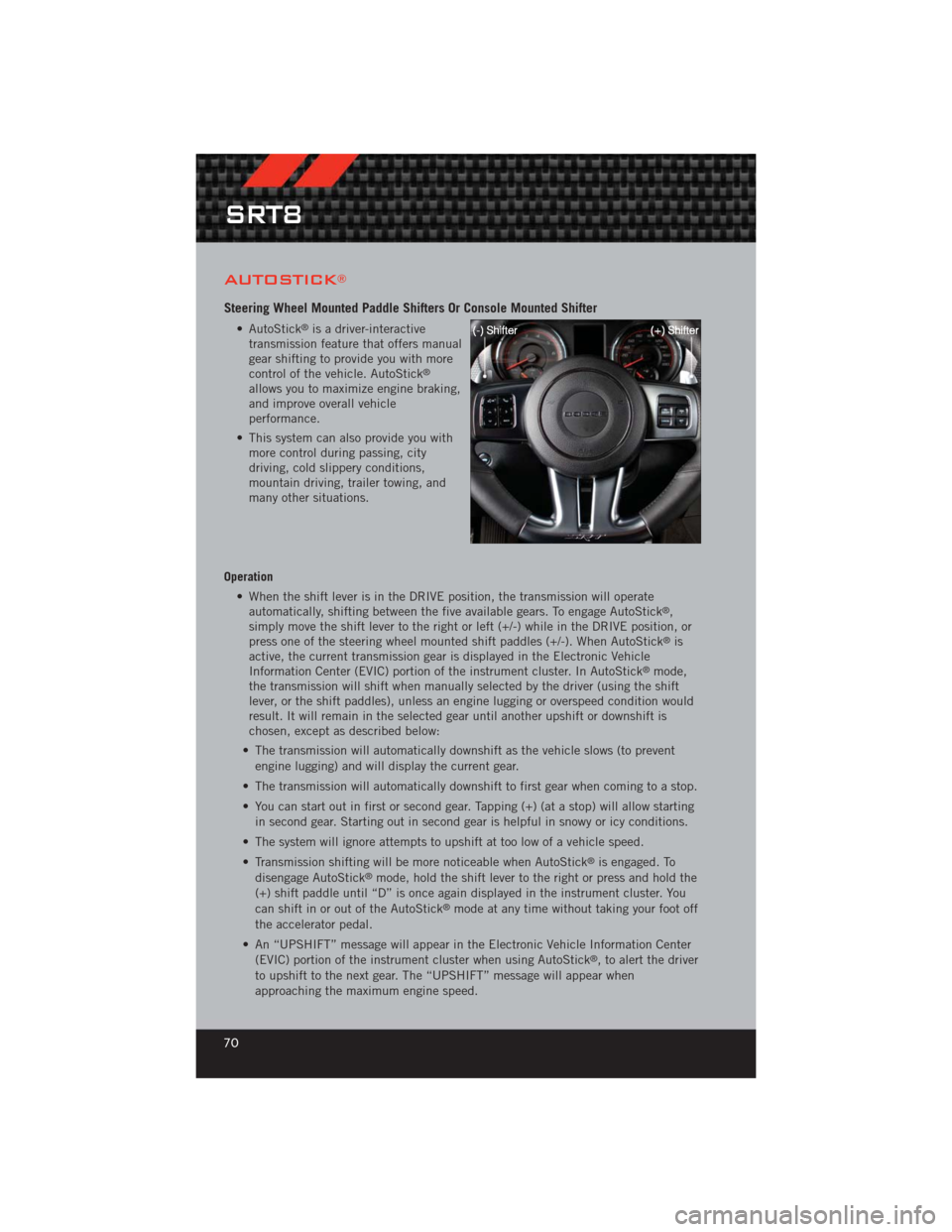
• AutoStick®is a driver-interactive
transmission feature that offers manual
gear shifting to provide you with more
control of the vehicle. AutoStick
®
allows you to maximize engine braking,
and improve overall vehicle
performance.
• This system can also provide you with more control during passing, city
driving, cold slippery conditions,
mountain driving, trailer towing, and
many other situations.
Operation • When the shift lever is in the DRIVE position, the transmission will operateautomatically, shifting between the five available gears. To engage AutoStick
®,
simply move the shift lever to the right or left (+/-) while in the DRIVE position, or
press one of the steering wheel mounted shift paddles (+/-). When AutoStick
®is
active, the current transmission gear is displayed in the Electronic Vehicle
Information Center (EVIC) portion of the instrument cluster. In AutoStick
®mode,
the transmission will shift when manually selected by the driver (using the shift
lever, or the shift paddles), unless an engine lugging or overspeed condition would
result. It will remain in the selected gear until another upshift or downshift is
chosen, except as described below:
• The transmission will automatically downshift as the vehicle slows (to prevent engine lugging) and will display the current gear.
• The transmission will automatically downshift to first gear when coming to a stop.
• You can start out in first or second gear. Tapping (+) (at a stop) will allow starting in second gear. Starting out in second gear is helpful in snowy or icy conditions.
• The system will ignore attempts to upshift at too low of a vehicle speed.
• Transmission shifting will be more noticeable when AutoStick
®is engaged. To
disengage AutoStick®mode, hold the shift lever to the right or press and hold the
(+) shift paddle until “D” is once again displayed in the instrument cluster. You
can shift in or out of the AutoStick
®mode at any time without taking your foot off
the accelerator pedal.
• An “UPSHIFT” message will appear in the Electronic Vehicle Information Center (EVIC) portion of the instrument cluster when using AutoStick
®, to alert the driver
to upshift to the next gear. The “UPSHIFT” message will appear when
approaching the maximum engine speed.
SRT8
70
Page 73 of 124
WARNING!
Do not downshift for additional engine braking on a slippery surface. The drive
wheels could lose their grip and the vehicle could skid, causing a collision or
personal injury.
ELECTRONIC CONTROL DAMPING SYSTEM
• This vehicle may be equipped with an electronic controlled damping system. Thissystem reduces body roll and pitch in many driving situations including cornering,
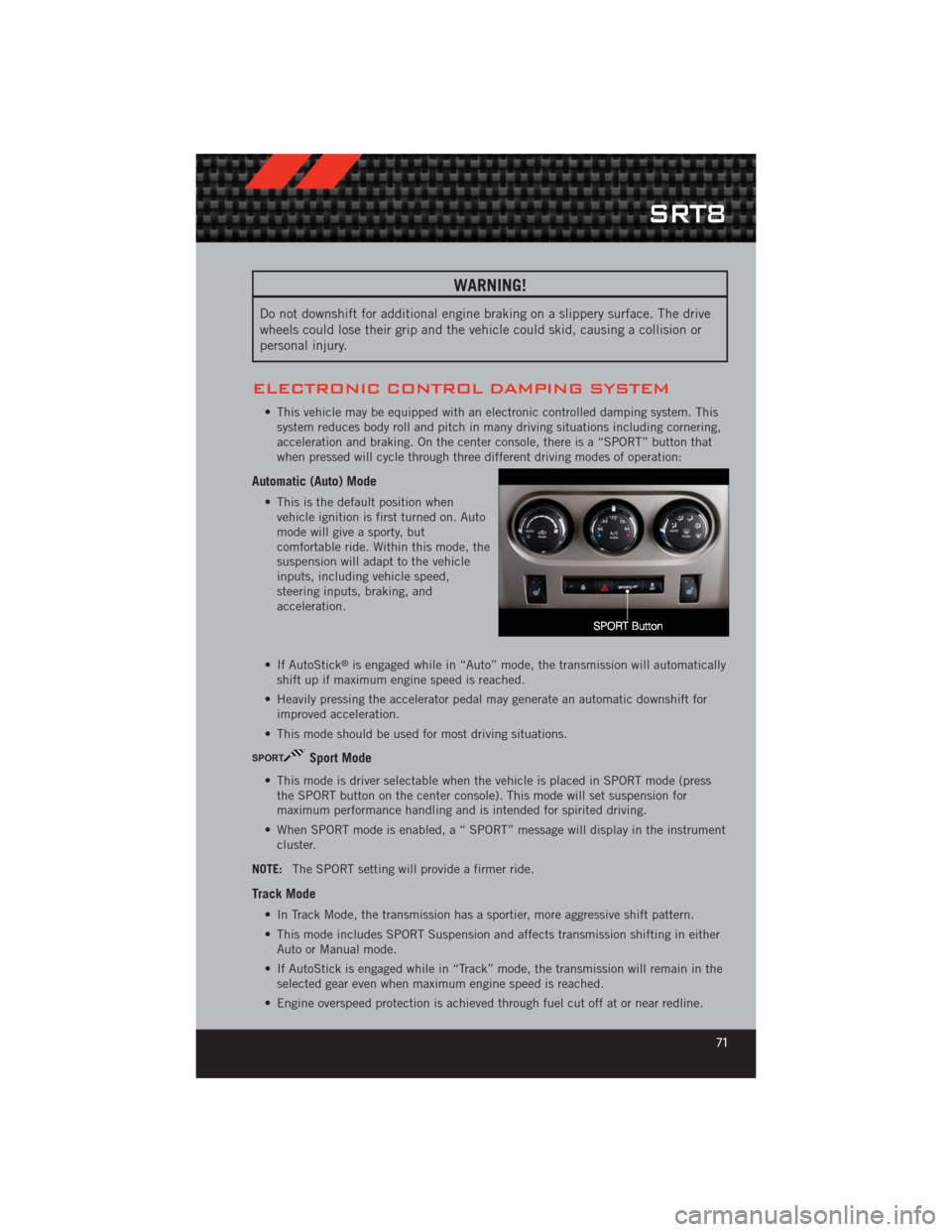
acceleration and braking. On the center console, there is a “SPORT” button that
when pressed will cycle through three different driving modes of operation:
Automatic (Auto) Mode
• This is the default position whenvehicle ignition is first turned on. Auto
mode will give a sporty, but
comfortable ride. Within this mode, the
suspension will adapt to the vehicle
inputs, including vehicle speed,
steering inputs, braking, and
acceleration.
• If AutoStick
®is engaged while in “Auto” mode, the transmission will automatically
shift up if maximum engine speed is reached.
• Heavily pressing the accelerator pedal may generate an automatic downshift for improved acceleration.
• This mode should be used for most driving situations.
SPORTSport Mode
• This mode is driver selectable when the vehicle is placed in SPORT mode (press the SPORT button on the center console). This mode will set suspension for
maximum performance handling and is intended for spirited driving.
• When SPORT mode is enabled, a “ SPORT” message will display in the instrument cluster.
NOTE: The SPORT setting will provide a firmer ride.
Track Mode
• In Track Mode, the transmission has a sportier, more aggressive shift pattern.
• This mode includes SPORT Suspension and affects transmission shifting in either
Auto or Manual mode.
• If AutoStick is engaged while in “Track” mode, the transmission will remain in the selected gear even when maximum engine speed is reached.
• Engine overspeed protection is achieved through fuel cut off at or near redline.
SRT8
71
Page 74 of 124
• This mode will provide aggressive shifting and is intended for spirited driving.
• The system will return to SPORT mode when the ignition switch is cycled fromRUN to OFF, and back to RUN again, if this mode is selected.
NOTE:
• A “TRACK” message will display in the instrument cluster.
• For manual transmission vehicles, the available driving modes are Sport on or Sport Off. Track is not available.
PERFORMANCE FEATURES
Electronic Vehicle Information Center (EVIC) – If Equipped
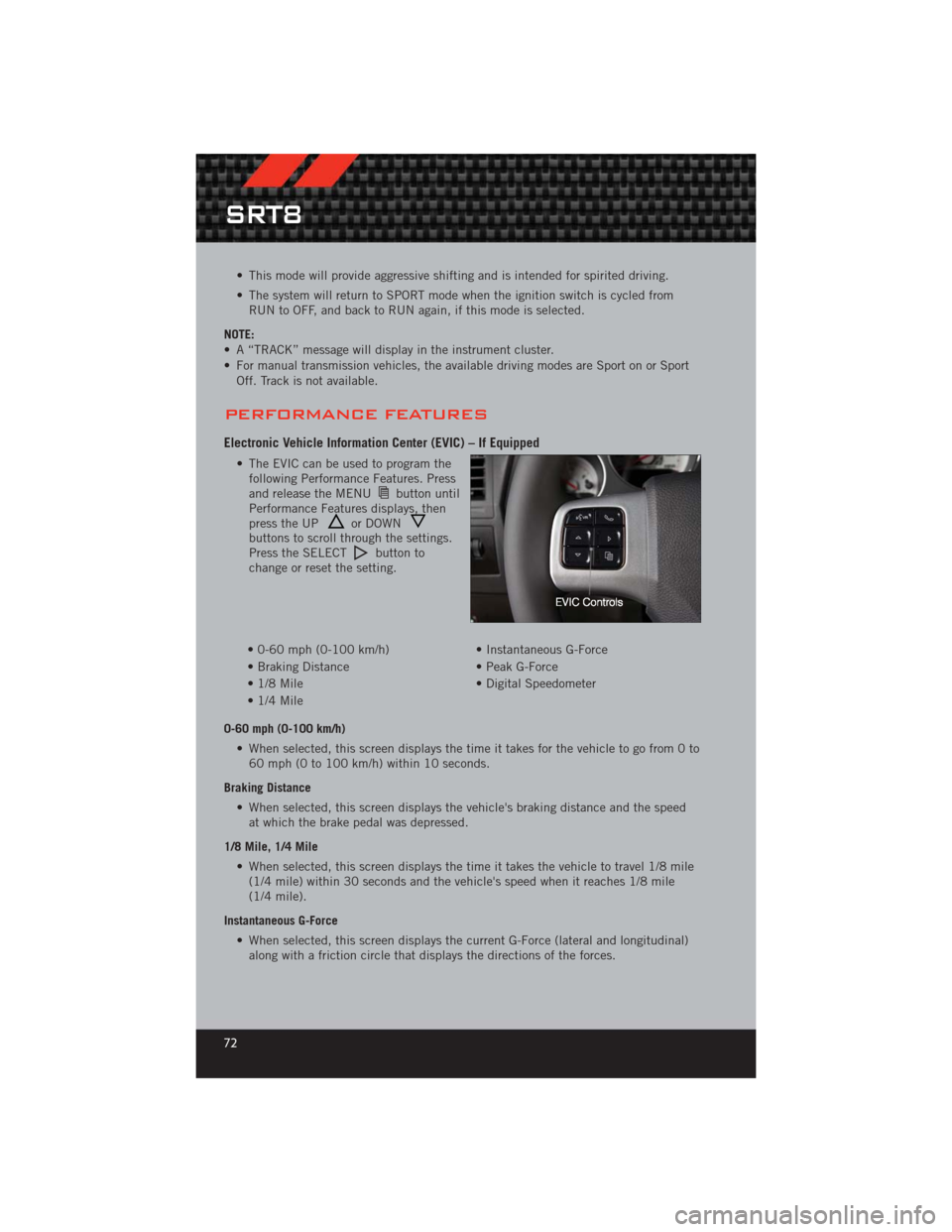
• The EVIC can be used to program thefollowing Performance Features. Press
and release the MENU
button until
Performance Features displays, then
press the UP
or DOWNbuttons to scroll through the settings.
Press the SELECTbutton to
change or reset the setting.
• 0-60 mph (0-100 km/h) • Instantaneous G-Force
• Braking Distance • Peak G-Force
• 1/8 Mile • Digital Speedometer
• 1/4 Mile
0-60 mph (0-100 km/h) • When selected, this screen displays the time it takes for the vehicle to go from 0 to60 mph (0 to 100 km/h) within 10 seconds.
Braking Distance • When selected, this screen displays the vehicle's braking distance and the speedat which the brake pedal was depressed.
1/8 Mile, 1/4 Mile • When selected, this screen displays the time it takes the vehicle to travel 1/8 mile(1/4 mile) within 30 seconds and the vehicle's speed when it reaches 1/8 mile
(1/4 mile).
Instantaneous G-Force • When selected, this screen displays the current G-Force (lateral and longitudinal)along with a friction circle that displays the directions of the forces.
SRT8
72
Page 85 of 124
WARNING!
• Do not attempt to change a tire on the side of the vehicle close to movingtraffic. Pull far enough off the road to avoid the danger of being hit when
operating the jack or changing the wheel.
• Being under a jacked-up vehicle is dangerous. The vehicle could slip off the jack and fall on you. You could be crushed. Never put any part of your body
under a vehicle that is on a jack.
• Never start or run the engine while the vehicle is on a jack. If you need to get under a raised vehicle, take it to a service center where it can be raised on a
lift.
• The jack is designed to be used as a tool for changing tires only. The jack should not be used to lift the vehicle for service purposes. The vehicle should
be jacked on a firm level surface only. Avoid ice or slippery areas.
• A loose tire or jack thrown forward in a collision or hard stop could endanger the occupants of the vehicle. Always stow the jack parts and the spare tire in
the places provided.
• Carefully follow these tire changing warnings to help prevent personal injury or damage to your vehicle:
• Always park on a firm, level surface as far from the edge of the roadway as possible before raising the vehicle.
• Turn on the Hazard Warning flasher.
• Block the wheel diagonally opposite the wheel to be raised.
• Set the parking brake firmly and set an automatic transmission in PARK; a manual transmission in REVERSE.
• Do not let anyone sit in the vehicle when it is on a jack.
• Do not get under the vehicle when it is on a jack.
• Only use the jack in the positions indicated and for lifting this vehicle during a tire change.
• If working on or near a roadway, be extremely careful of motor traffic.
• Raising the vehicle higher than necessary can make the vehicle less stable. It could slip off the jack and hurt someone near it. Raise the vehicle only
enough to remove the tire.
• To avoid the risk of forcing the vehicle off the jack, do not fully tighten the wheel nuts until the vehicle has been lowered. Failure to follow this warning
may result in personal injury.
• The limited-use spare tires are for emergency use only. Installation of this limited-use spare tire affects vehicle handling. With this tire, do not drive
more than 60 mph (100 km/h). Keep inflated to the cold tire inflation
pressure listed on either your tire placard or limited-use spare tire and wheel
assembly. Replace (or repair) the original tire at the first opportunity and
reinstall it on your vehicle. Failure to do so could result in loss of vehicle
control.
WHAT TO DO IN EMERGENCIES
83
Page 87 of 124
Using The Deflation Button
• Press the Deflation Button (2) to reduce the air pressure in the tire if it becomes over-inflated.
TIREFIT Usage Precautions
• Replace the TIREFIT Sealant Bottle (1) and Sealant Hose (6) prior to theexpiration date (printed on the bottle label) to assure optimum operation of the
system. Refer to “Sealing a Tire with TIREFIT” section (F) “Sealant Bottle and
Hose Replacement”.
• The Sealant Bottle (1) and Sealant Hose (6) are a one tire application use. After each use, always replace these components immediately at an authorized dealer.
• When the TIREFIT sealant is in a liquid form, clean water, and a damp cloth will remove the material from the vehicle or tire and wheel components. Once the
sealant dries, it can easily be peeled off and properly discarded.
• For optimum performance, make sure the valve stem on the wheel is free of debris before connecting the TIREFIT kit.
• You can use the TIREFIT air pump to inflate bicycle tires. The kit also comes with two needles, located in the Accessory Storage Compartment (on the bottom of the
air pump) for inflating sport balls, rafts, or similar inflatable items. However, use
only the Air Pump Hose (7) and make sure the Mode Select Knob (5) is in the Air
Mode when inflating such items to avoid injecting sealant into them. The TIREFIT
Sealant is only intended to seal punctures less than
1∕4in (6 mm) diameter in the
tread of your vehicle.
• Do not lift or carry the TIREFIT kit by the hoses.
Sealing A Tire With TIREFIT
(A) Whenever You Stop To Use TIREFIT:
• Pull over to a safe location and turn on the vehicle’s Hazard Warning flashers.
• Verify that the valve stem (on the wheel with the deflated tire) is in a position thatis near to the ground. This will allow the TIREFIT Hoses (6) and (7) to reach the
valve stem and keep the TIREFIT kit flat on the ground. This will provide the best
positioning of the kit when injecting the sealant into the deflated tire and running
the air pump. Move the vehicle as necessary to place the valve stem in this
position before proceeding.
• Place the transmission in PARK (auto transmission) or in Gear (manual transmission) and turn Off the ignition.
• Set the parking brake.
(B) Setting Up To Use TIREFIT:
• Turn the Mode Select Knob (5) to the Sealant Mode position.
• Uncoil the Sealant Hose (6) and then remove the cap from the fitting at the end ofthe hose.
• Place the TIREFIT kit flat on the ground next to the deflated tire.
WHAT TO DO IN EMERGENCIES
85