tow DODGE CHALLENGER 2013 3.G User Guide
[x] Cancel search | Manufacturer: DODGE, Model Year: 2013, Model line: CHALLENGER, Model: DODGE CHALLENGER 2013 3.GPages: 543, PDF Size: 3.04 MB
Page 130 of 543
NOTE:You should program the desired Towing Assis-
tance phone number using the Voice Command system.
To do this, press the button and say “Setup”, followed by
“Towing Assistance”. When prompted say 1-800-528-
2069 for the U.S., say 1-800-363-4869 for Canada, say
55-14- 3454 for Mexico City and 1-800-712-3040 for out-
side Mexico City in Mexico.
Paging
To learn how to page, refer to “Working with Automated
Systems”. Paging works properly except for pagers of
certain companies, which time out a little too soon to
work properly with the Uconnect® Phone.
Voice Mail Calling
To learn how to access your voice mail, refer to “Working
with Automated Systems”.
Working With Automated Systems
This method is used in instances where one generally has
to press numbers on the mobile phone keypad while
navigating through an automated telephone system.
You can use your Uconnect® Phone to access a voice mail
system or an automated service, such as a paging service
or automated customer service line. Some services re-
quire immediate response selection. In some instances,
that may be too quick for use of the Uconnect® Phone.
When calling a number with your Uconnect® Phone that
normally requires you to enter in a touch-tone sequence
on your mobile phone keypad, you can press the
button and say the sequence you wish to enter,
followed by the word “Send”. For example, if required to
enter your PIN followed with a pound, (3746#),you
can press the
button and say, “3746#Send”.
128 UNDERSTANDING THE FEATURES OF YOUR VEHICLE
Page 145 of 543
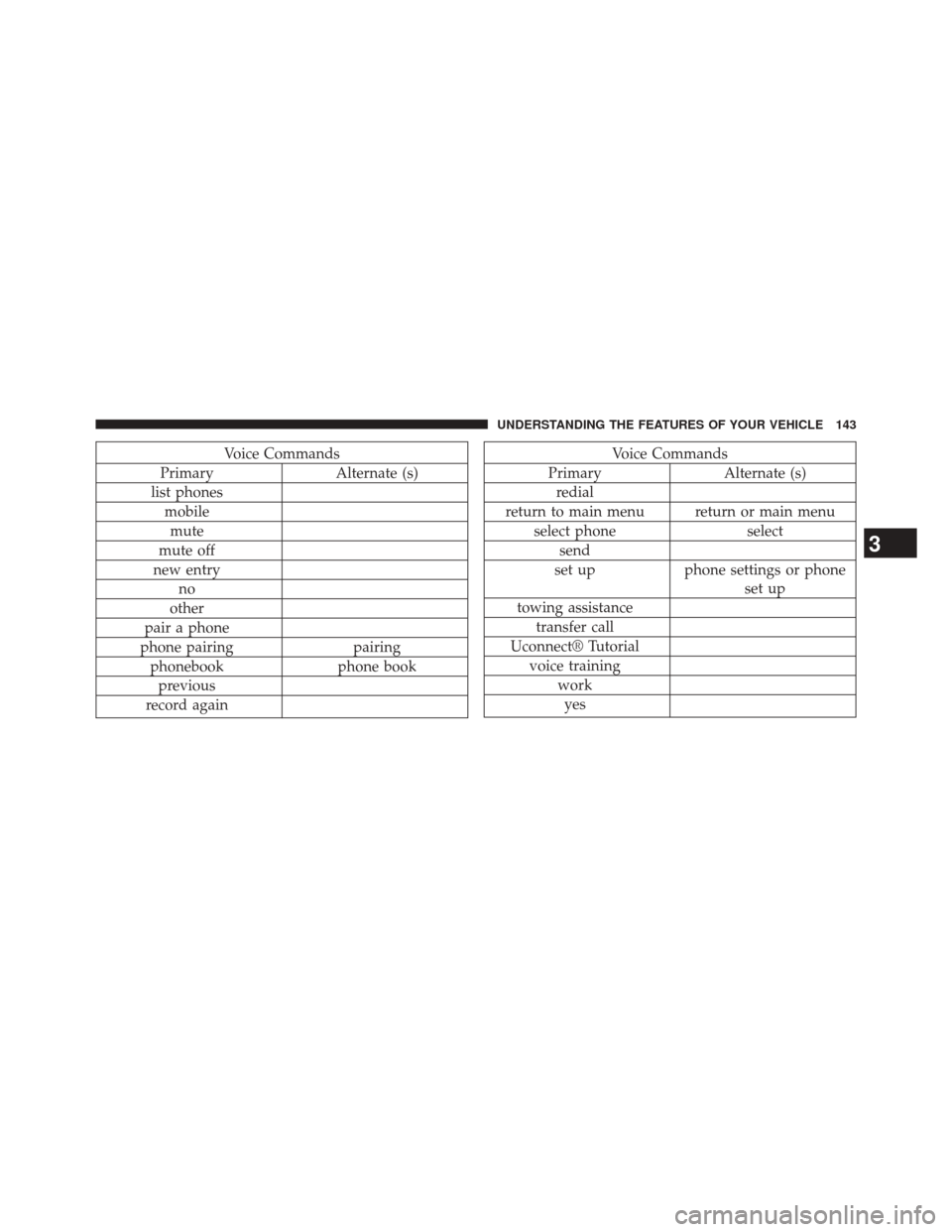
Voice Commands
Primary Alternate (s)
list phones mobilemute
mute off
new entry no
other
pair a phone
phone pairing pairing
phonebook phone book
previous
record againVoice Commands
Primary Alternate (s)
redial
return to main menu return or main menu select phone select
send
set up phone settings or phone
set up
towing assistance transfer call
Uconnect® Tutorial voice training workyes
3
UNDERSTANDING THE FEATURES OF YOUR VEHICLE 143
Page 169 of 543
Lane Change Assist
Tap the lever up or down once, without moving beyond
the detent, and the turn signal (right or left) will flash
three times then automatically turn off.
High/Low Beam Switch
Push the multifunction lever away from you to switch
the headlights to high beam. Pull the multifunction lever
toward you to switch the headlights back to low beam.
Flash-To-Pass
You can signal another vehicle with your headlights by
lightly pulling the multifunction lever toward you. This
will turn on the high beam headlights until the lever is
released.NOTE:
If the multifunction lever is held in the flash-to
pass position for more than 15 seconds, the high beams
will shut off.
Map/Reading Lights
These lights are mounted between the sun visors on the
overhead console. Each light is turned on by pressing the
lens. Press the lens a second time to turn off the light.
These lights also turn on when a door is opened, or when
the UNLOCK button on the Remote Keyless Entry (RKE)
transmitter is pressed, or when the dimmer control is
turned fully upward, past the second detent.3
UNDERSTANDING THE FEATURES OF YOUR VEHICLE 167
Page 173 of 543
Windshield Washers
To use the washer, push the multifunction lever inward
(toward the steering column) and hold it for as long as
washer spray is desired.
If you activate the washer while the windshield wiper
control is in the delay range, the wipers will operate for
three wipe cycles after releasing the multifunction lever
and then resume the intermittent interval previously
selected.
If you activate the washer while the windshield wiper is
turned off, the wipers will operate for three wipe cycles
and then turn off.
WARNING!
Sudden loss of visibility through the windshield
could lead to a collision. You might not see other
vehicles or other obstacles. To avoid sudden icing of
the windshield during freezing weather, warm the
windshield with the defroster before and during
windshield washer use.
Headlights On With Wipers (Available With
Automatic Headlights Only)
Whenthis feature is active, the headlights will turn on
approximately 10 seconds after the wipers are turned on if
the headlight switch is placed in the A (AUTO) position. In
addition, the headlights will turn off when the wipers are
turned off if they were turned on by this feature.
3
UNDERSTANDING THE FEATURES OF YOUR VEHICLE 171
Page 174 of 543
The Headlights On with Wipers feature can be enabled or
disabled. Refer to “Electronic Vehicle Information Center
(EVIC)/Personal Settings (Customer-Programmable Fea-
tures)” in “Understanding Your Instrument Panel” for
further information.
TILT/TELESCOPING STEERING COLUMN
This feature allows you to tilt the steering column
upward or downward. It also allows you to lengthen or
shorten the steering column. The tilt/telescoping control
handle is located below the steering wheel at the end of
the steering column.To unlock the steering column, push the lever downward
(toward the floor). To tilt the steering column, move the
steering wheel upward or downward as desired. To
lengthen or shorten the steering column, pull the steering
wheel outward or push it inward as desired. To lock the
Tilt/Telescoping Column Lever
172 UNDERSTANDING THE FEATURES OF YOUR VEHICLE
Page 206 of 543
UCI supports Mini, 4G, Photo, Nano, 5G iPod® and
iPhone® devices. Refer to “Universal Consumer Interface
(UCI) — If Equipped” in “Understanding Your Instru-
ment Panel” for further information.WARNING!
Do not operate this vehicle with a console compart-
ment lid in the open position. Cellular phones, music
players, and other handheld electronic devices
should be stowed while driving. Use of these devices
while driving can cause an accident due to distrac-
tion, resulting in death or injury.
Center Console
204 UNDERSTANDING THE FEATURES OF YOUR VEHICLE
Page 215 of 543
6. Charging System Warning LightThis light shows the status of the electrical charg-
ing system. The light should turn on when the
ignition switch is placed in the ON/RUN position and
remain on briefly as a bulb check. If the light stays on or
turns on while driving, turn off some of the vehicle’s
non-essential electrical devices (i.e., radio) or slightly
increase engine speed (if at idle). If the light remains on,
it means that the charging system is experiencing a
problem. See your local authorized dealer to obtain
service immediately.
If jump starting is required, refer to “Jump Starting
Procedures” in “What To Do In Emergencies”. 7. Electronic Throttle Control (ETC) Warning Light
This light will turn on briefly as a bulb check
when the ignition switch is placed in the ON/
RUN position. This light will also turn on while
the engine is running if there is a problem with the
Electronic Throttle Control (ETC) system.
If the light comes on while the engine is running, safely
bring the vehicle to a complete stop as soon as possible,
place the shift lever in PARK, for manual transmission
place the transmission in neutral, apply the parking
brake, and cycle the ignition key. The light should turn
off. If the light remains lit with the engine running, your
vehicle will usually be drivable. However, see an autho-
rized dealer for service as soon as possible.
If the light is flashing when the engine is running,
immediate service is required. In this case, you may
experience reduced performance, an elevated/rough idle
or engine stall, and your vehicle may require towing.
4
UNDERSTANDING YOUR INSTRUMENT PANEL 213
Page 216 of 543
Also, have the system checked by an authorized dealer if
the light does not come on during starting.
8. Temperature Gauge
The temperature gauge shows engine coolant tempera-
ture. Any reading within the normal range indicates that
the engine cooling system is operating satisfactorily.
The gauge pointer will likely indicate a higher tempera-
ture when driving in hot weather, up mountain grades,
or when towing a trailer. It should not be allowed to
exceed the upper limits of the normal operating range.
CAUTION!
Driving with a hot engine cooling system could
damage your vehicle. If the temperature gauge reads
“H,” pull over and stop the vehicle. Idle the vehicle
with the air conditioner turned off until the pointer
(Continued)
CAUTION!(Continued)
drops back into the normal range. If the pointer
remains on the “H,” and you hear a chime, turn the
engine OFF immediately and call for service.
WARNING!
A hot engine cooling system is dangerous. You or
others could be badly burned by steam or boiling
coolant. You may want to call a service center if your
vehicle overheats. If you decide to look under the
hood yourself, refer to “Maintaining Your Vehicle”
and follow the warnings under the Cooling System
Pressure Cap paragraph.
9. Turn Signal Indicators The arrow will flash with the exterior turn signal
when the turn signal lever is operated.
214 UNDERSTANDING YOUR INSTRUMENT PANEL
Page 225 of 543
24. Low Fuel LightThis light will turn on and a single chime will
sound when the fuel level drops to 1/8 tank.
25. Malfunction Indicator Light (MIL)
The
Malfunction Indicator Light (MIL) is part of an
onboard diagnostic system called OBD. The OBD
system monitors engine and automatic transmis-
sion control systems. The MIL will turn on when the
ignition is in the ON/RUN position before engine start. If
the MIL does not come on when turning the key from OFF
to ON/RUN, have the condition checked promptly.
Certain conditions, such as a loose or missing gas cap,
poor fuel quality, etc., may illuminate the MIL after
engine start. The vehicle should be serviced if the MIL
stays on through several of your typical driving cycles. In
most situations, the vehicle will drive normally and will
not require towing.
CAUTION!
Prolonged driving with the Malfunction Indicator
Light (MIL) on could cause damage to the engine
control system. It also could affect fuel economy and
drivability. If the MIL is flashing, severe catalytic
converter damage and power loss will soon occur.
Immediate service is required.
WARNING!
A malfunctioning catalytic converter, as referenced
above, can reach higher temperatures than in normal
operating conditions. This can cause a fire if you
drive slowly or park over flammable substances such
as dry plants, wood, cardboard, etc. This could result
in death or serious injury to the driver, occupants or
others.
4
UNDERSTANDING YOUR INSTRUMENT PANEL 223
Page 286 of 543
The operator can override the AUTO mode setting to
change airflow distribution by rotating the Mode Control
knob (right knob) to one of the following positions.
•Panel
Air is directed through the outlets in the instrument
panel. These outlets can be adjusted to direct airflow.
NOTE: The center instrument panel outlets can be aimed
so that they are directed toward the rear seat passengers
for maximum airflow to the rear.
• Bi-Level
Air is directed through the panel and floor outlets.
NOTE:For all settings, except full cold or full hot, there is
a difference in temperature between the upper and lower
outlets. The warmer air flows to the floor outlets. This
feature gives improved comfort during sunny but cool
conditions.
• Floor
Air is directed through the floor outlets with a
small amount flowing through the defrost and
side window demist outlets.
• Mix
Air is directed through the floor, defrost, and side
window demist outlets. This setting works best in
cold or snowy conditions that require extra heat to the
windshield. This setting is good for maintaining comfort
while reducing moisture on the windshield.
• Defrost
Air is directed through the windshield and side
window demist outlets. Use this mode with maxi-
mum blower and temperature settings for best wind-
shield and side window defrosting.
284 UNDERSTANDING YOUR INSTRUMENT PANEL