warning light DODGE CHALLENGER 2013 3.G User Guide
[x] Cancel search | Manufacturer: DODGE, Model Year: 2013, Model line: CHALLENGER, Model: DODGE CHALLENGER 2013 3.GPages: 543, PDF Size: 3.04 MB
Page 156 of 543
You can choose from HIGH, LOW or OFF heat settings.
Amber indicator lights in each switch indicate the level of
heat in use. Two indicator lights will illuminate for
HIGH, one for LOW and none for OFF.Press the switch once to select HIGH-level
heating. Press the switch a second time to select
LOW-level heating. Press the switch a third
time to shut the heating elements OFF.
If HIGH-level heating is selected, the system will auto-
matically switch to the LOW-level after a maximum of
60 minutes of continuous operation. At that time, the
number of indicators illuminated changes from two to
one, indicating the change. Operation on the LOW-level
setting also turns OFF automatically after a maximum of
45 minutes.
NOTE: Once a heat setting is selected, heat will be felt
within two to five minutes.WARNING!
• Persons who are unable to feel pain to the skin
because of advanced age, chronic illness, diabetes,
spinal cord injury, medication, alcohol use, exhaus-
tion or other physical condition must exercise care
when using the seat heater. It may cause burns
even at low temperatures, especially if used for
long periods of time.
• Do not place anything on the seat or seatback that
insulates against heat, such as a blanket or cushion.
This may cause the seat heater to overheat. Sitting
in a seat that has been overheated could cause
serious burns due to the increased surface tempera-
ture of the seat.
154 UNDERSTANDING THE FEATURES OF YOUR VEHICLE
Page 166 of 543
To activate the delay feature, place the ignition in the OFF
position while the headlights are still on. Then, turn off
the headlights within 45 seconds. The delay interval
begins when the headlight switch is turned off.
If you turn the headlights or parking lights on, or place
the ignition in the RUN position again, the system will
cancel the delay.
If you turn the headlights off before the ignition, they will
turn off in the normal manner.
NOTE:The lights must be turned off within 45 seconds
of placing the ignition in the OFF position to activate this
feature.
The Headlight delay time is programmable. Refer to “Elec-
tronic Vehicle Information Center (EVIC)/Customer-
Programmable Features” in “Understanding Your Instru-
ment Panel” for further information.
Daytime Running Lights — If Equipped
The headlights will come on as Daytime Running Lights
(DRL) whenever the ignition is placed in the RUN
position, the headlights are off and the parking brake is
released. The headlight switch must be used for normal
nighttime driving.
If vehicle is equipped with High Intensity Discharge
(HID) headlights, the front turn signal lamps provide the
DRL function. If equipped, the DRL will flash when a
turn signal is in operation, and return to DRL mode when
the turn signal is no longer flashing.
WARNING!
A transient high voltage occurs at the bulb sockets of
HID headlamps when the headlamp switch is turned
ON. It may cause serious electrical shock or electro-
cution if not serviced properly. See your authorized
dealer for service.
164 UNDERSTANDING THE FEATURES OF YOUR VEHICLE
Page 173 of 543
Windshield Washers
To use the washer, push the multifunction lever inward
(toward the steering column) and hold it for as long as
washer spray is desired.
If you activate the washer while the windshield wiper
control is in the delay range, the wipers will operate for
three wipe cycles after releasing the multifunction lever
and then resume the intermittent interval previously
selected.
If you activate the washer while the windshield wiper is
turned off, the wipers will operate for three wipe cycles
and then turn off.
WARNING!
Sudden loss of visibility through the windshield
could lead to a collision. You might not see other
vehicles or other obstacles. To avoid sudden icing of
the windshield during freezing weather, warm the
windshield with the defroster before and during
windshield washer use.
Headlights On With Wipers (Available With
Automatic Headlights Only)
Whenthis feature is active, the headlights will turn on
approximately 10 seconds after the wipers are turned on if
the headlight switch is placed in the A (AUTO) position. In
addition, the headlights will turn off when the wipers are
turned off if they were turned on by this feature.
3
UNDERSTANDING THE FEATURES OF YOUR VEHICLE 171
Page 176 of 543
NOTE:In order to ensure proper operation, the Elec-
tronic Speed Control System has been designed to shut
down if multiple Speed Control functions are operated at
the same time. If this occurs, the Electronic Speed Control
System can be reactivated by pushing the Electronic
Speed Control ON/OFF button and resetting the desired
vehicle set speed.
To Activate
Push the ON/OFF button. The Cruise Indicator Light in
the instrument cluster will illuminate. To turn the system
off, push the ON/OFF button a second time. The Cruise
Indicator Light will turn off. The system should be
turned off when not in use.
WARNING!
Leaving the Electronic Speed Control system on
when not in use is dangerous. You could accidentally
set the system or cause it to go faster than you want.
You could lose control and have an accident. Always
leave the system OFF when you are not using it.
To Set A Desired Speed
Turn the Electronic Speed Control ON. When the vehicle
has reached the desired speed, press the SET (-) button
and release. Release the accelerator and the vehicle will
operate at the selected speed.
NOTE: The vehicle should be traveling at a steady speed
and on level ground before pressing the SET (-) button.
174 UNDERSTANDING THE FEATURES OF YOUR VEHICLE
Page 178 of 543
Using Electronic Speed Control On Hills
The transmission may downshift on hills to maintain the
vehicle set speed.
NOTE:The Electronic Speed Control system maintains
speed up and down hills. A slight speed change on
moderate hills is normal.
On steep hills, a greater speed loss or gain may occur so
it may be preferable to drive without Electronic Speed
Control.
WARNING!
Electronic Speed Control can be dangerous where the
system cannot maintain a constant speed. Your ve-
hicle could go too fast for the conditions, and you
could lose control and have an accident. Do not use
Electronic Speed Control in heavy traffic or on roads
that are winding, icy, snow-covered or slippery.
PARKSENSE® REAR PARK ASSIST — IF
EQUIPPED
The ParkSense® Rear Park Assist system provides visual
and audible indications of the distance between the rear
fascia and a detected obstacle when backing up, e.g.
during a parking maneuver. Refer to ParkSense® System
Usage Precautions for limitations of this system and
recommendations.
ParkSense® will retain the last system state (enabled or
disabled) from the last ignition cycle when the ignition is
changed to the ON/RUN position.
ParkSense® can be active only when the shift lever is in
REVERSE. If ParkSense® is enabled at this shift lever
position, the system will remain active until the vehicle
speed is increased to approximately 7 mph (11 km/h) or
above. The system will become active again if the vehicle
speed is decreased to speeds less than approximately
6 mph (9 km/h).
176 UNDERSTANDING THE FEATURES OF YOUR VEHICLE
Page 202 of 543
WARNING!
To avoid serious injury or death:
•Only devices designed for use in this type of outlet
should be inserted into any 12 Volt outlet.
• Do not touch with wet hands.
• Close the lid when not in use and while driving the
vehicle.
• If this outlet is mishandled, it may cause an electric
shock and failure.
Power Outlet Fuse Locations
1 — #18 Fuse 20 A Yellow Cigar Lighter Instrument Panel
2 — #9 Fuse 20 A Yellow Power Outlet Center Console 200 UNDERSTANDING THE FEATURES OF YOUR VEHICLE
Page 212 of 543
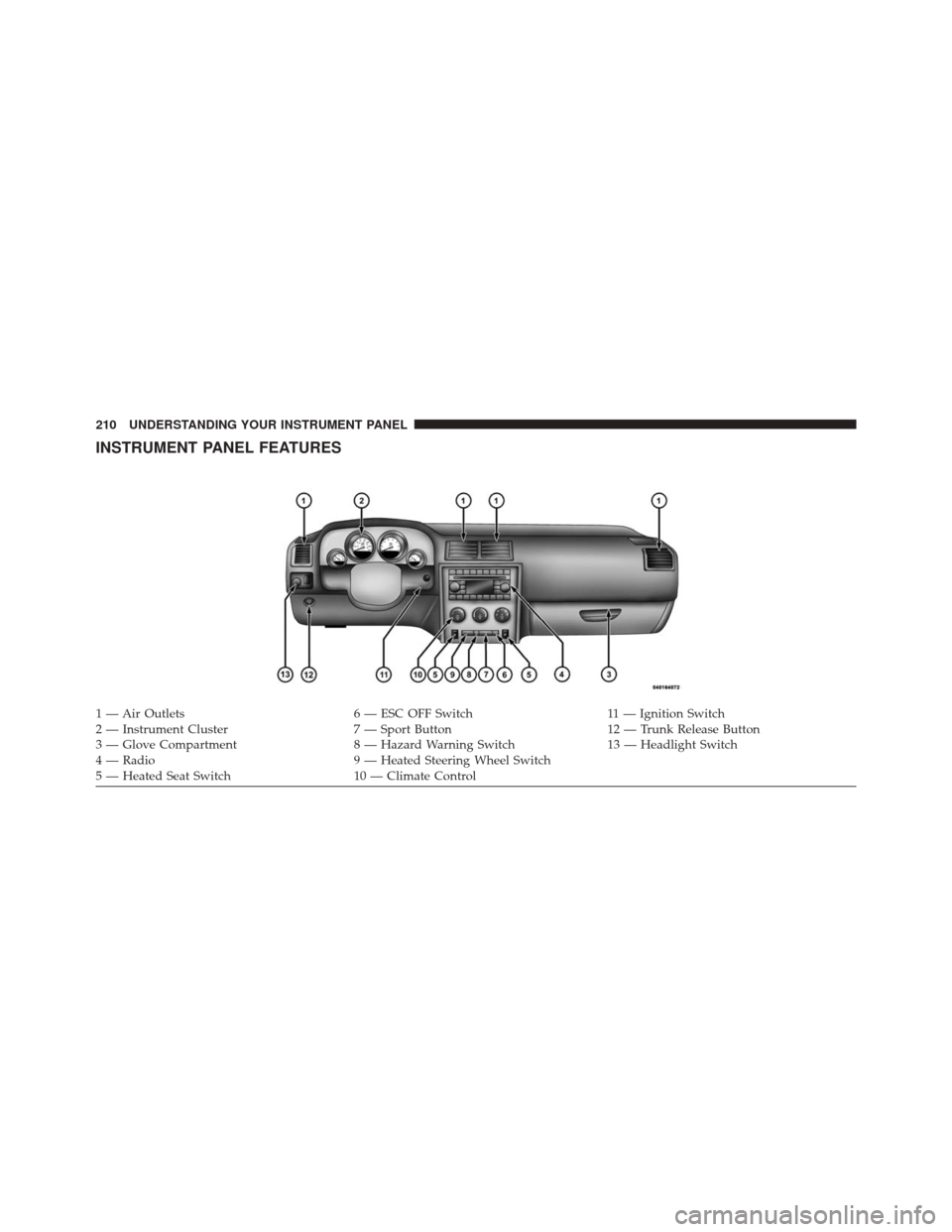
INSTRUMENT PANEL FEATURES
1 — Air Outlets6 — ESC OFF Switch11 — Ignition Switch
2 — Instrument Cluster 7 — Sport Button12 — Trunk Release Button
3 — Glove Compartment 8 — Hazard Warning Switch13 — Headlight Switch
4 — Radio 9 — Heated Steering Wheel Switch
5 — Heated Seat Switch 10 — Climate Control
210 UNDERSTANDING YOUR INSTRUMENT PANEL
Page 215 of 543
6. Charging System Warning LightThis light shows the status of the electrical charg-
ing system. The light should turn on when the
ignition switch is placed in the ON/RUN position and
remain on briefly as a bulb check. If the light stays on or
turns on while driving, turn off some of the vehicle’s
non-essential electrical devices (i.e., radio) or slightly
increase engine speed (if at idle). If the light remains on,
it means that the charging system is experiencing a
problem. See your local authorized dealer to obtain
service immediately.
If jump starting is required, refer to “Jump Starting
Procedures” in “What To Do In Emergencies”. 7. Electronic Throttle Control (ETC) Warning Light
This light will turn on briefly as a bulb check
when the ignition switch is placed in the ON/
RUN position. This light will also turn on while
the engine is running if there is a problem with the
Electronic Throttle Control (ETC) system.
If the light comes on while the engine is running, safely
bring the vehicle to a complete stop as soon as possible,
place the shift lever in PARK, for manual transmission
place the transmission in neutral, apply the parking
brake, and cycle the ignition key. The light should turn
off. If the light remains lit with the engine running, your
vehicle will usually be drivable. However, see an autho-
rized dealer for service as soon as possible.
If the light is flashing when the engine is running,
immediate service is required. In this case, you may
experience reduced performance, an elevated/rough idle
or engine stall, and your vehicle may require towing.
4
UNDERSTANDING YOUR INSTRUMENT PANEL 213
Page 216 of 543
Also, have the system checked by an authorized dealer if
the light does not come on during starting.
8. Temperature Gauge
The temperature gauge shows engine coolant tempera-
ture. Any reading within the normal range indicates that
the engine cooling system is operating satisfactorily.
The gauge pointer will likely indicate a higher tempera-
ture when driving in hot weather, up mountain grades,
or when towing a trailer. It should not be allowed to
exceed the upper limits of the normal operating range.
CAUTION!
Driving with a hot engine cooling system could
damage your vehicle. If the temperature gauge reads
“H,” pull over and stop the vehicle. Idle the vehicle
with the air conditioner turned off until the pointer
(Continued)
CAUTION!(Continued)
drops back into the normal range. If the pointer
remains on the “H,” and you hear a chime, turn the
engine OFF immediately and call for service.
WARNING!
A hot engine cooling system is dangerous. You or
others could be badly burned by steam or boiling
coolant. You may want to call a service center if your
vehicle overheats. If you decide to look under the
hood yourself, refer to “Maintaining Your Vehicle”
and follow the warnings under the Cooling System
Pressure Cap paragraph.
9. Turn Signal Indicators The arrow will flash with the exterior turn signal
when the turn signal lever is operated.
214 UNDERSTANDING YOUR INSTRUMENT PANEL
Page 217 of 543
NOTE:
•A continuous chime will sound if the vehicle is driven
more than 1 mile (1.6 km) with either turn signal on.
• Check for an inoperative outside light bulb if either
indicator flashes at a rapid rate.
10. Air Bag Warning Light
This light will turn on for four to eight seconds
as a bulb check when the ignition switch is first
turned to the ON/RUN position. If the light is
either not on during starting, stays on, or turns
on while driving, have the system inspected at an autho-
rized dealer as soon as possible. Refer to “Occupant
Restraints” in “Things To Know Before Starting Your
Vehicle” for further information. 11. Engine Temperature Warning Light
This light will turn on and a single chime will
sound to warn of an overheated engine condition.
When this light turns on, the engine temperature is
critically hot. Further overheating will cause a continu-
ous chime will sound for 4 minutes or until the engine is
allowed to cool. If the light turns on while driving, safely
pull over and stop the vehicle. The vehicle should be
turned OFF immediately and serviced as soon as pos-
sible. (Refer to “If Your Engine Overheats” in “What To
Do In Emergencies” for further information).
4
UNDERSTANDING YOUR INSTRUMENT PANEL 215