fuel DODGE CHALLENGER 2013 3.G User Guide
[x] Cancel search | Manufacturer: DODGE, Model Year: 2013, Model line: CHALLENGER, Model: DODGE CHALLENGER 2013 3.GPages: 140, PDF Size: 5.35 MB
Page 8 of 140
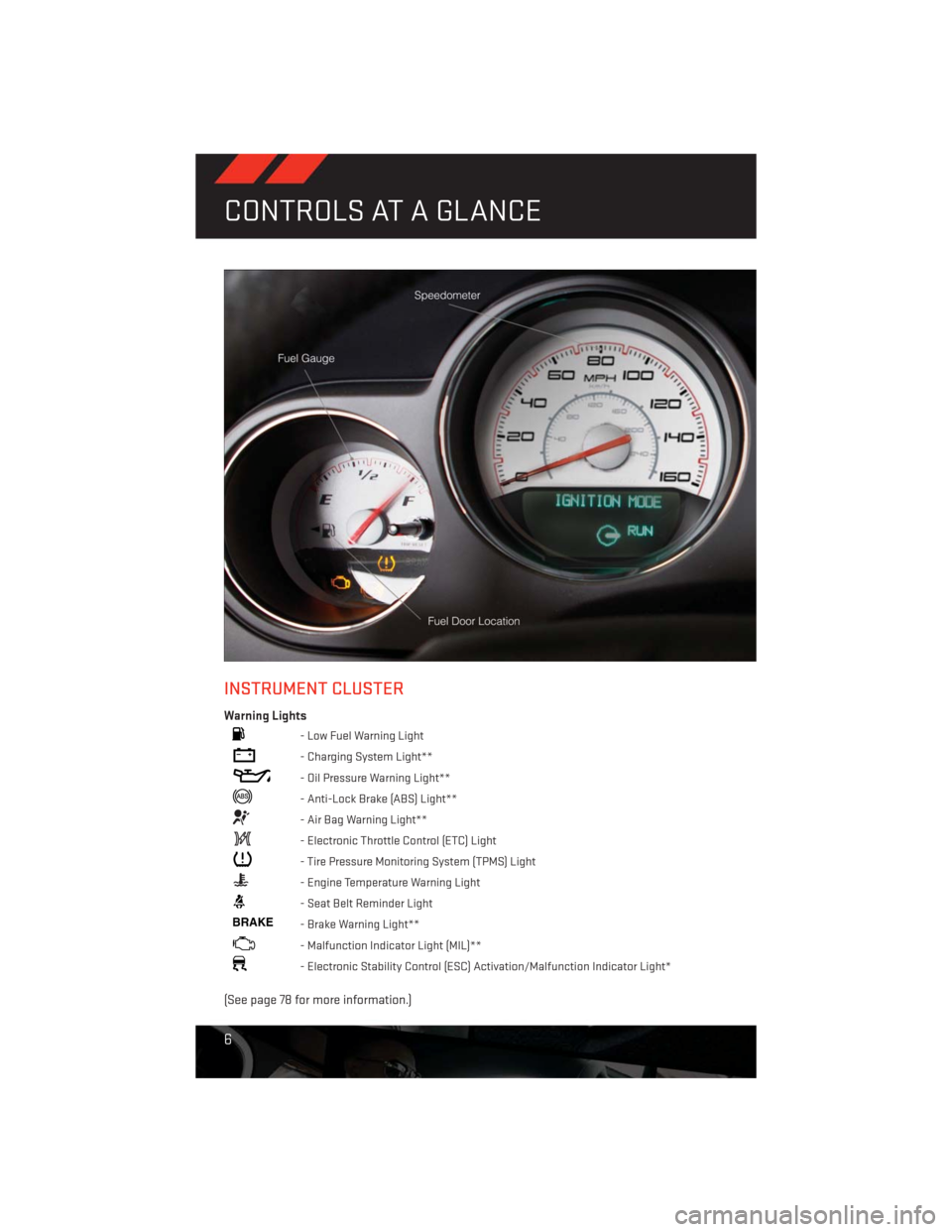
INSTRUMENT CLUSTER
Warning Lights
- Low Fuel Warning Light
- Charging System Light**
- Oil Pressure Warning Light**
- Anti-Lock Brake (ABS) Light**
- Air Bag Warning Light**
- Electronic Throttle Control (ETC) Light
- Tire Pressure Monitoring System (TPMS) Light
- Engine Temperature Warning Light
- Seat Belt Reminder Light
BRAKE- Brake Warning Light**
- Malfunction Indicator Light (MIL)**
- Electronic Stability Control (ESC) Activation/Malfunction Indicator Light*
(See page 78 for more information.)
CONTROLS AT A GLANCE
6
Page 29 of 140
SPORT MODE – IF EQUIPPED
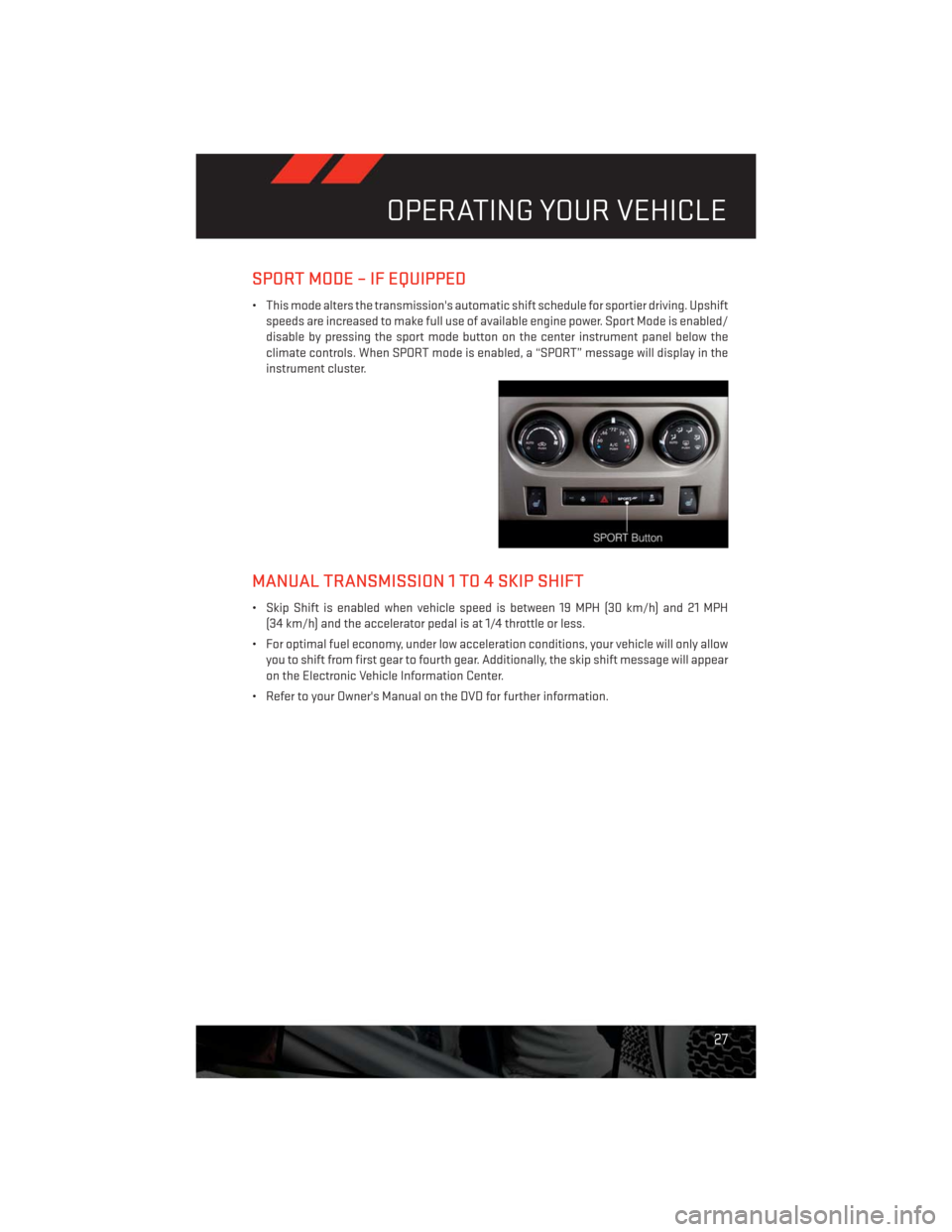
• This mode alters the transmission's automatic shift schedule for sportier driving. Upshift
speeds are increased to make full use of available engine power. Sport Mode is enabled/
disable by pressing the sport mode button on the center instrument panel below the
climate controls. When SPORT mode is enabled, a “SPORT” message will display in the
instrument cluster.
MANUAL TRANSMISSION 1 TO 4 SKIP SHIFT
• Skip Shift is enabled when vehicle speed is between 19 MPH (30 km/h) and 21 MPH
(34 km/h) and the accelerator pedal is at 1/4 throttle or less.
• For optimal fuel economy, under low acceleration conditions, your vehicle will only allow
you to shift from first gear to fourth gear. Additionally, the skip shift message will appear
on the Electronic Vehicle Information Center.
• Refer to your Owner's Manual on the DVD for further information.
OPERATING YOUR VEHICLE
27
Page 61 of 140
Replay Option Option Description
Replay Time Displays the amount of time in the upper center of the screen by which your
content lags the live channel.
Live Resumes playback of live content at any time while replaying rewound
content.
SiriusXM Travel Link (Uconnect® 730N & Uconnect® 430N Only)
NOTE:
• SiriusXM Travel Link requires a subscription, sold separately after the 1 year trial sub-
scription included with your vehicle purchase.
• SiriusXM Travel Link is only available in the United States.
• SiriusXM Travel Link brings a wealth of useful information into your vehicle and right to
your fingertips.
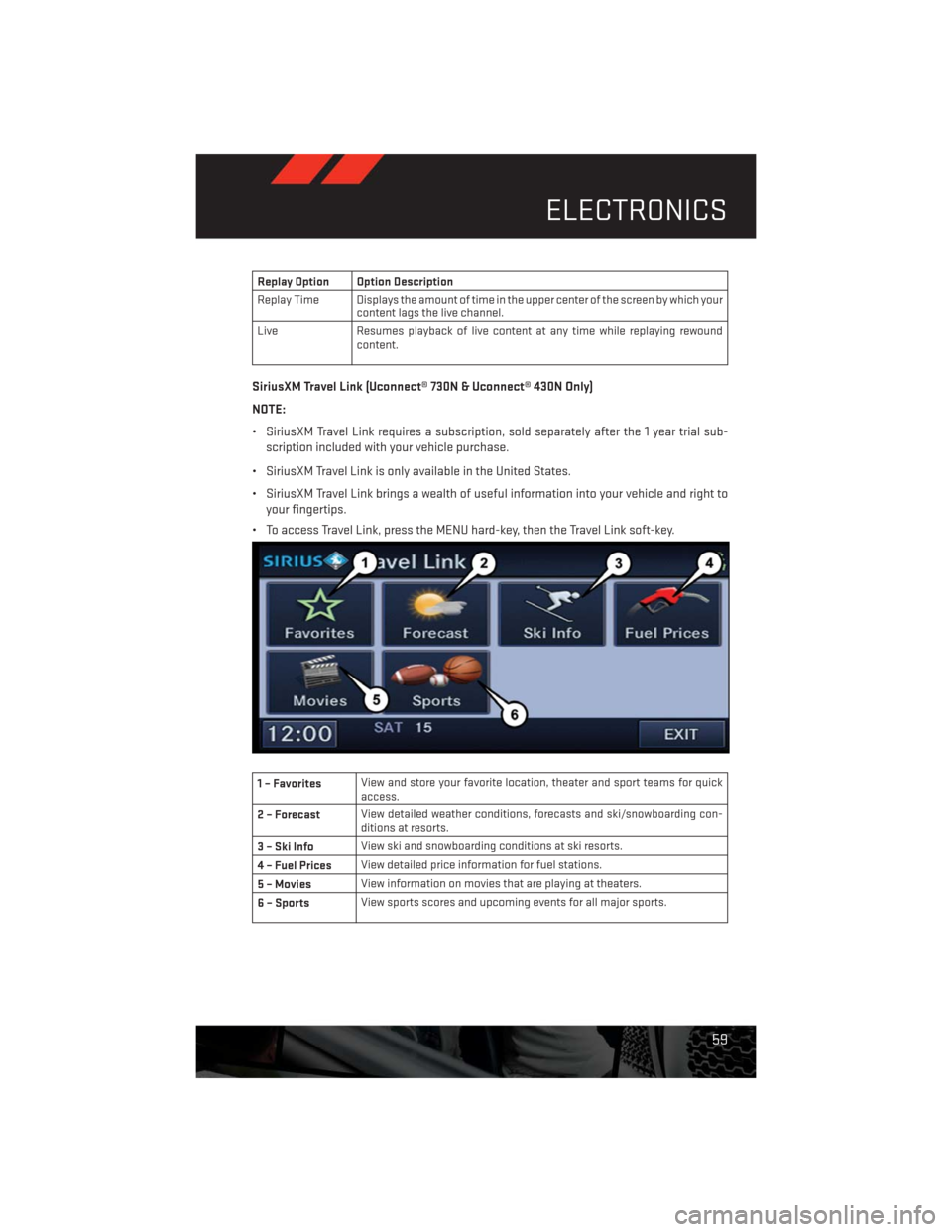
• To access Travel Link, press the MENU hard-key, then the Travel Link soft-key.
1 – FavoritesView and store your favorite location, theater and sport teams for quick
access.
2 – ForecastView detailed weather conditions, forecasts and ski/snowboarding con-
ditions at resorts.
3 – Ski InfoView ski and snowboarding conditions at ski resorts.
4 – Fuel PricesView detailed price information for fuel stations.
5 – MoviesView information on movies that are playing at theaters.
6 – SportsView sports scores and upcoming events for all major sports.
ELECTRONICS
59
Page 69 of 140
NOTE:
The USB port supports certain Mini, Classic, Nano, Touch, and iPhone® devices. The USB
port also supports playing music from compatible external USB Mass Storage Class
memory devices. For supported audio file formats, refer to the USB Port section in the
Owner's Manual on the DVD. Refer to www.UconnectPhone.com for a list of tested iPod®s.
Some iPod® software versions may not fully support the USB port features. Please visit
Apple’s website for iPod® software updates.
WARNING!
Do not plug in or remove the iPod® or external device while driving. Failure to follow this
warning could result in a collision.
ELECTRONIC VEHICLE INFORMATION CENTER (EVIC)
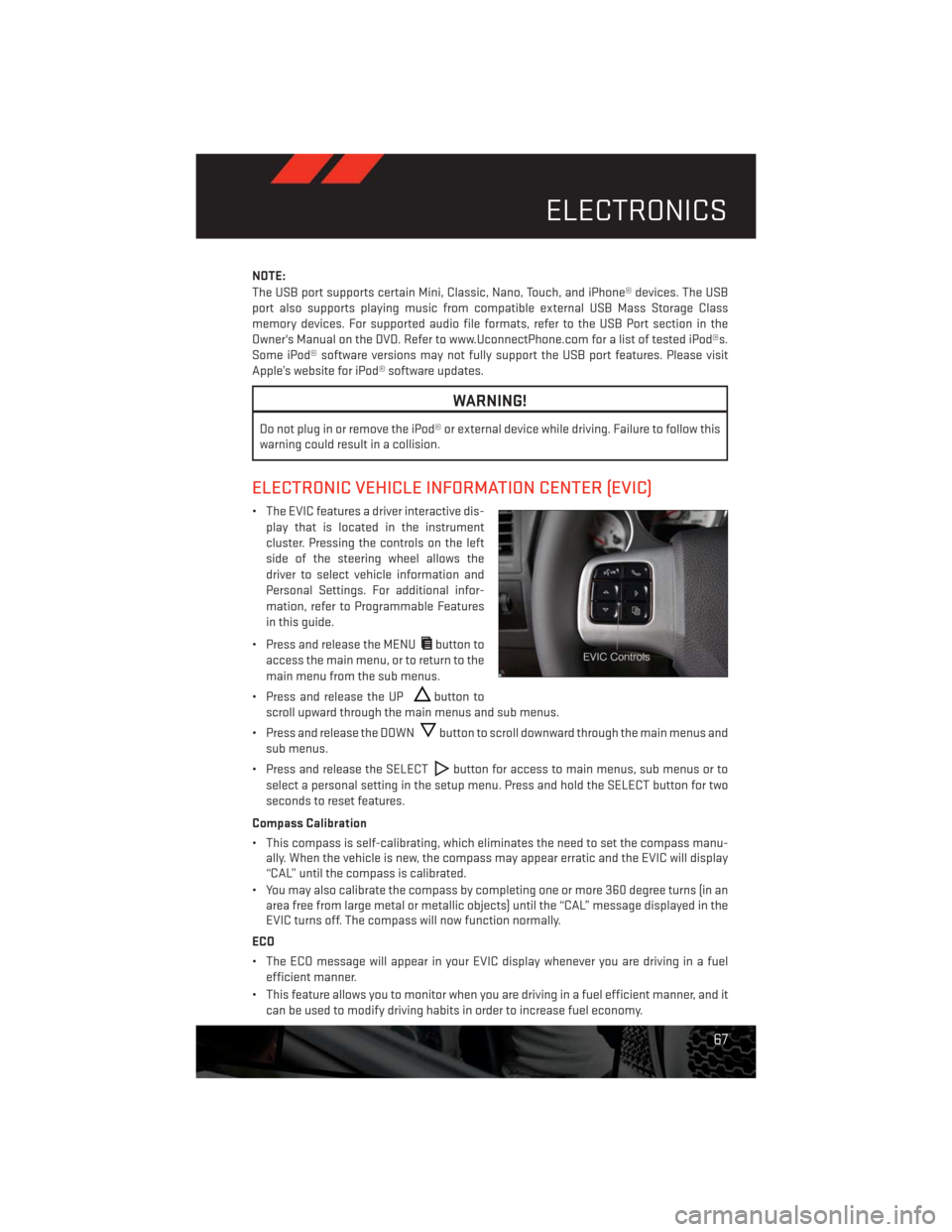
• The EVIC features a driver interactive dis-
play that is located in the instrument
cluster. Pressing the controls on the left
side of the steering wheel allows the
driver to select vehicle information and
Personal Settings. For additional infor-
mation, refer to Programmable Features
in this guide.
• Press and release the MENU
button to
access the main menu, or to return to the
main menu from the sub menus.
• Press and release the UP
button to
scroll upward through the main menus and sub menus.
• Press and release the DOWN
button to scroll downward through the main menus and
sub menus.
• Press and release the SELECT
button for access to main menus, sub menus or to
select a personal setting in the setup menu. Press and hold the SELECT button for two
seconds to reset features.
Compass Calibration
• This compass is self-calibrating, which eliminates the need to set the compass manu-
ally. When the vehicle is new, the compass may appear erratic and the EVIC will display
“CAL” until the compass is calibrated.
• You may also calibrate the compass by completing one or more 360 degree turns (in an
area free from large metal or metallic objects) until the “CAL” message displayed in the
EVIC turns off. The compass will now function normally.
ECO
• The ECO message will appear in your EVIC display whenever you are driving in a fuel
efficient manner.
• This feature allows you to monitor when you are driving in a fuel efficient manner, and it
can be used to modify driving habits in order to increase fuel economy.
ELECTRONICS
67
Page 80 of 140
ROADSIDE ASSISTANCE
•Dial toll-free 1-800-521-2779 for U.S. Residents or 1-800-363-4869 for Canadian Residents.
•Provide your name, vehicle identification number, license plate number, and your location,
including the telephone number from which you are calling.
• Briefly describe the nature of the problem and answer a few simple questions.
•
You will be given the name of the service provider and an estimated time of arrival. If you feel
you are in an “unsafe situation”, please let us know. With your consent, we will contact local
police or safety authorities.
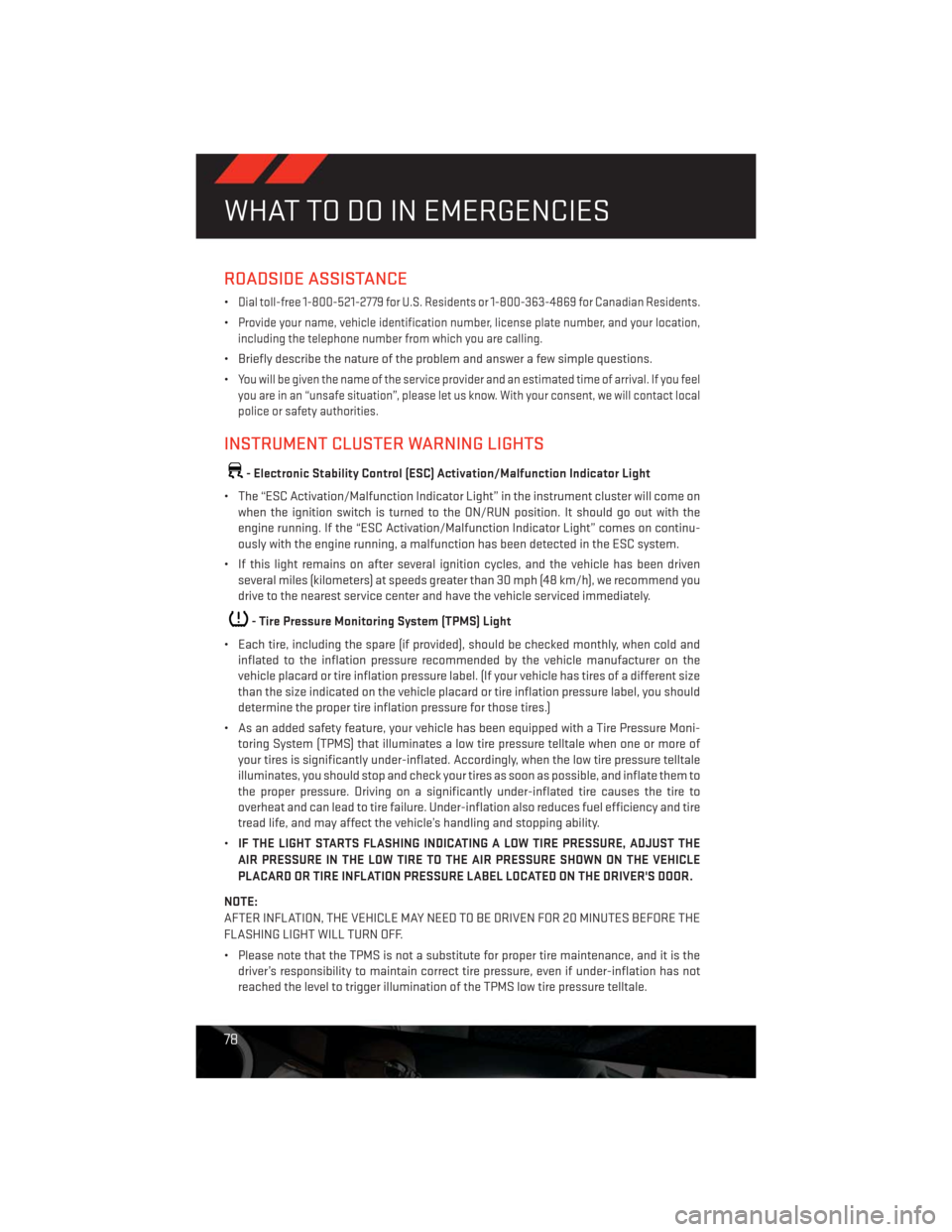
INSTRUMENT CLUSTER WARNING LIGHTS
- Electronic Stability Control (ESC) Activation/Malfunction Indicator Light
• The “ESC Activation/Malfunction Indicator Light” in the instrument cluster will come on
when the ignition switch is turned to the ON/RUN position. It should go out with the
engine running. If the “ESC Activation/Malfunction Indicator Light” comes on continu-
ously with the engine running, a malfunction has been detected in the ESC system.
• If this light remains on after several ignition cycles, and the vehicle has been driven
several miles (kilometers) at speeds greater than 30 mph (48 km/h), we recommend you
drive to the nearest service center and have the vehicle serviced immediately.
- Tire Pressure Monitoring System (TPMS) Light
• Each tire, including the spare (if provided), should be checked monthly, when cold and
inflated to the inflation pressure recommended by the vehicle manufacturer on the
vehicle placard or tire inflation pressure label. (If your vehicle has tires of a different size
than the size indicated on the vehicle placard or tire inflation pressure label, you should
determine the proper tire inflation pressure for those tires.)
• As an added safety feature, your vehicle has been equipped with a Tire Pressure Moni-
toring System (TPMS) that illuminates a low tire pressure telltale when one or more of
your tires is significantly under-inflated. Accordingly, when the low tire pressure telltale
illuminates, you should stop and check your tires as soon as possible, and inflate them to
the proper pressure. Driving on a significantly under-inflated tire causes the tire to
overheat and can lead to tire failure. Under-inflation also reduces fuel efficiency and tire
tread life, and may affect the vehicle’s handling and stopping ability.
•IF THE LIGHT STARTS FLASHING INDICATING A LOW TIRE PRESSURE, ADJUST THE
AIR PRESSURE IN THE LOW TIRE TO THE AIR PRESSURE SHOWN ON THE VEHICLE
PLACARD OR TIRE INFLATION PRESSURE LABEL LOCATED ON THE DRIVER'S DOOR.
NOTE:
AFTER INFLATION, THE VEHICLE MAY NEED TO BE DRIVEN FOR 20 MINUTES BEFORE THE
FLASHING LIGHT WILL TURN OFF.
• Please note that the TPMS is not a substitute for proper tire maintenance, and it is the
driver’s responsibility to maintain correct tire pressure, even if under-inflation has not
reached the level to trigger illumination of the TPMS low tire pressure telltale.
WHAT TO DO IN EMERGENCIES
78
Page 82 of 140
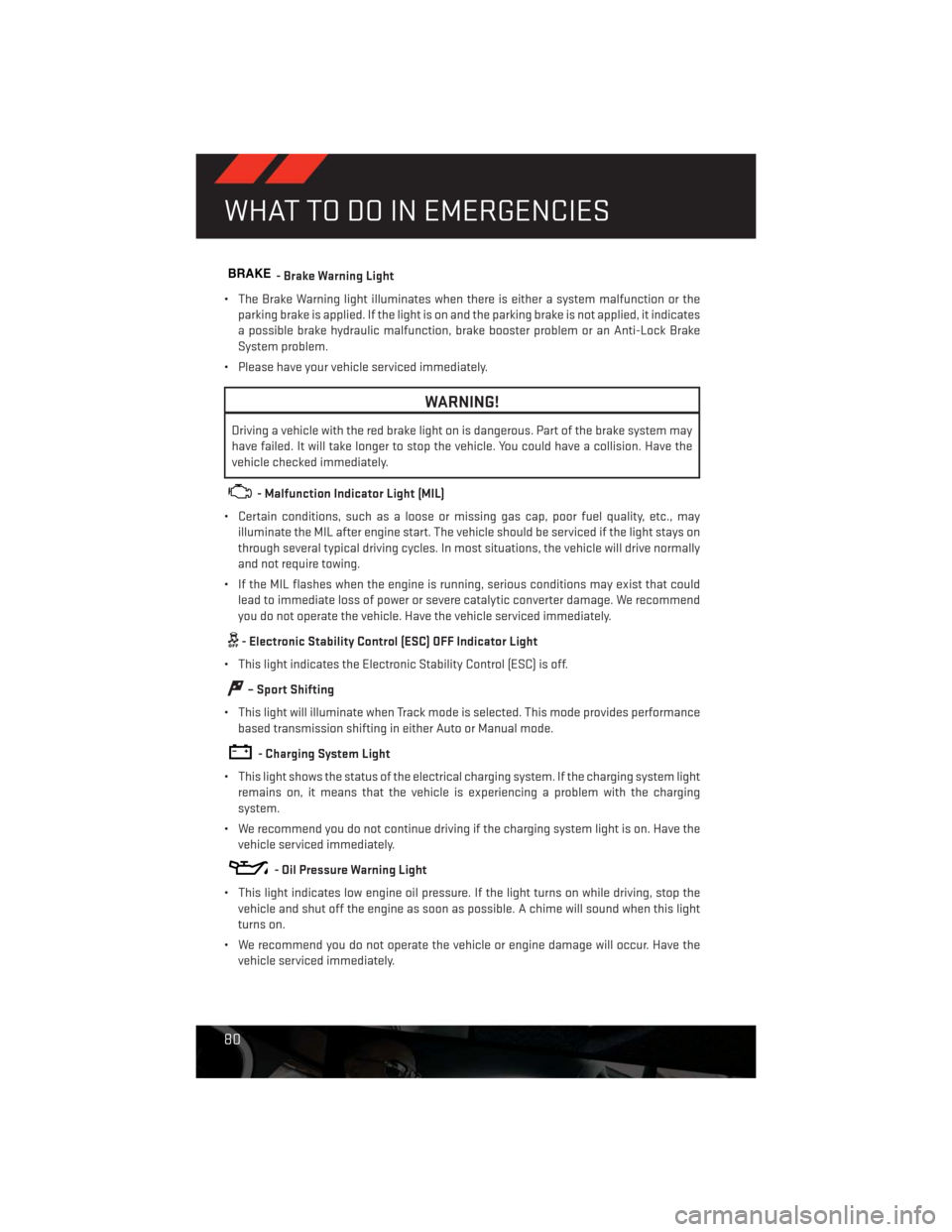
BRAKE- Brake Warning Light
• The Brake Warning light illuminates when there is either a system malfunction or the
parking brake is applied. If the light is on and the parking brake is not applied, it indicates
a possible brake hydraulic malfunction, brake booster problem or an Anti-Lock Brake
System problem.
• Please have your vehicle serviced immediately.
WARNING!
Driving a vehicle with the red brake light on is dangerous. Part of the brake system may
have failed. It will take longer to stop the vehicle. You could have a collision. Have the
vehicle checked immediately.
- Malfunction Indicator Light (MIL)
• Certain conditions, such as a loose or missing gas cap, poor fuel quality, etc., may
illuminate the MIL after engine start. The vehicle should be serviced if the light stays on
through several typical driving cycles. In most situations, the vehicle will drive normally
and not require towing.
• If the MIL flashes when the engine is running, serious conditions may exist that could
lead to immediate loss of power or severe catalytic converter damage. We recommend
you do not operate the vehicle. Have the vehicle serviced immediately.
- Electronic Stability Control (ESC) OFF Indicator Light
• This light indicates the Electronic Stability Control (ESC) is off.
– Sport Shifting
• This light will illuminate when Track mode is selected. This mode provides performance
based transmission shifting in either Auto or Manual mode.
- Charging System Light
• This light shows the status of the electrical charging system. If the charging system light
remains on, it means that the vehicle is experiencing a problem with the charging
system.
• We recommend you do not continue driving if the charging system light is on. Have the
vehicle serviced immediately.
- Oil Pressure Warning Light
• This light indicates low engine oil pressure. If the light turns on while driving, stop the
vehicle and shut off the engine as soon as possible. A chime will sound when this light
turns on.
• We recommend you do not operate the vehicle or engine damage will occur. Have the
vehicle serviced immediately.
WHAT TO DO IN EMERGENCIES
80
Page 83 of 140
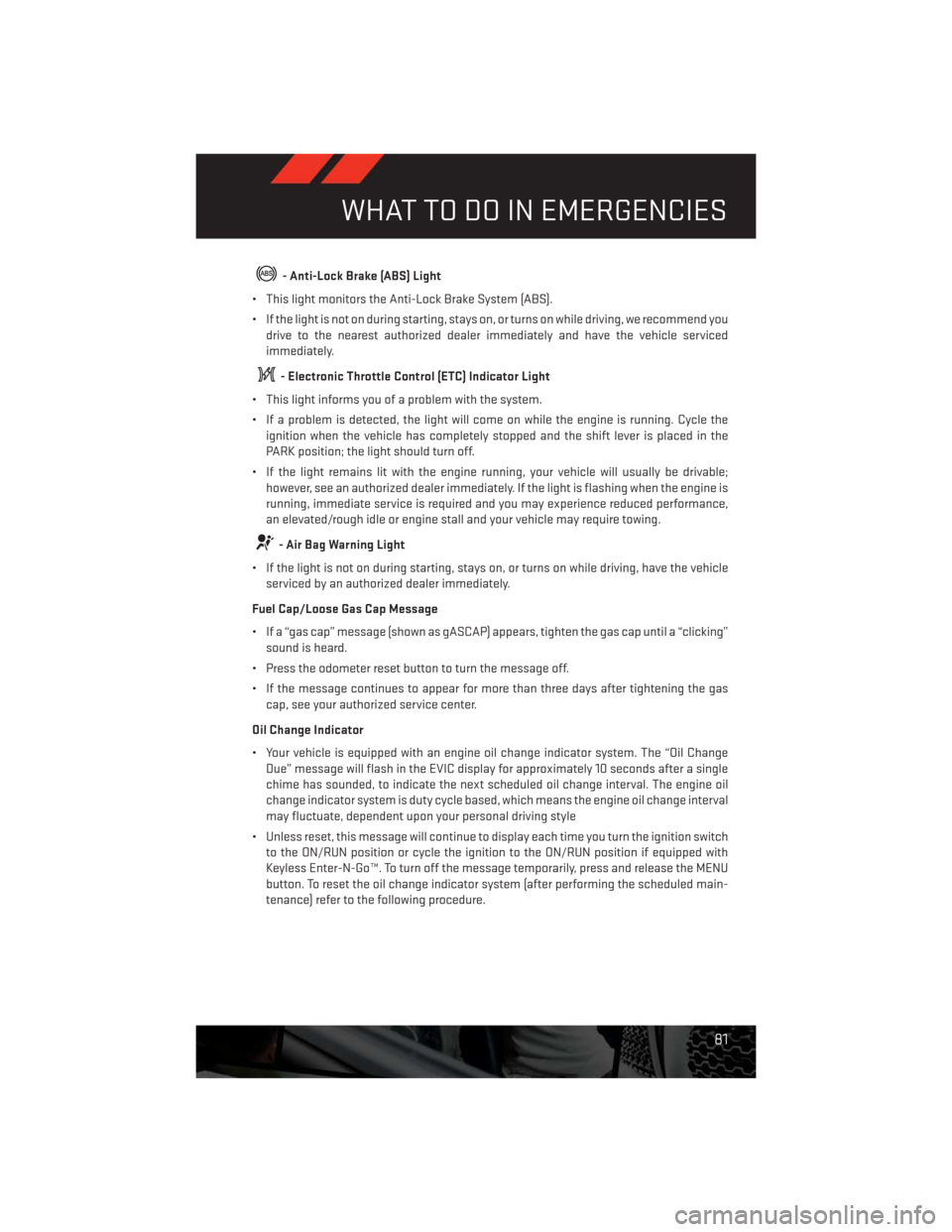
- Anti-Lock Brake (ABS) Light
• This light monitors the Anti-Lock Brake System (ABS).
• If the light is not on during starting, stays on, or turns on while driving, we recommend you
drive to the nearest authorized dealer immediately and have the vehicle serviced
immediately.
- Electronic Throttle Control (ETC) Indicator Light
• This light informs you of a problem with the system.
• If a problem is detected, the light will come on while the engine is running. Cycle the
ignition when the vehicle has completely stopped and the shift lever is placed in the
PARK position; the light should turn off.
• If the light remains lit with the engine running, your vehicle will usually be drivable;
however, see an authorized dealer immediately. If the light is flashing when the engine is
running, immediate service is required and you may experience reduced performance,
an elevated/rough idle or engine stall and your vehicle may require towing.
- Air Bag Warning Light
• If the light is not on during starting, stays on, or turns on while driving, have the vehicle
serviced by an authorized dealer immediately.
Fuel Cap/Loose Gas Cap Message
• If a “gas cap” message (shown as gASCAP) appears, tighten the gas cap until a “clicking”
sound is heard.
• Press the odometer reset button to turn the message off.
• If the message continues to appear for more than three days after tightening the gas
cap, see your authorized service center.
Oil Change Indicator
• Your vehicle is equipped with an engine oil change indicator system. The “Oil Change
Due” message will flash in the EVIC display for approximately 10 seconds after a single
chime has sounded, to indicate the next scheduled oil change interval. The engine oil
change indicator system is duty cycle based, which means the engine oil change interval
may fluctuate, dependent upon your personal driving style
• Unless reset, this message will continue to display each time you turn the ignition switch
to the ON/RUN position or cycle the ignition to the ON/RUN position if equipped with
Keyless Enter-N-Go™. To turn off the message temporarily, press and release the MENU
button. To reset the oil change indicator system (after performing the scheduled main-
tenance) refer to the following procedure.
WHAT TO DO IN EMERGENCIES
81
Page 109 of 140
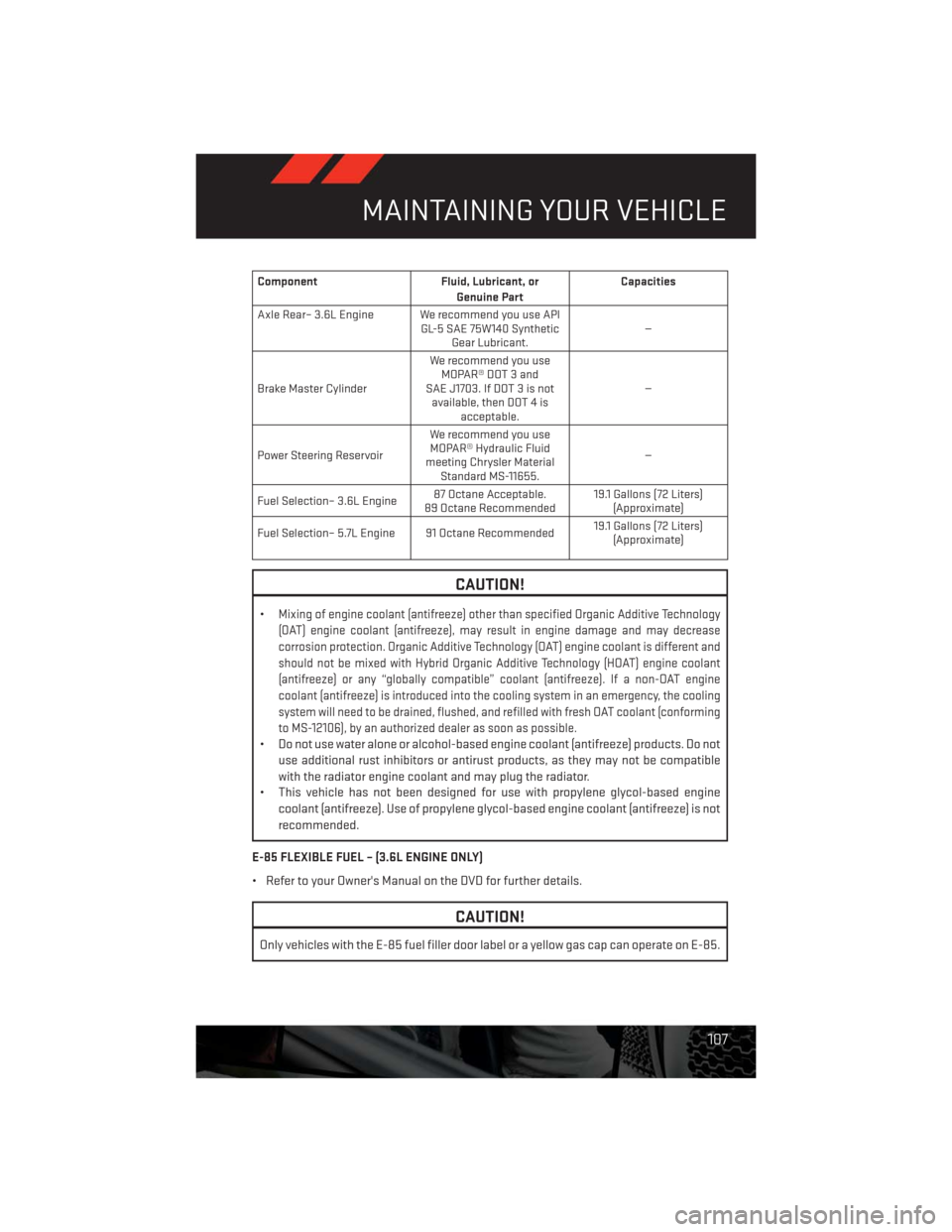
Component Fluid, Lubricant, or
Genuine PartCapacities
Axle Rear– 3.6L Engine We recommend you use API
GL-5 SAE 75W140 Synthetic
Gear Lubricant.—
Brake Master CylinderWe recommend you use
MOPAR® DOT 3 and
SAE J1703. If DOT 3 is not
available, then DOT 4 is
acceptable.—
Power Steering ReservoirWe recommend you use
MOPAR® Hydraulic Fluid
meeting Chrysler Material
Standard MS-11655.—
Fuel Selection– 3.6L Engine87 Octane Acceptable.
89 Octane Recommended19.1 Gallons (72 Liters)
(Approximate)
Fuel Selection– 5.7L Engine 91 Octane Recommended19.1 Gallons (72 Liters)
(Approximate)
CAUTION!
•Mixing of engine coolant (antifreeze) other than specified Organic Additive Technology
(OAT) engine coolant (antifreeze), may result in engine damage and may decrease
corrosion protection. Organic Additive Technology (OAT) engine coolant is different and
should not be mixed with Hybrid Organic Additive Technology (HOAT) engine coolant
(antifreeze) or any “globally compatible” coolant (antifreeze). If a non-OAT engine
coolant (antifreeze) is introduced into the cooling system in an emergency, the cooling
system will need to be drained, flushed, and refilled with fresh OAT coolant (conforming
to MS-12106), by an authorized dealer as soon as possible.
• Do not use water alone or alcohol-based engine coolant (antifreeze) products. Do not
use additional rust inhibitors or antirust products, as they may not be compatible
with the radiator engine coolant and may plug the radiator.
• This vehicle has not been designed for use with propylene glycol-based engine
coolant (antifreeze). Use of propylene glycol-based engine coolant (antifreeze) is not
recommended.
E-85 FLEXIBLE FUEL – (3.6L ENGINE ONLY)
• Refer to your Owner's Manual on the DVD for further details.
CAUTION!
Only vehicles with the E-85 fuel filler door label or a yellow gas cap can operate on E-85.
MAINTAINING YOUR VEHICLE
107
Page 110 of 140
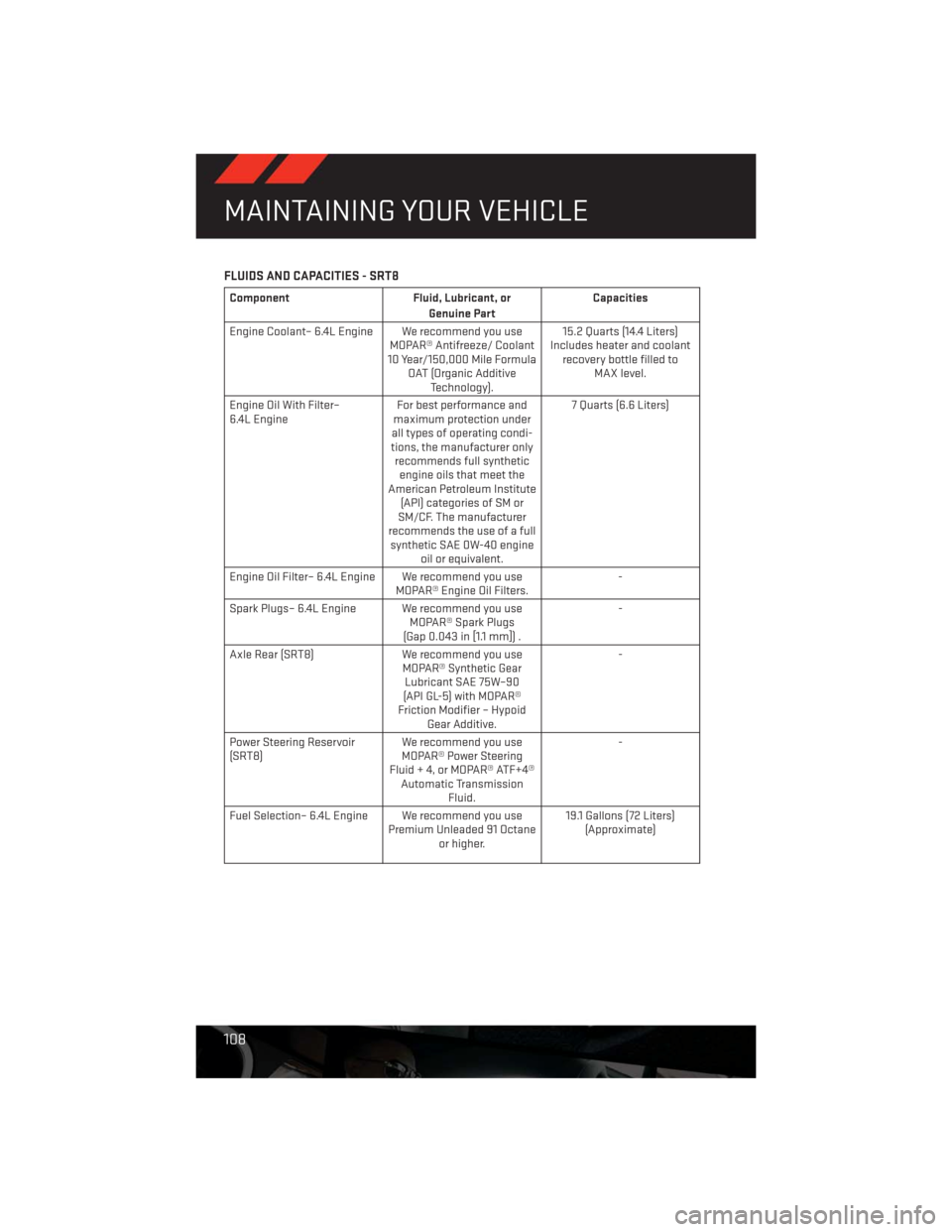
FLUIDS AND CAPACITIES - SRT8
Component Fluid, Lubricant, or
Genuine PartCapacities
Engine Coolant– 6.4L Engine We recommend you use
MOPAR® Antifreeze/ Coolant
10 Year/150,000 Mile Formula
OAT (Organic Additive
Technology).15.2 Quarts (14.4 Liters)
Includes heater and coolant
recovery bottle filled to
MAX level.
Engine Oil With Filter–
6.4L EngineFor best performance and
maximum protection under
all types of operating condi-
tions, the manufacturer only
recommends full synthetic
engine oils that meet the
American Petroleum Institute
(API) categories of SM or
SM/CF. The manufacturer
recommends the use of a full
synthetic SAE 0W-40 engine
oil or equivalent.7 Quarts (6.6 Liters)
Engine Oil Filter– 6.4L Engine We recommend you use
MOPAR® Engine Oil Filters.-
Spark Plugs– 6.4L Engine We recommend you use
MOPAR® Spark Plugs
(Gap 0.043 in [1.1 mm]) .-
Axle Rear (SRT8) We recommend you use
MOPAR® Synthetic Gear
Lubricant SAE 75W–90
(API GL-5) with MOPAR®
Friction Modifier – Hypoid
Gear Additive.-
Power Steering Reservoir
(SRT8)We recommend you use
MOPAR® Power Steering
Fluid + 4, or MOPAR® ATF+4®
Automatic Transmission
Fluid.-
Fuel Selection– 6.4L Engine We recommend you use
Premium Unleaded 91 Octane
or higher.19.1 Gallons (72 Liters)
(Approximate)
MAINTAINING YOUR VEHICLE
108
Page 112 of 140
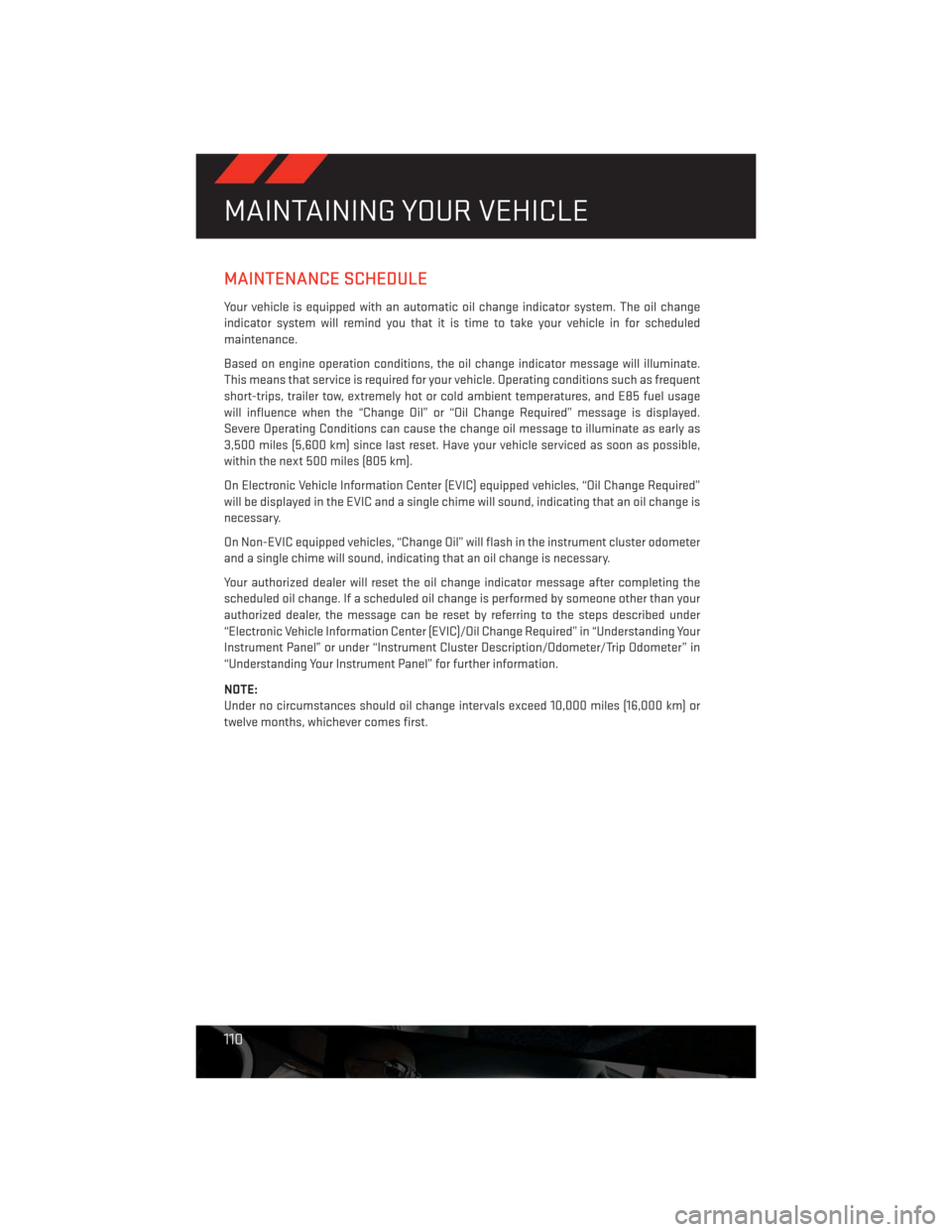
MAINTENANCE SCHEDULE
Your vehicle is equipped with an automatic oil change indicator system. The oil change
indicator system will remind you that it is time to take your vehicle in for scheduled
maintenance.
Based on engine operation conditions, the oil change indicator message will illuminate.
This means that service is required for your vehicle. Operating conditions such as frequent
short-trips, trailer tow, extremely hot or cold ambient temperatures, and E85 fuel usage
will influence when the “Change Oil” or “Oil Change Required” message is displayed.
Severe Operating Conditions can cause the change oil message to illuminate as early as
3,500 miles (5,600 km) since last reset. Have your vehicle serviced as soon as possible,
within the next 500 miles (805 km).
On Electronic Vehicle Information Center (EVIC) equipped vehicles, “Oil Change Required”
will be displayed in the EVIC and a single chime will sound, indicating that an oil change is
necessary.
On Non-EVIC equipped vehicles, “Change Oil” will flash in the instrument cluster odometer
and a single chime will sound, indicating that an oil change is necessary.
Your authorized dealer will reset the oil change indicator message after completing the
scheduled oil change. If a scheduled oil change is performed by someone other than your
authorized dealer, the message can be reset by referring to the steps described under
“Electronic Vehicle Information Center (EVIC)/Oil Change Required” in “Understanding Your
Instrument Panel” or under “Instrument Cluster Description/Odometer/Trip Odometer” in
“Understanding Your Instrument Panel” for further information.
NOTE:
Under no circumstances should oil change intervals exceed 10,000 miles (16,000 km) or
twelve months, whichever comes first.
MAINTAINING YOUR VEHICLE
110