ECU DODGE CHALLENGER 2015 3.G Owners Manual
[x] Cancel search | Manufacturer: DODGE, Model Year: 2015, Model line: CHALLENGER, Model: DODGE CHALLENGER 2015 3.GPages: 603, PDF Size: 14.97 MB
Page 11 of 603
THINGS TO KNOW BEFORE STARTING YOUR VEHICLE
CONTENTS
!A WORD ABOUT YOUR KEYS.............11
▫Keyless Ignition Node (KIN)..............11
▫Key Fob . . . . . . . . . . . . . . . . . . . . . . . . . . . .13
▫Ignition Or Accessory On Message..........14
!SENTRY KEY®.........................15
▫Replacement Keys.....................16
▫Customer Key Programming..............17
▫General Information....................17
!VEHICLE SECURITY ALARM..............18
▫Rearming Of The System.................18
▫To Arm The System....................18
▫To Disarm The System..................19
▫Security System Manual Override...........20
!ILLUMINATED ENTRY...................20
!REMOTE KEYLESS ENTRY (RKE)...........21
▫To Unlock The Doors...................22
▫To Lock The Doors.....................22
▫To Unlatch The Trunk...................23
▫Using The Panic Alarm..................23
▫Programming Additional Transmitters.......24
2
Page 18 of 603
the vehicle. The system will not allow the engine to crank
if an invalid Key Fob is used to start and operate the
vehicle. The system will shut the engine off in two
seconds if an invalid Key Fob is used to start the engine.
After placing the ignition to the ON/RUN position, the
Vehicle Security Light will turn on for three seconds for a
bulb check. If the light remains on after the bulb check, it
indicates that there is a problem with the electronics. In
addition, if the light begins to flash after the bulb check,
it indicates that someone used an invalid Key Fob to start
the engine. Either of these conditions will result in the
engine being shut off after two seconds.
If the Vehicle Security Light turns on during normal
vehicle operation (vehicle running for longer than 10
seconds), it indicates that there is a fault in the electron-
ics. Should this occur, have the vehicle serviced as soon
as possible by an authorized dealer.
CAUTION!
The Sentry Key® Immobilizer system is not compat-
ible with some aftermarket remote starting systems.
Use of these systems may result in vehicle starting
problems and loss of security protection.
All of the Key Fobs provided with your new vehicle have
been programmed to the vehicle electronics.
Replacement Keys
NOTE:Only Key Fobs that are programmed to the
vehicle electronics can be used to start and operate the
vehicle. Once a Key Fob is programmed to a vehicle, it
cannot be programmed to any other vehicle.
16 THINGS TO KNOW BEFORE STARTING YOUR VEHICLE
Page 19 of 603
CAUTION!
•Always remove the Key Fobs from the vehicle and
lock all doors when leaving the vehicle unat-
tended.
•For vehicles equipped with Keyless Enter-N-Go™,
always remember to place the ignition in the OFF
position.
At the time of purchase, the original owner is provided
with a four-digit Personal Identification Number (PIN).
Keep the PIN in a secure location. This number is
required for authorized dealer replacement of Key Fobs.
Duplication of Key Fobs may be performed at an autho-
rized dealer, this procedure consists of programming a
blank Key Fob to the vehicle electronics. A blank Key Fob
is one that has never been programmed.
NOTE:When having the Sentry Key® Immobilizer Sys-
tem serviced, bring all vehicle Key Fobs with you to the
authorized dealer.
Customer Key Programming
Programming Key Fobs or RKE transmitters may be
performed at an authorized dealer.
General Information
The Sentry Key® system complies with FCC rules part 15
and with RSS-210 of Industry Canada. Operation is
subject to the following conditions:
•This device may not cause harmful interference.
•This device must accept any interference that may be
received, including interference that may cause unde-
sired operation.
2
THINGS TO KNOW BEFORE STARTING YOUR VEHICLE 17
Page 20 of 603
NOTE:Changes or modifications not expressly approved
by the party responsible for compliance could void the
user’s authority to operate the equipment.
VEHICLE SECURITY ALARM
The Vehicle Security Alarm monitors the vehicle doors
and trunk for unauthorized entry and the ignition switch
for unauthorized operation. While the Vehicle Security
Alarm is armed, interior switches for door locks and
decklid release are disabled. If something triggers the
alarm, the Vehicle Security Alarm will provide the fol-
lowing audible and visible signals: the horn will pulse,
the headlights will turn on, park lamps and/or turn
signals will flash, and the Vehicle Security Light in the
instrument cluster will flash.
The Vehicle Security Alarm also monitors the hood for
unauthorized entry on vehicles equipped with Remote
Start.
Rearming Of The System
If something triggers the alarm, and no action is taken to
disarm it, the system will turn off the horn after approxi-
mately 29 seconds, turn off all of the visual signals after
5 seconds, and then the system will rearm itself up to 8
times.
To Arm The System
Follow these steps to arm the Vehicle Security Alarm:
1. Make sure the vehicles ignition is cycled to the “OFF”
position (refer to#Starting Procedures#in#Starting
And Operating#for further information).
•For vehicles equipped with Keyless Enter-N-Go™,
make sure the vehicle ignition system is OFF.
•For vehicles not equipped with Keyless Enter-N-
Go™, make sure the vehicle ignition system is OFF
and the key is physically removed from the ignition.
18 THINGS TO KNOW BEFORE STARTING YOUR VEHICLE
Page 21 of 603
2. Perform one of the following methods to lock the
vehicle:
•Push LOCK on the interior power door lock switch
with the driver and/or passenger door open.
•Push the LOCK button on the exterior Passive Entry
Door Handle with a valid Key Fob available in the
same exterior zone (refer to#Keyless Enter-N-Go™#
in#Things To Know Before Starting Your Vehicle#for
further information).
•Push the LOCK button on the Remote Keyless Entry
(RKE) transmitter.
3. If any doors are open, close them.
To Disarm The System
The Vehicle Security Alarm can be disarmed using any of
the following methods:
•Push the UNLOCK button on the Remote Keyless
Entry (RKE) transmitter.
•Grasp the Passive Entry Unlock Door Handle (if
equipped, refer to “Keyless Enter-N-Go™” in#Things
To Know Before Starting Your Vehicle#for further
information).
•Advance the vehicle ignition system out of the OFF
position.
NOTE:
•The driver’s door key cylinder and the Trunk button
on the RKE transmitter cannot arm or disarm the
Vehicle Security Alarm.
•The Vehicle Security Alarm remains armed during
power trunk entry. Pushing the trunk button will not
disarm the Vehicle Security Alarm. If someone enters
the vehicle through the trunk and opens any door the
alarm will sound.
2
THINGS TO KNOW BEFORE STARTING YOUR VEHICLE 19
Page 22 of 603
•When the Vehicle Security Alarm is armed, the interior
power door lock switches will not unlock the doors.
The Vehicle Security Alarm is designed to protect your
vehicle; however, you can create conditions where the
system will give you a false alarm. If one of the previ-
ously described arming sequences has occurred, the
Vehicle Security Alarm will arm regardless of whether
you are in the vehicle or not. If you remain in the vehicle
and open a door, the alarm will sound. If this occurs,
disarm the Vehicle Security Alarm.
If the Vehicle Security Alarm is armed and the battery
becomes disconnected, the Vehicle Security Alarm will
remain armed when the battery is reconnected; the
exterior lights will flash, the horn will sound. If this
occurs, disarm the Vehicle Security Alarm.
Tamper Alert
If something has triggered the Vehicle Security Alarm in
your absence, the horn will sound three times and the
exterior lights will blink three times when you disarm the
Vehicle Security Alarm. Check the vehicle for tampering.
Security System Manual Override
The Vehicle Security Alarm will not arm if you lock the
doors using the manual door lock plunger.
ILLUMINATED ENTRY
The courtesy lights will turn on when you use the
Remote Keyless Entry (RKE) transmitter to unlock the
doors or open any door.
This feature also turns on the approach lighting in the
outside mirrors — if equipped. Refer to “Mirrors” in
“Understanding The Features Of Your Vehicle” for fur-
ther information.
The lights will fade to off after approximately 30 seconds
or they will immediately fade to off once the ignition
switch is turned to ON/RUN from the OFF position.
20 THINGS TO KNOW BEFORE STARTING YOUR VEHICLE
Page 27 of 603
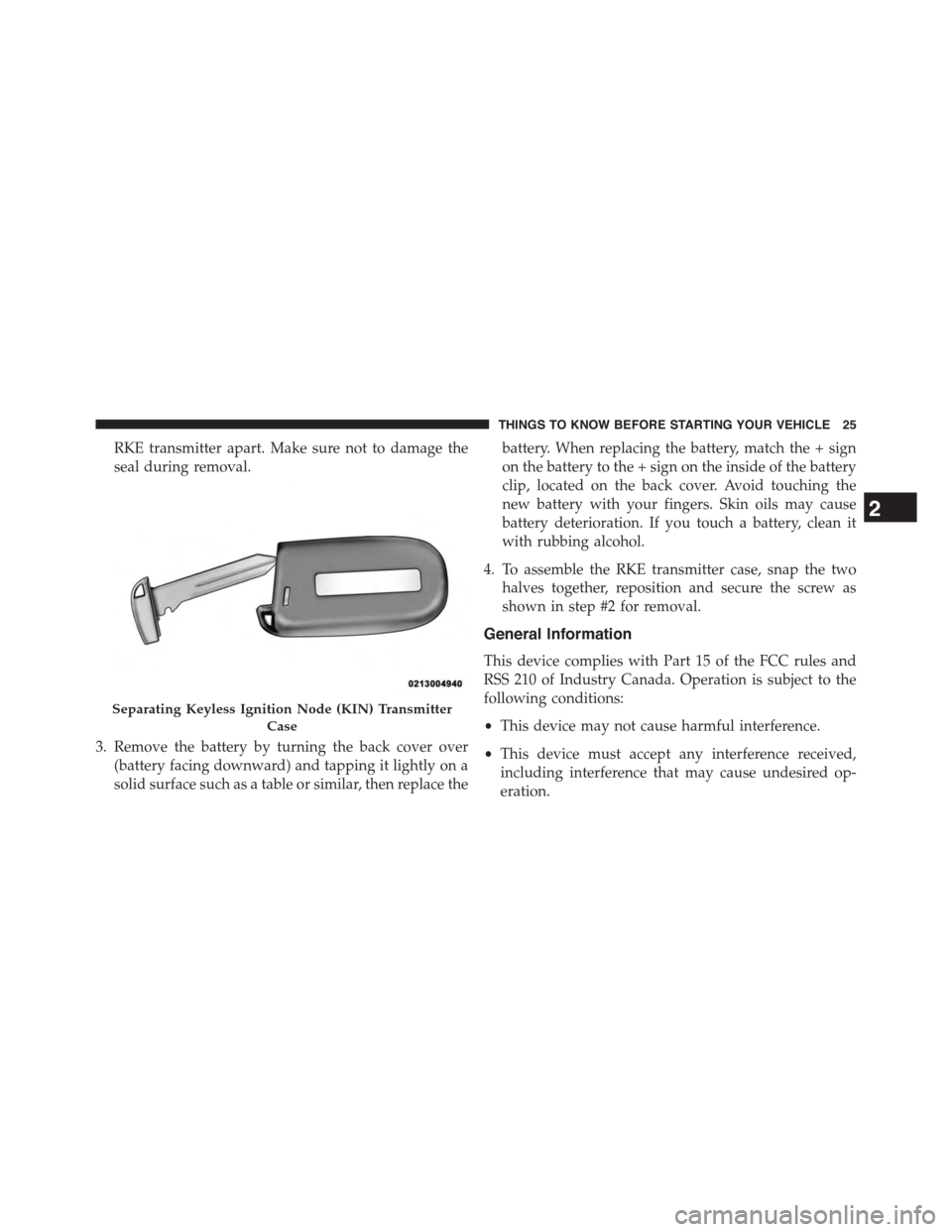
RKE transmitter apart. Make sure not to damage the
seal during removal.
3. Remove the battery by turning the back cover over
(battery facing downward) and tapping it lightly on a
solid surface such as a table or similar, then replace the
battery. When replacing the battery, match the + sign
on the battery to the + sign on the inside of the battery
clip, located on the back cover. Avoid touching the
new battery with your fingers. Skin oils may cause
battery deterioration. If you touch a battery, clean it
with rubbing alcohol.
4. To assemble the RKE transmitter case, snap the two
halves together, reposition and secure the screw as
shown in step #2 for removal.
General Information
This device complies with Part 15 of the FCC rules and
RSS 210 of Industry Canada. Operation is subject to the
following conditions:
•This device may not cause harmful interference.
•This device must accept any interference received,
including interference that may cause undesired op-
eration.
Separating Keyless Ignition Node (KIN) Transmitter
Case
2
THINGS TO KNOW BEFORE STARTING YOUR VEHICLE 25
Page 28 of 603
NOTE:Changes or modifications not expressly approved
by the party responsible for compliance could void the
user’s authority to operate the equipment.
If your RKE transmitter fails to operate from a normal
distance, check for these two conditions:
1. A weak battery in the transmitter. The expected life of
the battery is a minimum of three years.
2. Closeness to a radio transmitter such as a radio station
tower, airport transmitter, and some mobile or CB
radios.
REMOTE STARTING SYSTEM — IF EQUIPPED
This system uses the Remote Keyless Entry
(RKE) transmitter to start the engine conve-
niently from outside the vehicle while still
maintaining security. The system has a range of
approximately 300 ft (91 m).
NOTE:
•The vehicle must be equipped with an automatic
transmission to be equipped with Remote Start.
•Obstructions between the vehicle and the Key Fob may
reduce this range.
How To Use Remote Start
All of the following conditions must be met before the
engine will remote start:
•Shift lever in PARK
•Doors closed
•Hood closed
•Hazard switch off
•Brake switch inactive (brake pedal not pushed)
•Battery at an acceptable charge level
26 THINGS TO KNOW BEFORE STARTING YOUR VEHICLE
Page 29 of 603
•RKE PANIC button not pushed
•System not disabled from previous remote start event
•Vehicle security alarm not active
•Ignition in Off position (Keyless Enter-N-Go™)
WARNING!
•Do not start or run an engine in a closed garage or
confined area. Exhaust gas contains Carbon Mon-
oxide (CO) which is odorless and colorless. Carbon
Monoxide is poisonous and can cause serious in-
jury or death when inhaled.
•Keep Remote Keyless Entry (RKE) transmitters
away from children. Operation of the Remote Start
System, windows, door locks or other controls
could cause serious injury or death.
To Enter Remote Start Mode
Push and release the REMOTE START button
on the RKE transmitter twice within five sec-
onds. The vehicle doors will lock, the parking
lights will flash and horn will chirp twice (if
programmed). Then, the engine will start and the vehicle
will remain in the Remote Start mode for a 15-minute
cycle.
NOTE:
•If an engine fault is present the vehicle will start and
then shut down 10 seconds later.
•The park lamps will turn on and remain on during
Remote Start mode.
•For security, power window and power sunroof op-
eration (if equipped) are disabled when the vehicle is
in the Remote Start mode.
2
THINGS TO KNOW BEFORE STARTING YOUR VEHICLE 27
Page 30 of 603
•The engine can be started two consecutive times with
the RKE transmitter. However, the ignition must be
cycled by pushing the START/STOP button twice (or
the ignition switch must be cycled to the ON/RUN
position) before you can repeat the start sequence for a
third cycle.
To Exit Remote Start Mode Without Driving The
Vehicle
Push and release the REMOTE START button one time or
allow the engine to run for the entire 15-minute cycle.
NOTE:To avoid unintentional shut downs, the system
will disable the one time push of the REMOTE START
button for two seconds after receiving a valid Remote
Start request.
To Exit Remote Start Mode And Drive The Vehicle
Before the end of 15 minute cycle, push and release the
UNLOCK button on the RKE transmitter to unlock the
doors, or unlock the vehicle using Passive Entry via the
door handles, and disarm the Vehicle Security Alarm (if
equipped). Then, prior to the end of the 15 minute cycle,
push and release the START/STOP button.
NOTE:For vehicles equipped with the Keyless Enter-N-
Go™ feature, the message “Push Button/Insert Key” will
display in the Driver Information Display (DID) until
you push the START button.
28 THINGS TO KNOW BEFORE STARTING YOUR VEHICLE