phone DODGE CHALLENGER 2015 3.G Owner's Manual
[x] Cancel search | Manufacturer: DODGE, Model Year: 2015, Model line: CHALLENGER, Model: DODGE CHALLENGER 2015 3.GPages: 220, PDF Size: 30.96 MB
Page 69 of 220
Uconnect® Access Via Mobile — If Equipped (Available On Uconnect®
8.4A/8.4AN)
Via Mobile uses the Uconnect®Access app and your smartphone's data plan to access
your personal Pandora®,iHeartRadio,Aha™byHARMANandSlackerRadioaccounts
from the vehicle and control them using the vehicle touchscreen. Customer’s data plan
charges will apply.
To g e t s t a r t e d u s i n g V i a M o b i l e a p p s , f i r s t r e g i s t e r y o u r U c o n n e c t®Access system where
you'll be guided through the setup of your Via Mobile (requires a compatible Android or
iPhone®smartphone). Please refer to “Uconnect®Access Registration” for more infor-
mation.
The Uconnect®Access app is compatible with select iPhone®and Android smartphones.
Visit UconnectPhone.com to confirm that your smartphone is compatible with
Uconnect®.Onceyou’veconfirmedyoursmartphoneiscompatible,pairittothevehicle
touchscreen via Bluetooth®to use Via Mobile apps. If using an iPhone®,aUSBcableis
also supported for the data connection.
Launch the Uconnect®Access App on your smartphone, and login with your username
and password that was set up during registration, (this is your moparownerconnect.com
login). Accept the Terms and Conditions.
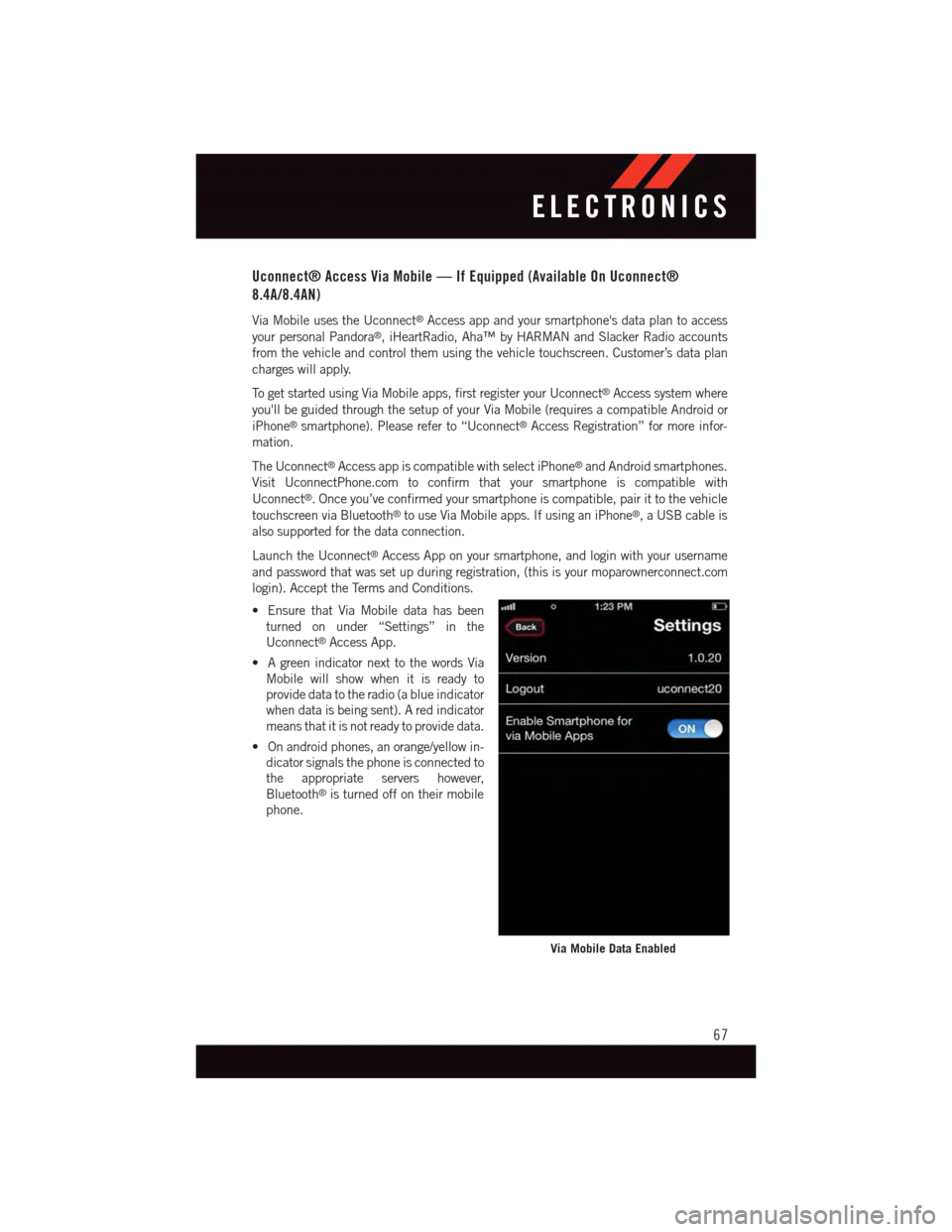
•EnsurethatViaMobiledatahasbeen
turned on under “Settings” in the
Uconnect®Access App.
•AgreenindicatornexttothewordsVia
Mobile will show when it is ready to
provide data to the radio (a blue indicator
when data is being sent). A red indicator
means that it is not ready to provide data.
•Onandroidphones,anorange/yellowin-
dicator signals the phone is connected to
the appropriate servers however,
Bluetooth®is turned off on their mobile
phone.
Via Mobile Data Enabled
ELECTRONICS
67
Page 70 of 220
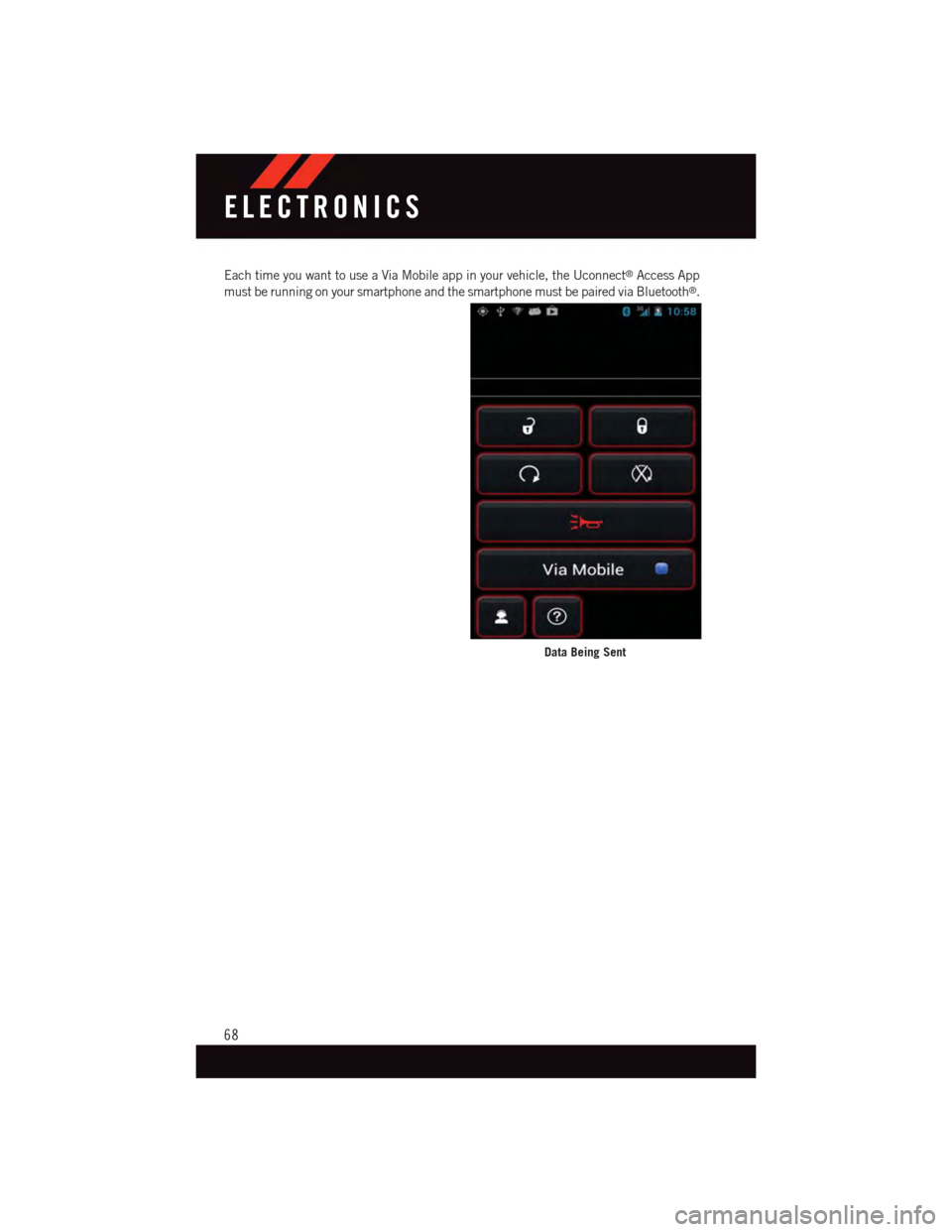
Each time you want to use a Via Mobile app in your vehicle, the Uconnect®Access App
must be running on your smartphone and the smartphone must be paired via Bluetooth®.
Data Being Sent
ELECTRONICS
68
Page 72 of 220
Via Mobile apps can also be launched through Voice Recognition by pressing the VR
button on the steering wheel and stating “launch” and then the name of the app. For
example, you can say “launch Aha Via Mobile.”
NOTE:
For detailed information on how to use Via Mobile apps visit the Mopar Owner Connect
website (moparownerconnect.com) and login using the username and password you set
up when registering for Uconnect®Access.
AmessagewillbedisplayedtoremindyouthatViaMobileappsutilizethedataplanon
your connected smartphone to provide content. Many smartphones have a limit to how
much data they can utilize before incurring additional charges. The amount of data being
used varies by smartphone device, cellular service provider and specific app. Check your
mobile phone service plan for more details.* Press “OK” to continue or the “X” to exit.
(*Additional smartphone data usage charges may apply.)
Via Mobile Apps — If Equipped
•Aha™ by HARMAN—Aha™byHARMANmakesiteasytoinstantlyaccessyour
favorite Web content on the go. Choose from over 40,000+ stations spanning internet
radio, personalized music, news, entertainment, hotels, weather, audiobooks,
Facebook®,Twitter®,andmore.
•iHeartRadio—iHeartRadioprovidesinstantaccesstomorethan1,500liveradio
stations from across the country and allows listeners to create custom music stations
inspired by their favorite artists or songs.
•Pandora®—Pandora®gives people the music and comedy they love anytime,
anywhere. Personalized stations launch instantly, with the input of a favorite artist,
track, comedian, or genre.
•Slacker Radio—Enjoymillionsofsongsandhundredsofhandcraftedstations.
NOTE:
For detailed information on how to use Via Mobile apps visit the Mopar Owner Connect
website (moparownerconnect.com) and log in using the username and password you set
up when registering for Uconnect®Access.
ELECTRONICS
70
Page 73 of 220
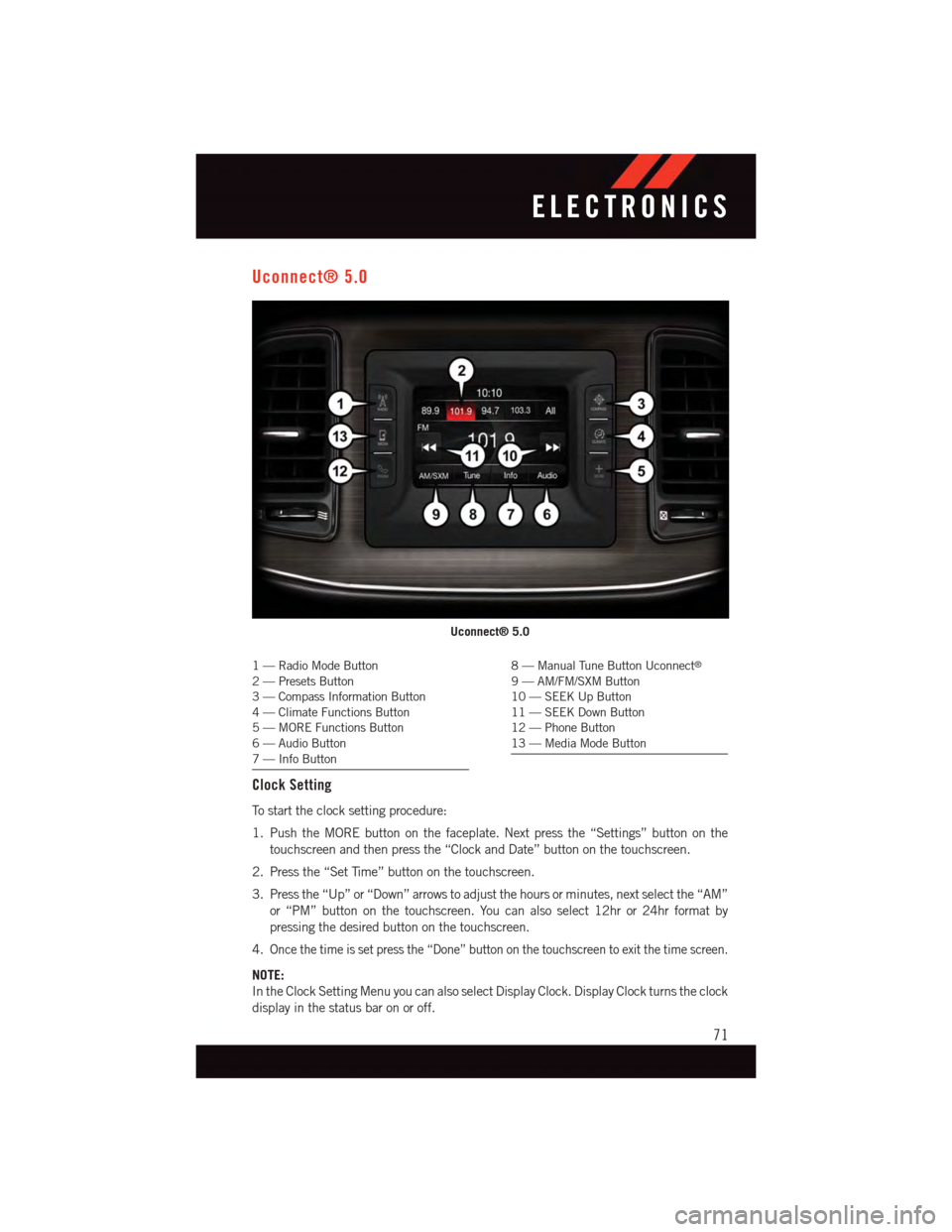
Uconnect® 5.0
1—RadioModeButton2—PresetsButton3—CompassInformationButton4—ClimateFunctionsButton5—MOREFunctionsButton6—AudioButton7—InfoButton
8—ManualTuneButtonUconnect®
9—AM/FM/SXMButton10 — SEEK Up Button11 — SEEK Down Button12 — Phone Button13 — Media Mode Button
Clock Setting
To s t a r t t h e c l o c k s e t t i n g p r o c e d u r e :
1. Push the MORE button on the faceplate. Next press the “Settings” button on the
touchscreen and then press the “Clock and Date” button on the touchscreen.
2. Press the “Set Time” button on the touchscreen.
3. Press the “Up” or “Down” arrows to adjust the hours or minutes, next select the “AM”
or “PM” button on the touchscreen. You can also select 12hr or 24hr format by
pressing the desired button on the touchscreen.
4.Once the time is set press the “Done” button on the touchscreen to exit the time screen.
NOTE:
In the Clock Setting Menu you can also select Display Clock. Display Clock turns the clock
display in the status bar on or off.
Uconnect® 5.0
ELECTRONICS
71
Page 76 of 220
Bluetooth®
If using a Bluetooth®-equippeddevice,youmayalsobeabletostreammusictoyour
vehicle's sound system.
•PushtheMEDIAbuttononthefaceplate,thenpressthe“source”buttononthe
touchscreen. Select “Bluetooth” to change the mode to Bluetooth®if the device is
paired, allowing the music from your portable device to play through the vehicle's
speakers.
SD Card
SD Card Mode allows you to play music that has been saved to your SD Card through your
vehicle’s sound system.
•YoucanenterSDCardModeisbyeitherinsertingaSDCardintotheSDCardslotor
push the “SD Card” button on the left side of the display while in media mode.
For further information refer to your Radio Supplement.
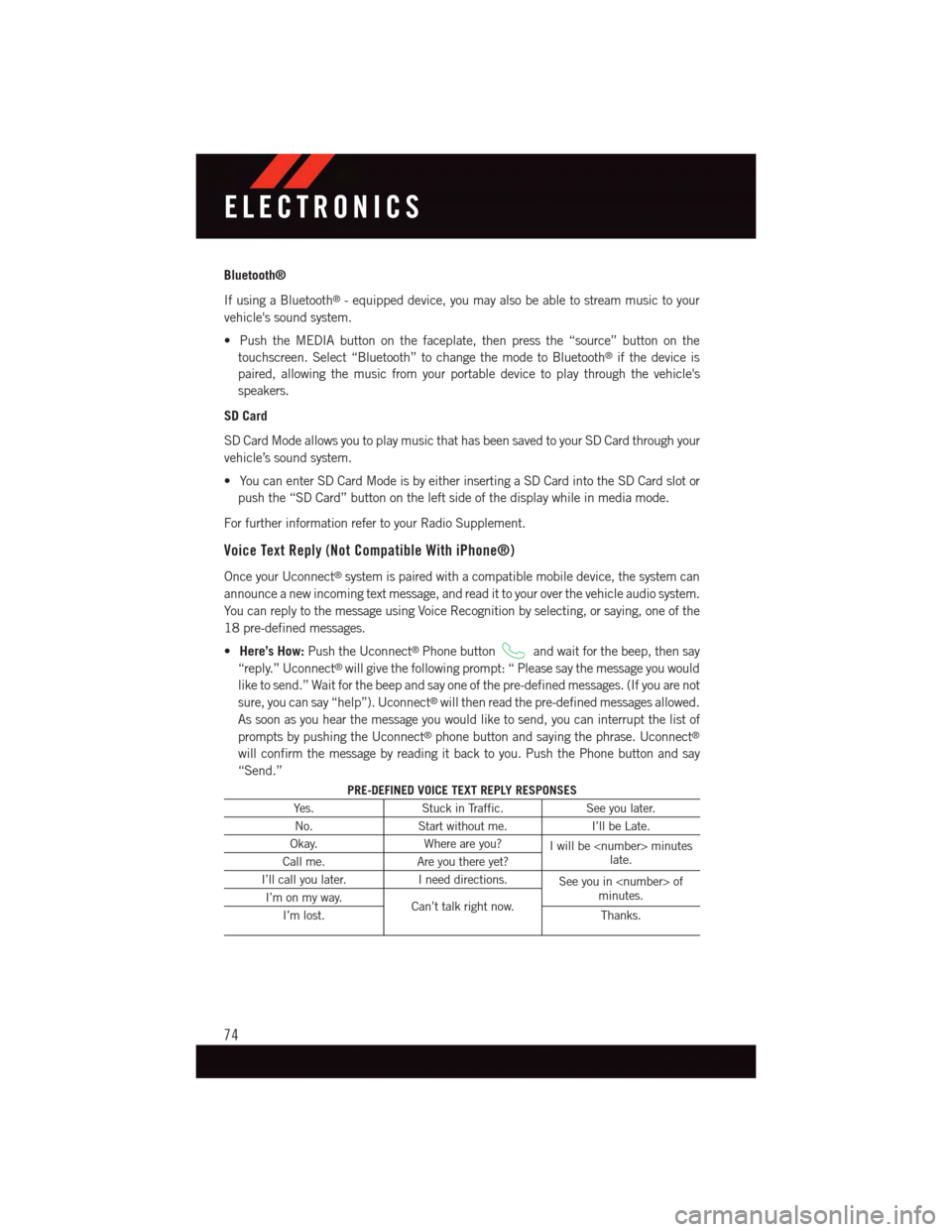
Voice Text Reply (Not Compatible With iPhone®)
Once your Uconnect®system is paired with a compatible mobile device, the system can
announce a new incoming text message, and read it to your over the vehicle audio system.
Yo u c a n r e p l y t o t h e m e s s a g e u s i n g Vo i c e R e c o g n i t i o n b y s e l e c t i n g , o r s a y i n g , o n e o f t h e
18 pre-defined messages.
•Here’s How:Push the Uconnect®Phone buttonand wait for the beep, then say
“reply.” Uconnect®will give the following prompt: “ Please say the message you would
like to send.” Wait for the beep and say one of the pre-defined messages. (If you are not
sure, you can say “help”). Uconnect®will then read the pre-defined messages allowed.
As soon as you hear the message you would like to send, you can interrupt the list of
prompts by pushing the Uconnect®phone button and saying the phrase. Uconnect®
will confirm the message by reading it back to you. Push the Phone button and say
“Send.”
PRE-DEFINED VOICE TEXT REPLY RESPONSES
Ye s .Stuck in Traffic.See you later.
No.Start without me.I’ll be Late.
Okay.Where are you?Iwillbe
I’ll call you later.Ineeddirections.See you in
ELECTRONICS
74
Page 77 of 220
NOTE:
Voice texting reply and voice texting features require a compatible mobile device enabled
with Bluetooth®Message Access Profile (MAP). iPhone®and some other smartphones do
not currently support Bluetooth®MAP. Visit UconnectPhone.com for system and device
compatibility.
•Wanttodictateapersonalmessage?YoumustfirstregisterwithUconnect®Access
(U.S. residents only) to take advantage of a new, cloud-based Voice Texting service, an
enhancement to Voice Text Reply.
Uconnect® 5.0 VOICE RECOGNITION QUICK TIPS
Introducing Uconnect®
Start using Uconnect®Voice Recognition with these helpful quick tips. It provides the key
Voice Commands and tips you need to know to control your Uconnect®5.0 system.
Key Features:
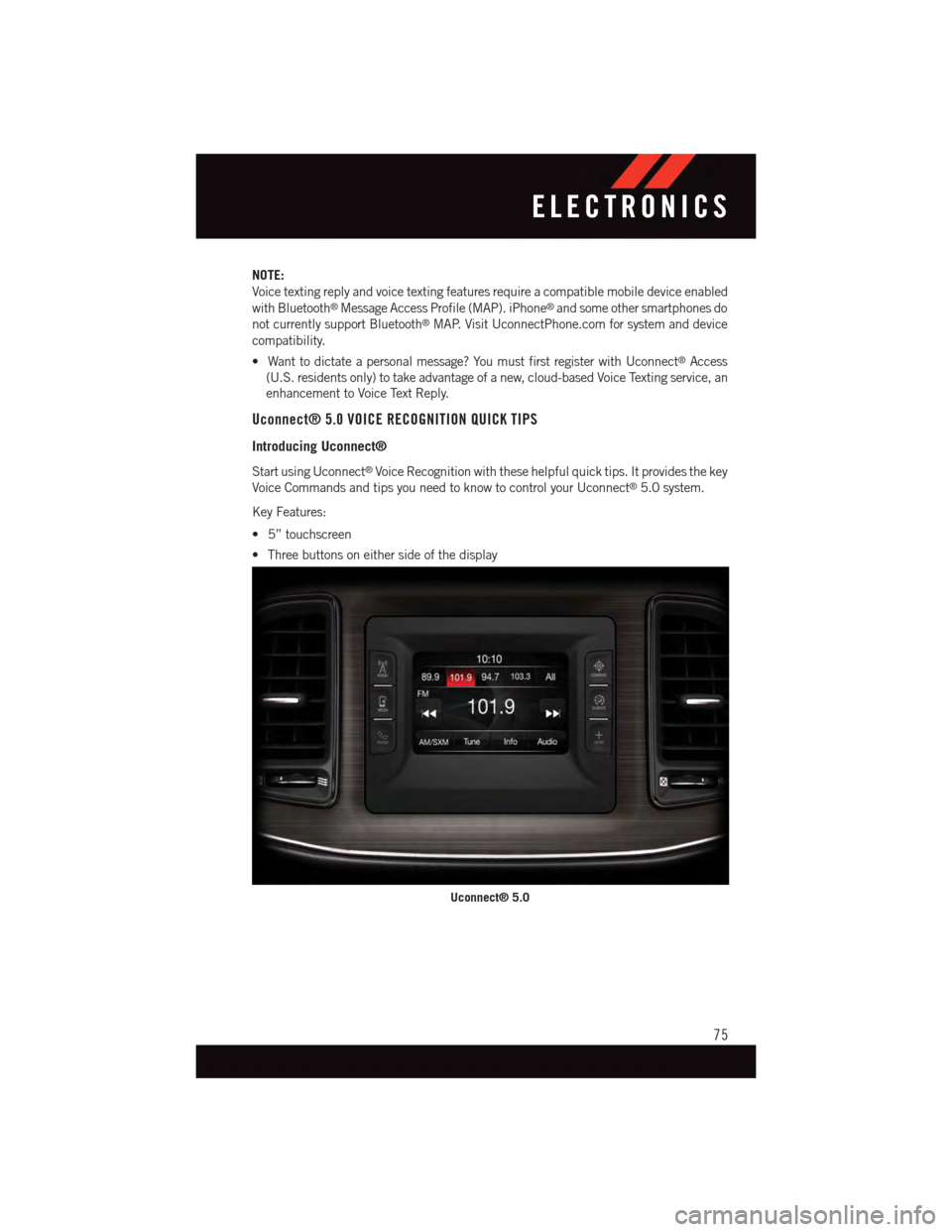
•5”touchscreen
•Threebuttonsoneithersideofthedisplay
Uconnect® 5.0
ELECTRONICS
75
Page 78 of 220
Get Started
1. VisitUconnectPhone.comto check mobile device and feature compatibility and to find
phone pairing instructions.
2. Reduce background noise. Wind and passenger conversations are examples of noise
that may impact recognition.
3. Speak clearly at a normal pace and volume while facing straight ahead. The micro-
phone is positioned on the rearview mirror and aimed at the driver.
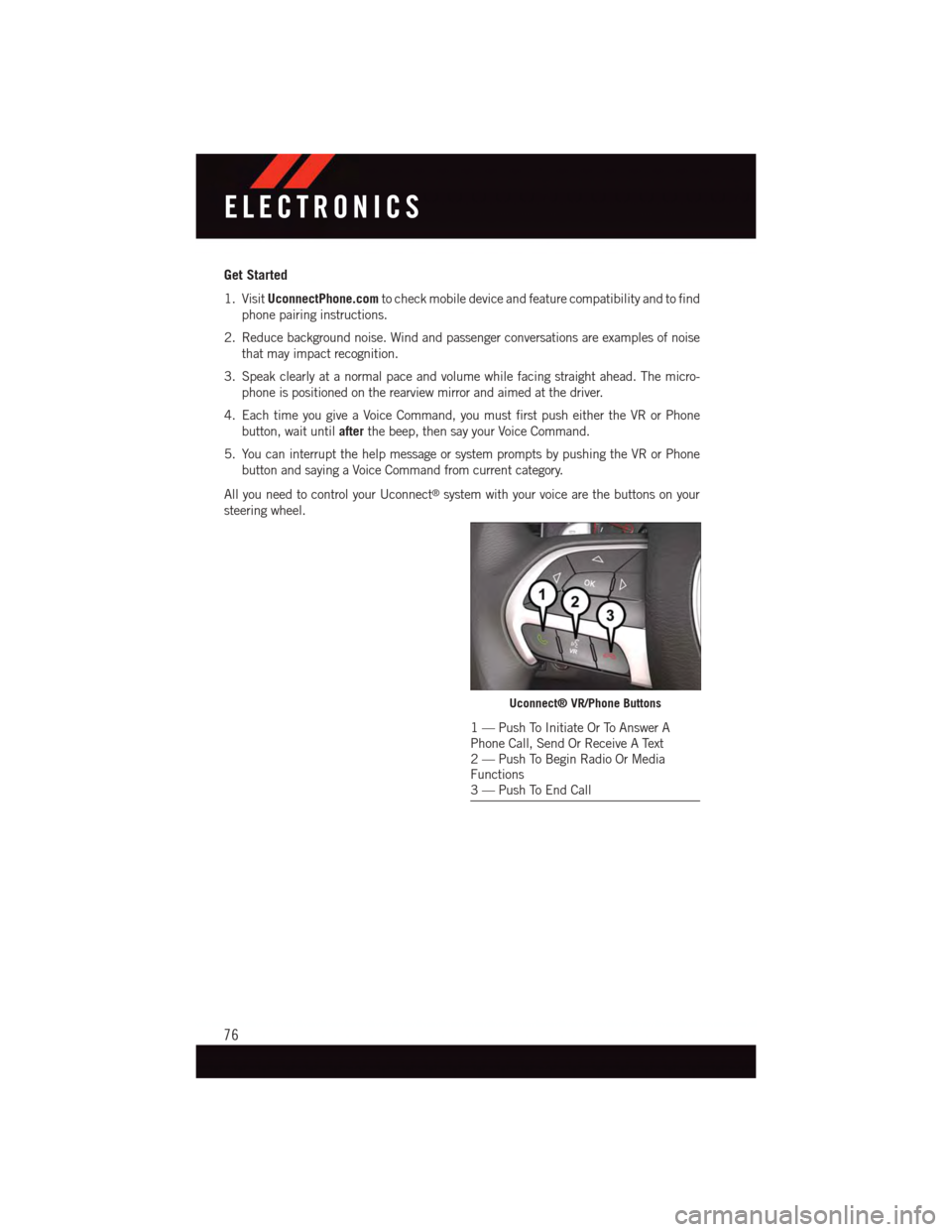
4. Each time you give a Voice Command, you must first push either the VR or Phone
button, wait untilafterthe beep, then say your Voice Command.
5. You can interrupt the help message or system prompts by pushing the VR or Phone
button and saying a Voice Command from current category.
All you need to control your Uconnect®system with your voice are the buttons on your
steering wheel.
Uconnect® VR/Phone Buttons
1—PushToInitiateOrToAnswerAPhone Call, Send Or Receive A Text2—PushToBeginRadioOrMediaFunctions3—PushToEndCall
ELECTRONICS
76
Page 82 of 220
Phone
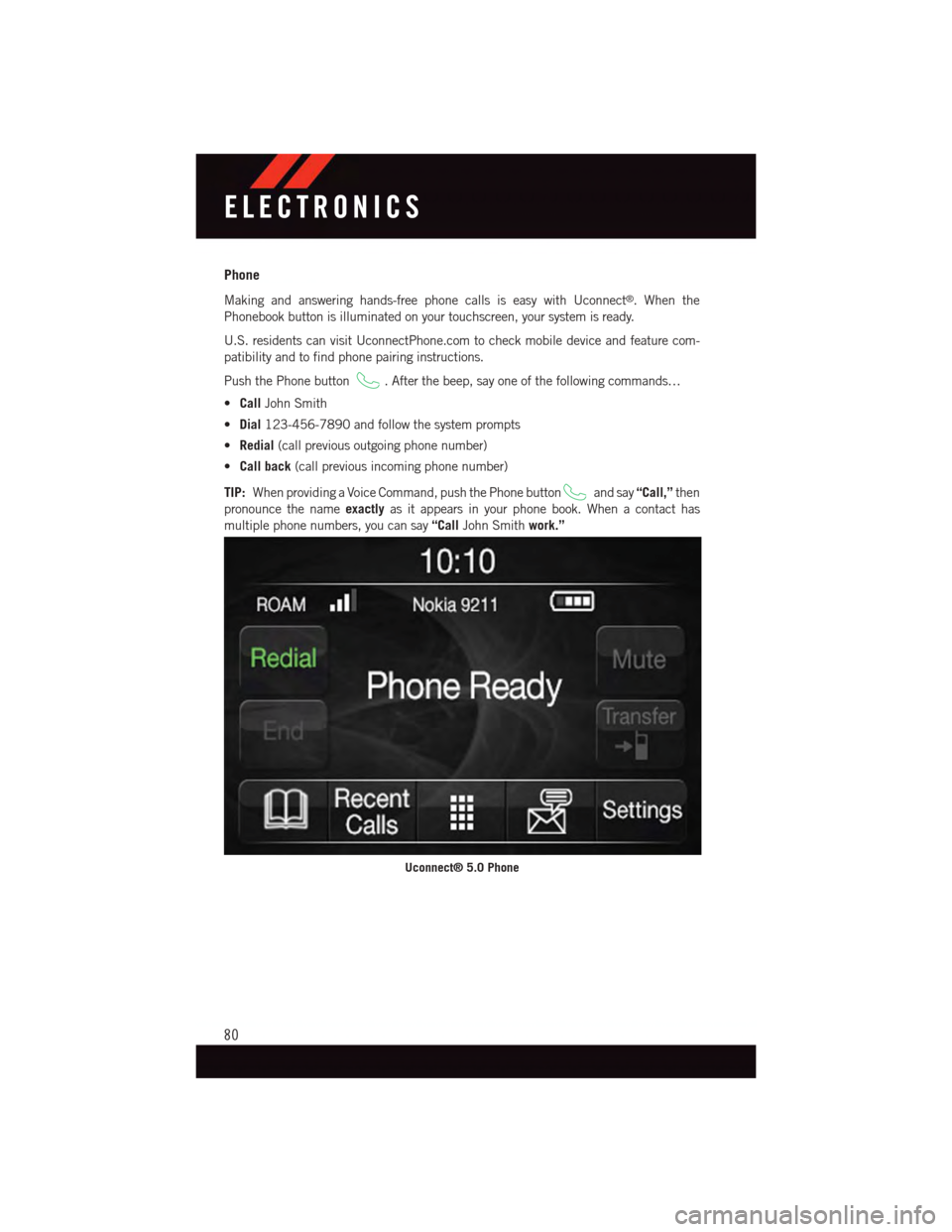
Making and answering hands-free phone calls is easy with Uconnect®.Whenthe
Phonebook button is illuminated on your touchscreen, your system is ready.
U.S. residents can visit UconnectPhone.com to check mobile device and feature com-
patibility and to find phone pairing instructions.
Push the Phone button.Afterthebeep,sayoneofthefollowingcommands…
•CallJohn Smith
•Dial123-456-7890 and follow the system prompts
•Redial(call previous outgoing phone number)
•Call back(call previous incoming phone number)
TIP:When providing a Voice Command, push the Phone buttonand say“Call,”then
pronounce the nameexactlyas it appears in your phone book. When a contact has
multiple phone numbers, you can say“CallJohn Smithwork.”
Uconnect® 5.0 Phone
ELECTRONICS
80
Page 83 of 220
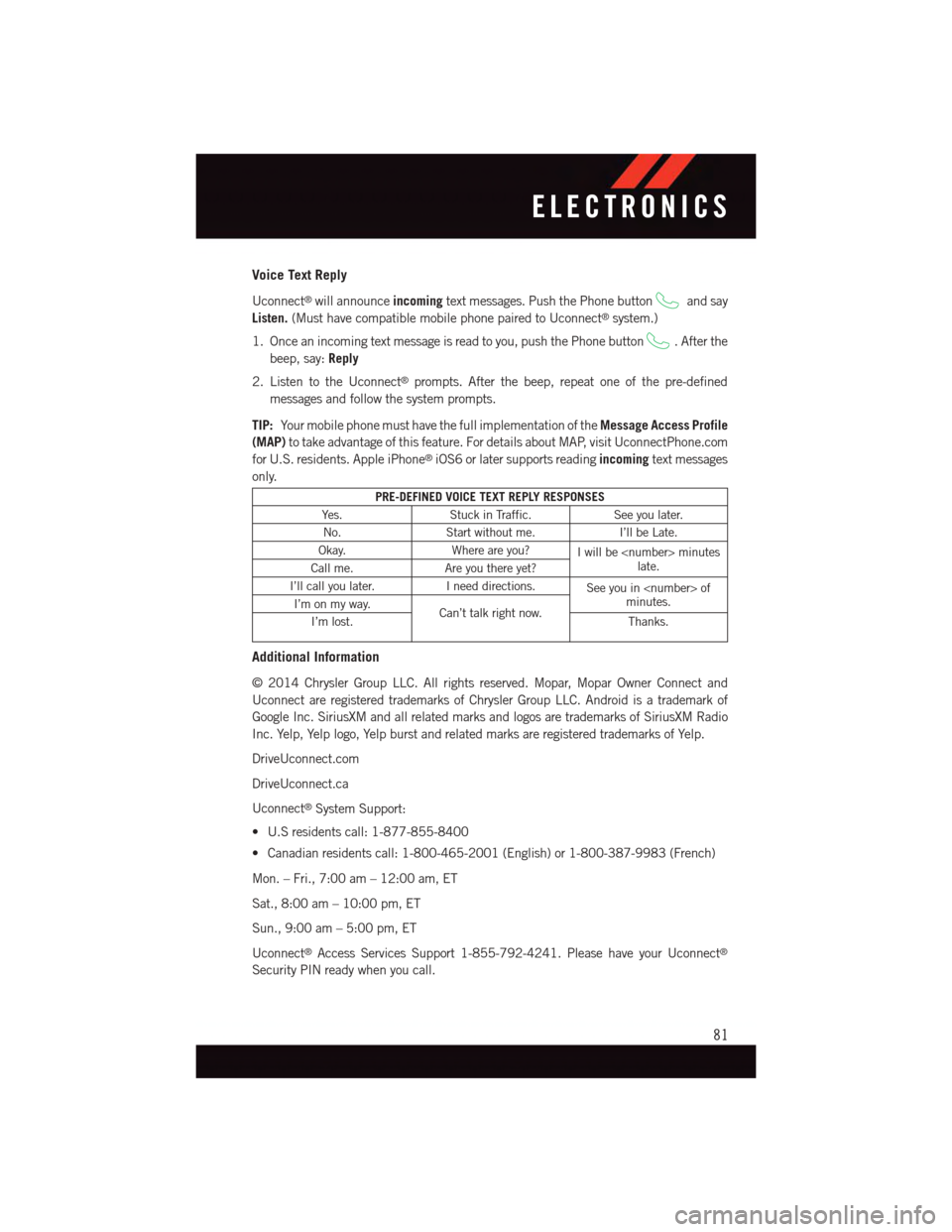
Voice Text Reply
Uconnect®will announceincomingtext messages. Push the Phone buttonand say
Listen.(Must have compatible mobile phone paired to Uconnect®system.)
1. Once an incoming text message is read to you, push the Phone button.Afterthe
beep, say:Reply
2. Listen to the Uconnect®prompts. After the beep, repeat one of the pre-defined
messages and follow the system prompts.
TIP:Yo u r m o b i l e p h o n e m u s t h a v e t h e f u l l i m p l e m e n t a t i o n o f t h eMessage Access Profile
(MAP)to take advantage of this feature. For details about MAP, visit UconnectPhone.com
for U.S. residents. Apple iPhone®iOS6 or later supports readingincomingtext messages
only.
PRE-DEFINED VOICE TEXT REPLY RESPONSES
Ye s .Stuck in Traffic.See you later.
No.Start without me.I’ll be Late.
Okay.Where are you?Iwillbe
I’ll call you later.Ineeddirections.See you in
Additional Information
©2014ChryslerGroupLLC.Allrightsreserved.Mopar,MoparOwnerConnectand
Uconnect are registered trademarks of Chrysler Group LLC. Android is a trademark of
Google Inc. SiriusXM and all related marks and logos are trademarks of SiriusXM Radio
Inc. Yelp, Yelp logo, Yelp burst and related marks are registered trademarks of Yelp.
DriveUconnect.com
DriveUconnect.ca
Uconnect®System Support:
•U.Sresidentscall:1-877-855-8400
•Canadianresidentscall:1-800-465-2001(English)or1-800-387-9983(French)
Mon. – Fri., 7:00 am – 12:00 am, ET
Sat., 8:00 am – 10:00 pm, ET
Sun., 9:00 am – 5:00 pm, ET
Uconnect®Access Services Support 1-855-792-4241. Please have your Uconnect®
Security PIN ready when you call.
ELECTRONICS
81
Page 84 of 220
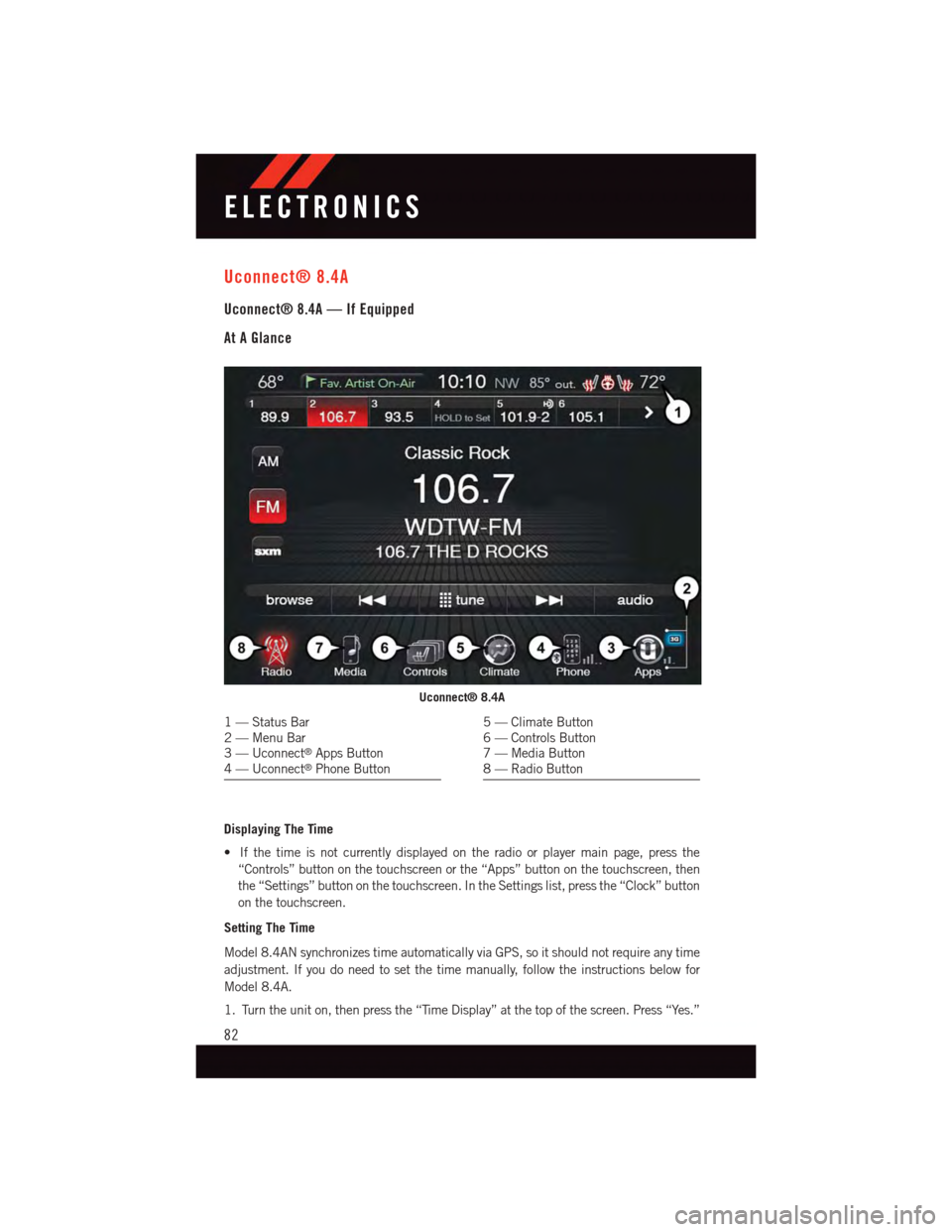
Uconnect® 8.4A
Uconnect® 8.4A — If Equipped
At A Glance
Displaying The Time
•Ifthetimeisnotcurrentlydisplayedontheradioorplayermainpage,pressthe
“Controls” button on the touchscreen or the “Apps” button on the touchscreen, then
the “Settings” button on the touchscreen. In the Settings list, press the “Clock” button
on the touchscreen.
Setting The Time
Model 8.4AN synchronizes time automatically via GPS, so it should not require any time
adjustment. If you do need to set the time manually, follow the instructions below for
Model 8.4A.
1. Turn the unit on, then press the “Time Display” at the top of the screen. Press “Yes.”
Uconnect® 8.4A
1—StatusBar2—MenuBar3—Uconnect®Apps Button4—Uconnect®Phone Button
5—ClimateButton6—ControlsButton7—MediaButton8—RadioButton
ELECTRONICS
82